
The album cover is the interface. diskOS Disco! 1.1.1 is a touch interface for the FiiO Snowsky Disc's round
screen, built on b0hemia's diskOS 1.2.4.
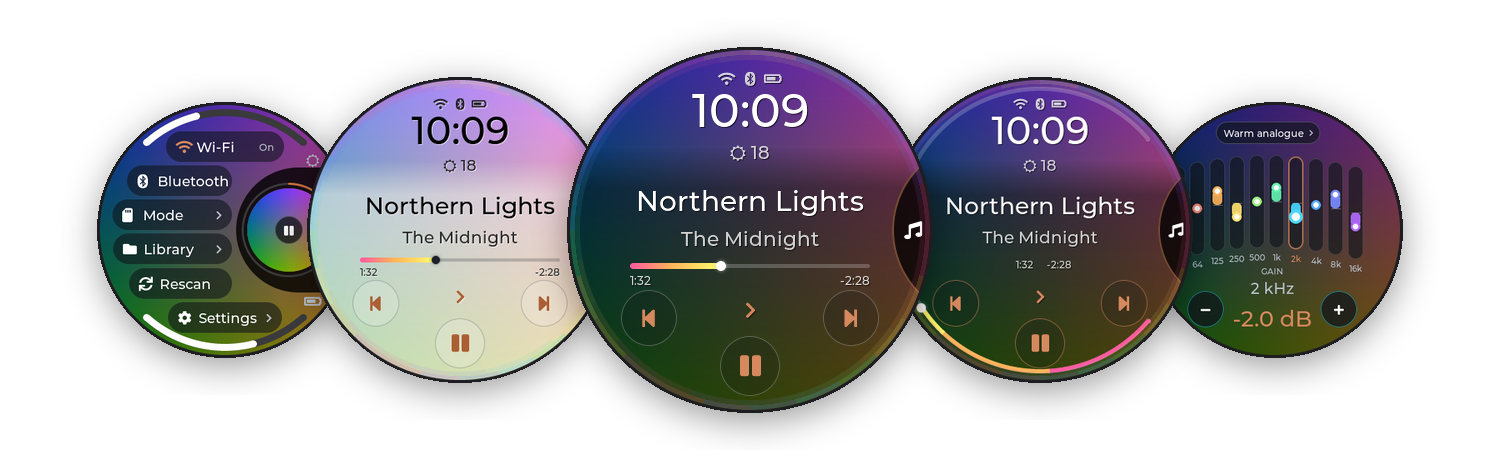
Testing release, as-is, no liability. Flashing rewrites the Disc's root filesystem. Back up your music and
keep the saved stock image safe. Not affiliated with FiiO, Snowsky or Ingenic.
Downloads
| File | What it is |
|---|---|
| Source code (zip / tar.gz) | Everything you need to flash: the installer, and the ready-built interface in payload/mq_ui
|
mq_ui
| The interface on its own (the same file as payload/mq_ui), for SD-card updates of an existing install
|
SHA256SUMS, MD5SUMS
| Checksums of mq_ui
|
mq_ui md5: e651f0c3c8915341b37712151515ac69
Flash it (first install)
You need a Disc on FiiO firmware V2.57, the official V2.57 firmware ZIP, a Linux computer and a good USB cable.
- Download Source code (tar.gz) below and unpack it (or
git clone https://github.com/zmd22/diskos-disco). - Optional, but recommended: make your own update keys, so you can install later versions from the SD card.
sh ui/tools/owner-keys/diskos-keys.sh
cp diskos-keys/diskos-root.pub.pem payload/
- Flash:
Power the Disc off, hold Volume Down and plug in USB. With a key, check that the
./install.sh                     # first time only: host setup
./diskos-installer install \
  --firmware SNOWSKY_DISC_update_20260909_v257.zip \
  --variant public \
  --ui payload/mq_ui \
  --ota-key payload/diskos-root.pub.pem      # leave this line out if you skipped step 2
ota: ON … key sha256line
matchessha256sum payload/diskos-root.pub.pembefore you answery.
Update an existing install from the SD card
Download mq_ui, then sign it with your keys and copy the folder to the card:
sh ui/tools/owner-keys/diskos-sign.sh mq_ui 1.1.1 # -> ./diskos-update/On the Disc: Settings › System › Update from SD Card › Update, then restart. It runs as a trial and rolls back
by itself if it doesn't start. More: docs/UPDATING.md.
What's new in 1.1.1
Small things, mostly asked for after 1.1:
- A - Z in Folders, and a bigger A - Z pill everywhere.
- Battery: playing and screen-on time since the last full charge (80% with Charging Limit on).
- Back to Artists lands on the artist you came from.
- Add to queue / Playlist on an artist now takes all of the artist's songs (album-artist mode and shared credits
were missed). - MA Sendspin tells you when Wi-Fi is off; the Bluetooth codec list explains the SBC fallback.
- Ring button rings follow your picked Accent; Braun knob pointers are consistent; a one-time Menu hint
points at the navigation circle.
If you're on 1.0.x or flashed with an older installer, flash this release once (see above): the flash brings the
start-up script that makes a fresh flash win over builds kept from SD-card updates.
In 1.1
- MA Sendspin (experimental): the Disc as a Music Assistant speaker. Music
shows what Music Assistant plays (title, artist, cover, progress, Immersive) and its buttons control it; the Disc
stays awake while it plays. Settings > Network > MA Sendspin (Server: Auto or an address, Player Name, Sync Delay
-2000 to +2000 ms); add Sendspin to the navigation circle in Disco Options > Disco Menu. The sound goes through
the Disc's own AirPlay. Experimental: made for Music Assistant 2.10's "legacy" Sendspin connection; a later Music
Assistant that drops it will need a Disco update. The physical buttons still control the built-in player. - Quick Settings: five rows of bigger pills; Wi-Fi and Bluetooth side by side with round On/Off badges, showing
the real radio state. - A big keyboard for typing (Wi-Fi password, Sendspin, playlist names), like Search's, with capitals and symbols.
- Track Number option (Disco Options): "3. Northern Lights" on Music.
- Volume Keys submenu in Settings > System; online updates removed (SD card or flash only); a tidier
Bluetooth Codec row.
Also in 1.0.2
Fixes the "Player didn't respond" message that still appeared a few seconds after start-up: a background request to the
player (switching off its own idle power-off) now waits for the player quietly. And flashing now always runs the build
you flashed: older builds kept from SD-card updates no longer take over after a flash.
Also in 1.0.1
A CD look for Immersive (Disco Options > Immersive: Vinyl or CD), a tidier Working mode ("Playback", spinning
arrows while switching), and a stability fix: no more "Player didn't respond" at start-up, and starting a song or a list no longer sometimes fails.
Commands to the player now wait for it while it's busy (starting up, rebuilding a playlist) instead of being dropped.
Details in the changelog.
What's in 1.0 (unchanged)
- Disco theme (default): the cover fills the screen, a navigation circle slides out of the right edge, Music with
a rainbow progress line or a progress arc around the rim, the title menu (Favourite, Album, Artist, Queue, Lyrics,
Immersive), Disco Options, and Disco versions of Quick Settings, Equalizer, Volume, Standby, Weather, Search,
Queue, Battery and more. - Ring, Braun and Stone themes included.
- SD-card updates fixed, safer helpers, and a round of bug fixes.
Take the tour · read the
changelog.
Thanks to b0hemia for diskOS, and to everyone credited in the README.