
ProxiFyre 2.5.0
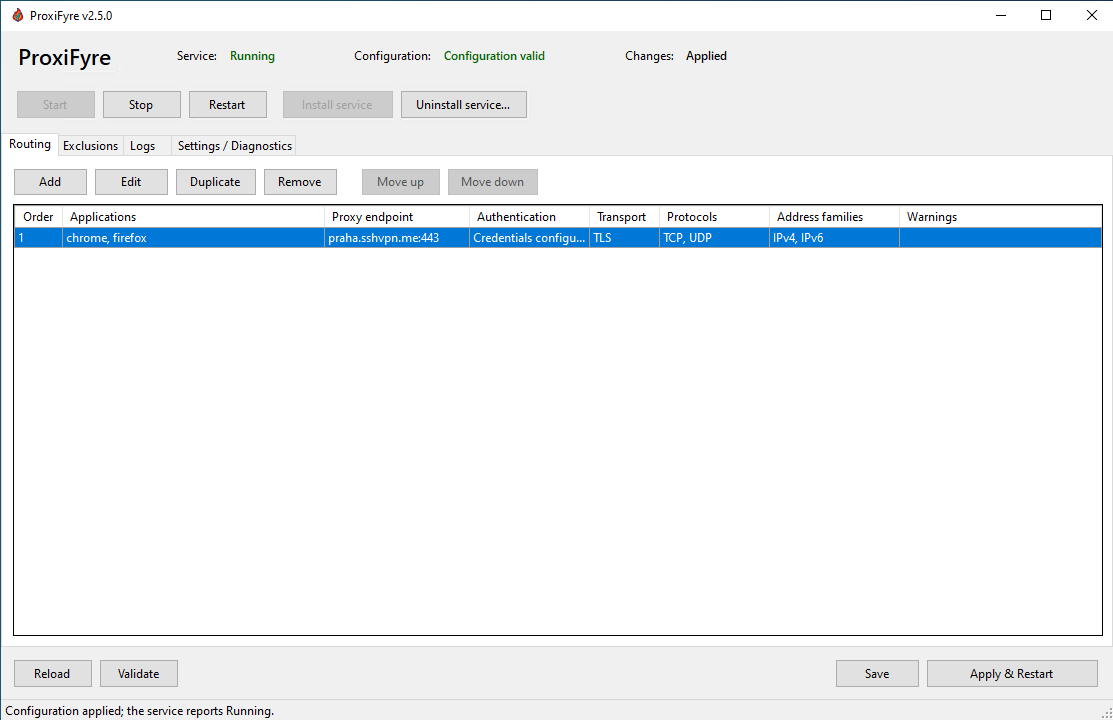
ProxiFyre now includes a complete Windows management application and a guided installer. You can configure routing rules, manage the service, follow logs, and diagnose installation or startup problems without editing JSON or using service-management commands by hand.
Highlights
- Windows GUI: create, edit, validate, duplicate, reorder, and remove routing rules and exclusions.
- Service controls: install, uninstall, start, stop, and restart
ProxiFyreService, with clear status and dependency errors. - Safe configuration updates: Save writes the configuration atomically; Apply & Restart waits for the real service result and can offer rollback after a startup failure.
- Built-in logs and diagnostics: follow the active log, search or filter displayed lines, open the log file/folder, and copy redacted diagnostics.
- Notification-area support: closing the window can hide it to the tray, and launching ProxiFyre again restores the existing instance.
- SOCKS5 and SOCKS5-over-TLS: configure authentication, TCP/UDP, IPv4/IPv6, certificate validation, and optional SHA-256 certificate pinning from the GUI. Alighieri is a compatible SOCKS5-over-TLS companion.
- Quieter normal logging:
Infofocuses on service lifecycle and configuration summaries; per-connection routing details are available atDebug.
Recommended installation
Choose the setup executable matching the machine's native Windows architecture:
| Architecture | Setup | SHA-256 sidecar |
|---|---|---|
| x64 | Download x64 setup | x64 checksum |
| x86 | Download x86 setup | x86 checksum |
| ARM64 | Download ARM64 setup | ARM64 checksum |
The online setup downloads and verifies the architecture-matched Microsoft Visual C++ runtime and Windows Packet Filter when they are missing. It does not install .NET Framework:
- x86 and x64 require .NET Framework 4.7.2 or later.
- ARM64 requires .NET Framework 4.8.1 or later.
Important
ProxiFyre's first-party setup, MSI, and application binaries are deliberately unsigned, so Windows may show Unknown publisher. Verify the downloaded file against its .sha256 sidecar before approving elevation.
After setup, open ProxiFyre from the Start Menu, add or review a routing rule, and select Apply & Restart. The service is intentionally left stopped until a valid configuration is available.
Other release files
- Use the standalone
.msionly for managed deployment after .NET Framework, Visual C++, and Windows Packet Filter are already provisioned. - The
.zipis an application payload for advanced/manual deployment. It is not an offline installer and does not create the protected installation directory, service, firewall rules, or shortcuts.
Upgrading from v2.4.0 or earlier
v2.5.0 is the first MSI-based ProxiFyre release, so an older ZIP/manual installation cannot be upgraded automatically:
- Back up
app-config.json. - Stop and remove the manually registered ProxiFyre service.
- Remove or relocate the old extracted application directory.
- Run the v2.5.0 setup matching the machine architecture.
- Restore the configuration through the elevated GUI or another elevated process.
The existing configuration schema remains compatible. Uninstalling the MSI preserves app-config.json, its backup, logs, GUI preferences, Visual C++, and Windows Packet Filter.
Windows 7
Windows 7 is supported only with Service Pack 1. Use a fully patched image with current servicing-stack and SHA-2 support updates, install .NET Framework 4.7.2, and reboot after applicable prerequisite updates.
Setup includes narrowly scoped compatibility handling for legacy WinINet behavior while continuing to verify downloaded prerequisite bytes before execution. Windows 7 SP1 x86 and x64 installation and startup were smoke-tested for this release.
Validation
- Windows 7 SP1: x86 and x64 smoke tests passed.
- Windows 10: x64 smoke test passed.
- Windows ARM64: smoke test passed.
- Automated managed tests: 266 passed.
- Release builds, MSI validation, and online setup validation passed for x86, x64, and ARM64.
- All nine published artifacts were independently checked against their SHA-256 sidecars.
Documentation
- README and quick start
- Configuration reference
- GUI guide and troubleshooting
- Installer and deployment guide
Full changelog: v2.4.0...v2.5.0