
Features
Le Mans Ultimate Support (Beta) (by @Foribald and @lubamartin)
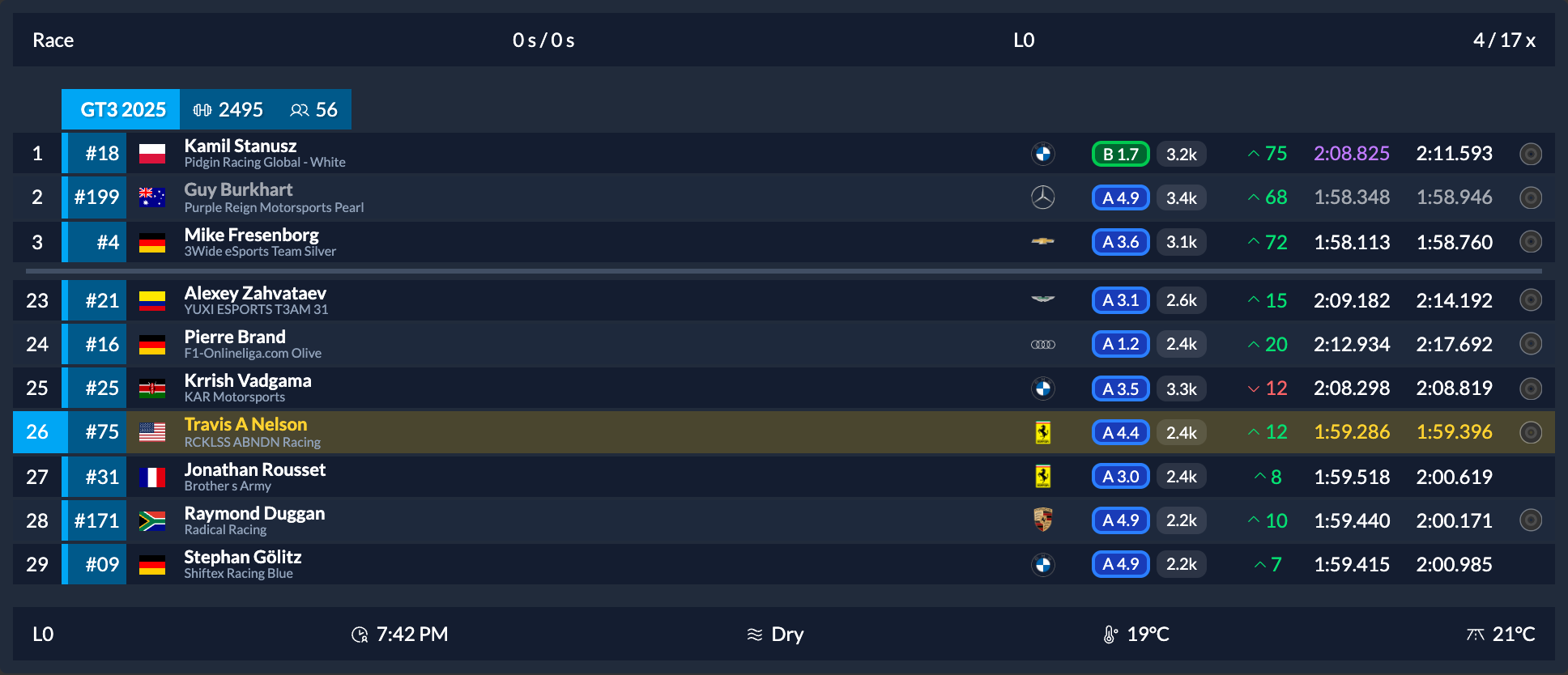
LMU support is in beta. Only the widgets listed below are currently supported. You may encounter bugs, missing data or differences between cars and sessions.
- Supported overlays: Standings, Relative, Input, Lap Trace, Pitlane Helper, Corner Names, Battle, Flag and Information Bar. The Telemetry Inspector is also available for diagnostics.
- Simulator selection: Choose your simulator or let irDashies detect it automatically, including when you switch sims without restarting the app.
- Compatible displays: LMU standings use class colours and manufacturer badges, with best-lap ordering in practice and position ordering in races.
- Track information: Corner Names and Lap Trace corner feedback depend on available LMU track data; unnamed turns use turn numbers where provided.
Setup and current limitations
- Getting started: Enable Settings > Gameplay > Enable Plugins in LMU, restart the simulator, and load into a session to receive data.
- Other widgets: All other widgets are currently unavailable in LMU, including Fuel Calculator, both track maps, Radar, Gantry, Car Systems, Lap Timer, Tachometer and Shift Light.
- Race data: LMU driver ratings, incident counts and team data are not yet integrated. Displayed car numbers are placeholders rather than actual race numbers, and iRacing rating columns are hidden.
- Lap Trace: Lap Trace does not yet check LMU's lap validity, so laps invalidated by track limits may still become saved references. Imports accept iRacing
.ibtfiles and Garage 61 CSV laps, with no native LMU telemetry-file import. - Player telemetry: Input and Lap Trace depend on your own car's telemetry, which can be unavailable while spectating or in the garage.
- Positions and units: Lap positions are estimated between updates; cars without full telemetry may update in larger steps. Automatic units are metric, and Pitlane Helper currently uses a fixed 60 km/h pit limit.
- Replays: LMU in-game replays do not yet have iRacing's replay-aware handling, and Gantry replay/history features are unavailable. The LMU session recording and playback tools mentioned in the changelog are development tools.
- Both simulators running: Auto gives iRacing priority if both simulators are active when detection runs; select Le Mans Ultimate explicitly in Settings > General > Simulator if needed.

Lap Trace (by @Foribald)
Compare your current lap against a saved reference to see where you gain or lose time.
- Reference laps: Automatically save your fastest lap for each car and track, with clean-lap checks in iRacing, or import iRacing
.ibttelemetry files and Garage 61 CSV laps. - Pedal comparison: See throttle, braking and gear changes alongside the reference lap, with ABS activity where available.
- Brake cues: Get configurable audio or visual countdowns to reference braking points, with a choice of audio device and a minimum brake-pressure setting to filter out light pedal touches.
- Corner feedback: Compare time gained or lost, braking distance and minimum speed after each corner where corner data is available.

Close-Range Radar (by @estem8)
A new Radar widget shows nearby rivals ahead, behind and alongside your car.
- Nearby traffic: See close cars, bumper-to-bumper gaps and grid or pace-line formations; iRacing positions are estimated from track position and spotter calls.
- Warnings: Configure alerts for close rivals, fast-closing cars and hazards ahead, including slow, crashed and rejoining cars. Warnings stay quiet during formation and full-course cautions.
- Your preferred look: Choose presets, road or oval profiles, colours, distance rings, car numbers and warning labels, with a live settings preview.
- Session visibility: Choose when the Radar appears, including warmup; calmer defaults apply to new installs and resets.


Car Systems (by @CtrlAltDale)
See your car's in-car adjustments in one compact widget.
- Live settings: Monitor brake bias, ABS, traction control and other adjustments supported by your car.
- Car-specific labels: Controls use the appropriate names for supported cars, including brake migration, brake valves and engine maps.
- Custom display: Choose your columns and hide unsupported or switched-off systems independently.

Flexible Input Layouts (by @23Kev)
Place your inputs where they are easiest to see while driving.
- Layout editor: Drag and arrange pedal traces, bars, steering, gear and ABS indicators.
- Separate bars and traces: Create multiple Input widgets with independent layouts, so you can place pedal bars in one area of your screen and input traces in another.
- Detached gear indicator: Use a gear-only Input widget to position the gear readout separately from your pedals and traces.
- Shift flash: Flash the Input background at redline or the custom shift points set in Tachometer settings, with a configurable colour.

Detached gear layout example

New Shift Light Widget (by @ChappyMotorsports)
Add a standalone shift indicator without needing the full Tachometer widget.
- Shift cues: Use automatic shift cues or configure custom shift points for each car and gear.
- Appearance: Choose glow, border or pulse indicators and customise their colour.
- RPM display: Choose whether to show the RPM readout.
Gantry Enhancements (by @23Kev)
More ways to follow a race and review it afterwards.
- Keep on top: Pin the Gantry above other windows from its tab bar or settings when using a windowed or borderless simulator.
- Session filtering: Group incidents by practice, qualifying, warmup and race sessions, and filter to the current session or a chosen one.
- Replay history: View incidents and lap history recorded by irDashies on this PC while watching an iRacing replay, with a clear explanation when history is unavailable. History follows the selected replay session.
- Post-race review: Keep final standings and lap graphs after iRacing closes, including when switching tabs, until the next session loads or you close irDashies.
- Docked panels: Add Fuel Calculator, Track Map or Flat Track Map panels beneath the incident feed, arranged side by side or in tabs, with optional Gantry-only fuel layouts.


Standings and Relative Enhancements (by @gui-seppe, @MostCromulent, and @CtrlAltDale)
- Column headers: Optionally show column names in Standings.
- Estimated class laps: Show each class's estimated race lap count, or its scheduled total in fixed-lap races, in the class header.
- Position changes: Show positions gained or lost within each class from the qualifying grid in the Relative during race sessions.
- Pit-stall filtering: Optionally hide drivers stopped in their pit stalls from the Relative while keeping pit-road traffic and the focused car visible.

Estimated class laps and Relative position changes


Team Name Subtext in Standings (by @tariknz)
Identify both the driver and their team at a glance in team sessions.
- Name options: Show the team below the driver name, or the driver below the team name, with a separate subtext setting for each name column.
- Default display: Team names appear beneath driver names by default in team sessions; non-team races retain single-line names.
Automatic Session Profiles (by @CtrlAltDale)
Assign profiles to practice, qualifying, races, testing, time trials and warmup, and let irDashies switch your layout automatically as the event progresses. A separate spotting profile activates after you have been out of the car for 20 seconds and switches back immediately when you resume driving.
Cleaner Lap History (by @CtrlAltDale)
Optionally hide pit laps from the lap history list and graph so long pit stops do not squash the laps you want to compare.
Browser Sources and VR (by @CtrlAltDale and @pureyang)
- Individual widget pages: Give each widget its own browser-source URL for OBS or VR tools such as OpenKneeboard, including widgets hidden from the desktop layout.
- Widget listing: Find links to every widget in the active dashboard on the built-in web page; older component links redirect to the new widget pages.
- Optional web server: Disable the built-in web server when you do not use browser sources, freeing its port after restarting the app.

Bug Fixes
- Wheel bindings: Saved wheel-button bindings work after restarting without needing to record them again. Buttons held at startup must be released and pressed again. (by @tariknz)
- Monitor changes: Overlays remain visible when monitors are switched off or on, and widgets return to their saved positions when a monitor reconnects. (by @estem8)
- Session displays: Fixed-lap races show an estimated duration, session endings avoid a zero-lap display, and replay lap times use more accurate readings. (by @L061N)
- Race positions: Reduced cases where the Relative reverted to qualifying positions while watching a live race from outside the car; paused live replays can still show fallback positions. (by @L061N)
- Dirty laps: Off-track laps are correctly marked even when no incident point is awarded. (by @CtrlAltDale)
- Fuel tank capacity: The Fuel Calculator shows the reported tank capacity before the first completed lap. (by @Foribald)
- Telemetry Inspector: Known values now display their units. (by @Foribald)
- Track recognition: The iRacing Corner Names overlay avoids selecting another circuit just because its name shares a common word. (by @Foribald)
- Demo visibility: Widgets opened after toggling demo mode correctly pick up the current demo state. (by @estem8)
- Overlay robustness: Invalid images and malformed session-bar settings are handled safely instead of loading unexpected content or crashing the overlay. (by @tariknz)
- Development checks: Restored checks that catch unsupported imports during development. (by @estem8)
- Development shutdown: Stopping the development launcher closes the app cleanly so it can restart. (by @tariknz)
- Website development: The site development tools start without the previous configuration warning. (by @tariknz)
Changelog
- feat: set a layout per session type instead of reconfiguring between sessions by @CtrlAltDale in #718
- feat: show the car's in-car adjustments at a glance by @CtrlAltDale in #723
- feat: keep pit laps out of the lap history graph by @CtrlAltDale in #726
- feat: add the Lap Trace widget by @Foribald in #731
- feat: add optional toggle to disable the built-in web server by @pureyang in #737
- feat: hide drivers parked in their pit stall from the Relative by @CtrlAltDale in #738
- feat: add position change column to relative widget by @MostCromulent in #739
- feat: add column headers for standings by @gui-seppe in #742
- feat: arrange the Input overlay freely, detach the gear, and flash at the shift point by @23Kev in #745
- feat: ShiftLight in its own widget by @ChappyMotorsports in #746
- feat: choose the simulator and hide widgets it cannot support by @Foribald in #751
- feat: configurable name subtext in Standings by @tariknz in #754
- feat: keep the Gantry on top of other windows by @23Kev in #757
- feat: group Gantry incidents by session and filter them by session by @23Kev in #758
- feat: dock the fuel calculator and track map under the Gantry incident feed by @23Kev in #759
- feat: show the recorded event history in the Gantry when watching a replay by @23Kev in #760
- feat: estimated lap count per class by @gui-seppe in #762
- feat: add close-range Radar widget by @estem8 in #768
- feat: give each widget its own URL for VR and OBS browser sources by @CtrlAltDale in #774
- feat(lmu): Le Mans Ultimate support: telemetry, REST API and session replay by @Foribald in #778
- feat(lmu): make the existing widgets read LMU, and fix three sim-agnostic faults found doing it by @Foribald in #779
- feat: radar preview shows car numbers, warmup and hazard-label toggles, calmer defaults by @estem8 in #783
- fix: tweak session time and lap displays, use raw telemetry for carXLaptimes by @L061N in #740
- fix: prevent qualifying position fallback mid race by @L061N in #750
- fix: restore wheel key bindings after app restart by @tariknz in #755
- fix: restore the brake countdown at corners that barely slow the car by @Foribald in #756
- fix: follow the simulator that is actually running when sims are swapped by @Foribald in #766
- fix: overlays disappear after a monitor is switched off or on by @estem8 in #769
- fix: lint no longer catches frontend imports from the main process by @estem8 in #770
- fix: new overlay windows get their initial data once instead of once per demo toggle by @estem8 in #775
- fix: report the session fuel tank before the first lap, and label inspector units by @Foribald in #777
- fix: stop development app when launcher exits by @tariknz in #781
- fix: Gantry loses the final session when switching tabs after the sim closes by @23Kev in #782
- fix: address CodeQL image validation and session bar alerts by @tariknz in #784
- fix: enable cross-platform LMU tape playback and preserve frames by @tariknz in #785
- fix: use ESM config for site Vite commands by @tariknz in #786
- chore: update dependencies by @tariknz in #743
- chore(deps-dev): bump fast-uri from 3.1.6 to 3.1.8 by @dependabot[bot] in #763
- chore(deps): bump undici by @dependabot[bot] in #767
- chore(deps): bump brace-expansion by @dependabot[bot] in #771
- chore(deps-dev): bump source-map-js from 1.2.1 to 1.2.2 by @dependabot[bot] in #773
- chore: let husky run Git LFS's pre-push hook by @Foribald in #776
- chore: upgrade Electron Forge to 8.0.1 and refresh dependencies by @tariknz in #780
New Contributors
- @lubamartin initiated the LMU support incorporated in #778
- @pureyang made their first contribution in #737
- @MostCromulent made their first contribution in #739
- @estem8 made their first contribution in #770
- @ChappyMotorsports made their first contribution in #746
Full Changelog: v1.1.0...v2.0.0