
Need Help? It looks like you're reading release notes. Would you like help with that? Too late. Meet C1iPPY: a paperclip somebody bent into a lock pick, who has moved in next to Squachy and will not stop offering advice. He has a tip for everything, he has an opinion on every catch, and every single one of them is the most obvious thing anyone could possibly say.
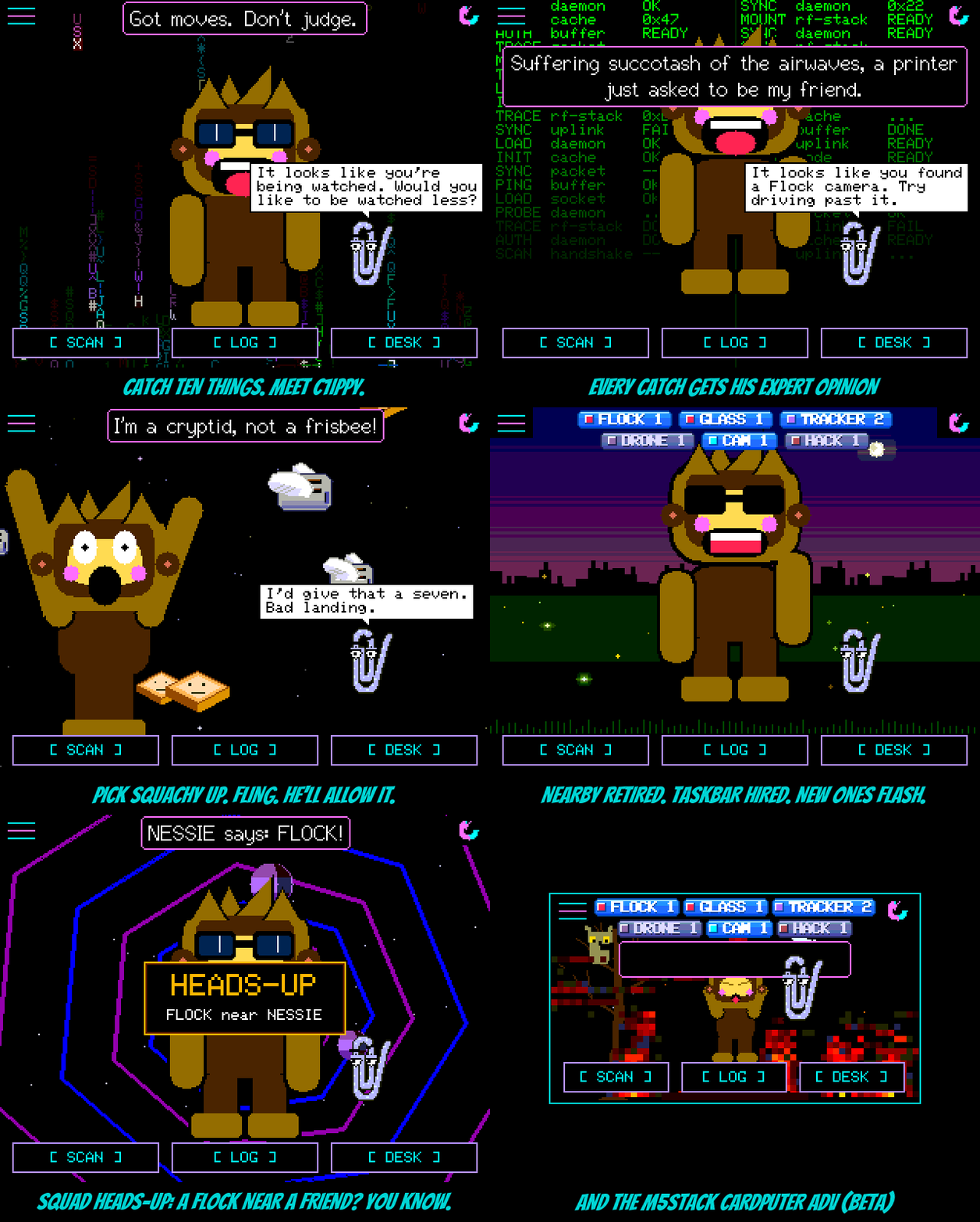
C1iPPY. A new pet, and the second thing you'll ever earn: catch ten things and he turns up with "It looks like you caught ten things. Want help?" (Already past ten? He's waiting for you after the update.) If you can't wait that long, press backspace ten times in a row on the name or message keyboard; he can tell when you're struggling. On the StickS3 and Cardputer, which have no such keyboard, opening Settings five times in thirty seconds does it; he'll assume you're lost. He switches himself on the moment he's earned, because he's the kind of help that doesn't wait to be asked; if you already walk VAPOR SHAGGY or the yeti, you keep them and he waits in Settings > Pet. About once a minute he has a tip ("Battery low? Have you tried charging it?"). After every catch he has the obvious take ("Pro tip: if it says FLOCK, it is a Flock."). Poke him and he'll offer to help, and keep offering. Now and then Squachy answers back, and C1iPPY looks smug about it. Every line stays up long enough to read; he waits his turn now, which is more than his namesake ever did.
Throw things. Press and hold Squachy until he notices, drag, and let go while your finger is still moving: he's thrown. He flies off at the speed you flung him, out of the top of the screen if you really meant it, bounces off the floor and the edges, sits there dazed after a hard one ("Which way is the forest?"), and walks home. Let go slowly and he just drops, like before. C1iPPY doesn't need the hold: grab him and fling. He's wire, so he bounces better, and once he lands he has something to say about it. He also stays put when you throw Squachy, and rates the landing. On the StickS3 and Cardputer, hold the button on either of them and let go to toss them.
NEARBY retired. Taskbar hired. The big rainbow NEARBY headline is gone; it covered Squachy, it covered the pets, and it only ever said "something". The counters took its job, and they took it Windows XP style. They're glossy blue taskbar buttons now, right along the top of the screen between the menu and the corner icons, and they only show the kinds of thing that are actually in range. Nothing around means no buttons and a clear sky. Each one has a tiny tray icon in that device's colour. A kind that has just turned up flashes orange for a few seconds, the way XP always asked for attention. A kind where everything in range is something you've ignored or snoozed goes grey. They use as few rows as they fit in, and tapping one opens the closest device of that kind. With the bottom of the screen free, Squachy stands right on the SCAN / LOG / DESK buttons now. The pets keep the line they always stood on, just behind him. Miss the old look? Settings > Appearance > DETECTIONS flips between XP and CLASSIC, and CLASSIC brings back NEARBY, every counter at the bottom, and Squachy where he used to stand.
Squad Heads-Up. When your board catches something serious it tells your squad. That means Flock, Axon, a card skimmer, Raven, a plate reader, a deauth flood, an evil twin or a hacking tool; never trackers, because nobody needs a banner for an AirTag in a coat. Their boards show an amber HEADS-UP banner for eight seconds, "FLOCK near NESSIE", before they walk into it. It's sent at most once a minute and never twice for the same device in ten minutes, and a board that's already seeing the thing itself stays quiet. It's on by default; HEADS-UP in the SquachMesh menu switches it off. Both boards need this release.
Two new boards, both BETA. The M5Stack StickS3 runs the whole firmware on its 240x135 screen, sideways. One button moves a cursor and the other presses; hold it to press-and-hold. Every screen was squeezed to fit, from the main screen (only what's in range, nothing else) to a log of one line per device and paged help. The M5Stack Cardputer ADV gets the same treatment with its keyboard: the arrows and TAB move, ENTER presses, and ESC goes home. If you've wired an ILI9341 to its EXT header, EXT SCREEN in Settings puts Squachy on the big screen and the menus on the little one. Both are on the flasher.
And from the squad. The 3.5" capacitive board (ESP32-3248S035C) joins the 3.5" resistive one as a BETA, thanks to VV-B0Y. And the NM-CYD-C5 now listens on 5 GHz as well, thanks to quietradio: after every 2.4 GHz sweep it takes a short slice of the 5 GHz channels, so cameras and access points parked up there stop being invisible. WIFI BANDS in Settings turns it off.
The actually-useful part
Added
- C1iPPY, a new pet, earned at ten catches (between TINFOIL and SHADOW). Shortcuts: backspace ten times in a row on the name or message keyboard, or on the StickS3 and Cardputer open Settings five times in 30 s. A tip about once a minute, a line for each catch, answers when poked, and Squachy talks back.
- Throwing: fling Squachy as you let go of a carry, or grab and fling C1iPPY. On button boards, hold and let go to toss.
- Squad Heads-Up: serious catches (no trackers) are shared with your squad as an eight-second banner. SquachMesh menu > HEADS-UP.
- M5Stack StickS3 (BETA) and M5Stack Cardputer ADV (BETA), with EXT SCREEN on the Cardputer.
- ESP32-3248S035C 3.5" capacitive,
[env:cyd35c-fast], by VV-B0Y (#24). On the flasher as a BETA. - 5 GHz scanning on the NM-CYD-C5, with WIFI BANDS in Settings and 5 GHz channels shown on screen, by quietradio (#27).
Changed
- The NEARBY headline is gone. The counters show only what's in range, as Windows XP style buttons along the top of the screen. Tap one to open the closest device of that kind.
- Squachy stands on the button bar; the pets keep their old line.
- DETECTIONS in Settings > Appearance: XP (the new look, the default) or CLASSIC (NEARBY and the full counter rows, as before).
- Squachy's speech bubble keeps clear of the counter buttons, and a button it does overlap waits until he's finished talking.
Fixed
- Tapping the HUNTING pill opens HUNT MODE, where STOP HUNT ends it. It used to open the watch alert, whose REMOVE FROM WATCH LIST left the hunt running.