
Fizgig v7.3.0: music with ACE-Step 1.5 XL
Fizgig now trains on music, thanks to the new driver engine. Teach ACE-Step 1.5 XL a sound from your own songs, hear every checkpoint in the gallery, then shape the result in Repair Studio, now a DAW for AI music. All in the same app as your image and video LoRAs.
ACE-Step 1.5 XL
Before your first run: the preset trains for 800 epochs, which sounds like a lot but goes quickly: a song set is small, and the whole run took about 2 hours on an RTX 5090, previews included. Judge your epochs by the previews played at strength 0.5, where a long-run song LoRA works really well; try up to 1, but towards 1 it leans closer to the training songs. More in the ACE-Step guide and on the starter dataset's page.
- LoRA training on songs. A folder of songs, each with a caption
.txt(lyrics in an optional.lyrics.txt, bpm and key in an optional.json). Trains on the XL Turbo model, or the XL SFT model for 30-step guided previews. LoRAs load in ComfyUI as they are. - A tested recipe. The ✨ ACE-Step Official LoRA (rank 64, 800 epochs) preset, measured on a 10-song album: a checkpoint and a preview every 40 epochs. The previews get worse before they get better while the model moves towards your style - it isn't overtraining - and on the starter dataset the best checkpoints came between epochs 740 and 800.
- EMA on by default. LoRAs trained on your songs now use EMA 0.98: the same 800-epoch run sounds far better with it.
- Play long runs at about half strength. After hundreds of epochs a LoRA at strength 1 starts copying its training songs. Around 0.5 keeps the detail and makes new music. The Training tab says so once Max Epochs passes 400.
- Previews at half strength too. Each preview is also rendered at strength 0.5, with the same prompt and seed, so you can pick your epoch by ear the way you'll use it. On by default; a tick on the Samples tab.
- Full fine-tuning. Every layer's attention and MLP, a part at a time on a 4-bit base. The ✨ ACE-Step Fine-tune preset runs 800 rotations with a checkpoint and a preview every 50 (on a 32 GB card a rotation is one epoch). Each checkpoint is a complete model file of about 10 GB that ComfyUI loads like the original, so the full run needs about 160 GB of disk, and Checkpoint to LoRA turns one into a LoRA ComfyUI reads.
- Caption Every Song. On the Captions tab: your trigger word plus the words that describe the set, written beside every song in one click.
- Gizmo's Music tab. Cut songs into sections of any length from 10 seconds to 4 minutes, or keep them whole. Each section exports at 48 kHz with its caption, its lyrics and the song's
.json, and gets a short fade where it cuts into the song. - A first dataset to try. The Fizgig ACE-Step Chiptune Starter: 10 songs with captions, and the LoRA they made (use it at 0.5).
Guide: docs/ACESTEP.md
Music sliders
A slider is a LoRA whose strength is a dial between two kinds of music: +1 one way, -1 the other, 0 the song as it was. Turn calm into energetic, soft into loud, sparse into busy, on any song of that style.
- No songs needed. You describe the music and the two ends - e.g.
instrumental, synth pop,withenergetic, fast tempo, loud drumsat +1 andcalm, slow tempo, softat -1 - and Fizgig teaches the dial from the model's own songs. - Quick. The ✨ ACE-Step Slider (rank 8, 20 epochs) preset trains in about a quarter of an hour on an RTX 5090, start to finish.
- Hear the dial while it trains. Every checkpoint's preview plays -1, 0 and +1 one after another, so you hear the whole sweep at once.
- Use it like any LoRA. Load it in ComfyUI or Fizgig and set its strength anywhere from -1 to +1.
Tip: change one thing per slider. Words that also change the genre or the instruments turn the dial into a genre switch.
Repair Studio, for every model
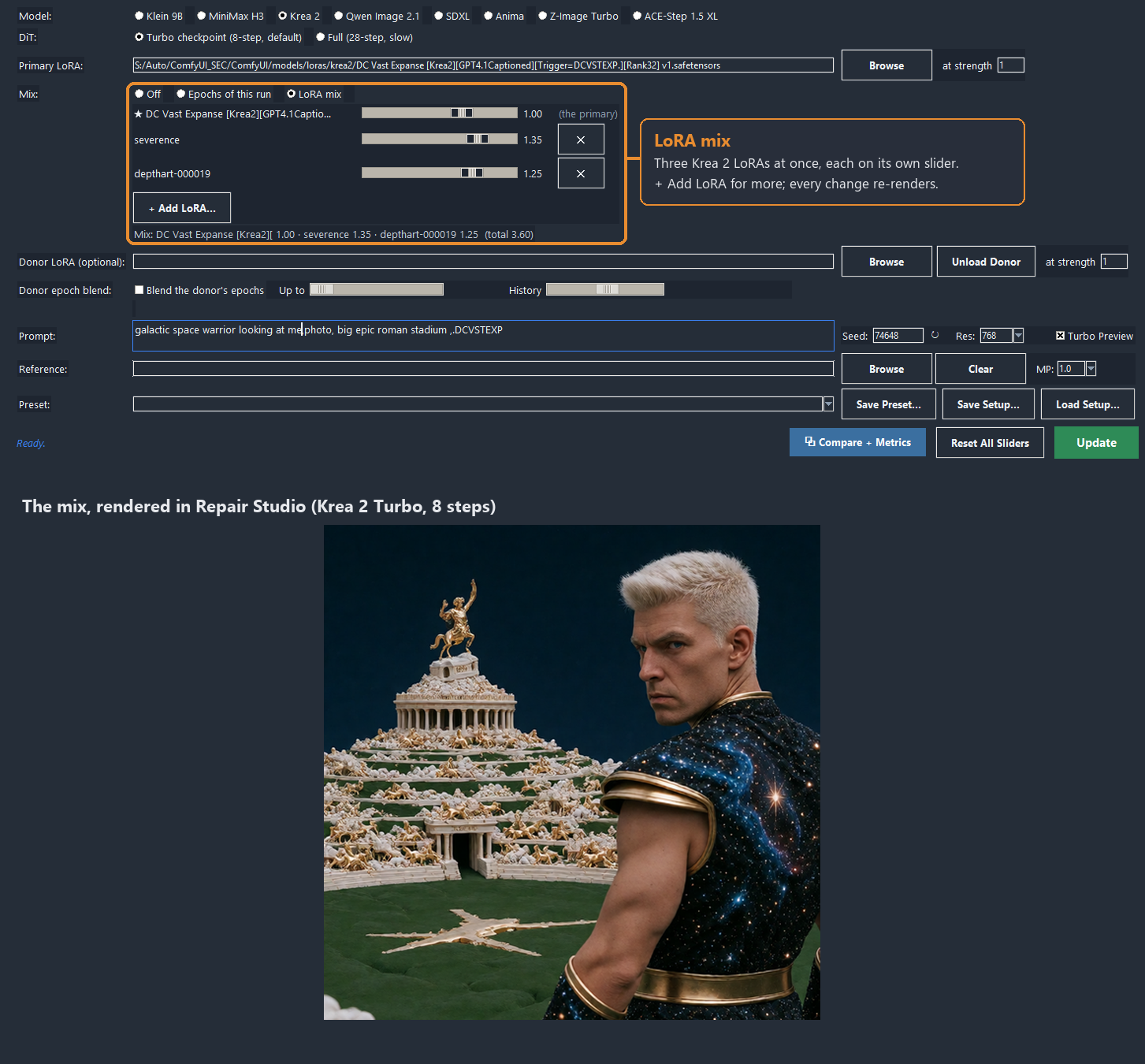
- LoRA mix. The primary plus any other LoRAs of the same model, each on its own slider, rendered together. To take a mix into LoRA the Explorer, save it with Save Repaired LoRA and load that file.
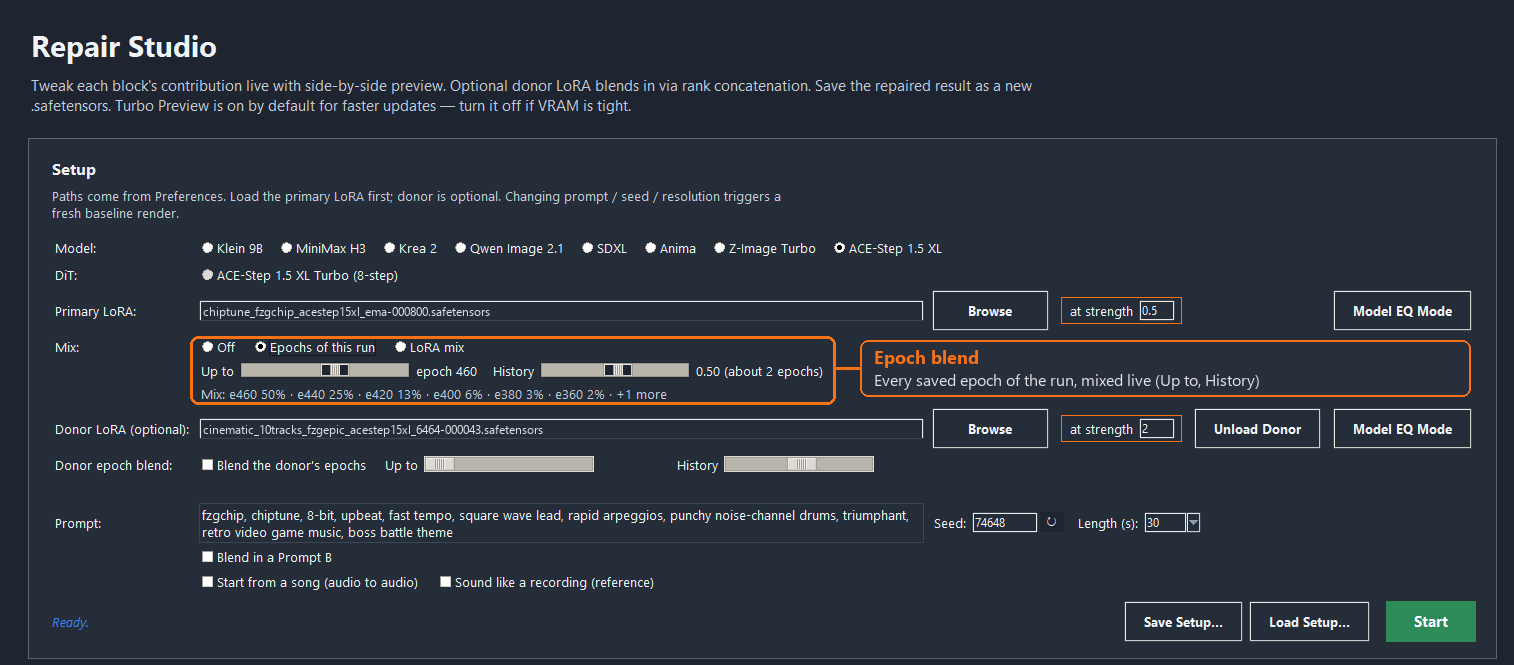
- Epoch blend. Mix a run's epochs live: Up to picks the newest epoch, History how far back the blend reaches. The donor gets its own, and both bake into the one saved file.
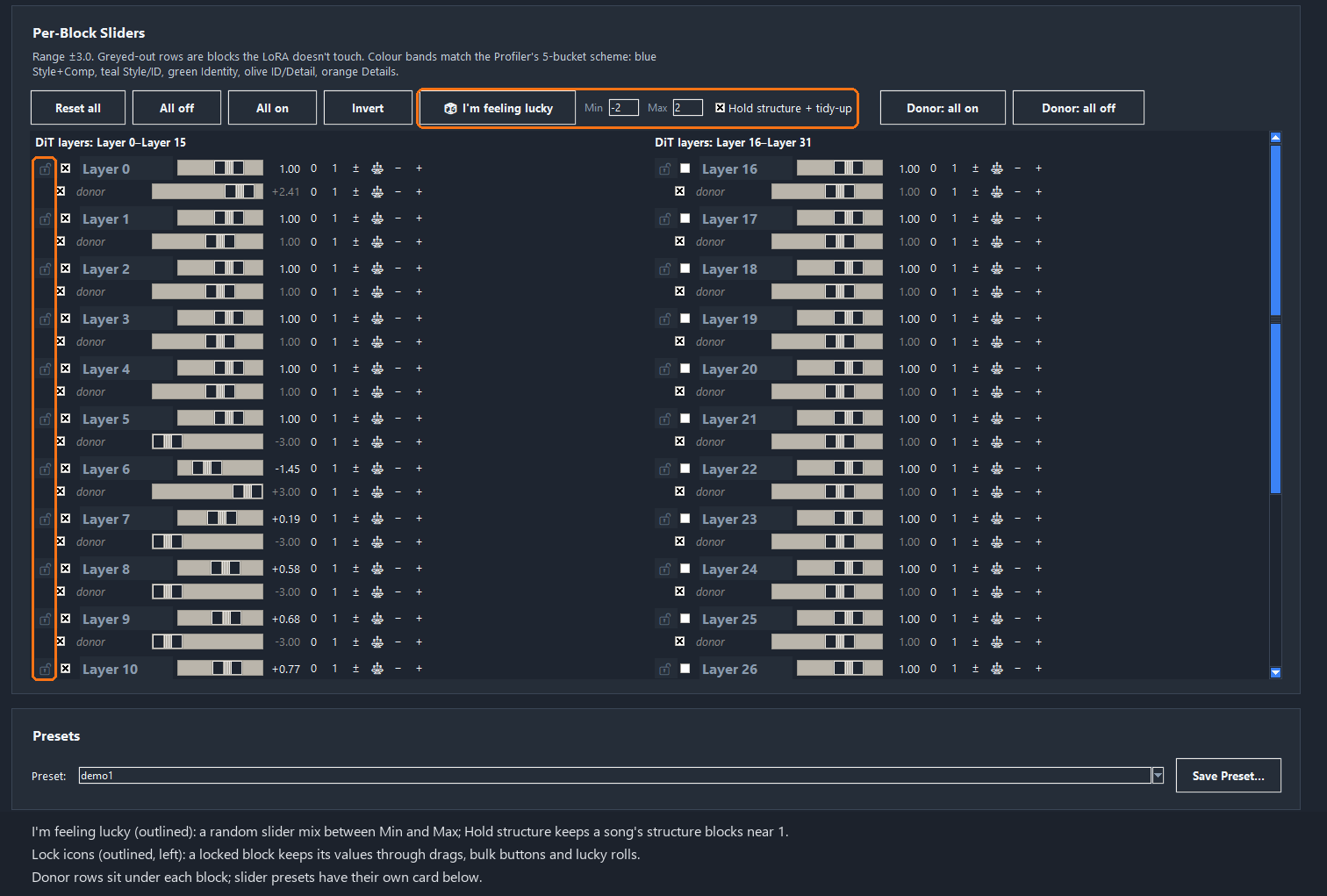
- I'm feeling lucky. A random slider mix between the Min and Max you set; Ctrl+Z takes you back.
- Block locks. A locked block keeps its values through drags, bulk buttons, master sliders and lucky rolls.
- Undo / redo on the block sliders (Ctrl+Z / Ctrl+Y).
- Save Setup / Load Setup, beside Start: the whole session in one file - the LoRAs, every slider and tick, the prompt, seed and size - to come back to or share.
- Unload Donor clears the donor path, so Update can't load it back by accident.
- A tidier layout. Slider presets have their own Presets card under the block sliders, the primary and donor rows line up, and the negative prompt only shows when the preview uses it (not on Krea 2's Turbo or Klein's Distilled).
Repair Studio for music
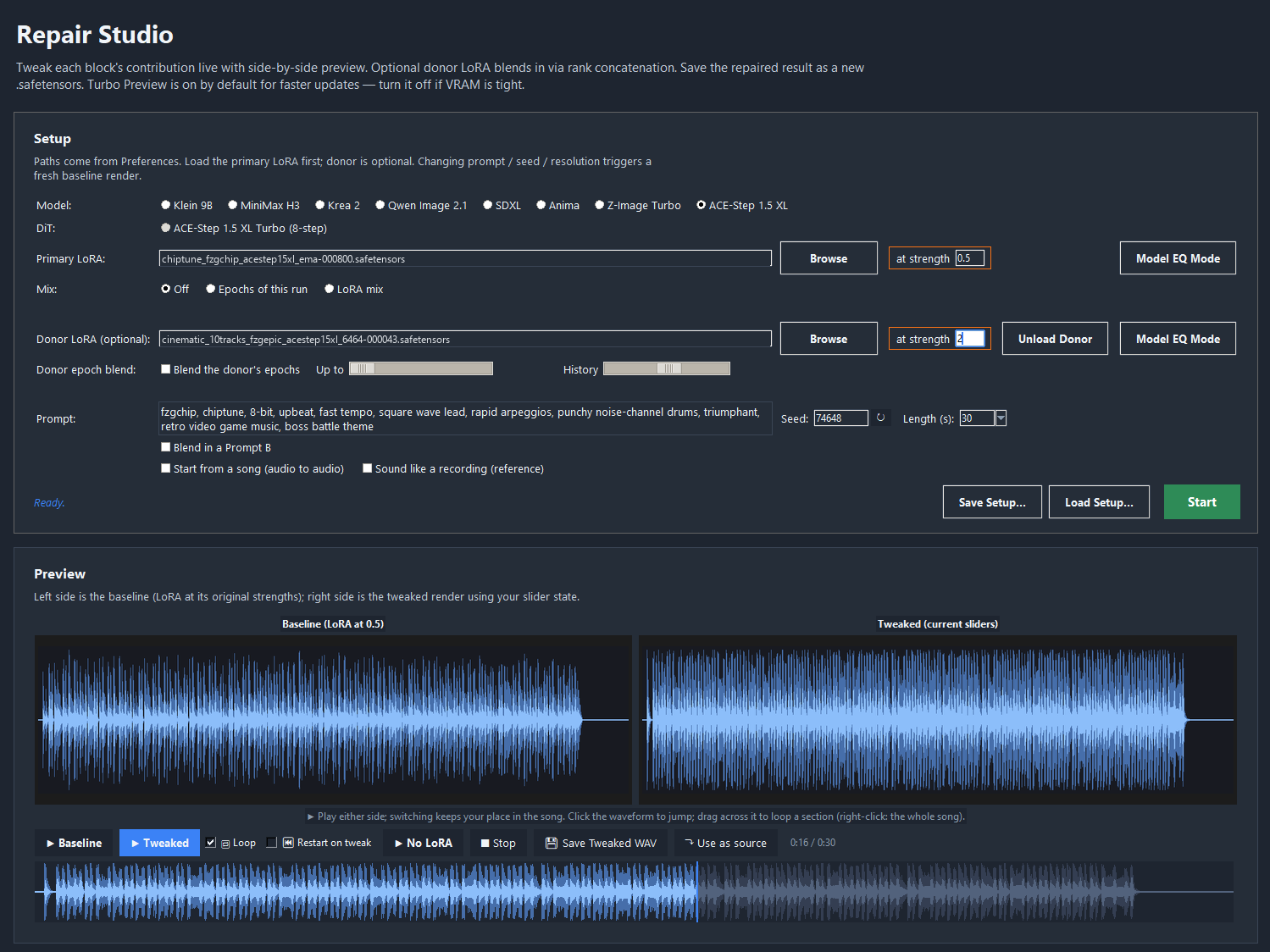
- Songs in place of pictures. Baseline, Tweaked and No LoRA players that keep your place in the song when you switch, and a song bar you can click to jump or drag across to loop a section.
- Save the song. Save Tweaked WAV writes the whole tweaked track as a 48 kHz stereo WAV, named after the LoRA and seed, ready to use.
- Audio to audio. Start from any song or a microphone take (pick the microphone in Preferences): a cover that follows its melody, a reference for the sound, or repaint and extend - remake one section, or carry the song on past its end.
- Prompt B. Blend a second prompt in with a slider.
- I'm feeling lucky, Hold structure. Lucky rolls keep the blocks that carry a song's structure near 1.
- Built-in mixes: ✨Demo Slider Adjustment, ✨Early Epoch Improver and ✨Make it more full.
- Model EQ Mode. A button on the primary and donor rows that loads ACE-Step's own weights as a LoRA, so the block sliders become an EQ of the model itself. As the donor, it EQs the model under your own LoRA. Click it again to go back to your LoRA.
- Half strength by default. The primary and donor start at strength 0.5, the strength long-run song LoRAs play best at. Each model remembers its own strengths.
For every model
- Resume picks up exactly where you paused. Resume Training now puts the paused run's own settings back first - its model, dataset folder and every Training and Samples setting - so a restart that left other settings on screen can't change the run you're resuming.
- The samples gallery no longer stops a song or clip when new previews arrive, and its play buttons always respond.
- Training tab: the number boxes no longer stretch across the row, and hint cards sit beside them.
- Samples tab: Every N Epochs is remembered per model.
- Preferences: Microphone. Pick the microphone Repair Studio records from. It's the same setting as Gizmo's, so changing it in either changes both.
- Gizmo now says that its queue keeps sections from every file you open, so one export can hold clips from many videos, recordings or songs, and that video clips are captioned on Fizgig's Captions tab.
- Krea 2 at 1 MP on 16 GB cards: Auto now picks INT8 with block swap instead of the 4-bit base, which filled the card and slowed training to a crawl (#185, thanks @greanmurk).
To update, run update_fizgig.bat (update_fizgig_rocm.bat on AMD). Pods pick up the update on their next start.