
Notice
Warning: While installing custom firmware does not automatically void the product warranty, any damage caused by or attributable to the installation or use of custom firmware is not covered under warranty. Use at your own risk. See Snapmaker Terms of Use for details.
If you notice a problem, always reproduce it on stock firmware before contacting Snapmaker support. Despite our best efforts, bugs can occur. Only contact support if the issue also occurs on stock firmware.
Custom firmware is intended for users with appropriate technical knowledge. Ensure you understand the implications before proceeding.
Big Thank You
The Snapmaker community chose this project as a Tier 1 winner of the Snapmaker Innovation Fund. This would not have been possible without your continued support. Thank you very much!
New Features and Key Changes
- Stock firmware
2.0.0.205, see below #702 + #723 (@paxx12) - HelixScreen (Experimental) as an alternative touchscreen GUI #590 (@paxx12)
- Firmware upgrades from
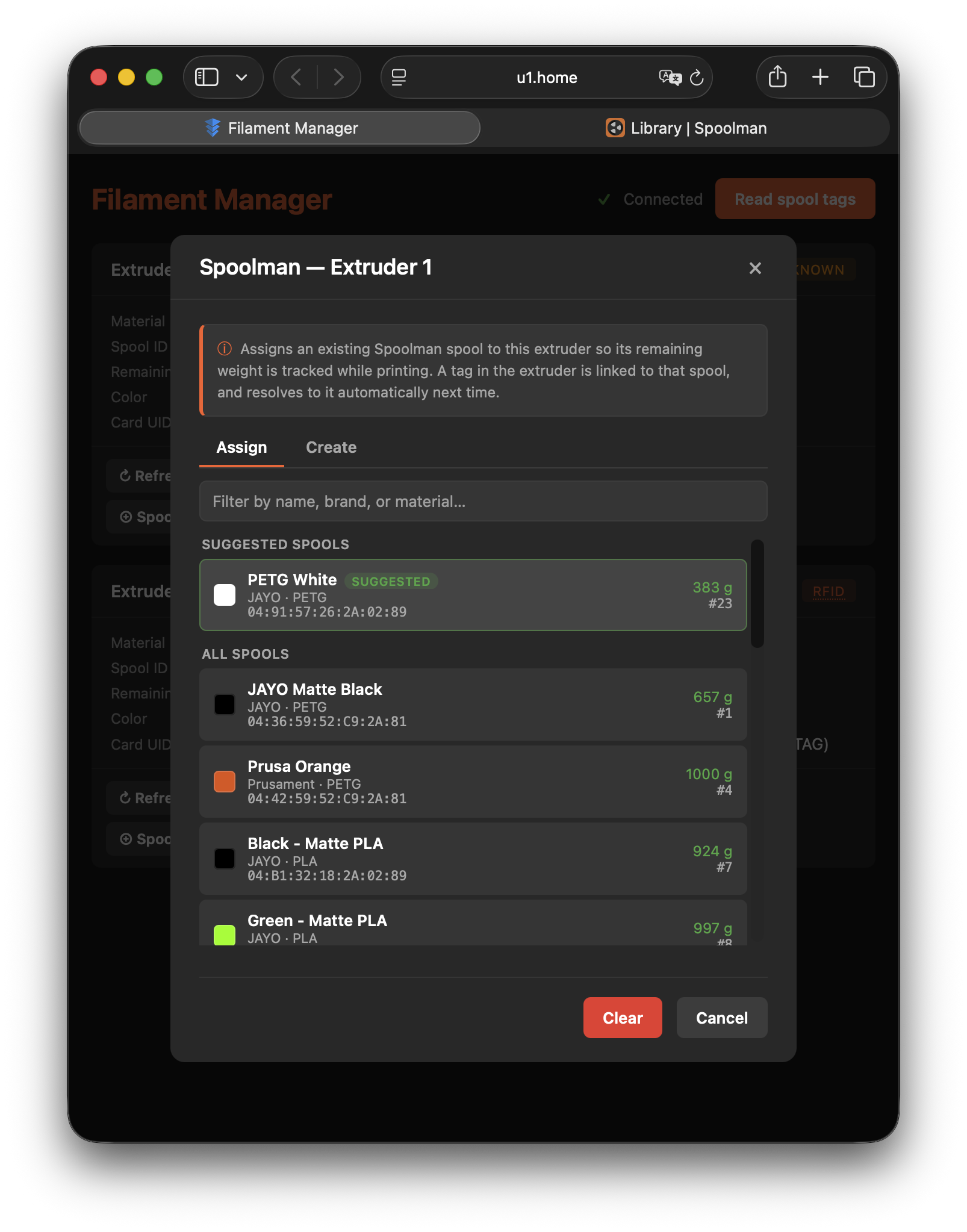
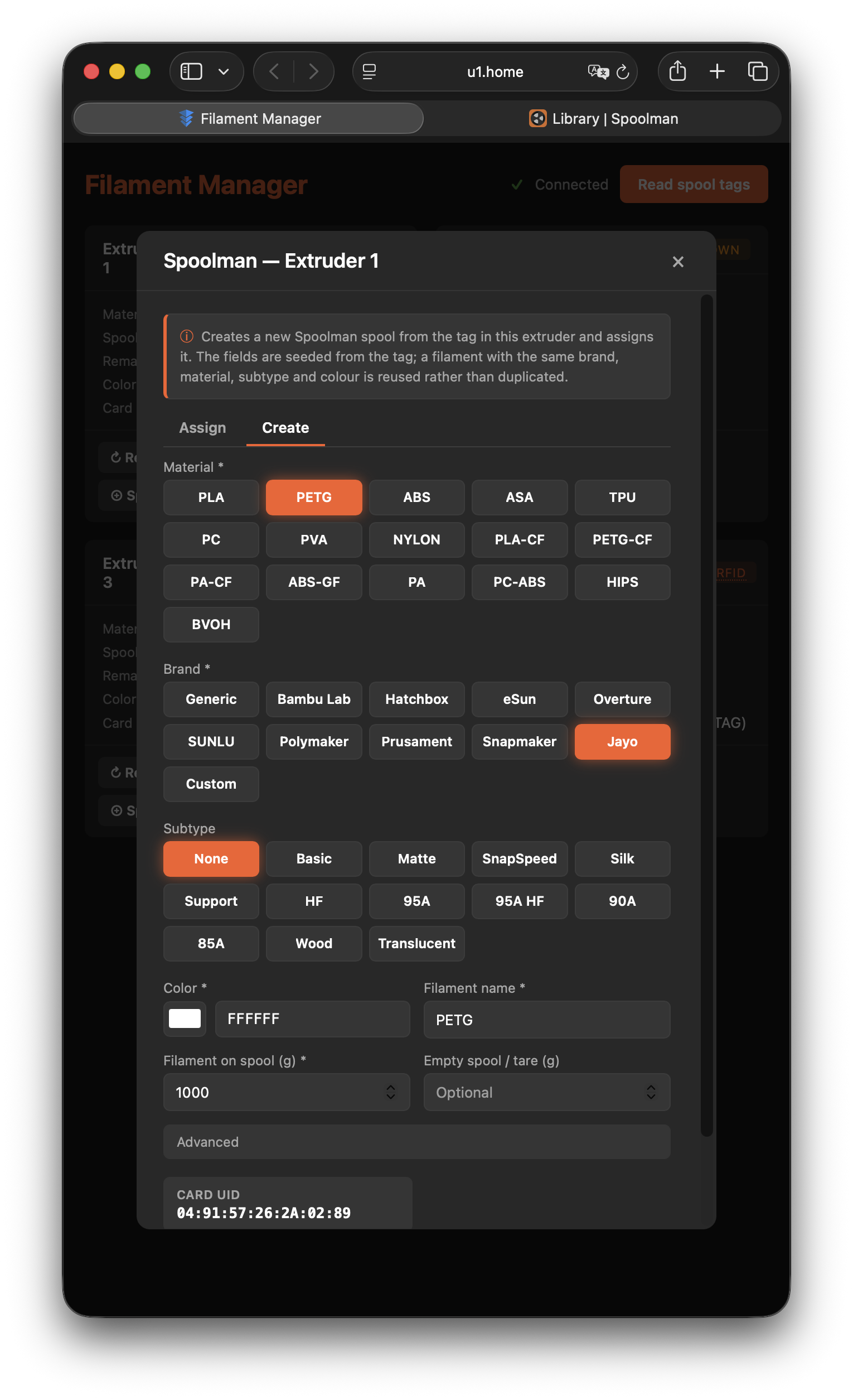
firmware-config#699 (@plastikman) - Filament Manager: easily create and assign Spoolman spools from RFID tags #636 (@Ali-Jab / @paxx12)
- Max Speed tweak with
BalancedandAggressivetiers #682 (@ni4223) - BIQU PopStation Mini support #771 (@alextac98)
- Auto-mount fixed-disk USB and USB-NVMe drives #747 (@Simon-CR)
- OpenRFID supports OpenTag3D by default #744 (@queengooborg) + #742 (@suchmememanyskill)
- Fix: OctoEverywhere install no longer crashes
firmware-config#721 (@paxx12) - Fix: SpoolLink keeps the active spool at print start #793 (@noon92)
- Updates: HelixScreen
v1.0.5, Fluiddv1.37.7, OctoEverywhere5.4.0, Tailscale1.104.1, DragonBreathv1.1.19
Full changelog: #760
Firmware 2.0.0.205
Rebased on Snapmaker's stock 2.0.0 line, which adds rainbow filament display, French language support, and a warning instead of a block for standard-flow G-code on a high-flow nozzle. See Snapmaker's release notes.
HelixScreen (Experimental)
HelixScreen is a third-party touchscreen UI for Klipper printers. Select it in firmware-config under Snapmaker Components > Touchscreen GUI (Experimental). See docs/helixscreen.md.

Filament Manager: Easily create Spoolman spools from RFID tags
Started by @Ali-Jab, built and extended by @paxx12: each channel card gets a ⊕ Spoolman action. Assign picks an existing spool, with matches for the tag suggested first. Create makes a new spool seeded from the tag.
Max Speed tweak
Built by @ni4223: Settings > Tweaks > Max Speed raises XY velocity, acceleration and tool change speeds:
| Stock | Balanced | Aggressive | |
|---|---|---|---|
| Max XY velocity | 500 mm/s | 600 mm/s | 750 mm/s |
| Max acceleration | 20000 mm/s² | 22000 mm/s² | 25000 mm/s² |
| Tool change speed | 400 mm/s | 550 mm/s | 700 mm/s |
| Tool change acceleration | 5000 mm/s² | 12000 mm/s² | 25000 mm/s² |
Run input shaper calibration first. See docs/tweaks.md.
Heroes of this release
- @Ali-Jab: easily create Spoolman spools from RFID tags in Filament Manager
- @plastikman: firmware upgrades from
firmware-config, DragonBreathM191release temperature - @ni4223: Max Speed tweak
- @alextac98: BIQU PopStation Mini support
- @Simon-CR: fixed-disk USB and NVMe auto-mount
- @queengooborg and @suchmememanyskill: OpenTag3D in OpenRFID
- @RrrrobertB1992: OpenRFID multicolor spools
- @noon92: SpoolLink print-start fix
See HEROES.md for all-time contributors.
Install
For detailed installation instructions, see the Installation Guide.
Quick steps:
- Download
.binand put on FAT32 formatted USB device - On the printer go to
Settings>About>Firmware Version>Local Update - Select
.binand confirm.
Troubleshooting
- Custom extensions installed via SSH can break the system, and recovery may not undo them. HelixScreen is now built in: replace a manual SSH install with Snapmaker Components > Touchscreen GUI. If something breaks, try
extended-recover.txt, thenfull-recover.txt, and only then reflash stock firmware from the Snapmaker U1 Wiki. - HelixScreen misbehaves: switch back to
snapmakerunder Touchscreen GUI and reboot. - Ringing or skipped steps with Max Speed: run input shaper calibration, or step down a tier.
- SpoolLink: for the most reliable spool resolution, use Snapmaker's built-in RFID Detection System rather than OpenRFID.
Feedback on Spoolman/SpoolLink/Filament Manager goes in this issue.
Revert
- Download
.binfrom the Snapmaker U1 Wiki. - Follow the same as for install.
Community
Join the Snapmaker Discord and visit the #u1-printer channel to connect with other users using the custom firmware, share experiences, and get help.
Support
If you find this project useful and would like to support its development, you can:
🖨️ Buy a Snapmaker U1 — ordering via the link below supports this project. Optionally use code PAXX12CUSTOM for $20 off, or any other discount you find online:
- EU store: https://snapmaker-eu.myshopify.com?ref=paxx12
- US store: https://snapmaker-us.myshopify.com?ref=paxx12
- Global store: https://test-snapmaker.myshopify.com?ref=paxx12
Checksums
| File | MD5 | SHA256 | Size |
|---|---|---|---|
| U1_extended_2.0.0-paxx12-23_upgrade.bin | d555fb02e0bff159033f91ccab246e40 | c404e30f7168628ff496713f6c2e4f913d2b8d22c275f14706f20a29b0580d51 | 253549312 |