
🚀 OpenCode Bar v2.1.1
Your AI provider usage dashboard, now with more power!
✨ Highlights
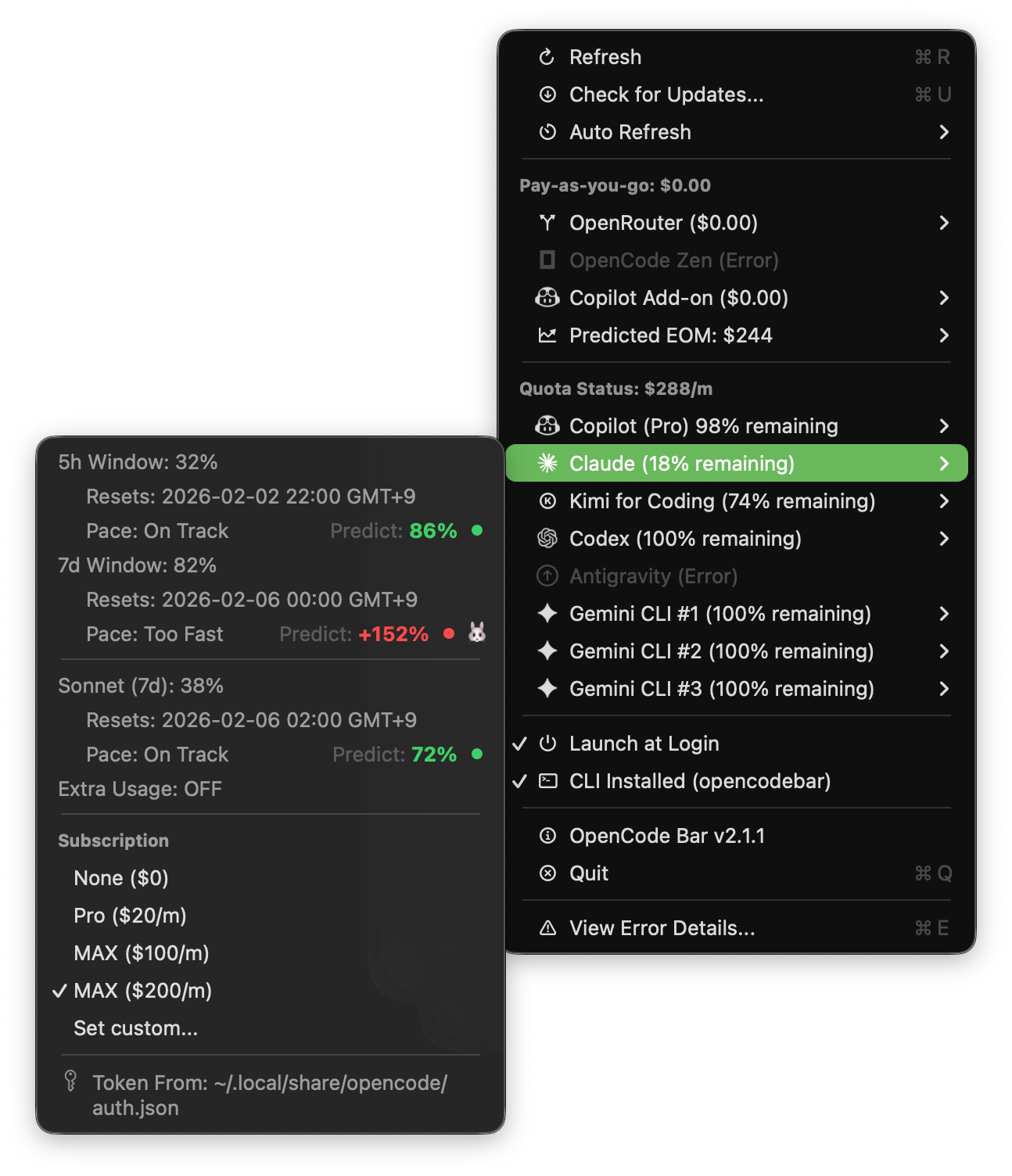
💰 Subscription Settings per Provider
Configure your subscription tier for each quota-based provider to get accurate monthly cost tracking. Now you can see exactly how much you are spending across all your AI subscriptions.
🖥️ Command Line Interface (CLI)
Query your provider usage directly from the terminal - perfect for scripting, automation, and CI/CD pipelines.
# Install the CLI
opencodebar --help

# View all providers at a glance
opencodebar status

# Get detailed info for a specific provider
opencodebar provider claude --json
Example Output:
Provider              Type             Usage       Key Metrics
─────────────────────────────────────────────────────────────────────────────────
Claude                Quota-based      77%         23/100 remaining
Codex                 Quota-based      0%          100/100 remaining
Gemini (#1)           Quota-based      0%          100% remaining (user1@gmail.com)
OpenCode Zen          Pay-as-you-go    -           $12.50 spent
OpenRouter            Pay-as-you-go    -           $37.42 spent
📊 Clearer Provider Categories
- Pay-as-you-go: Shows total cost (OpenRouter + OpenCode Zen)
- Quota Status: Shows monthly subscription cost for quota-based providers
📦 Installation
- Download
OpenCodeUsageMonitor-v2.1.1.dmg - Drag OpenCode Bar to Applications
- Launch and enjoy!
Note: If you see "App is damaged" error, run:
xattr -cr "/Applications/OpenCode Bar.app"
What's Changed
- feat: add subscription settings per provider with updated pricing by @kargnas in #28
- feat: Add CLI tool (opencodebar) for querying provider usage by @kargnas in #32
- refactor: Simplify VSCode tasks with auto-detect DerivedData path by @kargnas in #37
- refactor: clarify provider categories and update menu group titles by @kargnas in #38
- feat: pre-commit hook 설정 추가 (SwiftLint + action-validator) by @kargnas in #39
Full Changelog: v2.1.0...v2.1.1