
AzAPI Update Resource Attribute Grouping
This release extends the intelligent attribute grouping and array rendering from Feature 034 to the azapi_update_resource Terraform resource type, providing a consistent and readable experience when reviewing partial Azure resource updates.
✨ Features
- Dedicated template for
azapi_update_resource: Resources of this type now use a custom template instead of falling back to the generic resource template - Intelligent attribute grouping: Body attributes with common prefixes (≥3 attributes required) are automatically grouped for improved readability
- Improved array rendering: Array-indexed attributes are rendered with clean structure using the hybrid rendering strategy from Feature 034
- Nested object grouping: Attributes in nested objects are grouped appropriately (e.g.,
cors.allowedOrigins[0],cors.supportCredentials) - Consistent with
azapi_resource: Update resources now render with the same grouping behavior as create resources - Azure API documentation links: Automatic links to Microsoft Learn REST API documentation based on the resource type
- Clean property names: Grouped attributes show clean property names without repetitive prefixes
💡 Use Cases
- Reviewing partial Azure resource updates: Users making targeted updates to Azure resources see grouped attributes just like they do for full resource creates
- Comparing update changes: Easily identify what's being updated in a structured, grouped format
- Reducing visual clutter: Long, repetitive property paths in update operations are collapsed into logical groups
- Maintaining consistency: Both
azapi_resourceandazapi_update_resourceprovide the same user experience
▶️ Getting Started
No configuration required - grouping is applied automatically when azapi_update_resource resources are detected in your Terraform plan:
# Generate report with azapi_update_resource grouping
terraform show -json plan.tfplan | tfplan2md -o report.md
🔍 How It Works
When tfplan2md processes a Terraform plan containing azapi_update_resource changes:
- The tool detects the resource type as
azapi_update_resource - It resolves to the dedicated
azapi/update_resource.sbntemplate - The template extracts the resource type and resource ID
- The template applies the same grouping logic from Feature 034 via the
render_azapi_bodyhelper - Body attributes are automatically grouped by common prefixes and arrays are rendered with improved structure
- Azure API documentation links are generated based on the resource type
📝 Example
Before (flat list):
| Property | Before | After |
|----------|--------|-------|
| siteConfig.netFrameworkVersion | `v4.8` | `v6.0` |
| siteConfig.alwaysOn | `❌ false` | `✅ true` |
| siteConfig.connectionStrings[0].name | - | `Database` |
| siteConfig.connectionStrings[0].connectionString | - | `Server=tcp:...` |
| siteConfig.connectionStrings[0].type | - | `SQLAzure` |
| siteConfig.connectionStrings[1].name | - | `Redis` |
| siteConfig.connectionStrings[1].connectionString | - | `myredis...` |
| siteConfig.connectionStrings[1].type | - | `RedisCache` |
After (grouped with clean property names):
###### Body Changes - `siteConfig`

| Property | Before | After |
|----------|--------|-------|
| netFrameworkVersion | `v4.8` | `v6.0` |
| alwaysOn | `❌ false` | `✅ true` |

###### `connectionStrings` Array (new)

**Item [0]**

| Property | Value |
|----------|-------|
| name | `Database` |
| connectionString | `Server=tcp:...` |
| type | `SQLAzure` |

**Item [1]**

| Property | Value |
|----------|-------|
| name | `Redis` |
| connectionString | `myredis...` |
| type | `RedisCache` |
📸 Screenshots
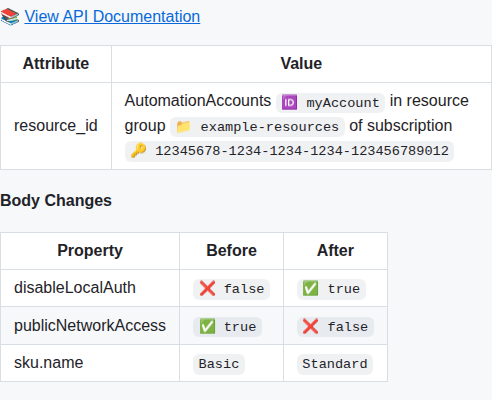
Example output showing azapi_update_resource with attribute grouping — the encryption prefix group is rendered as a dedicated section with clean property names:
Note: Screenshot URL uses
mainbranch reference — will resolve correctly after PR merge.
🔗 Related Features
- Feature 034 - Improved AzAPI Attribute Grouping and Array Rendering (provides the grouping logic)
- Feature 040 - Custom Template for azapi_resource (reference implementation)