
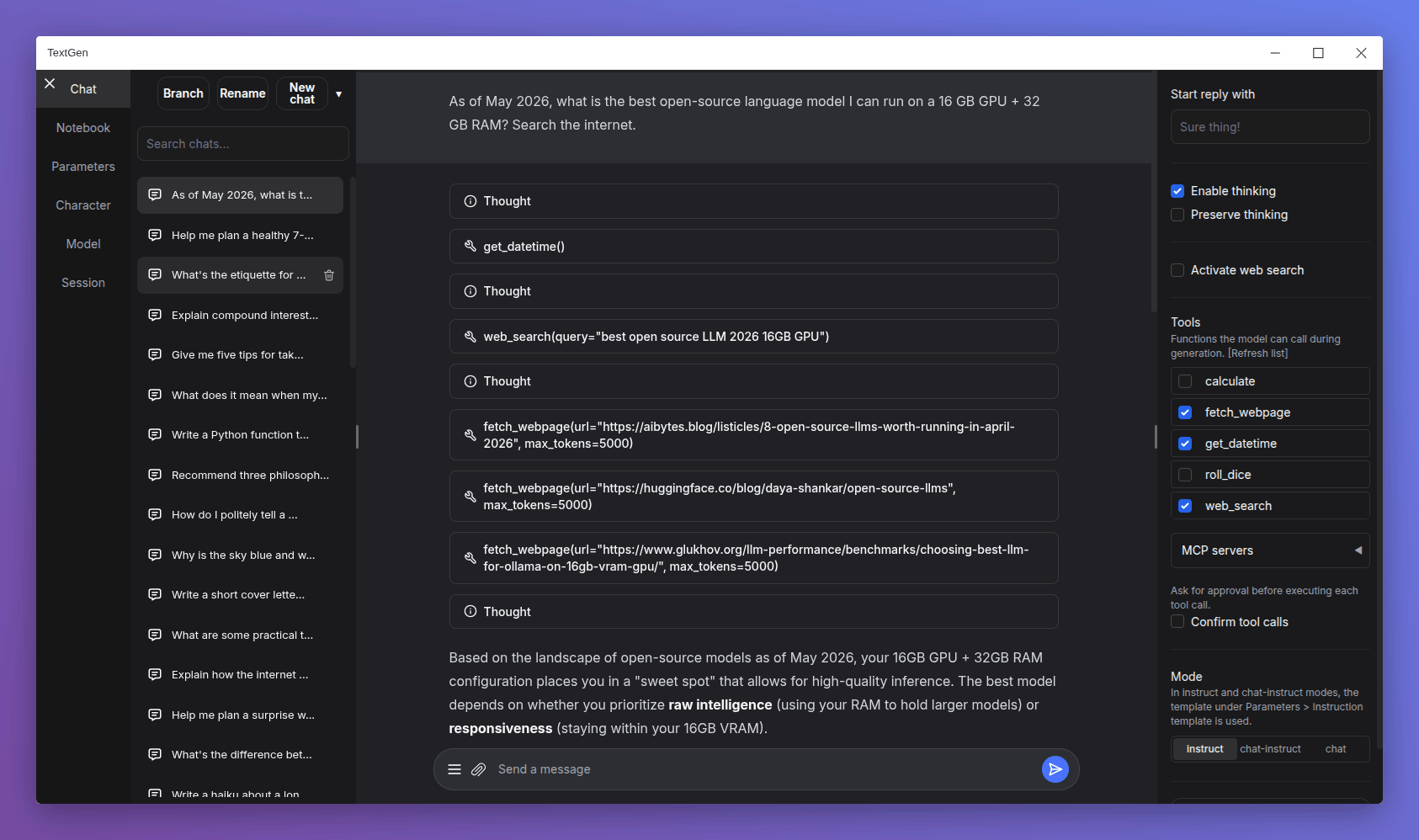
Changes
- Native desktop app: Portable builds now bundle Electron and open as a native window. Run
textgen/textgen.batinstead of the previous start scripts. Pass--listenor--nowebuito skip the window and run the server directly. - Major UI overhaul:
- Replace Noto Sans with Inter as the default font.
- Replace emoji refresh/save/delete buttons with Lucide SVG icons.
- Turn the chat mode selector (chat / chat-instruct / instruct) into a 3-button segmented control.
- Redesign the chat input as a single rounded card with a circular accent-colored send button.
- Use a flat underline for the active tab indicator.
- Replace the sidebar toggle buttons with 3px hairline handles on desktop.
- Tensor parallelism for llama.cpp: New
--split-modeflag (replacing--row-split) with atensoroption that can make multi-GPU inference 60%+ faster. On the ik_llama.cpp backend,tensorandrowfall back tograph. - Replace DuckDuckGo HTML scraping in the web search tool with the ddgs library, which is more robust against DuckDuckGo's bot blocking.
- Add support for standalone
.jinja/.jinja2instruction template files in the UI, in addition to the existing.yamlformat (#7517).
Bug fixes
- Fix Stop button being ignored during tool call approval, and not interrupting between tool turns in multi-turn tool loops.
- Fix race condition in the ExLlamaV3 backend that could affect concurrent API requests.
- Fix extension settings not saving for extensions inside
user_data/extensions(#7525).
Dependency updates
- Update llama.cpp to ggml-org/llama.cpp@0929436
- Update ik_llama.cpp to ikawrakow/ik_llama.cpp@9f1deef
- Update transformers to 5.6
Portable builds
Below you can find self-contained packages that work with GGUF models (llama.cpp) and require no installation! Just download the right version for your system, unzip/extract, and run.
Note
NVIDIA GPU: If nvidia-smi reports CUDA Version >= 13.1, use the cuda13.1 build. Otherwise, use cuda12.4.
ik_llama.cpp is a llama.cpp fork with new quant types. If unsure, use the llama.cpp column.
Windows
| GPU/Platform | llama.cpp | ik_llama.cpp |
|---|---|---|
| NVIDIA (CUDA 12.4) | Download (891 MB) | Download (1.23 GB) |
| NVIDIA (CUDA 13.1) | Download (816 MB) | Download (1.33 GB) |
| AMD/Intel (Vulkan) | Download (336 MB) | — |
| AMD (ROCm 7.2) | Download (604 MB) | — |
| CPU only | Download (318 MB) | Download (334 MB) |
Linux
| GPU/Platform | llama.cpp | ik_llama.cpp |
|---|---|---|
| NVIDIA (CUDA 12.4) | Download (848 MB) | Download (1.20 GB) |
| NVIDIA (CUDA 13.1) | Download (803 MB) | Download (1.32 GB) |
| AMD/Intel (Vulkan) | Download (324 MB) | — |
| AMD (ROCm 7.2) | Download (395 MB) | — |
| CPU only | Download (306 MB) | Download (334 MB) |
macOS
| Architecture | llama.cpp |
|---|---|
| Apple Silicon (arm64) | Download (271 MB) |
| Intel (x86_64) | Download (283 MB) |
Updating a portable install:
- Download and extract the latest version.
- Replace the
user_datafolder with the one in your existing install. All your settings and models will be moved.
Starting with 4.0, you can also move user_data one folder up, next to the install folder. It will be detected automatically, making updates easier:
textgen-4.6/
textgen-4.7/
user_data/    <-- shared by both installs