
I spent two evenings taking the batteries out of a TV remote and putting them back in. Around fifty times. A connection only introduces itself when it is set up, so the remote had to reconnect, and the box had to answer on the one channel the HackRF was listening to. It mostly didn't.
The remote is fine. The box is fine. I am mostly fine. My wife and my daughter, having watched me spend my evenings in front of a laptop doing unspeakable things to a TV remote, have started to worry about me.
What came out of it: sdrtop can now follow a Bluetooth LE connection, not just watch devices introduce themselves.
LE 3: one connection, event by event
A BLE connection is set up by one packet, the CONNECT_IND, which says everything a listener needs: the connection's address, its timing and how it hops. The new Connection view takes that packet and follows the connection on the channels the radio already sees, without retuning. Every event is accounted for (followed, missed, out of view or lost to the feed), the control packets are read until encryption starts, and the two devices' turnaround time and clock are measured.
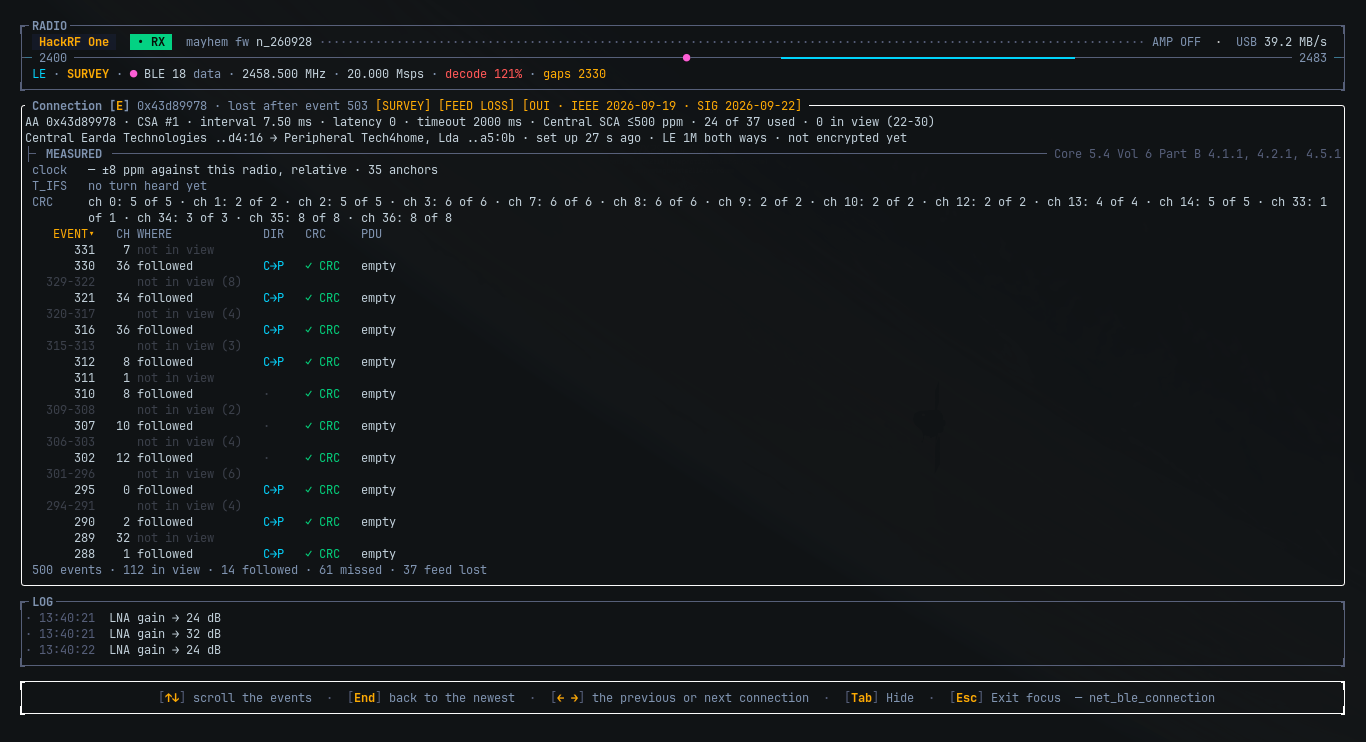
The first real connection it met, it followed perfectly through 268 events without hearing one. The box had set a bit that said "hop the new way", and sdrtop believed it. A page further on, the specification gives the remote a vote too, and the remote had voted no. With both bits read, every event in view was there.
Live on the old i3 it keeps up with part of it, and says exactly how much it lost to the feed rather than guessing.
Ctrl+R records the radio
The raw IQ stream, as SigMF, from any layout, with every gap, retune and gain change written into the file. Recording is also how I found the worst bug of the release: a HackRF at 20 Msps had been losing up to a third of its samples inside the radio, because sdrtop did its sums on the driver's own thread. It doesn't any more, and the radio's own drop count is now read and shown.
Classic and the rest
- Classic Bluetooth: one piconet packet by packet, and a bench with both ends side by side.
- The menu grew to three sections: NET, LE and Classic.
tfilters the Advertising list to CONNECT, SCAN or ADV, so the one packet you want is not buried in the flood.- A clipping ADC shows on the NET band line.
- SoapyRemote radios open now, thanks to @kajoty. ❤️
Upgrading
One new, optional [record] section in the config; everything else loads as before. The full list is in the
changelog.
cargo install sdrtop --lockedOr the installer, same as before. And if you own a BLE remote, I am sorry in advance.
What's Changed
- fix(soapy): keep the remote address in the open markup (SoapyRemote devices could not be opened) by @kajoty in #21
New Contributors
Full Changelog: v0.6.2...v0.6.3