
PS5_RetroArch-v4.6.0-beta-4
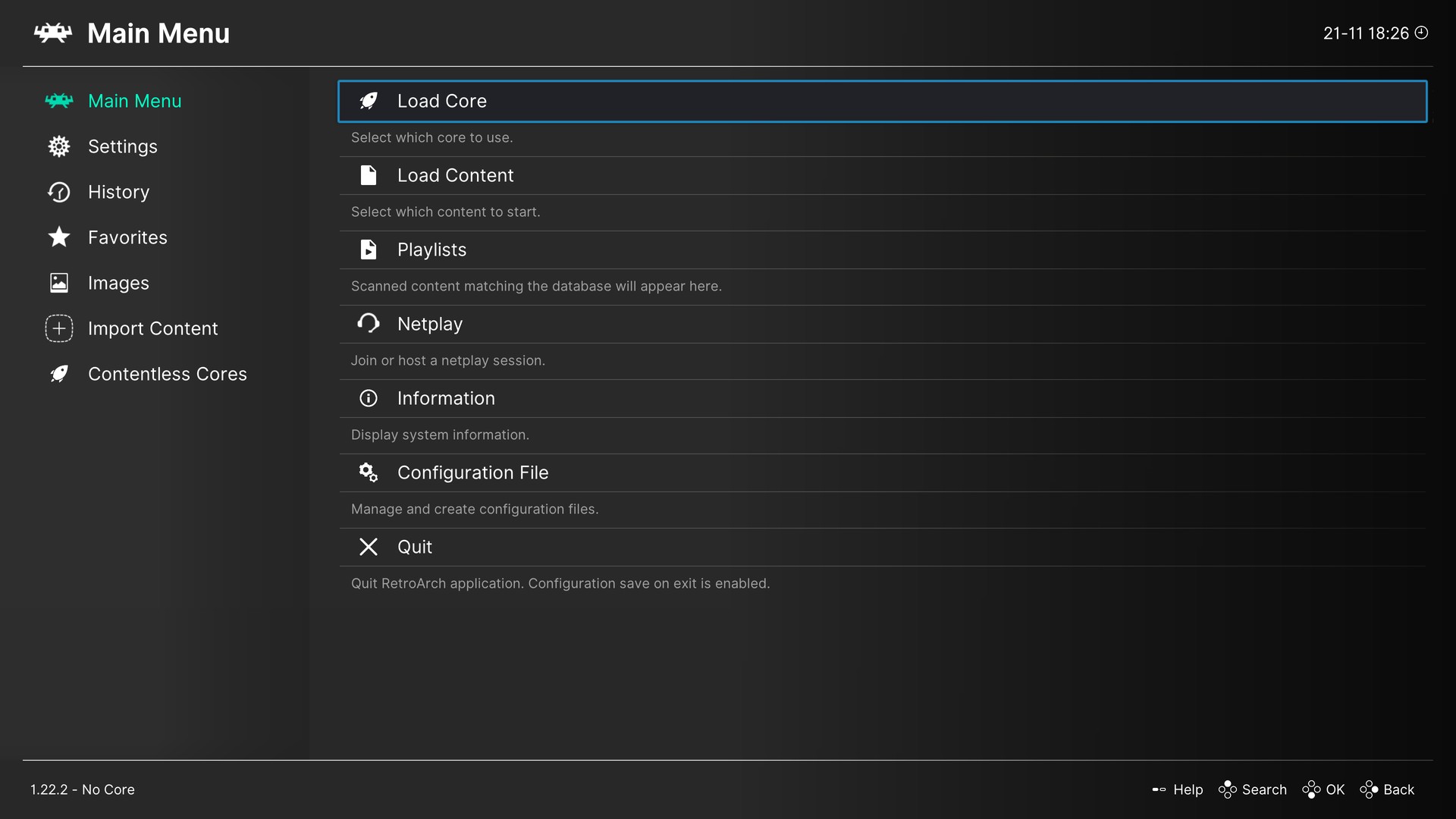
The Ozone menu is here, and the Update button works.

PS5 RetroArch is a passion project, not a piracy project.
It exists so you can play the games you own on the console you own.
- Piracy is not condoned.
- No games, BIOS files, console firmware or decryption keys are included, and they never will be.
- Use only legally obtained backups of games you own, made yourself from your own discs, cartridges or digital purchases.
- Use only BIOS and firmware files dumped from hardware you own.
- Requests for, or links to, games, BIOS files, firmware or keys are not welcome in this project's issues or discussions.
 Thank you
 to darkxex, asp0909 and ElMeteK for asking for Ozone (#91, #67), and to asp0909, Eli0rZeR70 and AnAngryParsnip for reporting the update that never installed (#75).
 At a glance
| What's new | What it means |
|---|---|
 The Ozone menu | A third menu for RetroArch, beside XMB and RGUI: a sidebar, a list, eleven colour themes. |
 The Update button works | From this release on, the WebUI downloads, verifies and installs a new release by itself. |
The Ozone menu
- A third menu. RetroArch's Ozone menu is built in, with its sidebar, its icons and its eleven colour themes. XMB stays the default: nothing changes unless you choose Ozone.
- To choose it on the console: Settings → Drivers → Menu, then restart RetroArch.
- To choose it from the WebUI: Settings → Interface → Console menu style.
- The WebUI's QR code is shown in XMB and RGUI only. Ozone has no WebUI entry yet. The WebUI itself runs whichever menu you use, at the same address.
The Update button works
- What was wrong. The WebUI downloaded a new release and then nothing happened: the page offered the same update again. Three faults were behind it, and each one alone was enough.
- The update stopped as it began to verify the download. The WebUI's background service crashed at that moment, restarted, and had forgotten the update.
- Every release was refused as invalid. A package carries an empty content folder for each system, and the updater did not accept folders.
- An update would have left EmulationStation, the picker, the Game Forwarder and the Lapy service at their old versions. They are installed with everything else now.
- One more manual update. The faults are inside every earlier release, v4.5.0-beta-4 included, so their Update button cannot install this one. Install this release by hand once; from then on the button works.
 Played on a Base PS5
| What | How it went |
|---|---|
| Ozone | The menu drew at 4K with its sidebar, icons and cursor. It was walked with the controller through the main menu, a submenu and the sidebar, and its Quick Menu opened over a running game. No crash. |
| The update, before | With v4.4.0-beta-4 installed, the download finished and the WebUI's service restarted the same minute; the update was back at the start. |
| The update, after | A build with the fixes downloaded v4.5.0-beta-4, checked its 19,482 entries in four minutes, closed RetroArch, installed in five seconds, and started again as that release, with matching files. |
Upgrading from v4.5.0-beta-4
- Back up your existing title folder, especially configuration, saves, states, system files, content and any custom media.
- Merge the complete
PPSA99169folder from the package into your installation, keeping your own files and configuration. The Update button of v4.5.0-beta-4 and earlier cannot install this release. - Fully close and reopen PS5 RetroArch. Later releases can be installed with the WebUI's Update button.
No games, BIOS files, console firmware, or decryption keys are supplied. Use only legally obtained backups of games you own and system files dumped from hardware you own.
 Source, licences, and credits
Changes since v4.5.0-beta-4. Release source; component source links and exact revisions are included in licenses/components.json. The Ozone menu's images are unmodified files from libretro's retroarch-assets (CC-BY-4.0), each listed with its digest in assets/ozone/source.json. RADV is built from PS5_Mesa and PS5_Vulkan at the revisions this repository pins, with the payload SDK at its pinned revision. The SDK's elevation client is rebuilt with platform/sdk/elevation-root-proof.patch, and Beetle PC-FX with patches/beetle-pcfx/missing-disc.patch, both from this repository.
Snes9x, FinalBurn Neo, Genesis Plus GX, PicoDrive, Opera, and the Alekfull NX theme carry non-commercial restrictions. This distribution may not be sold, and this release carries no donation link. The package's licenses/ directory records component licences and exact source revisions. RPCS3 is not included.
Thank you to the RetroArch/libretro community, the emulator and ES-DE developers, and the PS5 homebrew scene. Icons: Microsoft Fluent UI System Icons (MIT).
Ready to get started? Available releases · Installation guide · Source and credits