
Pick your frontend. Play it all in RetroArch.
PS5 RetroArch v0.6.7-alpha.6 opens on a pre-screen that starts RetroArch or EmulationStation, adds up to four controllers, installs verified updates from the WebUI and fixes the Manual Scan crash.
Download the title ZIP · Installation guide · Screenshot catalog
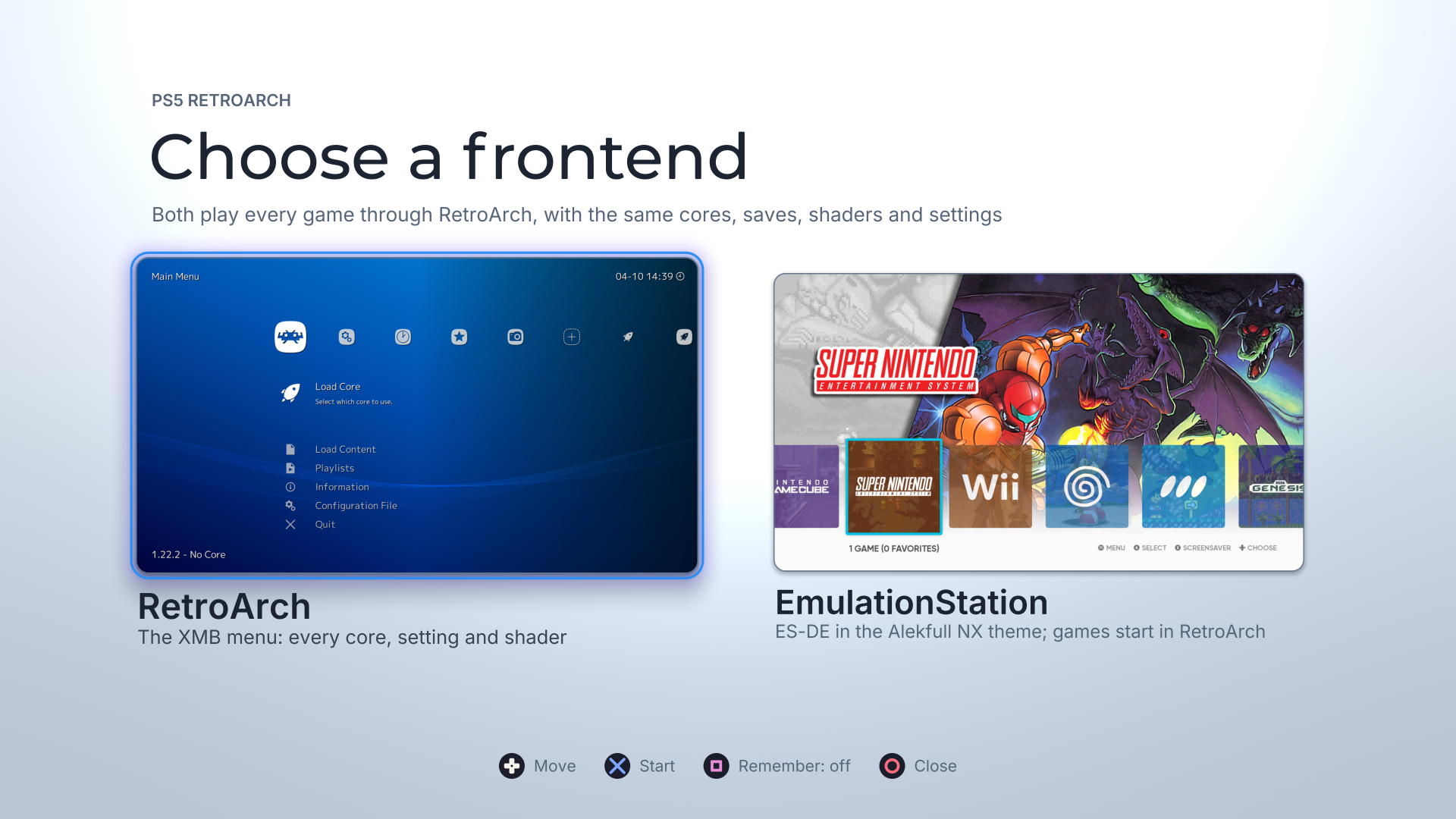
Choose a frontend · RetroArch’s XMB or EmulationStation, both playing every game through RetroArch.
Captured on the console. Both use the same cores, saves, shaders and settings.
At a glance
| What’s new | Where to start |
|---|---|
| Pre-screen · RetroArch or EmulationStation, with your choice remembered if you like | Open the title |
| EmulationStation · ES-DE 3.5.0 with Alekfull NX, sound and your RetroArch library | Its card on the pre-screen |
| Up to four controllers · one per signed-in PS5 user, each with its own rumble | Sign in on another controller |
| WebUI · verified updates from the console, BIOS alerts and Start with | http://<PS5-IP>:6769
|
| Display sizes · 3840×2160, 2560×1440 and 1920×1080 | video_fullscreen_x, video_fullscreen_y
|
| Fixes · Manual Scan, the menu’s search and logs you can send | Nothing to set |
Two frontends, one RetroArch
- A pre-screen when the title starts. Move with the D-pad, start a frontend with Cross, close the title with Circle. Each card shows the frontend it starts, captured on the console.
- Remember your choice. Press Square to switch Remember on, and the title starts that frontend straight away from then on. Hold L1 while the title starts to come back to the pre-screen. The WebUI’s new Start with setting changes it from your phone or computer: Ask every time, RetroArch or EmulationStation.
- Quitting goes where you expect. Quitting RetroArch or EmulationStation returns to the pre-screen. With a frontend remembered, it closes the title, as RetroArch alone always did.
- Each frontend runs on its own. Switching restarts the title as the frontend you chose, in about a second, so each one has the console’s full memory and nothing of the other stays behind.
EmulationStation on PS5
ES-DE 3.5.0, built for the console.
- Alekfull NX by default, with ES-DE’s own Linear theme also included.
- Smooth browsing at 58–60 fps, after an OpenGL driver fix that removed a full-screen cache flush from every frame.
- Sound. ES-DE’s navigation sounds play through the PS5’s audio output.
- Your library, not a second one. Its systems and game lists come from RetroArch’s playlists every time it starts. A game you add or remove in RetroArch appears or goes in EmulationStation; nothing is scanned twice.
- Every game starts in RetroArch, with RetroArch’s cores, saves, states, shaders, overlays, remaps and settings. Close the content and you are back in EmulationStation, on the same game, with its play count and time recorded.
- Favorites and Last Played. RetroArch’s favourites, history and play time fill EmulationStation’s Favorites and Last Played collections, and a favourite set in either frontend shows here.
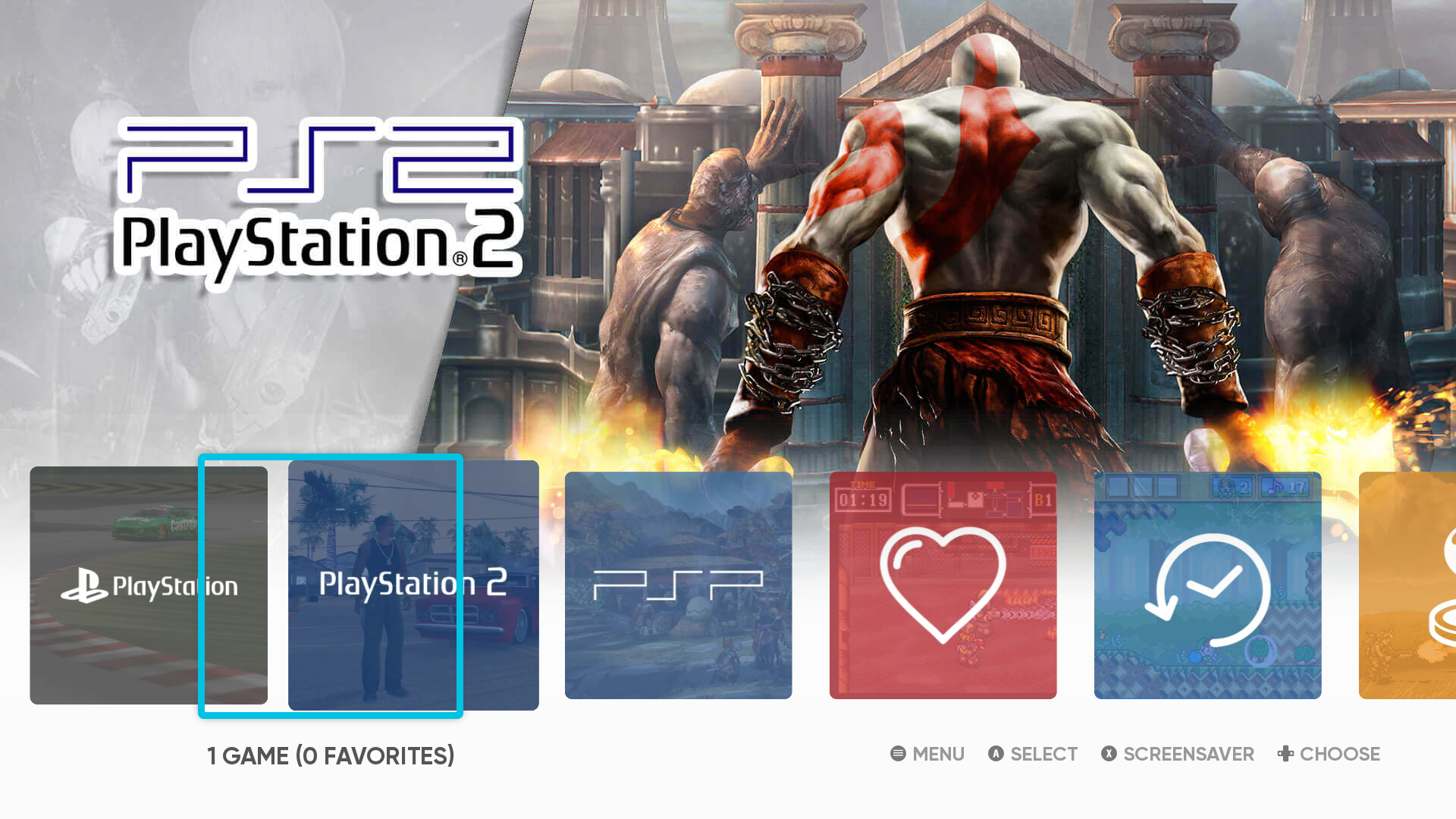
Favorites and Last Played · the heart and the clock, beside your systems.
Captured on the console.
Up to four controllers
- One controller per signed-in PS5 user. Player 1 is whoever started the title; each other signed-in user’s controller becomes the next player.
- Players follow the signed-in users. A user who signs in during a session takes the first free player within about a second; one who signs out is let go.
- Per-controller rumble and DualSense haptics.
To add a player, turn on another controller and sign in as another user or a guest.
The WebUI
- Verified updates from the console. Download a published release and check it; choosing Install closes RetroArch, installs it and closes the title. Open it again to run the new version. Your configuration, saves, states and content are kept.
- BIOS alerts tell you when a core’s BIOS file is missing.
- Start with chooses the frontend the title opens on.
Display
The Vulkan driver now offers 3840×2160, 2560×1440 and 1920×1080, not 4K alone. RetroArch still starts at the largest; set video_fullscreen_x and video_fullscreen_y to choose a smaller one. Each size was checked filling the TV.
Fixes
- Manual Scan no longer crashes when you open Content Directory again after creating a playlist. The same fault affected the menu’s search, Explore filtering and Load Content’s return to the last folder; all of them are fixed, and the build now refuses the kind of missing function that caused it.
- Logs you can send with a bug report. Each launch keeps its own
trace.txt(the previous one istrace.1.txt), and a game started from EmulationStation logs toretroarch-game.log, so it no longer overwrites RetroArch’s ownretroarch.log.
PlayStation 3
I’ve decided to discontinue my RPCS3 port for PS5 due to unresolved licensing compatibility concerns and legal uncertainty around the integration. Resolving those issues would require more time and resources than I’m prepared to commit, so I’m focusing on my other projects.
No build of this title includes RPCS3 any more.
Tested scope and alpha limits
Verified on a base PS5, firmware 13.40
- The pre-screen, both frontends and every handover between them: choosing, quitting, Remember, Start with, and a launch straight into a remembered frontend.
- A game started from EmulationStation in RetroArch, closed through the Quick Menu’s Close Content, returning to EmulationStation with its play recorded.
- Two controllers as players 1 and 2 in a racing game.
- RetroArch’s favourites and play time in EmulationStation’s collections.
- EmulationStation’s sound output, checked through its audio device status.
- The display sizes above, each filling the TV.
Not yet verified
- EmulationStation with more than one controller, and a controller joining or leaving during a RetroArch session.
- Holding L1 on a real pad at launch; the pad read itself works.
- An update installed from the WebUI that closes the title instead of starting the pre-screen (covered by tests).
- EmulationStation’s scraper and other online features, and sound in video previews.
- The PS5 Pro, for the frontends.
This is an alpha release: compatibility varies by core, game and workload.
Install or upgrade
- Back up your existing title folder.
- Merge the complete
PPSA99169folder into your launcher’s installation location. It adds two folders,es-de/andpicker/. Preserve yourconfig, saves, states, system files and content; do not replace your configuration with a fresh default. - Open the title. It now opens on the pre-screen. To start RetroArch directly as before, choose it with Remember on, or set Start with to RetroArch in the WebUI.
No games, BIOS files or firmware are included.
Licences
EmulationStation (MIT) and the libraries it uses are listed with their licence texts in the package’s licenses/: SDL2, PS5 OpenGL with Mesa, FFmpeg (LGPL-2.1-or-later), curl, Mbed TLS, FreeType, HarfBuzz, ICU, pugixml, libwebp and stb.
Snes9x, FinalBurn Neo, Genesis Plus GX and the Alekfull NX theme (CC BY-NC-SA 2.0) are under non-commercial terms: this release may not be sold, and it carries no donation link.
Source and credits
Built from the commit tagged v0.6.7-alpha.6. Corresponding source archives, licence notices and checksums accompany this release, including EmulationStation’s source and the sources of every library it links. See the package’s licenses/ for exact revisions.
Thanks to:
- the ES-DE team (Northwestern Software AB, Leon Styhre and contributors);
- fagnerpc and anthonycaccese for Alekfull NX;
- BlackBearReloaded for PS5 OpenGL and the UI kit the pre-screen is drawn with;
- the ProsperoEden project, whose controller handling the multiplayer support follows.