
🎬 Screencast
New Page.Screencast API provides a unified interface for capturing page content with:
- Screencast recordings
- Action annotations
- Visual overlays
- Real-time frame capture
- Agentic video receipts
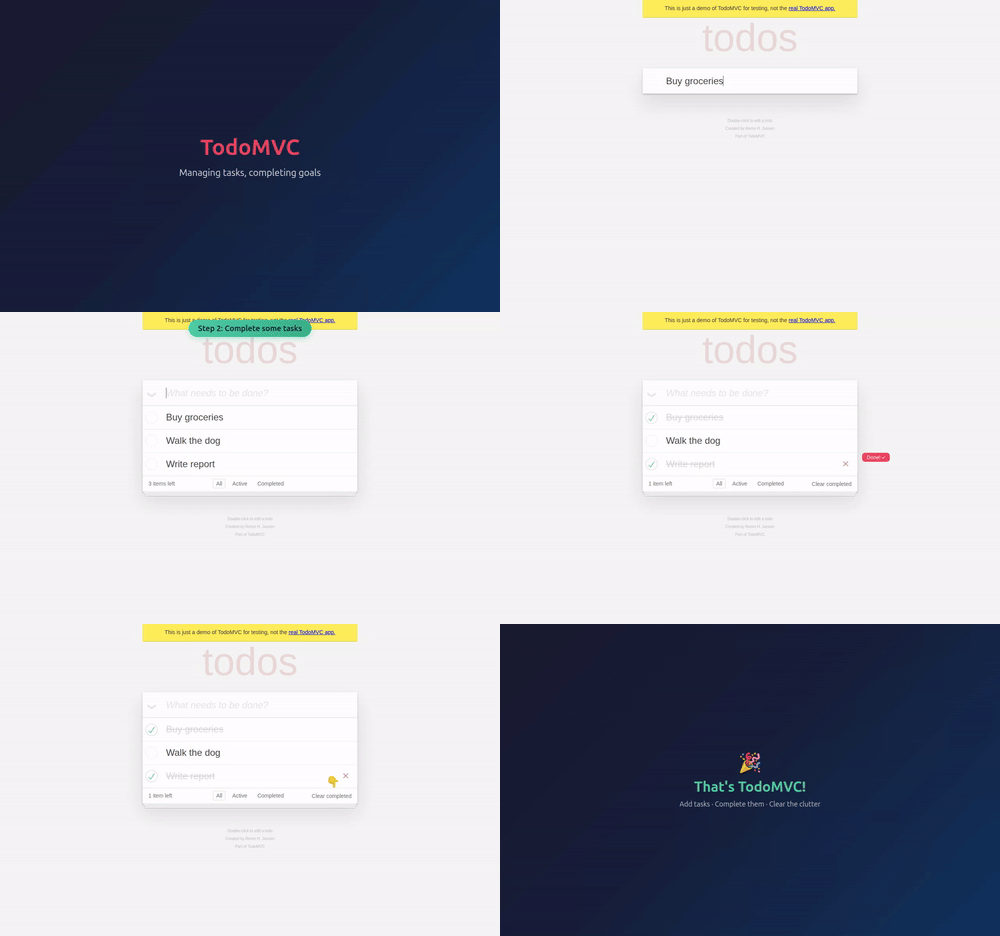
Screencast recording — record video with precise start/stop control, as an alternative to the recordVideoDir option:
await page.Screencast.StartAsync(new() { Path = "video.webm" });
// ... perform actions ...
await page.Screencast.StopAsync();
Action annotations — enable built-in visual annotations that highlight interacted elements and display action titles during recording:
await page.Screencast.ShowActionsAsync(new() { Position = "top-right" });ShowActionsAsync accepts Position ("top-left", "top", "top-right", "bottom-left", "bottom", "bottom-right"), Duration (ms per annotation), and FontSize (px). Returns a disposable to stop showing actions.
Visual overlays — add chapter titles and custom HTML overlays on top of the page for richer narration:
await page.Screencast.ShowChapterAsync("Adding TODOs", new() {
    Description = "Type and press enter for each TODO",
    Duration = 1000,
});

await page.Screencast.ShowOverlayAsync("<div style=\"color: red\">Recording</div>");
Real-time frame capture — stream JPEG-encoded frames for custom processing like thumbnails, live previews, AI vision, and more:
await page.Screencast.StartAsync(new() {
    OnFrame = frame => SendToVisionModel(frame.Data),
});
Agentic video receipts — coding agents can produce video evidence of their work. After completing a task, an agent can record a walkthrough video with rich annotations for human review:
await page.Screencast.StartAsync(new() { Path = "receipt.webm" });
await page.Screencast.ShowActionsAsync(new() { Position = "top-right" });

await page.Screencast.ShowChapterAsync("Verifying checkout flow", new() {
    Description = "Added coupon code support per ticket #1234",
});

// Agent performs the verification steps...
await page.Locator("#coupon").FillAsync("SAVE20");
await page.Locator("#apply-coupon").ClickAsync();
await Expect(page.Locator(".discount")).ToContainTextAsync("20%");

await page.Screencast.ShowChapterAsync("Done", new() {
    Description = "Coupon applied, discount reflected in total",
});

await page.Screencast.StopAsync();
The resulting video serves as a receipt: chapter titles provide context, action annotations highlight each interaction, and the visual walkthrough is faster to review than text logs.
🔍 Snapshots and Locators
- Method Page.AriaSnapshotAsync() to capture the aria snapshot of the page — equivalent to
Page.Locator("body").AriaSnapshotAsync(). - Options
DepthandModein Locator.AriaSnapshotAsync(). - Method Locator.NormalizeAsync() converts a locator to follow best practices like test ids and aria roles.
- Method Page.PickLocatorAsync() enters an interactive mode where hovering over elements highlights them and shows the corresponding locator. Click an element to get its Locator back. Use Page.CancelPickLocatorAsync() to cancel.
New APIs
Screencast
- Page.Screencast provides video recording, real-time frame streaming, and overlay management.
- Methods Screencast.StartAsync() and screencast.stop() for recording and frame capture.
- Methods Screencast.ShowActionsAsync() and Screencast.HideActionsAsync() for action annotations.
- Methods Screencast.ShowChapterAsync() and Screencast.ShowOverlayAsync() for visual overlays.
- Methods Screencast.ShowOverlaysAsync() and Screencast.HideOverlaysAsync() for overlay visibility control.
Storage, Console and Errors
- Method BrowserContext.SetStorageStateAsync() clears existing cookies, local storage, and IndexedDB for all origins and sets a new storage state — no need to create a new context.
- Methods Page.ClearConsoleMessagesAsync() and page.clearPageErrors() to clear stored messages and errors.
- Option
Filterin Page.ConsoleMessagesAsync() and page.pageErrors() controls which messages are returned. - Proeprty ConsoleMessage.Timestamp.
Miscellaneous
- BrowserContext.Debugger provides programmatic control over the Playwright debugger.
- Property BrowserContext.IsClosed.
- Property Request.ExistingResponse returns the response without waiting.
- Method Response.HttpVersionAsync() returns the HTTP version used by the response.
- Option
Livein Tracing.StartAsync() for real-time trace updates. - Option
ArtifactsDirin BrowserType.LaunchAsync() to configure the artifacts directory.
🔗 Interoperability
New Browser.BindAsync() API makes a launched browser available for playwright-cli, @playwright/mcp, and other clients to connect to.
Bind a browser — start a browser and bind it so others can connect:
var serverInfo = await browser.BindAsync("my-session", new() {
    WorkspaceDir = "/my/project",
});
Connect from playwright-cli — connect to the running browser from your favorite coding agent.
playwright-cli attach my-session
playwright-cli -s my-session snapshot
Connect from @playwright/mcp — or point your MCP server to the running browser.
@playwright/mcp --endpoint=my-sessionConnect from a Playwright client — use API to connect to the browser. Multiple clients at a time are supported!
var browser = await chromium.ConnectAsync(serverInfo.Endpoint);Pass Host and Port options to bind over WebSocket instead of a named pipe:
var serverInfo = await browser.BindAsync("my-session", new() {
    Host = "localhost",
    Port = 0,
});
// serverInfo.Endpoint is a ws:// URL
Call Browser.UnbindAsync() to stop accepting new connections.
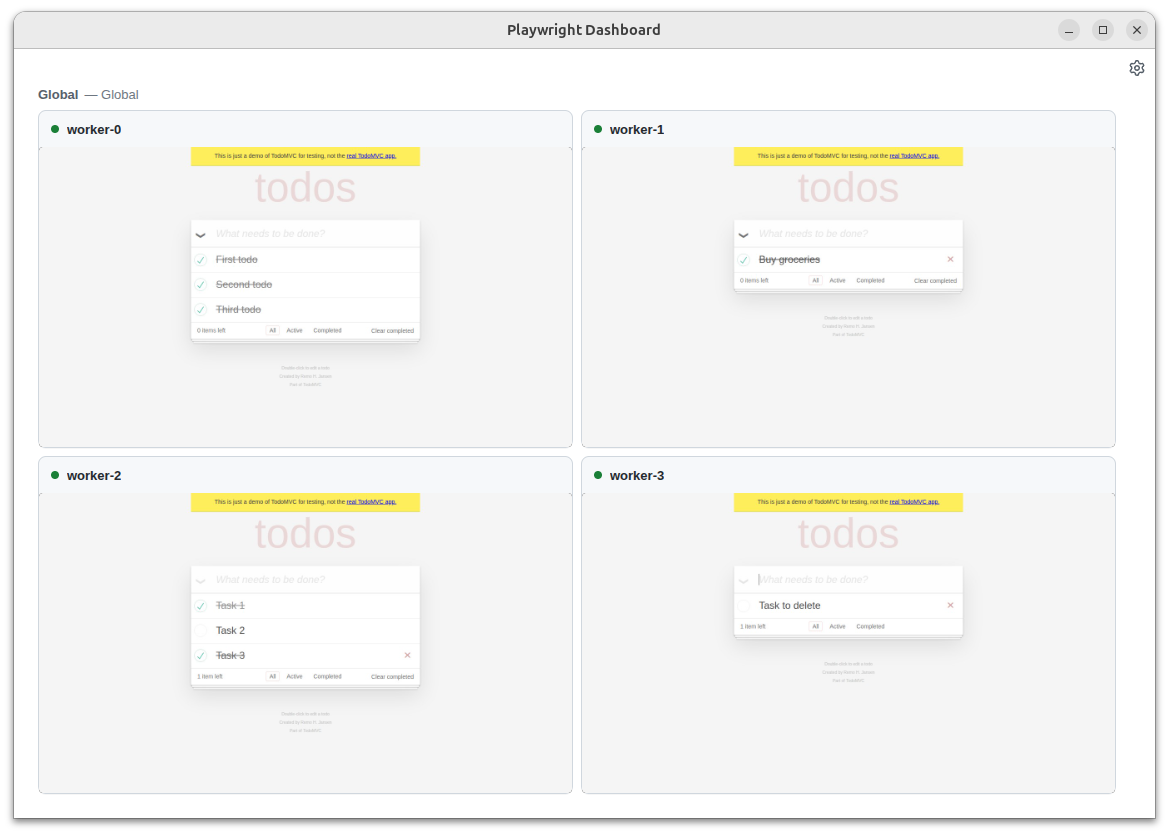
Run npx playwright-cli show to open the Dashboard that lists all the bound browsers, their statuses, and allows interacting with them:
- See what your agent is doing on the background browsers
- Click into the sessions for manual interventions
- Open DevTools to inspect pages from the background browsers.
Breaking Changes ⚠️
- Removed macOS 14 support for WebKit. We recommend upgrading your macOS version, or keeping an older Playwright version.
Browser Versions
- Chromium 147.0.7727.15
- Mozilla Firefox 148.0.2
- WebKit 26.4
This version was also tested against the following stable channels:
- Google Chrome 146
- Microsoft Edge 146