
Note
Coming from 2.15 or earlier? Read the 2.16 notes first: the card layout changed, and the Web Manager has to Organize the card once. Coming from 2.16.x or 2.17 there is nothing to reorganise: 2.18 does not move any file.
What's New
A file manager in the browser
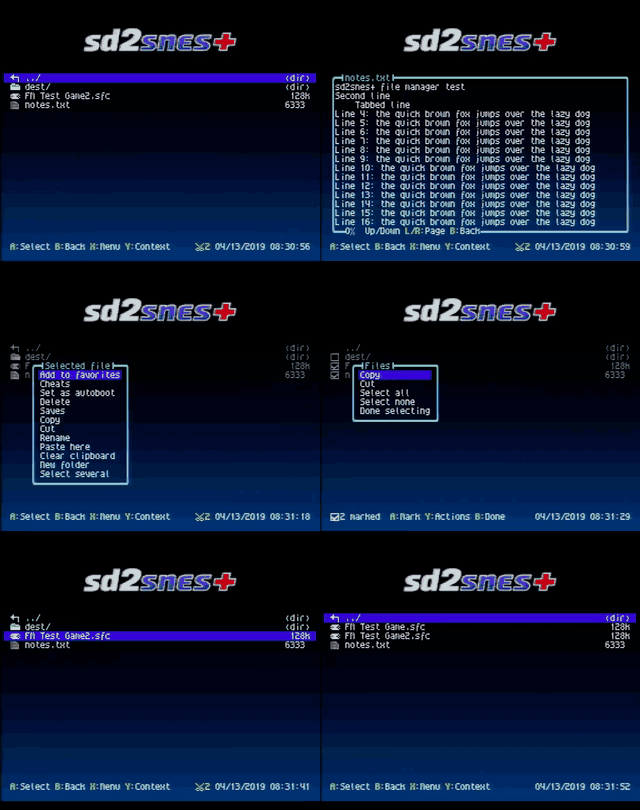
Y on any entry now also offers Copy, Cut, Rename, New folder and Select several, plus Paste here and Clear clipboard once something was copied.
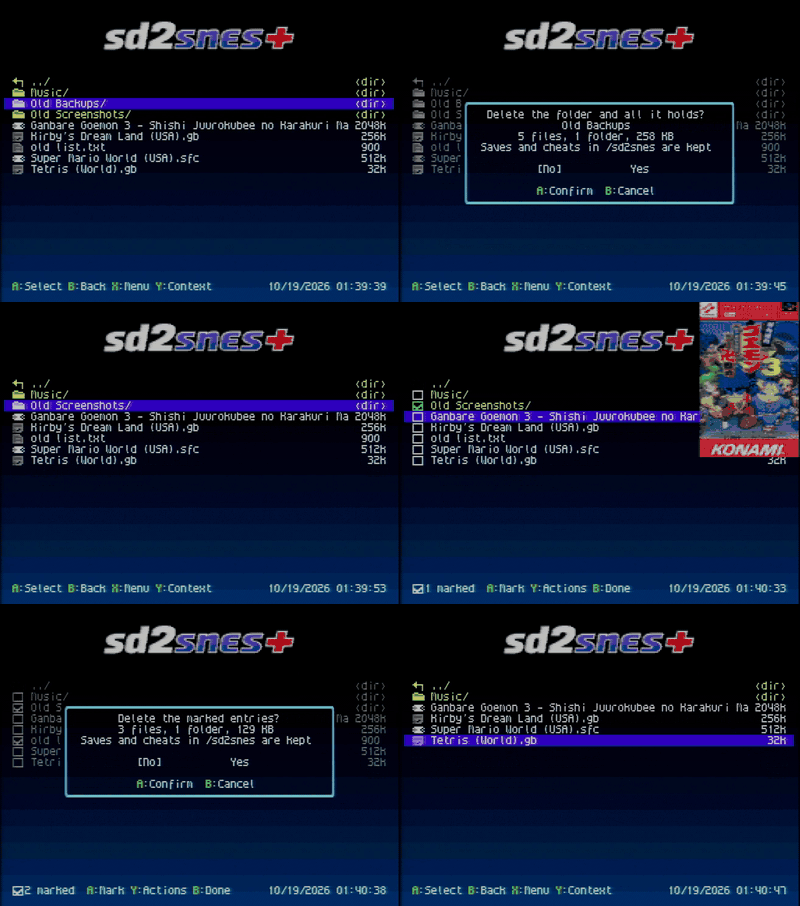
- Select several turns the list into check boxes: A marks an entry (folders too), Y copies, cuts or deletes the marked ones, B leaves.
- Pasting shows a progress bar, checks the free space first, and B stops it (a half-copied file is removed). A name that is taken asks: replace, skip or keep both, each with a "for all" choice.
- Renaming or moving a game takes its saves, savestates, cheats, cover, info card and MSU-1 tracks along, and Recent games and Favorites follow it. Copying a game copies its cover, info card and cheats too.
- A on a text file (
.txt,.md,.nfo,.yml,.cfg,.ini,.log,.json…) opens a viewer that pages through files of any size. - Delete folder: Y on a folder counts what it holds (4 files, 1 folder, 257 KB), asks, and removes the whole tree with a progress bar. In Select several, Delete removes every marked entry after one confirmation. The card root,
/sd2snesand its system folders are refused, and the saves and cheats that/sd2sneskeeps by game stay.
The work runs in the card modules /sd2snes/fileops.bin and /sd2snes/rmdir.bin (included in the package), so it fits the Mk.II's nearly full firmware too.
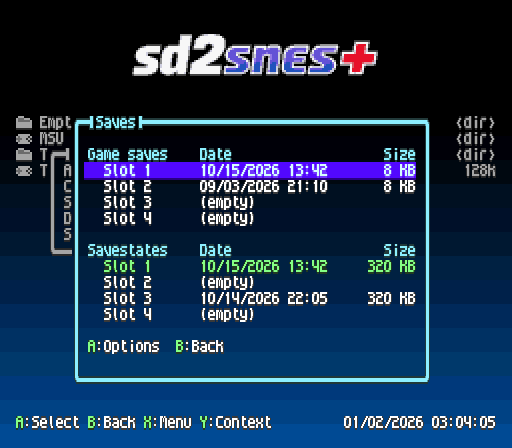
Saves screen: every slot, with its date
Saves in the context menu (Y) of the browser, Recent games and Favorites, or R on the game info card, lists the game's four battery-save slots and four savestate slots with the date each was last written and its size. The slot the game starts with is in green. A on a slot:
- Use when starting: the game boots with that slot from now on (remembered per game). This is the way to switch saves when the in-game hook is off.
- Duplicate to: copies the save onto another slot, asking first when that slot is taken. A quick backup before a risky part.
- Delete: removes just that slot. It replaces the old Delete save, which wiped all four slots at once.
The slot you pick inside a game (the in-game menu's SAVESTATES tab or the slot combo) is remembered for the next time, and the in-game SAVES tab shows each slot's date too (#68).
Game options: settings for one game only
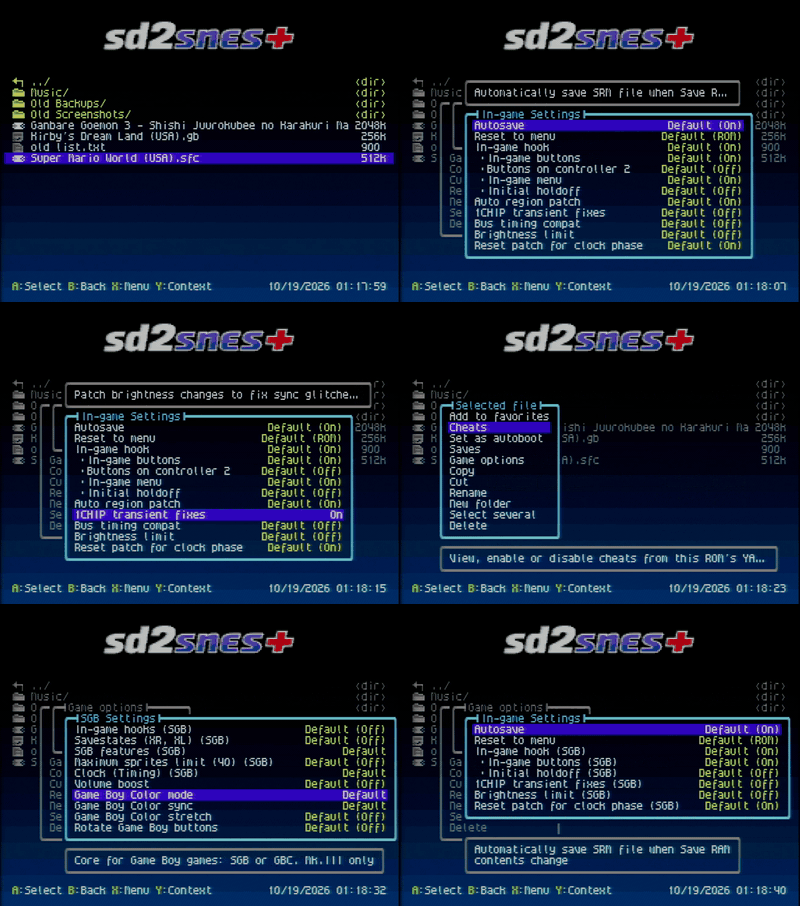
Game options overrides config.yml options for one game: turn the 1CHIP fix on for the one game that needs it, the in-game hook off for the one game that dislikes it, pick another brightness limit, autosave or reset-to-menu mode, and so on. Every value can be Default, which follows the global setting (the screen shows which it is, e.g. Default (Off)).
- The screen is laid out like Configuration and shows only what means something for that game: the CX4 or Super FX speed only with that chip, the MSU-1 options only with a
.msu, the Super Game Boy and Game Boy Color settings on a Game Boy game, and only what the core uses on NES, Master System and Atari 2600 games. - Open it from the Game options row in the context menu (Y), or with L on the game info card.
- In a game, Y on the in-game menu's tab bar opens the same screen. What can change live (1CHIP fix, brightness limit, autosave, reset to menu, MSU-1 volume) changes at once; the rest is dimmed there.
- The choices live in
/sd2snes/saves/<BB>/<rom>.yml, next to the game's saves, with the same keys asconfig.yml. Only what differs from the default is written.
Parental lock
Set a code of 4 to 10 pad buttons in Configuration → Parental lock and the menu asks for it before anything that changes the card or the settings: Configuration, the language, deleting, renaming, cutting and pasting files, the Saves screen, Game options, the cheat editor, the autoboot ROM, the menu music, themes and patches. In a game, the in-game menu asks before Game options, the cheat editor and the trainer's SAVE CHEAT (#71).
Playing, the info card, Recent games, Favorites, copying, savestates and turning cheats on and off stay free. Only stars show while you type, never the buttons, and holding B for 3 seconds cancels. Once the code is entered, the menu stays unlocked until a game starts or the console resets (in the in-game menu, until that menu closes).
Forgot it? Delete the LockCode line from /sd2snes/config.yml on a computer.

Japanese and Simplified Chinese
日本語 and 简体中文 join as the ninth and tenth languages: the menu, the messages, the description of every option, the game info card (including a game's own Japanese or Chinese title and description) and the tour. The ideographs are drawn on the fly, so they need the files in /sd2snes/lang/, included in the package; without them the menu falls back to English. The in-game menu stays in English for these two.
Important
Native speakers wanted. The Japanese and Chinese translations were made without a native speaker, so some wording may read stiff or plain wrong. If you read Japanese or Chinese, please help review them: open an issue with what reads wrong, send a pull request (the menu texts are in snes/utils/lang_ja.py and lang_zh.py, the tour in onb_lang_ja.json and onb_lang_zh.json), or say hello in the beta testers group.
The Russian translation was also reviewed by a native speaker.
SNES Mouse and the NTT Data Keypad
Plug a SNES Mouse into either port and the menu takes it: a pointer over the file list, left click = A, right click = B, right held = Y (the context menu). On the info card the arrows at the sides step between games, and the keys in the footer are clickable. While a mouse is connected, the key hints show mouse-button symbols instead of A/B/X/Y. This is a first version.
The NTT Data Keypad now works as a standard pad in the menu, the in-game menu and the in-game shortcuts (#69).
Xeno Crisis
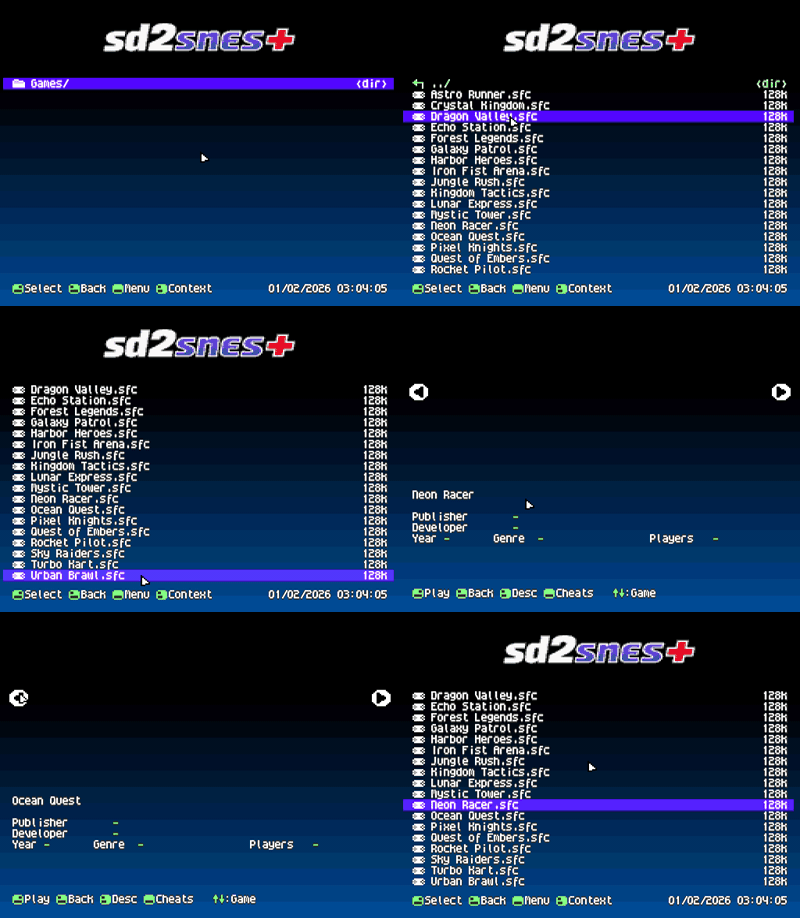
Xeno Crisis (Bitmap Bureau, 2019) is a cartridge with an RP2040 microcontroller that runs the game. A soft Cortex-M0 inside the FPGA now runs the cartridge's own RP2040 firmware.
- Load the
XENOCRISISROM like any game, and put your own dump of the cartridge's RP2040 flash on the card as/sd2snes/xenocrisis_rp2040.bin(16 MB, game version v1.00). The menu names the file if it is missing. - Copied the dump somewhere else on the card? Organize card in the Web Manager finds it and moves it to
/sd2snesfor you. - The cartridge keeps its music inside the RP2040 in a form the console cannot play, so the music comes from an MSU-1 pack next to the ROM (
<rom>.msuand<rom>-1..26.pcm). The Web Manager builds a basic pack from the tracks stored in your dump (Tools → Xeno Crisis music…), right in the browser, and writes it next to the ROM or gives you a ZIP. It can also install a pack you already have as a ZIP. Without a pack the game runs with sound effects only. - Saves work like any game (
.srm). Savestates, cheats and the in-game menu are not available on this core.
Core and soft CPU by M2M (@sttng).
Super FX 3: DOOM at full speed
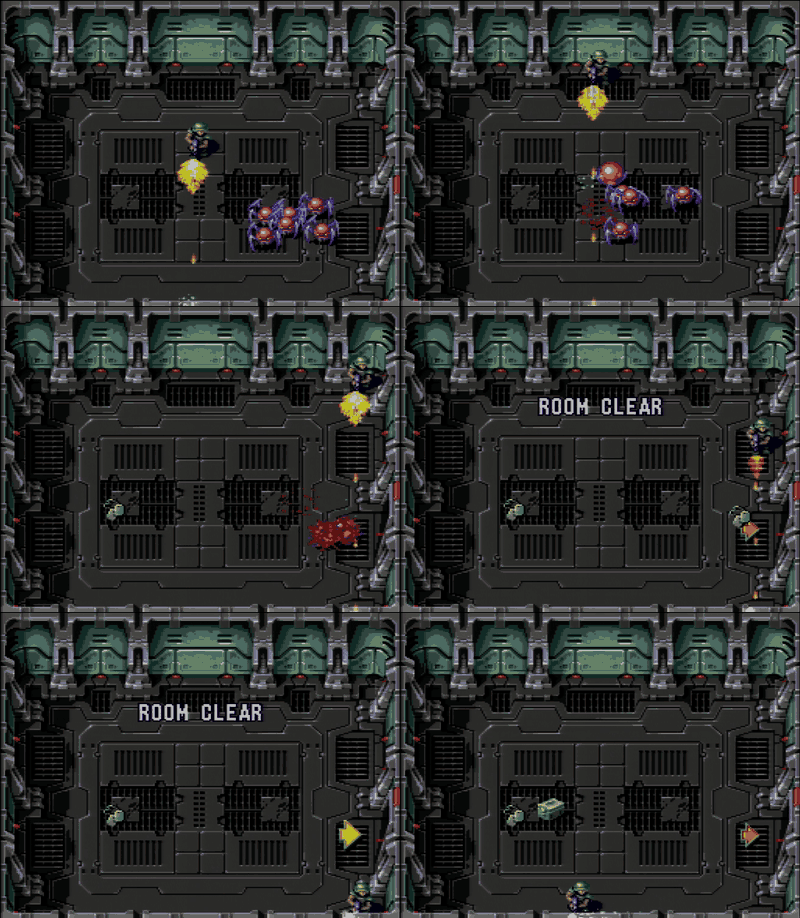
With M2M's pipelined Super FX CPU, DOOM (2025) and the Star Fox FX3 patch run at 20 fps, and Star Fox 2 FX3 runs at the game's full speed on the Mk.III. FX3 carts run on a core of their own, fpga_gsu3; classic Super FX games keep the regular core. A freeze at the end of a DOOM level seen on some Mk.III consoles is fixed. Core by M2M (@sttng).
Music players
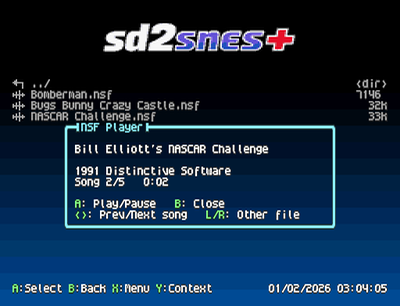
- NES music (
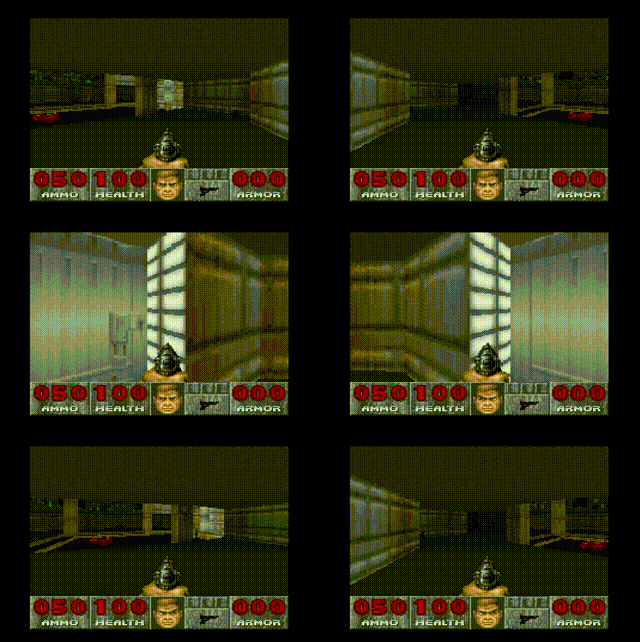
.nsf): press A on an.nsfand it plays right on the console, with the title, composer and song number. Left/Right change the song, L/R move to the folder's previous or next file. The full NES sound chip is emulated; extra cartridge sound chips (VRC6, Namco 163…) play without their channels. - The folder is the playlist: in the
.pcmand.spcplayers, when a track ends the next one starts, and L/R skip. In the.pcmplayer Left/Right jump 5 seconds. - The
.spcplayer shows the title, game and artist from the file's tag, a clock and, when the tag has a length, a progress bar. - Repeat: X in any of the three players repeats the current track (a
.pcmloops at its MSU-1 loop point). Remembered.
Game info card
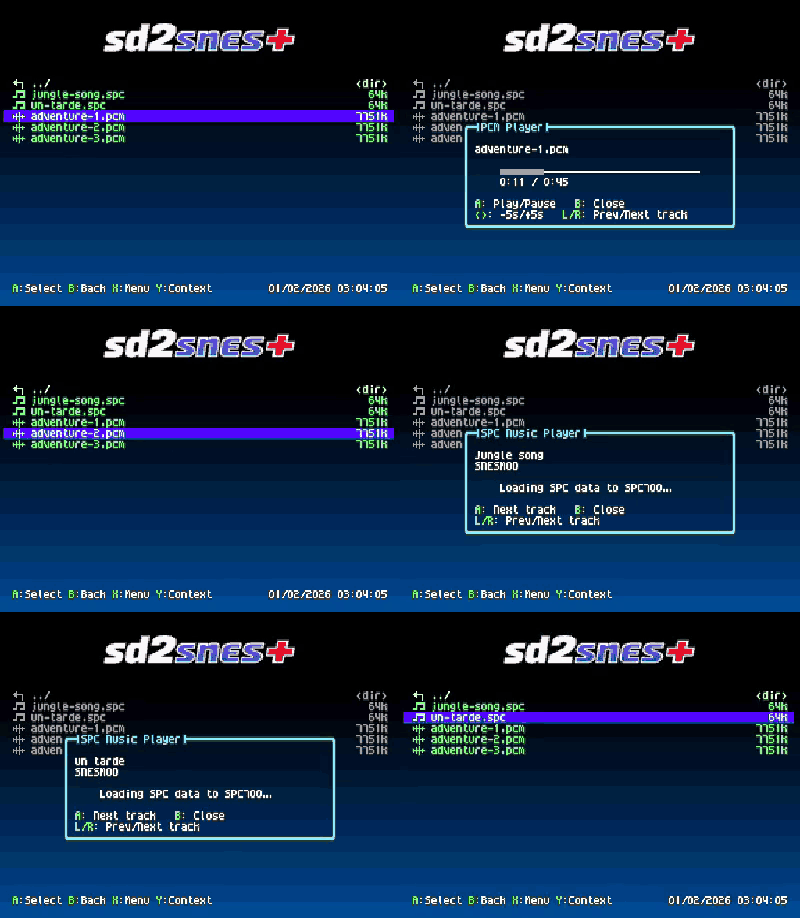
- ROM CRC32: the title row ends with the ROM's CRC32 in green, computed in the background. It matches No-Intro and the GameDB (copier and iNES headers left out). Long titles scroll instead of being cut.
- Stop music on game info (Browser Settings, off by default): silences the menu music while the info card is open and starts the same track over when you leave.
- The card opens faster in big folders (a folder of Super… games has thousands of info files): text 1.2–1.5 s → 0.2 s, clip 1.6–1.9 s → 0.6 s on the Mk.III.
Game info clips: soundtracks in QOA, up to 80% smaller
The soundtrack of a game info clip can now be a .qoa file (QOA) instead of the MSU-1 .pcm: practically the same sound in up to 80% less space (about 1 MB instead of 5 MB for a 30-second clip). The card plays the .qoa when both are there.
- From now on the Web Manager downloads
.qoato cards running 2.18. - For the soundtracks already on your card, Autofill offers to convert them to QOA and shows how much space it frees. Each
.pcmis deleted only after its.qoais written and checked.
Tip
Converting runs in the browser and takes a while on a big card. It is faster to delete the old info files (/sd2snes/info) and let Autofill download them again: they come straight down as .qoa.
Rotate Game Boy buttons
Configuration → SGB Settings → Rotate Game Boy buttons (off by default): SNES B plays the Game Boy's A and Y its B, the two buttons under your thumb, as in SNES games. Works on the Super Game Boy and the Game Boy Color core, and can also be set per game in Game options.

More games and consoles
- Hind Strike (Bubblezap, 2015) boots: its DSP-1 sits on an unusual map. Needs
dsp1b.bin, like any DSP-1 game. By M2M and @terminator2k2. - CX4 accuracy improvements, by Akiteru.
- Master System (experimental, Mk.III): a big speed and compatibility overhaul. Most well-known games now boot and play at close to full speed, the Codemasters mapper works, Start pauses, and games with cartridge RAM run (that RAM is not saved to the card yet).
- NES (experimental, Mk.III): battery saves (
/sd2snes/saves/nes/…), mappers 5 (MMC5, for now only Castlevania III), 16, 118 and 159, and faster cores. The NES core now comes in four files, one per mapper family, all in the package.
Tour
After updating, the tour comes back once with only the 2.18 cards, without asking first. Configuration → Tour of the new features now asks where to start: from the beginning, from 2.17 or from 2.18.
And more
- The menu clears the video memory before every game starts, so romhacks that count on a blank screen (such as the Portuguese translation of Super Metroid) no longer show leftovers of the menu. The Patch options submenu is gone with it.
- Folders full of MSU-1 games open much faster (a folder with ~300 of them went from 20 s to under a second), and holding Down scrolls at full speed again (#65).
- File-type icons in the browser can be turned off: Browser Settings → File type icons.
- The memory test and the
.pcmplayer are now card modules (memtest.bin,pcmplay.bin), which freed room in the Mk.II firmware for this release's features.
Fixes
- Super Mario Kart froze at the start of a race on some Mk.II (#64): the Mk.II DSP core now meets timing.
- Controller 2 shortcuts (2.17's Buttons on controller 2) did not always respond, in some games (such as Super Mario World) not at all, and savestates from controller 2 were rejected. Fixed.
- Mouse in port 1: closing the in-game menu no longer stalls for 3 seconds (Mario Paint).
- MSU-1 audio: tracks split into many fragments on the card played wrong or as a buzz after a while. They now stream correctly.
- ROMs whose header claims a bigger size than the file (some hacks and translations) booted into empty memory. They now boot.
- Super Game Boy: the v1.0 BIOS (JU) is recognised. The region patch no longer touches Game Boy games, and on the Game Boy Color core it no longer switches a PAL console's timing to NTSC.
- Browser: in a folder with many files the list could show the previous folder's entries while a folder cover was still loading.
- USB: reading a missing or empty file no longer hangs the cartridge's USB.
- Leaving the info card no longer shows the list being redrawn, and the cheat editor's button hints are translated.
Updating
- Download
sd2snes_firmware_v1.11.2-br-2.18.zipbelow. The same package serves every board: the SD2SNES (Mk.II) readsfirmware.img,menu.binand the.bitcores, the FXPak Pro (Mk.III) readsfirmware.im3,m3nu.binand the.bi3cores, and the FXPAK PRO STM32 readsfirmware.stmwith the samem3nu.binand.bi3cores. - Extract it and copy the
sd2snesfolder to the root of your SD card, replacing the files when asked. Yourconfig.yml, saves, savestates, cheats, covers and info cards are not in the package and stay as they are. - Put the card back and switch the console off and on. The new firmware is installed by the cartridge at power-on; the RESET button or a reload of the menu is not enough.
Important
Copy the whole sd2snes folder, not just the firmware and the menu. Several features now live in files next to them (fileops.bin, rmdir.bin, nsfplay.bin, pcmplay.bin, memtest.bin, rtc7110.bin, the lang/ folder, the new cores). Without them the feature says the file is missing.
Note
The package replaces /sd2snes/menu.spc, the four sfx_*.pcm sound effects and the two savestate_*.yml files. If you swapped in your own, back them up before copying and put them back afterwards (or keep your tracks in /sd2snes/music/, which the package only adds to).
Thanks
Thanks to M2M (@sttng) for the Xeno Crisis and Super FX 3 cores, to @terminator2k2 for Hind Strike, to @AkiteruSDA for the CX4 improvements, to BASIX the native speaker who reviewed the Russian translation, and to everyone who reported and the beta testers.
Want to try the next features before they ship? Join the beta testers group on Telegram.