
ElixirOffice 0.8.0 — desktop build 75
Release cut: 2026-11-13. Update metadata is signed and was publicly verified before publication.
What's new
Interface
- Every ribbon tab of Word, Calc and Slides was checked by an automatic audit in
English, French, German and Russian at three window widths (overlaps,
controls outside their group, clipped text, alerts at open), and the defects
found were fixed. - Large ribbon buttons split their caption into two balanced lines.
- Calc Home: when space runs short, the AutoSum, Fill and Clear buttons first
show as icons, as in Excel, before the Editing group collapses; the cell
styles gallery collapses first. The Cut, Copy, Format painter and AutoSum,
Fill, Clear buttons no longer overlap. - Word Review: the groups follow Word's order and no empty group is shown. The
comment margin is translated. - Calc in Dutch: about 1,660 interface texts that were shown in English are
Dutch again.
Charts
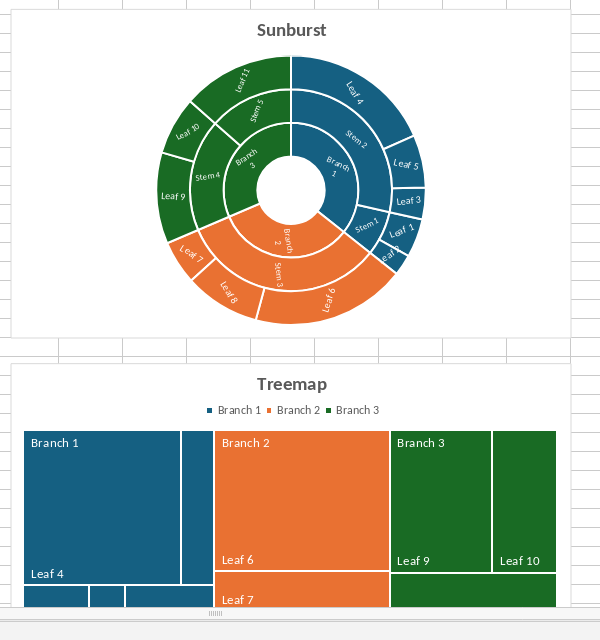
- Sunburst charts: the rings are in the right order (top level in the centre),
each top-level branch has its own colour, labels are placed inside the
segments along the radius, a label that is too wide becomes smaller instead of
splitting a word, and dragging a label no longer stops the editor (#78, #79). - Treemap charts: one colour per top-level branch, the branch name as a header,
the name of each leaf and a legend. - Waterfall and funnel charts show the names of the leaves on their category
axis, as Office does. - Office 2016 extended charts (sunburst, waterfall, box and whisker) linked as
classic charts are now also kept in Excel and PowerPoint files (Word files:
0.7.3, #76).
- The quick access toolbar of the PDF editor has a Print button, as in the other
editors. It prints the PDF with the system print dialog, like File > Print.
Files and fixes
- Calc, Word and Slides: a hyperlink can point to a file of the computer (a
file:// address, or an absolute or relative path, as Excel stores it). A
click in the desktop app asks first, in the language of the interface, and
opens the file with the system, unless it does not exist or is a program,
script or installer (#77). - Word: saving a DOCX keeps the style ids of the file ("Titre1", "Titre1Car" and
so on) and every reference to them. Generated numbers were written before,
which broke macros, templates and round-trip comparisons. New styles get an
id made of their name. - Word: a text watermark (VML WordArt, for example a title turned by 45
degrees) is drawn with the length, height and position Word gives it, for
Calibri, Arial, Arial Black and Times New Roman. - Pictures: lines of SVG pictures (including WMF and EMF drawings saved by Word
as SVG) that end up thinner than one pixel are drawn one pixel wide, as
Microsoft Word does. They looked missing before (#61).
Screenshots



Security
- Electron 44.11.3, which carries fixes backported from Chromium, V8, Skia,
ANGLE, Dawn and ICU. - Local file links (#77): the editor page cannot open a file itself. It asks the
desktop application through a dedicated bridge that accepts local links only,
refuses programs, scripts, installers and disk images (also behind a symbolic
link) and asks a native question, with Cancel as the default, before the system
opens the file. - New code that reads document data (style ids, WordArt text paths, extended
chart data and labels) runs in the sandboxed converter and editor. No new
finding affecting the shipped product in the 2026-11-13 check. Details are in
SECURITY.md.
AI stays optional and off by default. Sending document context requires your
configured service, consent and explicit request. Documents are not sent to the
publisher.
Qualification
The portable test suite and the Windows packaging test suite each ran 1,450
tests with 1,450 passed and none failed or skipped. The packaged resource
audits of the Linux, Windows and Mac packages passed.
On Apple Silicon macOS, the Darwin unit tests reported 1,450 tests: 1,381 passed,
none failed and 69 were skipped. The DMG audit passed. The packaged Mac app passed the six-format smoke test: for each of docx, xlsx, pptx, odt, ods and odp it opened a file, edited and saved it, reopened it and exported a PDF with the bundled Wasm PDF engine; the native Mac PDF sheet was not verified.
The ribbon audit of the interface conformity work covers Word, Calc and Slides
in four languages at three widths; it is an automatic check, not a native
platform acceptance.
The 74-document layout measurement against Word was not re-run for this build,
so no layout score is stated for 0.8.0.
Not run for this build: the unattended Mac check and the native Mac
Mailings and Avenir Next interface checks. Physical printing, Gatekeeper, Intel
Macs and this build on a physical Windows PC were not verified.
No all-green suite, native platform acceptance, speed improvement or
Office-layout equivalence is claimed.
Installation and updates
Use the package for your operating system and follow the
desktop installation instructions.
Exact download links and checksums accompany the qualified release.
Installers remain publisher-unsigned. macOS packages are arm64-only, ad-hoc
signed and not notarized; Gatekeeper may require the documented manual
approval. Update signatures authenticate update metadata and bytes; they do
not provide an OS publisher certificate. Silent updates are not available.
Known limitations
- Markdown round trips are not lossless: the text may be written back with a
different list or line-break style, and formatting Markdown cannot express is
dropped after the warning. - Chinese, Japanese and Korean text in PDF export uses the native path only
for the safe case; rare characters such as CJK Extension B can still be
missing from the PDF. - Physical printing, downloaded-installer handling, Gatekeeper and all-users
installation require separate native checks. - On Linux hosts that restrict unprivileged user namespaces, the AppImage can
run without the Chromium sandbox. Prefer the DEB on affected systems. - Long-session memory growth and Windows CPU spikes on lower-end computers
remain unresolved. - Font substitution cannot reproduce every missing typeface or glyph.
- Existing conversion, PDF, ODF, embedded-object and AI tool limits remain.
AI can make mistakes.
Reporting problems
Open an issue with the app
version, operating system, steps and expected/actual behavior. For security
problems use private reporting as described in SECURITY.md, not a public issue.
Remove personal information, private content and API keys before sharing
attachments.
Corresponding source contains public snapshots of every repository used by the build: the product, DocumentServer, core, sdkjs, web-apps and the other DocumentServer components.
Public product revision: 343be3a.
Source archive: elixiroffice-desktop-source.tar.gz.
Source archive SHA-256: 23043c1a874906e8b8fa078fbc17a2f26b07da22ce17a55f14763e2898d00df7.