
PS5 UltraPack 2.5.0
zstd packs make any game smaller and keep it a plain folder or .exfat.
zstd packs
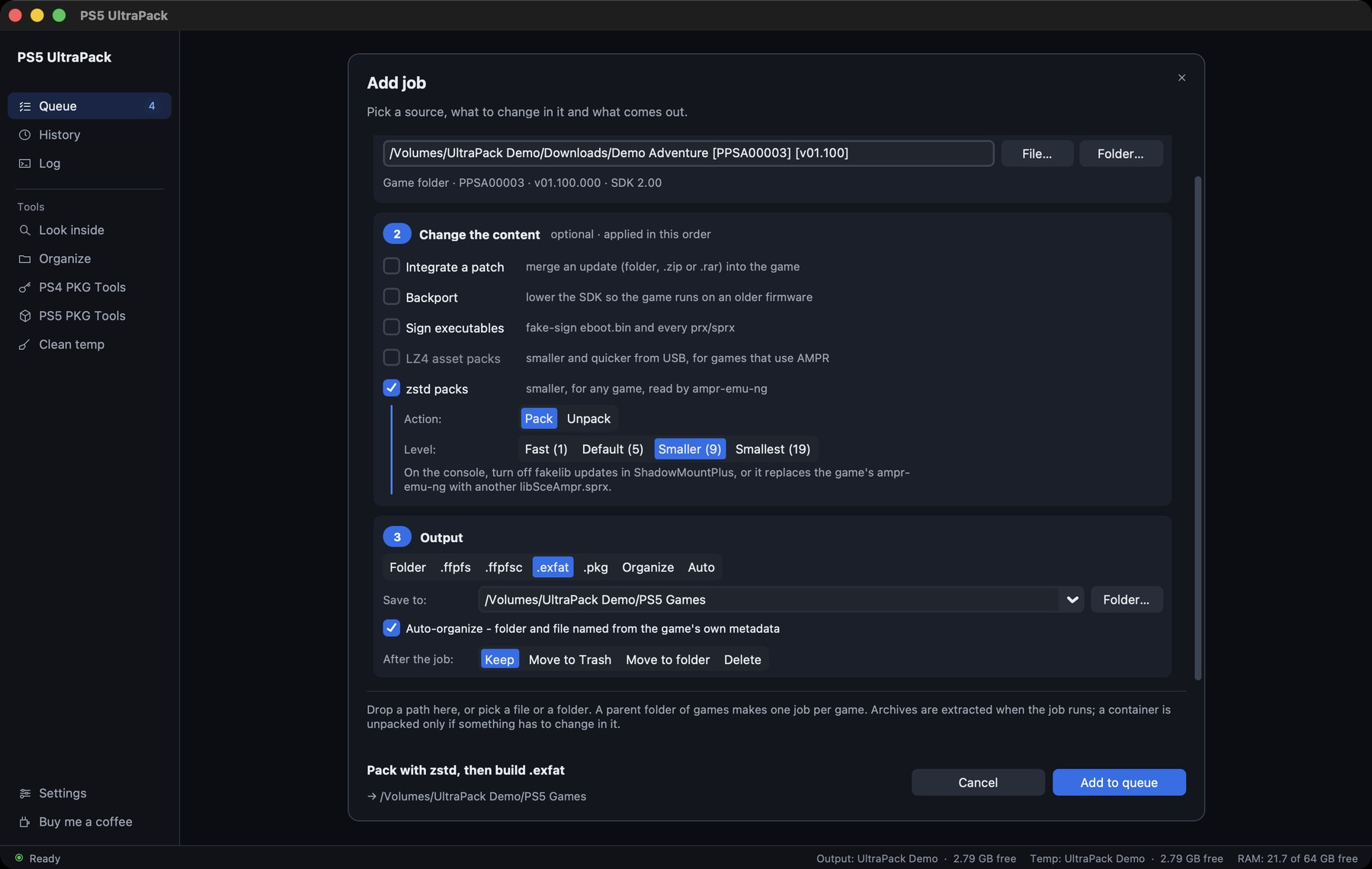
Tick zstd packs in Add job, next to LZ4 asset packs. LZ4 only works for games that load through AMPR. zstd works for any game.
Everything except eboot.bin, the modules, sce_sys, fakelib and .ini files goes into ampr_zstd-NNN.pak volumes. On the console, quer3q's ampr-emu-ng reads them while the game runs. The app puts it into the game's fakelib/ and writes a fresh ampr_emu.index that lists every file. You pick the level: 1 is the fastest, 19 the smallest, 5 the default. The output is an .exfat or a folder.
Every packed file is compared with the original before the originals go. A game that would shrink by less than 5 % stays as it is. Unpack turns a packed game back into plain files, and Add job picks it by itself when the source already holds packs.
On the console, turn off fakelib updates in ShadowMountPlus. Otherwise it replaces the game's runtime with its own libSceAmpr.sprx.
The packs follow the format that ampr-emu-ng and ps5-dump-forge use. I wrote my packer from their documentation and checked it against four other implementations. ps5-dump-forge's writer makes byte-identical volumes from the same files. ampr-emu-ng's own index and mount code accepts them. Alembic's format checker and strongt1me's packer agree as well. I haven't run a zstd-packed game on my own console yet, so feedback from the console is welcome.
Thanks to quer3q for ampr-emu-ng and ps5-dump-forge and for documenting the format so well.
Also new
- A
.pkgbuilt from a zstd-packed game keeps itsampr_emu.index, and the PS5 PKG Tools count packed files as present. - New screenshots and an asset packs section in the README.
Install
macOS: download PS5-UltraPack-2.5.0-macos-arm64.zip below, unzip it and start the app. If macOS won't open it, run this once in Terminal:
xattr -dr com.apple.quarantine "PS5 UltraPack.app"
macOS 26 or newer on Apple Silicon. SHA-256: 5b56c8c914f55e876dd13059ced7fd92b166f248ee4a16bd395a92613429cd68
Windows: download PS5-UltraPack-2.5.0-windows-x64.zip below, unzip it anywhere and start PS5 UltraPack\PS5 UltraPack.exe. The exe isn't signed, so SmartScreen warns on the first start: click More info, then Run anyway.
Windows x64. SHA-256: 1897bb00c4e381e009b46e9f795350c447cc785aaf20e95140a553c375842c4e
Linux: download PS5-UltraPack-2.5.0-linux-x64.tar.gz below, unpack it and run ./PS5 UltraPack in the folder. ./install.sh adds it to the app menu.
Linux x64, built and tested on Ubuntu 24.04. SHA-256: 6bf1ea04b76d7400f0a43a89c0a36bae4242a60787303ecab0736b3bae2aab1b
The sources of the two runtimes the app ships are attached as ampr_emu-0.4.2.1-source.tar.gz (GPL-3) and ampr-emu-ng-0.4.0-source.tar.gz (GPL-3.0-or-later).
PS5 UltraPack works with files you provide. It does not decrypt or distribute any Sony content, firmware or keys. Not affiliated with Sony Interactive Entertainment.
Full Changelog: v2.4.2...v2.5.0