
Careful of fake copies. The only download for this project is this releases page. Fake websites and lookalike GitHub repositories exist (#88, #115); this project has no executable installer. The standalone
CAREFUL_FAKE_MALICIOUS_FEEDER.txtasset explains how to check what you downloaded. SHA-256 ofDLSS5-Feeder-2.0.0.zip:fa41fe2c5d3da803688775b802dc373a922daab0e721c8154a17066fcdd62584. The genuine zips are scanned on VirusTotal, for instance the 1.16.0-beta.2 zip; look this release's hash up there yourself.
There is a one-command installer. Download
Install-DLSS5Feeder.ps1from the assets below (it is a plain PowerShell script: read it here first if you like), put it beside the game's executable, and runpowershell.exe -ExecutionPolicy Bypass -File .\Install-DLSS5Feeder.ps1. The standaloneAUTOMATIC_INSTALLATION_AVAILABLE.txtasset explains every option.
Does not work with your game? I can't test every game reported in the issues: I don't own most of them, and I don't have the time to try them all. Read this README section. It gives a prompt for an AI coding agent that reads your logs against the source and opens a pull request if it finds a legitimate fix.
2.0.0 is a stable release, and the biggest one since the project started: it has its own in-game menu, and it no longer needs anybody else's motion-vector shader. Every binary embeds commit 9bd0af3; line 1 of dlss5-feed.log must say 2.0.0 commit 9bd0af3.
32-bit games and the 64-bit helper mode: install the add-on (
dlss5-feed.addon32, ordlss5-feed-helper.addon64) andhost64\dlss5-feed-host64.exefrom this zip. The IPC protocol is v12 (v11 in 1.19.0 and 1.19.1-beta.1); an add-on and a host from different releases refuse each other.
Updating from 1.19? Two defaults changed.
preset=0indlss5-feed.cfgnow means DLSS preset L (it meant "whatever the DLL picks", K). And a new install uses the built-in motion vectors; an existing install keeps the provider it has, and the menu offers the switch.
The DLSS 5 Feeder menu (Alt+C)
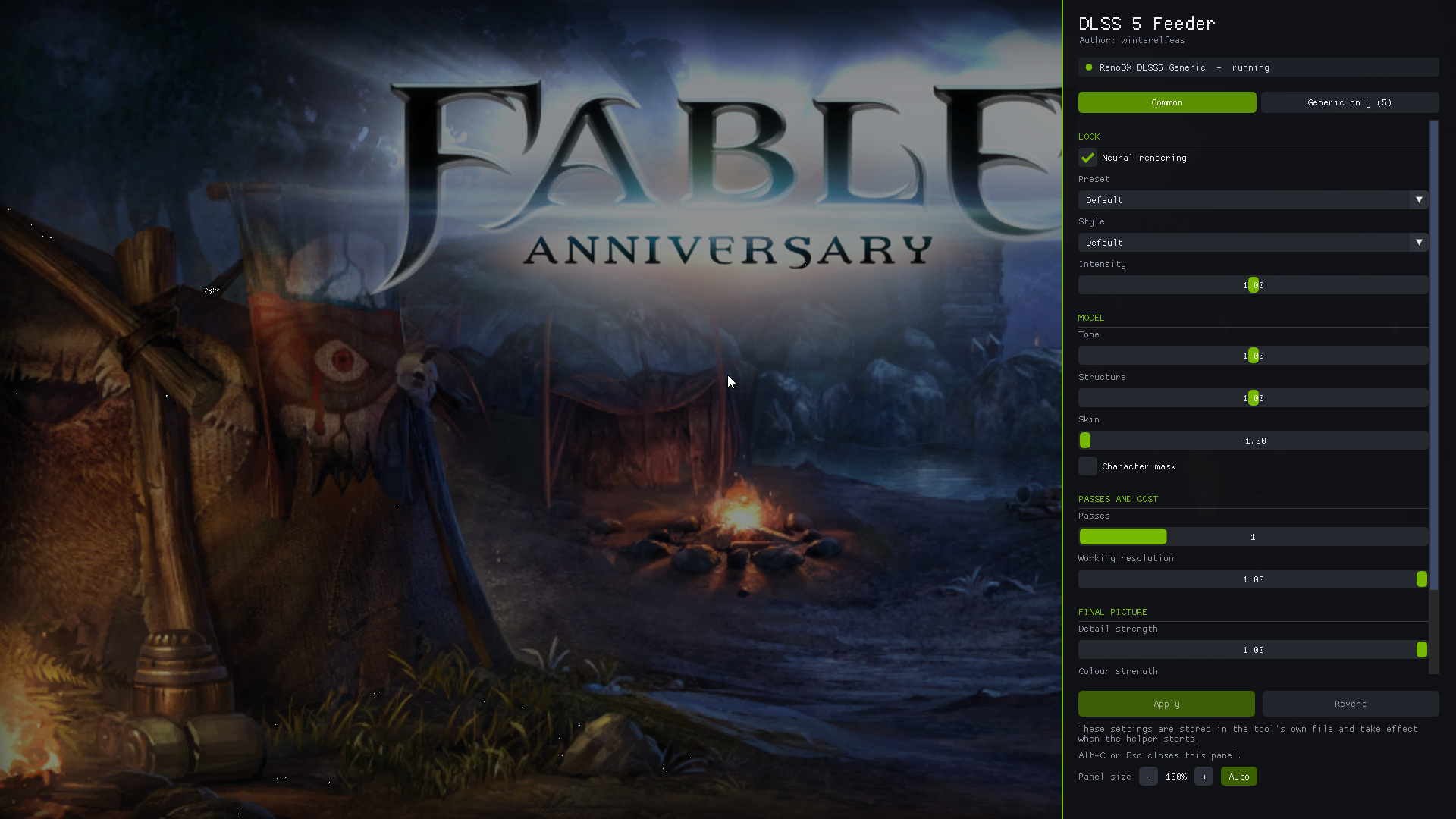
(The picture is from an early build: today's menu no longer dims the game beside it and has a few more lines.)
Press Alt+C in the game. A panel slides in from the right with the settings of the neural tool that is doing the work; Alt+C or Esc closes it. It is the same panel in an ordinary 64-bit game, in a 32-bit game and in the 64-bit helper mode, and it is drawn by the game's own ReShade, so there is no second window to find.
- What it drives: this project's OptiScaler DLSS-NR fork or the RenoDX DLSS 5 add-on, whichever is installed. The line under the title names it and says whether it is running.
- Two tabs. Common holds what both tools have under one name: neural rendering on/off, preset, style and intensity; tone, structure, skin and the character mask; number of passes and working resolution; detail and colour strength; paper white. The second tab is named after the tool and holds what only it has (OptiScaler: highlight guard, white point source, exposure trims, up to 10 passes, separate skin / environment controls. RenoDX: HUD correction, diffuse white, and from v8 on its look controls, Detail stability and guards).
- Changes while the game runs. With the fork from v0.8.93 every row applies at once and the menu shows LIVE. With the RenoDX add-on v10 or newer the settings its control interface offers apply at once (intensity, preset, style, tone, structure, skin, mask, HUD, the look group); the rest are marked with a star and wait for Apply. Older builds of either tool take changes on Apply (the helper restarts in a few seconds), or from the next start of the game when they run in the game's own process.
- GPU cost and frame rate. Under the tool's name: what the feed costs on the GPU per frame, DLSS and the neural pass together, and the game's frame rate.
- Motion vectors. If
DLSS5_Feed.fxis not on its built-in vectors, the menu says so at the top, names the provider in use, and Use the built-in vectors switches it for you. It then lists any motion-vector shader still switched on, with Switch it off. - Size. Auto follows the height of the picture and the Windows display scaling (a 4K picture gets 200%); the Panel size row changes it in steps of 10%.
- New keys in
dlss5-feed.cfg:panel_key,panel_mods,panel_side,panel_scale,panel_mv_notice.
Either tool keeps reading its settings from its own file, and that is where the menu writes them, so the tool's own page and the menu always agree. The installer fetches builds of both that take live changes.
Motion vectors: built in, and the default
DLSS5_Feed.fx has its own motion estimator (DLSS5_MV_PROVIDER=5). Nothing else to install, no second technique to enable. It was rebuilt for this release:
-
Hierarchical matching on a luma pyramid, down to 2 px cells, with a vote between neighbouring cells at every level. A lone line no longer drags the surface beside it along itself.
-
It uses the depth buffer when there is a stable one, and needs none. Depth is checked every frame before it is believed; a capture, or a game ReShade finds no depth for, simply runs from the picture.
-
On our test scene (4K, no depth buffer, error in pixels on textured / plain surfaces) against LumeniteFX Kernel, the previous recommendation:
objects pan slow pan dolly strafe built in 0.48 / 0.57 0.92 / 1.54 0.35 / 0.40 1.79 / 1.67 1.32 / 1.17 LumeniteFX Kernel 0.84 / 0.96 2.52 / 2.05 0.39 / 0.32 2.98 / 2.36 1.88 / 1.63 -
The installer sets it on a new install. An install that already has a provider keeps it (
-MvProvider 5switches). LumeniteFX, Launchpad, VORT andtexMotionVectorsproviders all still work.
A sharper, steadier picture
- Per-pixel vector refinement, on by default, for every provider. A still caption or a HUD over a moving picture gets a clean zero vector right up to the edge of each glyph, instead of a fraction of the motion behind it. Under 3D camera motion it now stays out of the way of good vectors.
- New optional technique
DLSS5_Feed_Restore(enable it belowDLSS5_Feed). It puts captions, HUD text and fine texture back the way they came in after DLSS and the neural pass, keeps what came in black black, and lets fire, smoke and heat haze through untouched instead of smeared. - Repeated frames (a 30 fps game shown at 60) are recognised, and no longer read as a picture that stands still every other frame.
- DLSS render preset L is the default and is always sent. On a real 4K HDR capture with the neural pass behind DLSS, every preset but L and M left white text and plain bright areas speckled; L and M are clean. Presets L and M are new in the overlay's list; K is
preset=11, E ispreset=5(still the closest to the input for text where no neural pass follows). - HDR10: changing
hdr_bridge, or the swapchain changing colour space, now rebuilds the textures; restored HDR text no longer gets full-brightness specks.
Installer
- The neural tool is this project's OptiScaler DLSS-NR fork (recommended, and the default) or the RenoDX add-on; the installer says which kind of build it installed and whether it takes live changes from the menu.
- Built-in motion vectors on new installs; LumeniteFX is only downloaded with
-MvProvider 3or4, or for an install that already uses it. - The verifier knows provider 5.
Also in this release
- 32-bit games and the helper mode: the DLSS preset now reaches the host (IPC v12), and closing the game no longer waits on a host that is waiting on the game.
- Everything from 1.19.1-beta.1: GITC Uplift no longer stops the feed in D3D11 games (#153); the Direct3D 10 pipelined handoff (#146, Far Cry 2: 52 to 87 fps on a synthetic load);
dpi_aware=1for DPI-unaware 32-bit games. tools/fx-testbed, the test rig all the numbers above come from, is in the repository: a 2D and a 3D scene with exact motion vectors, run through the real ReShade, add-on and DLSS.
Verified, and not
All six binaries build from 9bd0af3. The installer was run end to end with this zip (0 warnings, 0 failures). The motion-vector and picture numbers come from the test rig (Direct3D 11, 4K, plain DLAA).
Run in real programs before publishing:
- Worms Ultimate Mayhem (32-bit, OpenGL, 4K, set to exclusive fullscreen), installed with the installer from this zip: the shader compiles with the built-in motion vectors, frames are delivered through the helper, and the menu opens on Alt+C.
- Fable Anniversary (32-bit) and Elgato Studio (4K HDR10 capture): the menu, and in Elgato the built-in vectors and preset L.
Not verified:
- The built-in motion estimator on Direct3D 10 and Vulkan. If
DLSS5_Feed.fxshows a compile error in the ReShade overlay there, setDLSS5_MV_PROVIDER=3with LumeniteFX (or run the installer with-MvProvider 3) and open an issue withReShade.log. - The menu, and the mouse on it, beyond the three programs above.
- Preset L as a default was chosen by eye on an HDR capture with the neural pass. The rig, which has no neural pass, says plain DLAA on L is further from the input on HUD text than K or E; if text looks soft without a neural pass, try
preset=5. - The Uplift fix and the Direct3D 10 pipeline were not run in a game by us (carried over from 1.19.1-beta.1).
If this release breaks something for you, 1.19.0 is the fallback.