
Version 4.2 - Start screen, updates from inside the game, no more texture stutter
⚠️ Alpha - expect bugs. If something goes wrong, send burstlimit.log (next to burstlimit.exe) in an
issue. No game data is included: you need your own copy of the game.
What's new
-
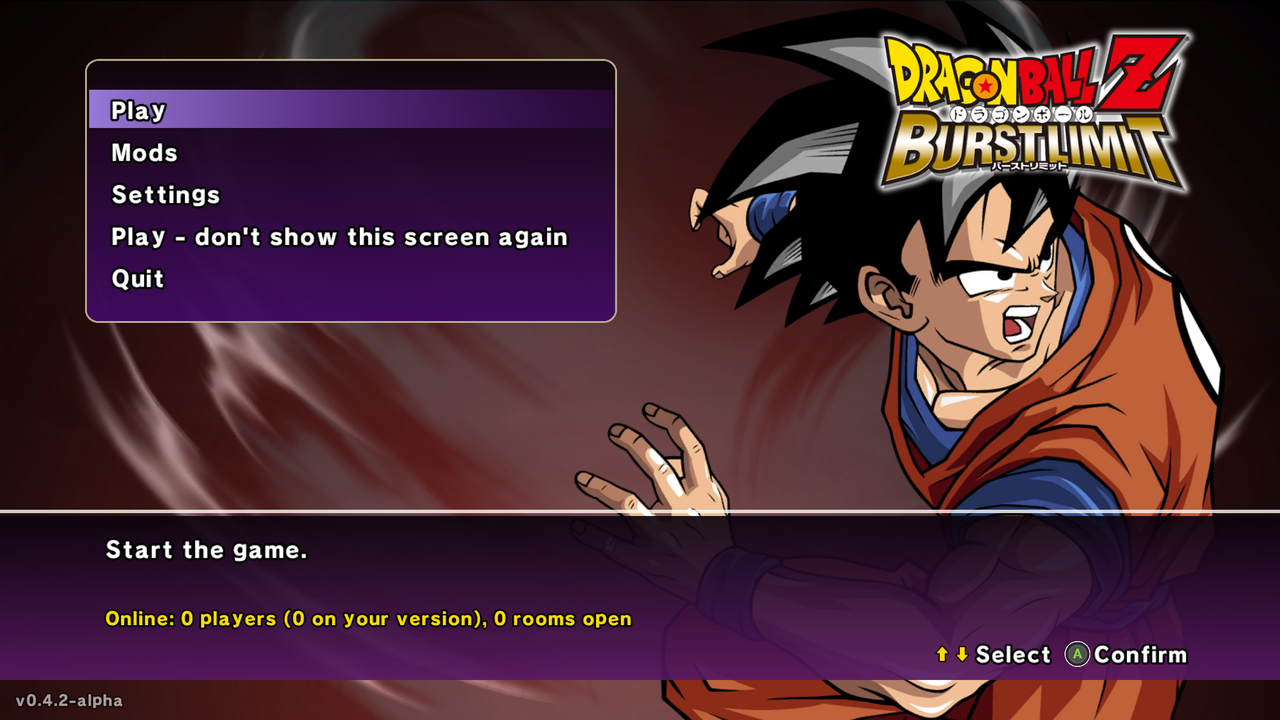
Start screen in the game's own style: Goku, the Burst Limit logo and the game's font, read from your game
files. From there:- Play.
- Mods: turn your mods on or off before the game starts.
- Settings: the settings menu.
- Update: shows up when a new version is out (see below).
- Who's online: players online, how many are on your version, and the open rooms.
- Don't want it? Pick "Play - don't show this screen again" (Settings > GAME > Start screen brings it back).
-
Updates from inside the game (from this version on): when a new version is out, an Update button shows
on the start screen. It downloads the new version, installs it and restarts the game by itself. Your settings,
saves, mods, texture packs and game files stay. -
Settings menu (F1) in the game's style, with the game's font, menu box and button icons, and a clearer order:
DISPLAY, GRAPHICS, EFFECTS, GAME, ONLINE, SAVE.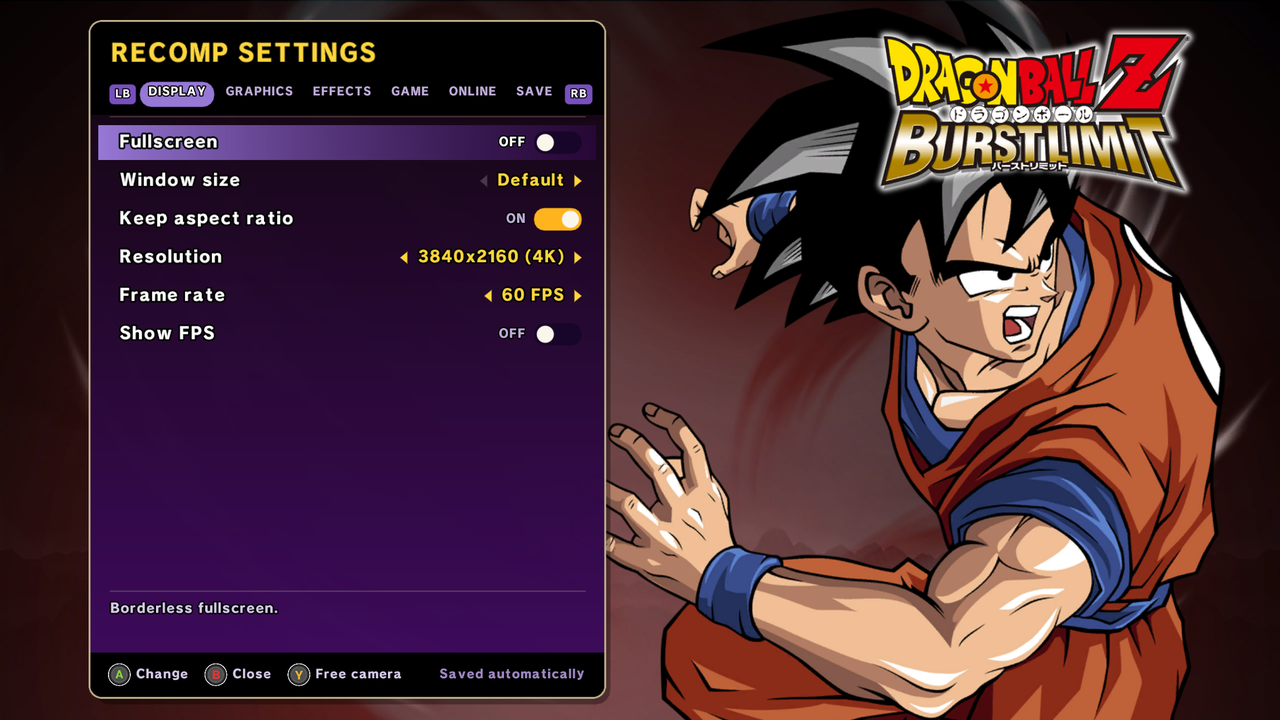
-
The game's own menu sounds on the start screen and in the settings menu (Settings > GAME > Menu sounds).
-
No more texture pack stutter: HD textures now load in the background. The first time something shows up,
you may see the original texture for a split second, then the HD one, instead of the game freezing. In our
test with a big DDS pack, the worst hitch went from 1.7 seconds to 0.07 seconds, about the same as playing
without a pack. -
Window size (Settings > DISPLAY, when Fullscreen is off): 512x448, 640x480, 800x600, 1024x768, 1024x896,
1280x720, 1600x900, 1920x1080, 2560x1440. Keep aspect ratio: on keeps the 16:9 picture with black bars,
off stretches it to fill the window (for example a 4:3 screen). -
Start transformed online too: RB / LB on the character select (Super Saiyan Goku, Final Form Frieza,
Perfect Cell...) now works in online matches. Each player picks their own. Don't want it? Turn off
Settings > ONLINE > Start transformed (online, the host's setting is used by both players). -
Discord status: your Discord profile shows that you're playing, and what: the menus, Z Chronicles,
Training, Versus or online. Nothing to install; turn it off in Settings > GAME > Discord status. -
PlayStation and Switch controllers work on the start screen and the installer too (before, only Xbox
controllers did there), and the button icons follow the controller from the start. -
The ISO installer has the start screen's layout and works with a controller.
Fixes
- Online: when the online lobby lost its connection for a moment during a match, a new player could join the
room and disconnect your opponent. The room now stays closed while a match is on
(#6).
Online
Both players need this same version (4.2). Rooms are version-locked, so 4.1 and 4.2 don't see each other.
Known issues
- The Update button is new in 4.2, so this time update by hand (see below). From 4.2 on, it's one click.
- Online, the Update button and the Discord status through Wine / Proton (Linux zip) haven't been tested yet.
- FSR 4 hasn't been tested on AMD GPUs yet.
How to install
- Download DBZ-Burst-Limit-Recompiled-v0.4.2-alpha.zip (Windows) or
DBZ-Burst-Limit-Recompiled-v0.4.2-alpha-linux.zip (Linux / Steam Deck) and extract it anywhere. - Run
burstlimit.exe(Windows) or./run_linux.sh(Linux). - The first time, pick your Burst Limit Xbox 360
.iso. Only the US (NTSC-U) version works
(which version).
- Have an older version? Extract the zip over your old folder and choose "Replace". Your game files, saves
and mods stay. You can keep yourburstlimit.toml: the new settings have their defaults. - If the game doesn't start on Windows, install the
Visual C++ Redistributable (x64). - ❤️ Like the project? You can support it on Ko-fi.
- Third-party: NVIDIA DLSS (
nvngx_dlss.dll, NVIDIA RTX SDKs license), AMD FidelityFX (FSR, AMD license),
libjuice (online connections, MPL-2.0) - licenses in thelicensesfolder. Button icons: Xelu's Free
Controller Prompts (CC0). This project is not affiliated with or endorsed by NVIDIA or AMD.
الإصدار 4.2 - شاشة بداية، تحديث من داخل اللعبة، وخلاص بدون تقطيع التكستشرز
⚠️ نسخة ألفا، ومتوقع فيها مشاكل. إذا صارت أي مشكلة أرسل ملف burstlimit.log (جنب burstlimit.exe) في
issue. ما فيها ملفات اللعبة، لازم تكون عندك نسختك.
الجديد
-
شاشة بداية بتصميم اللعبة نفسها: قوكو وشعار Burst Limit وخط اللعبة، تنقرا من ملفات لعبتك. ومنها:
- Play تبدأ اللعب.
- Mods تشغّل وتطفّي المودات قبل ما تبدأ اللعبة.
- Settings قائمة الإعدادات.
- Update يطلع لما ينزل إصدار جديد (الشرح تحت).
- مين أونلاين: كم لاعب، وكم واحد على نسختك، والغرف المفتوحة.
- ما تبيها؟ اختار "Play - don't show this screen again" (وترجعها من Settings > GAME > Start screen).
-
التحديث من داخل اللعبة (من هذي النسخة وطالع): لما ينزل إصدار جديد، يطلع زر Update في شاشة البداية. يحمّل
النسخة الجديدة ويثبتها ويعيد تشغيل اللعبة بنفسه. إعداداتك وتخزيناتك وموداتك وباكات التكستشرز وملفات اللعبة كلها
تبقى. -
قائمة الإعدادات (F1) بتصميم اللعبة: خط اللعبة وصندوق قوائمها وأزرارها، وترتيب أوضح:
DISPLAY و GRAPHICS و EFFECTS و GAME و ONLINE و SAVE.
-
أصوات قوائم اللعبة نفسها في شاشة البداية وقائمة الإعدادات (Settings > GAME > Menu sounds).
-
خلاص بدون تقطيع باكات التكستشرز: الصور الـHD صارت تتحمل في الخلفية. أول مرة يطلع شي، ممكن تشوف الصورة الأصلية
جزء من الثانية وبعدها الـHD، بدل ما تعلق اللعبة. في تجربتنا مع باك DDS كبير، أسوأ تقطيع نزل من 1.7 ثانية إلى 0.07
ثانية، تقريباً نفس اللعب بدون باك. -
حجم النافذة (Settings > DISPLAY، لما Fullscreen مطفي): 512x448 و 640x480 و 800x600 و 1024x768 و 1024x896
و 1280x720 و 1600x900 و 1920x1080 و 2560x1440. و Keep aspect ratio: لو شغال يحافظ على الصورة 16:9 مع أشرطة
سوداء، ولو مطفي يمط الصورة على كامل النافذة (مثلاً شاشة 4:3). -
تبدأ متحول في الأونلاين بعد: RB / LB في شاشة اختيار الشخصيات (قوكو سوبر سايان، فريزا الشكل الأخير، سيل الكامل...)
صارت تشتغل في مباريات الأونلاين. كل لاعب يختار تحوله. ما تبيها؟ طفها من Settings > ONLINE > Start transformed
(في الأونلاين إعداد الهوست يمشي على الاثنين). -
حالة الديسكورد: بروفايلك في ديسكورد يعرض إنك تلعب، ووش تلعب: القوائم أو Z Chronicles أو التدريب أو Versus أو
أونلاين. ما يحتاج تثبيت شي، وتطفيها من Settings > GAME > Discord status. -
أيادي PlayStation و Switch تشتغل في شاشة البداية والتثبيت بعد (قبل كانت أيادي Xbox بس)، وأشكال الأزرار تتبع يدك
من البداية. -
شاشة التثبيت من ملف ISO صارت بنفس تصميم شاشة البداية، وتشتغل باليد.
إصلاحات
- الأونلاين: لما ينقطع اتصال سيرفر الأونلاين لحظة وأنت في مباراة، كان ممكن يدخل لاعب جديد الغرفة ويقطع خصمك. الحين
الغرفة تبقى مقفلة طول ما المباراة شغالة (#6).
الأونلاين
لازم الاثنين يكونون على نفس هذي النسخة (4.2). الغرف مقفلة على النسخة، يعني 4.1 و 4.2 ما يشوفون غرف بعض.
مشاكل معروفة
- زر Update جديد في 4.2، فـهالمرة حدّث بيدك (الشرح تحت). من 4.2 وطالع، ضغطة وحدة.
- الأونلاين وزر التحديث وحالة الديسكورد على Wine / Proton (ملف اللينكس) ما انجربت للحين.
- الـFSR 4 ما انجرب على كروت AMD للحين.
طريقة التثبيت
- نزّل DBZ-Burst-Limit-Recompiled-v0.4.2-alpha.zip (ويندوز) أو
DBZ-Burst-Limit-Recompiled-v0.4.2-alpha-linux.zip (لينكس و Steam Deck) وفكّه بأي مكان. - شغّل
burstlimit.exe(ويندوز) أو./run_linux.sh(لينكس). - أول مرة، اختار ملف الـ
.isoحق Burst Limit للإكس بوكس 360. تشتغل بس النسخة الأمريكية (NTSC-U)
(أي نسخة).
- عندك نسخة قديمة؟ فك الملف فوق مجلدك القديم واختار "Replace". ملفات اللعبة والتخزينات والمودات تبقى.
وتقدر تخليburstlimit.tomlحقك مثل ما هو: الإعدادات الجديدة لها قيم افتراضية. - إذا اللعبة ما اشتغلت على الويندوز، ثبّت
Visual C++ Redistributable (x64). - ❤️ عجبك المشروع؟ تقدر تدعمه في Ko-fi.
- برامج خارجية: NVIDIA DLSS (
nvngx_dlss.dll، رخصة NVIDIA RTX SDKs)، AMD FidelityFX (الـFSR، رخصة AMD)،
libjuice (اتصال الأونلاين، MPL-2.0) - التراخيص في مجلدlicenses. أيقونات الأزرار: Xelu's Free Controller
Prompts (CC0). المشروع مو تابع لإنفيديا ولا AMD ولا مدعوم منهم.