
Version 4.1 - 2x faster, install from your ISO, Mods menu, Ki Charge
⚠️ Alpha - expect bugs. If something goes wrong, send burstlimit.log (next to burstlimit.exe) in an
issue. No game data is included: you need your own copy of the game.
What's new
-
Install from your ISO: no more copying game files by hand. On the first start, the game asks for your
Dragon Ball Z: Burst Limit (USA) Xbox 360.iso. It checks that it's the US version, copies the game files
next toburstlimit.exe(about 3.3 GB, only once), then starts. Your.isoisn't changed.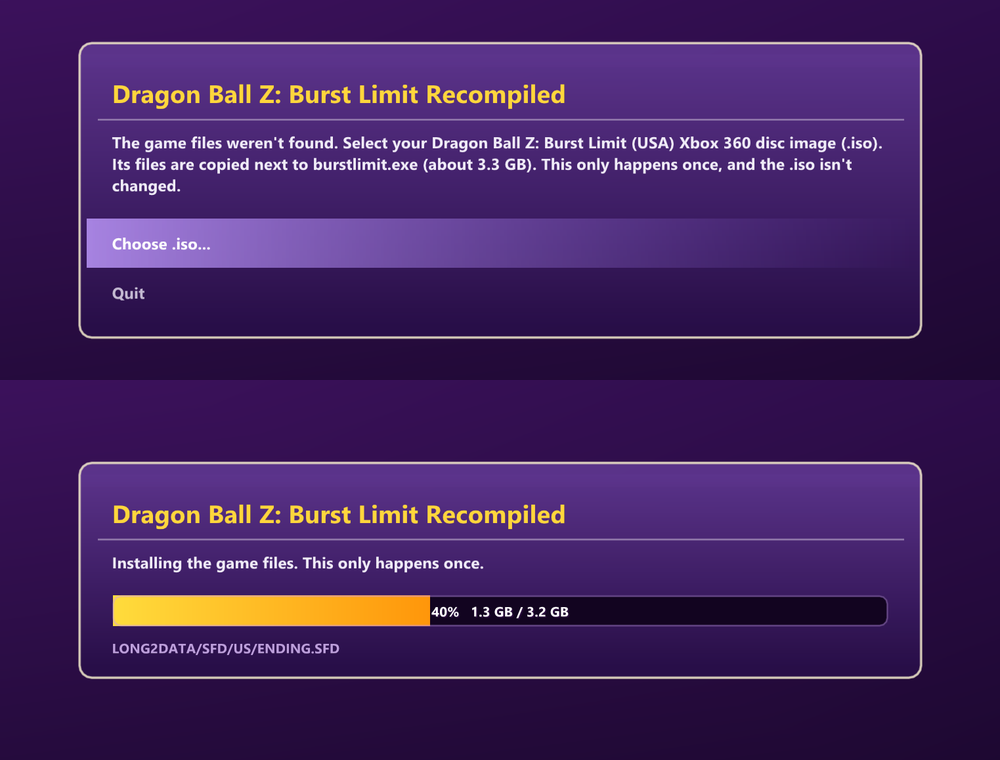
-
About 2x faster: the renderer does much less work per frame. In our tests on an RTX 4080 at native 4K:
~100 -> ~190+ FPS, and +40% with DLAA. On an AMD integrated GPU at 1080p: +32%. The picture is
exactly the same. Results vary by PC. -
Mods menu: a new Mods entry in the main menu (under Options), in the game's own style.
- Put each mod in its own folder inside
modsnext toburstlimit.exe, then turn it on or off from the
menu. No restart needed. - PS3 model mods work too: they're converted automatically.
- The game's own files are never changed.
- Online, rooms only match players with the same mods on.
- Put each mod in its own folder inside
-
⚡ Ki Charge (new, optional): hold L3 to charge your Ki, like in Shin Budokai. It works on the ground
and in the air, and when your Ki is full the character plays a finishing pose. Off by default: turn it on
in F1 > GAME > Ki charge. It works online too (the host's setting is used by both players).
There are two looks:- Built-in (included): Burst Limit's own Aura Spark animation, with wind and dust effects in your aura's
color. Nothing to download. - Shin Budokai 2 style (community mod, not part of this release): the original SB2 charge animations -
download. Put theSB2_Ki_Chargefolder in themodsfolder, then turn it on in
Main Menu > Mods.
- Built-in (included): Burst Limit's own Aura Spark animation, with wind and dust effects in your aura's
-
"Online" instead of "Xbox LIVE": the menus now say Online Battle, with a new title to match.
-
PlayStation, Nintendo Switch and Xbox Series button icons: sharp at any resolution, and the controller
picture in Control Settings matches too (DualSense, Joy-Cons or Xbox Series). They follow the controller
you're using; pick one yourself in F1 > DISPLAY > Button icons. -
Save export / import (F1 > SAVE): Export puts your save in a zip in the
savesfolder. Import
loads one back, including saves from Xenia. Your current save is backed up first. -
Texture packs:
- DDS (BC7) packs are supported now.
- Texture decoding is about 8x faster, so much less stutter.
- 💡 Keep big packs on an SSD, not a hard drive: a hard drive is the biggest cause of stutter.
- With 32 GB of RAM or more, you can raise
texture_replace_ram_mbinburstlimit.toml(for example
texture_replace_ram_mb = 12288).
Online
Both players need this same version (4.1). Rooms are version-locked, so 4.0 and 4.1 don't see each other.
The menus have new names: Versus > Online Battle > Player Match (same steps as 4.0).
Known issues
- Online through Wine / Proton (Linux zip) hasn't been tested yet.
- FSR 4 hasn't been tested on AMD GPUs yet.
- Big texture packs can still stutter a little the first time a character or stage shows up.
How to install
- Download DBZ-Burst-Limit-Recompiled-v0.4.1-alpha.zip (Windows) or
DBZ-Burst-Limit-Recompiled-v0.4.1-alpha-linux.zip (Linux / Steam Deck) and extract it anywhere. - Run
burstlimit.exe(Windows) or./run_linux.sh(Linux). - The first time, pick your Burst Limit Xbox 360
.iso. Only the US (NTSC-U) version works
(which version).
You can still copy your extracted game files intogame_data_rootyourself instead.
- Have an older version? Extract the zip over your old folder and choose "Replace". Your game files in
game_data_rootstay. You can keep yourburstlimit.toml: the new settings have their defaults. - If the game doesn't start on Windows, install the
Visual C++ Redistributable (x64). - Third-party: NVIDIA DLSS (
nvngx_dlss.dll, NVIDIA RTX SDKs license), AMD FidelityFX (FSR, AMD license),
libjuice (online connections, MPL-2.0) - licenses in thelicensesfolder. Button icons: Xelu's Free
Controller Prompts (CC0). This project is not affiliated with or endorsed by NVIDIA or AMD.
الإصدار 4.1 - أسرع مرتين، تثبيت من ملف ISO، قائمة المودز، شحن الكي
⚠️ نسخة ألفا، ومتوقع فيها مشاكل. إذا صارت أي مشكلة أرسل ملف burstlimit.log (جنب burstlimit.exe) في
issue. ما فيها ملفات اللعبة، لازم تكون عندك نسختك.
الجديد
-
التثبيت من ملف ISO: خلاص ما تحتاج تنسخ ملفات اللعبة بيدك. أول تشغيل، اللعبة تطلب منك ملف
.isoحق
Dragon Ball Z: Burst Limit (النسخة الأمريكية) للإكس بوكس 360. تتأكد إنه النسخة الأمريكية، وتنسخ ملفات اللعبة
جنبburstlimit.exe(حوالي 3.3 جيجا، مرة وحدة بس)، وبعدها تبدأ. ملف الـ.isoحقك ما يتغير.
-
أسرع تقريباً مرتين: الرسم صار يسوي شغل أقل بكثير كل فريم. في تجاربنا على RTX 4080 بدقة 4K بدون رفع دقة:
من ~100 إلى ~190+ فريم، و +40% مع DLAA. وعلى كرت AMD مدمج بدقة 1080p: +32%. الصورة نفسها بالضبط.
النتيجة تختلف حسب الجهاز. -
قائمة المودز: خيار جديد Mods في القائمة الرئيسية (تحت Options)، بنفس شكل اللعبة.
- حط كل مود في مجلد لحاله داخل مجلد
modsجنبburstlimit.exe، وبعدها شغله أو طفه من القائمة.
بدون ما تعيد تشغيل اللعبة. - مودات موديلات PS3 تشتغل بعد: تتحول لحالها.
- ملفات اللعبة الأصلية ما تتغير أبداً.
- في الأونلاين، الغرف تطلع بس للي عندهم نفس المودات مشغلة.
- حط كل مود في مجلد لحاله داخل مجلد
-
⚡ شحن الكي (جديد، اختياري): اضغط مطولاً على L3 عشان تشحن الكي، مثل Shin Budokai. يشتغل على الأرض وفي
الجو، ولما يمتلي الكي تسوي الشخصية حركة النهاية. مطفي افتراضياً: شغله من F1 > GAME > Ki charge. يشتغل في
الأونلاين بعد (إعداد الهوست يمشي على الاثنين).
فيه نوعين:- المدمج (موجود في التحديث): حركة Aura Spark من Burst Limit نفسها، مع ريح وغبار بلون هالتك. ما يحتاج أي
تحميل. - ستايل Shin Budokai 2 (مود من المجتمع، مو جزء من هذا التحديث): حركات الشحن الأصلية من SB2 -
تحميل. حط مجلدSB2_Ki_Chargeداخل مجلدmods، وبعدين شغله من
القائمة الرئيسية > Mods.
- المدمج (موجود في التحديث): حركة Aura Spark من Burst Limit نفسها، مع ريح وغبار بلون هالتك. ما يحتاج أي
-
"Online" بدل "Xbox LIVE": القوائم صارت تقول Online Battle، مع عنوان جديد يناسبها.
-
أزرار PlayStation و Nintendo Switch و Xbox Series: واضحة على أي دقة، وصورة اليد في Control Settings تتغير
بعد (DualSense أو Joy-Con أو Xbox Series). تتبع اليد اللي تلعب فيها، أو اختار بنفسك من
F1 > DISPLAY > Button icons. -
تصدير واستيراد التخزينة (F1 > SAVE): Export يحط تخزينتك في ملف zip داخل مجلد
saves. وImport
يرجعها، حتى تخزينات Xenia. تخزينتك الحالية تنحفظ نسخة منها قبل. -
باكات التكستشرز:
- صار يدعم باكات DDS (BC7).
- فك الصور صار أسرع تقريباً 8 مرات، فالتقطيع صار أقل بكثير.
- 💡 حط الباكات الكبيرة على SSD مو هارد عادي: الهارد العادي هو أكبر سبب للتقطيع.
- إذا عندك 32 جيجا رام أو أكثر، تقدر ترفع
texture_replace_ram_mbفيburstlimit.toml(مثلاً
texture_replace_ram_mb = 12288).
الأونلاين
لازم الاثنين يكونون على نفس هذي النسخة (4.1). الغرف مقفلة على النسخة، يعني 4.0 و 4.1 ما يشوفون غرف بعض.
أسماء القوائم تغيرت: Versus > Online Battle > Player Match (نفس خطوات 4.0).
مشاكل معروفة
- الأونلاين على Wine / Proton (ملف اللينكس) ما انجرب للحين.
- الـFSR 4 ما انجرب على كروت AMD للحين.
- باكات التكستشرز الكبيرة ممكن تقطع شوي أول مرة تطلع فيها شخصية أو ماب.
طريقة التثبيت
- نزّل DBZ-Burst-Limit-Recompiled-v0.4.1-alpha.zip (ويندوز) أو
DBZ-Burst-Limit-Recompiled-v0.4.1-alpha-linux.zip (لينكس و Steam Deck) وفكّه بأي مكان. - شغّل
burstlimit.exe(ويندوز) أو./run_linux.sh(لينكس). - أول مرة، اختار ملف الـ
.isoحق Burst Limit للإكس بوكس 360. تشتغل بس النسخة الأمريكية (NTSC-U)
(أي نسخة).
وتقدر برضو تنسخ ملفات اللعبة المستخرجة داخلgame_data_rootبنفسك بدل كذا.
- عندك نسخة قديمة؟ فك الملف فوق مجلدك القديم واختار "Replace". ملفات اللعبة اللي في
game_data_rootتبقى.
وتقدر تخليburstlimit.tomlحقك مثل ما هو: الإعدادات الجديدة لها قيم افتراضية. - إذا اللعبة ما اشتغلت على الويندوز، ثبّت
Visual C++ Redistributable (x64). - برامج خارجية: NVIDIA DLSS (
nvngx_dlss.dll، رخصة NVIDIA RTX SDKs)، AMD FidelityFX (الـFSR، رخصة AMD)،
libjuice (اتصال الأونلاين، MPL-2.0) - التراخيص في مجلدlicenses. أيقونات الأزرار: Xelu's Free Controller
Prompts (CC0). المشروع مو تابع لإنفيديا ولا AMD ولا مدعوم منهم.