
New
-
Routines: an agent saves what it just did as a routine, and you run it again from Settings → Routines, filling in its blanks (a name, a time, a message). It goes through the same checks and approval cards as the agent did, on a hidden screen when background mode is set up, and stops rather than guesses when the screen isn't as it was. Agents can run your routines too
-
Other devices: your chats in a browser on your computer or another phone, straight from the phone over Tailscale: no account, no server. Settings → Other devices, open the address on the other device and click Pair; you approve it on the phone with the same code. From the page you can:
- read your chats as they go, send messages and files, and start a chat with any agent and model
- answer approval cards (cards about money and letting a device or computer in stay on the phone)
- copy, quote, edit and fork messages; pin, rename, archive or delete chats; search and filter them
- see what the agent is running and stop it
- browse Files, upload and download at any size
- watch the phone's screen and the hidden screens agents work on, to look at only and never while a money app is in front (a switch turns this off)
- set schedules, and run schedules and routines
- remove paired devices, and add or remove computers
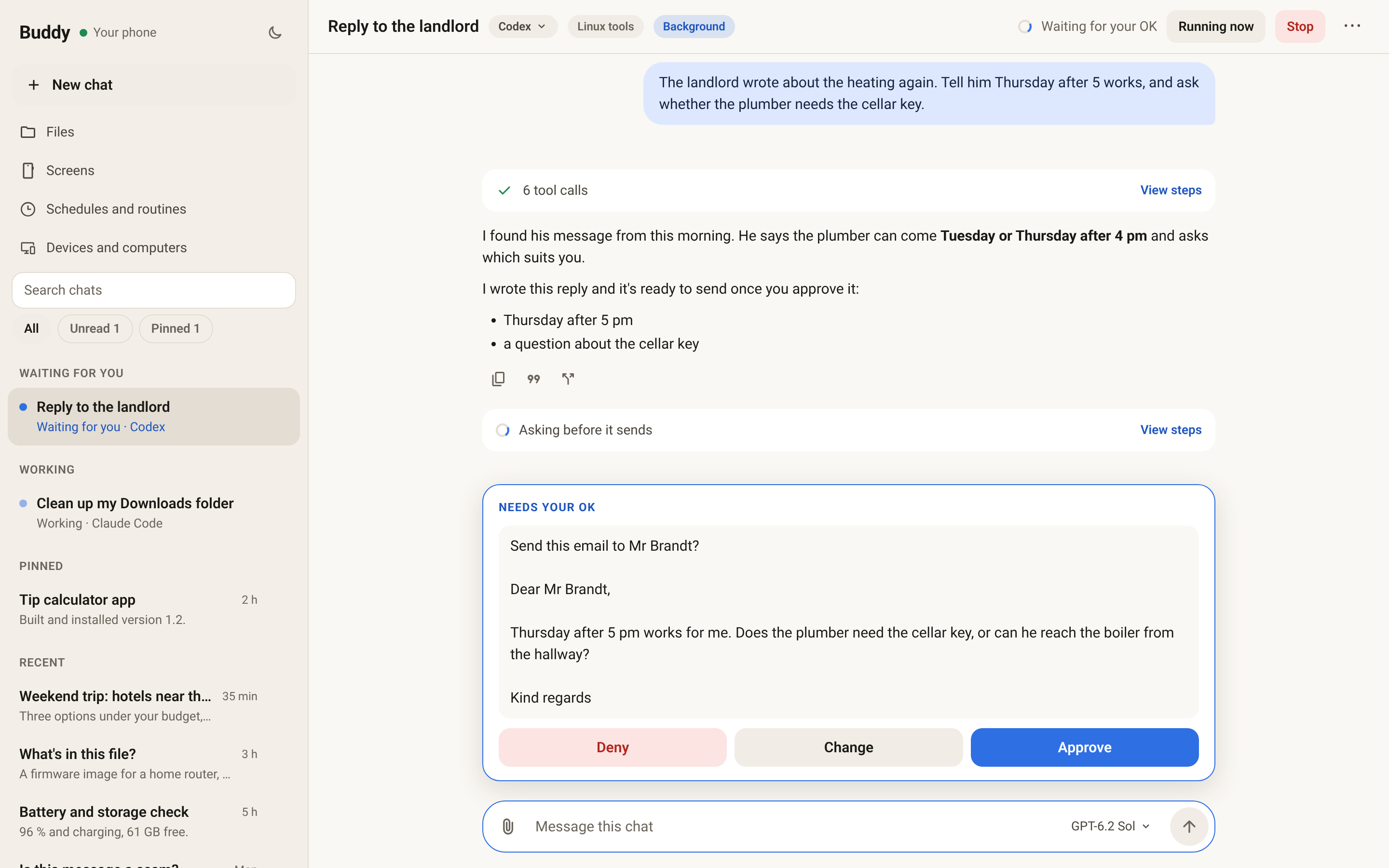
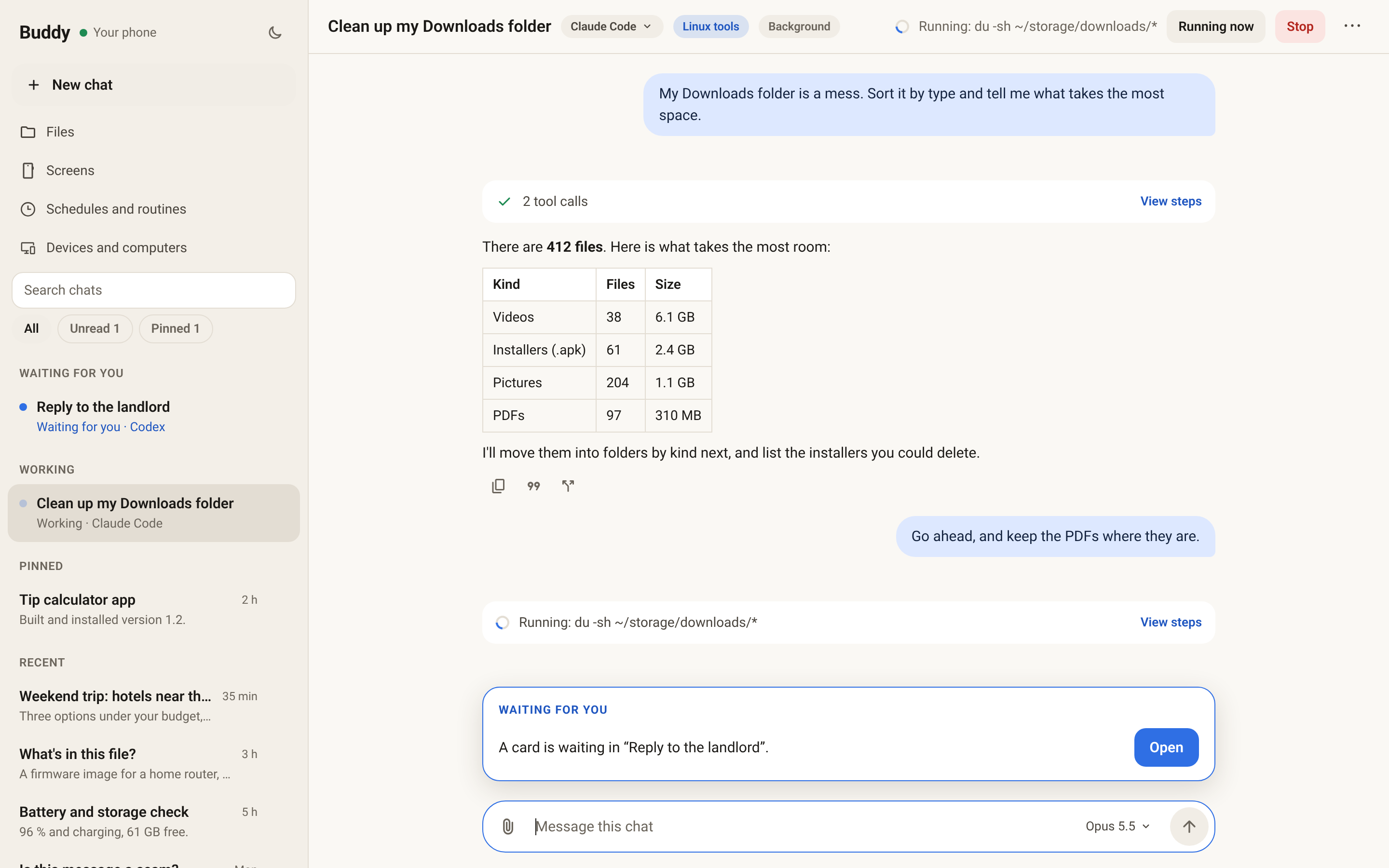
Click a picture to see it full size. -
Computers: agents run commands on your own computer over SSH (Settings → Other devices, or the page). Every command shows on a card first, and the key stays in Buddy's own storage, never in its Linux
-
GitHub Copilot and Pi (#74): two more agents. Pi signs in to your Claude, ChatGPT or GitHub Copilot plan inside Buddy, and can use the API services you connected
-
Agents and models, reworked: one page for what new chats use, what's connected and what it costs. Each service has a check that it answers and calls a tool. Add a connection has five tabs (Free, Plans, API keys, This phone, Servers), with Sign in with OpenRouter (no key to copy) and Google AI Studio, Mistral, xAI, Groq and Cerebras. Model lists group models by the sign-in they come from, with readable names
-
Files (#76): a browser for Buddy's Linux in chat options and Settings. Upload files of any size, open, share or save what agents made, rename and delete. In a chat with Linux tools, a file over 25 MB goes to the chat's Linux tools instead of being refused, and stays a chip on the sent message
-
A project folder per chat: pick a folder of the workspace in chat options and the chat's agent starts there and keeps its work there. Chats without one share the workspace as before
-
Running now (#81): tap a working chat's running line to see the command, how long it has run and the processes under it, and stop one of them without stopping the agent
-
Event triggers: a schedule can also start when the charger is connected, on a Wi-Fi network, with a Bluetooth device, or at the first unlock of the day, with a daily limit
-
Keep Wireless debugging on: Settings → Background mode. When the phone switches it off, Buddy turns it back on; when Android asks again on another Wi-Fi access point, the notification says so
Changes
- Jump to the end: a long chat, the bubble's panel, transcripts and steps get an arrow back to the bottom
- Long steps (a script inside a command) show their first four lines, and all of it on a tap
- Apps on hidden screens are muted while they're there
- Set up what's missing walks through what's left to set up
- Voices (#84): a language's voice comes from your phone's region, so Portuguese in Brazil speaks Brazilian Portuguese
- The "Using your phone" pill (#73) shows only steps that are still going
Full Changelog: v2.3.20...v2.4.0
Which file? Download buddy.apk: it updates itself. Buddy is also on F-Droid, where each version arrives a few days after it is released here. fdroid-check-only-v2.4.0.apk is only there for F-Droid's reproducible-build check, and doesn't update itself.