
Spotifast 0.14.0 starts with your computer, plays the local files in your playlists, shows what the people you follow are listening to, and fills Home with what you played last, Your top mixes and New releases. Skips start at once, a song keeps playing through a dropped connection, and you can pick this computer's audio output from the device picker. It also speaks Korean, adds Play next, your own equalizer presets and a light and a dark theme for Follow system, and the AppImage now updates itself. On Linux, Spotifast now plays through PipeWire, PulseAudio or ALSA on its own, and the audio backend setting is gone.
Download Spotifast: Mac · Windows · Windows ARM · Linux · Linux ARM · Flatpak · AppImage · AppImage ARM
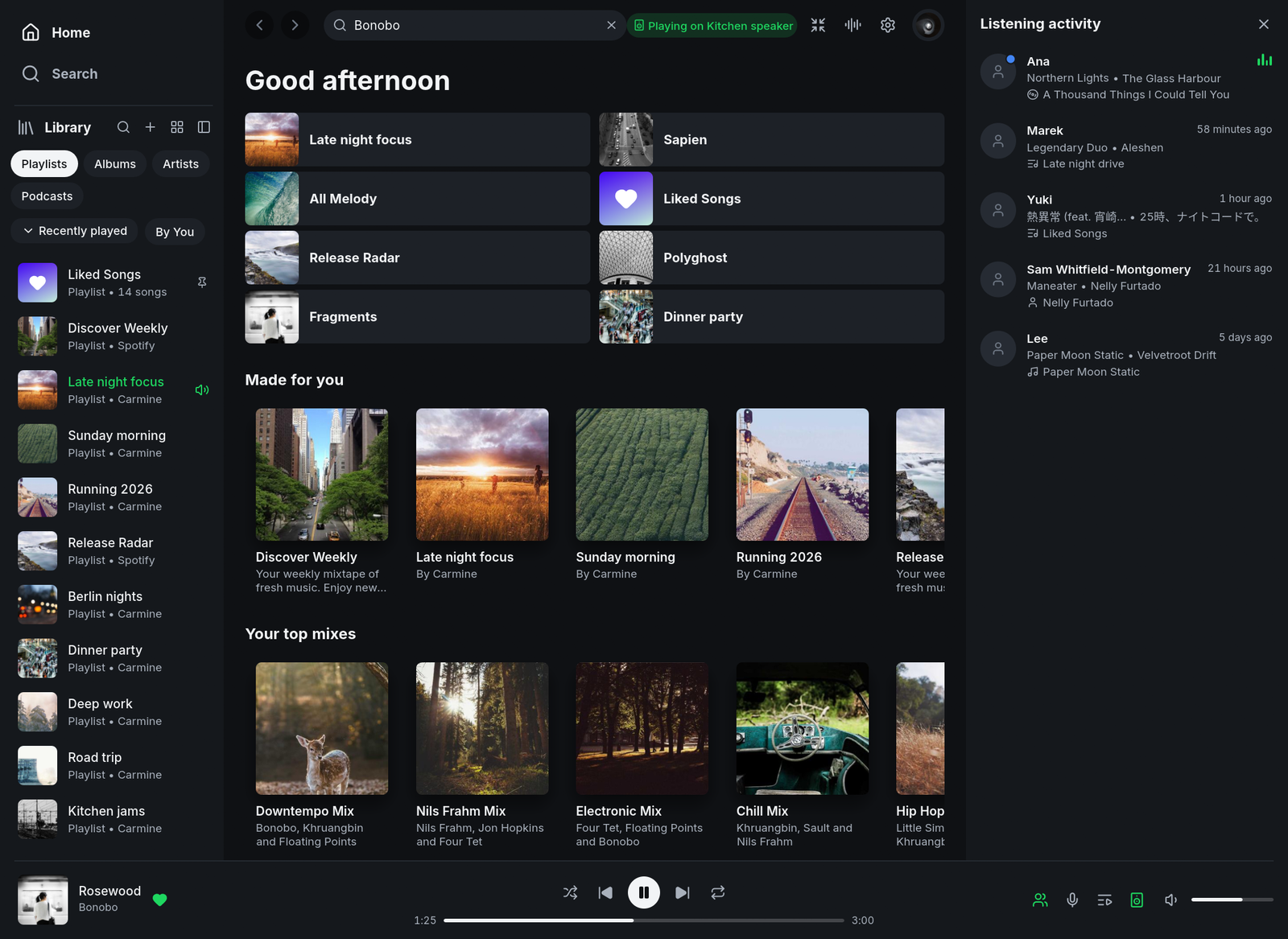
Home with what you played last and Your top mixes, and what the people you follow are listening to (demo content).
On Windows, pick the .msi. The setup program (-setup.exe) is still attached so that installs from 0.12.0 and earlier can update through it.
New
- Start Spotifast with your computer, with its window or in the tray. Choose under Settings → Playback on this computer → Start with your computer. It is your system's own startup entry, so a change made in your system's settings shows in Spotifast too. By @crmne; thanks @gabrieleancora. (#122)
- Play the local files in your playlists. Pick a folder under Settings → Playback on this computer → Local files, and the local files your playlists hold play from it instead of showing as unavailable. Only 44.1 kHz files play, and Spotify's own Local Files playlist still can't. By @crmne; thanks @PeeblyWeeb. (#3)
- See what the people you follow are listening to. The people button beside Queue and Lyrics opens Listening activity: each person's song, its artist and where it plays from, with a dot on whoever is listening right now. Point at an avatar to play their song. It needs local playback. By @dawid-bytys; thanks @Iskrata. (#909, #799)
- Home's top tiles show what you played last, as Spotify's Home does: the playlists, albums, artists, podcasts and songs you played, newest first. By @crmne; thanks @TawfiqAbubaker. (#942)
- Your top mixes on Home, the artist, genre and decade mixes Spotify makes from your listening. It needs local playback. By @crmne and @RageMouse. (#946)
- New releases on Home: the latest albums, EPs and singles from the artists you follow, newest first, with a page that lists all their songs. By @crmne; thanks @DmitrySkibitsky. (#907)
- Play counts on album pages and an artist's popular songs, with local playback. By @crmne; thanks @igorrfisse. (#543)
- Skips start at once. While a song plays, Spotifast now prepares the next two in the queue, so Next no longer leaves about a second of silence. By @crmne; thanks @jgoyvaerts. (#927)
- A song keeps playing through a dropped connection. On a train or after a reset connection, the song plays on from what it has already downloaded while Spotifast reconnects, instead of stopping for several seconds. By @crmne, building on the work of @ECuteri; thanks @karolzlot. (#268, #947)
- Choose this computer's audio output from the device picker. Audio output, below the devices, lists this computer's outputs with System default first, and switching keeps your place in the song. By @crmne; thanks @Zac99LOL. (#963)
- Hide songs in Discover Weekly and Spotify's other playlists for you. As in Spotify's apps, a hidden song stays in the list greyed out and is skipped, and Spotify's other apps hide it too. It needs local playback. By @crmne; thanks @dotvhs. (#779)
- Play next in song and selection menus puts songs at the front of the queue, ahead of the songs already queued. By @crmne and @nikankad; thanks @D3SOX. (#594)
- Save your own equalizer presets, preamp included, such as a headphone correction curve. They show in Settings and in the mini player's PRESETS menu. By @crmne; thanks @yaskepalhares. (#702)
- A light and a dark theme for Follow system. With Follow system, Settings → Appearance now picks one palette for light mode and one for dark mode, such as Catppuccin Latte and Catppuccin. By @crmne; thanks @santiruffino. (#619)
- A white or black tray icon on Linux and Windows, under Settings → Playback on this computer → Tray icon. By @crmne; thanks @joy4eg. (#128)
- Keep Spotifast in the macOS menu bar only. Turn off Show in Dock under Settings → Playback on this computer, and the Dock icon and the Cmd+Tab entry go at once. By @crmne; thanks @curlyhacker. (#837)
- The computer stays awake while music plays on it. It can sleep again once you pause or play on another device, and the display still turns off and the screen still locks. By @crmne; thanks @marcinkurek. (#962)
- The AppImage updates itself from inside Spotifast, like the portable downloads, when it sits in a folder of your own. It also carries update information, so AppImageUpdate, AppImageLauncher, AM and Gear Lever can update it, downloading only what changed. Copies of 0.13.3 and earlier need one more manual download. By @crmne; thanks @shuvashish76. (#737)
- The portable Windows copy keeps its settings and sign-in next to it, in
spotifast-databesidespotifast.exe, and runs beside an installed copy. Its first start copies the settings and sign-in you had before. By @crmne; thanks @KuroZantetsuken. (#703) - Click a page's cover to see it larger, on playlist, album, artist and podcast pages. By @crmne and @nikankad; thanks @deepydarkness. (#586)
- A liked song's heart opens Add to playlist, as in Spotify, with Remove from Liked Songs below your playlists. By @crmne and @samboland; thanks @oscrwebr. (#792)
- A queue beside full-screen lyrics, shown and hidden with Q. By @PixelAsh6. (#875)
- The player bar visualizer sweeps across the cover's colours with Colour from album art on, and a black and white cover moves in grey instead of pink. By @xxgvqxx. (#922)
- Pages keep their shape while they load, with grey rows and cards in place of a spinner. By @crmne; thanks @sakurayung. (#674)
- Refresh a podcast from its More menu to see its new episodes. By @crmne; thanks @nojaf. (#936)
- Release notes in Settings → About open the notes of the version you're running. By @crmne; thanks @dev-westie. (#658)
- Cast devices show up sooner, and the device picker lists the outputs you choose most often first. By @samfriedmaan. (#913)
- Korean. Spotifast is now available in Korean. By @laskaflask. (#934)
Fixed
- Pause on Linux stops the sound at once, instead of playing on for about 0.4 seconds. By @crmne; thanks @jgoyvaerts. (#969)
- Playback comes back on Windows after a Bluetooth headset connects, instead of failing until Spotifast restarts. By @crmne; thanks @TnZzZHlp. (#689)
- Fewer crackles and dropouts on a busy Mac or Linux computer. The thread that decodes music now runs ahead of other work, as it already did on Windows, and on Linux the sound device's thread asks for real-time priority. By @crmne; thanks @sriram3720. (#785)
- Spotifast's memory no longer grows while it sits in the tray. By @crmne; thanks @kkatnaomi. (#954)
- Windows keeps your sign-in when Credential Manager fails. Spotifast now also keeps a copy only your Windows user can open, used when Credential Manager refuses to save the sign-in or loses it at a restart. By @crmne; thanks @HyPeRXKo and @sasirmishamsi. (#748, #815)
- Your playlists load while Spotify is rate limiting the shared app. With local playback, the list is read over the playback session instead of sitting on Loading for minutes. By @crmne and @Iskrata; thanks @notcapi and @offluencer-com. (#698, #816, #796)
- A song a playlist holds more than once is handled one copy at a time. Removing a copy removes only that copy (with local playback), and playing a copy starts that copy and marks only its row. By @crmne; thanks @jorisw. (#937)
- A song picked from search plays on its own, followed by Spotify's suggestions instead of the other results. By @Magniquick; thanks @0xD10. (#925, #888)
- A song radio starts with its song. By @Sam-C137. (#983)
- Repeat stays on across restarts. By @ECuteri. (#953)
- A song liked again on another device shows in Liked Songs after you unliked it here. By @saikumargudelly. (#933, #932)
- Playlists stay in their folders when the Library sorts by Name. By @crmne; thanks @ZebulanStanphill. (#651)
- Recommended for you no longer loads forever for an account Spotify has no top songs for yet. By @TobiasVeiga00. (#988, #987)
- The window no longer reopens too small to use after its size was saved below the minimum. By @fussyonfire; thanks @hahn-kev. (#971, #704)
- A click just past the mini player's volume no longer sends the sound to one side. By @crmne; thanks @gzam1028, @ElAlan444 and @lucachamba132-commits. (#804, #931, #929)
- The empty space beside the player bar's title and artists changes the visualizer, like the rest of the bar. By @a2mta. (#979)
- Lyrics show when LRCLIB is busy. When it asks Spotifast to slow down, Spotifast now waits and asks again instead of showing an error. By @pipemalz. (#924)
- The macOS menu bar icon keeps working after the window is hidden, and opens its menu on click. By @crmne; thanks @tarnowsky for the fix. (#832)
- The sign-in card no longer shows a scroll bar while it waits for the browser. By @crmne; thanks @Reuzehagel. (#782)
- A long Recent history costs less to draw. By @MaxRong. (#977)
- Source builds that run the tests, such as the AUR package, no longer fail on the Arabic text tests. By @Magniquick; thanks @SpoonMan234. (#926, #739)
Changed
- On Linux, Spotifast plays through PipeWire, a PulseAudio server or ALSA, whichever is running, in that order. The audio backend setting is gone, and so is the libpulse dependency. A saved backend is ignored. Volume mixers show the stream as Spotifast, with its icon, on PipeWire and PulseAudio. By @crmne; thanks @jgoyvaerts. (#969)
- Linux now needs PipeWire's library, libpipewire 0.3.53 or newer, even where PulseAudio or ALSA plays the sound. The DEB, RPM and AUR packages install it. Building from source needs PipeWire's headers too, so Ubuntu 22.04 can no longer build Spotifast.
- Your audio output is now saved by its device id. An output an older version saved by name still opens and is then saved by its id; one that is not there plays through the system default until you choose another. By @crmne.
Thanks
@gabrieleancora, @PeeblyWeeb, @dawid-bytys, @Iskrata, @TawfiqAbubaker, @RageMouse, @DmitrySkibitsky, @igorrfisse, @jgoyvaerts, @ECuteri, @karolzlot, @Zac99LOL, @dotvhs, @nikankad, @D3SOX, @yaskepalhares, @santiruffino, @joy4eg, @curlyhacker, @marcinkurek, @shuvashish76, @KuroZantetsuken, @deepydarkness, @samboland, @oscrwebr, @PixelAsh6, @xxgvqxx, @sakurayung, @nojaf, @dev-westie, @samfriedmaan, @laskaflask, @TnZzZHlp, @sriram3720, @kkatnaomi, @HyPeRXKo, @sasirmishamsi, @notcapi, @offluencer-com, @jorisw, @Magniquick, @0xD10, @Sam-C137, @saikumargudelly, @ZebulanStanphill, @TobiasVeiga00, @fussyonfire, @hahn-kev, @gzam1028, @ElAlan444, @lucachamba132-commits, @a2mta, @pipemalz, @tarnowsky, @Reuzehagel, @MaxRong, @SpoonMan234, and everyone who reported problems since 0.13.3. Thanks also to @fussyonfire for the guide to checking a Windows download. (#938)
Full changelog: v0.13.3...v0.14.0