
QuickAdd 2.20.0
QuickAdd 2.20.0 is a broad quality and reliability release focused on a simple promise: the plugin should explain what it is doing, preview what will really happen, and protect your setup when something goes wrong.
The first-run experience is friendlier, choice builders are clearer, format syntax is easier to learn, prompts now explain where your answer will go, invalid file names are caught before side effects happen, and damaged configuration data no longer takes the whole settings page down with it.
Important
QuickAdd 2.20.0 requires Obsidian 1.13.0 or newer.
Highlights
A much better path from installation to your first working choice
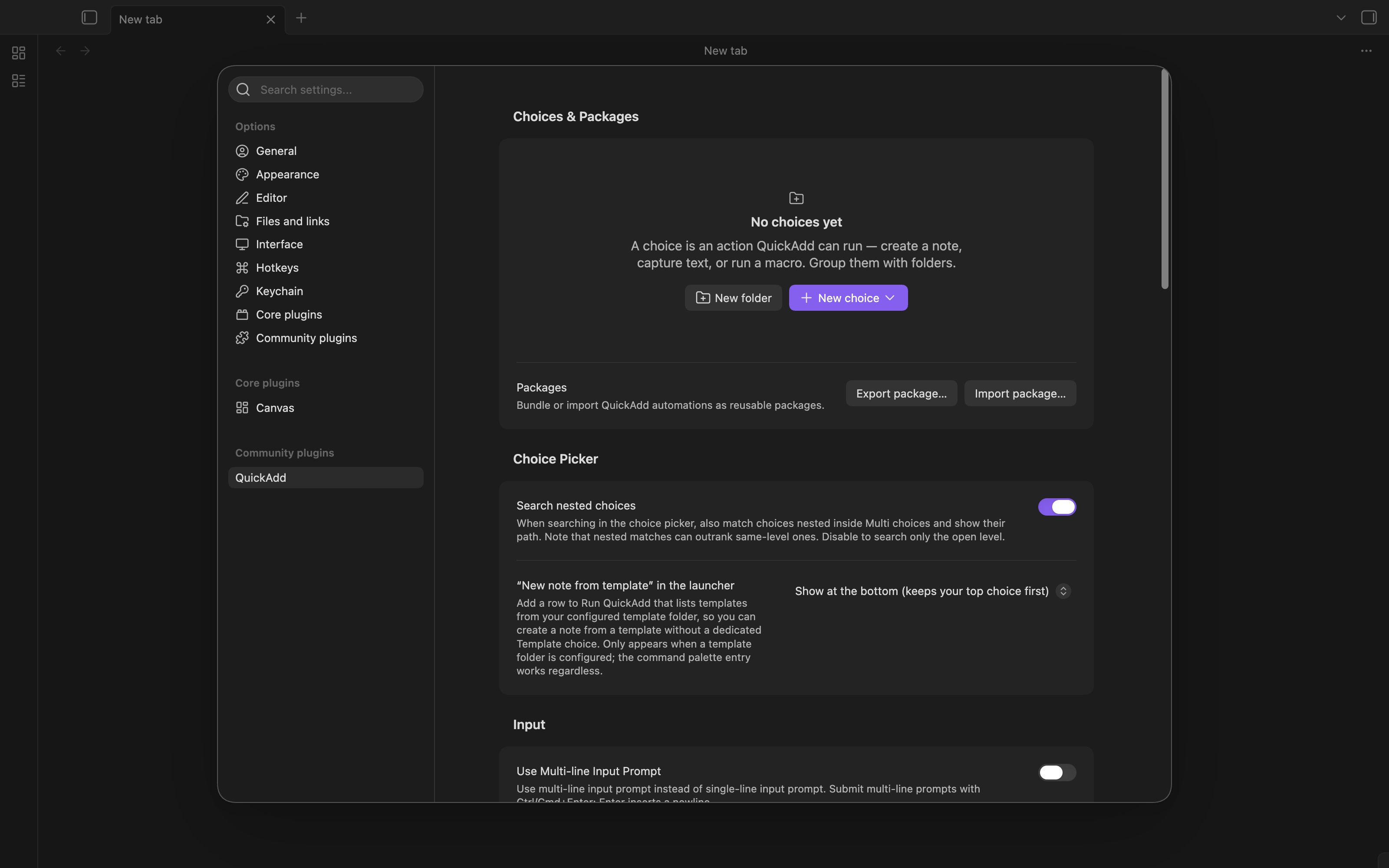
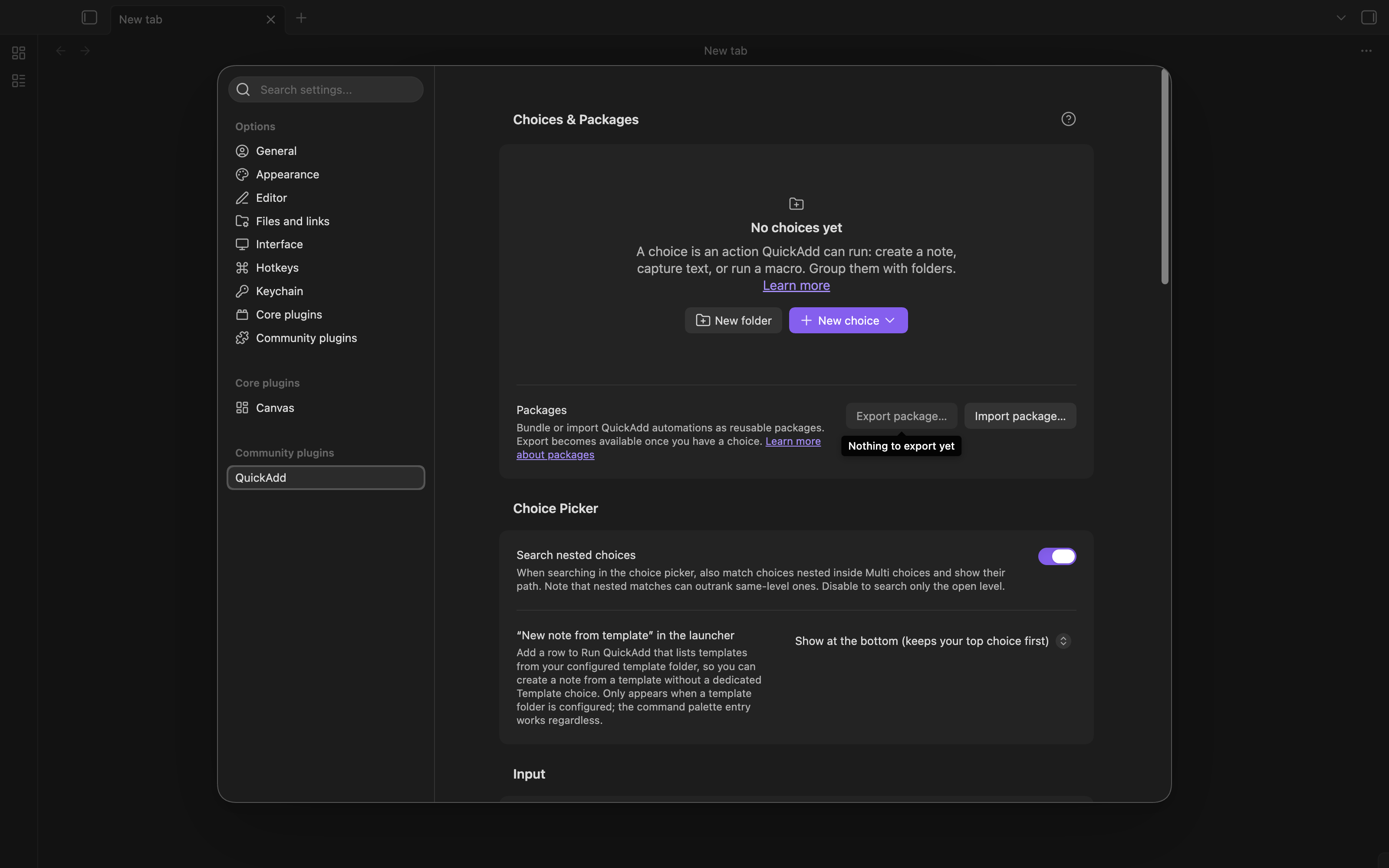
A fresh QuickAdd installation no longer leads to an empty picker with no explanation. Running QuickAdd with no choices now tells you what to do and opens the QuickAdd settings page.
The settings page also gives new users a useful starting point:
- A real empty state explains what choices are.
- Documentation is reachable from the page header and empty state.
- Export package... stays disabled until there is something to export, while Import package... remains available.
- Folder creation asks for a Folder name, not a "Choice name".
- Empty folders are visibly unavailable before you click them.
- A new Open QuickAdd settings command takes you directly to the plugin settings from the command palette.
| Before | After |
|---|---|
| 
|
Choice builders that explain themselves
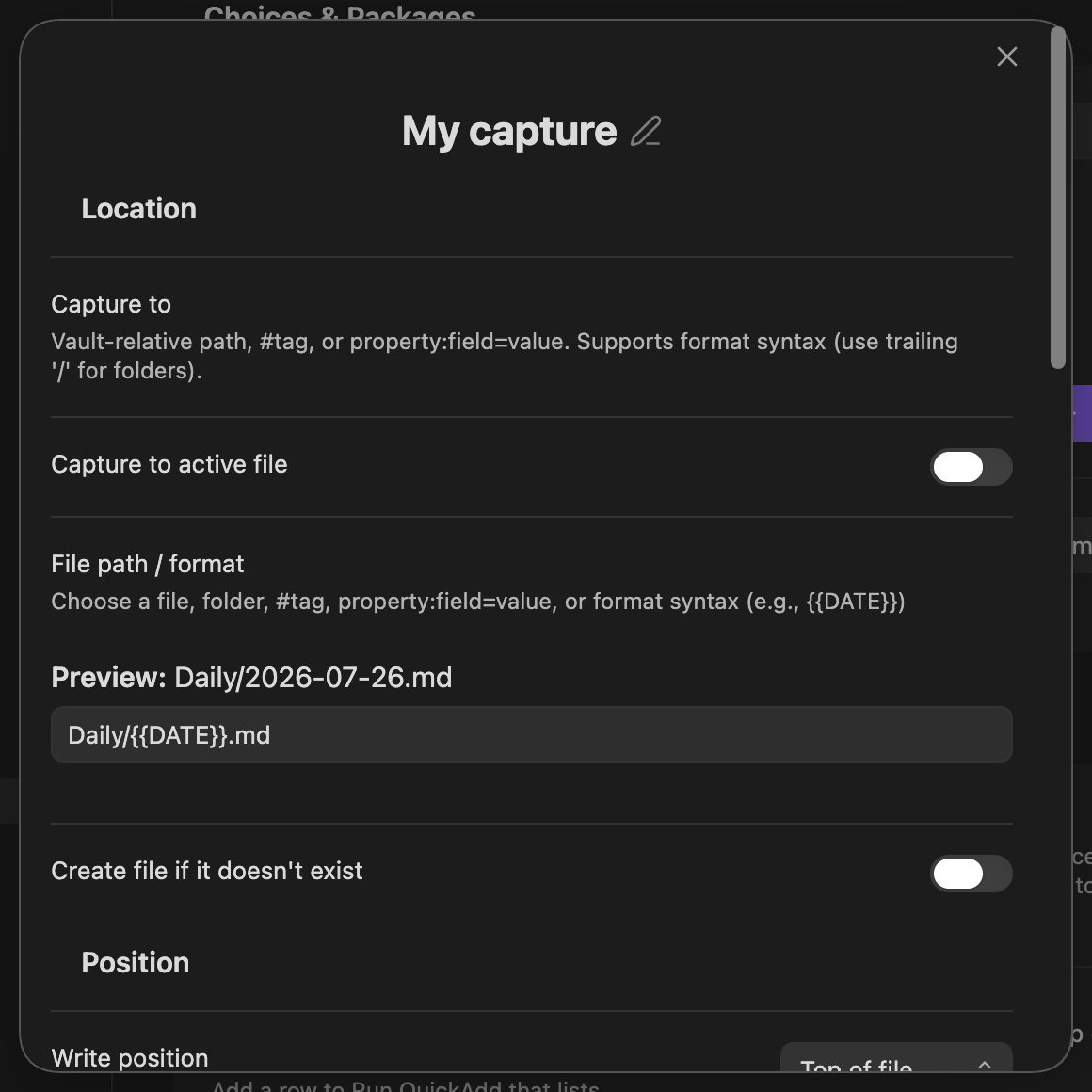
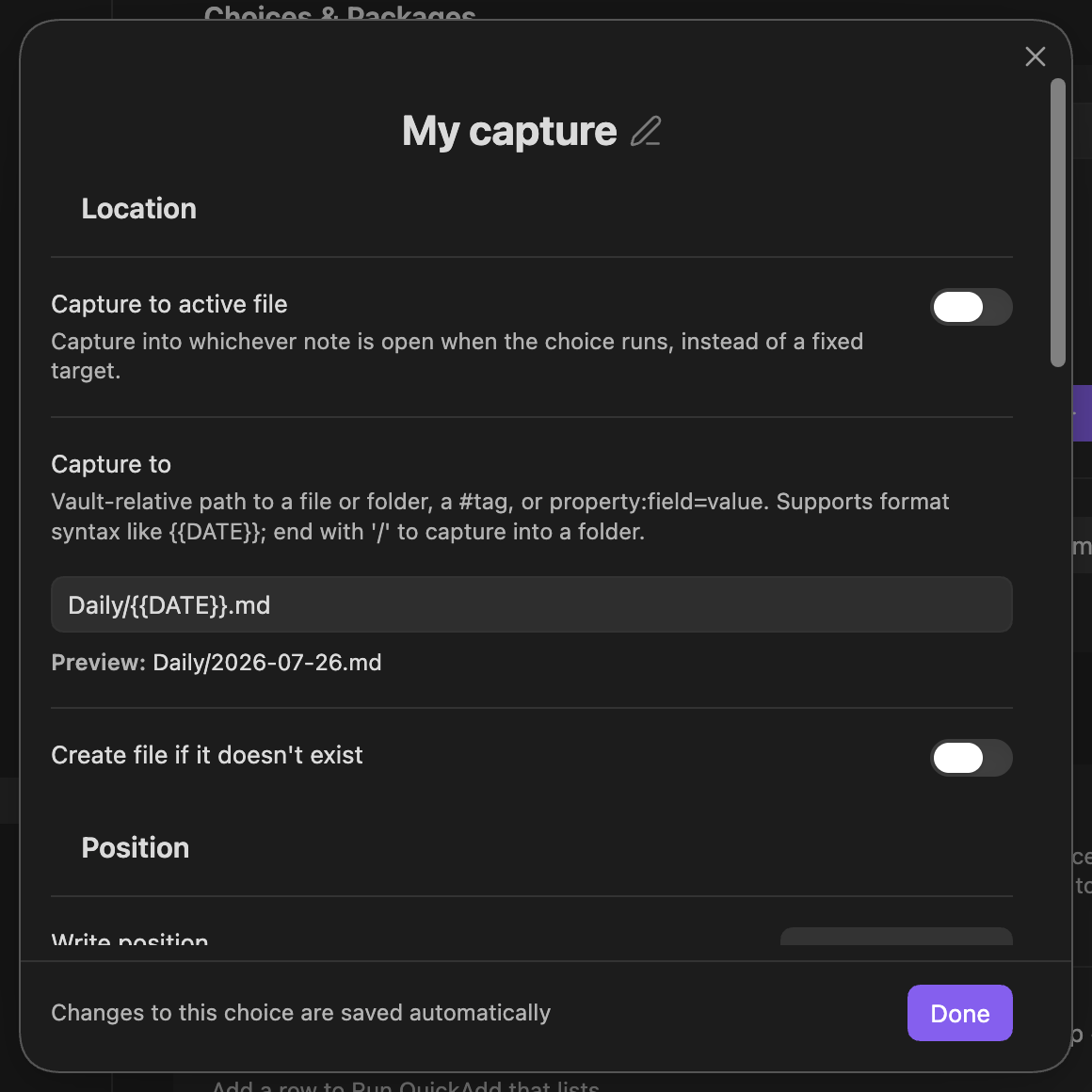
Capture, Template, and Macro builders now make their save behavior explicit. A pinned footer says that changes are saved automatically and gives you a clear Done button.
Fields are grouped and labelled consistently, previews appear below the field they describe, empty previews disappear, and settings that are turned off hide their inactive fields instead of leaving large disabled controls behind.
For example, a Capture target now has one clear Capture to field, a worked example, and a live preview:
| Before | After |
|---|---|
| 
|
Format syntax is now something you can discover
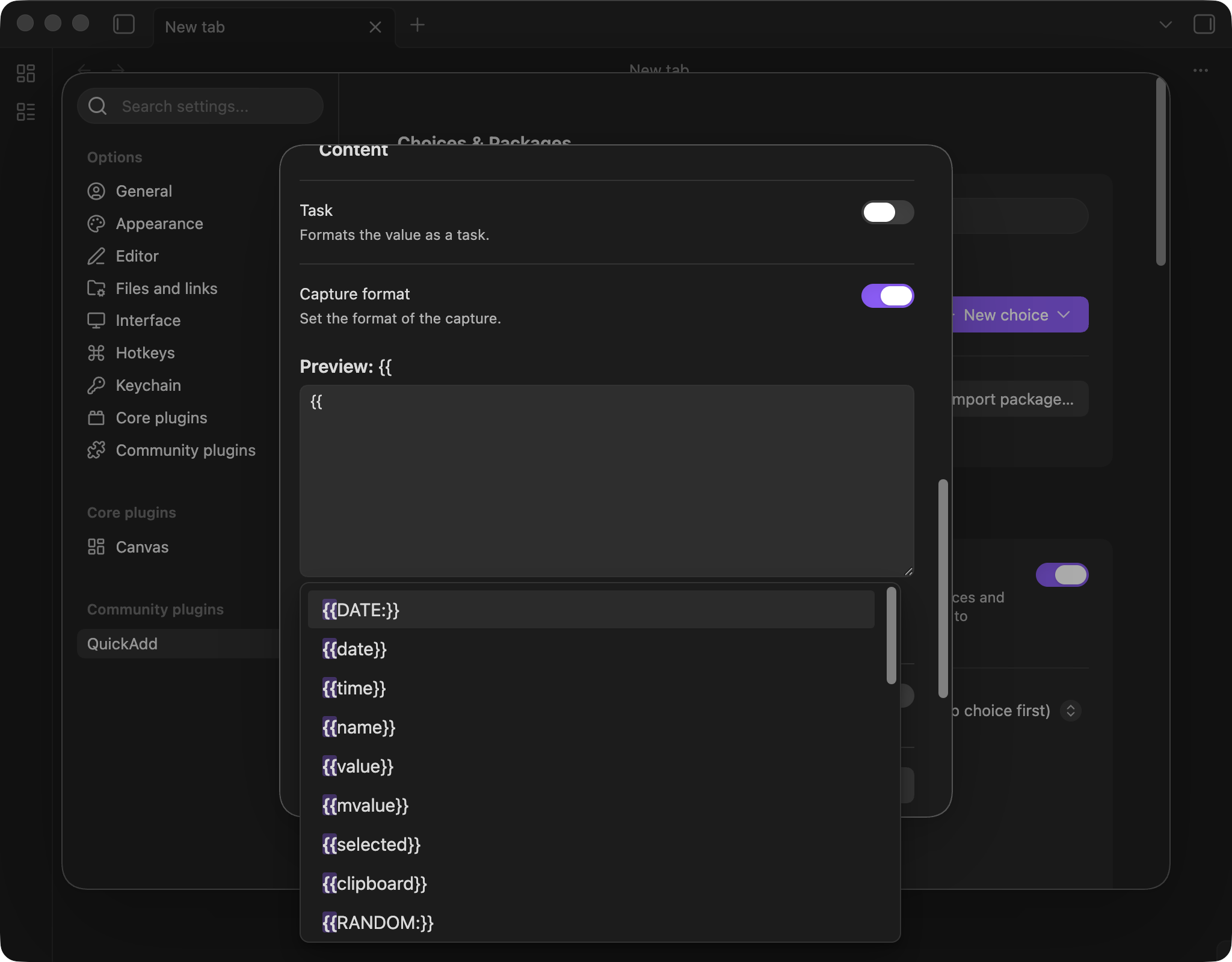
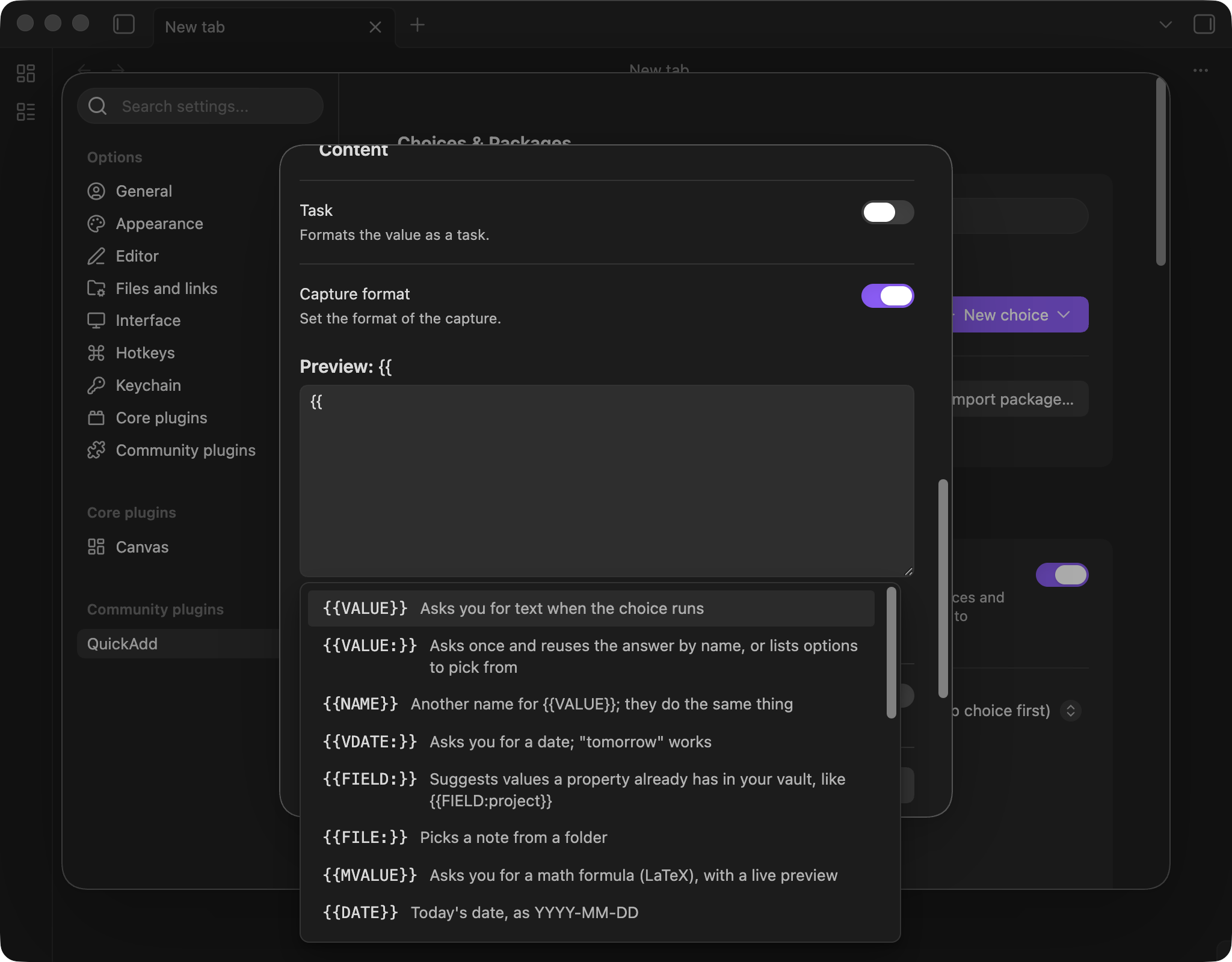
Type {{ in a supported format field and the autocomplete becomes a compact reference:
- Every token has a plain-language description.
- Suggestions use one consistent casing style.
- Results are ordered by usefulness, starting with
{{VALUE}}. - The list only offers tokens that work in the field you are editing.
- Prefix matches rank first, so
{{datleads with{{DATE}}. - Date examples show what they resolve to now.
{{FIELD:}}and{{TIME:}}are finally discoverable.- Fill-in examples select their placeholder, so you can immediately type over it.
The builder also advertises the shortcut directly, so you do not need to already know it exists.
| Before | After |
|---|---|
| 
|
Prompts tell you what they need and where it will go
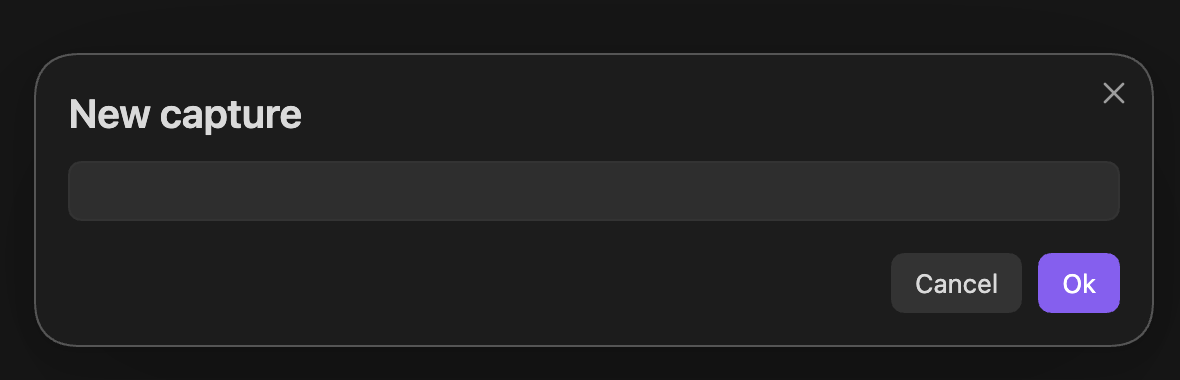
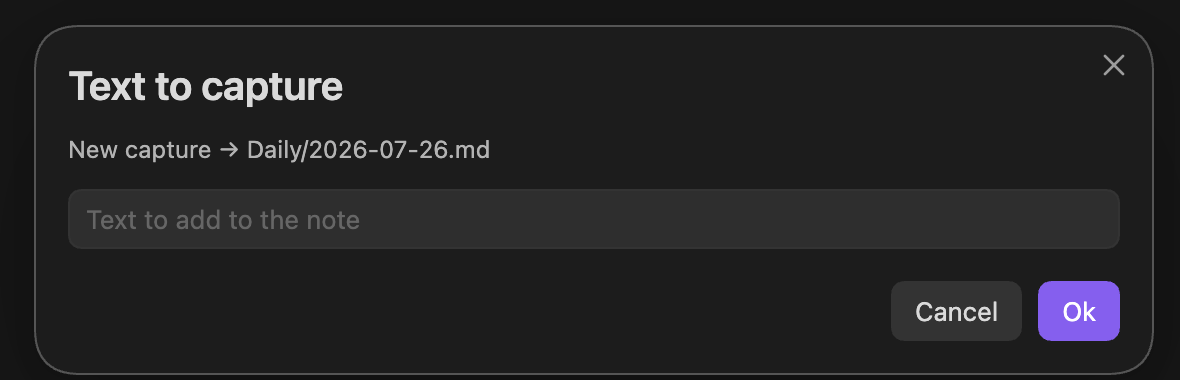
Runtime prompts no longer rely on the choice name as a vague title. QuickAdd now tells you what kind of answer it needs, which choice is asking, and the resolved destination when one exists.
Instead of a generic prompt, a Capture can now say:
- Text to capture
New capture -> Daily/2026-07-26.md- Text to add to the note
| Before | After |
|---|---|
| 
|
Prompt drafts are isolated by choice and scope, so cancelling one prompt cannot leak its unfinished answer into an unrelated run.
Previews now match the real run
File-name previews have been rebuilt around the same rules the runtime uses. They now resolve nested templates, dates, math values, target folders, named values, and token diagnostics much more faithfully.
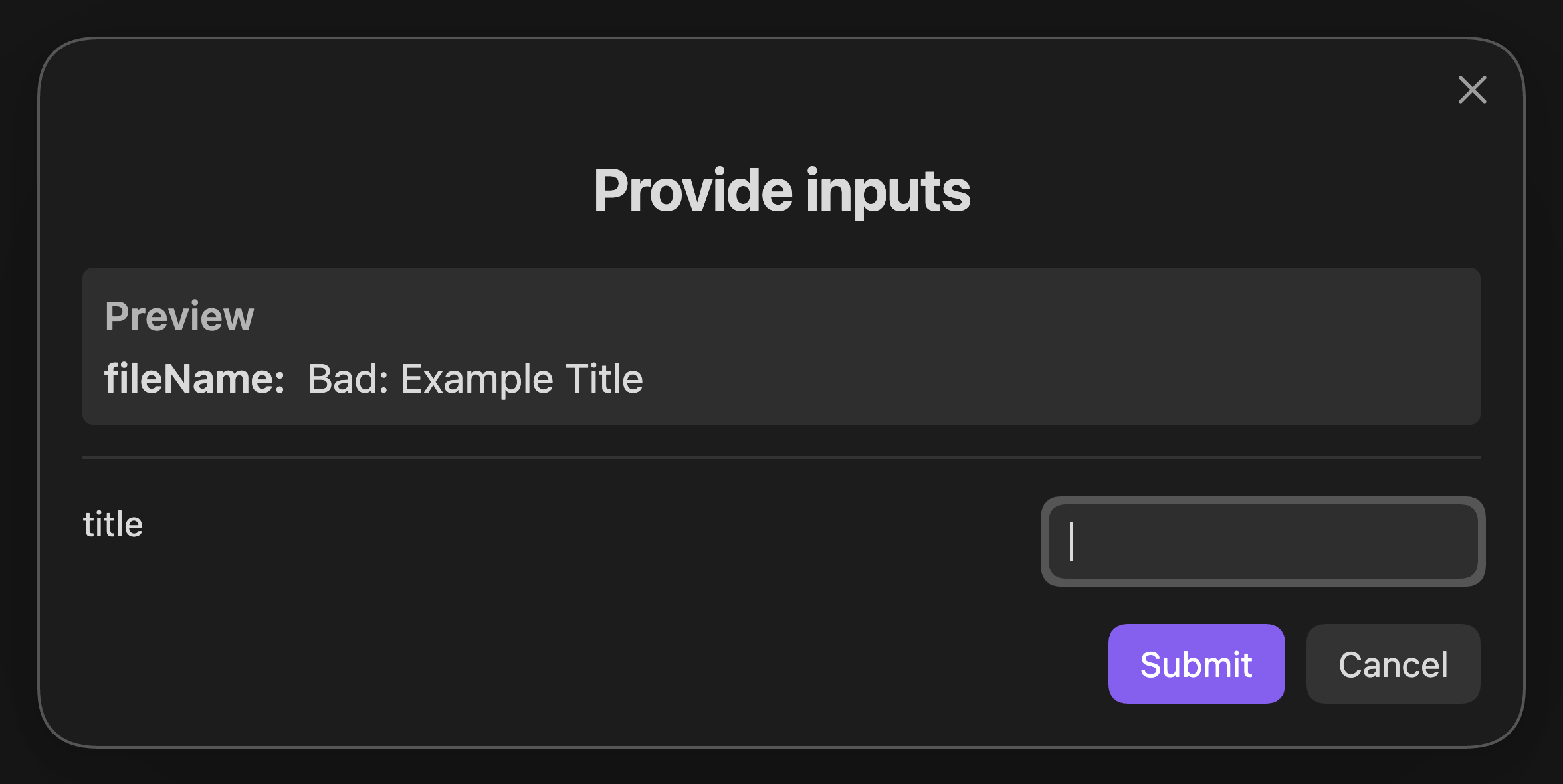
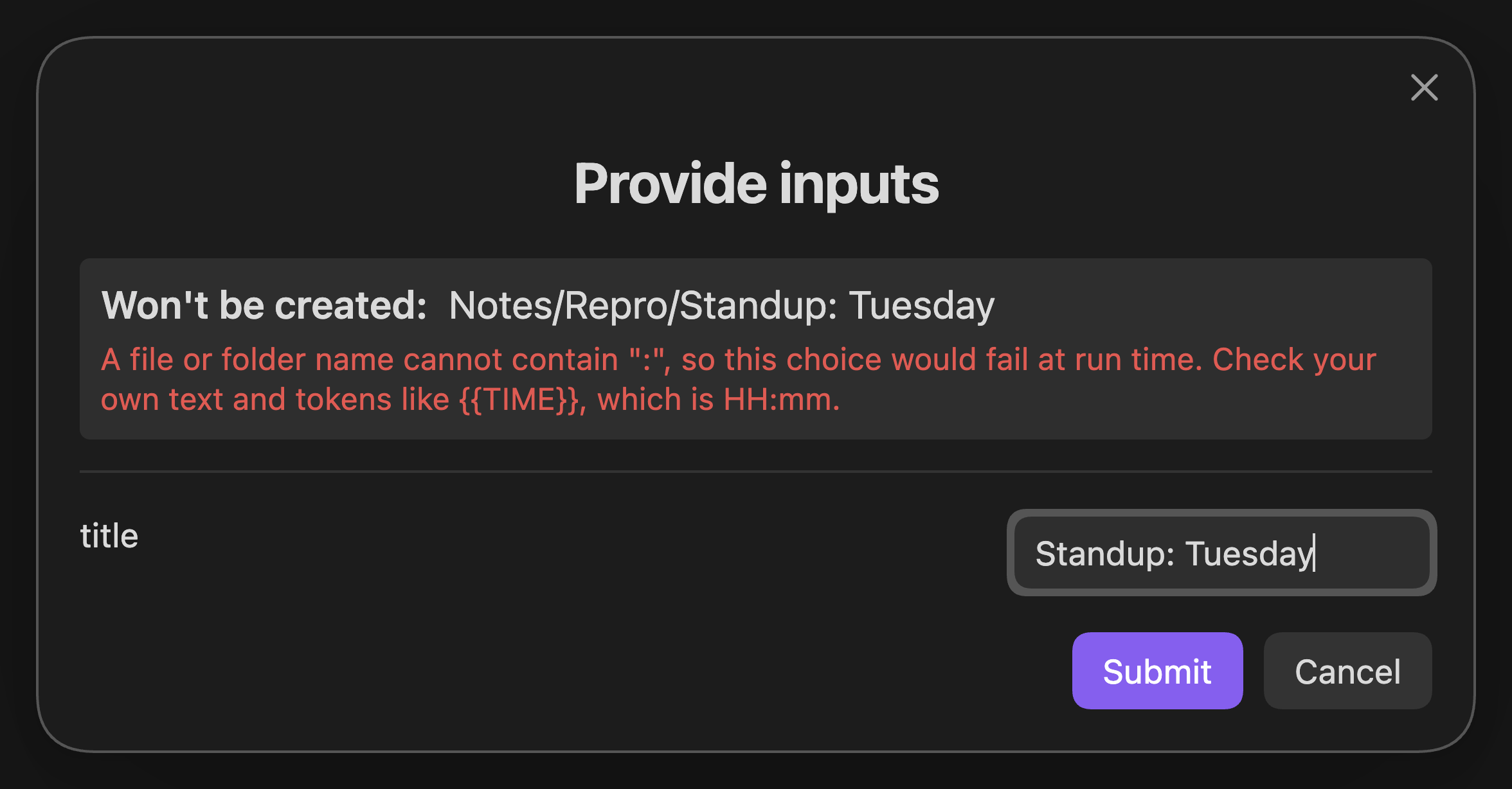
The most important change is that a bad target is rejected before QuickAdd starts doing work. If a title such as Standup: Tuesday would create an invalid Obsidian file name, the one-page input form says Won't be created and explains why:
| Before | After |
|---|---|
| 
|
QuickAdd now stops before creating folders, asking follow-up questions, reading and rendering templates, or running inline scripts. Existing notes with otherwise unsupported names remain usable.
Builder previews are also inert. They never run scripts, macros, nested templates, AI calls, clipboard-image writes, or vault pickers just to show a sample. When a value cannot be safely known in a preview, QuickAdd shows a neutral placeholder and a useful explanation.
Template frontmatter merges without losing set-like values
Applying a template in top, bottom, or cursor mode now performs a typed, non-destructive frontmatter merge.
Existing scalar values still win. Tags, aliases, and Obsidian multi-text properties keep the existing order and append only distinct values from the template.
For example:
# Existing note
tags: [project]
status: active

# Template
tags: [weekly, project]
status: draft

# Result
tags: [project, weekly]
status: active
Reapplying the same template does not duplicate weekly. Unknown arrays continue to use the conservative existing-value-wins behavior, and replace mode is unchanged.
Reliability and recovery
QuickAdd is now much harder to take down with one malformed entry.
- A malformed
data.jsonno longer hides every choice. Valid choices remain available, damaged entries are preserved, and the settings page shows exactly what could not be rendered. - A malformed folder no longer crashes the choice tree.
- A malformed macro command list opens in a repairable state instead of making the macro inaccessible.
- If one settings component fails to render, the rest of the settings page stays usable and the failed area explains what happened.
- Unknown or retired macro steps are reported instead of silently skipped.
- A failed action is reported once, at the correct boundary, with the most useful available message.
- Cancelling a Yes/No prompt is treated as a user answer, not as an error.
- Markdown-like views without an editor are handled as "no active editor" instead of causing a null-editor crash.
- A top-of-file capture keeps the blank line after frontmatter and never glues the new content to the closing
---. - A newly created choice is saved before its builder opens, removing a race where background settings writes could make it disappear.
Automation and interactive runs
The CLI and API result contract is more truthful:
- A Multi choice awaited from a macro, script, or interactive CLI run now completes only after the chosen leaf action finishes.
- A run with no person available to answer a picker or prompt stops with an actionable message instead of opening UI that nobody can use.
- A run no longer claims a file was created, modified, or opened when that side effect did not happen.
{{MVALUE}}answers collected by one-page input or passed withvalue-mvalue=are now consumed by the run instead of being requested again.- Cancellation has a typed internal contract rather than depending on English error-message matching.
AI behavior and documentation
{{VALUE}}prompts inside AI prompt templates now receive the same choice and run context as other QuickAdd prompts.- The system-prompt preview no longer pretends to resolve dynamic substitutions that the actual system prompt receives literally.
- The AI documentation now distinguishes settings copied into new commands from settings read live on every run.
- The documentation now clearly explains that AI prompt templates run the full trusted QuickAdd format pass, including templates, macros, and inline scripts.
- The unreachable legacy
InfiniteAIAssistantcommand type has been retired. It was never creatable or runnable in a released version. Existing hand-authored data is preserved and receives a clear message pointing to the supportedquickAddApi.ai.chunkedPrompt()API.
Mobile polish
On phones, folder rows now align their chevrons with the icon column and match the height of leaf choices. Toggle-only settings in builder modals stay inline with their descriptions instead of dropping the checkbox onto a separate row.
Complete user-facing changelog
New and improved
- Added Open QuickAdd settings to the command palette (#1526).
- Rebuilt first-run guidance, settings links, empty states, folder naming, and package availability (#1550).
- Redesigned builder field grouping, preview placement, labels, and autosave affordance (#1551).
- Turned format-token autocomplete into a described, context-aware reference (#1549).
- Added visible hints that advertise
{{autocomplete (#1570). - Added contextual runtime prompt titles, destinations, placeholders, and isolated drafts (#1555).
- Added structured, single-delivery failure reporting (#1617).
- Added typed set-like frontmatter merging for templates (#1638).
Preview and safety fixes
- Made builder previews inert and side-effect free (#1560).
- Improved file-name previews and readable
{{FIELD:}}filter warnings (#1582). - Stopped previews from promising file names Obsidian will reject (#1595).
- Unified builder, one-page-input, and runtime file-name behavior, with early aborts before side effects (#1618).
- Corrected AI system-prompt preview behavior (#1581).
Data and execution reliability
- Preserved valid choices when
data.jsoncontains damaged entries (#1629). - Kept malformed folders from taking down the plugin (#1583).
- Kept malformed macro command lists repairable (#1616).
- Kept the settings page partially usable and visibly diagnostic when one surface fails (#1592).
- Reported un-runnable macro steps instead of dropping them silently (#1623).
- Corrected cancellation and error reporting across choices and scripts (#1606).
- Made dismissed Yes/No confirmations cancel cleanly (#1573).
- Made interactive and non-interactive runs stop at the correct boundary and report only real side effects (#1632).
- Fixed Multi completion, AI prompt context, new-choice persistence, raw control bytes, and AI trust documentation (#1634).
- Retired the never-runnable Infinite AI Assistant command type without rewriting user data (#1633).
Notes, files, and UI
- Preserved the blank line after frontmatter when capturing at the top of a note (#1548).
- Treated Markdown views without an editor as no active editor (#1537).
- Made empty folders visibly unavailable before selection (#1569).
- Standardized folder terminology and Obsidian-style sentence case (#1562).
- Fixed phone-only folder-row and modal-toggle alignment (#1637).
Build and release hardening
- Made the split-pane E2E scenario wait for Obsidian's in-memory vault index, removing a release-gate race between a file reaching disk and becoming openable in the app (#1639).
- Pinned every build-tool consumer of PostCSS to patched 8.5.25, resolving GHSA-r28c-9q8g-f849 and removing vulnerable transitive copies from the lockfile (#1640).
Upgrading
There is no settings migration or manual conversion required for 2.20.0. Your existing choices, macros, templates, and packages continue to use the same stored configuration.
As always, update through Settings -> Community plugins -> Check for updates, then update QuickAdd.
If you maintain scripts or integrations, see the updated CLI documentation, QuickAdd API documentation, and format syntax reference.
Thank you, contributors
QuickAdd gets better because people take the time to contribute code, report problems clearly, share screenshots and reproduction steps, and test the result.
A special thank-you to:
- DavidJoy (@davidjoydong) for contributing the new Open QuickAdd settings command (#1526).
- @birthdaydog for reporting the frontmatter tag-merging problem (#1628) that led to typed, non-destructive set-like frontmatter merges (#1638).
- @nyukiher0 for reporting the active-view compatibility crash (#1536) that led QuickAdd to handle Markdown views without an editor safely (#1537).
Thank you as well to everyone who reported confusing behavior, revisited older issues, supplied reproduction details, shared before-and-after screenshots, and tested the fixes. Those contributions are what made this release possible.
The full code comparison is available in 2.19.1...2.20.0.