
This is the biggest QuickAdd update yet. The AI Assistant can now act as an agent that works in your vault - searching, reading, and (only with your approval) writing notes through tools you hand it. Prompts now write real typed properties - numbers, checkboxes, sliders, multi-select lists, date & time - instead of red untyped text. Capture can target notes by their properties, let you pick the heading at capture time, and keep newest-first logs that sort themselves. A new "New note from template" command runs any template without configuring a choice, {{CLIPBOARD}} now captures images, and the plugin itself is ~4x smaller, so Obsidian starts faster on every device - plus a security-hardening pass and a long list of quality-of-life fixes.
Note
Seeing this inside Obsidian for the first time? That's a fix, not a new habit. If you installed QuickAdd after late 2025, the default "Announce updates" level (Major versions only) never matched QuickAdd's releases - features ship as minor bumps (2.13 → 2.14), so those installs never got release notes in-app. Feature releases now announce as intended; patch releases stay quiet. You can change the level (or turn announcements off) in QuickAdd's settings.
🤖 Your AI assistant can now work in your vault
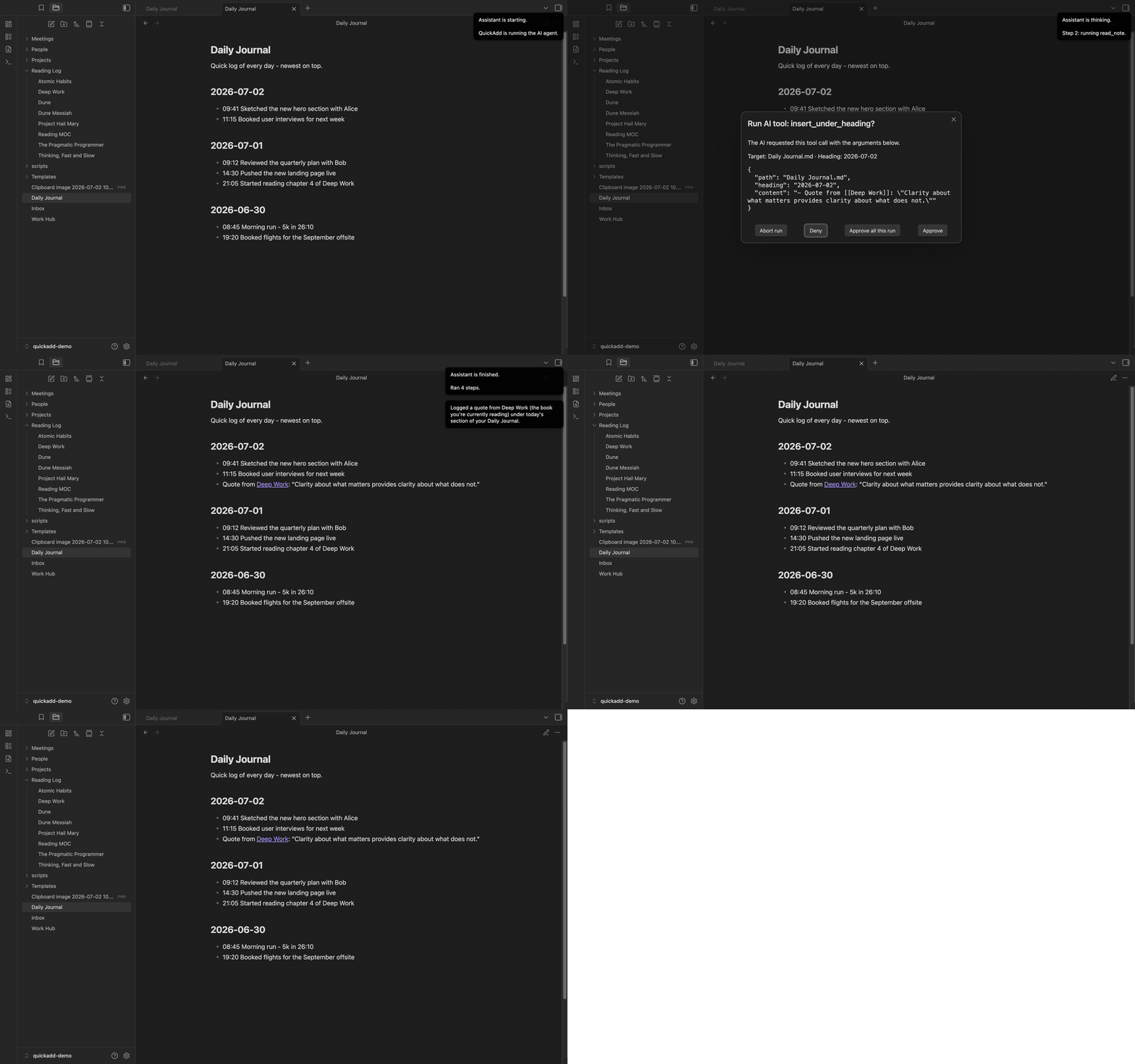
Until now, ai.prompt was one-shot: the model answered blind, with no way to look anything up. New in this release, a user script can hand the model tools - and it uses them in a loop until it has an answer. Ask "which books did I rate 5 stars this year?" and the agent actually searches your reading log, opens the notes, and answers from what it found:
module.exports = async ({ quickAddApi }) => {
  const agent = quickAddApi.ai.agent({
    model: "gpt-5",
    system: "You are a vault librarian. Ground every claim in the user's notes.",
    tools: { ...quickAddApi.ai.tools.vault({ only: ["read_note", "search_notes"], allowedRoots: ["Reading Log"] }) },
    stopWhen: quickAddApi.ai.stepCountIs(20),
  });
  const { text } = await agent.generate({ prompt: "Which books did I rate 5 stars this year, and what did I say about them?" });
  return text;
};
- Built-in tool groups you opt into:
ai.tools.vault()(read_note, list_notes, search_notes, get_property_values - plus write tools create_note, append_to_note, insert_under_heading),ai.tools.workspace()(active note, selection), andai.tools.system()(date). Or define your own withai.tool({ description, inputSchema, execute }). - Structured output:
agent.generate({ prompt, schema })returns a validated JSON object, not prose - perfect for feeding a template. - Works across OpenAI, Anthropic, and Gemini providers (and OpenAI-compatible local servers).
Safety is layered in, because an agent in your vault should earn its trust:
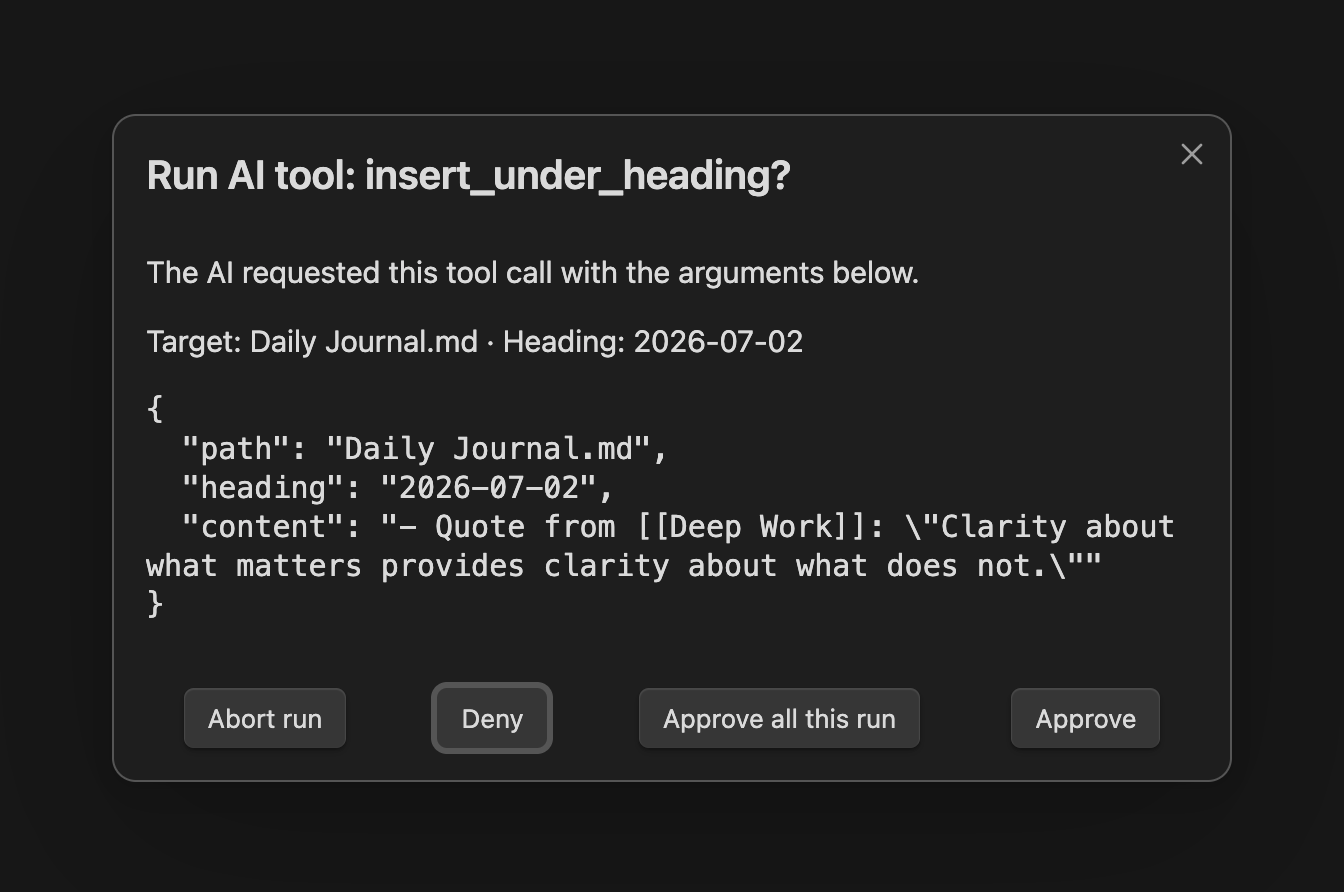
- The agent only ever has the tools you explicitly hand it - there are no ambient capabilities.
- Write tools pop a confirmation modal that says in plain language what the call will touch, with Deny as the focused default. A new "Confirm AI tool calls" setting (default: Destructive tools only) governs this.
allowedRootsfences a tool group to specific folders, so an agent can't surface notes outside them - enforced across every read tool.- Step and size caps bound the loop, and deliberately risky tools (delete, run choice, apply template) are not shipped in this first version.
One honest caution for script authors: the model chooses tool calls, and note content it reads can steer it. Treat tool results as untrusted input - the docs cover the details.
🪶 QuickAdd is ~4x smaller - Obsidian starts faster
QuickAdd's bundle went from 4.4 MB to 1.2 MB. Obsidian loads and parses a plugin's entire code at startup, so you feel this on every single launch - especially on mobile.
The weight was a bundled OpenAI-specific tokenizer, which was only ever accurate for some of the providers QuickAdd supports. Token counting is now a fast local estimate: scripts should use the new ai.estimateTokens(text) (the old countTokens still works as an alias), and chunked AI prompts plan with the estimator and automatically re-split if the provider says a chunk is too big.
🏷️ Prompts that write real typed properties
If you've ever had a template produce a red, "invalid" property - a number stored as text, a list crammed into one string - this section is for you. Format syntax placeholders can now declare their type, get the right input widget, and write properly typed Obsidian properties:
---
rating: {{VALUE:rating|type:number|min:1|max:10}}
finished: {{VALUE:finished|type:checkbox}}
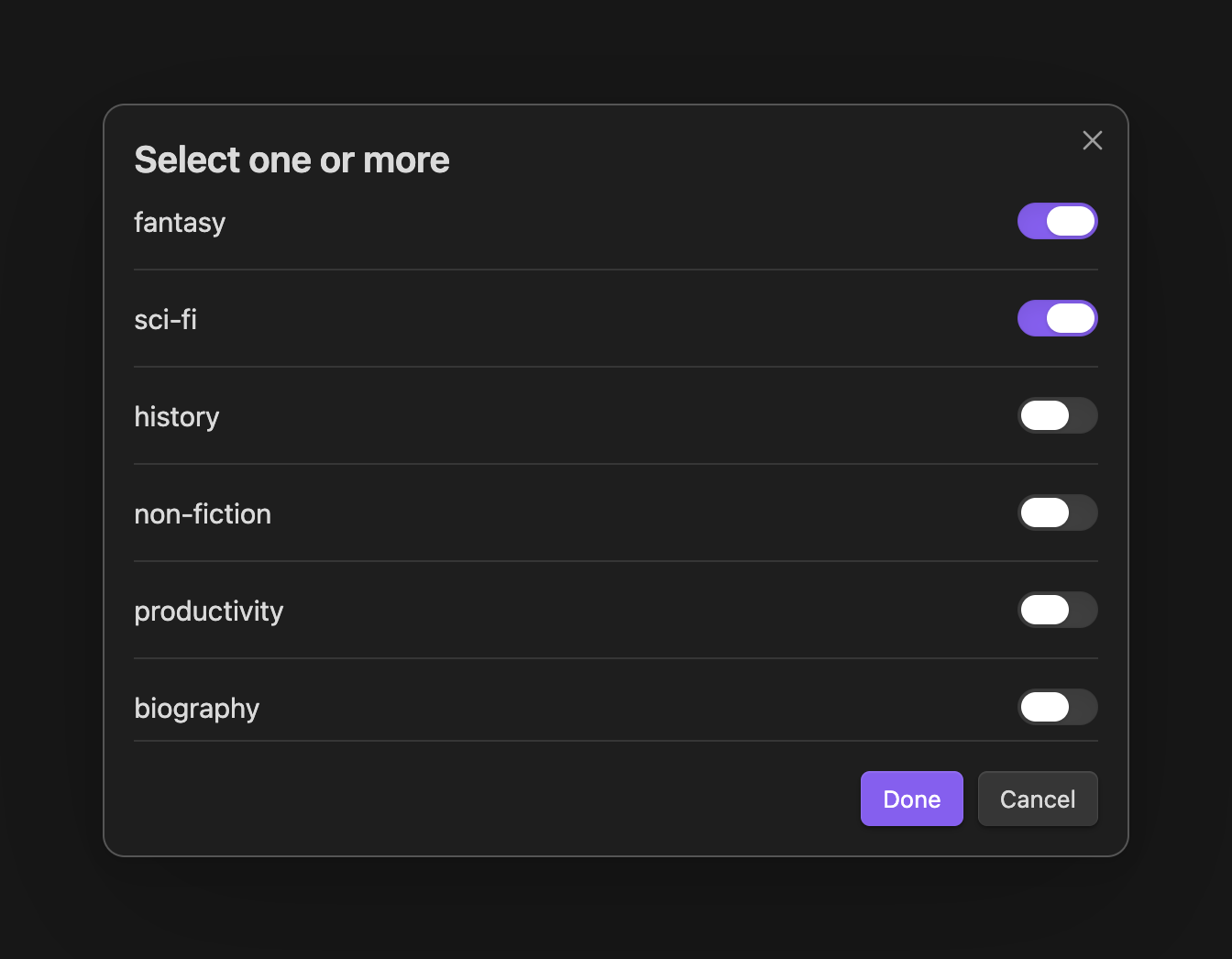
genres: {{VALUE:fantasy,sci-fi,history|multi}}
started: {{VDATE:started,YYYY-MM-DDTHH:mm|time}}
---
Run that book template and you get a numeric prompt, a true/false picker, a multi-select, and a date picker with a time control:
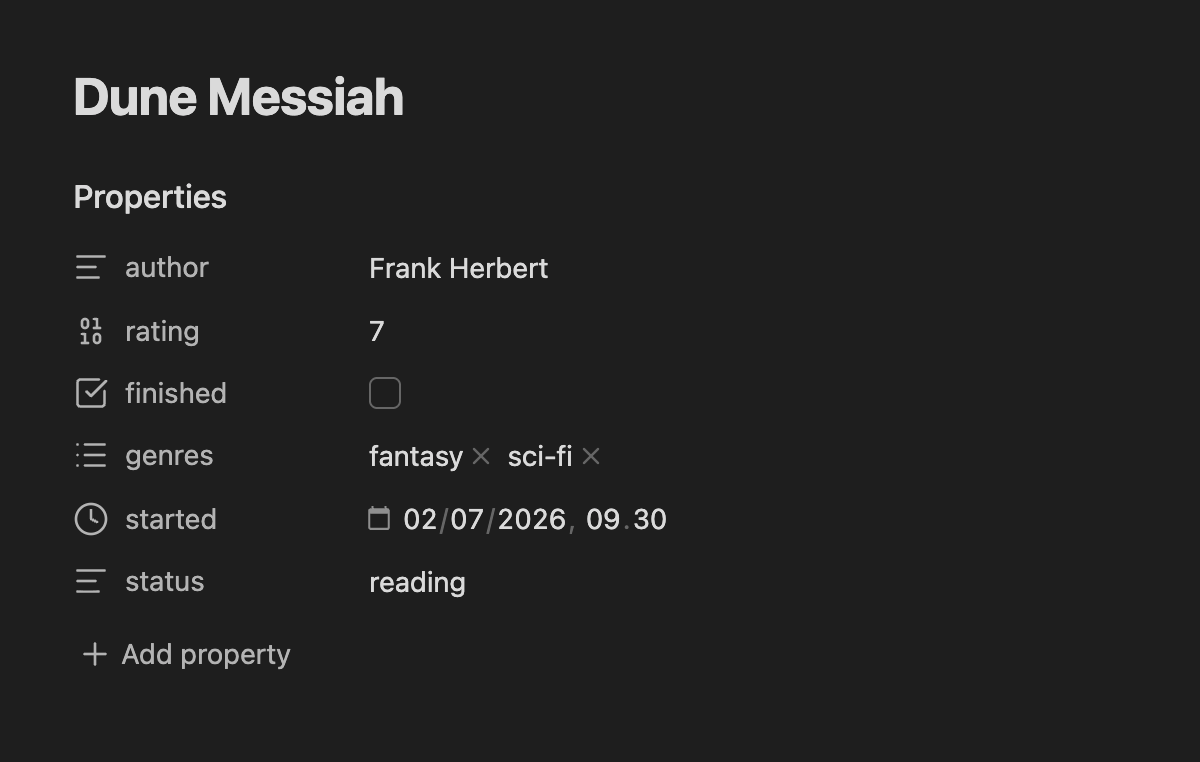
…and the created note's Properties panel shows a real Number, Checkbox, List, and Date & time. Nothing red:
-
Sliders:
{{VALUE:rating|type:slider|min:1|max:10|step:1|default:5}}shows a drag slider with a synced number field - ratings and priorities become one drag, even on mobile.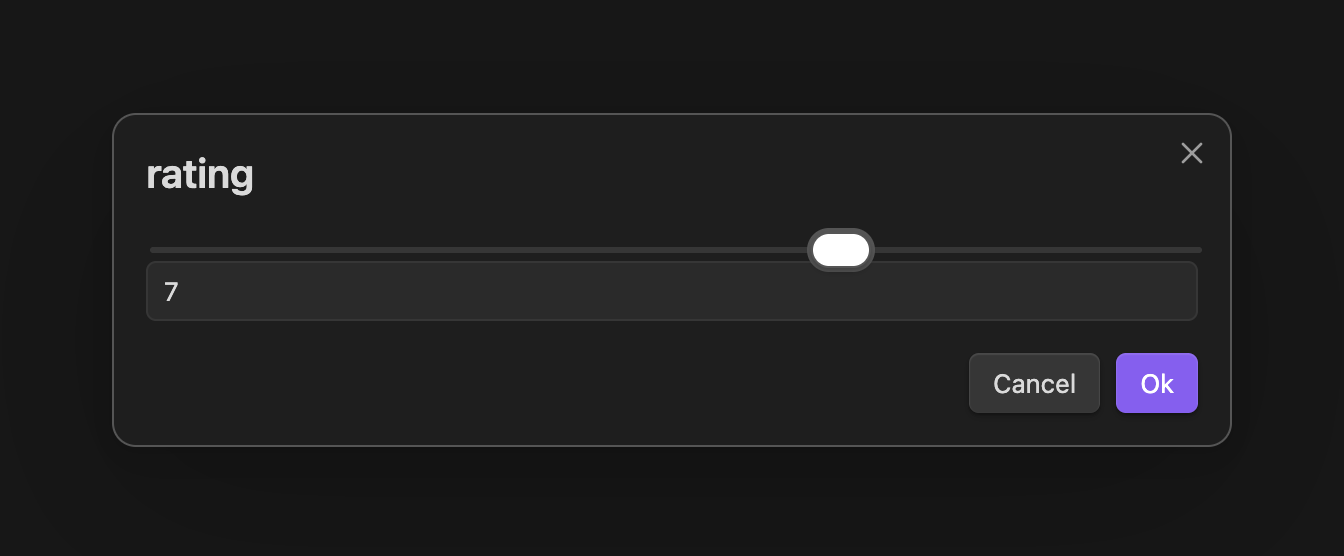
-
{{FIELD}}goes multi-select:{{FIELD:topic|multi}}gathers everytopicvalue across your vault and lets you check several - written as a real YAML list. -
Inherit metadata from the note you're in:
{{FIELD:project|default-from:active}}pre-fills the prompt with the active note's ownprojectvalue. Capture a task from inside a project note and its project property is already filled in. -
|type:textcloses the inverse trap: it quotes the value so0042stays text instead of silently becoming the number 42. -
Scripts get this for free: a macro that hands QuickAdd an array or object for a frontmatter field now writes a real List/object property out of the box - no beta toggle. The popular Movie & Series script finally produces clickable
cast/genre/directorlink lists instead of one broken red string (#662). -
Multi-select links:
|multi:linklistwraps each pick as a[[wikilink]];|multi|customlets you add off-list values.
🎯 Capture to notes by what they are, not where they live
Capture's "Capture to" field now accepts a property: target. Set it to property:status=reading and the note picker only lists notes whose frontmatter says so:
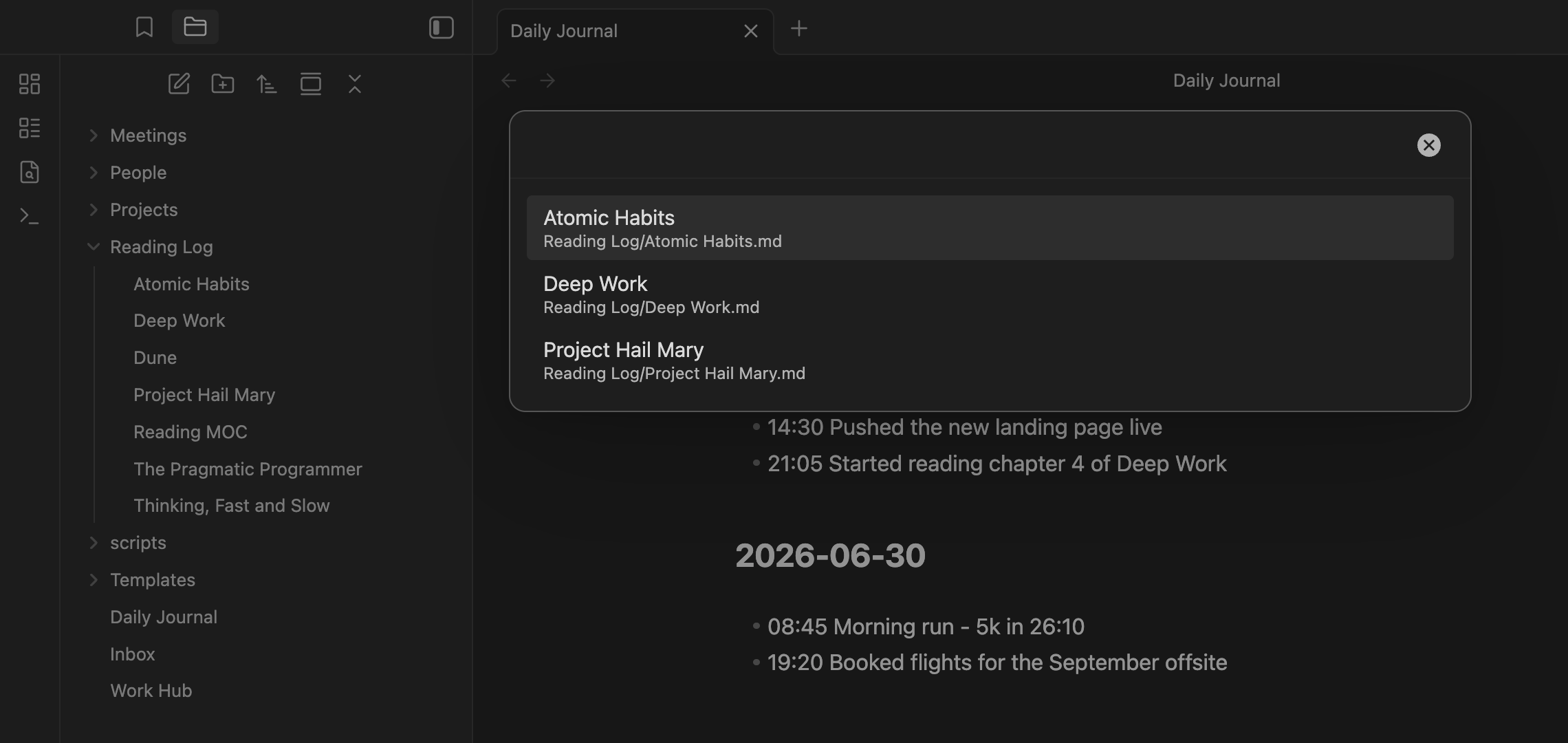
A reading log becomes one choice: Capture to property:status=reading, format {{DATE}} - {{VALUE:quote}}. Trigger it while reading, and the picker shows exactly your in-progress books - no more maintaining a folder just so a capture can find the right notes.
property:type(no value) lists every note that has atypeproperty.- Matching is case-insensitive and list-aware:
Status: Readingandstatus: [reading, favorite]both match. - Narrow further with pipe filters -
property:type=draft|folder:Notes, plus|tag:,|exclude-folder:,|exclude-tag:,|exclude-file:. - The value can itself be a token that resolves at run time:
property:status={{VALUE}}.
📌 Capture lands exactly where you want
Two placement upgrades that finally unlock classic workflows:
Pick the heading when you capture. "After line…" gains a Choose heading when capturing toggle: instead of hard-coding a target line in the choice, QuickAdd reads the note at capture time and shows a dropdown of its actual headings. Project notes with changing sections stop needing one choice per section:
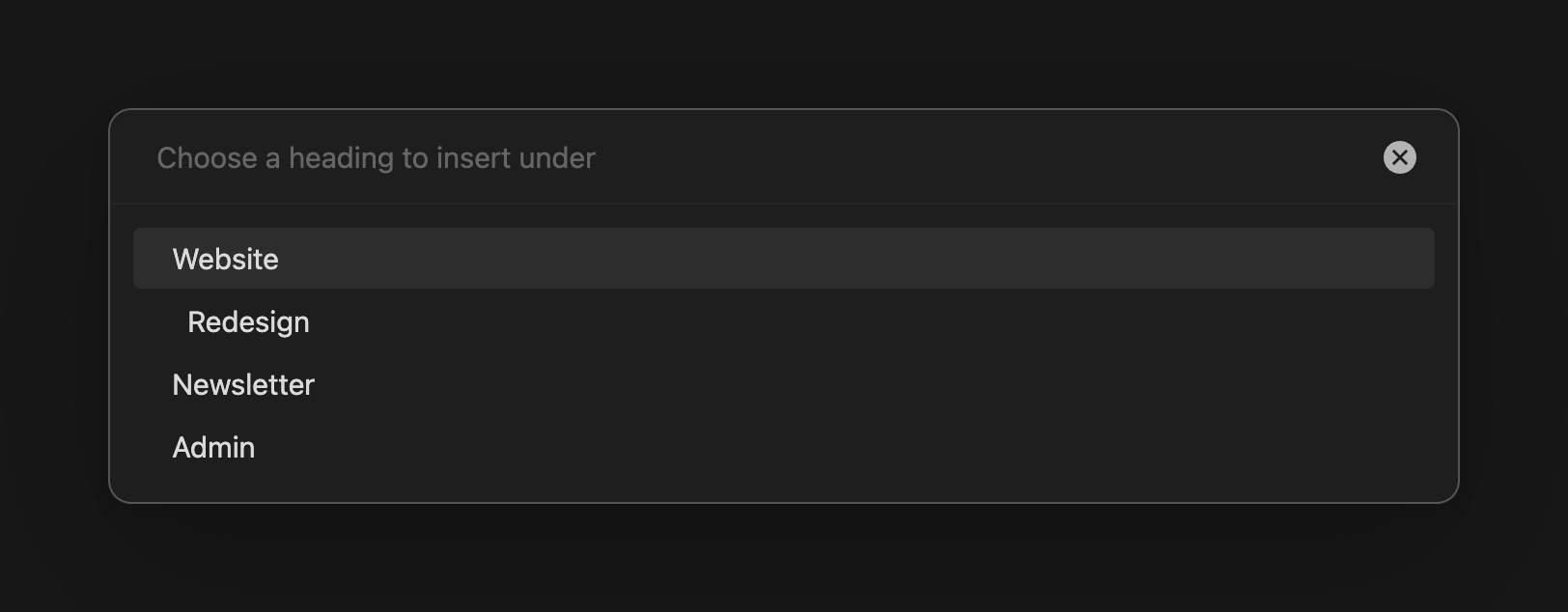
Ordered sections: logs that sort themselves. "Create line if not found" gains an Ordered placement. When your insert-after heading (say ## {{DATE:YYYY-MM-DD}}) doesn't exist yet, QuickAdd creates it at its sorted position among sibling headings - by date, number, text, or even semver:
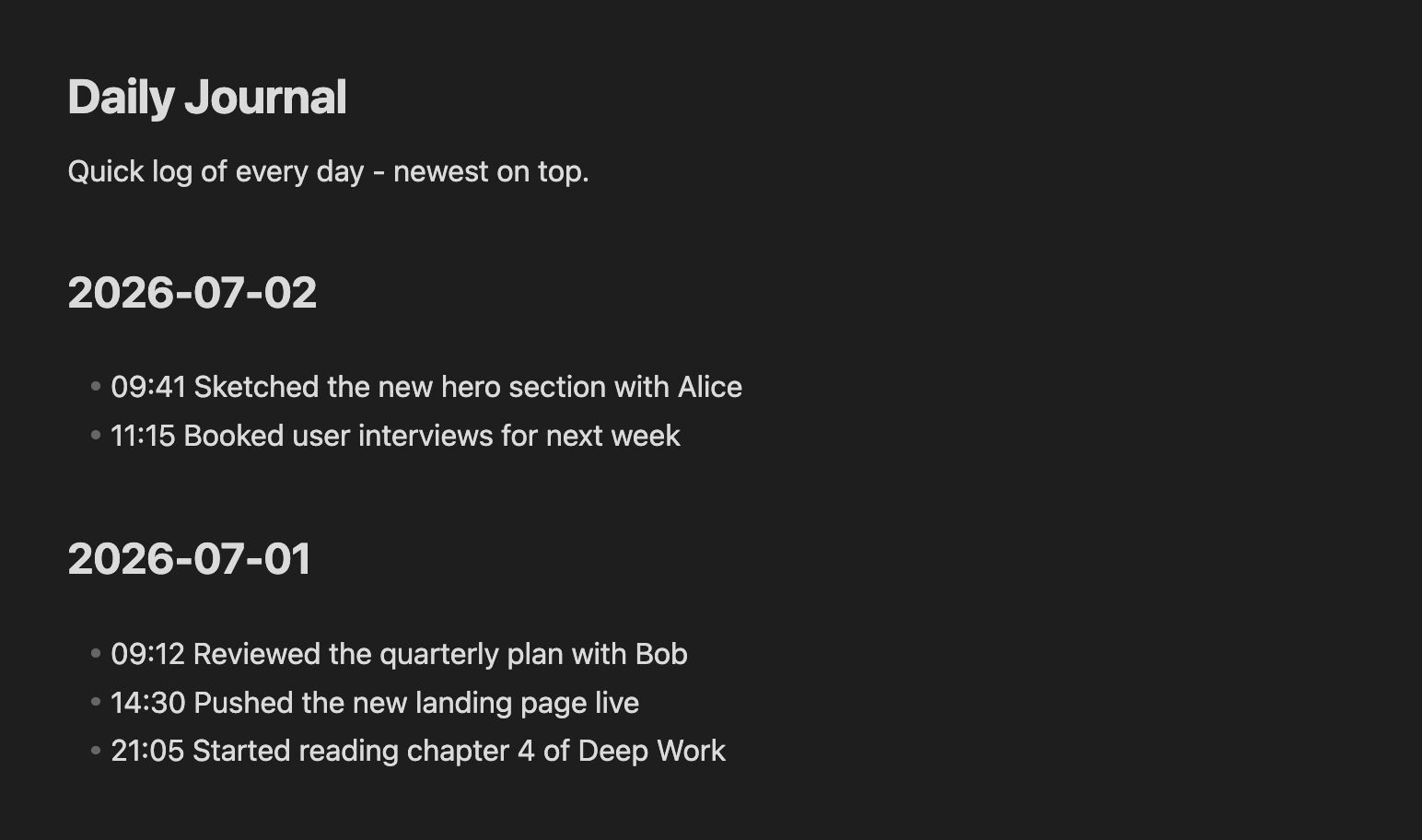
The newest-first daily log - impossible with one capture until now - just works: your pinned intro stays on top, each new day's section is created below it and above older days, and repeat captures the same day find the existing heading instead of duplicating it (#481). The same mechanism keeps a changelog sorted with 1.10.0 above 1.9.0.
Also in this area: when a capture opens the target note afterwards, the cursor now lands right after what you captured instead of at the top of the file (#348) - keep typing exactly where the text landed.
📎 {{CLIPBOARD}} captures images too
Copy a screenshot, run your usual {{CLIPBOARD}} capture, and QuickAdd now saves the image as a vault attachment (following your Obsidian attachment settings) and embeds it:
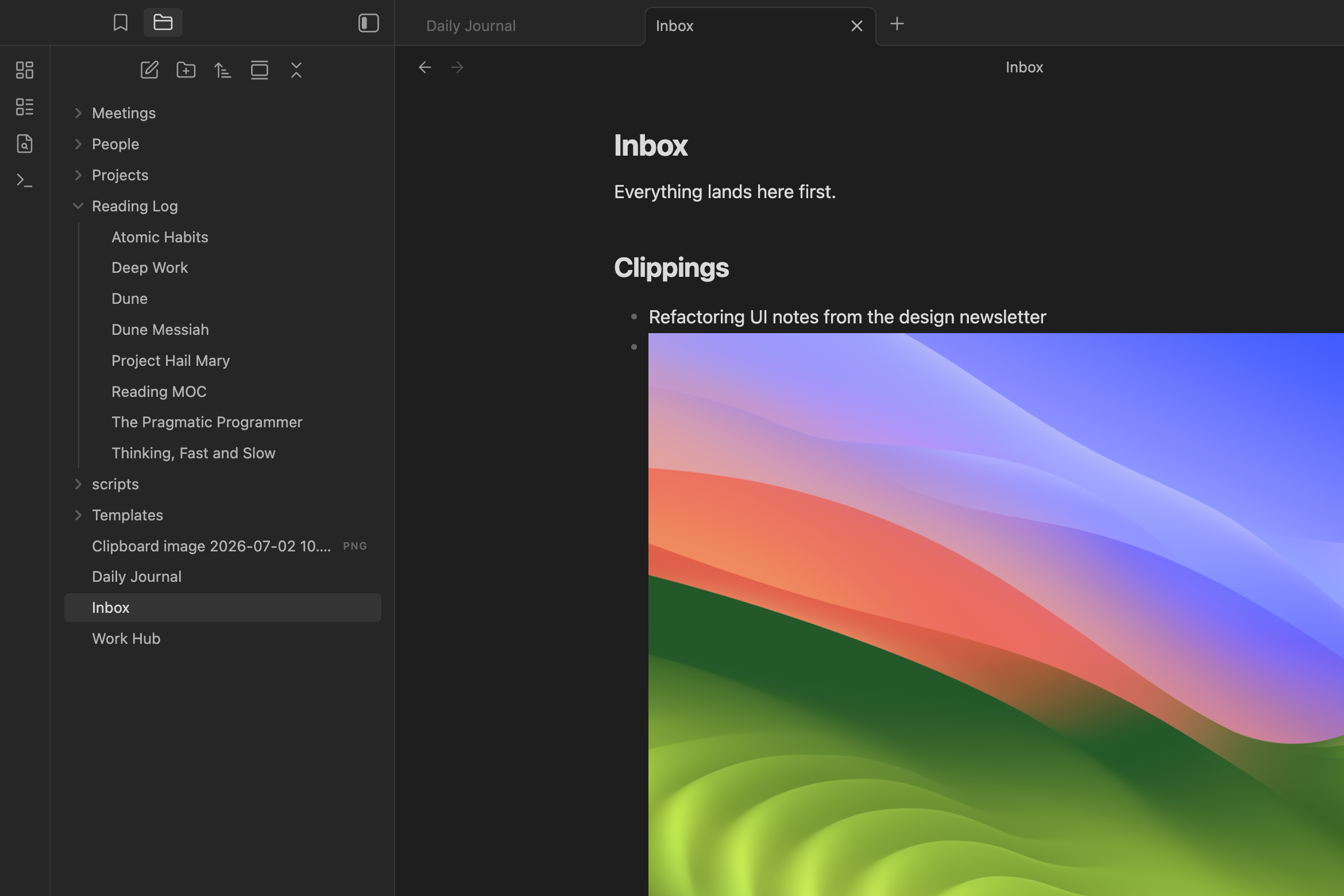
Text on the clipboard behaves exactly as before - one capture choice now handles both. Repeated {{CLIPBOARD}} tokens in one capture reuse the same saved attachment.
📄 Templates without the busywork
-
"New note from template" - a new command (and a row in the Run QuickAdd picker) that lists every template in your template folder(s), asks for a name, and creates the note. You no longer need one Template choice per template file; the folder is the menu (#1023).
-
Multiple template folders: Settings → Templates & Properties now takes a list of folders - a personal
TemplatesplusWork/Templates, all feeding suggestions. Your old single folder migrates automatically (#1170). -
Search existing notes before creating. The name prompt can now search while you type: matching notes (and unresolved
[[wikilink]]targets) appear above an explicit "Create new note" row. Typing "Alice" surfacesPeople/Alice.mdbefore you create "Alice 1" (#184).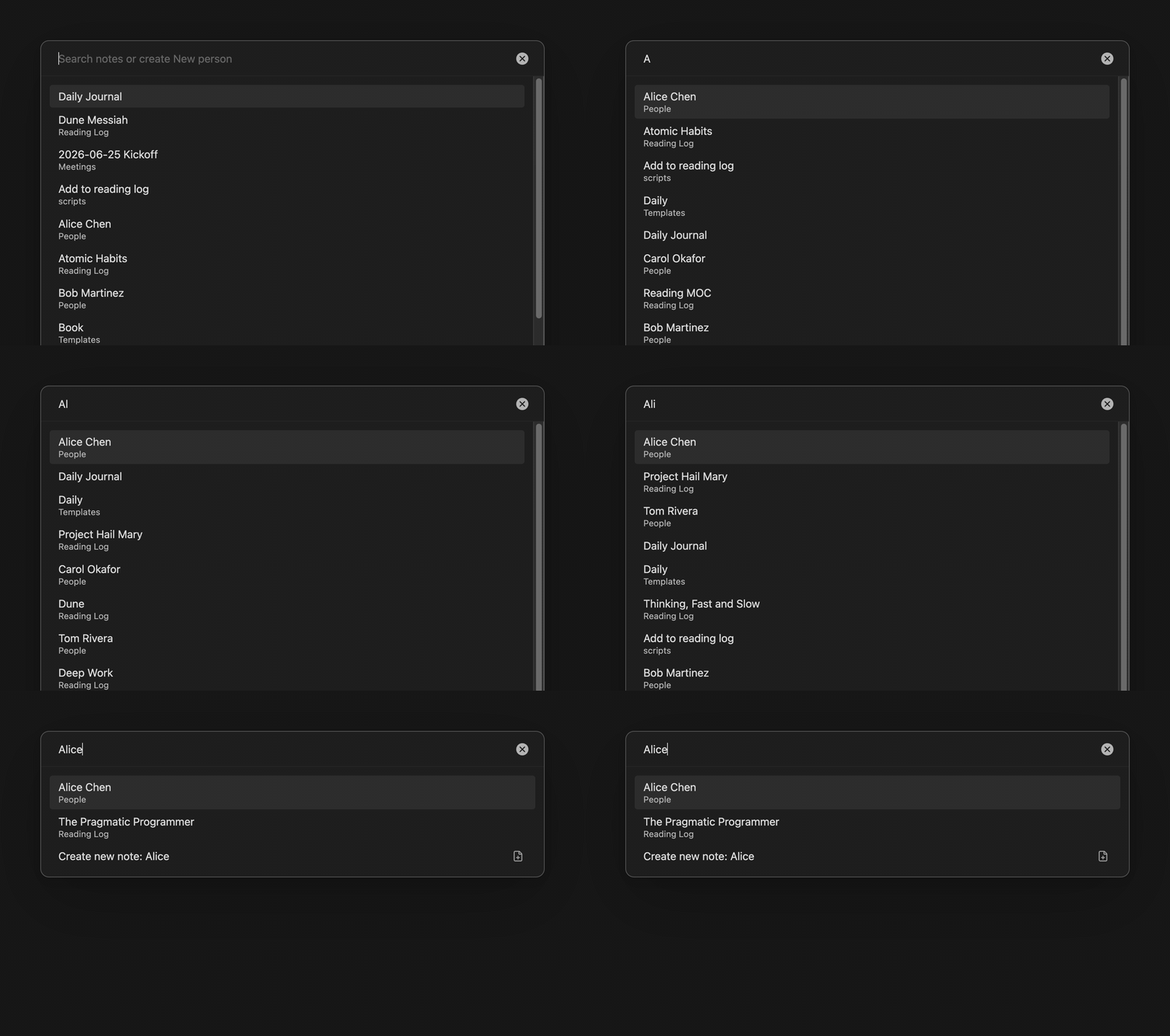
-
Format syntax in the template path:
Templates/{{VALUE:collectionName}} Template.mdprompts once and picks the matching template - one choice serving a whole family of templates (#620). -
One "New note location" dropdown replaces four tangled toggles in the Template builder: Obsidian default, specific folder, same folder as current file, or ask each time - and switching modes no longer looks like it deleted your folder list (#1131).
-
Copy link to clipboard: Template choices (and now Capture choices too) can put a wikilink to the created/captured note on your clipboard - paste it into your reading list, daily note, or a chat (#600).
🔗 Links that keep your indexes up to date
The "Append link" feature grew from one behavior into a small routing system:
-
Append to a specified note: every note a choice creates can register itself in an index note or MOC -
[[The Pragmatic Programmer]]lands at the bottom ofReading MOC.mdautomatically, while you stay wherever you were working (#146). -
Append into a frontmatter property: name a property (e.g.
meetings) and the link is written into that property on the active note as a real list item - create a meeting note from a project hub and the hub'smeetingsproperty collects it. Handles create/convert/require-list modes, via Obsidian's own frontmatter API (#768).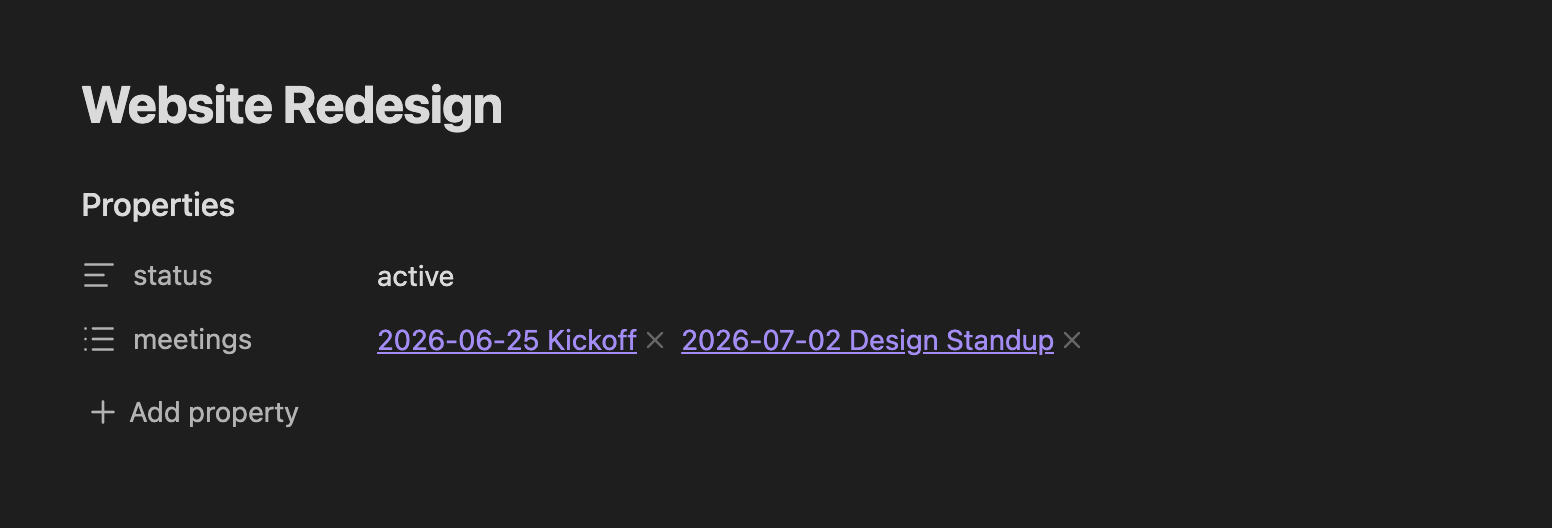
-
Embed works with every placement: Link type = Embed is now honored for New line, End of line, and After selection - not just Replace selection.
![[2026-07-02 Standup]]on its own line in your daily note renders the meeting inline (#1422).
🔎 Pickers you can actually read
-
Recent notes first: capture note pickers now sort like the Quick Switcher - this session's notes, then your recents, then everything else predictably - instead of surfacing whatever sorted first in the vault registry (#745, #539).
-
Titles, not UUIDs: file pickers label notes by frontmatter title (then first heading, then filename). Zettelkasten vaults where every row read
202606181045.mdbecome legible - search still matches the real path (#491). -
Compound filters and multi-picks:
folder:Goals|folder:Projects|tag:active|exclude-folder:Archivescopes a picker to exactly "active work notes in either folder", and{{FILE:People|multi|link}}picks several people at once, written as a YAML list of wikilinks (#528, #467). The Capture To field shows live green/red feedback as you type filter syntax.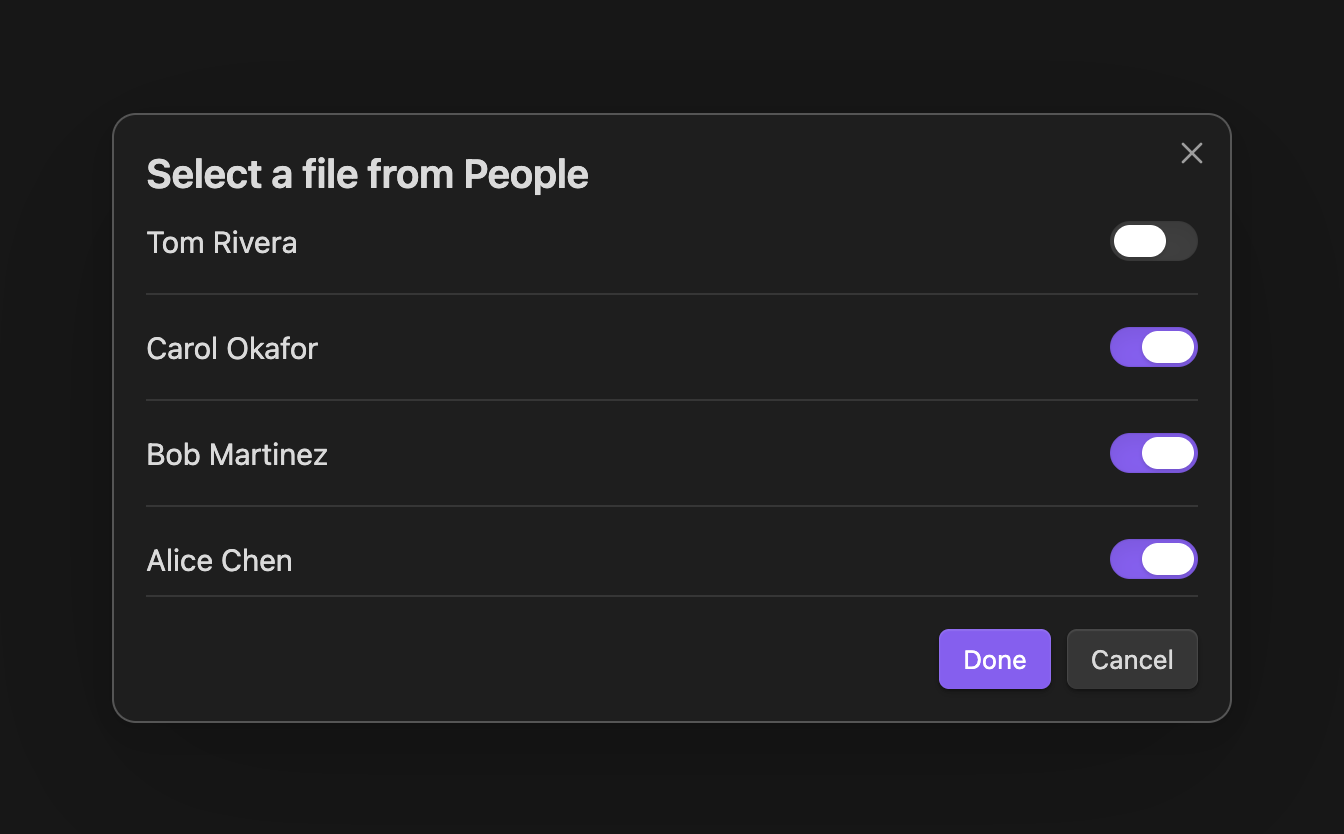
-
Icons for your choices: every choice type gets a sensible default icon in the picker and on its command - including the mobile toolbar, which used to show
?for every QuickAdd button. Override per choice with any Lucide icon name (#428, #766).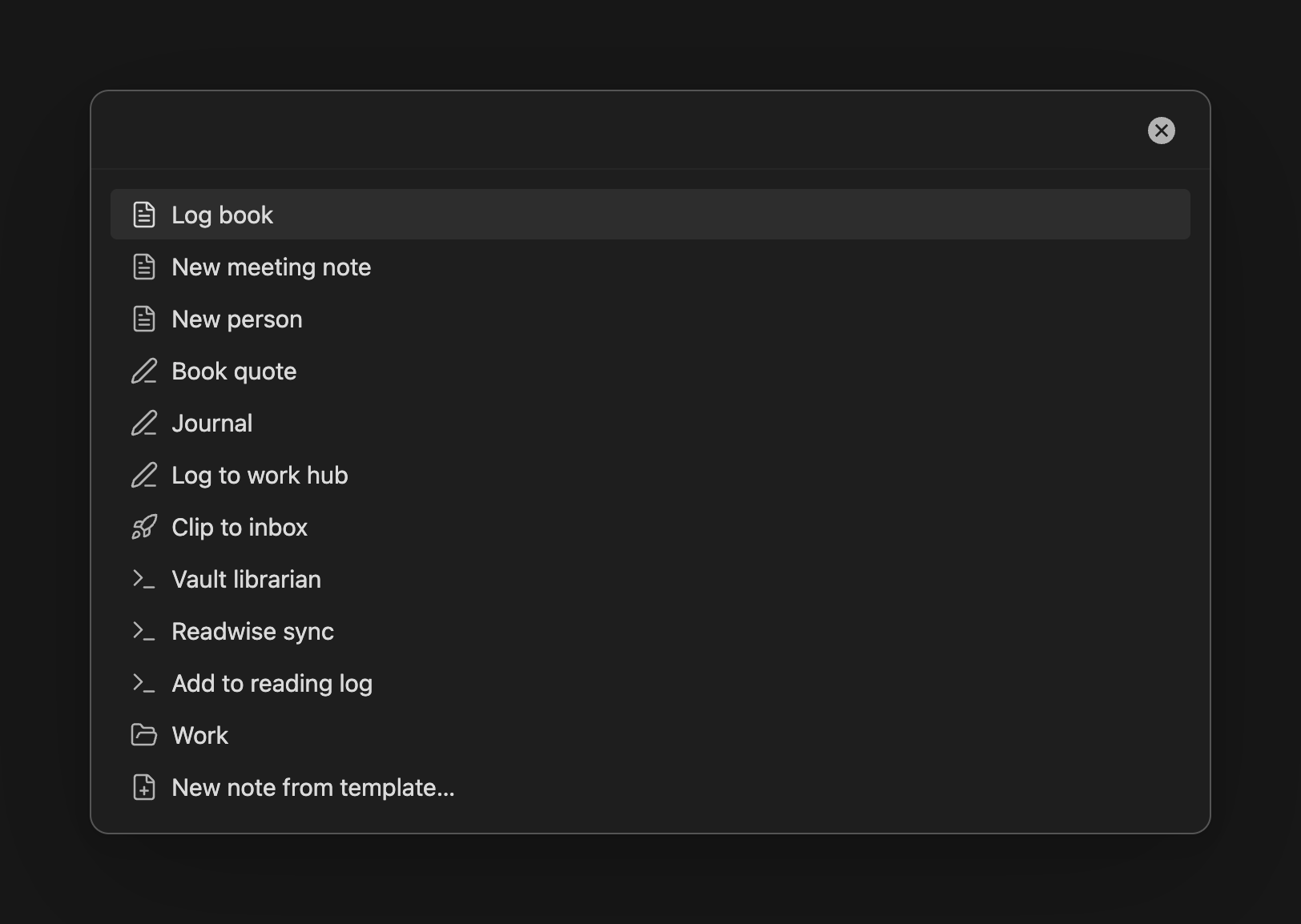
✨ New format tokens & prompt upgrades
{{FILE:People}}opens a picker over a folder's notes -|linkfor a wikilink,|pathfor the vault path, plus|multi,|custom,|label:, and tag/folder filters. Your "metadata folders" (People/, Projects/) stop drifting into inconsistent retyped names (#933, #1159).{{FOLDER}}resolves to the folder the note is being created in ({{FOLDER|name}}for just the last segment) - let the destination drive file names and breadcrumbs (#1258).{{linksection}}links to the heading your cursor is under: capture a task out of a long note and the backlink is[[Project Plan#Tasks]], not the top of a 2,000-line file (#387).- Date snapping:
|startof:/|endof:withyear,quarter,month,week,isoweek,dayon{{DATE}}and{{VDATE}}. A weekly planner named{{VDATE:d,gggg.MM.[Wk]w|startof:week}}finally files a month-straddling week under the right month - one date prompt, snapped in the filename, day-accurate in the heading (#511). - Named suggesters:
{{VALUE:Personal,Work,Errand|name:category}}- pick once, reuse the answer anywhere with{{VALUE:category}}: file name, tags, and body from a single prompt (#148). |trimstrips stray whitespace per token -[[{{VALUE:title|trim}}]]stops mobile keyboards' trailing spaces from creating phantom duplicate notes.- Commas inside options:
{{VALUE:"Blocked, waiting on reply",In progress,Done}}- quote an option to keep its comma (#239). - Tab indents in the multi-line prompt instead of jumping focus - nested checklists inside a capture prompt at last (#764). (Shift+Tab still moves focus out.)
⚙️ Automation that reports back
-
x-callback-url support:
obsidian://quickaddURIs can carryx-success,x-error, andx-cancelcallbacks. An Apple Shortcut can trigger a capture and learn the outcome - including the created note's path and a ready-madeobsidian://openURL to jump to it. Off by default; enable Allow URI x-callback-url in settings; onlyshortcuts:andobsidian:callback schemes are permitted (#1070). -
Run user scripts from a note's code block: a macro's user script can now live inside a ```js fence in a regular note - editable anywhere, including mobile, with your own prose around it. The script picker lists qualifying notes right beside your
.jsfiles (#1065).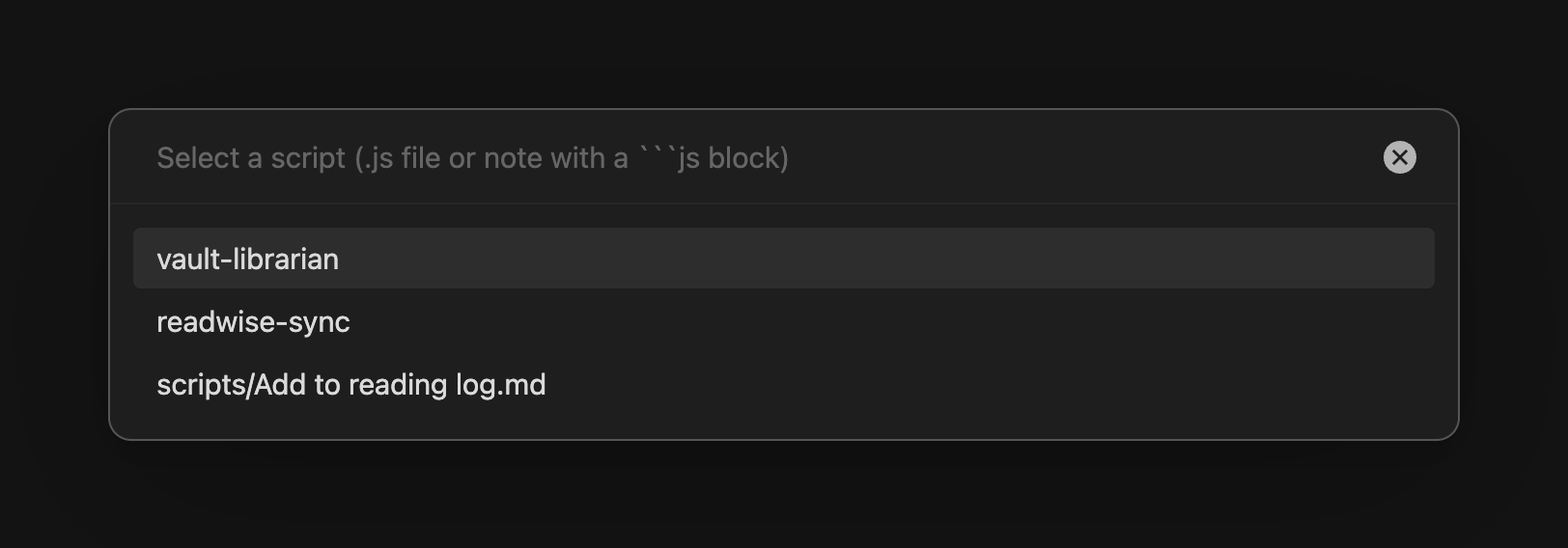
-
Headless runs fail fast: a CLI/URI run that needs a prompt it can't pre-answer now returns a clean
{ok:false}error envelope with an actionable message in milliseconds, instead of hanging a terminal forever (#1428).
🛡️ Hardening & trust
An internal security audit drove a large hardening pass this cycle - proactive fixes, no known exploitation in the wild. Most users will notice nothing except stricter package imports and the disappearance of freeze-on-paste stalls, which is exactly the point:
- Imported packages are contained to your vault and fully disclosed. A shared package can no longer write outside your vault or into
.obsidian/; every bundled file that could run as code is flagged for explicit acknowledgement before Import unlocks - even one disguised asnotes/helper.txt. Packages with colliding or divergent contents are refused outright. Honest packages import exactly as before. - Template and Capture writes are locked to your vault. File names built from tokens (or smuggled in via
obsidian://links, which any webpage can offer) can no longer traverse out of the vault or silently redirect a capture to a different note than the one you configured. - A whole class of freeze-on-paste bugs is gone. Seven-plus regular expressions that could lock Obsidian's UI for seconds-to-minutes on unlucky content were rewritten as linear-time scanners - proven byte-identical on millions of fuzz cases. A 400 KB clipboard paste that took ~11 seconds now takes ~2 ms.
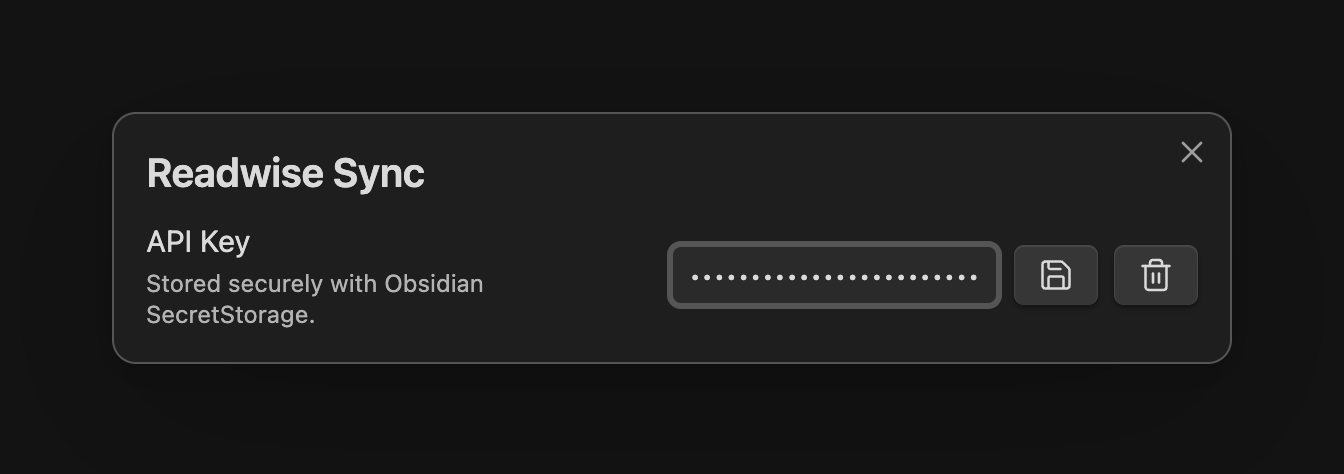
- Secrets live in Obsidian's secret storage, not
data.json. User scripts can declaretype: "secret"settings: masked input, OS-keychain-backed storage, never synced, never exported in packages. AI provider keys already worked this way - and the migration now retries until every old plaintext key is actually moved. - We also hardened the release pipeline itself (scoped, non-persisted release credentials; build provenance attestation), so the
main.jsyou download is verifiably the one CI built from this repo.
⚠️ Behavior changes to know about
Honest disclosure - a few things now behave differently, almost all of them for the better:
- Empty captures abort with a "nothing to capture" notice instead of inserting a blank line.
- Copy-link actions honor your vault's link-format setting - Markdown-link vaults now get
[text](path)where QuickAdd always emitted wikilinks. - Anonymous
{{VALUE|default:X}}actually applies its default when you submit empty (previously only the named form did). - Generated note paths are stricter:
./..segments abort, backslashes count as path separators, trailing dots/spaces are trimmed per segment. trim,name:, andoptionalare reserved words in{{VALUE}}options (write|default:trimif you want the literal text).- Quoted options parse differently:
a,"b",cnow strips the quotes; a fully quoted"a, b"is one option, not two. - Appending a template to a
.canvas/.basefile is blocked - it used to corrupt the file's JSON. - Variable names starting with
__qa.are reserved and refused in URI/CLI parameters and capture variable assignment. - Package files that previously imported may now be refused with an error if they do something the review screen can't honestly represent.
🐛 Fixes
A themed selection of the ~60 fixes in this release:
Capture & templates
- Captured text no longer glues onto the next line when your format doesn't end in a newline -
## Log+ a capture no longer producesnew- existingcorruption. - Multi-line "Insert after" targets are found on later runs instead of being re-created every capture - the target block no longer duplicates (#742); inline captures with multi-line targets abort clearly instead of writing garbage (#468).
- Top-of-note insertion is frontmatter-aware - captures and apply-template no longer write above or into YAML properties (#647).
- Task captures no longer add a stray blank line below the inserted task (#312).
- Backslashes survive capture:
\nablaandC:\Users\nadiaare taken verbatim instead of being mangled into linebreaks (#527). - Template self-inclusion can't hang QuickAdd anymore, and preflight over dense
{{TEMPLATE:…}}graphs went from exponential to linear - one pathological setup dropped from ~1M rescans to instant. - Appending a template to an existing note merges frontmatter instead of stacking a second
---block that displaced your properties. - The one-page input form finds prompts inside included templates, so questions appear up front instead of popping mid-run.
- The multi-line prompt no longer doubles backslashes (
C:\tempstayedC:\temp, notC:\\temp).
Prompts & pickers
- A note named like a format token can't freeze Obsidian anymore (
{{filenamecurrent}}.mdwas an infinite loop), and{{SELECTED}}no longer hangs when the selection contains itself (#1358). - Typos fail loudly: invalid
|case:styles, unknown FIELD filters, and conflicting|name:definitions warn instead of silently doing nothing. - A batch of 18 prompt fixes: Tab no longer crashes an empty suggester, the math prompt submits with Cmd+Enter, unparseable dates warn, the one-page form auto-focuses and submits on Enter.
- Suggester leaks fixed (per-keystroke Popper instances, per-row scroll listeners, tag-listener accumulation) - prompts stay fast no matter how many you open.
- The date-format preview no longer corrupts month/day names ("March" previewing as "3arch").
- Search highlighting aligns for Unicode note names (Turkish İ no longer shifts the highlight).
Choices & settings
- Editing a choice keeps your scroll and cursor position - toggles no longer bounce you to the top of the form (#1130).
- Editing a folder from a filtered/search view no longer deletes its hidden children on save, and configuring a nested choice no longer crashes with DataCloneError.
- A duplicated choice id (from device sync) no longer blanks the whole settings page - QuickAdd self-heals on load.
- Global Variables no longer lose data when clearing or duplicating a name mid-edit.
- The update modal can be closed on iPhone - the X was hiding under the Dynamic Island (#635).
Macros & automation
{{MACRO:Name::member}}conflicts resolve gracefully again (a 2.12.1 regression), a macro referencing a deleted choice skips it with a message instead of crashing, and aborting inside a Conditional branch actually halts the macro.- One failing startup macro no longer blocks the rest, and command palette entries stay in sync when duplicating or deleting choices.
quickadd:runsuccess envelopes carry averifiedfield - no moreok:truewhen no file was created.
AI assistant
- Errors name your actual provider with the real error message - no more "Assistant is dead.", no more blaming OpenAI for a Gemini failure.
- Chunked prompts keep their separators - long content no longer reaches the model with lines run together.
- Agents on OpenAI no longer fail mid-loop after a tool call, and the assistant-command settings modal no longer opens blank for default/removed models.
- Folder scoping is anchor-exact: scoping tools to
Projectsno longer also exposesProjectsArchive/andProjects 2024/.
🧰 For script & template authors
-
Secret settings: declare
type: "secret"(optionally with a stableid) in a script's settings block - masked input, SecretStorage-backed, stripped from package exports:settings: { name: "Readwise Sync", options: { "API Key": { type: "secret", id: "api-key", placeholder: "Paste API key" }, }, }
-
New AI surface:
ai.agent(),ai.tool(),ai.tools.vault()/workspace()/system(),ai.stepCountIs(),ai.hasToolCall(),ai.estimateTokens(text);ai.prompt/ai.chunkedPromptacceptassignToVariable, andchunkedPrompttakesmaxChunkTokens. -
Deprecation:
ai.countTokens(text, model)still works but returns a provider-agnostic estimate and ignoresmodel- switch toestimateTokens(text). -
requestInputsgainsnumberandsliderinput types (numericConfig/sliderConfig) plus anoptionalflag;checkboxPrompttakes a header argument;fieldSuggestions.getFieldValuesfilters across multiple folders. -
Behavior change:
executeChoicewith an unknown choice name reports the error and returns instead of throwing - a script relying on the crash to stop a macro will now continue past the call. -
Sharing code between scripts is now a documented pattern (one shared
.jsmodule +require()with a runtime-built path), and the Capture docs gained recipes for capturing one entry to multiple notes.
📚 Full documentation at quickadd.obsidian.guide. Found a bug or have an idea? Open an issue - and if QuickAdd saves you time, consider supporting development ❤️
Full commit-level changelog
2.14.0 (2026-07-02)
Bug Fixes
Features
Performance Improvements