
Your Rivian knows where it is going, and now Riviamigo can show you. This release puts the vehicle's navigation route on the Overview map, tidies up the vehicle panel beside it, stops other cars' Wall Charger sessions from landing in your charging history, and fixes a dashboard that never stopped redrawing itself.
Thank you to @yorek, whose report in #122 led to the Wall Charger fix.
Vehicle Overview
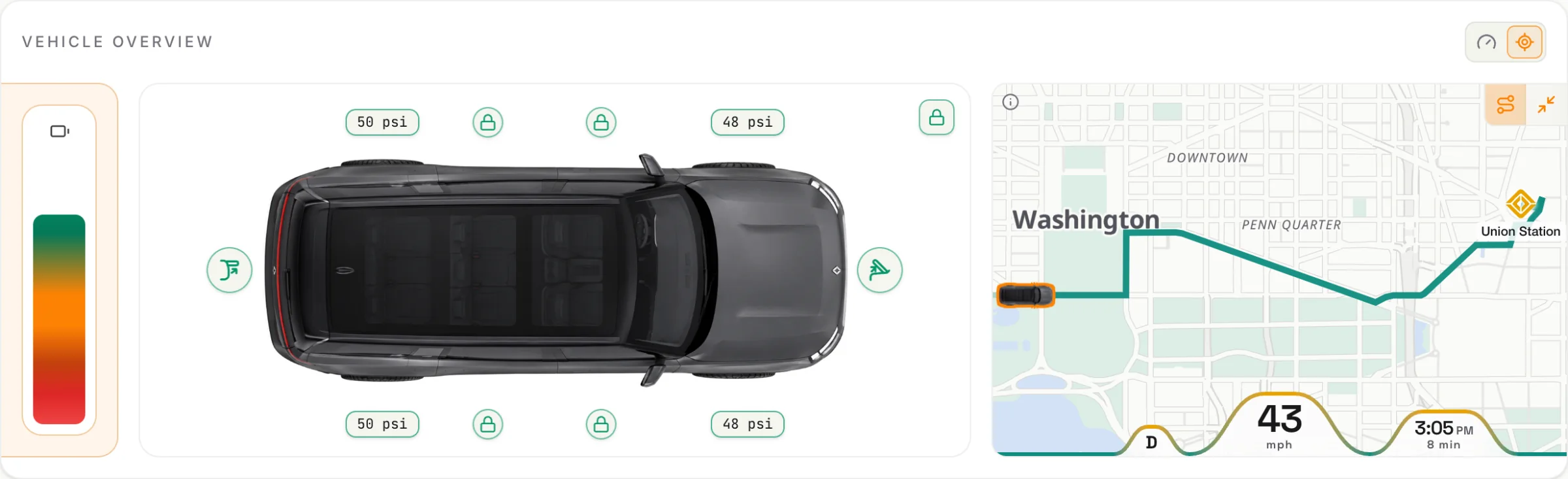
- Navigation on the map. While the vehicle is navigating, the Overview map draws the route it planned, with the part already driven dimmed. The destination is marked with a gold Rivian mark and its name. A charging stop the vehicle added along the way is marked with a bolt, and any other stop with a pin.
- Arrival time. The wave along the bottom of the map gains the arrival time, with the time left beneath it.
- Whole route. A new button beside Expand zooms out to show what is left of the trip: the vehicle, the remaining stops, and the destination. Press it again to go back to following the vehicle.
- Nothing about the trip is kept. The route, the stop names, and the arrival time are shown live and never stored: not in the database, your history, backups, logs, or ingestion captures. They disappear when navigation ends.
- Charging at a glance. Parked on a charger, a bolt beside Parked shows the charging state: grey over Plugged in while no power is flowing, lit over Charging while it is.
- A centered vehicle. The vehicle picture, its tire labels, and its lock icons sat left of center. They are now centered for every vehicle picture and screen size.
- Lock state as an icon. The "Locked" label in the corner is now a padlock: green and closed when the vehicle is locked, open when it is not. Hover over it, or tap it on a phone, to see each lock by name. It now reads unlocked when the frunk, the rear gate, or an R1T side bin is unlocked, not only a door. Until all four doors have reported, it stays grey.
Navigation comes from the vehicle's own route planner, so it needs extended vehicle telemetry, and nothing is shown for a drive without a destination. The Vehicle Overview guide has the details.
Navigation is new, so please tell us how it goes. It is built on the message layout the community has documented for Rivian's navigation data. If a route does not appear while your vehicle is navigating, or looks wrong, open an issue.
Charging history
- Other cars' Wall Charger sessions stay out. Rivian's charging history lists every session on your Rivian Wall Charger, including charges of other EVs that share it. With one Rivian on the account, Riviamigo counted those as your Rivian's sessions, with the wrong dates (#122). They are now left out, both as they arrive and in the backfill. Your Rivian's own Wall Charger sessions are unaffected, because the vehicle reports those itself.
- Cleaning up what is already there. Run Charging history backfill for the vehicle from Settings > Jobs to remove sessions that earlier versions added this way. Sessions your vehicle's own telemetry recorded are kept. Corrections you made to a removed session are removed with it.
One limit to know about: if your Rivian charges on the Wall Charger and Rivian records no vehicle-side report for that charge, a session known only from Rivian's history is treated as another car's.
Dashboards
- The Charging dashboard rests between updates. Once live data had arrived from the vehicle, a dashboard with widgets that show or hide with the charging connection kept redrawing itself, many times a second, for as long as it was open. The Charging dashboard is one by default. It used processor time for nothing and logged errors in the browser console. Dashboards now redraw only when the data changes.
- Favorite charts stick. A chart widget could fall back to an older chart when your favorite loaded late or a background refresh failed. It now waits for your favorite and keeps it through failed refreshes. Marking a chart as the default no longer switches the chart you are viewing.
Documentation
- New screenshots. The README, the Vehicle Overview guide, and the Appearance guide have new screenshots in both built-in themes, Classic and RAD, on desktop and phone.
Under the hood
- Development builds keep only line tables for debug info, which stops the build folder from growing by tens of gigabytes on macOS.
- The local CI gate points its API tests at its own Redis, so it no longer needs a development stack running.
Upgrading
This release has no database migrations and no new settings. Update the image and restart as usual.
Full Changelog: 2026.11.3...2026.11.4