
This is a big one!
It adds a brand new Ownership page (in preview), a live location map on the Vehicle Overview, one Save bar for all of Settings, and a long list of fixes across charging history, vehicle artwork, ingestion, and sign-in.
Thank you to everyone who keeps sending reports, captures, and PRs. Two people made their first contributions in this release:
- @ddeitterick sent three fixes: #93 keeps each vehicle's charge history separate on shared Rivian accounts, #96 makes sure every vehicle shows its own Rivian artwork, and #99 detects the R1 generation from the model year in the VIN.
- @Rolled sent #97, which accepts OIDC issuers that are published with a trailing slash, so those single sign-on providers now sign in cleanly, and #115, which keeps live vehicle status flowing after Redis restarts instead of freezing until the API is restarted.
Welcome, and thank you both!
Ownership (preview)
u/ikshaar asked for a total-cost-of-ownership dashboard in this thread, and this is our first take on it. Ownership shows what your Rivian has actually cost since you bought it, month by month, next to what other vehicles would have cost over the same miles.
It is off by default. Turn it on in Settings > Ownership with the Show Ownership switch. It needs a few inputs before the numbers mean much: at minimum your purchase price and purchase date, and ideally the odometer reading when you bought it, your insurance and other monthly costs, and an expected resale value. Anything you leave blank falls back to a typical estimate.
What it does:
- Real miles. Your miles come from the odometer, not just the trips Riviamigo happened to record, so months before tracking began and drives that were missed still count. If your charging history covers far fewer miles than the odometer moved, the page suggests the odometer reading at purchase that would explain it.
- Real charging costs. Your Rivian is billed what your charging sessions actually cost. Home charging uses the electricity plan on your home place (time-of-use plans included), and fast charging uses what the network billed you. The month readout shows that month's home and fast rates side by side with the gas price.
- Fair comparisons. Every compared vehicle drives your miles in the same months. Gas and hybrid vehicles pay that month's U.S. average pump price. Electric vehicles pay what your charging cost per kWh that month, and their EPA rating is adjusted by how far your own Rivian runs from its rating, so they share your driving and charging habits. The Rivian isn't always going to come out head.
- Maintenance as it lands. Oil, brakes, tires, and routine service post as one-time costs when they fall due by mileage or time. Every vehicle's schedule is editable in Settings, and the built-in ones follow published intervals and typical tire and brake life (EVs regenerate most of their braking, so their pads last longer).
- *Projection. The Project view runs up to 20 years from your purchase date (5 by default), following the pace of your recent odometer readings, and shows where the odometer ends up.
- Compare what you like. Eight vehicles are built in (Kia EV9, Tesla Model Y, Chevrolet Tahoe, BMW X7, Porsche Cayenne, Range Rover, Toyota Camry Hybrid, and Toyota Prius), and Add a vehicle searches fueleconomy.gov by year, make, and model or takes figures entered by hand.
Ownership uses two new optional external connections, Fuel prices (U.S. Energy Information Administration) and Vehicle lookup (fueleconomy.gov). If you have already turned off every optional connection, both start disabled, and the page keeps working with a flat gas price and hand-entered vehicles.
I would love your feedback. This is a preview, so please tell us about any bugs, numbers that look wrong, or anything you would add or change. Open an issue or reply in the thread above.
Vehicle Overview
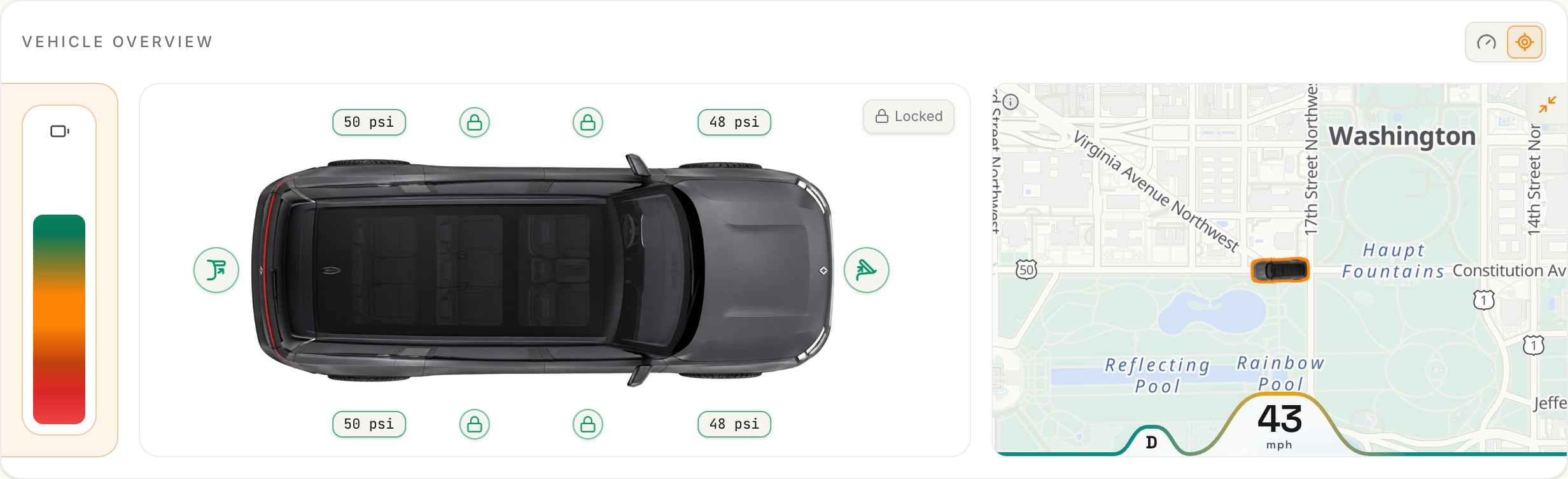
- Location map. The Vehicle Overview can now show where the vehicle is on a map, with a marker that faces the way the vehicle is pointing, including after reversing into a spot.
- Gear and speed wave. The map shows a wave of recent gear and speed alongside the location.
- Remembers your choice. Whether you prefer the cluster or the map, and whether the map is expanded, is saved per user.
- Theme-matched basemaps. Follow appearance maps are painted from the app theme, with a loading state while tiles render and sharper high-DPI map icons.
Settings
- One Save bar. Changes across every Settings section are now held until you press Save in the bar at the bottom of the page, and Discard puts them back. Ctrl+S (Cmd+S on a Mac) saves too, and leaving with unsaved changes asks whether to save or discard them first.
- Maintenance jobs. Settings > Jobs lists repair jobs you can run without a terminal, split into site-wide and per-vehicle jobs, with when each last ran and what it touched.
- Pause collection per vehicle. Pause the Rivian connection for one vehicle from its card in Settings > Vehicles. A paused vehicle stays paused across restarts and credential refreshes.
- In-app confirmations. Browser pop-ups for deleting a vehicle, refreshing demo data, and restoring a backup are replaced with proper in-app dialogs.
Charging history
- Per-vehicle history. Charge history stays with the right vehicle on shared Rivian accounts, sessions that were attributed to the wrong vehicle are repaired, and unidentified summaries are refused on shared accounts rather than guessed.
- Place pricing. Place prices now apply to existing charging history, not just new sessions.
- Time-of-use accuracy. Energy delivered at the end of a telemetry gap is no longer billed after a free overnight window has closed.
Vehicles and artwork
- Model year and generation. The model year is read from your VIN, and R1 generation detection uses it, so Gen 1 and Gen 2 vehicles are told apart correctly.
- The right artwork. Each vehicle shows its own Rivian artwork, pictures stay put across reloads without flashing the fallback, a loading wave shows while a picture loads, and artwork repair backs off when Rivian has none for a vehicle.
Reliability and sign-in
- Redis restarts. Live vehicle status and live charging sessions resume on their own when Redis restarts, for example after a Redis image update, instead of staying frozen until the API is restarted. The log notes once when live updates pause and once when they resume.
- Ingestion. Captures prune finished files and stale socket holds, record poll failures by error class, and keep Parallax close reasons out of capture files. A resumed vehicle worker starts only after the old one has stopped.
- Backups. Recovery workspaces abandoned by a crash are reclaimed, and one that may still be in use is never swept.
- Sign-in. Session renewal keeps working on plain-HTTP LAN origins, and the sign-in page explains short sessions when refresh cookies cannot be kept.
Fixes and polish
- Dark mode. Dark styles follow the app's theme setting instead of the operating system's.
- One Smoothing slider. Every line chart now has a single Smoothing slider in its chart settings, replacing the separate curve and time-filter choices. Off joins the recorded values with straight lines, Curve rounds the line through the same values, and the windows from 15 min to 7 days average the values over that window. Only the drawing changes: your recorded data stays as it is, the line still starts and ends on real values, and a total such as mileage is never drawn going down.
- Smoothed charts. With a time filter on, a chart's line no longer overshoots and falls back. Total mileage could appear to climb and then drop, though the odometer never went down. Your stored data was never affected, so past dates now draw correctly too.
- Roomier charts. Line charts, such as the drive chart, now run edge to edge, and the right-hand axis labels sit as close to the edge as the left-hand ones. Charts no longer spill past the edge of phone cards, and daily charging bars sit flat on the axis with only their tops rounded.
- Small things. The selected option in segmented toggles is easier to see, page headline chips get their icons, the charging art stays on the card's right edge, charging chips no longer blank during background refreshes, and battery health refreshes after a capacity change.
- Under the hood. Large backend and frontend files were split into focused modules, and the local CI gate now matches CI, including the database-backed API tests and a secret scan.
Upgrading
This release adds twelve database migrations, which run automatically on startup. The first start after upgrading builds two indexes on the telemetry table before the app comes up, so it can take noticeably longer on large installs. Let it finish.
Full Changelog: 2026.11.1...2026.11.2