
The Quattro Release
Omarchy 4 aka Quattro is the biggest release since the project started. The entire desktop shell has been reimagined in Quickshell: the bar, launcher, menus, notifications, on-screen displays, control panels, lock screen, and polkit agent now all live inside a single long-running shell process with a plugin architecture. That means Waybar, Walker, Mako, SwayOSD, hyprlock, hypridle, swaybg, and polkit-gnome are all gone, replaced by one coherent, fully-themed, IPC-scriptable shell.
You can upgrade an existing Omarchy installation to Quattro by first Update > Omarchy, then Update > Omarchy to Quattro.
Install on new machines with the ISO:
- Download: https://iso.omarchy.org/omarchy-4.0.0.iso
- SHA256: 9224fab3720560f771969a99a499e5f7e0f8e2d6a0681d872d52f05fb5003da4
Always take a backup of important data!

Watch the full introduction video: https://www.youtube.com/watch?v=F7fe9pa8OeE
Headline Features
- Reimagine the entire desktop shell in Quickshell.
- Move Omarchy internals from git to system packages for safely separating user modifications.
- Offer dual-boot installation when free space is available (remember to turn off Bitlocker for Windows!).
- Setup a machine for a new owner during install, so OEMs and gift givers can prepare a machine for others.
- Allow for factory reset (
Setup > Reset Computer) from new Quattro installs for safe resale/gifting of your machine. - Shrink the ISO by over a gigabyte (now under 6GB!).
- Speed-up installation by +30% (sub-minute installs now possible!).
- Convert all Hyprland configs to lua for full 0.56 compatibility.
- Expand theme coloring from base 8 to 24 so btop/nvim/vscode themes can be autogenerated.
- Use networkmanager for new network panel for greater compatibility.
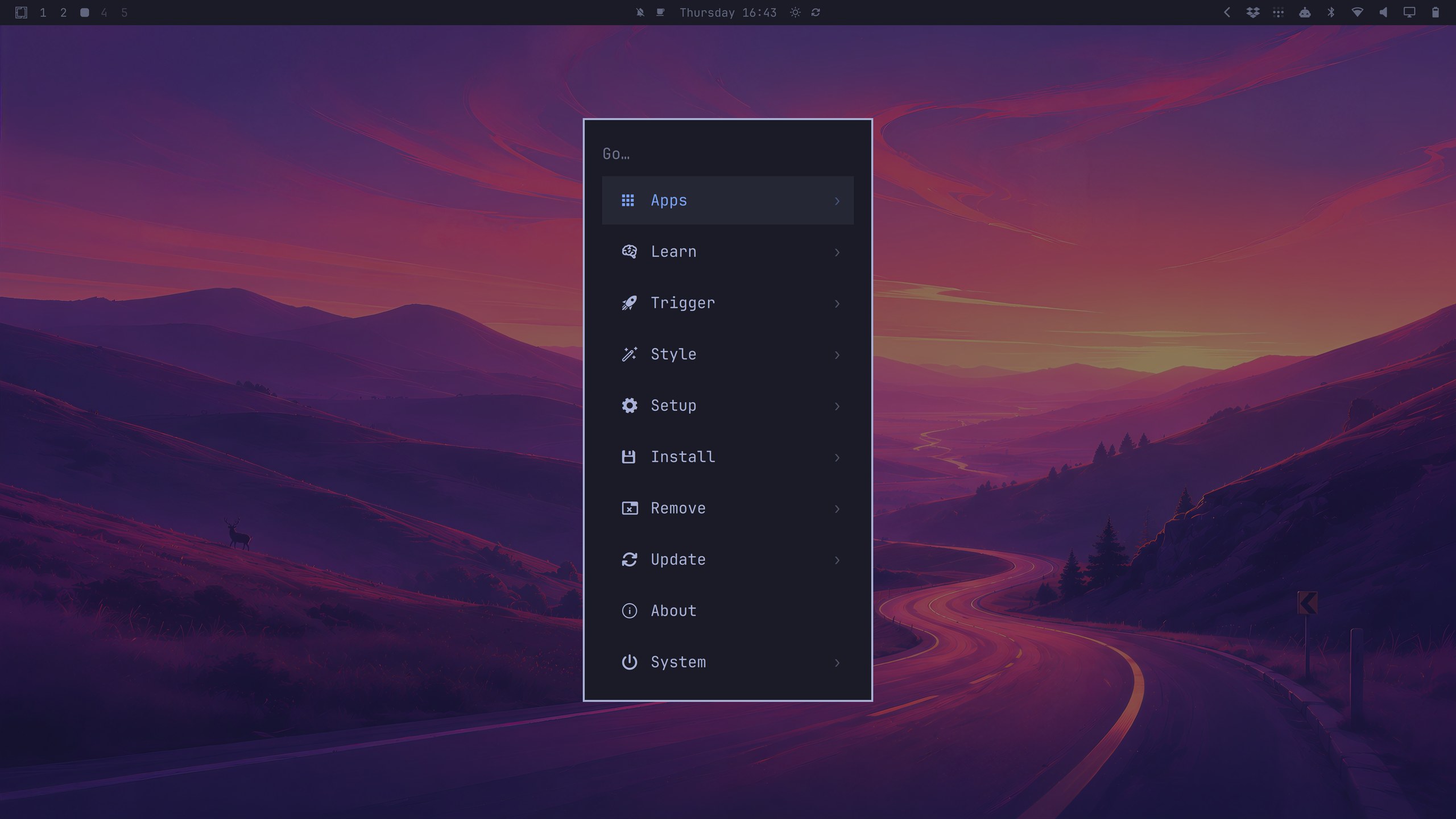
- Add nested search to Omarchy menu and merge the launcher into that one unified menu (
Super + Space). - Add text scaling across the shell, GTK, and terminals in one move via the Display panel.
- Add speaker tunings for 2026 XPS 14/16 laptops for dramatically better sound.
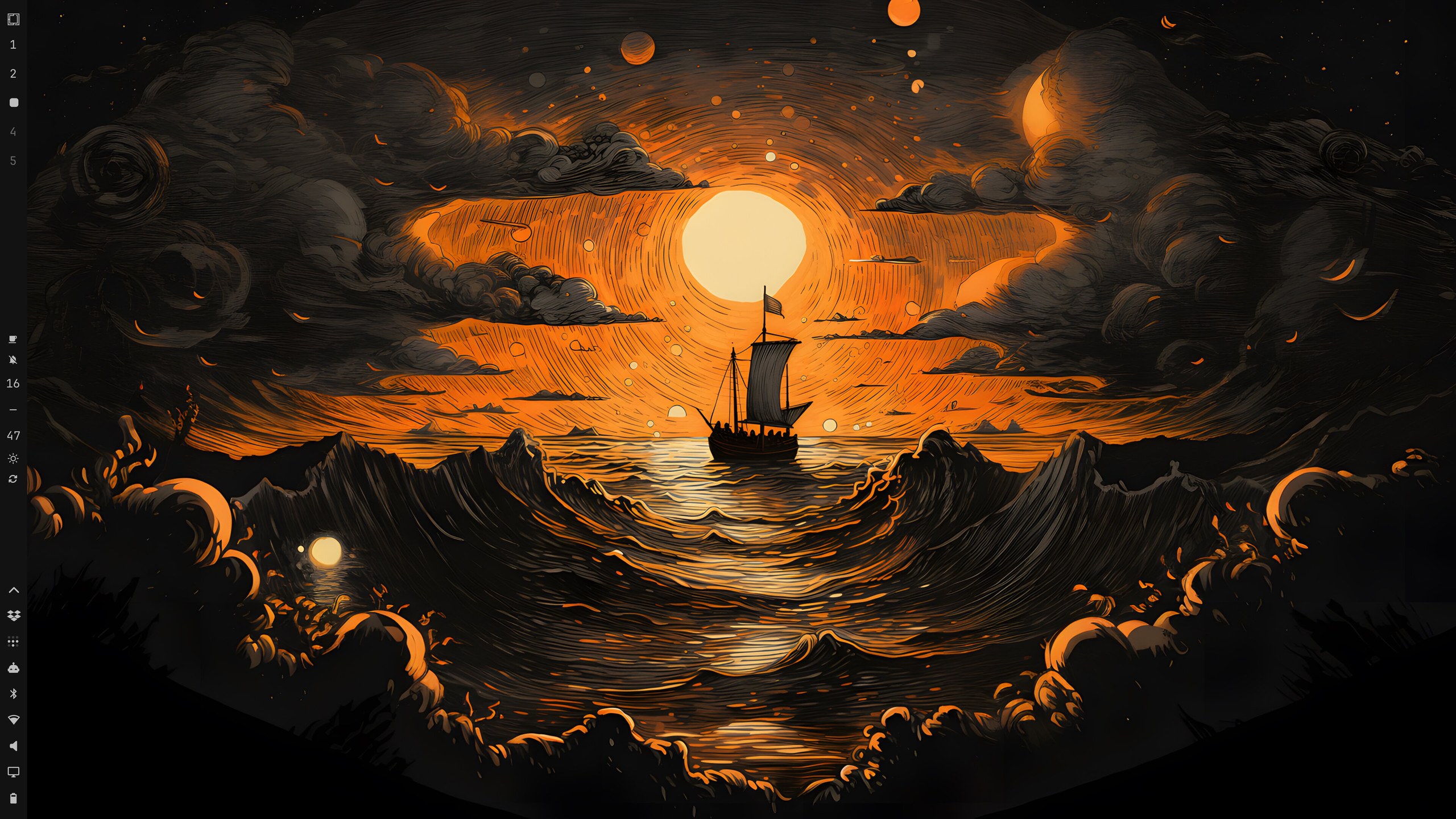
- Add menu bar repositioning (top/bottom/left/right) and transparency.
- Add menu bar panels for Tailscale + Dropbox.
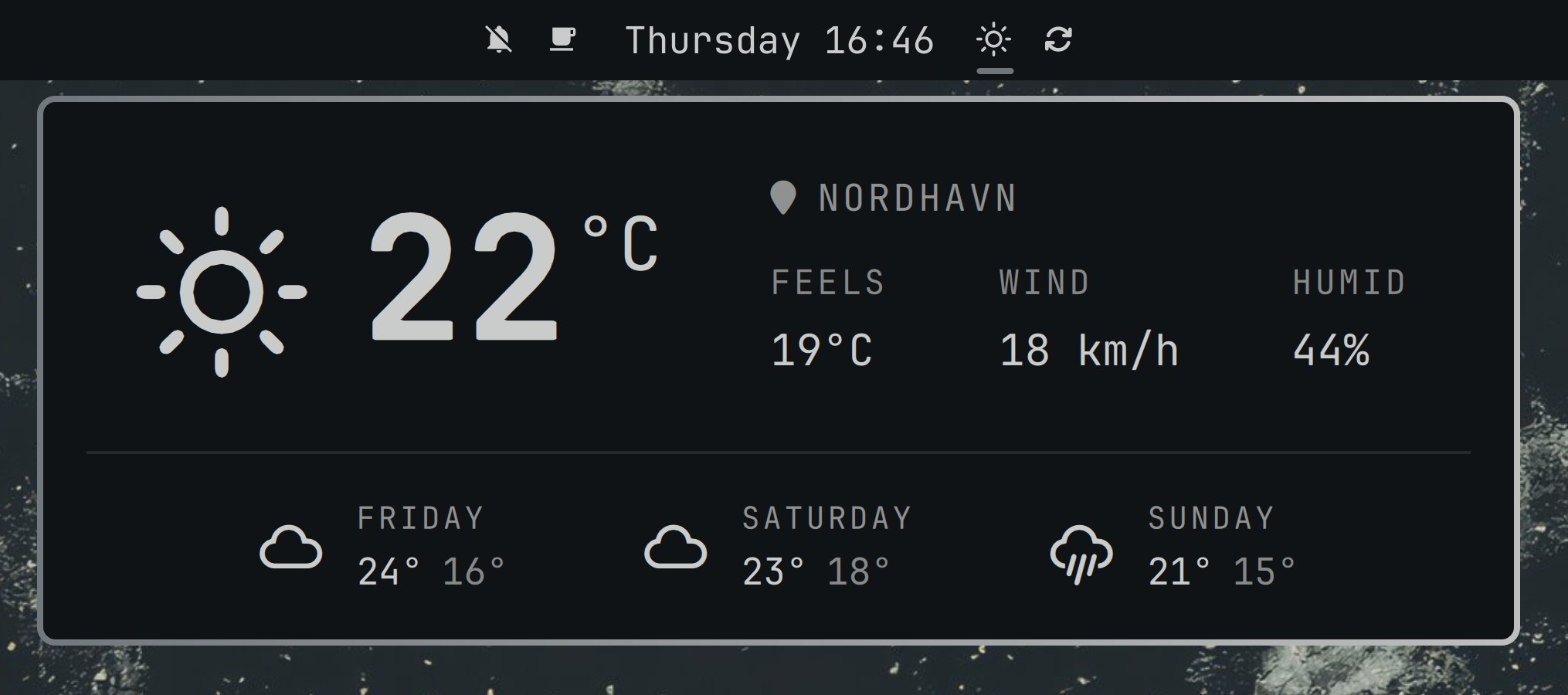
- Add weather panel with configurable location.
- Add plugin system and full ecosystem.
- Add Omawrite, Omacut, and Omacalc as default applications.
- Add a configurable default coding agent with instant launch shortcuts and crash diagnosis.
- Add Solitude, Last Horizon, and Lupine as new themes.
- Add window position saving per workspace for quick layout restoring.
- Add much-improved clamshell operations for laptops used with external monitors.
The Shell
- Rewrite the entire desktop shell in Quickshell — bar, launcher, menus, notifications, OSDs, panels, lock screen, and polkit agent as plugins in one process by @dhh and @ryanrhughes
- Add a new modular bar with interactive widgets: workspaces, active window, clock (click for ISO week format), weather, media (MPRIS), system tray, battery, keyboard layout, microphone, update indicator, and manual-state indicators (DND, night light, stay awake, screen recording, dictation, reminders)
- Move the bar by dragging it to any screen edge — a ghost slab previews the target edge while you drag — and double-click empty bar space to toggle transparency (you can also set this via
Setup > Menu Barin the Omarchy menu) - Add a bar plugin system: third-party widgets and even whole replacement bars installed straight from git with
omarchy plugin add <git-url>, and managed fromSetup > Plugins(add, clone, enable, disable, remove) by @ryanrhughes and @dhh - Add a native launcher with fuzzy/acronym matching, live app icon indexing, and hidden-entry management — now merged into the Omarchy menu itself, so
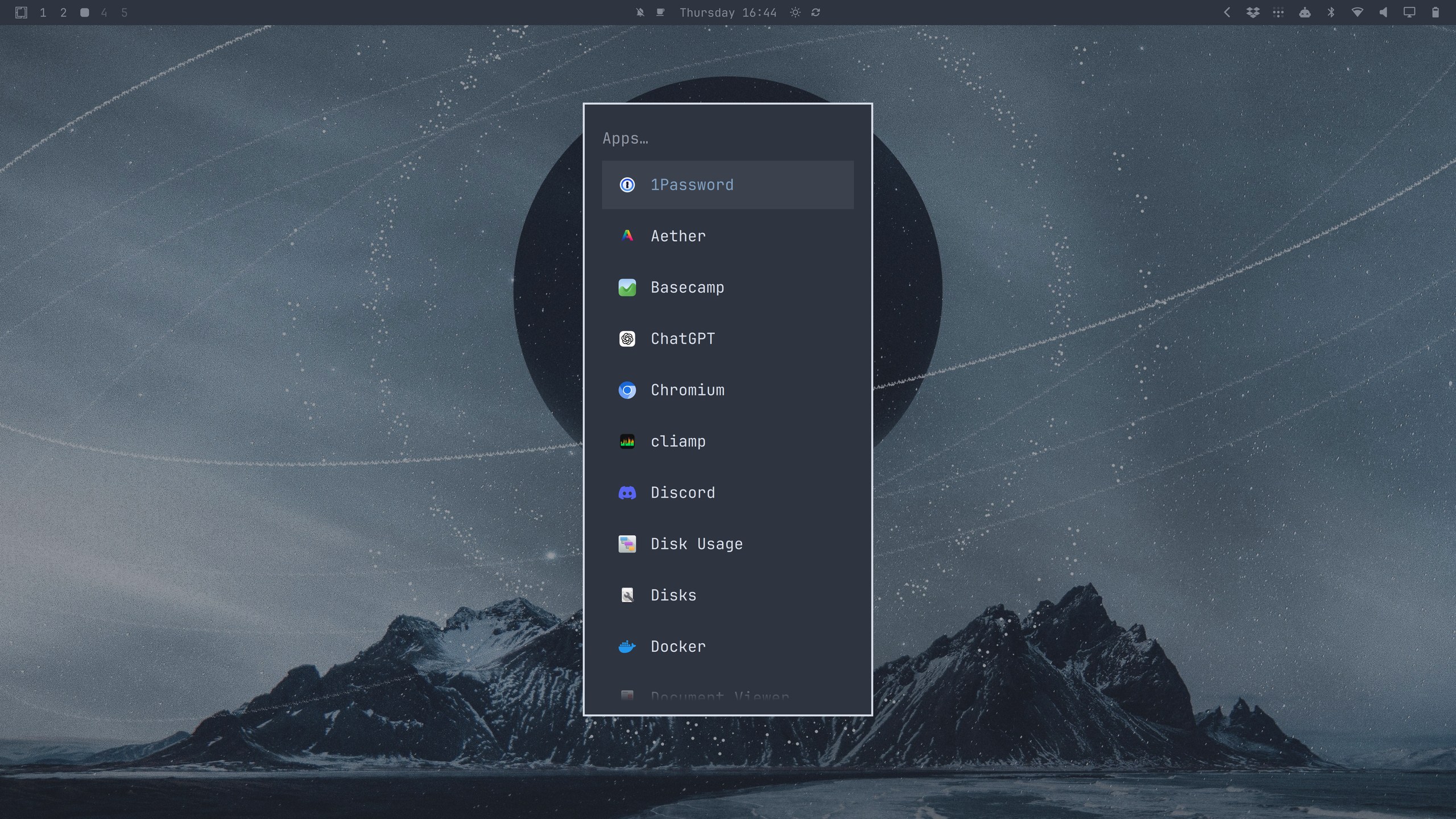
SUPER + SPACEsearches apps and commands from one surface - Add a dedicated apps-only menu on
SUPER + ALT + SPACE - Add a native notification daemon with popups, do-not-disturb, deduping, and a replayable history:
SUPER + SHIFT + ALT + ,brings back the last ten notifications exactly as they were shown, including the ones do-not-disturb silenced — and popups on screen survive shell restarts (like the one every update performs), so critical alerts always make it across by @ryanrhughes and @dhh - Dismiss notification popups with a right-click by @taxin-404
- Add a native clipboard manager with image previews and sensitive-content exclusion (
SUPER + CTRL + V) - Add a native emoji picker (
SUPER + CTRL + E) replacing Walker picker - Add native volume/brightness/media OSDs replacing swayosd
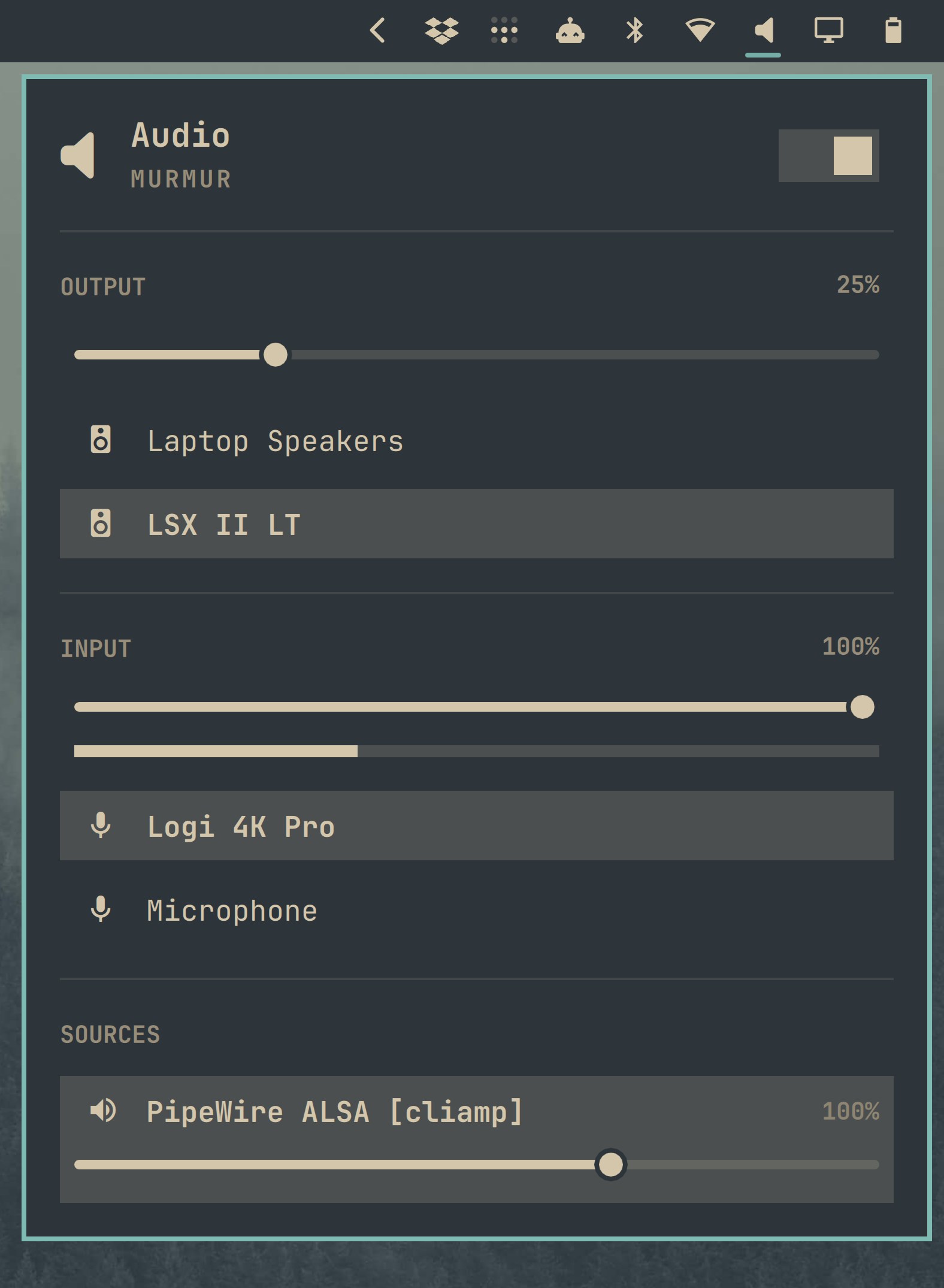
- Add control panels for Audio (
SUPER + CTRL + A), Bluetooth (SUPER + CTRL + B), Network (SUPER + CTRL + W), Display (SUPER + CTRL + D), and Power (SUPER + CTRL + P) replacing bluetui, impala by @dhh and @ryanrhughes - Add optional service widgets with full panels for Tailscale (connection control, exit-node picker with Mullvad nodes grouped by country) and Dropbox (login, storage, recent files) by @ryanrhughes and @dhh
- Add a model-usage bar widget showing Claude Code/Codex/Fireworks usage stats and count from all the major harnesses by @ryanrhughes + @dhh
- Add a Google Meet picture-in-picture widget by @ryanrhughes
- Offer 12-hour AM/PM clock formats when right-clicking the bar clock by @scottjones
- Add a battery percentage readout toggle to the power widget on right-click
- Replace hyprlock with shell-powered password and fingerprint PAM flows, and invite you to enroll a finger on first run when a reader is present — with fingerprint offers on the lock screen, polkit, and sudo gated by lid state
- Move the Omarchy menu into the shell as a filterable, nested command palette defined in JSONC (extensible via
~/.config/omarchy/extensions/omarchy-menu.jsonc) by @ryanrhughes and @dhh - Make the shell event-driven rather than polled: status indicators, monitor and network state, and the background all react to signals now, so an idle desktop stops burning CPU
- Expose the battery percentage toggle in the Omarchy menu by @bwynnyck
- Open the bar's right-side panels with
SUPER + CTRL + 1through9, counted left to right — rearranging the section or adding a widget renumbers them with no binding to rewrite by @dhh - Ship the keyboard layout widget on the bar by default: hidden while only one layout is configured, click to cycle, and labeled with the xkb language code (EN, PT, AR) instead of a truncated description by @dhh and @defer
- Add the Discord community and Herdr's keybindings viewer to the Learn menu by @dhh
Theming & Aesthetics
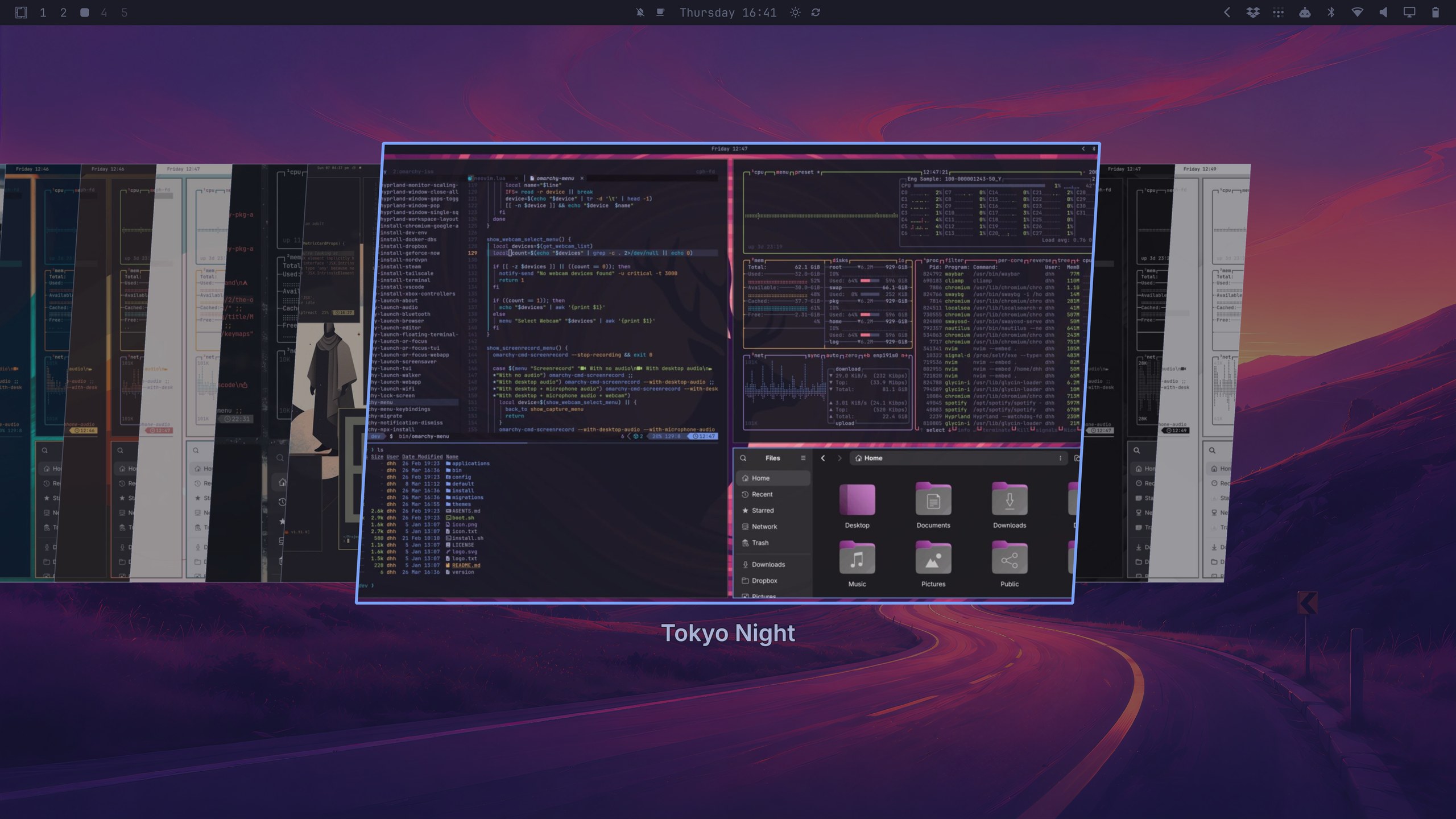
- Add a visual theme switcher: a filterable carousel of live theme previews (
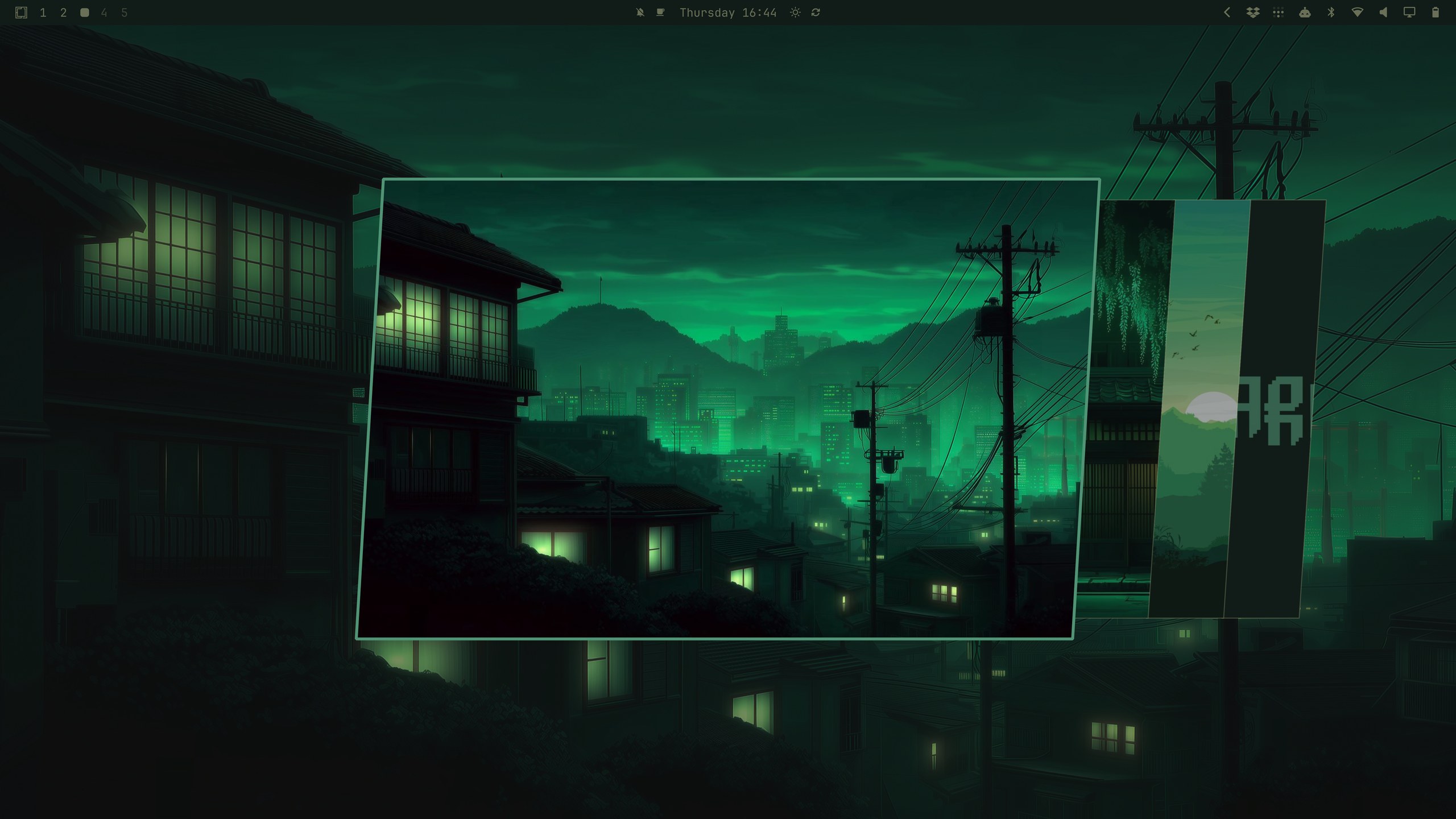
SUPER + SHIFT + CTRL + SPACE) by @dhh - Add a visual background switcher in the same style (
SUPER + CTRL + SPACE) by @dhh - Add a semantic theme color system with normalized color names by @bjarneo
- Add generation of neovim, VS Code, and btop configs straight from a theme's expanded colorset, so themes carry fewer hand-maintained files by @bjarneo, @ryanrhughes
- Add Last Horizon and Solitude themes by @HANCORE-linux
- Add Lupine theme by @bjarneo
- Add
~/.config/omarchy/shell.tomlas a machine-level override merged over the active theme, so a personal font, spacing, or bar tweak survives theme switching — and it's watched, so edits re-flow the shell live - Bring back the classic Omakub background in Tokyo Night for early-Linux-adoption nostalgia
- Add a Quattro background by @vulturetone plus a new winding-road launch background for Tokyo Night, and retire the backgrounds no longer worth shipping
- Add a Pi theme based on the system theme by @ryanrhughes
- Sync the active Omarchy theme to Claude Code by @MoizIbnYousaf
- Add integrated corner controls (rounded/sharp) applied across Hyprland, notifications, lock screen, and menus by @ryanrhughes and @dhh
- Add
omarchy display text size: one knob, 9–20px, that moves the shell font, GTK's text-scaling-factor, and the terminal point size in lockstep, with a notched slider in the display panel
Apps & Defaults
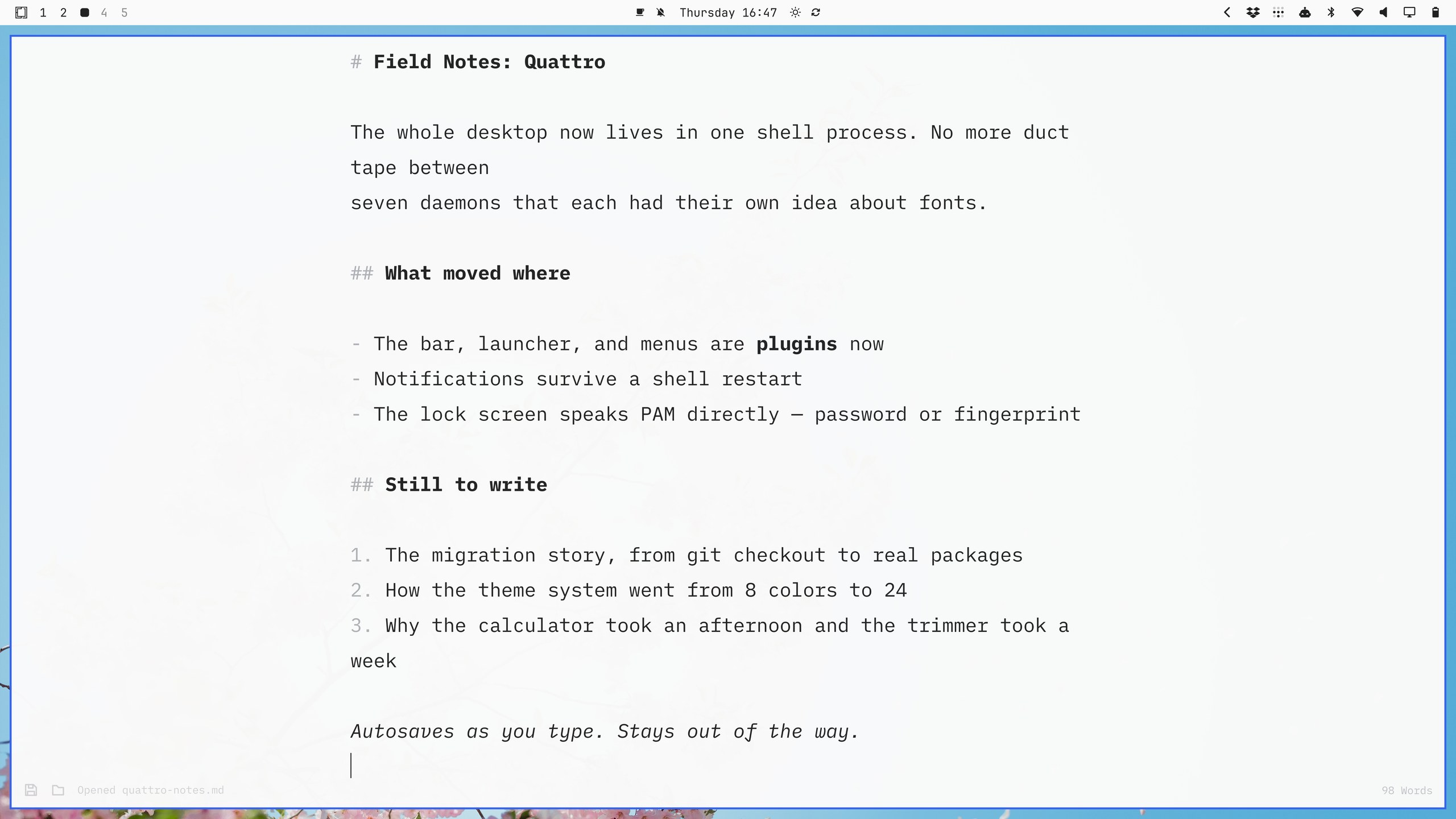
- Add Omawrite, a dead-simple Markdown writing app, as the default writing tool replacing Typora (
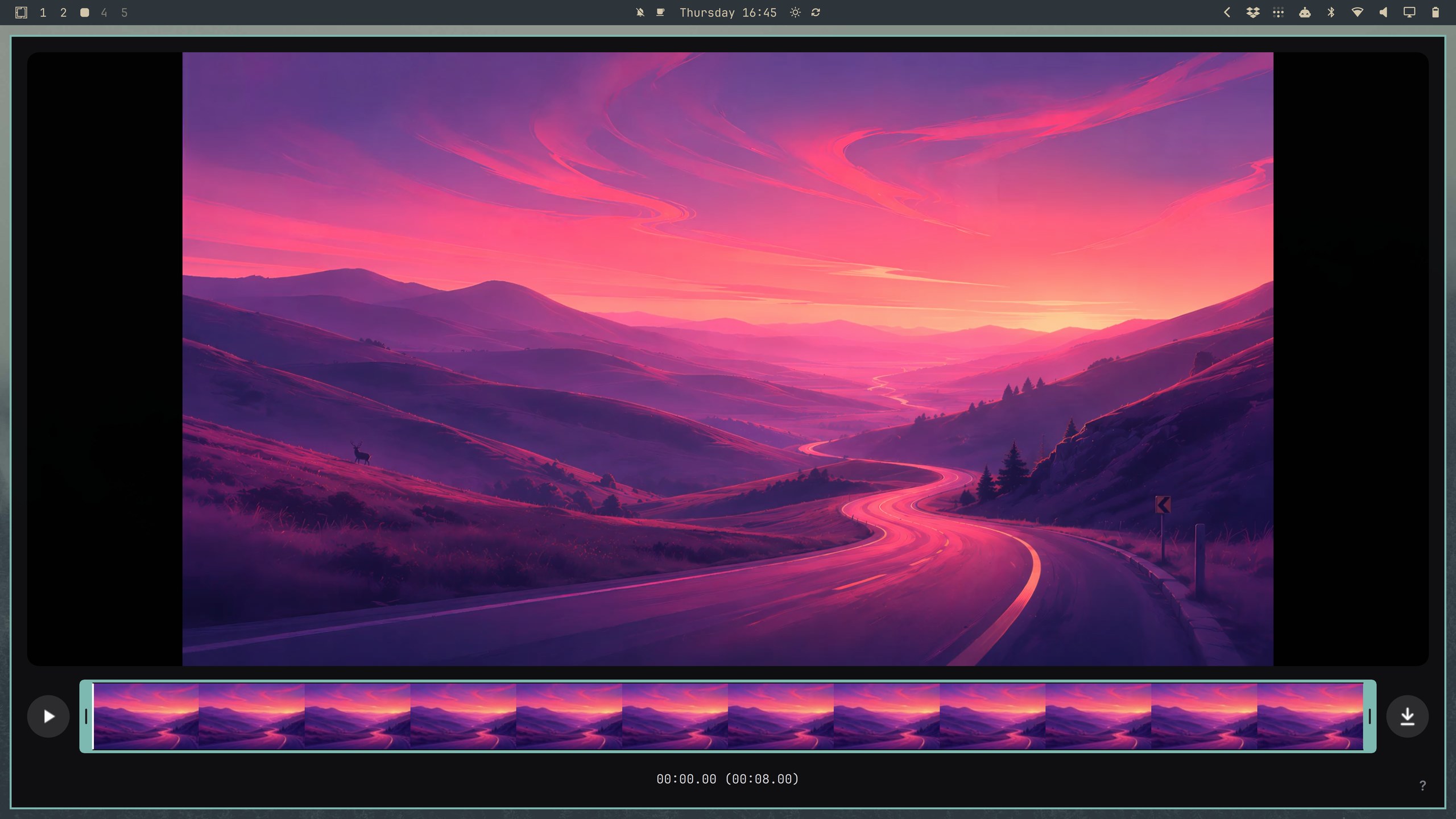
SUPER + SHIFT + W) by @dhh - Add Omacut, a dead-simple video length trimmer built on ffmpeg by @dhh
- Add Omacalc, a dead-simple calculator replacing GNOME Calculator (
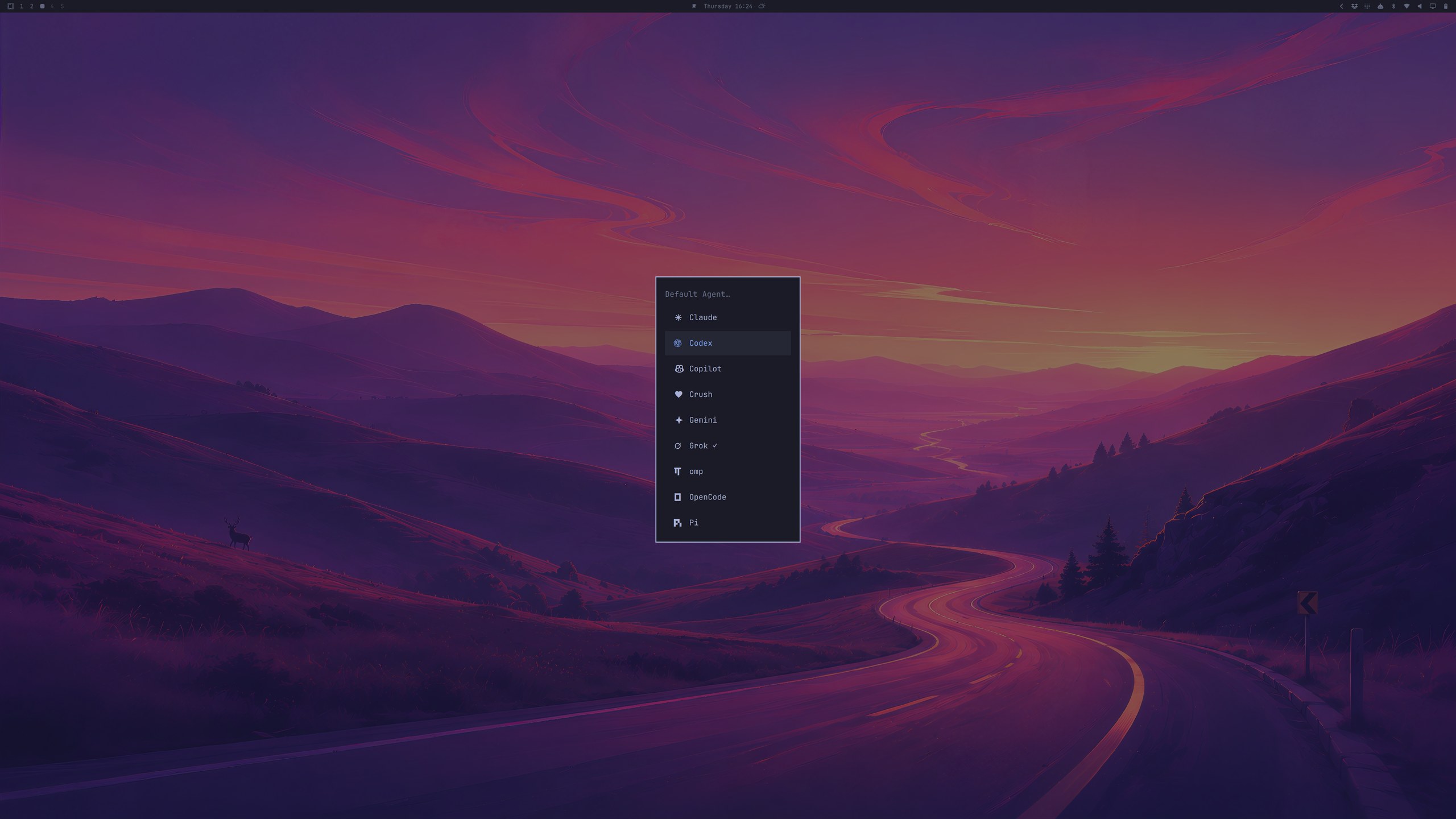
SUPER + CTRL + Q) by @dhh - Add a configurable default coding agent: pick Claude Code, Codex, OpenCode, Pi, Oh My Pi, Gemini, Grok, Copilot, or Crush under
Setup > Defaults > Agent, then launch it withSUPER + SHIFT + CTRL + Aor theaterminal alias — lazy-installed on first use, opened as its ownorg.omarchy.agentapp, and started in~/Workwhen summoned from home so trust actually sticks by @dhh - Switch the default terminal to Foot for better resource utilization by @dhh
- Add a yt-dlp-powered "Download Video" Chromium extension (on any URL with a video press
Alt + Shift + D) by @dhh - Switch the default image annotator from Satty to Tensaku by @ryanrhughes
- Add Moonlight client for Sunshine game/desktop streaming as new default by @dhh
- Add automounting of removable drives via udiskie by @ryanrhughes
- Add mpv MPRIS support so media keys control mpv by @berenddeboer
- Use dua for disk usage by @crmne and @dhh
- Make WhatsApp Web follow the system light/dark theme, and collapse it to a Signal-style avatar rail in slim windows by @scottjones and @dhh
- Move Signal, Spotify, and 1Password to on-demand installs and remove Figma + GitHub from the defaults by @dhh
- Switch to the lighter basic JetBrains Mono Nerd font to save 200mb on install by @dhh
- Install ChatGPT as a real desktop app under
Install > AI, dropping the web app from the defaults so the launcher can't show two identical entries by @dhh - Share files and folders over LocalSend through the desktop file chooser, instead of an fzf pick over a
findof the whole home directory in a terminal by @dhh
Capture
- Add relatively sized preview to the live webcam overlay on screen recordings (and offer further tweaks via
SUPER + ALT + [ / ]) by @dhh (on request from @jasonfried) - Drive the region picker from the keyboard:
RETURNcaptures the highlighted window,CTRL + RETURNthe whole display, andTABand the arrow keys move the selection through the workspace's windows by @jzimdars and @dhh - Add QR code capture: select a region and the QR code inside it decodes straight to the clipboard, so an
otpauth://setup code on screen no longer needs a phone. The decoded value never touches disk and is marked sensitive, so clipboard history skips it by @dhh and @Wondertan - Handle rotated monitors in the recording region picker.
- Trash imv deletions and add Ctrl+E to edit in Tensaku by @jondkinney
Controls
- Convert the Hyprland configuration to Lua: bindings, monitors, and toggles are now expressive Lua (
o.bind("SUPER + SHIFT + W", "Omawrite", { launch = "omawrite" })) by @ryanrhughes - Add save/restore of window widths per app and workspace on
SUPER + ALT + HOME/SUPER + HOMEby @dhh - Add external monitor brightness via DDC/CI: the brightness keys and OSD now control the focused external display, while laptop panels keep using the kernel backlight by @ssupt
- Add fine (±25px) and coarse (±100px) window resizing tiers by @zaborowskimichal and @dhh
- Add alternative media next/previous bindings for keyboards with only a play button by @dhh
- Ship Herdr alongside tmux with matching keybindings, configuration, and
hdl/hds/hdlm/hsldevelopment-layout helpers by @dhh - Add a tmux keybindings viewer (
SUPER + ALT + K) and new-pane/split bindings for tmux, kitty, ghostty, and alacritty by @ryanrhughes, @vtmx, @heymaikol, and @dhh - Open Herdr with
SUPER + CTRL + RETURNand its keybindings viewer withSUPER + CTRL + K, mirroring the tmux pair — plus tmux's tab moves, zoom flag, hostname in the window title, and hidden outer pane frame carried over by @dhh - Add laptop clamshell handling with idempotent scale recovery, internal-display toggle, and display mirroring by @dhh
- Toggle Caps Lock by pressing both Shift keys by @tyvsmith
Networking/Connections
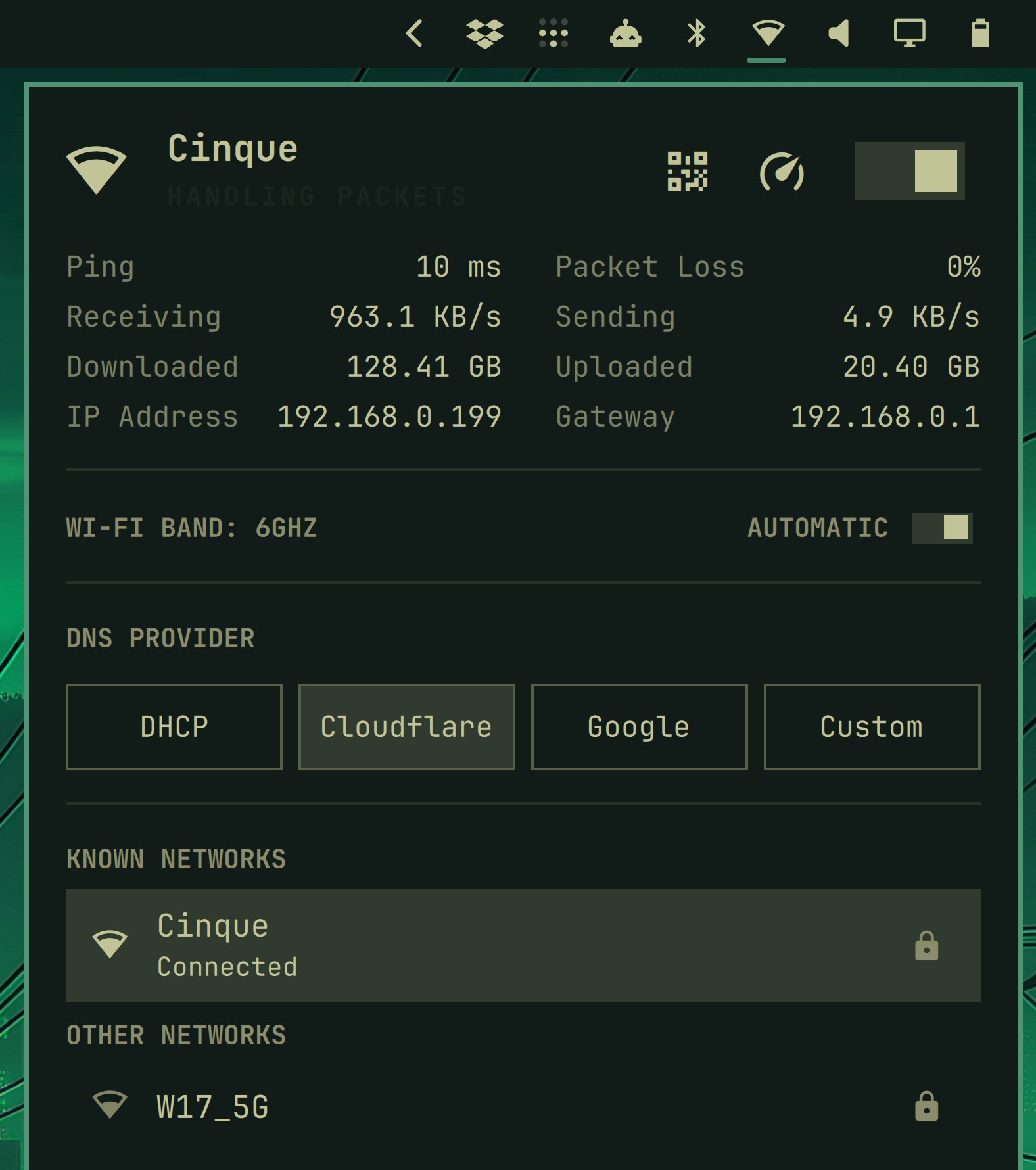
- Add ping, live up/down stats, speed test, and DNS provider selection to the network panel by @dhh
- Add Wi-Fi QR sharing to the network panel, so another device can join with a scan by @tobi
- Add a Wi-Fi band toggle to the network panel by @dhh
- Add per-device Bluetooth pairing, connection state, and forget/disconnect flows by @ryanrhughes and @dhh
- Add audio output/source switching that preserves playback, with recovery when audio services get stuck by @dhh
- Switch Wi-Fi management to NetworkManager, replacing iwd/impala/bluetui/wiremix with the shell panels by @dhh
- Connect to enterprise (802.1X) Wi-Fi networks from the network panel by @KazeTachinuu
- Clean up the terminal and reconnect when an SSH connection drops: a remote tmux, herdr, or editor that dies with the link no longer leaves mouse tracking and the alternate screen armed on your local terminal, and an established interactive session comes back on its own. Client keepalives make the drop show up in about 45 seconds instead of whenever TCP gives up by @dhh
System & Upgrade
- Re-architect Omarchy into proper Arch packages with system files shipped via
/etc, so updates flow through pacman by @ryanrhughes - Add an ALPM guard that routes system updates through
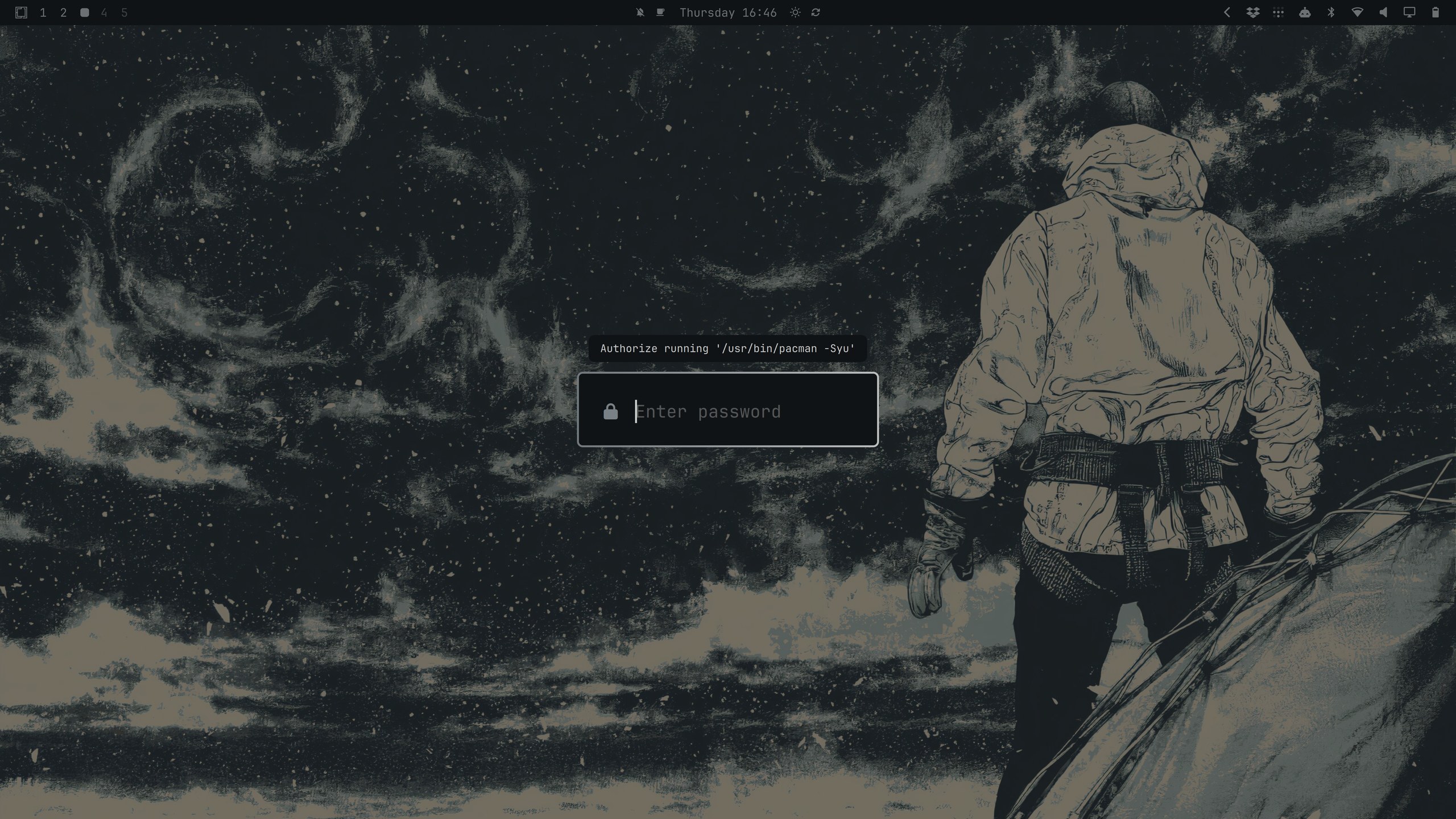
omarchy update(bypassable viaOMARCHY_ALLOW_DIRECT_PACMAN=1) by @ryanrhughes - Switch privilege escalation to pkexec/polkit with a themed prompt that shows exactly what's being authorized by @dhh
- Switch lazy-loaded tools (Claude Code, GitHub CLI) from npm to mise, and keep their wrappers plus
omarchy updateon current releases instead of waiting out the release cooldown by @dhh - Launch apps in their own systemd scopes instead of the compositor's cgroup, and let systemd-oomd take out a runaway app instead of losing the whole session by @defer and @dhh
- Warn when disk space is low before updating by @ericvrp
- Add
pre-refresh-pacman.dhooks for custom repository support by @tyvsmith - Persist Bluetooth power state across reboots, by making an rfkill soft block the state systemd restores at boot rather than forcing the adapter off every time, and carrying existing installs across by @heymaikol and @dhh
- Enable Docker multi-arch builds by default by @axelfontaine
- Add weather locations that can be pinned to a chosen place instead of following IP geolocation by @dhh
- Add SSHD setup and removal under Setup/Remove > Security by @dhh
- Ship NordVPN directly from the Omarchy package repository by @dhh
- Add per-laptop speaker tunings: a PipeWire filter chain in front of the internal speaker sink, matched by DMI string, restoring the voicing the vendor's Windows DSP does and Linux doesn't. Shipping for the XPS 14 and 16; adding a machine is two data files and no new code by @dhh and @spencerbull
- Tune swap on zram instead of leaving it at kernel defaults, so large machines stop reaching for the hibernation swapfile early by @dhh
- Remember explicit power profile choices per power source (AC/battery) across reboots by @dhh
- Pin Chromium-based browsers to the gnome-libsecret password store, so backend autodetection can't silently log you out of everything by @nt1998
- Add a reproducible read/write disk speed test under
Trigger > Speed Test, sharing the live dial interface with the network test by @dhh - Harden the Quattro upgrade by preserving and verifying boot-critical kernel parameters, forcing a fresh package database before keyring installation, surfacing partial-transition failures, and keeping the NetworkManager/iwd handoff safe — including unmasking a wpa_supplicant left masked from the iwd era by @tmn73 and @dhh
- Report when an update proceeds without the Snapper snapshot it expected, instead of claiming a snapshot that was never created, by @nille
- Add deferred first-boot provisioning: an install can finish with no user at all, and the machine's owner picks their keyboard, account, hostname, and timezone on the first boot instead — behind the same logo, progress bar, and rotating tips the ISO installer uses. On an encrypted disk the LUKS volume is re-keyed from the throwaway install passphrase to the owner's password, all-or-nothing, with every other slot killed by @dhh
- Add
Setup > Reset Computer: swap the running root for a fresh clone of the@factorysnapshot the ISO takes at install time, scrub machine identity, accounts, and fingerprint enrollments, and hand the machine back in that untouched first-boot state. A machine with no factory snapshot is turned away with an explanation rather than given a partial wipe by @dhh - Swap terminaltexteffects for ttfx, a Rust port rendering byte-identical frames as a single dependency-free binary: the screensaver starts in ~1ms instead of ~107ms, holds its frame rate on the heavier effects, and the base image no longer needs Python for it by @dhh
- Greet the first login with a toast that opens the keybindings menu when clicked, and wait for NetworkManager to actually settle before deciding you have no Wi-Fi or offering an update by @dhh
- Offer an AI diagnosis when a process crashes: systemd-coredump's journal stream raises a "Process crashed" toast, and clicking it briefs your default agent on the core with a
diagnose-crashskill that covers symbolizing the backtrace and — only with your agreement, and after a duplicate search — reporting a confirmed Omarchy bug upstream by @dhh - Prune the package cache with
paccache -rk2as the first step of an update, before the snapshot so the space is actually reclaimed, and keeping one spare version so the offline downgrade path survives by @dhh - Detect NVIDIA GPUs from sysfs instead of lspci, which resumed a runtime-suspended discrete GPU out of D3cold and spent more than Hyprland's entire 1.5s config-load budget waking it — and classify by device ID, so pre-Maxwell cards stay off a driver that can't drive them and the Maxwell/Pascal parts the name regex missed are picked up by @dhh
- Simplify the Quattro upgrade: follow the channel the machine is already on instead of dropping rc machines onto stable, leave the Omarchy 3 session running until the reboot that is the real cutover, shim the legacy Hyprland defaults from the on-disk backup rather than a network fetch of master, run the packaged firewall config so upgraded machines get the ufw-docker rules too, and clear the Hyprland error bar the swap used to leave on screen by @dhh
Fixes
- Fix fontconfig monospace binding overriding app-specific fonts by @Ninso112
- Fix power profile race on plug/unplug events by @aikazu
- Fix brightness indicator glitches from hardware key auto-repeat by @mateuszkowalczyk
- Fix brightness OSD width jitter across percentages by @Pegorim
- Fix new windows — including browser windows and portal file dialogs — opening on the wrong workspace by @scottjones and @dhh
- Fix the LUKS passphrase prompt ignoring the configured keyboard layout by bundling vconsole.conf in the initramfs (Latin layouts) by @Zeus-Deus
- Prevent empty disk encryption passwords when changing the drive password by @heymaikol
- Align snapshot pruning with Snapper's retention (off-by-one) by @Pegorim
- Force software cursors on nouveau by @stephentaylor-com
- Keep software-composited cursors out of screenshots by @dhh
- Fix new terminals not opening in the current directory on Kitty
- Fix
fipand friends misparsing under zsh by @pkwagner - Only bind F9 to Voxtype when it's installed by @r3quie
- Prefer Noto Naskh Arabic over Nastaliq Urdu for Arabic text by @husamemadH
- Run the screensaver on every monitor, not just the last one, by @scottjones
- Switch Brave Origin from the beta to the stable release by @virtualabishek
- Fetch high-res site icons for web apps instead of blurry favicons by @dhh
- Resend the night light temperature until it sticks on a hyprsunset cold start
- Fall back to the XDG MIME browser handler when xdg-settings names no browser by @ShiroKSH
- Fit the About window to its rendered content so long values, custom fonts, and branding cannot wrap over the logo or clip — and open it at the size it last settled on by @28allday and @dhh
- Fix background cycling for filenames with glob characters
- Fix suspend and fan defaults on T2 Macs
- Stop the Tuxedo/Slimbook backlight fix from aborting hardware setup
- Fix the keyboard-layout migration aborting when vconsole.conf is missing or defines no layout by @acidkill
- Fix hardware-detection false negatives under
pipefail, rerun the T2 defaults migration they skipped, and choose the gmux display backlight instead of the Touch Bar on T2 Macs - Find UKIs through a restricted
/booton encrypted installs, fixing direct-boot setup and stale-UKI cleanup - Close three code-execution paths a malicious theme could take through install (colors.toml values reaching GNU sed's
eflag, an unescaped VS Code theme name, unvalidated keyboard RGB), and drop the unconstrained tzupdate sudoers grant that let any wheel user write a root-owned symlink anywhere by @KazeTachinuu - Recover a monitor Hyprland brought up at 0x0 because it was powered off at boot: the connector never drops at DRM level, so powering the screen on fires no event and it stayed black until a reboot by @dhh
- Apply the Broadcom Wi-Fi quirk to Macs without a T2, gating on the PCI IDs brcmfmac actually binds rather than the T2 bridge, and repair machines installed before it shipped — these fail the WPA four-way handshake against a WPA2/WPA3 transition-mode access point and report the password as wrong by @cupatea
- Give non-login shells the system locale, so bash started by SSH or herdr's remote bridge stops printing
\uescapes instead of characters by @dhh - Repair the theme symlinks the state-move migration left dangling with an unexpanded literal
~, which cost btop, Helix, and VS Code their theme while the migration reported success by @shrijit37 - Rebuild the boot images the Plymouth migration left stale, which kept encrypted machines falling back to an unthemed text LUKS prompt by @dhh
- Fix
--helpbeing ignored for commands that resolve with arguments left over, likeomarchy update aur --helpby @EFrMG and @dhh - Drop the kms hook when the proprietary NVIDIA driver handles early KMS, cutting nouveau and ~100MB of its firmware from every initramfs on NVIDIA-only machines — existing images are rebuilt on upgrade by @matjam
- Stop hybrid GPU mode queries and the menu's hybrid-GPU gate from hanging on a wedged supergfxd by @yashranaway and @dhh
- Only offer real video capture devices as webcams, so IPU6 laptops stop opening a black overlay instead of their camera by @yashranaway
- Treat LVDS and DSI panels as internal displays, so older laptops stop counting their own screen as an external monitor by @yashranaway
Thanks also to @AksharP5, @artfwo, @dalmasluca, @DataDave-Dev, @DiegoMirner, @flavorjones, @franciscoaccabral, @GebaRoanoke, @glafeara, @grantwiley, @heyssh, @JustMrMendez, @kevinmcconnell, @lukehsiao, @lukewalker2010, @markbus-ai, @meirdick, @monorkin, @richardlences, @RushiChaganti, @s-gato, @setiapam, @Vtorrealba, and @vivek7405 for fixes and polish to the new Quattro features during the beta itself.
Feature presentations
The theme switcher
Switching themes is now a more visual affair: a filterable carousel of live previews for every installed theme, opened with SUPER + SHIFT + CTRL + SPACE or via Style > Theme. You can see the new bar riding on top too.
The background switcher
Backgrounds get the same treatment on SUPER + CTRL + SPACE: flip through the current theme's backgrounds (plus any you've added) and see exactly what you're picking.
The launcher and the menu, together
Walker is gone, and SUPER + SPACE now opens the Omarchy menu itself: a native, filterable command palette living inside the shell. Once the menu could search its own nested entries, there was no reason to keep two palettes with two shortcuts around — so one box now finds your apps and every Omarchy command, with instant response, and it's extensible through a JSONC file if you want to add your own entries.
The app-launching side lost nothing in the merge: fuzzy and acronym matching, live icon indexing (freshly-installed apps show up with their icons immediately), and the ability to hide entries you never use. And when you want a launcher scoped to just your apps, SUPER + ALT + SPACE opens exactly that.
Control panels
The bar widgets now open real control panels. Audio (SUPER + CTRL + A) has output/input device switching and volume control:
Network (SUPER + CTRL + W) shows live throughput, ping, packet loss, a one-click speed test, DNS provider selection, Wi-Fi QR sharing, and nearby networks:
And weather now has a proper forecast panel, which can be pinned to a chosen location instead of following your IP around:
A bar you can grab
There's no settings panel for the bar — you just grab it. Click and hold any empty stretch of bar and drag it toward a screen edge, and a ghost slab previews where it will dock. Drop it on the left or right and it turns into a vertical bar. Double-click empty bar space to toggle transparency. Widgets are added, removed, and rearranged with omarchy bar put and omarchy bar move, and third-party widgets install straight from git with omarchy plugin add.
Privilege escalation with context
Omarchy now uses pkexec/polkit for privileged operations, with a themed prompt that tells you exactly what command you're authorizing before you type your password.
Pick your coding agent
Omarchy no longer picks a coding agent for you — it asks. Choose Claude Code, Codex, OpenCode, Pi, Oh My Pi, Gemini, Grok, Copilot, or Crush under Setup > Defaults > Agent, and it's lazy-installed the first time you use it. From then on, SUPER + SHIFT + CTRL + A (or just a in any terminal) summons your agent in its own window, started in ~/Work so trust actually sticks. The model-usage bar widget keeps an eye on your Claude and Codex spend, and when a process crashes, one click on the toast briefs your agent on the core dump for a diagnosis.
The new default apps
Typora is out, and Omawrite is in. A dead-simple Markdown writing app that opens in a blink, autosaves as you type, and stays out of the way. Bound to SUPER + SHIFT + W. Free software.
It's joined by Omacut, a dead-simple video trimmer. Drop in a clip — like the screen recordings Omarchy takes — drag the handles on the filmstrip, and export the cut with ffmpeg doing the heavy lifting.
Omacalc completes the trio: a dead-simple calculator replacing GNOME Calculator, on SUPER + CTRL + Q.
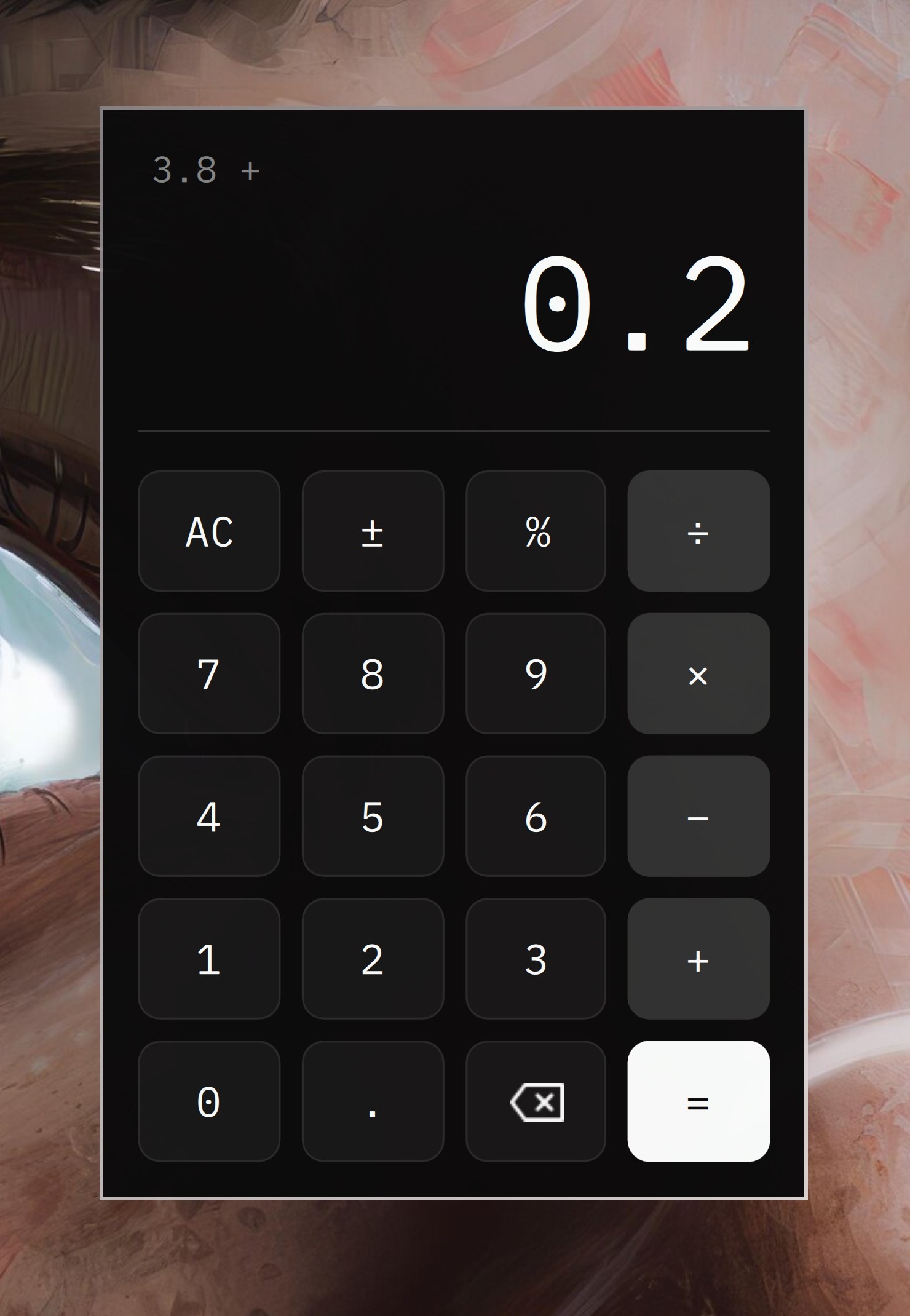
And the defaults have been refreshed elsewhere too: Foot is the new default terminal, Tensaku replaces Satty for image annotation, Moonlight ships for Sunshine game/desktop streaming, and dua handles disk usage.
Install it for someone else
An install can now finish with no user at all. Deferred first-boot provisioning means you can set up a machine — for a family member, a colleague, a whole classroom — and hand it over untouched. On the first boot, the owner picks their keyboard, account, hostname, and timezone behind the same logo, progress bar, and rotating tips the ISO installer uses. On an encrypted disk, the LUKS volume is re-keyed from the throwaway install passphrase to the owner's password, all-or-nothing.

And when the machine comes back, Setup > Reset Computer hands it over again: the running root is swapped for a fresh clone of the @factory snapshot the ISO takes at install time, with machine identity, accounts, and fingerprint enrollments scrubbed — back to that untouched first-boot state.
New Contributors
- @Ninso112 made their first contribution in #5700
- @heymaikol made their first contribution in #5683
- @Malanius made their first contribution in #5756
- @Pegorim made their first contribution in #5806
- @rahmatov-abdullaxon made their first contribution in #5867
- @axelfontaine made their first contribution in #5901
- @r3quie made their first contribution in #5897
- @tuklu made their first contribution in #5922
- @berenddeboer made their first contribution in #5937
- @jzimdars made their first contribution in #5769
- @crmne made their first contribution in #6052
- @monorkin made their first contribution in #6236
- @scottjones made their first contribution in #6317
- @RushiChaganti made their first contribution in #6307
- @husamemadH made their first contribution in #6322
- @ssupt made their first contribution in #6343
- @heyssh made their first contribution in #6336
- @almondsun made their first contribution in #6338
- @khpark43 made their first contribution in #6357
- @InfeCtlll3 made their first contribution in #6348
- @zainsyedz made their first contribution in #6353
- @KazeTachinuu made their first contribution in #6334
- @mwikala made their first contribution in #6384
- @yuters made their first contribution in #6354
- @tobi made their first contribution in #6408
- @OldJobobo made their first contribution in #6422
- @ShiroKSH made their first contribution in #6424
- @ericvrp made their first contribution in #6432
- @glafeara made their first contribution in #6418
- @taxin-404 made their first contribution in #6400
- @jeremy made their first contribution in #6434
- @richardlences made their first contribution in #6446
- @MoizIbnYousaf made their first contribution in #6480
- @lukewalker2010 made their first contribution in #6546
- @acidkill made their first contribution in #6539
- @DataDave-Dev made their first contribution in #6584
- @nille made their first contribution in #6580
- @flavorjones made their first contribution in #6610
- @JustMrMendez made their first contribution in #6619
- @akashgagda made their first contribution in #6482
- @bwynnyck made their first contribution in #6640
- @dalmasluca made their first contribution in #6655
- @markbus-ai made their first contribution in #6568
- @vivek7405 made their first contribution in #6677
- @cupatea made their first contribution in #6652
- @GebaRoanoke made their first contribution in #6691
- @s-gato made their first contribution in #6688
- @setiapam made their first contribution in #6457
- @shrijit37 made their first contribution in #6717
- @Vtorrealba made their first contribution in #6737
- @EFrMG made their first contribution in #6788
- @AksharP5 made their first contribution in #6775
- @matjam made their first contribution in #6791
- @franciscoaccabral made their first contribution in #6772
- @grantwiley made their first contribution in #6773
- @yashranaway made their first contribution in #6738
- @atomashevic made their first contribution in #6801
- @jitendradara12 made their first contribution in #6809
- @e2escobar made their first contribution in #6817
- @acrogenesis made their first contribution in #6842
- @fayimora made their first contribution in #6857
- @lu-jim made their first contribution in #6867
Full Changelog: v3.8.5...v4.0.0