
Read this: Raising voltage and OCP on driver 621.01 and later
On drivers before the 621 branch, mVolt+ raises voltage limits and the OCP maximum instantly: the Core and MSVDD voltage limits cards change the limit offsets, XOC voltage range widens the offset range, and Unlock OCP limits in Settings raises the OCP maximum.
Driver 621.01 and (probably) later still accept these changes but no longer enforce them, so these controls are greyed out from the 621 branch on.
I don’t expect this to be reversed; if anything, it will get stricter. There are other ways around this limitation, but I believe the BIOS override is the best approach. It saves the new limits in Windows, applies them after a restart and never flashes the card.
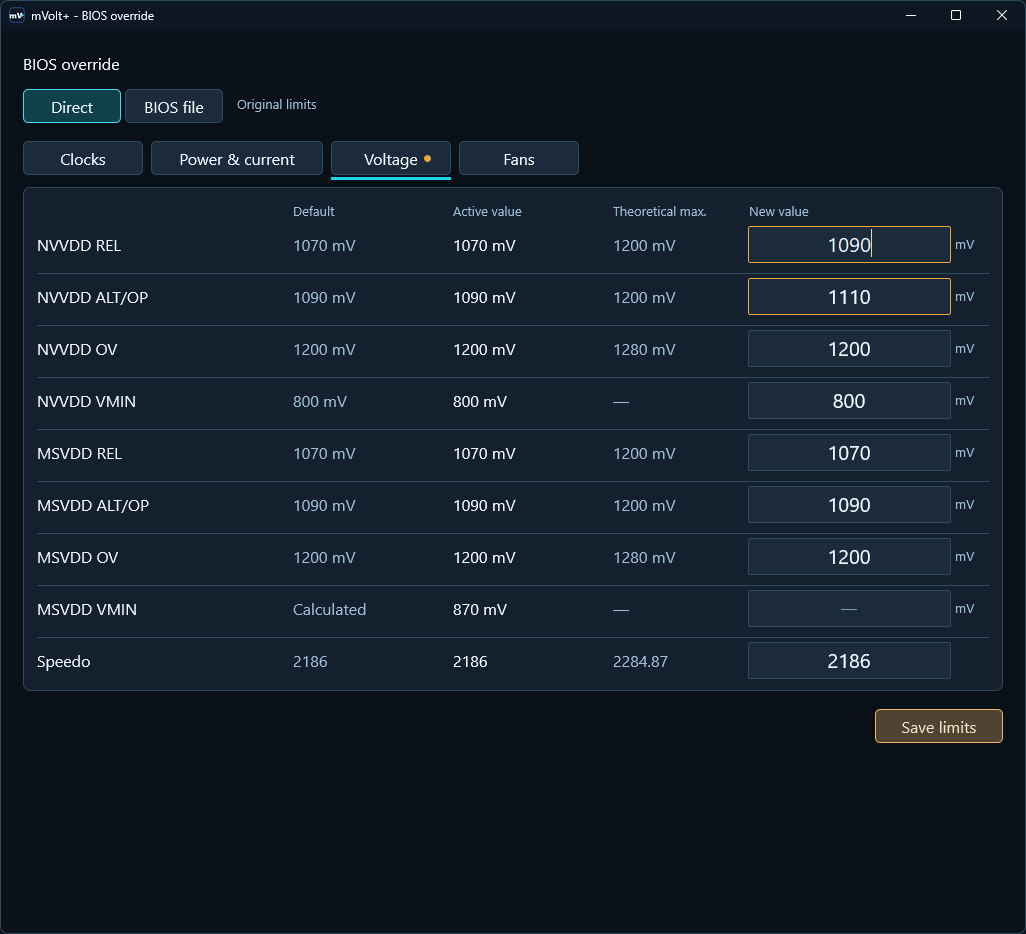
Raise the voltage limit (OCP works the same way, see below):
- Open Settings → Advanced tuning → BIOS override, Voltage tab, and choose Direct (no BIOS file needed).
- Type a higher New value for NVVDD REL. ALT/OP moves with it. MSVDD works the same way.
- Choose Save limits, then Restart GPU or Restart Windows.
- Wait for The new limits are active and verified.
- Set Voltage boost on the dashboard and tune as usual.
REL, ALT/OP and Voltage boost: REL is the limit at Voltage boost 0 %, ALT/OP
the limit at 100 % (20 mV higher on desktop RTX 50). Raising REL from 1070 to 1090 mV gives
1090 mV at 0 % and 1110 mV at 100 %. Default is your card's stock value, Active value
the limit in force now.
OV (overvoltage) is the highest voltage the card allows at all, so REL and ALT/OP can’t go above it (for instance, 1200 mV stock on the RTX 5090).
Raise OCP: on the Power & current tab, raise NVVDD current limit or
MSVDD current limit, then save and restart the same way.
Undo: choose Use original limits / Remove BIOS override and restart as offered.
Good to know:
- You are raising limits, not setting values. Use the normal sliders and tiles to actually use the new headroom.
- Recovery is much more robust: Remove BIOS override is now offered even when the recovery data is damaged or another tool left a broken BIOS override behind.
- Some rows can be unavailable on some BIOSes, for example on laptops. Hover over a row for the reason.
- MSVDD's real limit sits below its REL by its Reported Vrel offset (Telemetry → GPU info).
- Before going back to v0.50.6 or older, remove the BIOS override and restart. On a laptop, also Reset Power cap (watts) first.
Step-by-step guide: Raising voltage and OCP on driver 621.01 and later.
What’s new
This release makes voltage limits and OCP adjustable again on driver 621.01 and later,
through new BIOS override voltage and current-limit rows. The BIOS override window now uses
tabs, Remove BIOS override stays reachable in more cases, and laptop power caps also raise
the CPU+GPU budget. Hotspot and memory temperatures cover more cards, and many bugs are fixed,
especially around slow applies and the tray icon.
BIOS override
- The window now has Clocks, Power & current, Voltage and Fans tabs. A dot on a tab marks entries that are not saved yet.
- NVVDD ceiling and MSVDD ceiling are now NVVDD REL and MSVDD REL, joined by new ALT/OP, OV and VMIN rows for both rails. REL and ALT/OP move together by the gap the BIOS keeps between them.
- On most desktop RTX 50 BIOSes, REL now sets the limit the card calculates instead of only capping it. Default shows the card's calculated value, and New value starts there.
- New NVVDD current limit and MSVDD current limit rows replace NVVDD OCP maximum and MSVDD OCP maximum. They set the rail's default current limit and are offered on every driver, including 621.01 and later.
- Board input current is now named Board input current limit on the dashboard, in Overview and in BIOS override.
- Pressing Enter with an invalid entry opens that entry's tab and selects it. An error for an entry on another tab names the entry.
Recovery
- Remove BIOS override is now also offered:
- when a change cannot be verified, for example after switching between Direct and BIOS file;
- when the recovery data is damaged (the damaged data is kept as a copy);
- on systems with one NVIDIA GPU, when mVolt+ cannot match the GPU to its Windows device.
- If Windows cannot start the GPU (Code 43), the startup recovery now also offers removal when the recovery data cannot be read.
- Added
--remove-bios-override [--gpu-id ID]. Run it from an administrator terminal to remove every stored override without the NVIDIA driver, then restart Windows.
Power
- On laptops where Power cap (watts) raises the laptop's own power request, it now also raises the CPU+GPU budget by the same amount, so the higher limit can hold under CPU load. Review changes shows the budget, and Reset returns it. Not yet tested on a laptop.
- Fixed laptops where switching the power mode after a Power cap (watts) Apply blocked Reset and further power changes until Windows restarted. Not yet tested on a laptop.
- Fixed Power cap (watts) doing nothing at the new maximum after the BIOS power limit was raised. Without a cap, Target now starts at the power limit in force. Not yet confirmed on hardware.
Monitoring
- RTX 30 and 40: hotspot temperature now updates in the header and the RTSS overlay without opening Telemetry.
- RTX 5050 and 5060 class: memory-junction temperature and thermal inputs now work where the driver refused the full request.
- RTX 40: memory-junction temperature is now read where the driver refused the full request.
- These readings are not yet confirmed on these cards.
- POWER in the header shows "—" instead of "0 W" when the GPU reports no power reading, and a held HOTSPOT value is shown dimmed instead of as live.
- Tuning Overview now rounds voltage limits to the nearest mV, like the cards.
Applying changes
- A failed hotkey, tray or V/F apply no longer leaves Applying… in the bottom bar.
- Pressing Enter to apply no longer loses keyboard focus when the apply takes a moment.
- While a change is being applied, Telemetry, Overview, Review changes, Profiles, the fan curve editor and section and tile controls now work. Buttons that must wait are greyed instead of ignoring clicks.
- The Toggle RTSS overlay hotkey now works while a change is being applied. The Boost Lock hotkey now says it is busy instead of doing nothing.
- A successful card Apply no longer shows a Rollback warning next to its result.
Interface
- Whole-number fields now refuse "2,5" instead of applying 25.
- Focusing GPU clock range fields no longer turns the card into a lock request.
- Apply changes in the bottom bar no longer resets the REL + ALT/OP linked or separate choice, and its failure text no longer mentions a profile.
- NVVDD / MSVDD clock ratio: + and − now step the exact ratio instead of jumping into the slider's 0.20–2.00 view, and Allowed shows what the field accepts.
- The mouse wheel over a closed dropdown now scrolls the window instead of changing the dropdown. With more than one GPU, it no longer switches the header GPU selector.
- Dragging the window between monitors with different scaling no longer makes it jump.
- The V/F Curve button now says when no curve can be read, instead of doing nothing.
- Refreshing the Core V/F editor keeps Undo/Redo and a selected range.
- Fan Reset curve keeps the Enabled switch.
- Unlock OCP limits is now greyed on GPUs without OCP support.
- Clock, voltage offset, OCP, Power limit, Voltage boost and Fan control fields you are in no longer keep an old value after a hotkey or tray apply.
- Clearer error texts for V/F frequencies, SYS and Video offsets, and OCP amps.
Tray, startup and CLI
- The tray icon now comes back after Explorer restarts.
- At logon, the window now starts minimized instead of hidden when the tray is not ready yet.
- The tray icon now opens with the keyboard (Win+B, arrow keys to the icon, Enter).
- Starting mVolt+ again while it runs in the tray no longer shows a UAC prompt first.
- Switching GPU in
--read-onlymode now stays read-only. - CLI errors now name their flag, and
--install-startup-taskand--remove-startup-taskprint a result.
See the user guide for setup, the
621.01 voltage guide
for raising voltage and OCP, and the BIOS-copy guide
for BIOS-file support.