
Calendar Card Pro v5.3.0
One card can now show each person their own calendars, and a calendar kept as a log reads newest first, each entry saying how long ago it was. Countdowns can count in days, wait until an event draws near and leave out a repeat, an event lasting days says which of them it is, and any event can say how long it lasts. One calendar can draw its events smaller or without the weather, today's date can stand out while past days fade, and a second list card can carry on where the first one stops.
Most of that is yours to turn on. Three things change on cards you already have, listed under ⚠️ Changes to Existing Cards: an event that runs a full day or longer into a second date no longer shows "Now", grid view draws a timed one as one banner above the hours, and a finished event on a card with countdowns says how long ago it ended. And a Home Assistant restart can no longer freeze a dashboard whose cards take their colors from Home Assistant.
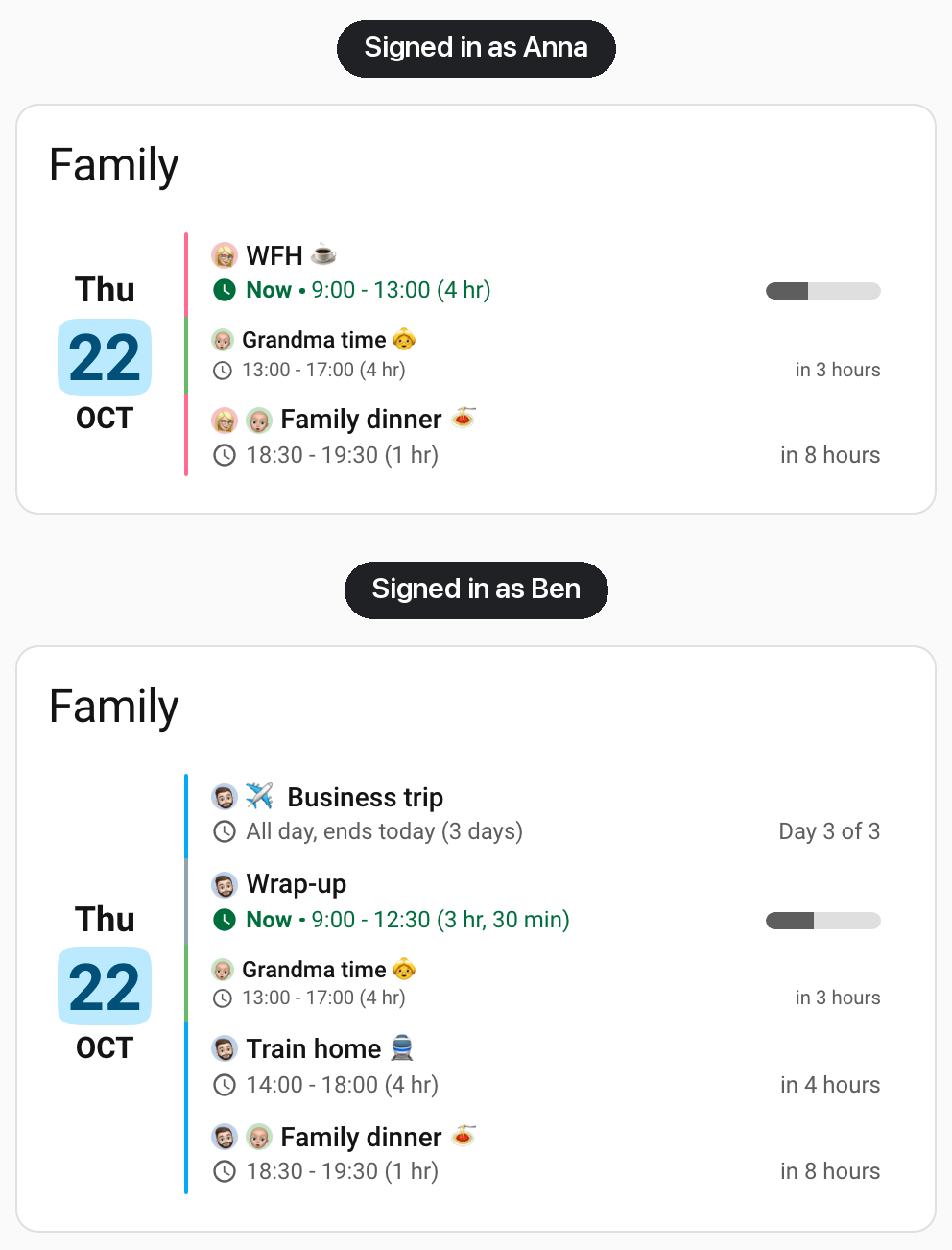
🎉 New Features
👥 Each Calendar for the Right People
Showing each person their own calendars used to take a card per person. Each calendar under entities: now takes visibility:, the conditions a card's own Visibility tab sets in Home Assistant, and its events show only while those conditions hold: a work calendar only for the person it belongs to, hidden on holiday, or kept off the kitchen tablet. In the visual editor, each calendar's panel holds Home Assistant's own Visibility editor, which picks people by name. Every condition that editor offers works; template, sun, zone, device and a state held for a while need Home Assistant 2026.10 or later. A hidden calendar is off the card for that person: its events, its chip in the calendar filter, its search results and its place among the calendars a new event can go to. This tidies a shared card but is not a privacy control, since everyone with a Home Assistant login can still read every calendar in Home Assistant itself. See Showing a Calendar Under Conditions (Thanks @dhc25, @hasnaat-k and @Tommatheussen, #368)
📜 A Calendar Kept as a Log
A calendar can record what was done as well as plan what is coming: when the lawn was last mowed, when the water filter was changed, who came to the door. Two additions make a card read it that way.
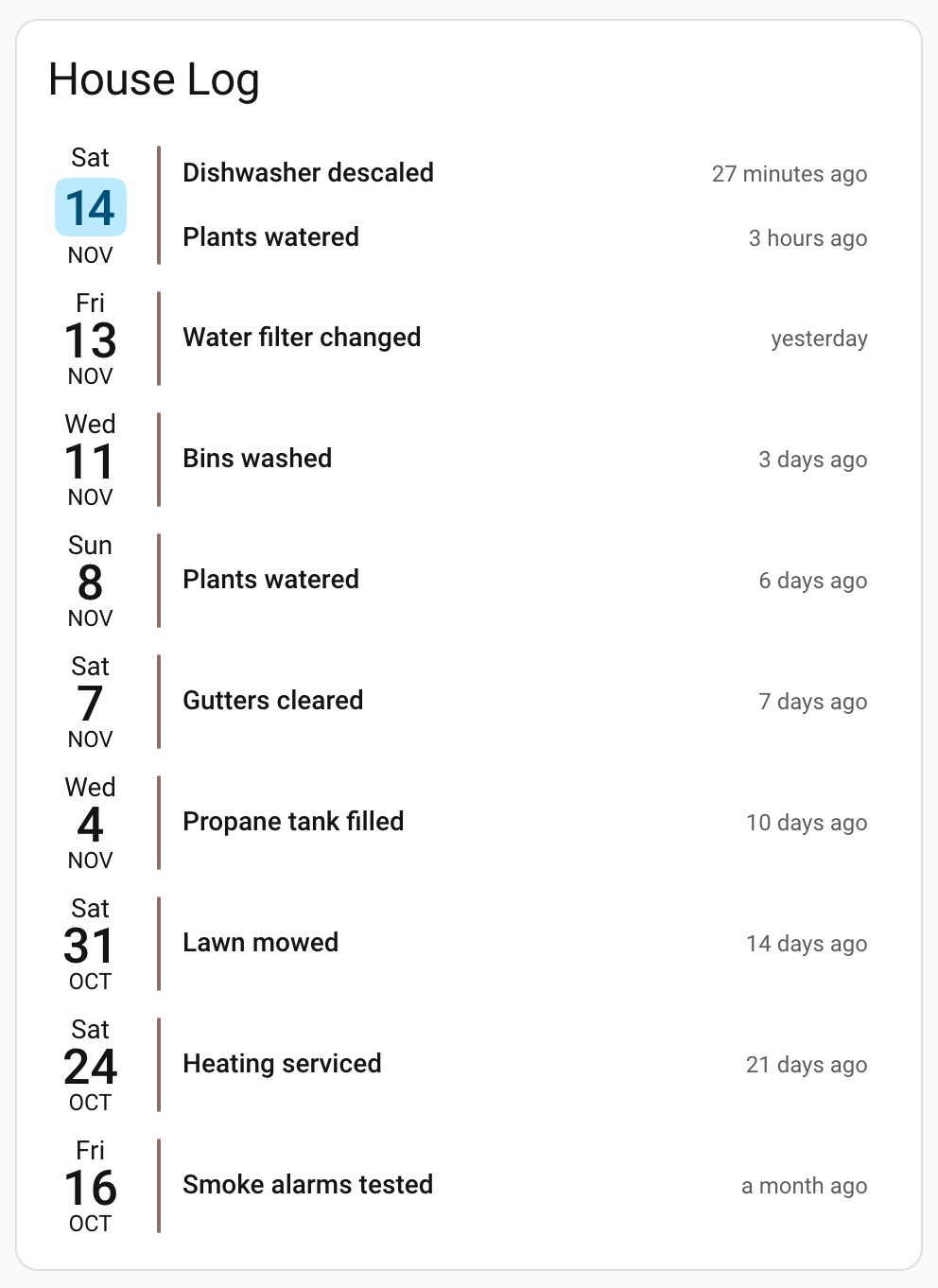
- How Long Ago - With
show_countdownon, a finished event now says how long ago it ended, the countdown read backward: "40 minutes ago", "yesterday", "13 days ago". It needs no option of its own: it appears wherever the card draws countdowns and keeps finished events, and the countdown options below apply to it as well. A long event showing its day counter keeps the counter. See Counting Up From Past Events (Thanks @ither, #165) - Newest First -
event_order: latest_firstin thelist:block reads a list card from the most recent day and event down, and its event limit keeps the most recent entries instead of the oldest. With a window that starts in the past and finished events kept, such asstart_date: today-29,days_to_show: 30andshow_past_events: true, the card shows the last month of a log with the latest entry on top. List view only. See Event Order (Thanks @iKaew and @sicrob007, #176) - House Log - A seventh Example Story puts the two together: a household log of the last 30 days, newest first, with a script that writes an entry and a front-door log as its variation. Quick Setup in the visual editor offers it as a fifth starting point
⏳ Countdowns That Say What You Need
"In a month" for a birthday 36 days away, "in 46 days" for something nobody needs to think about yet, and the same "tomorrow" on two bins going out together each say less than they could. Three options settle them, all off by default and each settable per view:
- Counting in Days -
countdown_exact_days: truecounts every date after today in days: "in 36 days" or "in 400 days" instead of "in a month" or "in a year", and "in 1 day" instead of "tomorrow". Later today still counts in hours and minutes. In some languages it also rewords shorter countdowns, such as Spanish "dentro de 3 días" for "en 3 días". See Counting in Days (Thanks @KieranHills, #342) - Countdown Range -
countdown_max_daysshows a countdown only for events starting within that many days:7for the week ahead,0for today's events alone. See Countdown Range (Thanks @mbrevda, #156) - Repeated Countdowns -
show_countdown: once_per_dayleaves out a countdown that reads exactly like the one above it on the same day, so two bins going out together say "tomorrow" once. Countdowns to events later today always show, since two that read "in 2 hours" can name different times. List and column view; grid view draws every countdown. See Repeated Countdowns (Thanks @snowdd1, #613)
🔢 Which Day of a Long Event It Is
Over a 45-day course, a progress bar barely moved and "Now" stayed green on every one of its days, so neither said how far along it was. With show_progress_bar on, each row of an event that lasts a full day or longer and runs into a second date now reads "Day 12 of 45" in place of the bar, in list and column view, and once the event has started it takes the countdown's place too, so a later day of a trip reads "Day 3 of 4" rather than "tomorrow". An all-day event over several days, which never had a bar, gains the counter as well. A shorter event, such as a night shift or a single day from midnight to midnight, keeps its bar, and grid view keeps its bars. See Day Counter (Thanks @dullabha, #281)
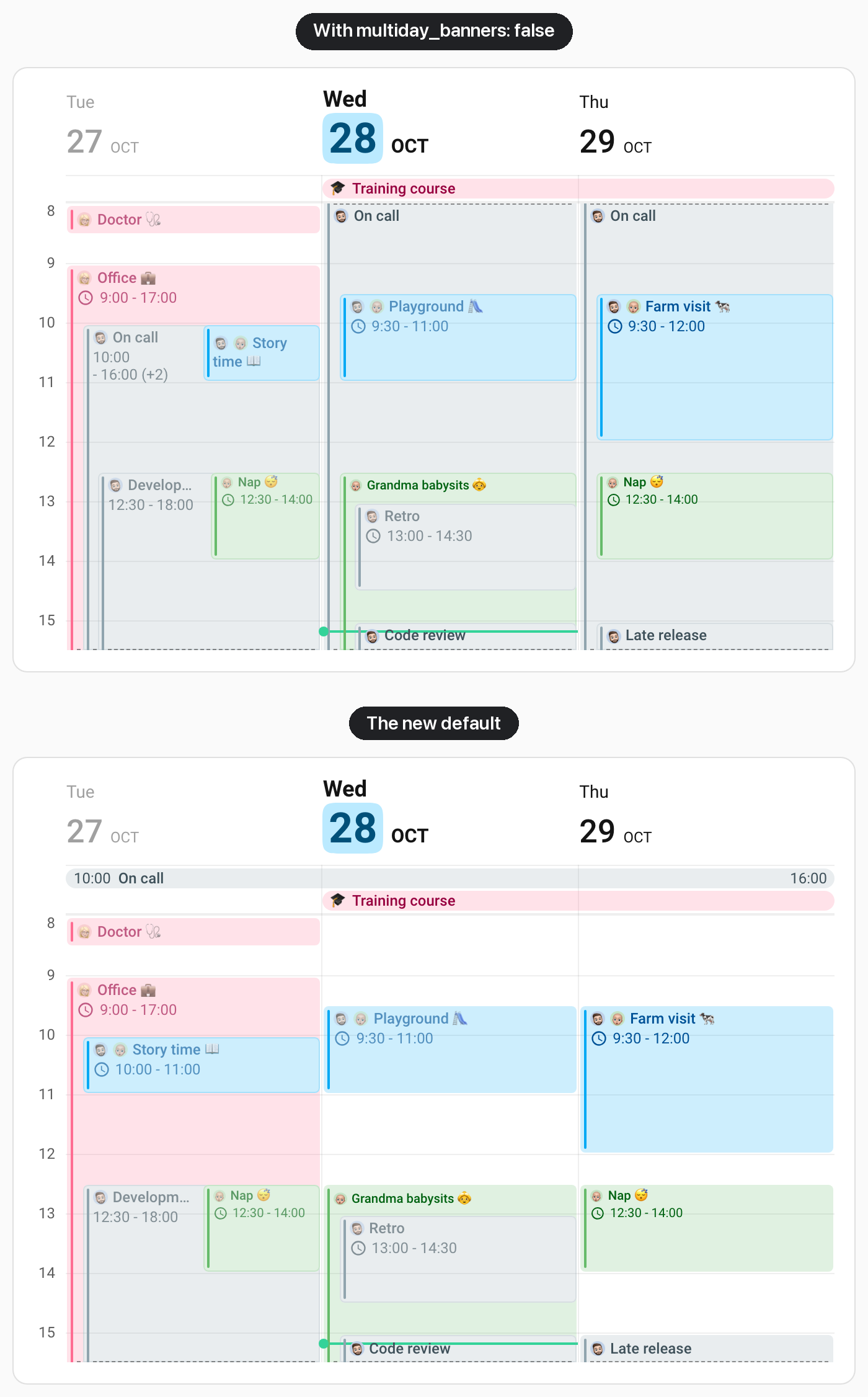
🗓️ A Long Timed Event as One Banner in Grid View
An on-call week from Monday 10:00 to Friday 16:00 used to fill five columns of hours in grid view and bury the appointments in them. Grid view now draws a timed event that lasts a full day or longer and runs into a second date as one banner above the hours, beside the all-day events, with its start time at the banner's start and its end time at its end; the popover still shows and changes both. Like an all-day banner, it draws its title and times only. Night shifts and anything shorter keep their blocks. It is on by default, and multiday_banners: false in the time_grid: block, or on one calendar, keeps the blocks. See Long Timed Events as Banners (Thanks @loich67, #716)
⏱️ How Long an Event Lasts
How long "16:00 - 16:30" takes is easy to see; how long "22:05 - 1:35 (+1)" takes is not. show_duration: true adds each event's length after its time, or after its title on a grid banner, in parentheses and in the card's language: "16:00 - 16:30 (30 min)", "(1 hr, 45 min)", "(1 day, 8 hr)", "(3 days)". A row that shows only part of a longer event, such as one day of a weekend away, gives the whole length as a total, "(3 days total)". It works in every view, can be set per view, and is off by default. See Event Duration (Thanks @Soundistor, #299)
🔉 A Quieter Calendar
A calendar that only needs to be there, such as a child's school calendar on a wall panel, can now take less room and less attention than the rest.
- Smaller or Larger Text -
text_scaleon a calendar draws the text and icons of its events smaller or larger,0.75for three quarters of the card's size, in every view. The popover, search and calendar filter keep the card's sizes. See Scaling One Calendar's Text (Thanks @BSkando, #150) - No Weather Beside It -
show_weather: falseon a calendar leaves the forecast out beside its events, such as an indoor work schedule's, and keeps it beside every other calendar's and in the day headers. See Turning Weather Off for One Calendar (Thanks @cromelex, #247)
📅 Today Stands Out, Past Days Fade
In a week that starts on Monday, today can be anywhere on the card, and the days already gone compete with the days ahead. today_date_scale and today_date_font_weight draw today's date larger and bolder, date tile included, and past_date_opacity fades the dates of past days, which keep their weekend color, only fainter. past_date_scale and past_date_font_weight set the size and weight of past days' dates. All five change nothing until set, and each can be set per view; in the visual editor they are under Day Header. Each past day also carries a past-day class, for card-mod styles. See Today & Past Days (Thanks @codetalker78, #619)
⏭️ A Second Card That Carries On
A small card with what is on now, above a card with what comes later, repeated the first card's events in the second. skip_first_events in the list: block leaves the first events off a list card, so a second card that skips as many events as the first one shows carries on where the first stops, as long as both show the same calendars, dates and filters. The skip holds when the card is expanded, too. List view only. See Continuing a List on a Second Card (Thanks @loryanstrant, #222)
🔎 Search by the Words You Use
The visual editor's search matched only what is on screen and the option names, so someone looking for "AM/PM" or "newest first" found nothing. It now also knows the words people use for a setting whose name says something else: 12h or AM/PM finds Time Format, hide past finds Show Past Events, newest first finds Event Order and max events the event limit, and on a calendar, exclude finds its Blocklist and who sees its visibility conditions. A translated editor searches by its own language's words. See Search & Customized Only
⚠️ Changes to Existing Cards
- Long Events Show Their Day Instead of "Now" - An event that lasts a full day or longer and runs into a second date, timed or all-day, is no longer marked "Now" with its time in green in list and column view, on any card. With
show_progress_bar: trueit also reads "Day 2 of 3" on its rows instead of drawing a bar; before, a timed one drew a bar that barely moved and an all-day one drew nothing. A shorter event, such as a night shift, keeps both. See Day Counter - Long Timed Events Become Banners in Grid View - A timed event that lasts a full day or longer and runs into a second date, such as an on-call week or a conference from Thursday morning to Friday afternoon, is now one banner above the hours instead of a block on every day it covers, and the events beneath it get their width back. The banner draws its title and times only, without the location, description, weather, countdown or progress bar its blocks showed, and takes a row of the all-day band, where
allday_band_max_rowsapplies. To keep the blocks, setmultiday_banners: falsein thetime_grid:block, or on one calendar. See Long Timed Events as Banners - Finished Events Say How Long Ago - On a card with
show_countdownthat shows finished events, as every grid card does by default, finished events now read how long ago they ended, such as "2 days ago", where they had no countdown before. Setshow_countdown: falsein the view to go without. See Counting Up From Past Events
🐛 Bug Fixes
Older iPhones & iPads
- No Event Text on Safari 15.4 to 16.x - Since v5.2.0, iPhones and iPads on iOS or iPadOS 15.4 to 16.x, among them iPads that stop at iPadOS 15 or 16 and run the Companion app, drew each day's date and accent bar but no event titles and no
empty_day_text, in list, column and grid view. The card now draws them there as it did in v5.1. (Thanks @adamdougal, #877)
Home Assistant Restarts
- A Restart Could Freeze the Dashboard - On a card that takes its colors from Home Assistant (
accent_color: home-assistant, card-wide or on a calendar), a failed read of Home Assistant's entity registry made the card redraw, and every redraw read it again, with no pause between. Where a card appeared while Home Assistant was restarting, such as on switching views or opening the editor, the browser tab could freeze for good, and stayed frozen after Home Assistant was back. A failed read now waits a minute before trying again, longer each time, and tries again at once when the connection returns
Grid
- A Short Block's Title Never Scrolled - In grid view, a block too short for its usual title row, such as a one-hour event on a card whose
heightsqueezes the hours, draws its title on one fitted line, and withscroll_long_titles: truethat line stayed still while longer blocks scrolled. It now scrolls with them (Thanks @kaikri31, #820)
The Editor
- Search Left Matches Behind Closed Groups - A search opened the editor's panels but not the collapsible groups inside them, so searching
colorleft five matches behind the closed Weekend Colors, Time and Location headings. Every group a search or Customized Only keeps now opens, and clearing the search closes them again - Essentials Only Hid What a Card Sets - Essentials Only, which your browser remembers for every card, hid settings the card had set, such as an event font size or a calendar's blocklist. It now keeps the essentials plus everything in the card's YAML
Related Issues
- #368 - Per-entity visibility conditions by @alexpfau, as @dhc25, @hasnaat-k and @Tommatheussen asked, answered by
visibilityon each calendar - #231 - Show calendar for specific users only by @Tommatheussen, answered by
visibilityon each calendar - #165 - Count up from a past event, "13 days ago", by @ither
- #176 - Sort events newest first, for calendars used as a log, by @iKaew, with @sicrob007's ask that the event limit keep the most recent
- #342 - Show the countdown in exact days, not "in a month", by @KieranHills
- #156 - Only show the countdown for events inside a configurable horizon by @mbrevda
- #613 - Only show one countdown for multiple events on future date by @snowdd1
- #281 - Show which day of a multi-day event is running, "day 12 of 45", by @dullabha
- #716 - Option to display timed multi-day events as banners in Grid view by @loich67. Banners became the default rather than an option, and
multiday_banners: falsekeeps the blocks - #299 - Show an event's duration alongside its time by @Soundistor
- #150 - Scale a calendar's event text, to make some calendars less prominent, by @BSkando
- #247 - Turn weather off for an individual calendar by @cromelex
- #619 - Style past, today and future day headings separately, including weight and size, by @codetalker78. Today's and past days' size and weight shipped, and past days fade; italic and a color of their own for past days are possible with card-mod through the new
past-dayclass - #222 - Skip the first N events, so a second card can continue the list, by @loryanstrant
- #820 - 1 hour event wont scroll title text by @kaikri31
- #876 - No event text in any view on Safari 15.4–16.x (iPadOS 15/16) since v5.2.0 by @adamdougal
Full Changelog: v5.2.0...v5.3.0