
Calendar Card Pro v5.2.0
Start a card from an Example Story and answer a few questions, instead of working through the whole editor. Quick Setup, at the top of the visual editor, builds one of four stories on your own calendars, and Essentials Only cuts the editor down to the settings most cards need. The calendar filter gains Show all and Hide all and can leave a calendar out, grid view can shade today's column, a holiday two calendars share can be drawn once, and a long title beside the time now wraps.
Most of the rest needs no setting and applies wherever it is needed: the end of a multi-day event reads the way each language writes a date, which changes it in 36 of the card's 38 languages, Thai, Vietnamese and other scripts keep the marks above and below their letters, times keep their order where the card's language runs the other way from the dashboard, and older iPhones and iPads draw colors they had lost, with Safari 16.4 and 16.5 no longer crashing on a tinted event. Two things change on cards you already have; they are listed under ⚠️ Changes to Existing Cards.
🎉 New Features
🪄 Quick Setup & an Easier Editor
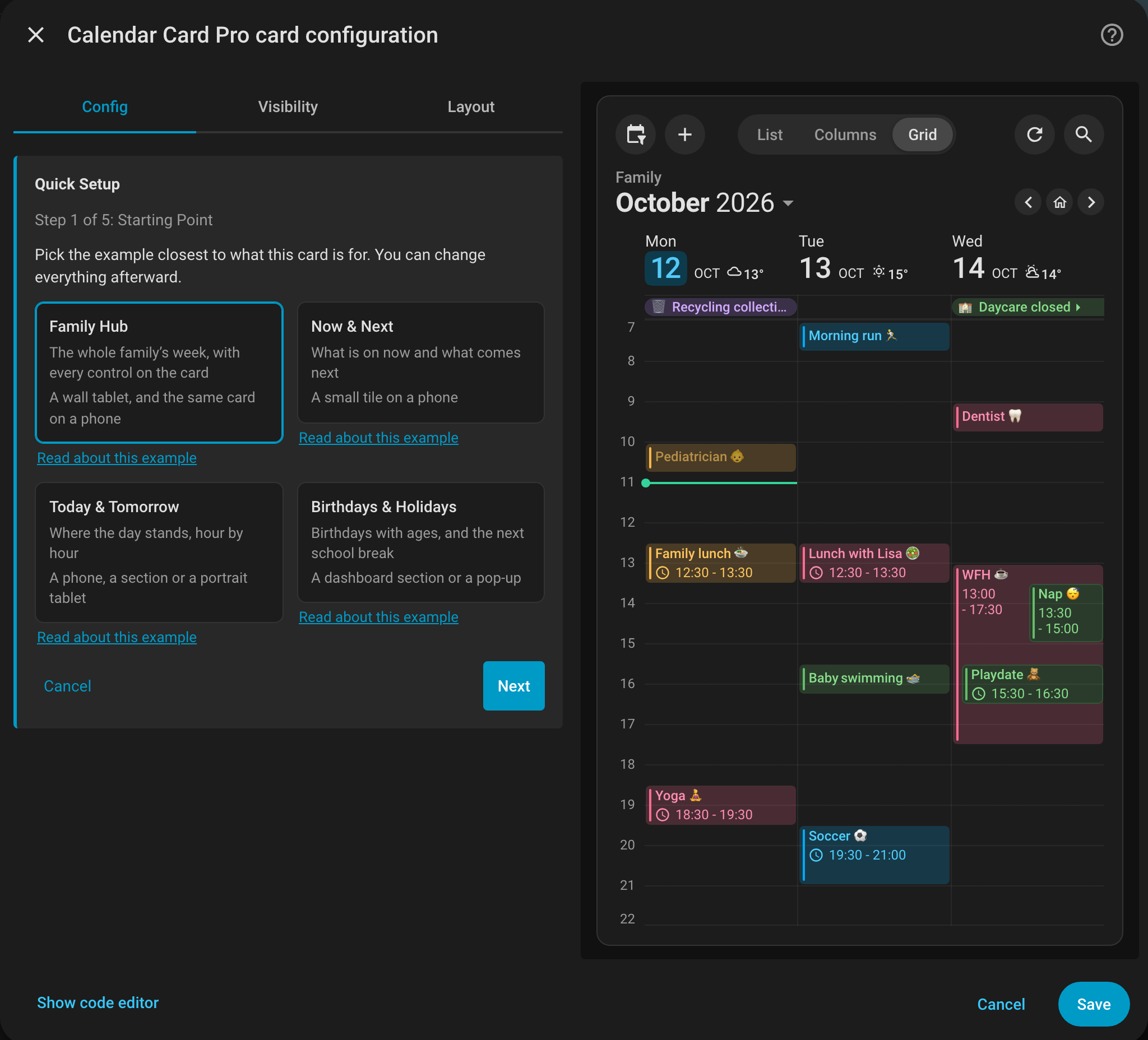
Configuring the card used to mean knowing which of the editor's panels held what you wanted. Quick Setup, at the top of the visual editor, starts from one of four Example Stories: the Family Hub, Now & Next, Today & Tomorrow or Birthdays & Holidays. It then asks only what a story cannot know about your home, the title, your calendars, your weather, the toolbar and what a tap should do, and ends on a review with Apply. The preview follows every answer, and Cancel puts the card back exactly as it was. Each calendar keeps its own settings, calendars without a color take the story's colors in order, as far as they go, and keys the card does not own, such as card_mod or grid_options, stay as they are. See Quick Setup.
- Essentials Only - A switch beside Customized Only cuts the editor down to about twenty settings most cards need, and says how many it hides. A search sets it aside, and your browser remembers it for every card. See Essentials Only
- Options in the Wrong Place, Found & Moved - An option written where the card does not read it, such as
toolbarinsidetime_grid:orhour_heightat the top level, does nothing on the dashboard and says nothing about it. The editor now lists each such line at the top, says where it works, and offers to move it there when that place is free. See Options the Card Ignores - Your Weather in the Card Picker - On Home Assistant 2026.6 or later, the card picker's Interactive List and Interactive Time Grid now show your home's forecast where Home Assistant has exactly one weather entity. See Adding the Card to Your Dashboard
👁️ Show All & Hide All in the Calendar Filter
To see one person's week on a family card, press Hide all, then tick that person's calendar; Show all brings every calendar back. The two buttons head every menu the calendar filter opens, including the one the chips fold into on a narrow card. Like the checkboxes, they change only what this device shows, and other cards with the same configuration follow. See Showing & Hiding Calendars (#770)
🙈 A Calendar That Stays Out of the Filter
A calendar that is on the card only to be seen, such as school holidays drawn in a child's color, took a chip nobody would press. show_in_legend: false on that calendar leaves it out of the calendar filter, chip and menu row alike, and its events always show, since nothing is left that could hide them. It was asked for on the Home Assistant community forum. See Leaving a Calendar Out of the Filter.
📍 Today's Column, Shaded
In a week grid, only the small date tile told today apart, which is hard to find at a glance on a wall or an e-ink display. today_background_color in the time_grid: block tints today's column from just under the date row down, as weekend shading tints a weekend, and on a weekend today's color takes the weekend's place. It is off by default. See Shading Today.
🎉 A Holiday Two Calendars Share, Drawn Once
Home Assistant's Holiday integration writes each calendar's own name into every event's location, so a holiday in two regional calendars reached the card as two events, and filter_duplicates: true rightly kept both. filter_duplicates: ignore_location matches copies on their title, start and end alone, and keeps the one from the calendar listed first. true matches exactly as before, location included, and the editor's Filter Duplicates switch is now a choice of all three. See Filtering Duplicate Events (Thanks @rudiratlos, #705)
⚠️ Changes to Existing Cards
- A Long Title Beside the Time Wraps - In v5.1, a title too long for its line beside the time (
time_position: title) scrolled, whateverscroll_long_titlessaid. It now wraps over as many lines as it needs, as every other title does, and the time ends its last line, or takes a line of its own where that line has no room; the two never overlap. The title's lines stop where the time ends, as far from the card's edge as every other time.title_max_lines: 1keeps the title on one line, ending in "…", andscroll_long_titles: truescrolls it as before. See Time Beside the Title (Thanks @Gloomyeye, #37, for the e-ink case) - Icelandic Cards in Chrome Fall Back to English - Chrome has no Icelandic date data, so where Home Assistant runs in another language, an Icelandic card wrote "Now", countdowns and dates in the browser's own language, such as "Jetzt" and "in 3 Stunden" in a German Chrome, beside an English toolbar. They now fall back to English throughout, as the card's own words do. With Home Assistant's time format set to System, a browser whose own language Chrome has no data for now picks 12- or 24-hour time the English way too;
time_24h: truekeeps 24-hour times
🐛 Bug Fixes
Languages & Scripts
- A Multi-Day Event's End Read Like a Heading - The end of a multi-day event was built from the card's own capitalized month abbreviations in one of three fixed orders, so in most languages it read like a column heading in the middle of a sentence: Czech "do Pátek, 23 Říj", Korean "~ 금요일, 23 10월 에 17:00". The browser now writes that date in the card's language, so its order, punctuation and month follow the language: "do pátku 23. října", "~ 10월 23일 금요일 17:00". US English reads as before
- The Words Around It Were Wrong - The weekday after "until" was capitalized, in the wrong case or without its article in Czech, Slovak, Croatian, Slovenian, Estonian, Latvian, Lithuanian, Finnish, Hungarian, Catalan, Romanian, Greek and Spanish, and the word before the time was wrong in Hungarian ("itt:"), Korean, Turkish, Slovak, Ukrainian, Lithuanian and Chinese. Catalan read "acaba damà" for "acaba demà", and Norwegian put two spaces after "kl.". Each now reads as Home Assistant and the language's own date patterns write it: Hungarian "holnap 0:30-kor ér véget", Chinese "明天 0:30 结束"
- A Western Comma in Chinese & Thai - "整天, 明天结束" is "整天,明天结束" now, and Thai joins the two parts of an event's time with a space, as Thai writes a pause
- Two Korean Editor Labels Read Like Others - In the visual editor in Korean, the today indicator's icon and the weather's Nowhere option had the same names as other controls; each now reads as its own
- Nynorsk Read Partly in English - Chrome carries no Nynorsk data of its own, so where Home Assistant ran in another language, a Nynorsk card drew "Now", its countdowns, the toolbar's dates and "Today" in the browser's language, usually English. They now fall back to Bokmål
- Home Assistant in Icelandic or Nynorsk Took Over Every Card's Dates - Chrome has no date data for Icelandic or Nynorsk, so a Home Assistant running in either replaces the browser's date formatting with its own, holding only that language, and every card on the dashboard wrote through it: a German card under an Icelandic Home Assistant read "Núna", "eftir 3 klukkustundir" and "á morgun". The card now loads its own language into that formatting from Home Assistant and redraws once it has. Until then, or where Home Assistant cannot serve it, the card shows what it showed before
- Marks Above & Below the Line Were Cut - Wherever the card cuts text to a number of lines (the time, location and description, a title with
title_max_lines, and grid titles), Thai tone marks, Vietnamese stacked accents, and Devanagari, Khmer, Burmese and Arabic marks lost their tips, so "สิ้นสุดพรุ่งนี้" drew as "สินสุดพรุ่งนี". Letters leaning past the start or end of a field, a chip, the month or the weather lost an edge, the chips trimmed the tails of letters such as g, p and y, and a sliver of the next, hidden line could show under a title capped withtitle_max_lines. These are drawn whole now, and nothing moves to make room. A weather condition capped withweather.event.max_linesstill cuts Thai marks above its first line
Right-to-Left
- Times Read Backwards Where the Card's Language Runs the Other Way - An English card on a Hebrew dashboard drew a range as "17:00 - 16:00" and a multi-day end as "until Friday, Nov 13 at 2:00 22:00", a Turkish countdown on such a dashboard read "saat sonra 6", and a Hebrew card on an English dashboard did the same the other way round. Every Arabic or Persian Home Assistant got this without setting anything, because the card has no Arabic or Persian and draws in English there. The card's own times, countdowns and dates now keep their order, and so do the dates in the toolbar's tooltips
- One-Line Titles Lost Their Beginning - With reduced motion on,
scroll_long_titlescuts a long title with "…" rather than scrolling it, and a title running the other way from the dashboard, such as a Hebrew title on an English dashboard, was cut at its beginning instead of its end
Older Browsers
- Safari 16.4 & 16.5 Could Crash on a Tinted Event - Since v5.0, hovering over or pressing a tinted event in column or grid view, where grid view tints events by default, crashed the whole page on Safari 16.4 and 16.5. Safari before 18 now washes such an event in the card's accent, as it does an untinted one. A color of your own or your theme's that holds
currentColorcan still crash those two versions, and the installation guide now says so; updating to Safari 16.6 or later fixes it. See Browser Support - Colors Went Missing Before Safari 16.2 - On iPhones and iPads that stop at iOS 15, and in Chrome before 111, the card lost most of the colors it mixes: the toolbar's pills, the chips' tint, the progress bar's track, the loading spinner, focus rings, grid view's hour lines, day separators and weekend shading, the week number pill, and a filled all-day pill, whose label then vanished. They now draw in gray, or in the solid color where a pill is filled
Events, Popover & Grid
- List Rows Sat 2px Low on Cards With an Event Action - Since v5.0, on a list card with an
event_tap_actionorevent_hold_action, each event's title and time sat about 2px below the middle of its accent bar. They are centered again - A Capped Title Could End in "-…" - A title cut by
title_max_linesin the middle of a word could end in a stray hyphen before its "…" - Add Could Slip Below the Screen - A new event's Cancel and Add appear once something is typed, so a popover opened low on a short screen could push Add past the screen's bottom edge, out of reach; opening the date or a map loading did the same, and on a phone the keyboard covered the sheet, title included. The popover now moves only as far as it must to stay in sight, stands on the keyboard, and keeps its buttons at its foot when its content has to scroll
- Unreadable Lists in the Popover in Dark Mode - In Chrome and Edge on Windows and Linux, with Home Assistant in dark mode, the popover's calendar picker and the lists for repeating events opened as light text on white, so only the highlighted row could be read (Thanks @Laeress, #775)
- Search Results Behind the Keyboard - On a phone, the search panel's lower results ran behind the on-screen keyboard, and held sideways with the magnifier low on the screen, the search field itself could sit behind it. The panel now keeps the field and its results above the keyboard, as the popover does
- A Hold Beside a Grid Event Could Move It - On touch screens running Chrome, Edge or Home Assistant's Android app, a finger held on an empty slot close to an event, meant to draw a new one, could grab that event instead, and dropping it moved the event in its calendar. A press now acts where the finger is: it draws or adds there wherever a tap on a day adds, and otherwise may still open the event, but never lifts it
Loading & the Editor
- Cards That Named the First Weekday Differently Loaded Twice - Two cards showing the same calendars, one with
first_day_of_week: systemand one naming the same weekday, kept separate copies and asked Home Assistant twice. And after a change in your profile moved a week-relative card to another week, a calendar failing in that week kept drawing the old week's events, and waited longer before trying again - The Editor Deleted a Line From
list:- An option in thelist:block that does not belong there was deleted from your YAML on the next unrelated edit in the visual editor. It is now kept, and listed under Options the Card Ignores
Related Issues
- #775 - Event popover's calendar dropdown shows light text on a white list in dark mode by @Laeress
- #705 - Treat events as duplicates even when their locations differ by @rudiratlos, answered by
filter_duplicates: ignore_location - #770 - "Show all" and "Hide all" in the calendar filter's menu by @alexpfau
- #37 - Time and title on the same line by @perolamlarsson, with @Gloomyeye's follow-up for an e-ink display, answered by titles that wrap beside the time
Full Changelog: v5.1.0...v5.2.0