
Calendar Card Pro v5.0.0
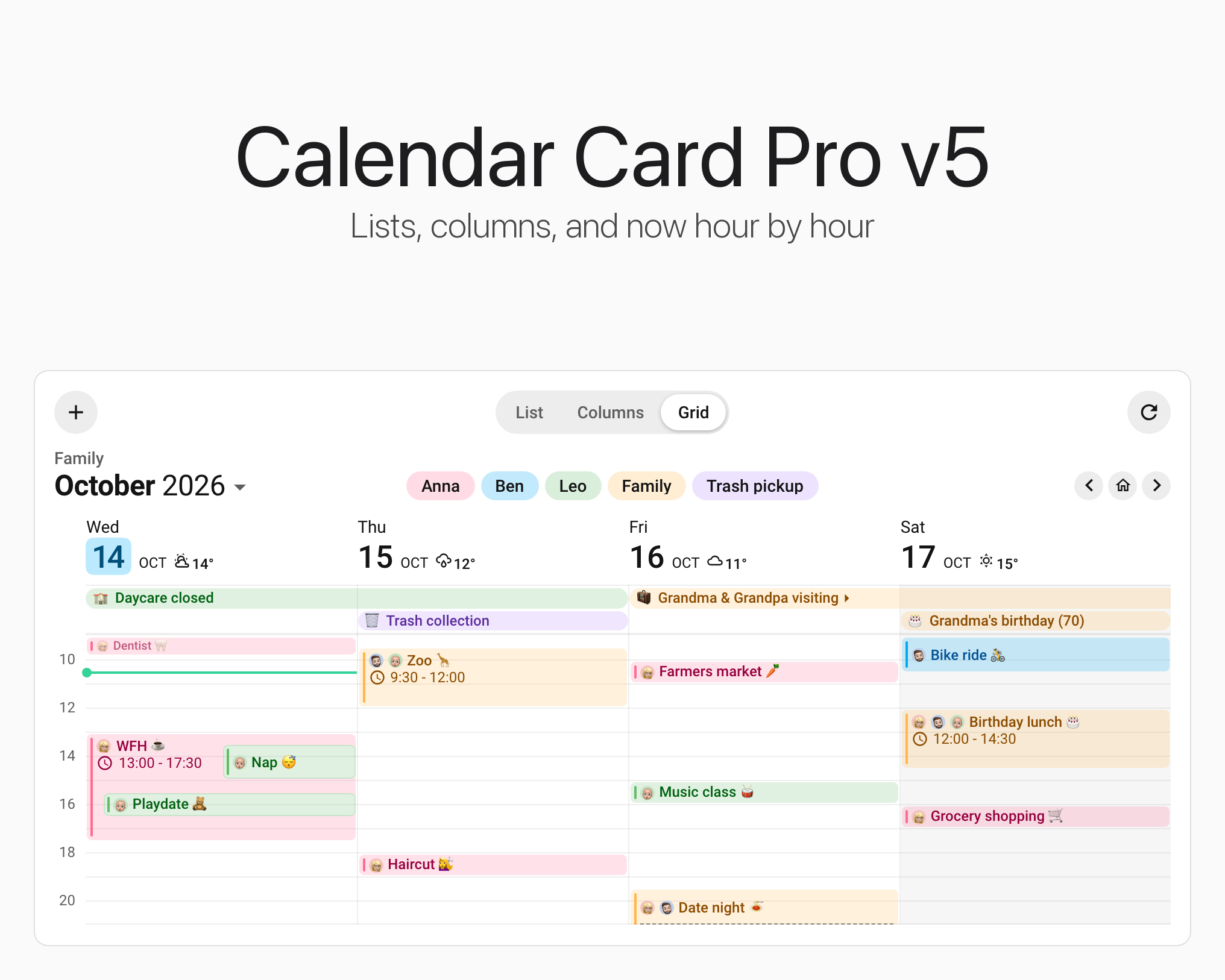
This one changes what Calendar Card Pro is. 🎉 v5 brings grid view to your calendar and makes the card something you can act on, and with that it answers more than twenty feature requests, some of them open since March 2025. A lot of work went into it, and I wanted it to be truly polished on release day rather than soon after. Thank you to everyone who asked, waited, tested and contributed along the way.
Grid view draws days as columns and events as blocks positioned and sized by their start time and duration, with an all-day band and a current-time line. The card is also no longer only something to look at: add an event, tap one to read, change or delete it in Home Assistant's own dialogs, and page through the dates or switch between list, columns and grid from a toolbar on the card. The visual editor lets you choose which layout to configure without changing the card's displayed layout.
🎬 Smart-Live has the exclusive first video review of v5, in German: Calendar Card Pro 5: Endlich ZEITRASTER für deinen Familienkalender in Home Assistant
A few defaults change whichever layout you use, so they come first. 👇
⚠️ Breaking Changes
- Today Sits on a Tile - Today's day number now sits on a soft tile tinted with the today color (
today_indicator: tile), where v4 drew no indicator unless you chose one. A card whose editor was set to None stored nothing, so it gets the tile as well. In column and grid view every day's number keeps room for the tile, so those headers grow slightly.today_indicator: falsebrings back the plain number. See Today Indicator - The Accent Follows Your Theme -
accent_colorandtoday_indicator_colornow default to your theme's primary color instead of a fixed#03a9f4, and the week-number pill and week separator take that color at 31%. On Home Assistant's default theme that is#009ac7, a touch deeper. On a theme whose primary color is orange or green, every calendar without anaccent_colorof its own turns orange or green too. To keep the old blue, setaccent_color: '#03a9f4'andtoday_indicator_color: '#03a9f4', andweek_number_background_colorandweek_separator_colorto'#03a9f450'. See Visual Styling & Colors - An Event Under Way Is Marked - In list and column view, a running event's clock fills in, "Now ·" goes before its time, and its time turns green. It is on by default;
show_now_indicator: falseturns it off. See The Now Indicator - The Accent Bar Is an Element, Not a Border - The colored stripe beside each event was the inline-start border of
.event. It is now.event-accent-bar, an element of its own inside the event's start padding, so a card-mod rule that setsborder-leftorborder-inline-starton.eventno longer reaches it,border-left: noneno longer hides it, and a rule that setspaddingon.eventcan run the text under it.vertical_line_width: 0pxhides it, and card-mod can style.event-accent-bar. See Theming & Card-Mod
🎉 New Features
🗓️ Grid View
Set view: grid and the card stops being a list. Days become columns against a shared hour axis, and an event is drawn where it starts and as tall as it lasts, so a morning stacked with meetings looks different from an empty one at a glance. An event that starts inside a longer one is drawn on top of it, the way your calendar app draws a day, and when more events start together than will fit side by side, the rest collapse into a counted +N block.
- Events sized and placed by their real time - A block's position and height come from the event's own start and end, which is what makes the shape of a day readable at a glance. Multi-day timed events are drawn in each day they touch (#300, #206)
- Overlaps drawn the way your calendar app draws them - A meeting during the school run or a flight during a trip is drawn on top of the longer event, slightly indented, instead of both shrinking to half a column for the whole day. Events that start together sit side by side. The longer event's text keeps to the part nothing covers, so it is never printed underneath the event drawn over it, and the card measures how tall an hour is drawn so the longer event keeps room for its title. Prefer counting parallel lanes?
overlap_layout: columnsdraws every overlap side by side (#624) - A line across today at the current time -
show_now_linedraws it, in the card'snow_color, the same color list and column view give an event under way. Only today's column carries it, and only while the current time is inside the visible hours — a line clamped to an edge would say something false. It runs across the events in its way rather than hiding behind them, and under their text rather than through it (#325) - An all-day band above the axis - All-day events sit between the day headers and the grid, spanning their included dates, while timed multi-day events stay on the hour axis.
allday_band_max_rowscaps how tall the band may grow - The axis is yours to set -
start_timeandend_timechoose the hours drawn,hour_heighthow tall an hour is,slot_minuteshow finely it is ruled,axis_label_minuteshow often it is labeled, andaxis_widthhow wide the hour gutter sits.show_axis_labelsturns the labels off entirely - It gives way gracefully when narrow -
min_day_widthsets how narrow a day column may get before the grid sheds one,min_days_to_showthe fewest it will shrink to, andmin_days_fallbackwhat happens when even that will not fit — fall back to the list, or cramp - Blocks reveal more as they grow - A short block keeps its title and every calendar label, shrinking the type a step at a time rather than dropping anything. Give it more height and it adds the time, then progress, location, description and weather — so a half-hour meeting stays readable while an afternoon workshop shows what it is for
- Grid defaults you can edit directly - Grid starts with filled event blocks, empty days and past events kept, locations left out of the blocks, a hairline between day columns, and a full-width progress bar. The Grid workspace shows each option's effective value and where it comes from, and untouched defaults stay out of YAML
Every option grid view adds lives under time_grid:, and that block is also where you override any presentation option for grid alone. See Grid View.
✨ Ruling the Axis & Banners That Show Where They Stop
- Lines you can set family by family - Grid starts with one rule per hour and a narrow gutter between days. Choose 15-, 20-, or 30-minute ruling with
slot_minutesand set the label cadence separately withaxis_label_minutes. Each family of lines has its own width and color —day_separator_*between columns,day_header_separator_*below the date row,allday_band_line_*below the all-day band, andhour_line_*across the axis — all starting from the theme's divider gray - All-day banners with shaped ends - A banner has rounded ends where its event begins or finishes, and squared ends with continuation marks where it runs past the visible span, so you can tell at a glance whether a holiday started before the week you are looking at. Banners use their fill instead of an accent bar; timed blocks keep the bar
See Ruling the Axis.
🎛️ Configure the View You Mean
Card Displays chooses the card's starting layout. Editing Settings For chooses All Layouts, List, Columns, or Grid, independently of what the card displays — so you can set a layout up without switching the card to it. The workspace itself is not saved in YAML.
- Edit the value the layout uses - All Layouts writes the shared top level; List, Columns, and Grid show their effective values and write to
list:,column:, andtime_grid:. Helper text distinguishes inherited values, layout defaults, and explicit overrides, and Reset removes one view's override without touching another - See only relevant controls - Each workspace withholds the options its renderer cannot use, including per-calendar ones, so you are never offered a setting that would do nothing. Search and Customized Only stay within that workspace
- Keep your choices when switching to Grid - Moving a card to Grid copies the shared choices you authored into the Grid overrides that would otherwise diverge, with one notice naming what it kept. Existing Grid overrides win
- Keep default configurations short - A fresh Grid card needs no
time_grid:block at all. Untouched defaults are neither saved nor counted as customizations
Older cards whose shared and List values are ambiguous get a one-time choice: keep the existing List appearance, or keep those values as shared. Unambiguous cards adopt the v5 format on their first real edit, and YAML-only cards keep working without the config_version: 5 marker. See the visual editor guide.
👆 Add, Open, Change & Delete Events
A grid block is only as tall as its event lasts, so no layout makes a half-hour meeting hold its description. Now a tap opens the whole event, and the card can add one too, through the dialogs Home Assistant's own Calendar panel uses.
- Add an event from the card - A button in the card's header, which
toolbar: { show: true }puts there, opens Home Assistant's new-event dialog with one of the card's calendars already chosen and today's date, or the first of the dates the card covers when today is not among them, and once you save, the new event appears on every card on the page that can show it. It appears only when one of the card's calendars accepts new events and is not failing to load (#45, Thanks @GContaldi, #663) - Tap an event for its details -
event_tap_action: { action: details }opens Home Assistant's event dialog for the event you tapped, in list, column and grid view, all-day banners included, with its full description, location and how it repeats. Any other tap still runstap_action, and a hold anywhere runshold_action(#241, Thanks @GContaldi, #668) - Change or delete it there - The dialog offers Edit and Delete wherever the calendar's integration allows them.
allow_event_edit: falseandallow_event_delete: falsetake them away, on a wall tablet for instance; they never add what a calendar cannot do. Neither is offered on a merged duplicate or on a calendar that is failing to load (#298, Thanks @GContaldi, #668) - Setting the card up writes nothing - In the editor's preview and in dashboard edit mode, the add button and event taps do nothing, so configuring a card never opens a dialog or changes a calendar
See Tapping an Event and Add Event Button.
🧰 A Toolbar to Page Through Dates, Switch Layouts & Hide Calendars
- The card's own controls, in its header -
toolbar: { show: true }adds two rows above the events: first the actions, with the calendar filter and the add button at the start, the view switcher in the middle and refresh at the end, then the month on screen, its name in bold, with the arrows at its end. Every control is on except reset, and each can be turned off. The card's title becomes a small label over the month, which takestitle_font_sizeandtitle_colorin its place; a card-mod rule written.header-container h1.card-headerstill reaches the title. A card that leaves the toolbar off looks as it always has - Switch between List, Columns and Grid on the card - The toolbar's view switcher lets a wall tablet change layout without the editor. Each device remembers its own choice until the card is edited, and
viewstays the layout the card opens with. A layout too wide for the card is dimmed, and switching never reloads events - A different number of days in each layout -
days_to_showcan be set inlist:,column:ortime_grid:, so a card can look two weeks ahead as a list and show this week on the grid. Every layout starts on the same day, and the card loads the longest of them once, so switching still never reloads. See Showing a Different Number of Days in Each Layout - Page through the dates - Arrows at the end of the month's row move by as many days as the card shows, and the house between them goes back to the days the card opens with. The month opens the browser's date picker; it names the month the first day on screen falls in, and the exact dates are its tooltip and what a screen reader hears. Away from its own days the card shows events that have ended, so last week can be looked back on, and a reload or an edit brings it home. Pages are kept in memory while the dashboard is open, never in the browser's storage (#185)
- Show and hide calendars - The calendar filter is a button that opens a checkbox for each calendar.
toolbar: { legend: chips }shows a chip for each calendar in the month's row instead, tinted in its color, so the chips are also the key to the colors below, and falls back to the button where they do not all fit. A press hides that calendar's events on this device until the card is edited, and nothing is fetched to do it. Withfilter_duplicates, an event two calendars share stays, drawn from the calendar still shown.legend: falsetakes the filter away (#608) - Refresh when you want - The toolbar's refresh button loads the events again now, then shows a green check for a moment, or a red alert where a calendar could not be loaded, so a press shows it worked however fast the network.
refreshis also a card action, for a tap or a hold (#245) - Back to how the card is set up - For a screen several people share,
toolbar: { reset: true }adds a button that undoes, in one press, everything chosen on this device: the page, the layout, the hidden calendars and an expanded compact card. It appears only while there is something to undo, without moving anything around it, so a glance at a shared wall tablet says whether someone left it on a choice of their own. The card never goes back by itself
See Header Toolbar, Showing & Hiding Calendars, Refreshing the Events and Resetting the Card.
📍 Today & Now at a Glance
- The date tile - Today's day number sits on a soft tile in your theme's color, a little wider than tall with the rounded corners of an app icon and the digits centered more evenly, so on a two-day card today's events are the ones under the tile. It is the new default,
today_indicator: tile, andtoday_indicator_colortints it (#615) - The Now indicator - An event under way gets a filled clock and "Now ·" in front of its time, in green, in list and column view, and the mark comes and goes on time without waiting for Home Assistant.
now_colorchanges the green, here and on grid view's now line, andshow_now_indicator: falseturns it off. "Now" comes from your browser, in the card's language - Today, even when it is empty -
show_empty_todaykeeps today's row, reading "No events", while the other empty days stay hidden, so a glance tells you today is free (#670, Thanks @vincentullmann, #669)
See Today Indicator, The Now Indicator and Showing Today When It Is Empty.
🎨 Your Theme's Accent & a Rounded Accent Bar
- The card takes its accent from your theme - A calendar without a color of its own, the today tile, the week-number pills and the week separators all follow your theme's primary color, so a custom theme no longer gets a fixed blue it did not ask for. So do the washes on an event and on a toolbar control under the pointer or pressed, as the card's own hover always has; an event with a background tint keeps its faint wash of its text color
- A rounded accent bar beside every event - The colored bar beside an event has rounded ends in every view. Untinted, a day's touching events share one line that changes color where one calendar's event meets another's, so a busy day in one calendar still reads as one block. With
event_background_opacityabove 0, each event's bar sits inside its own tinted box, clear of the rounded corners.vertical_line_widthsets how wide it is
↕️ Room Between Events
event_gap- Back-to-back events from one calendar read as one long event when they touch.event_gapholds each event of a day apart from the next in list and column view, with its own accent bar and, under a background tint, its own rounded corners.0px, the default, keeps a day's events together in one block, and the option can differ per view (#653)
See Gaps Between Events.
🖍️ Event Text in Calendar Colors
accent, in any of five color options - Writeaccentintoevent_color,time_color,location_color,description_colororprogress_bar_colorand that field follows the calendar its event came from, so a glance at a busy day tells you whose it is. The five stay independent, sotime_color: accenttints only the time. Grid starts all five ataccent; list and column accept it but leave it off. The text is the accent mixed toward the theme's own text color, so it stays readable on a tinted block
See Event Text in Calendar Colors.
↔️ Scrolling Long Titles
scroll_long_titles- A title too wide for its space is kept to one line and scrolled sideways — when, and only when, it actually overflows — so the end of a long meeting subject can be read instead of wrapping the row taller or being lost. Visible titles travel at one steady pace and set off together, rather than each running as its own ticker. It respects the system reduce-motion setting, stops while the card is off-screen, and replacestitle_max_lineswhile it is on. Off by default, settable per view (#374)
🌍 Weekends, Wherever You Are
- Weekend shading in grid view -
time_grid: { weekend_background_color: … }tints the weekend columns, so the shape of a week is visible before you read a single date. Any CSS color works andtransparentturns it off; the default is a mix of the theme's own text color, which darkens a light theme and lightens a dark one. Grid only, because a grid column stands the same height whatever is in it and a column-view column does not - The card now asks Home Assistant which days you rest - It used to answer Saturday and Sunday for everybody, which is wrong in Israel and much of the Arab world (Friday and Saturday), in Iran (Friday alone) and in India (Sunday alone). The country set in Home Assistant now decides, whatever language it runs in, and the language stands in only when no country is set. The answer reaches the shading above, the
weekend_*date colors and the per-calendardays_of_weekfilter alike. Where the weekend is not Saturday and Sunday, an existingdays_of_weekfilter may show different events after upgrading; a Saturday–Sunday home with its country set sees no change (#621)
See Shading the Weekend and Showing a Calendar on Weekdays Only.
🌘 How Faded a Finished Event Looks
past_event_opacity- A finished event has always been drawn at 60% strength, and that number was fixed. This takes anything from 0 to 100, so a calendar kept as a log can stop looking uniformly grayed out.100removes the dimming entirely;0makes the contents transparent while keeping the row, its actions and its accessible name. Settable per view, and only the contents dim — backgrounds, accent stripes and date headers are untouched (#176)
See Past Events Display.
📆 Per-Calendar Splitting in Column View
split_multiday_events, per calendar, now applies in Column - It takes precedence over that view's card-wide choice, so one calendar can keep a multi-day event as a single entry while another splits it across days. A Column card that already setssplit_multiday_events: falseon a calendar now follows it, so that calendar's multi-day events show once instead of in every column they cover. Grid derives its own daily coverage and does not use it
See per-calendar options.
🌙 Night Icons That Follow the Forecast
- Weather beside an event shows the sky where the forecast is - A sunny hour was drawn as a moon whenever your own clock read between 18:00 and 06:00, so an afternoon game abroad sat under a night sky. Where the weather integration marks each hour as day or night, as Home Assistant's
is_daytimedoes, the icon now follows that instead. Forecasts without it keep the 18:00 to 06:00 rule, and weather from the daily forecast, which stands for the whole day, keeps its day icon (#603)
See Weather Display Positions.
⚡ Your Events, the Moment the Dashboard Opens
Open a dashboard and the card draws the events it last loaded straight away, instead of Loading calendar events..., then checks with Home Assistant in the background and swaps in anything new. It draws cached events up to 24 hours old, so a phone opening Home Assistant after a night away is not left waiting either.
refresh_on_navigatedoes what it says - With it on, which is the default, the card refetches in the background whenever it appears: on a page load, on opening a dashboard, on returning to its view. It skips that when its data is under 5 seconds old. Turn it off and the cached events stand untilrefresh_intervalis up. It used to act only in a browser tab that had started with a manual reload- All calendars at once - Every calendar is requested in parallel, so a load takes as long as the slowest calendar rather than the sum of all of them, and one slow calendar no longer holds back the ones listed after it. Seven calendars answering in 150 ms each drew their first event after about a second; now it is about 160 ms
- A calendar that fails is named - A line at the bottom of the card reads "Couldn't load: Ben", using the calendar's name in Home Assistant, or its entity id when Home Assistant does not know it. That calendar's last loaded events stay on the card for up to 24 hours, and it is tried again after 1 minute, then 2, 4, 8 and so on up to
refresh_interval, with every card showing it sharing one retry. When nothing loads at all, the line replaces "Error: Calendar entity not found or improperly configured", which the card also showed when a calendar that exists was merely down
🌐 Korean
The card now speaks Korean (ko), its 36th language: dates, relative times and every message in full, and the visual editor in part, with English filling in the rest string by string (Thanks @onesounds, #662).
📚 Example Stories
Starting from a blank card means knowing the options before you know what you want. The documentation now opens on six complete cards instead, each built for a real place in a home and the question it answers there. Every story shows the card, gives you its YAML to copy and says what each part adds, so you can start from the closest one and adapt it.
- Family Hub - The whole family's week on a wall tablet, in grid view with the toolbar, a chip for each calendar and everyone's face in front of their events, and the same card on a phone
- Family Agenda - The next three days from calendars that mix several kinds of event: whose birthday it is, whether the trash goes out, who is out tonight and who is busy, without showing what the work meetings are about
- Now & Next - What is on now and what comes next, in a small tile that opens up on a tap
- Today & Tomorrow - Where the day stands, hour by hour, on a phone, a dashboard section or a portrait tablet
- Birthdays & Holidays - Two months ahead, with each birthday's age and when the next school break starts and ends
- Bin Day - Which bin goes out tonight, each one's next pickup only, in half a dashboard section
See Example Stories.
🐛 Bug Fixes
These fixes address behavior present in v4.2, including the shared processing and lifecycle paths the new Grid view uses.
Tap & Hold
- The visual editor stopped offering the expand action -
tap_action: expandkept working in YAML, but the dropdown has listed only Home Assistant's own actions since v4.0, so there was no way to choose it in the UI. It is back at the top of both lists, named in every editor language - Every default card fired an action on every tap -
tap_actionandhold_actionboth default tonone, but the card dispatched the action to Home Assistant anyway, on every tap, Enter and Space, in every view. Harmless in effect, sincenoneasks Home Assistant to do nothing, but it should never have been sent - A card with no actions still looked and focused like a button - The default card showed a hand cursor and ripple and accepted keyboard focus even though neither tap nor hold could do anything. Those affordances now appear only when an action is configured
- A second finger could steal a press and strand its hold disc - Adding another touch transferred the active gesture to that finger, so releasing it could trigger an action started with the first — and an indicator already drawn could stay on the dashboard until the page was reloaded
- Sliding off the card canceled a hold you were still making - The press continued, but the gesture ended the moment the pointer crossed the card's edge
- Right and middle mouse buttons could run the card's actions - Only the primary button should. A right or middle click ran the tap action, and holding one down ran the hold action
- A card-wide
home-assistantaccent hid the keyboard focus ring - Withaccent_color: home-assistantset for the whole card, the ring a keyboard draws around the card had no color and did not show. Where the card needs a color of its own, it now takes your theme's primary color, as a calendar without one does
Cards That Leave the Screen
Switching dashboard tabs disconnects a card without destroying it, and some of its work could outlive that:
- A card off screen could start itself again - Disconnecting stopped the refresh timer and the title template, but a configuration change or a queued repaint arriving afterwards restarted them on the detached card, with nothing left to stop them
- Old weather could reappear after changing the weather entity - A forecast from the previous subscription could arrive late and replace the new one, or return after the card had deliberately blanked it
Layout
- Calendar pictures and icons sat below their title text - Labels and adjacent titles now align vertically at their centers, including merged labels
- Limiting title lines put the label on a row of its own - List and Column now clamp the label and title together, keeping them inline when there is room instead of always moving the title below its label
- Limiting the weather line split it in two - In column view, setting
weather → event → max_linespushed the condition onto a line of its own, so a row meant to read28° · Cloudyshowed28°above· Cloudyat any width. The condition now stays beside the temperature - An empty card could stay visible after its last event expired - The events disappeared, but
hide_when_emptyreused an earlier count until the next calendar fetch. It now follows the current clock on every repaint, including all-day expiry and a date window moving past yesterday - Expanding a compact card, then switching layouts, filled the window - After expanding, a card switched to column view could ignore
show_empty_days: falseand render every empty day in the window - An empty day's text could be styled per view but its color could not -
empty_day_textaccepted acolumn:override andempty_day_colordid not, although the card honors both in exactly list and column view. Setting the color inside acolumn:block silently did nothing; it now applies, so a placeholder can be toned down in columns without changing the list - A finished day's "no events" notice stayed bright - With past events shown, an empty-day placeholder was drawn at full strength however old its date was, so a finished Monday's notice sat undimmed beside the finished meetings around it. It is now judged past on its own local date and fades with everything else, while today's stays bright all day
- A Sunday-start week broke before Monday - With
first_day_of_week: sundayand week numbers left off, the week rule was drawn between Sunday and Monday rather than before Sunday, on exactly the cards where the rule is the only marker of the week. It now marks the start of the week you chose, as it already did whenshow_week_numberswas set (#621) - Icon and font sizes could blow the layout up -
today_indicator_size: 6 px, with a space before the unit, drew today's dot hundreds of pixels wide, and other icon sizes blew up the same way;day_font_size: 26 pxgave the date column half the card, and even a valid150%orlargecould squeeze the events aside or hide the progress bar. The space is now closed up, an unusable size falls back to its default, and any valid font size works. Avertical_line_widthwritten that way, or with a misspelled unit, no longer loses the accent stripe (#620) - Right-to-left text ran into the accent stripe - With Home Assistant in Hebrew or another right-to-left language, an event's text sat flush against its stripe in list and column view, because the space for the text was kept on the left while the stripe moved to the right. The text now keeps the same distance from the bar on either side
- A narrow column card could leave today out - With
min_days_to_showletting column view drop days to fit, the card kept the start of the range, so a week starting on Monday, three columns wide on a Thursday, showed Monday to Wednesday and never today. The columns now start at today and reach back to earlier days only when the range ends sooner, and they move on at midnight - A relative font size drew titles and countdowns at the wrong size - In list and column view, a size written in
em, as a percentage, or aslargerorsmallerwas applied twice, soevent_font_size: 1.5emdrew event titles at 2.25 times the card's text rather than 1.5, andsmallershrank them twice over. A relativetime_font_sizedid the same to the countdown, and in column view a relativeweather → event → font_sizedid it to the weather text. Pixel sizes, which every default uses, were never affected
Events & Language
- The empty-day message promised something it could not keep - The default read "No upcoming events" on every empty day, including days already behind you, which are not waiting for anything. It now reads "No events" in every language the card speaks, several of which were carrying the same promise in their own words. A custom
empty_day_textis untouched - A filtered duplicate could hide an event that still qualified - When the first calendar excluded a date or had already expired an all-day event, duplicate filtering also discarded eligible copies from later calendars. It now chooses among eligible copies, with shared labels and colors reflecting those contributors
- Midnight could add a day the event did not cover - A split List or Column event spanning several days could gain an extra
00:00–00:00row. An exact midnight end now stays exclusive on every segment - A reminder showed its time twice - An event that starts and ends at the same moment, which is how reminders and other events with no duration arrive, read
9:41 - 9:41whenever end times were shown, as they are by default. It now reads9:41, and so does an event shorter than a minute that never leaves the minute it starts in (#625) - An anniversary could gain a year halfway through - Split List and Column events crossing New Year now keep their original occurrence year on every row, rather than increasing the count on January 1
- An event with non-text fields could break valid calendars - An event whose title or dates arrived as something other than text threw during processing, and the valid events beside it went with it. An impossible all-day date such as June 31 was quietly moved to the next day. Both are now rejected individually and reported in the log
- An event with a missing or backwards end - A timed event that ended before it started read
12:00 - 11:00, and one that arrived with no end vanished with nothing on screen or in the log. Both now show at their start time, the way a reminder does. An all-day event whose end is not after its start is no longer shown in list view, which already left it out of column view - Calendar pictures had no text alternative - A screen reader met an unnamed image in front of the title. A person's picture (
label: person.anna) now carries the person's name from Home Assistant, and any other picture is marked as decoration, like icon and emoji labels - Language changes waited for another update - Changing the card language or Home Assistant's language now updates the rendered dates and event text in the first repaint
- A timed event ending tomorrow read "until ends tomorrow" - Left unsplit, an event from 22:30 to 0:30 the next day read "22:30 until ends tomorrow at 0:30", and the same in other languages ("22:30 bis endet morgen um 0:30"). It now reads "22:30, ends tomorrow at 0:30", the way an all-day event reads "All day, ends tomorrow"
- A split event's progress bar started again at midnight and skipped the days between - With
split_multiday_eventson, the first and last day of a running timed event each measured their own part of the day, so the bar emptied at midnight, and the days in between, shown as all-day, had no bar at all. Today's row now carries the bar on every day of the event and fills it over the whole event
Loading & Refreshing
- The card refreshed at twice its
refresh_interval- Every second scheduled refresh was skipped, so the default 30 minutes behaved as an hour. Refreshes now follow the age of the data on screen - A calendar that never answered stopped the card refreshing - Every later refresh waited on the request still open for it, until the page was reloaded. A calendar now has 30 seconds to answer before it counts as failed
- A reload could hide a calendar that had failed - An incomplete result was cached as if it were whole, so for the rest of the refresh interval the card showed the remaining calendars and logged nothing at all
Visual Editor
- Searching for an option's YAML name missed some controls - The editor's search finds a control by the option name used in the configuration reference, but not where the control is named differently from the option it writes:
time_24h,show_week_numbers,remove_location_countryandentitiesfound nothing. Every option name now finds the control that writes it
Related Issues
- #300 - Configurable time-grid ruling, events positioned by start time, and seven day columns on a full-width card by @rozrabiak; Grid completes the time-axis request left open after Column shipped
- #206 - Size an event by its duration by @ak-uma — answered by the block geometry
- #624 - The Google Calendar day @1Cedric1 showed, with overlapping events drawn on top of one another — answered by the default
overlap_layout: cascade. Already closed as a duplicate of #300, so comment only - #325 - A "now" line on a time-axis day view by @junkiness — answered by
show_now_line - #339 - The original issue/proposal by @lenaxia, whose design and configuration choices informed Grid. This is not a merged pull request or full parity with the proposal; do not close it as fully implemented. The event-detail popup ships here too, through
event_tap_action(#241), and so does paging by the days shown, with a button home, through the toolbar's date navigation (#185); the one-day step, swipe (issue 699), scrolling to the current time and copying a location do not - #131 - An hourly view with rows that show free time by @sundar2012, closed in 2025 as outside what the card then aimed to be. Grid view answers the chosen hours, the 30- or 60-minute lines, events against those rows and a column per day; a column per calendar is not part of v5. Already closed, so comment only
- #346 - Filter events by time of day by @polklabs. Grid view leaves out timed events wholly outside its hours, so
time_grid: { start_time: '16:00', end_time: '24:00' }keeps only the afternoon and evening there. List and column view have no such filter, so do not close it - #374 - Optional horizontal auto-scroll for long event titles — answered by
scroll_long_titles, scoped to the title as the issue proposed - #176 - Asked for newest-first sorting on a calendar kept as a log by @iKaew, and in the discussion for a way to switch off the 60% dimming on past events.
past_event_opacityanswers the second in full; sorting newest first is untouched, so do not close it - #621 - The week rule ignoring
first_day_of_week: sunday, reported by @A-Talmor against Asia/Jerusalem. Both halves are answered: the week separator is fixed, and the weekend now follows the country set under Settings → System → Home information, so a home in Israel gets Friday and Saturday rather than Sunday, whatever language Home Assistant runs in - #620 - The today indicator taking over the column header when
today_indicator_sizewas written as6 px, reported by @codetalker78 - #625 - Showing the time once for an event that starts and ends at the same time, requested by @KingDando8430. Filed as a feature request, but v4.2 printed the time twice, so it is listed above as a fix
- #603 - Choosing day or night weather icons from the forecast's own
is_daytime, with the 18:00 to 06:00 rule kept as the fallback, requested by @jonaspinall - #185 - Page through weeks from the card, with a Today button by @brandher — answered by
toolbar → navigation: arrows, a button home and a date picker - #45 - Add an event from the card, using Home Assistant's create-event dialog — answered by the toolbar's add button (Thanks @GContaldi, #663)
- #318 - An add-event button like Home Assistant's own calendar card by @martinsheldon, closed as a duplicate of #45 — answered by the same add button. Already closed, so comment only
- #241 - Tap an event to see its details by @elindse — answered by
event_tap_action: details. Passing an event's fields to a custom tap action, asked in the discussion, moves to an issue of its own (issue 692) - #308 - Tap a single event to see, change or delete it, rather than acting on the whole card, by @lexidevs, closed as a duplicate of #241 — answered by
event_tap_action: detailsand the dialog's Edit and Delete. Already closed, so comment only - #117 - A popup with more information for each event by @duczz, closed as a duplicate of #241 — answered by
event_tap_action: details. Already closed, so comment only - #298 - Delete an event from the card by @borgqueenx — answered by the event dialog's Delete, wherever the calendar's integration allows it (Thanks @GContaldi, #668)
- #604 - Event details & editing by @alexpfau. Reading, adding, changing and deleting an event are answered; links in locations and descriptions (issue 306) and attendees are not, so do not close it
- #615 - A "Today" option in the day header by @EcoHeliGuy — answered by the date tile rather than the word, because "Today" and "Tomorrow" do not fit the list view's date column
- #619 - Making today easy to find in a week view by @codetalker78 — the date tile answers the problem; the separate text styles for past, today and future dates it proposes are not part of v5, so do not close it
- #670 - Always show today, even if empty by @vincentullmann — answered by
show_empty_today(Thanks @vincentullmann, #669) - #653 - Optional spacing between events in column and list view by @slikrik98 — answered by
event_gap - #608 - A calendar legend that hides and shows calendars by @maleyd — answered by
toolbar → legend - #245 - Refresh as a tap or hold action by @noxhirsch — answered by the
refreshcard action, and the toolbar's refresh button besides - #264 - Spacing between events from different calendars on the same day by @Kaulhaaz.
event_gapgives the spacing it asks for, but not the joined runs of one calendar's events its mock-up shows, so do not close it - #151 - Give a shared event its own color by @Bastian007, which v4.2.0 answered for the accent bar with
duplicate_accent_color. @dw1562 then asked for the event's text to take that color too — answered byevent_color: accent, which on a shared event followsduplicate_accent_color. Already closed, so comment only
Full Changelog: v4.2.0...v5.0.0