
Calendar Card Pro v4.1.0
Per-calendar filtering, rewriting and styling, an all-day pill in each calendar's own color, and an editor that can list one calendar twice so each copy answers differently. A calendar used to be one thing: you added it, and it contributed all of its events, styled one way. This release takes that apart — one shared family calendar can show birthdays as a name and an age, retire bin day at eleven in the morning, and say only Busy for a parent's work, all at the same time. One Calendar, Many Purposes walks through it, building a hallway dashboard out of four calendars and seven blocks; everything below is the parts list.
🎉 New Features
🏷️ All-Day Events, as a Pill
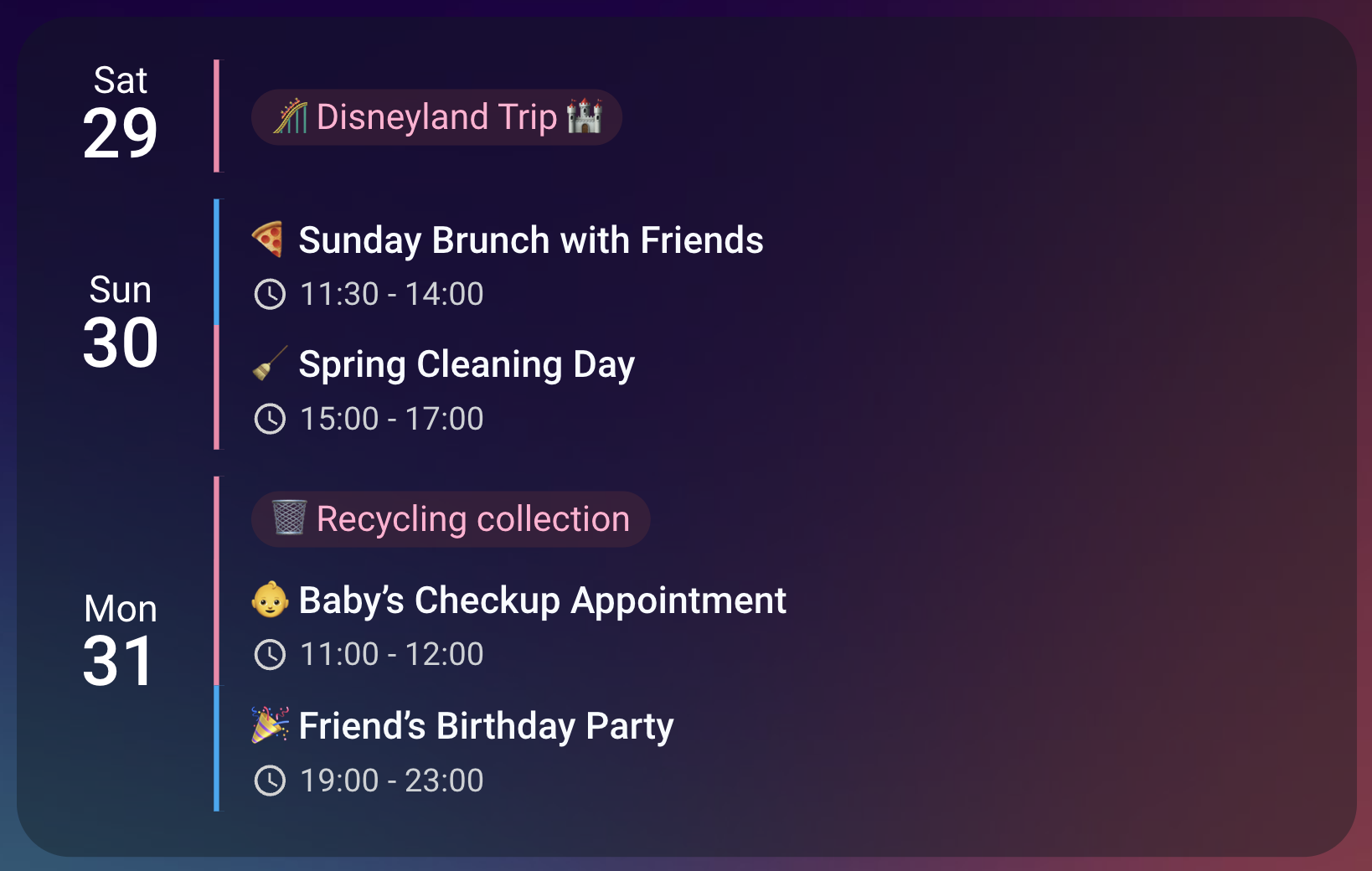
allday_badge,allday_badge_style&allday_badge_color- An all-day event can say so with a rounded pill in its calendar's own color instead of with the words All day, the way nearly every calendar app marks one.allday_badgesays where —titlewraps the event title as Google Calendar and Apple Calendar do,timeputs it beside the clock —allday_badge_stylepicks one of four shapes from a quiet wash to a solid chip, andallday_badge_colorsays whose color that shape carries: each calendar's own accent, the color the row already uses, or any CSS color you name. Every color is derived by the browser, so a theme variable works exactly like a hex value. Off by default;allday_badge: titleis the one to try first. See The All-Day Badge (#282)
🎨 Follow the Colors and Icons Home Assistant Holds
accent_color: home-assistant- Home Assistant stores a color and an icon for each calendar entity, and the card can now follow either, so a calendar looks the same here as it does everywhere else. Set a calendar'slabeltohome-assistantfor its icon too. Both need the value to exist in Home Assistant first, and most do not yet — Google Calendar is the only integration setting a color, only on first add, and only from 2026.2. Set them by hand under Settings → Devices & Services → Entities; anything missing falls back rather than breaking (#314, #188)
🧑 A Person's Picture as a Calendar's Label
label: person.anna- Point a calendar's label at a person entity and the card shows that person's photo in front of their events — four faces instead of four words on a household dashboard, with a person picker in the visual editor. The picture is read from the person each time the card draws, so replacing a photo in Home Assistant changes it here with nothing to edit. Onlyperson.IDs resolve this way; any other picture still works if you paste its address. See Showing a Person's Picture (#215)
🗂️ Show All-Day and Timed Events Separately
event_type- Takesall,timedorall_day, card-wide or per calendar. Becausetimedandall_dayare exact complements, listing one calendar twice — once each way, with a differentaccent_coloron each — splits it into two colors without drawing anything twice or losing anything. It names the kind of event, not how long one lasts: a dinner running 23:30 to 00:30 istimed, however many dates it touches (#132)
🗑️ All-Day Events That Clear Partway Through the Day
allday_expires_at- A bin emptied this morning no longer sits on the card until midnight. All-day events have no end time, so the card has always retired one at midnight after its last day — right for a birthday, wrong for a council waste feed you cannot edit. This per-calendar option moves that moment earlier within the final day, for that calendar alone. The row goes on the card's next refresh rather than exactly on the minute (#163)
📅 A Calendar That Only Shows on Weekdays
days_of_week- Takesweekdaysorweekendsfor one calendar, while every other calendar keeps its weekend. Narrowing the card's date window was never an answer, because the window belongs to the card. It judges the day a row actually lands on rather than the day the event began, so a fortnight's holiday is judged a day at a time — pair it withsplit_multiday_eventson a calendar of long events. Column view already splits by default (#225)
🎂 Ages on Birthdays, and Counts on Anniversaries
- A
YEAR=marker in the description - WriteYEAR=1976in a birthday event's description and the card draws Anna's Birthday (50). There is nothing to configure. Because a repeating birthday's occurrences each carry their own year, the age is a subtraction that stays right forever, and the card never needs a full date of birth. The same marker counts anniversaries, and the marker itself is removed before the description is drawn. See Birthday Ages & Anniversary Counts (#124)
💬 A Teams Icon on Your Teams Meetings
- Automatic, and
location_iconto override it - Online meetings now show the Teams logo instead of a map pin, in any language Teams writes the location in, and ateams.microsoft.comjoin link is recognized too. Meetings that are actually somewhere keep the pin. This changes how your card looks the moment you upgrade if you have Teams meetings on it;location_icon: mdi:map-marker-outlineputs the pin back. Teams is the only service recognized this way because Material Design Icons has no brand icon for Zoom, Meet or Webex —location_iconcovers those (#205)
🔍 Filter on the Location or the Description
filter_field- Pointsblocklistandallowlistat an event'slocationordescriptioninstead of itstitle, which is still the default, so every existing card filters exactly as it did. That answers a Zoom link sitting where a room name should be, and it splits a calendar by where its events are rather than by what they are called. The field is selected, not added: filtering two fields means listing the calendar twice (#186, #205)
✏️ Rewrite What an Event Says
replace_pattern,replace_with&replace_field- Rewrite an event's title, location or description as the card draws it, leaving the calendar untouched. Which options you set is the instruction: both replaces the match,replace_patternalone removes it soBirthday of BenbecomesBen, andreplace_withalone replaces the whole field, which is how a shared calendar showsBusyon every entry. Matching is case-insensitive and global, and capture groups work. An age is never appended to a title replaced outright. See Text Replacement (#153, #212, #186)
📑 List One Calendar Twice, Without Leaving the Editor
- Duplicate, on every calendar's panel - Splitting a calendar in two no longer means dropping into YAML: Duplicate gives a calendar a second block carrying the settings it already has. Home Assistant's picker cannot hold the same calendar twice, so it no longer tries — it lists each calendar once and answers only which calendars the card shows, while how many blocks a calendar has is the business of its own panel. Clearing a picker row removes the calendar entirely; Remove on a panel drops one block (#533)
⚙️ Editor Settings Grouped Under Sub-Headings
- Event Filtering, then Multi-Day Events, then Event Details - The panels deciding what the card shows now group their settings under sub-headings, in the order the card itself works in, with Text Replacement beside the filters on the per-calendar panel. Until now the two panels ordered the same settings differently and neither said what a run of settings was for
🌍 The New Settings Arrive Translated
- Nine editor languages, complete on the day this ships - German, Estonian, Italian, Latvian, Lithuanian, Norwegian Bokmål, Polish, Slovak and Swedish each carry the editor in full, including every string this release adds — so
event_type,days_of_week,allday_expires_at,filter_field,location_icon, the badge treatments, the replacement options and the new sub-headings are all translated rather than left in English. That is eleven editor languages counting US English and British English, and the calendar itself still speaks all 35
🔤 A Today Indicator That Can Be Words
today_indicator- Now takes any text, so the marker on today can readKW 34orSprint 12rather than only a dot, an icon, an emoji or a picture. It half-worked already: the drawability test asked Unicode whether a value contained an emoji, and the ASCII digits qualify, soSprint 12drew as words andSprintdrew as a dot. Raisetoday_indicator_sizewhen you use text — it ships at6px, right for an emoji and far too small for a word (#573)
🐛 Bug Fixes
Events & Content
- Finished All-Day Events Stayed on the Card - With
show_past_events: falsea timed event vanished when it ended and an all-day one never did, because an all-day event has no end time for the card to compare against. Any card whose window reached backwards therefore kept showing all-day events from days that were over —start_date: 'today-7', orstart_of_weekread on a Thursday. All-day events are now past at midnight after their last day, so a finished one goes and today's stays up all day - A Description Using
<and>Lost Everything Between Them - Descriptions are flattened before they are drawn, and the pattern doing it matched a<, anything at all, and the next>. Soalert if temp < 5 and pressure > 3 ENDdrew as alert if temp 3 END, and it had been that way since long before v4. Only something markup-shaped is removed now — a<followed by a letter, a slash, or a!or?— and real markup strips exactly as it did (#576, #581)
Labels & Indicators
- A Label Pointing at a Home Assistant Image Rendered as Its Own Address -
labelaccepted only/local/or a filename ending in one of six extensions, so a person's picture at/api/image/serve/…was drawn as those characters in front of the event title, with nothing in the log. On one ordinary instance that hit 52 of 169 entity pictures. An address is now read as an image: anything beginning with/orhttps://, plus a relative filename. A text label beginning with/now needslabel_type: text(#566) - A Today Indicator Pointing at an Image Drew a Plain Dot -
today_indicator's image test named six lower-case extensions and no scheme, sohttps://example.com/avatar,cover.avifand evenPHOTO.PNGall missed it and fell through todot— which is also the default, so the card drew exactly what it would have drawn had the option never been set. Addresses are now read on the same rulelabeluses, and capitalization no longer matters (#569)
Editor
- The Editor Could Not Set a Relative Start Date -
start_dateset to Relative to Today drew a date picker for the expression, so the documented grammar —wednesday,start_of_week,today+7— could only be reached by hand-editing YAML. Home Assistant reuses the form control when one selector replaces another in the same position, and a text selector naming no type left the date picker in place. Every text field in the editor now names its type (#589) - The Editor Called
show_past_events"Show Today's Past Events" - It shows every past event inside the card's configured window, not only today's, so on a card starting a week back the label described a fraction of what the switch did. Corrected in English and in all nine translated editor languages - A Calendar's Panel Named It Differently From the Picker Above It - The Calendars row read Calendar card pro - family while the settings panel a few pixels below read
calendar.calendar_card_pro_family, which left no reliable way to tell which panel belonged to which row. Panels now carry the same name Home Assistant shows; a calendar removed from Home Assistant keeps its entity id, since that is all that identifies it - The Editor Said the First-Listed Calendar Won a Duplicate -
filter_duplicateskeeps the copy from whichever entry is listed first, and an entry may be a second block of the same calendar — which is exactly what Duplicate creates. Naming calendars made that common case read as impossible. Both helpers now name the entry, in English and in all nine translated editor languages
Related Issues
- #124 - Display age / anniversary by @RK62, supported by @mheidinger, @pyxis1 and @peterdausm
- #132 - Filter based on all-day events by @syst3x
- #153 - Replace text in event titles by @michelnet, supported by @s91nl
- #163 - All-day events that should disappear during the day by @Stefan765
- #186 - Hide or display location based on a regex expression by @mrtag23, with the two-block pattern suggested by @sebatze — answered in full by
filter_fieldandreplace_field - #188 - Use a calendar entity's own attributes to configure it by @shmuelie — both halves, the color in #314 and the icon here
- #205 - An icon chosen by the meeting location by @loryanstrant — Teams meetings get theirs automatically, and
filter_field: locationwith a per-calendarlocation_iconcovers the rest, which is the allowlist/blocklist route the issue itself proposed - #212 - Private calendar, hide details by @oneyozfest182; @Tom-10101 added the repeating-fragment case, which is why replacement is global
- #215 - Use a person entity's picture as a calendar's label by @fl0om, supported by @voyagers21
- #225 - Show only Monday to Friday entries for some calendars by @nytram-md
- #251 - Blocklist based on the duration of events by @tommi1968 — half-served, do not close.
event_type: timedanswers the all-day half; the multi-day half needs a span axis the card cannot yet express - #282 - Render all-day events in the calendar's own color by @Homeassistantfrost, answered by
allday_badge: title - #310 - Free/busy support for a shared calendar by @jlorince — answered in both directions, by
labelfor an empty title andreplace_withfor a placeholder one. Merging contiguous detail-free events is declined and the issue closes in full - #314 - Use color from entity registry by @Misiu, who also contributed the upstream Home Assistant support
- #345 - Filtering events by description content by @RemyGeode
- #533 - Duplicate a calendar block from the visual editor by @alexpfau
- #543 - Glossary rejected-form matcher missed inflections that change the stem by @alexpfau
- #557 - Card-level Events panel showed the wrong styling controls under a column override by @alexpfau
- #566 - A label pointing at an image outside
/local/silently rendered as its own URL by @alexpfau - #569 -
today_indicatorsilently fell back to a dot for image addresses its list did not name by @alexpfau - #573 -
today_indicatorhad an undocumented text mode, gated on whether the text contained a digit by @alexpfau - #576 - A description pairing a
<with a later>lost the prose between them by @alexpfau - #581 - The description flattening kept 21 shapes a browser discards as a bogus comment by @alexpfau — found by the pre-release audit, so no user ever saw it
- #582 - Nine of fifteen editor dropdowns could lose an option with every gate green, by @alexpfau — a gate rather than a user-visible fix
- #589 -
start_dateset to Relative to Today rendered a date picker instead of a text field for the expression, by @alexpfau
Full Changelog: v4.0.0...v4.1.0