
Calendar Card Pro v4.0.0
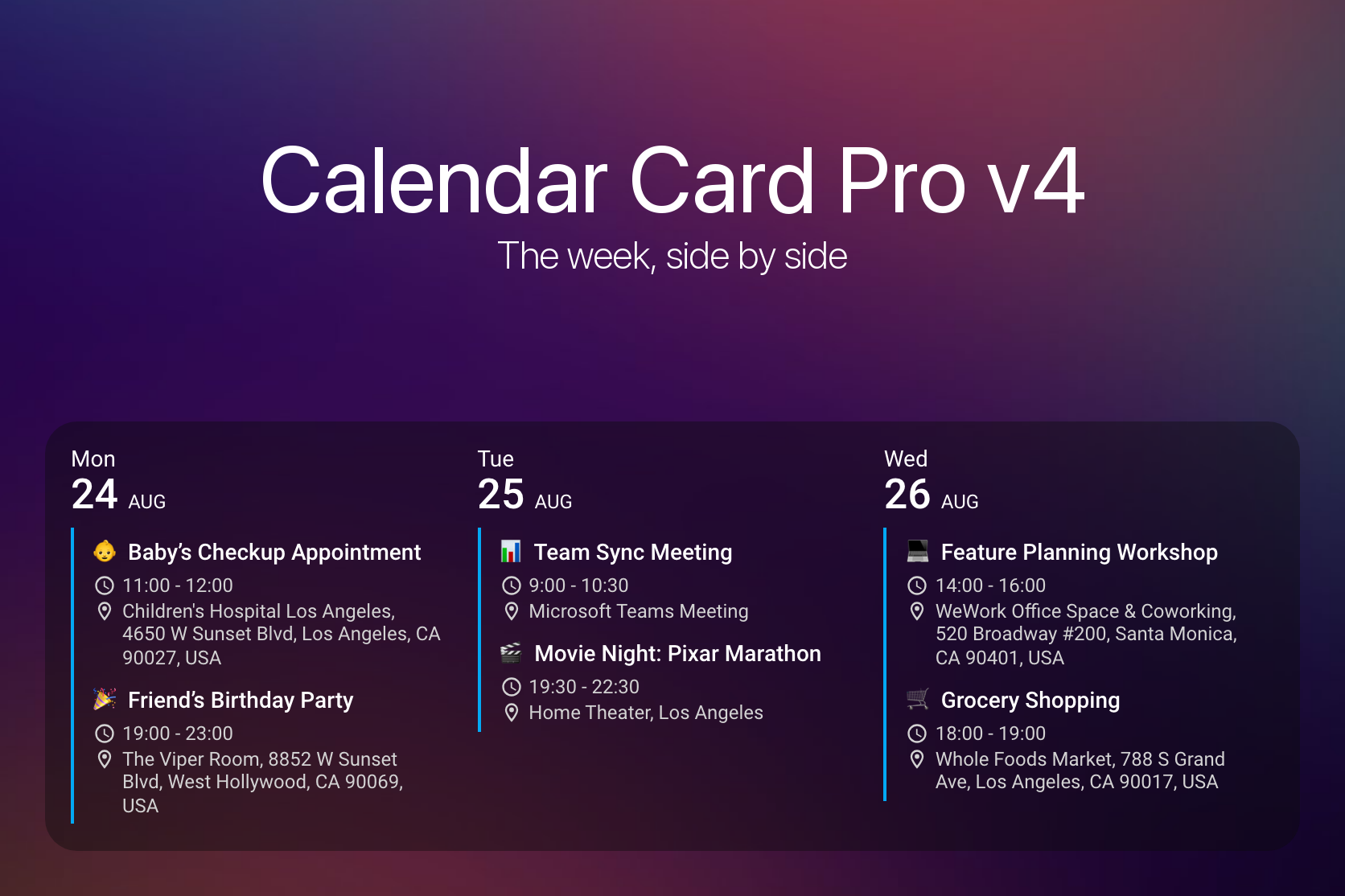
This is a big one. 🎉
Two days after this card's first public release, someone opened #14 and asked whether the days could sit side by side instead of stacked on top of each other. That was March 2025. It was asked again in June, again in July, and again in November — the most-requested thing in this project's history, and the one I never had a good answer for. Last year did not leave me the time this card deserved, and some of you waited a lot longer than you should have for it.
So I gave this release the time instead: 560 commits, and the kind of polish I would want if I were the one installing it. 🗓️ Column view is here — the same agenda you already have, rotated, with your events and colors carrying over exactly as they are. And because a layout with its own defaults, its own per-view overrides and its own density rules needs an editor that can actually express them, ⚙️ the visual editor is rebuilt from the ground up: nine panels, a search box that reaches any of 119 settings in a keystroke, and a filter that hides everything you have never touched.
Here is the part I am proudest of, though. Both of those are opt-in — most cards will never set view or open a form — so this could easily have been a big release for a few people and nothing much for everyone else. It is not. ⚡ Moving the editor into a file that loads only when you open it leaves a card file 41% smaller to download on every single dashboard, whether or not you ever touch either feature. 🐛 And behind that sit twenty-three fixes that reach further than any feature does: week numbers wrong for one date in seven outside UTC, a twelve-hour clock handed to 33 of the 64 languages Home Assistant ships, and a first_day_of_week: system that quietly answered Monday to every user on earth.
A card that does not set view keeps the list it has always had. But a few things change whichever layout you use, so they come first. 👇
⚠️ Breaking Changes
- Manual Installation Now Copies Two Files - The card is no longer a single file. A release ships
calendar-card-pro.jsandeditor.js, and the card fetches the editor by URL the first time someone opens it. HACS handles this and needs nothing from you. If you install by copying files intowww/, download both and put them in a folder of their own, such aswww/calendar-card-pro/— copying onlycalendar-card-pro.jsleaves a card that renders normally but reports a missing file when you open the visual editor, and/config/www/itself is shared with every other hand-installed card, where a secondeditor.jscan take the name. Onlycalendar-card-pro.jsis registered as a Lovelace resource; see Manual Installation event_icon_vertical_alignmentNow Defaults totop- It previously defaulted tomiddle. The option is invisible until a row wraps, andmiddlethen centers the icon against the whole wrapped block — a clock or map-marker floating level with neither line of a two-line address. Column view wraps routinely, and the list view wraps on a long location or description, so the default moved to the alignment that reads correctly in both. Setevent_icon_vertical_alignment: middleto keep the old behavior; see Spacing & Alignmentfirst_day_of_week: systemNow Follows Home Assistant -systemis the default, and the editor labels it Follow Home Assistant, but it returned Monday for every user on earth. Two faults produced it: the branch never read the First day of week setting in the Home Assistant user profile at all, and its language fallback tested foren-US,en-CAores-USin a string that has always been lowercased before it arrives, so it could not match anything. The setting is now resolved the way Home Assistant resolves it — an explicit weekday in the profile wins, and only when that is left at Auto does the language decide. Upgrading therefore shifts week numbers, week separators and thestart_date: start_of_weekanchor for anyone whose profile or language implies a week that does not begin on Monday — nineteen of the 64 languages Home Assistant ships, seventeen starting on Sunday and Arabic and Persian on Saturday. Setfirst_day_of_week: mondayto keep the old behavior; see Week Numbers & Visual Separators- Weather Badges Are Styled Through Custom Properties - The weather icon and text carried their font size and color as inline
styleattributes, which no theme could override. Those attributes are gone, and the six--calendar-card-weather-*properties the card was already emitting are now read by the stylesheet instead, making them a real override surface. Two things follow. Card-mod rules that targeted the inline-styled elements need updating — the properties are listed under Weather Custom Properties. Andweather.date.color/weather.event.colorno longer carry a default. They did in 3.x, but it never reached a card that showed weather:setConfigmerged only the top level, so anyweather:block replaced the whole default sub-tree. The rendered color came from a fallback in the renderer either way — primary for the day header, secondary for the per-event badge — and both fallbacks now live in the stylesheet with the same values, so the badge looks as it did
🎉 New Features
🗓️ Column View
See the week at a glance instead of scrolling through it. view: column lays the days out side by side, one column each, instead of stacking them — the same agenda the list layout already shows, rotated. Your events, labels and colors carry over exactly as they are; only the date moves, from the left of each row to the top of each column. The default is still list, so nothing changes until you ask for it (#377, #14, #263, #253)
- It Falls Back on a Phone - Columns need width, so a card too narrow to give every day a readable one —
column.min_day_width, 140 pixels — simply renders as a list instead. The same card can be columns on a desktop dashboard and a list on a phone, with no second card and no conditional wrapper. That is also why the editor annotates list-only options rather than hiding them: hiding a control would remove it for the layout that same card uses on a phone - Or Sheds a Day Instead - If you would rather keep the columns,
column.min_days_to_showlets a narrowing card drop trailing days one at a time before it gives up on the layout. It defaults todays_to_show, which leaves the behavior off, because a card quietly showing four of seven days looks exactly like a card configured for four.column.min_days_fallback: crampkeeps every day and lets the columns go narrower still - Different Values in Columns Than in the List - A size tuned for a full-width row is usually wrong in a 140px track, so a nested
column:block holds the values that apply only when the card renders as columns; anything it does not mention keeps its top-level value. It works in both directions, so an option switched off at the top level can be switched back on for columns. Only presentation options may go there — anything deciding which events are loaded has to hold one value in both layouts, since the card switches between them as the dashboard resizes (see Overriding Options in Column View) - Two Options Start From a Different Default -
show_empty_daysandsplit_multiday_eventsboth default totruein column view and do not inherit the top-level value. A list reads perfectly well with the blank days left out; a row of columns does not, because dropping the empty ones stops the columns corresponding to consecutive days. The same reasoning covers a multi-day event — a column is a day, so an event spanning three of them belongs in all three (see Options That Start From a Different Default) - Separators Rotate into the Gutter - Day, week and month separators keep their existing options and become full-height vertical rules between the columns, with month taking precedence over week and week over day. A column-only rule can also run under each day header —
column.day_header_separator_widthand_color— off by default like every other separator in the card. Switching it on centers it inside the spacecolumn.day_header_gapalready reserves, rather than shifting the layout - A Header Per Column - Week numbers move into each column's header instead of taking a full-width row, and the today indicator becomes a leading marker on the weekday row so it stays unambiguous at any column width — the default
15% 50%position is calibrated for the list view's narrow date cell and would land inside the day number on a full-width column header - Room for the Progress Bar - A countdown and a progress bar never appear on the same event, so each now gets the treatment it needs instead of one compromise suiting neither. The countdown stays on the time row as trailing text after a middot, breaking at an ordinary word boundary when the column is too narrow; the bar moves to a row of its own under the title, spanning 80% of the column
- One Click From the Card Picker - Adding a card by entity and picking a
calendar.*entity now offers two starting points under Community: Calendar Card Pro for the list layout and Calendar Card Pro - Columns for this one, each previewed with that calendar's real events. The two differ by a single option, so the second is the fastest way to find out whether you like the layout - Your Card-Mod Recipes Work in Both - Both day containers expose the same four state classes —
today,tomorrow,future-dayandweekend— so one selector list can style either layout.weekendis new to the list view's.day-table;.date-column.weekendis unchanged and still drivesweekend_day_colorandweekend_weekday_color(see Card-Mod Examples)
Column view is the days-side-by-side half of #300. A time axis, overlap lanes and a now-line are a genuinely different layout — the two want opposite things from vertical space — and are reserved for a separate view under the name grid. They are not in this release.
⚙️ A Rebuilt Visual Editor
Configuring the card used to mean scrolling one long form and already knowing what you were looking for. At 119 options that stopped being reasonable, so the editor is rebuilt from the ground up around finding things: nine panels named for what they configure, a search box that reaches any setting in a keystroke, and a filter that hides everything you have never touched.
It is now built on Home Assistant's own form components rather than a hand-assembled tree of them, and you get two things from that. Every control arrives with the keyboard handling and screen-reader labelling Home Assistant maintains. And the editor stops breaking when Home Assistant renames a component — as it did in 2026.5, when ha-textfield was removed and the old editor lost every text field it had.
- Search - Type what you are after and the editor collapses to it, dropping the panels — and the groups inside them — that have nothing left, so a match is never hidden behind a heading you forgot to open. It looks at everything on screen: the name of a setting, the sentence explaining it, and the choices a dropdown offers. It also matches the YAML option name, so a key copied out of the configuration reference leads straight to its control
- Customized Only - One toggle hides everything still set to the value the card would use anyway, leaving exactly what this card changes — the fastest way to see what a config actually does, or to find the one setting you regret. It reads values the way the card does, so a number written as
"3"still counts as untouched when3is the default (see Search & Customized Only) - Nine Panels Named for What They Configure - Calendars, Card & Title, Time Range & Content, Events, Day Header, Layout, Separators, Weather, and Actions & Refresh — named for what you want to change rather than for where the option happens to sit in YAML. Panels open one at a time, and options inside them appear only when they apply
- Every Calendar's Settings in One Place - Each configured calendar gets its own collapsible form holding all eleven per-calendar options — the label, three colors, four inheritable switches, the two filters and the compact limit — plus a clipboard for copying settings from one calendar to another. Four of those switches are genuinely three-state, because "follow the card" is not the same as "off"; the editor this replaces drew them unchecked and wrote a literal
falsethe first time you touched one, which nothing could take back - Per-View Exceptions - Give an option a different value in column view without leaving the editor or hand-writing a
column:block. Each exception sits in a collapsed group at the end of the panel that owns the option, beside the value it is an exception to (see Column View Exceptions) - Labels You Pick the Way You Think of Them - A calendar's label can be text, an emoji, an icon or an image, and choosing which gives you the right control for it — Home Assistant's icon picker, say, rather than a box where you have to know
mdi:already. Most of the time the type is not stored at all: it is read back from the value, so a calendar configured in YAML opens with the right control already selected and nolabel_typeoption anywhere in it
🌍 Eleven Editor Languages
The editor now speaks your language, completely. Eleven of them: nine newly translated in full — German, Estonian, Italian, Latvian, Lithuanian, Norwegian Bokmål, Polish, Slovak and Swedish, at 312 of 312 strings each — alongside US English, which lives in code, and British English, which carries only the 36 strings where it differs. The rebuild came with a new and considerably larger string table, so every one of the nine was re-translated against it rather than carried over, and none was lost along the way.
The remaining 24 of the card's 35 languages render the editor in English, which is fully supported. Translation now resolves per string, requested language first and English second, so a partial file renders in that language for everything it covers and in English for the rest rather than looking broken. That makes a partial contribution genuinely useful — a language does not have to be finished to be worth having. The calendar itself continues to speak all 35.
📏 Per-Field Line Limits
Stop one long title from pushing the rest of the day off the card. title_max_lines, time_max_lines and location_max_lines cap how many lines each field may occupy, mirroring the existing description_max_lines — a number, 0 for unlimited, and truncated text ends in .... They work in both layouts and can be given a different value inside a column: block, which is where they earn their keep: a title that runs to four lines in a 140px track pushes every event below it off the screen (see Limiting Lines Per Field)
🌦️ Weather in the Column Layout
A forecast that fits a 140px column. In column view an event's weather takes a row beneath the time rather than sitting on the title row beside the summary, where at that width a two-word title breaks into three lines around it. That row shares a leading icon edge with the time, location and description rows, so the condition icon is always shown there.
- The Condition in Words -
show_conditionsdecides whether the condition is also stated in words alongside the icon —21° · UV4 · Partly cloudy. The words come from Home Assistant, which translates all fifteen conditions itself, so they follow the card's configured language and the card ships no condition wording of its own. A middot rather than a comma, because Home Assistant's own vocabulary containsClear, night weather.event.max_lines- Caps how many lines that row may use,0for unlimited (see Weather In The Column Layout)
🩺 Diagnosing a Released Build
Reproduce a bug and actually see why it happened. A released build prints errors only, so every warning the card raises is invisible to real users — including actionable ones, such as an invalid start_date quietly falling back to today. The person best placed to report a problem could not produce the output that would explain it. Running window.calendarCardProDebug = true in the browser console turns the detail back on, and window.calendarCardProLogLevel = 0..3 selects a level directly. Neither persists and neither needs a reinstall: the card reads the flag on its next render, so reproduce the problem without reloading — a reload discards it (see Reporting a Bug)
⚡ Performance
None of what follows is opt-in. It applies to every card on every dashboard, including one configured exactly as it was in v3.6.0.
- The Card File Is 41% Smaller to Download - The visual editor and its translations are the larger half of the bundle, and most dashboard loads never open it. Splitting the editor into a file the card fetches on demand takes it, and every string it needs, off the path every dashboard pays for. Measured on the production build against v3.6.0, the release before this one: the file every dashboard downloads is 41% smaller compressed, the figure to compare if your setup serves these files gzipped. On disk — which is what most installs actually transfer — the reduction is larger still, at 45%. The editor is a separate download paid only by someone who opens it, and only once per version
- One Card Load Asked Home Assistant for the Same Events Three Times - Three independent paths start the first load —
setConfig(),connectedCallback(), and the arm ofupdated()that fires whenhassfirst arrives — and all three ran before any of them had written the cache. Each therefore found nothing cached and issued its own request: one configured calendar, three round-trips, multiplied by every calendar card on the dashboard and repeated on every page load. A fourth came from the safety net, a retry armed in case Home Assistant attaches the card before handing over its state, which was only ever cancelled while the card was still waiting and so fired even after a successful load. Requests for the same calendars and window are now deduplicated at the API call itself, and the retry is disarmed the moment a load starts with usable state - Toggling Two Display Switches No Longer Refetches Your Calendars -
show_past_eventsandfilter_duplicatesare both applied after the data arrives, while building the day list, and neither has any bearing on what the card asks Home Assistant for. Both were nevertheless treated as fetch-affecting, so flipping either switch discarded a still-valid cache entry and spent a network round-trip — and a visible loading state — retrieving a byte-identical payload. The card now re-renders from the data it already has - CSS Comments No Longer Ship - A
csstagged template's contents are a string literal, so no minifier looks inside one and every explanatory comment in the stylesheet was downloaded by every user. They are now stripped at build time instead of being kept terse in the source
🐛 Bug Fixes
Configuration
- Sizes Typed Into the Visual Editor Were Thrown Away - The editor renders twenty-one options — every spacing, font size, icon size and separator width — as free-text fields, and a text field hands its value back as a string, so typing
10stored"10"where CSS needs10px. The consequence is worse than an ignored value, because a browser drops the entire declaration rather than the offending token: a typedevent_spacingtook the neighbouring12pxof padding down with it, and a typedadditional_card_spacingleft the card with no padding at all, looking markedly worse than if the option had never been set. Worse still where the option has no pixel default to fall back on:title_font_sizeis read asfont-size: var(--calendar-card-font-size-title, …), and a unitless24substitutes into that rather than falling back, so the declaration went invalid and the title dropped to its inherited body size — setting the option left the card worse off than never touching it. Bare numbers are now given their unit on every length option, whichever input path they arrive by, including the five whose shipped default is a keyword, acalc()or nothing at all and so could not mark them as lengths:title_font_size,progress_bar_width,progress_bar_height,heightandmax_height - A Separator Set to Zero Still Took Up Its Space - Whether a separator is drawn at all was decided by matching the literal string
0px, and0.0pxor00pxare perfectly valid ways of writing the same length. A separator written either way rendered an invisible border that still carried a fullday_spacingmargin above and below it, so asking for no separator produced the gap without the line. The numeric part is now parsed rather than matched character by character, so every spelling of zero counts as one - Editing a Calendar's Own Settings Appeared To Do Nothing - Per-calendar options — a label, a color, a per-entity event limit, an allowlist or blocklist — are stamped onto each event while the calendar payload is processed, and every reader prefers that stamp over the live configuration. The card decided whether to reprocess by comparing the entity identifiers alone, which is right for deciding whether to call Home Assistant again and wrong for deciding whether to reprocess, so editing any other per-calendar option left the card unchanged until the next scheduled refresh — up to thirty minutes on the default interval — or a reload. A filter was the sharpest version: an event you had just excluded stayed on screen. Any change to a calendar block now reprocesses the payload already in the cache, with no additional API call
- An Event Ending Exactly at Midnight Gained a Phantom Extra Day - The multi-day splitter decided whether an event crossed into the next day by comparing its end against the last millisecond of the day it started on. Midnight is one millisecond past that, so an event running 23:00 to 00:00 — a perfectly ordinary way to say "until the end of the evening" — was classified as multi-day and produced a second entry whose start and end were the same instant. The event appeared twice: once where it belonged, and once as a zero-length entry at the top of the following day. The next day is now entered only when the event genuinely extends past the first instant of it, so an event that really does run past midnight keeps its true end time
- Two Cards With Different Week Starts Shared One Cache Entry -
first_day_of_weekmoves the fetch window wheneverstart_dateis week-relative, but the event cache key left it out. Two cards over the same calendars and window — one set tosunday, the other tomonday— therefore collided on a single entry, and whichever was fetched first was served to both, so one of them showed the wrong week. The resolved weekday is now part of the key, and its parameter is typed as a number so the raw setting cannot be passed again by mistake. Only week-relative start dates are affected: an absolutestart_dateresolves to the same window whatever the week begins on - A Slow Reply From the Previous Calendar Could Replace the New One - Fetching events is asynchronous, and the card read its own identity when a reply arrived rather than when the request was issued. Every edit starts a fresh request, so two are routinely in flight at once, and their latencies are unrelated — the older one can settle last. When it did, it committed the previous calendar's events and stamped them with the current identity, so the check that exists to notice events no longer matching the query reported that they matched, and the wrong calendar stayed on screen until the next scheduled refresh. Each request now takes a monotonic ticket, and a reply whose ticket has been superseded discards itself
- One Malformed Event Could Empty the Whole Card - Home Assistant's calendar API is supposed to supply a start and an end, but the payload is produced by whichever integration backs the entity — CalDAV, ICS, Google or a third-party one — so an incomplete event does arrive in practice. Duplicate filtering read both without checking they were there, and it did not cost that event its row: it threw, and the card rendered nothing at all, taking every other event and every other calendar down with it. Only cards with
filter_duplicatesenabled could reach it, which is why it went unreported. Events missing a start or an end are now dropped with a warning naming how many, and everything beside them renders - A Start Date That Never Existed Silently Became a Different Day - A fixed
start_dateis checked part by part — a month of 1 to 12, a day of 1 to 31 — and the assembled date is then tested for validity. That test can never fail: JavaScript does not reject February 30, it rolls it forward into March, so the check passed, the warning promising a fallback to today never printed, and the card quietly showed a window starting three days after the one that was asked for. Every impossible day that clears a 31-day bound behaves this way, and the further out of range the date, the further the window slides. The parts are now read back off the assembled date, so an impossible date falls back to today and says so - A Corrupted Cache Entry Was Rendered Instead of Refetched - A cached entry was read back from browser storage and trusted on the strength of being valid JSON. Anything that parsed was treated as events, and a text value was the dangerous shape: iterating a string yields its characters, so the card built a row per character and still counted the read as a hit, which suppressed the refetch that would have replaced it. Nothing the card writes today produces such an entry, but an older version, another tab, or any of the storage-syncing add-ons people run can. A parsed entry is now checked for the shape the card assumes, and one that fails is evicted so the ordinary miss path refetches it
- A Bare
hold_action:Killed the Tap As Well - Writinghold_action:with nothing after it is valid YAML that parses to null, and the card read that as "there is a hold action" when it armed the hold timer but as "there is none" when the press ended. A long press drew the hold indicator and then did nothing — and because the press had already been marked as a hold, the tap action did not run either, so the card stopped responding to an ordinary tap for as long as the key was there. Both ends now agree on what an empty action means
Appearance
- A Themed
accent_colorNever Reached the Card - Anaccent_colorwritten as a CSS variable —var(--primary-color), or anything a theme defines — was composited forevent_background_opacityby emittingrgba(var(--calendar-color-rgb, 3, 169, 244), …), against a variable this project defines nowhere and no theme knows about. The fallback therefore won every time, and the fallback is#03a9f4, the defaultaccent_color— so a themed card never looked broken, it looked like it had ignored your theme. Both the background tint and the progress bar now usecolor-mix(), which carries the configured color through without having to resolve it - Entity Labels Broke the Alignment of Wrapped Titles - A glyph or emoji label before an event title left continuation lines starting under the label rather than under the title text; the label now hangs so wrapped titles align
- Wrapped Event Titles Ignored
event_font_size- The block holding an event title declared no line height of its own, so a title that wrapped was spaced on Home Assistant's leading — a fixed 22.4px — instead of the card's. Loweringevent_font_sizethen made it look worse rather than better, because the pitch stayed where it was while the glyphs shrank away from it, opening a gap wider than the lines it separated. Column view showed it most, since narrow columns wrap titles routinely. Wrapped titles now use the card's own leading and tighten as the font does; a single-line title keeps the spacing it had in 3.x - Sizes Written in
em,remorcalc()Were Silently Read as Pixels -day_spacingandday_font_sizeare CSS lengths, and the card honored them as written in most places while quietly converting them to pixels in the few sizes derived from them.day_spacing: 2emspaced the day blocks by2embut the rules between them by2px, so the separators collapsed into the content they divide;day_font_size: 2emgave a day number a3.5pxcolumn to sit in, and acalc()value produced no size at all. Derived lengths now scale in the unit they were written in, and anything the card cannot resolve is handed to the browser, which can. Pixel values — the defaults, and what nearly every configuration uses — render exactly as before
Dates & Times
- Week Numbers Were Wrong for One Date in Seven Outside UTC - Both numbering methods built their two dates from local components and then measured the gap between them in milliseconds, so a daylight-saving transition falling inside that gap left the elapsed time an hour short of — or an hour past — a whole number of days, and the rounding that followed tipped the result by a full week. The two methods round in opposite directions, which makes the defect a mirror image:
isowas wrong only in the southern hemisphere andsimpleonly in the northern, each on roughly one date in seven. Sydney showed ISO week 15 on a date in week 14; Berlin and New York showed week 14 on a date in week 15. The arithmetic is now done in UTC internally, where a day is 24 hours by definition, and is verified against every date from 2015 to 2035 across seven zones - The Last Day of the Calendar Could Lose Its "No Events" Placeholder - The same defect in a second place. The empty-day filler measured how wide its window was by subtracting two locally built midnights, so a transition inside that window left the elapsed time short of a whole number of days and the floor that followed dropped it to one day fewer. The loop then stopped a day early, and a day with nothing scheduled vanished from the card instead of showing its placeholder. It needed three things at once —
show_empty_daysenabled, a window spanning the March or October transition, and no events on the last day of it — which is why it went unreported for so long - A 24-Hour Locale Could Still Get a 12-Hour Clock -
time_24hdefaults tosystemand Home Assistant's own time format setting defaults tolanguage, so for anyone who has changed neither the clock was chosen from the language alone — by a hardcoded list of twenty-four "likely 24-hour" languages that disagreed with the platform's locale data for 33 of the 64 languages Home Assistant ships. The region was discarded before the lookup, soen-GBtook the American answer; the list named the macrolanguageno, which never matches thenbandnntags Home Assistant sends; and Greek and Korean were wrong outright. Ukrainian, Hebrew, Thai, Vietnamese, Icelandic, Catalan, Estonian, Latvian and a dozen more read1:00 PMwhere their language writes13:00. A second fault decided thesystembranch by searching the formatted string forAMorPM, which recognises only an unpunctuated Latin day period, so Greek1 μ.μ.and Arabic1 مwere read as 24-hour. Both are now a single query to the platform's own locale data, which agrees with it for all 64
Weather
- "Nowhere" Was the Most Expensive Weather Setting - The weather position offers "Nowhere" alongside the date column, the event row and both. Picking it drew no weather anywhere, as intended — but it fell through the branch that decides which forecasts to subscribe to and landed on the arm reserved for the positions that draw the most, so the option that renders nothing quietly subscribed to both the daily and hourly forecast streams. It now subscribes to neither
- A Weather Block Without a Position Drew Nothing -
weather.positiondefaults todate, and the documentation says so, but that default only ever reached half the card. Aweather:block naming an entity and leavingpositionout replaced the shipped block wholesale, so the value arrived unset: the half deciding which forecasts to subscribe to applied the default and dutifully fetched the daily forecast, while both halves that draw the badge compared the raw value, matched nothing, and rendered nothing at all. The card paid for a forecast stream and showed no weather. Only hand-written YAML could reach it, since the editor writes the block out in full. All three now resolve the default in one place - The Editor Showed Five Weather Toggles Off While the Card Drew Them On - Every nested weather option is read as "on unless explicitly false", so a
weather:block that names an entity and leaves the rest out renders conditions and temperatures anyway. The editor bound that block exactly as written, and a checkbox given nothing to bind draws unchecked — so five toggles sat off in the editor while the card was visibly drawing them. The one panel whose job is to show you what the card is doing was the one contradicting it, and only for hand-written YAML, since a configuration saved from the editor writes the block whole. The weather block is now filled in from its defaults before the form binds to it —setConfigmerges nested blocks key by key rather than replacing them wholesale — and stripped back down again on write, so the form states the truth without expanding anyone's YAML - The Editor Wrote a Weather Color Into Your Configuration -
weather.event.colorshipped a default, and the editor writes the whole weather block back the moment you pick an entity — so that default was copied into the user's YAML, where it became indistinguishable from a deliberate choice forever after. A card nobody had styled ended up with a weather badge pinned to the primary text color, beside siblings that were not. The default is now absent so it is never created, and each placement supplies the color it actually wants. A configuration already saved in this state keeps its explicit value; delete thecolorline to pick up the per-placement fallback - Changing the Weather Entity Left the Old Entity's Forecast on Screen - Switching to a different weather entity tore down the old subscription but never cleared the forecast it had already delivered, so the card kept drawing the previous entity's conditions and temperatures under the new configuration until the replacement subscription happened to emit. Where the new entity does not offer that forecast type at all there was no later emission to correct it, and the old data simply stayed. The forecasts are now cleared when the entity changes, and only when it changes
Translations
- Weekday Names Were Capitalized Mid-Sentence - Full weekday names are rendered in exactly one place, in the running text after "until", and 17 of 35 languages stored a capital there — Swedish read
till Måndag, 5 Janwhere it wantstill måndag. Fixed in ten languages: nine lower-cased againstdayjs, and Polish given the genitive its preposition governs. Seven more need an inflected form that no in-repo evidence supplies, so they are deliberately left flagged rather than half-fixed - Romanian Diacritics - Restored throughout the Romanian translation
Related Issues
- #14 - Add Column View to Calendar-Card-Pro by @chrannen
- #253 - Landscape mode - days next to each other on desktop and tablet by @fugazzy
- #263 - Horizontal mode by @wsw70
- #300 - Time grid + seven days view (columns) by @rozrabiak — the columns half only; the time grid is a separate view and is not in this release
- #377 - [Epic] Column view — days side by side by @alexpfau
Full Changelog: v3.6.0...v4.0.0