
Calendar Card Pro v2.0.0
This major release completely reimagines Calendar Card Pro with a new architecture, enhanced performance, and numerous new features for customization. Calendar Card Pro v2 brings significant improvements to theme compatibility, visual styling options, and smart data management.
→→→ Please see the 🆕 What's New in v2 section in the README for detailed examples of all new features. ←←←
🚀 Major Refactoring
Enhanced Performance
- Complete Rewrite: Entirely new rendering engine for better performance
- Smart Caching: Intelligent caching reduces API calls and improves load times
- Progressive Rendering: Efficiently renders events in small batches to maintain responsiveness
- Stable DOM Structure: Consistent structure for better compatibility with other components
Improved Theme & Card-Mod Compatibility
- Native Theme Support: Properly integrates with all Home Assistant themes
- Standard Card Structure: Uses standard ha-card structure making card-mod work exactly like other cards
🎉 New Features
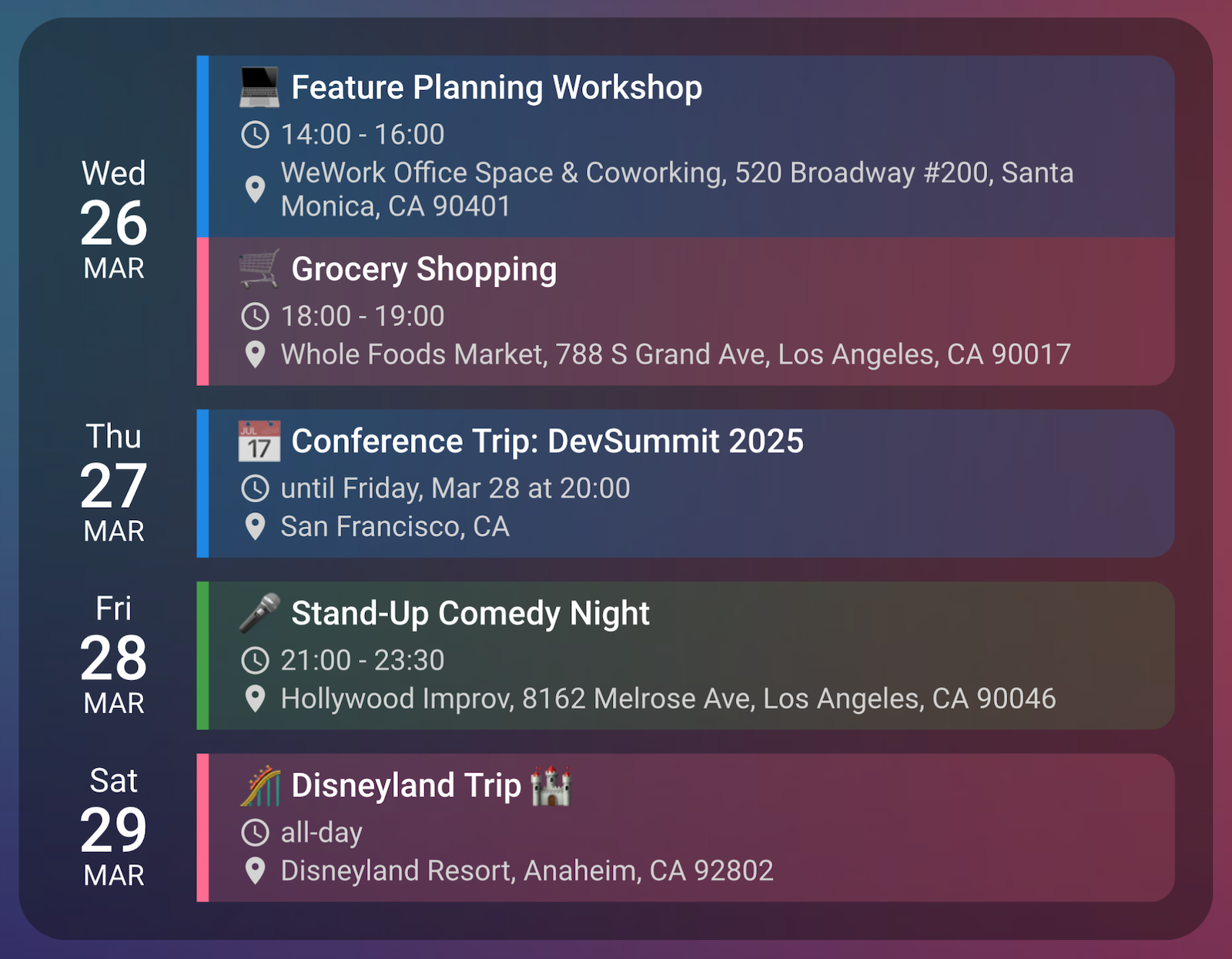
Custom Styling Per Calendar
-
Accent Colors: Assign unique colors to the vertical line for each calendar entity (#19 and #92 by @LiquidPT)
-
Background Colors: Enable semi-transparent backgrounds matching the accent color
-
Smart Rounded Corners: Events use rounded corners derived from your theme's card radius
-
Visual Hierarchy: Instantly distinguish events from different calendars at a glance
Calendar Labels
- Custom Calendar Identifiers: Add emoji or text before event titles (#65, #83, #91)
- Visual Distinction: Labels appear before event titles with proper spacing
- Improved Accessibility: Distinguish calendars beyond just color coding
Advanced Display Controls
- Per-Calendar Settings: Control which information appears for specific calendars
- Flexible Configuration: Show time or location information based on calendar type
- Simplified Display: Hide time information for all-day events (#7)
Custom Start Date
- Date Selection: View calendars from any date, not just today (#25, #77)
- Future Planning: Create seasonal or special-purpose calendars
- Flexible Format: Supports both YYYY-MM-DD and ISO date formats
Empty Day Display
- Consistent Layout: Always display all configured days, even when they have no events (#40)
- Visual Placeholders: Clear indication of empty days with checkmark emoji
- Improved Organization: Easily see when days have no scheduled events
Enhanced Past Event Display
- Visual Distinction: Past events appear with reduced opacity (60%)
- Improved All-Day Handling: Correctly handles multi-day all-day events
- Smart Detection: All-day events active today are never marked as "past"
Fixed Height with Scrolling
- Size Control: Limit card height while preserving all events (#62, #51)
- Automatic Scrolling: Content scrolls when it exceeds defined height
- Consistent Layout: Maintain dashboard aesthetics regardless of event count
Smarter Caching
- Navigation-Aware Caching: Option to preserve cache when switching dashboard views
- Reduced API Calls: Minimizes unnecessary API requests
- Mobile-Friendly: Better performance and battery life for mobile users
Enhanced Spacing Controls
- Fine-Tuned Layout: Control vertical padding within each event (#11)
- Day Spacing: Adjust spacing between different calendar day rows
- Consistent Naming: More intuitive parameter names (row_spacing → day_spacing)
Today's Event Styling with Card-Mod
- Custom Today Highlighting: Easily style today's events differently with card-mod (#20)
- Animation Support: Create subtle animations for today's events
- Visual Priority: Make current day events stand out
🛠 Breaking Changes
-
Parameter Renaming:
row_spacingis nowday_spacing(for clarity)
-
Split Parameters:
time_location_icon_sizehas been split into separate parameters:time_icon_size: '14px' location_icon_size: '14px'
-
Card DOM Structure: Internal structure updates may affect existing card-mod customizations
📚 Documentation Updates
- Reorganized README: Clearer feature explanations with examples
- Enhanced Configuration Guide: Comprehensive parameter documentation
- New Examples: Additional configuration examples with screenshots
- Architecture Documentation: New developer documentation explaining internal design
⚙️ Technical Improvements
- Modular Architecture: Completely restructured codebase for maintainability
- Type Safety: Enhanced TypeScript interfaces throughout the codebase
- Styling System: Improved CSS variable integration with Home Assistant themes
- Event Processing: Better handling of multi-day and all-day events
- Error Handling: Graceful degradation when calendar data is unavailable
🐛 Bug Fixes
- Multiple Lit Versions: Fixed issues with multiple versions of Lit being loaded (#74)
- Title Display: Card title now always displays even with no events (#70)
- All-Day Events: Improved detection and display of all-day events
- Theme Compatibility: Fixed inconsistencies with various Home Assistant themes
- Date Alignment: Fixed date column alignment issues (#41)
New Contributors
Full Changelog: v1.2.3...v2.0.0
Thank you to everyone who contributed feature requests and bug reports that made this release possible!