
Summary
Stable release of this fork, built on the same CrossInk v1.6.1. It brings a BookOrbit Home theme, sorting, filtering and sections in the BookOrbit catalog, and release candidates over the air for those who want them. It also fixes the catalog on the Xteink X3 and X4, which failed past its first pages and behind some reverse proxies (#96).
Installing
This is a stable release: on a device already running this fork (v1.5.1+bookorbit.1 or newer), Settings → System → Check for Updates installs it over the air.
A device running CrossInk has to be flashed once by USB or from the SD card — see the installation guide, which also covers USB-locked devices and reverting to upstream. Pick the file for your device:
| Device | File |
|---|---|
| Xteink X3 / X4 | firmware-x3-x4-v1.6.1-bookorbit.5.bin
|
| Xteink X4 Pro | firmware-x4-pro-v1.6.1-bookorbit.5.bin
|
| Xteink X4 Classic | firmware-x4-classic-v1.6.1-bookorbit.5.bin
|
| Seeed reTerminal Sticky | firmware-sticky-v1.6.1-bookorbit.5.bin
|
What's Changed since v1.6.1+bookorbit.4
BookOrbit Home theme
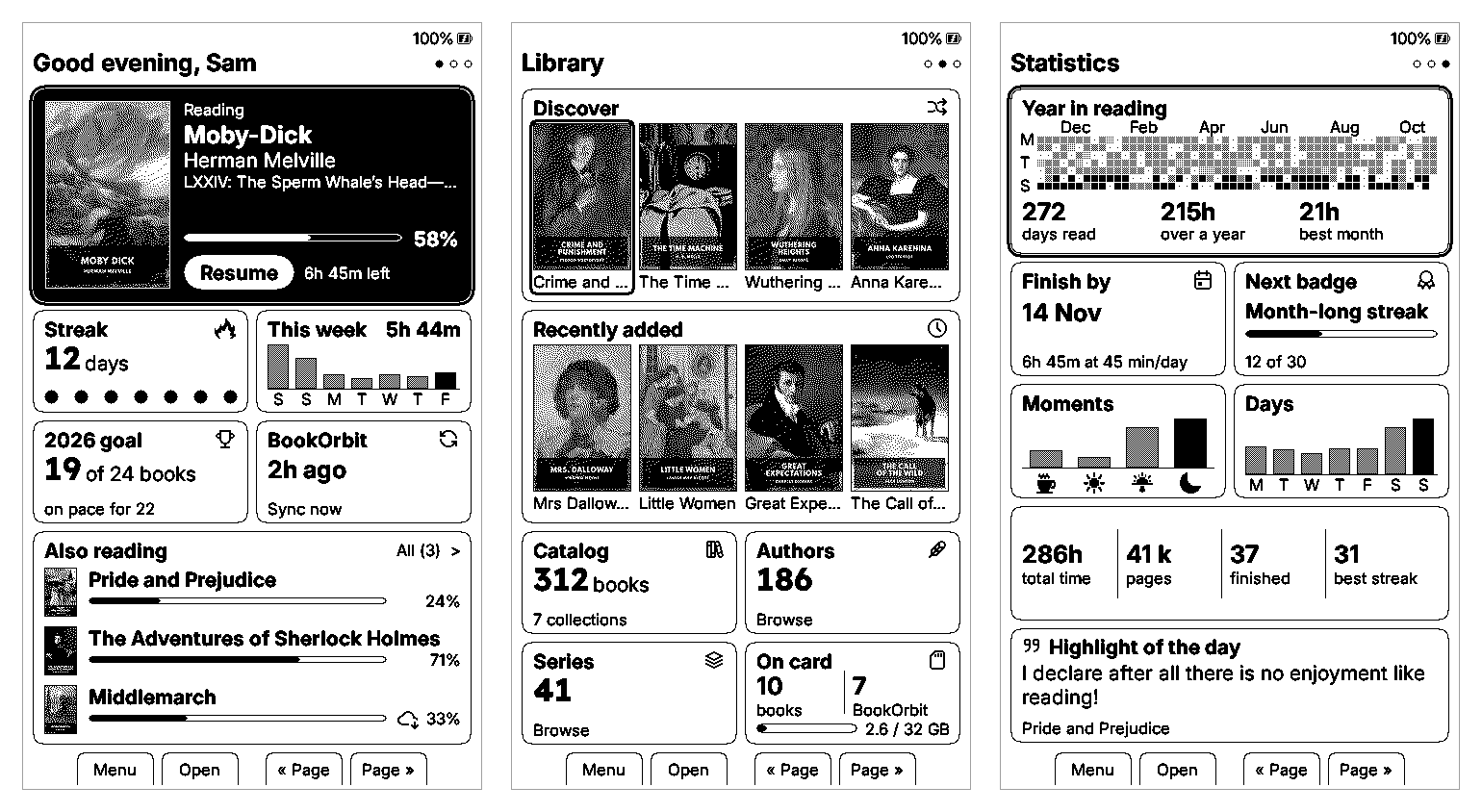
- A new BookOrbit theme (Settings → Display → UI Theme → BookOrbit) turns Home into three pages of tiles modeled on BookOrbit's dashboard:
- Home: the current book with its chapter, progress and time left (Confirm resumes it in one press), your streak, this week's reading, your yearly goal, and the other books you are reading, on this device or another one.
- Library: the catalog's Discover and Recently Added shelves, links to the catalog, its authors and its series, and what is on the card: how many books, how many came from BookOrbit, and how full the card is. A book that is not on the card yet downloads from its cover, and Home comes back once it is done.
- Statistics: a year of reading, one square a day, when you will finish the current book, the times and days you read, your all-time totals, the next badge and a highlight of the day.
- Opening Home never waits on the network. Sync on Sleep, or the BookOrbit tile, brings the server's numbers. Reading done on the device counts on Home straight away, until the server's numbers include it. Without an account, the theme runs on your own numbers.
- Left and Right turn pages, Up and Down move between tiles. On touch devices, swipe between pages and tap a tile.
- Reading time per day is now recorded on the X4 as well, once its clock has been set over Wi-Fi. The X4 has no clock chip, so its streak and calendar statistics used to stay empty.
BookOrbit catalog
- Book lists can be sorted and filtered by reading status. Sort offers the Library's orders that BookOrbit supports (date added, title, author by last name, recently read, series); Filter shows all books, or only unread, reading or finished ones. The server sorts and filters, so a long list still pages exactly, and the header shows how many books match.
- On the X3 and X4, Left sorts and Right filters while Up and Down move through the list, as in the Library. On touch devices, two buttons in the header do the same.
- Book lists are split into sections, as the Library is when its List View is Expanded: by first letter, by day added or by series, depending on the sort. The sort picker switches the List View between Expanded and Compact.
- Your Want to Read shelf (#86) appears in the catalog when your server offers it, as BookOrbit's KOReader plugin shows it.
- Back from a book list opened from Authors, Series, Collections, Libraries or SmartScopes returns to the entry you opened it from, instead of the top of that list.
- Fixed: browsing past the second page of a listing, or opening a book found there, no longer fails with "Could not reach BookOrbit" on the X3 and X4 (#96). The catalog now keeps only the pages around the one on screen, and on the X3 and X4 it opens after a quick restart, as the OPDS browser does.
- Fixed: downloads from the catalog or an OPDS server no longer fail after about 100 KB on the X3 and X4 behind Caddy, Traefik or another proxy written in Go (#96).
Updates
- Settings → System → Include Release Candidates lets Check for Updates offer this fork's release candidates, the test builds published ahead of a release. It is off by default. When on, the reader is offered whichever is newer, the latest candidate or the latest release. Turning it back off keeps the installed candidate until a newer release comes out.
Full Changelog: v1.6.1+bookorbit.4...v1.6.1+bookorbit.5