
MegaDownloader Revival v2.6.1 — Visual polish & system language
Download — MegaDownloader.exe (single file, all 15 DLLs embedded) or MegaDownloader-Revival-win-x86.zip (portable archive).
Upgrading — replace the executable for the single-file edition, or replace the application files with the new ZIP contents. Settings and the download queue remain in
%LOCALAPPDATA%\MegaDownloader\. On the first upgrade, the task list migrates to the new six-column layout; optional columns remain available from the column menu. Existing manual language choices are preserved.Requirements — Windows 7 SP1 or later · .NET Framework 4.8 (built into Windows 10 1903+).
A cleaner workbench, faster settings, and a language option that follows Windows. This update refines the light and dark interface, fixes menus that appeared only after resizing, removes the long settings-opening stall, and chooses English when the system display language has no matching translation.
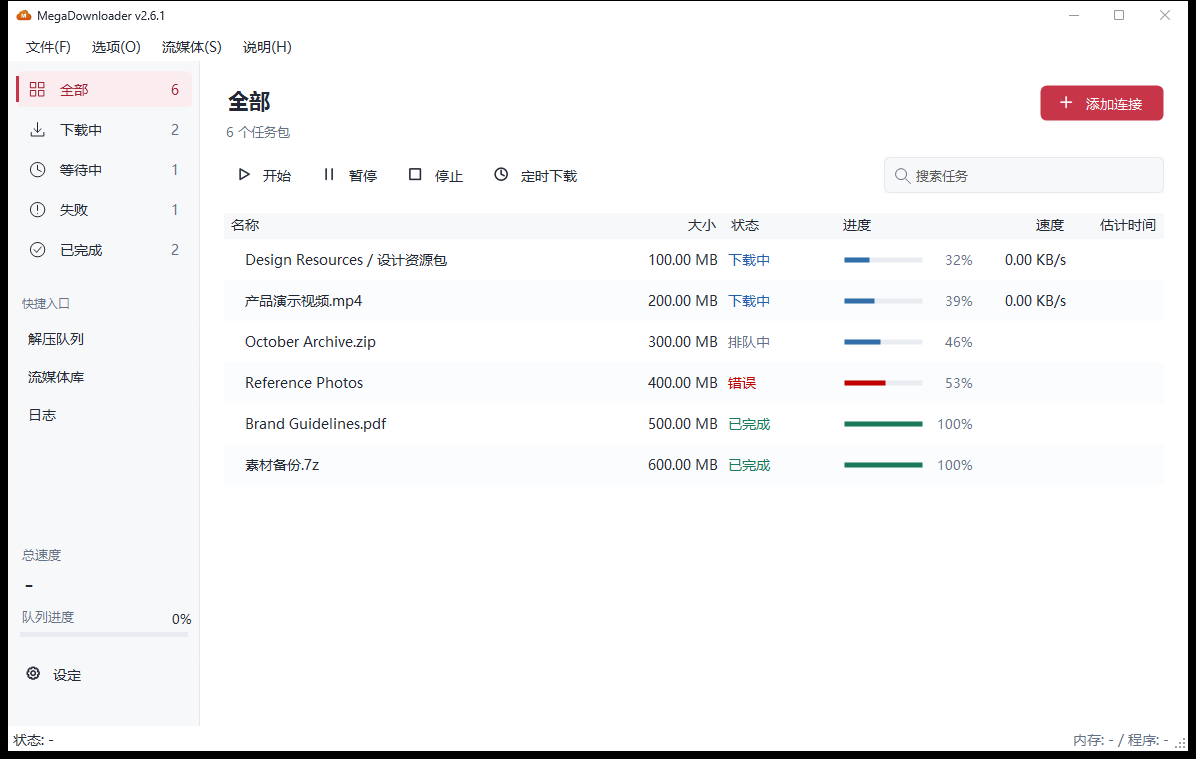
What changes for you
- The interface has clearer hierarchy. Consistent fonts, spacing and line icons; one progress column; a quieter sidebar; details that appear when selected and adapt to the window width.
- All menus appear on first open. File, Options, Streaming and Help no longer need a maximize/restore cycle to become visible.
- Settings opens faster. Repeated layout work was removed and the ELC account editor loads when its tab is opened. An isolated first-open measurement fell from about 8.2 seconds to about 1.1 seconds; actual times vary by machine.
- Stop has its text again. The caption stays visible in compact windows, scheduled downloads gets a clock icon, and Settings stays aligned to the left of the sidebar.
- Language can follow Windows. New configurations use automatic selection. Regional variants and Simplified/Traditional Chinese are matched; unsupported languages fall back to English. Change Settings → General → Language, save, then restart.
Symptoms fixed in this release
- Only File appeared on the menu bar until the window was resized → menu width is established on the first frame.
- Opening Settings stalled for several seconds → nested automatic sizing was replaced, and unused account controls are not initialized.
- Saving Settings without visiting the account tab could affect existing account data → unopened account collections are preserved.
- Searching Settings found the right page but left the match below the fold → the page scrolls to the matching section.
- The Stop caption disappeared, Schedule lacked an icon, and Settings drifted right → captions, icons and sidebar alignment are corrected.
- Resizing a hidden window could unexpectedly show it and start its business loading → visibility is controlled by explicit startup and tray-restore paths.
- Progress cells could retain old text after repainting or restoring columns → backgrounds and presentation caches are refreshed.
Details
Workbench and dialogs
- Shared typography, neutral surfaces, spacing and button roles across light/dark workbench, adding links, file selection, Settings and scheduling.
- The task list defaults to Name, Size, Status, Progress, Speed and Estimated time; percentage and progress bar share one cell. Status colors apply to status text and progress instead of the entire row.
- Task names occupy the first tree column; the hidden priority column still controls queue ordering.
- The details panel appears beside the list in wide windows and below it in narrower windows. Empty queues and empty search results use separate prompts.
- Settings is resizable and scrollable, with connection/proxy options on a separate tab. Unavailable download paths are preserved without a synchronous path probe.
- Account cleanup is repeatable; painting an empty account list no longer disposes the caller-owned graphics. Menu rebuilds and icon replacement release obsolete resources.
- DPI geometry and the WinForms application configuration use one scaling basis; supported Windows versions use the native dark title bar.
Automatic language selection
- Uses the current Windows user's display language, independently of number/date formatting.
- Tries an exact language pack, then a compatible regional/script family, then English. Singapore Chinese uses Simplified Chinese; Hong Kong and Macau Chinese use Traditional Chinese.
- New, missing or invalid language preferences default to automatic mode. Existing valid manual selections keep priority.
- Automatic mode is saved as
auto, so a later startup follows a changed display language. It does not switch the running interface immediately. - Custom language packs participate in matching and are preserved. Missing strings use the same-language built-in pack when available, then English; damaged user packs do not prevent built-in fallback.
- The 10 built-in UI languages are unchanged; Japanese and Korean README translations do not imply built-in Japanese/Korean UI packs.
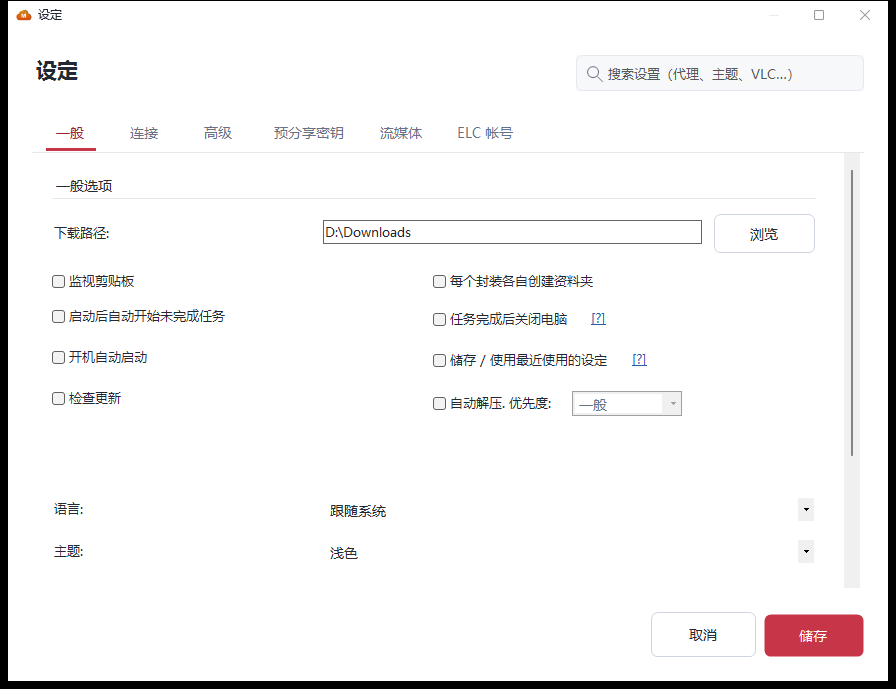
Documentation and verification
- English, Simplified Chinese, Traditional Chinese, Japanese and Korean READMEs updated for 2.6.1, together with the changelog, contributor release checklist and updater metadata.
- Native screenshots replaced for light/dark workbench, empty queue, details, both add-link steps, Settings and scheduled downloads. Images use demonstration data in isolated native windows.
- Debug and Release builds passed; the full Release regression run passed 509 assertions, covering language selection, first-frame menus, Settings loading, layouts, and the existing download/extraction/pre-flight/scheduling fixtures.
- Release assets retain the established names. The ZIP uses an explicit file list: the executable, 15 dependency DLLs and runtime configuration. Local logs, user settings, PDBs and test output are excluded.
- Real MEGA transfers and multi-monitor/high-DPI behavior on other devices are not covered by the isolated screenshot fixtures.
简体中文摘要
2.6.1 整理界面层次、修复菜单和设置首开问题,新增语言跟随系统。
- 主窗口、添加链接、文件预检和设置统一字体、留白、按钮与深浅色;进度条和百分比合并,详情随窗口宽度调整。
- 顶栏首次打开即显示全部菜单,不必放大再缩小。设置首开减少重复布局,ELC 账号页按需加载;隔离采样由约 8.2 秒降至约 1.1 秒,实际时间因设备而异。
- “停止”恢复两字文案,窄窗口也保留;定时下载补上时钟图标,设置按钮靠左对齐。
- 新配置默认根据 Windows 显示语言匹配,区分简繁及地区变体,未支持的语言使用英文;已有手动选择保留。设置 → 一般 → 语言中切换,保存并重启生效。
- 修复未打开账号页时的保存与关闭、空列表绘制、设置搜索不滚动、隐藏窗口 Resize 意外触发加载及进度重绘残留。
- 首次升级迁移到六列布局,其他列可从列菜单恢复;配置和下载队列仍保存在
%LOCALAPPDATA%\MegaDownloader\。 - 五种语言 README、变更日志与原生截图同步更新。Debug / Release 构建通过,Release 完整回归通过 509 项断言。
完整明细见 CHANGELOG。
Full Changelog: v2.6.0...v2.6.1