
MegaDownloader Revival v2.6.0 — The Workbench Update
Download — MegaDownloader.exe (single file, all 15 DLLs embedded) or MegaDownloader-Revival-win-x86.zip (portable archive).
Upgrading — for the single-file edition, replace the executable. For the ZIP edition, replace the application files with the contents of the new ZIP. Settings and the download queue live in
%LOCALAPPDATA%\MegaDownloader\and are kept; 2.6 reads existing configuration and leaves scheduling off by default.Requirements — Windows 7 SP1 or later · .NET Framework 4.8 (built into Windows 10 1903+).
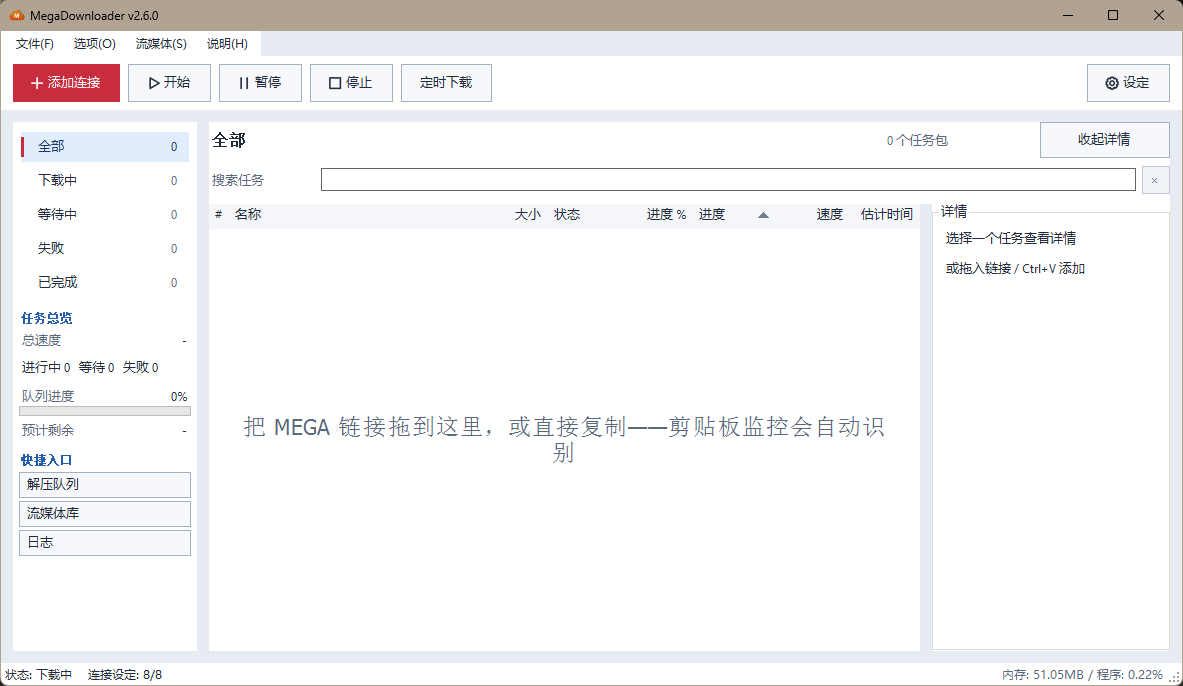
The biggest update since the revival began. The interface is rebuilt around one workbench, adding links is now a two-step flow inside a single window, downloads can be inspected file by file before they start, the queue is searchable, and downloads can run on a schedule. In one test setup, cold start fell from 5–7 seconds to 150–200 ms; times vary by hardware and environment.
What changes for you
- It starts in a blink. Cold start went from 5–7 s to 150–200 ms — the first paint no longer queries performance counters or WMI, and resource sampling moved to the background.
- Adding a big share is no longer blind. Paste the link, see every file with its name, size, status and relative path, expand or collapse folders, select with Ctrl/Shift, and check the total against the free space on your target disk. Duplicates — old and new link formats — are skipped automatically.
- No more dialog pile-ups. Link input and file selection live in the same resizable window. Press Back and your links, search term, expanded folders and tick marks are all still there.
- Finding a task takes one keystroke.
Ctrl+Fsearches package names, file names and relative paths, combined with the current status filter.Escrestores the queue. - Downloads can wait for the right time. Set a daily window or a one-off appointment, including ranges that cross midnight.
- The app stops freezing on import. Link parsing, package building and metadata checks moved off the UI thread; pre-flight uses a virtual list and group counts reuse a background snapshot.
Symptoms fixed in this release
- Importing several hundred files froze the window → parsing and building run in the background, and packages over 500 files start collapsed.
- Clicking "recheck" after a failed pre-flight showed 100% with the old selection still in place → failures now show the error and keep your selection.
- Searching while a background refresh was running could snap back to stale results → results are versioned and discarded when the input changes.
- Switching windows during clipboard parsing could add the link twice, or miss it entirely → the input-window origin is recorded before parsing.
- Resizing the window while the details panel was scrolled shifted the layout → scroll position is preserved across layout passes.
- At high DPI, folder expand markers overlapped the text and deep rows painted outside their cell → markers use DPI-scaled indentation and are clipped to the row.
- The darker list area could stay light after a theme switch, or after columns were restored → native background, text background and empty-state layers are themed and re-synced.
- Pasting rich text could carry a web page's text colour into the dark theme → pasted input is plain text.
Details
Workbench
- One palette, type scale and spacing system for light and dark; Add Link is the primary action and the toolbar gains a schedule entry.
- Sidebar groups carry independent counts and selection markers; the task list gains a title, package count and an empty-result hint.
- The details panel collapses and yields space on narrow windows; fields are grouped, long names and paths get tooltips and scrolling.
- Icons are drawn on a shared canvas with uniform stroke weight, rendered at high resolution and downscaled; text icons are lifted one logical pixel at high DPI, icon-only buttons stay centred.
- Native list background, text background and empty-state layers are themed; column restore and window-handle rebuild re-sync colours and clear the stale virtual-row cache.
Two-step add flow and pre-flight
- Input and selection share one resizable window sized to the screen work area, with a scrolling body and a fixed footer.
- Pre-flight shows name, size, status and relative path, with name search, type filter and "select all results".
- Folder tree by shared folder and subdirectory, collapsed by default: whole-folder checks, partial state, expand/collapse all, arrow keys. Search and filters reveal matching branches; folder actions apply only to matches, and collapsing never changes the selection.
Ctrl/Shiftmulti-select,Spaceor the context menu to toggle a batch,Ctrl+Ito invert the current results. Duplicates and dead links are always skipped.- Elapsed time, stop and re-check during parsing; a separate submission state ("Adding to download queue") that cannot be triggered twice.
- Changing only the destination refreshes free-space information without re-checking the links; unchanged links reuse the cached metadata and pre-flight page.
Queue search, groups and refresh
- Search covers package name, file name and relative path;
Ctrl+Ffocuses it,Escclears it, and the filter combines with the current status group. - Stale results are invalidated on input change and re-checked before they return; long lists are version-checked per item.
- Group counts and the overview reuse a background snapshot — no full-queue scan on the UI thread; navigation items are only rewritten when a value changes, and the details layout is recalculated only on resize.
Scheduled downloads
- One-off appointment or daily window, including windows that cross midnight; downloads resume at the start and pause at the end. Settings persist across restarts; existing configurations default to off.
- Per-task manual pause survives a scheduled resume; a whole-queue manual pause lasts until the next window.
- Outside the window, new starts are blocked; scheduled queue resumes respect quota waits.
- Both daily and one-off settings are written and restored independently; a corrupted field in the inactive mode does not affect the active one.
Startup and performance
- First paint no longer queries performance counters or WMI; CPU and memory are sampled in the background after the window appears. Measured cold start in a test setup: 5–7 s → 150–200 ms. Startup times vary by hardware and environment.
- Background work starts only after the terms and required configuration are complete; a silent start with pending work stays in the tray with a prompt.
- Language files are not rewritten when their content is unchanged; inter-instance argument passing uses a cross-process mutex.
- Logs record startup phases and time to first paint.
Fixes
- Duplicate or missed clipboard detection when the focus changes during background parsing.
- Group membership lagging behind status changes when totals stayed the same.
- Details layout offset after resizing while scrolled.
- High-DPI folder markers overlapping text and painting outside their cell.
- Manual force retry not clearing the old per-task pause flag.
- Next-step buttons staying enabled during online playback.
- Minimum window size exceeding the work area on small screens; size and position are now clamped on first show and across DPI changes.
Localization
- All 10 interface language packs updated with the new workbench, pre-flight, scheduling and search strings.
Documentation
- All five READMEs rewritten around 2.6, with a new banner, a "what's new" section and a shorter path to the download.
- Added
SECURITY.md,CODE_OF_CONDUCT.md, issue forms and a pull-request template.
Full Changelog: v2.5.9...v2.6.0
简体中文摘要
2.6「工作台」是复活计划启动以来改动最大的一版。 界面整体重做;添加链接合并为同一窗口内的两步流程;下载前可逐文件预检;队列支持搜索;新增定时下载。
- 启动从 5–7 秒降到 150–200 毫秒:首屏不再同步读性能计数器与 WMI,资源采样改到窗口显示之后。
- 大型分享不再盲下:粘贴链接后先看文件名、大小、状态与相对路径,文件夹可折叠,支持多选,并显示选中总大小与目标磁盘剩余空间;新旧格式的重复链接自动跳过。
- 不再层层弹窗:输入与选文件在同一窗口,返回后链接、搜索词、展开目录与勾选都保留。
Ctrl+F直接找任务:包名、文件名、相对路径,叠加当前状态分组过滤。- 下载可以等到合适的时间:每日时段或一次性预约,支持跨午夜。
- 导入不再卡界面:解析、建包、元数据检查移到后台;超过 500 个文件的任务包默认折叠。
修复的症状包括:预检失败仍显示 100%、旧搜索结果回写、剪贴板焦点切换导致漏加或重复、详情滚动后缩放偏移、高 DPI 文件夹标记重叠、深色任务区发白、带格式粘贴带入网页字色等。
完整明细见 CHANGELOG。