
This stable release replaces the Flutter UI with an embedded native UI, cutting typical memory use roughly in half, and adds offline Dictation, file-content search, countdown timers, and Private Mode while rolling up the stability and cross-platform improvements from the v2.4.0 betas.
-
Add
- [
UI] Replace the Flutter UI with an embedded native UI that owns windows, focus, widgets, and GPU rendering in-process, removing the separate Flutter process, cutting typical memory use roughly in half to about 150 MB in daily use, and keeping launcher and settings workflows aligned across Windows, macOS, and Linux. - [
Dictation] Add local voice-to-text dictation with downloadable offline models, configurable microphones and model loading, press, double-press, and hold hotkeys, live status overlays, audio ducking, searchable history with audio playback that preserves original and AI-refined transcripts, and custom actions that can refine speech with AI, type into the active window, show an overlay, or start AI Chat. - [
File Search] Add optional file-content indexing and search so users can find supported text, PDF, and Office files by words inside them, choose indexed extensions, track indexing progress, use quoted phrases, benefit from faster parallel indexing and more reliable index reconciliation, and open theme-aware previews with clear large-file limits. - [
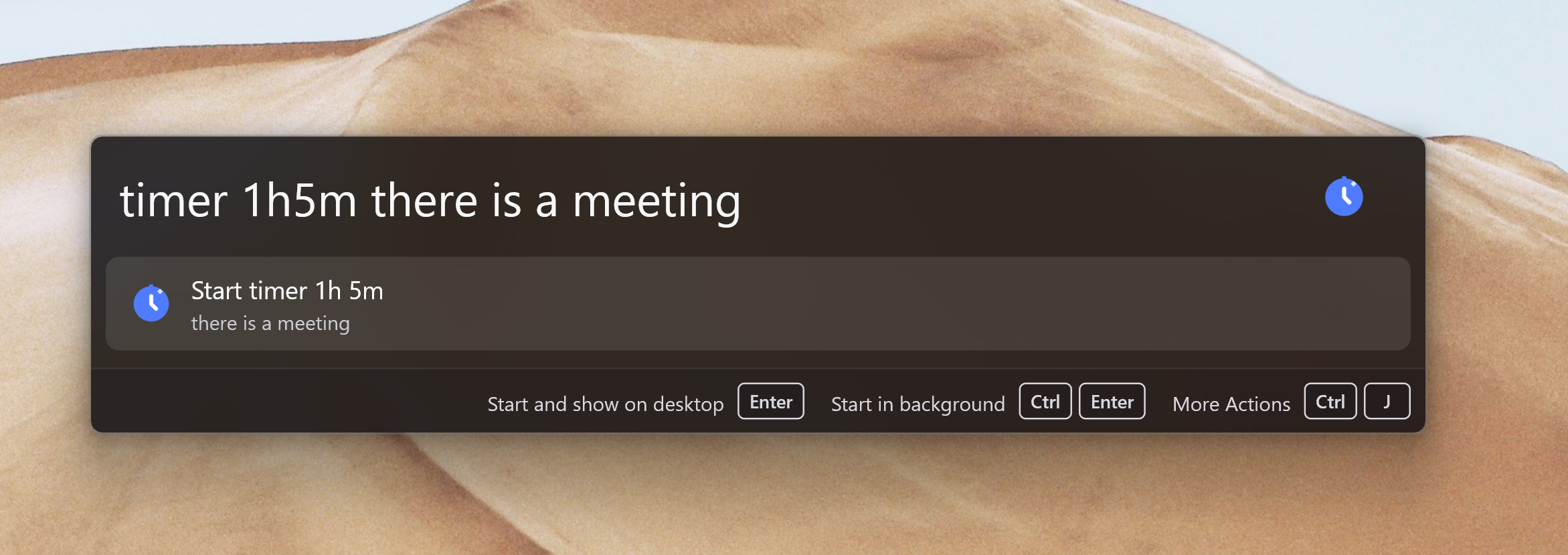
Timer] Add built-in countdown timers with pause/resume, optional notes, accessible desktop overlays, and persistence across restarts so users can start timers liketimer 5mortimer 1h meetingfrom the launcher. #4495 - [
Privacy] Add Private Mode for temporary use on shared computers: when enabled, Wox clears local data after exit while preserving non-sensitive settings such as language and hotkeys.
- [
-
Improve
- [
AI Chat] Improve AI Chat with reusable local and remote skills, built-in tools, inline model and skill selection, configurable tool usage, cancellable streaming, summarized conversation history, and a fallback search action. - [
OCR] Support downloadable offline PaddleOCR models alongside system OCR, with per-feature model selection for Screenshot and Clipboard. - [
Screenshot] Improve capture, annotation, and recording with cursor inclusion, numbered markers, shadowed pinned overlays, display-scaled editor chrome, clearer scrolling-capture borders, and more consistent recording controls across platforms. - [
Preview] Improve native file and WebView previews with draggable title-bar controls, user-agent presets, URL validation, corner radius, mouse-button navigation, Markdown, scrollable metadata, and clearer window chrome. - [
Launcher] Improve query editing with multiline input, clipboard actions, context menus, secondary-tap actions, stable result layouts while typing, and a loading indicator for slow queries. - [
Query] Add scoped queries that pin results to specific plugins and show scope icons, and automatically record successful display-only queries such as Calculator and Converter results in query history. - [
Hotkey] Improve hotkey recording and registration with left/right-specific modifiers, multi-key hold shortcuts, F-keys, more reliable press, double-press, hold, and Caps Lock combo handling, clearer registration fallback messaging, and additional recorder tip positions #4496 - [
Media Player] Improve now-playing results with artwork, a dedicated preview, live progress, playback controls, an action to open the full Media Player view, and Linux MPRIS support. - [
Explorer] Improve type-to-search with indexed results beyond the current folder, faster in-place navigation and item selection in Windows open/save dialogs, Cmd+G hints on macOS, and Quick Switch between Explorer or Finder and open/save dialogs #4511 - [
Overlay] Improve movable overlays with draggable title bars, sticky host-window tracking, and clearer close-button and focus behavior. - [
Onboarding] Expand first-run onboarding with main hotkey, selection hotkey, platform-specific tray setup, interactive demos, and a guided macOS permission flow. - [
Window Manager] Improve workspace restoration with more reliable display matching across resolution changes and faster placement of newly launched apps. - [
Cloud Sync] Improve setup guidance after sign-in and make per-item synchronization progress clearer. - [
Converter] Improve time and duration results with localized weekdays and units, 24-hour formatting, more reliable date and timezone calculations, and confirmation before fetching crypto prices #4480 - [
AI] Support Ollama Cloud with its default endpoint and improve compatibility with OpenAI-compatible relays #4473 - [
Indicator] Let plugin results open the corresponding plugin settings directly. - [
Theme] Improve AI-generated themes with more reliable JSON extraction and clearer preview guidance. - [
Settings] Improve settings control sizing, hover feedback, disabled table states, dialog actions, and form layout consistency across settings pages #4503 - [
Clipboard] Let users exclude applications from clipboard history, and improve text and image clipboard handling across Linux Wayland and X11 environments. - [
Shell] Support running shell commands as administrator with UAC elevation on Windows. - [
App] Support running Windows apps as administrator from launcher results #4498 - [
Diagnostic] Capture crash incidents for bug reports with more reliable Windows crash artifacts. - [
Plugin] Improve plugin-host reliability with a watchdog that recovers unhealthy host processes. - [
Linux] Improve Hyprland and GTK rendering, pointer and scroll capture, per-pixel alpha and pointer passthrough, in-window tooltips, settings chrome alignment, and package distribution with.deband.rpmbuilds. - [
Windows] Improve CJK text rendering, Task Manager Apps grouping, backdrop and dark-appearance sync, and DPI transition stability. - [
macOS] Improve hidden-window memory release and keep management windows available across Spaces.
- [
-
Fix
- [
Calculator] Fix floating-point display artifacts by preserving exact arithmetic in expressions #4497 - [
Input] Fix IME mode being reset when opening the launcher #4493 - [
Updater] Fix Windows updates when the downloaded executable and Wox installation are on different drives #4471 - [
Launcher] Fix preview panel sizing and query state when switching launch modes #4474 - [
Settings] Fix memory accumulation after closing the settings window on macOS, plugin-list navigation scrolling to the wrong position, and settings rendering on Hyprland. - [
Linux] Fix startup crashes by initializing Xlib thread support before GTK, Hyprland hotkey and clipboard handling, X11 window visibility #4505, and query cursor movement during accessibility updates. - [
Windows] Fix GPU renderer recovery after display device removal and release renderer resources after Wox remains hidden for an extended period #4502 - [
Explorer] Fix type-to-search function-key handling and file-dialog window detection on Windows #4504 - [
Bookmark] Fix Chromium bookmark loading #4501 - [
Cloud Sync] Fix update checks blocking restore flows. - [
Plugin] Fix disabled system plugins appearing in results, toolbar messages without an explicit icon, plugin-host recovery, and trash deletion reliability. - [
Overlay] Fix text overlay sizing. - [
Emoji] Fix AI-assisted emoji matching with models that enable thinking by default. - [
URL] Fix URL history entries with missing favicons.
- [