
v0.108.0
Note
If you enjoyed this release, consider showing a token of appreciation by:
- Pressing the “Star” button on GitHub (top-right).
- Considering a one-time or recurrent donation to the lead developer via GitHub Sponsors or PayPal.
Trilium can now be written in by hand. Handwriting notes, in beta, take a pen on a tablet or a drawing tablet, on ruled, grid or dotted paper, and can hold photos and PDFs to write over. OneNote pages with ink, RNote and Xournal++ documents are imported as handwriting notes.
Tablets get a new layout, with the note tree docked beside the note, the desktop's tabs and the right sidebar.
Links can now point at a heading or an anchor instead of a whole note, in text and Markdown notes as well as in PDF, EPUB, Word and OpenDocument files. The Outline tab lists the headings of those files too, with a filter and a way to copy a reference to any of them. Text notes gain collapsible headings, aside blocks and a scrollbar that marks search results and colored text.
Vim users can now bring their habits to text notes, with a Vim mode that understands paragraphs, lists, tables and embedded content. Trilium also starts noticeably faster, on desktop and on phones.
Android gets its first stable release, with its APK on the GitHub release. It syncs with a server of the same version and installs beside the nightly build, so moving from the nightly means syncing again or restoring a backup.
💡 Key highlights
Handwriting notes (beta)
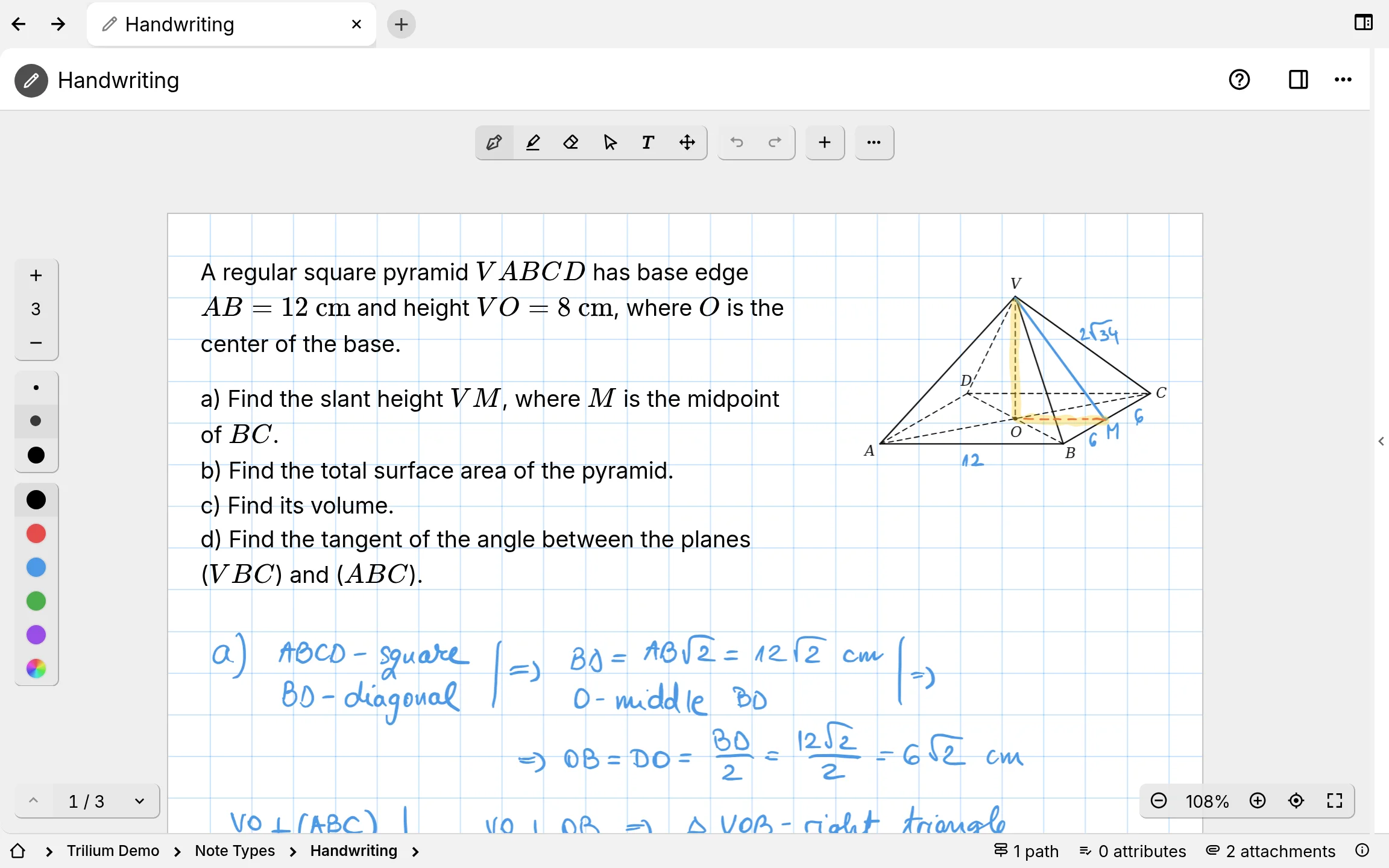
The new Handwriting note type is made for writing by hand with a pen, on a tablet or a drawing tablet. It stays responsive in notes holding a great deal of ink. It is in beta.
- Write on pages of ruled, grid or dotted paper, or on a canvas without bounds, with a pressure-sensitive pen, a highlighter and an eraser.
- Fingers pan and zoom while the pen writes, and a palm resting on the screen is ignored.
- Draw a line, a rectangle, a triangle, a circle or an arrow and hold the pen still at the end, and it becomes a clean shape.
- Add a photo or a screenshot, such as the exercise being worked on, and write over it.
- Add a PDF, such as the slides of a lecture, and write over its pages. A PDF note or attachment already in Trilium has Annotate by hand in its menu.
- Drag a note from the note tree onto the paper to show it in a box.
- Collections and text notes show a picture of the note's first page.
- A Canvas note used for writing by hand can be converted into a handwriting note, which keeps its freehand strokes, its text, its images and its shapes.
- Documents of RNote (
.rnote) and Xournal++ (.xopp), on their own or in a ZIP archive, are imported as handwriting notes, with their pen strokes, images and typed text.
Collapsible headings
A heading in a text note can now be collapsed to hide the content under it, up to the next heading of the same or a higher level, which makes a long note easier to work through one section at a time. Click the arrow at the end of the heading, or press Ctrl+Alt+Enter with the cursor in it.
The collapsed state is saved with the note, and dragging a collapsed heading moves its section with it. Search in note, the table of contents and links to a heading still find the hidden content. See Collapsible headings for the details.
Vim mode in text notes
Code notes have had Vim key bindings for years, but text notes, where most of the writing in Trilium happens, had none. For anyone used to Vim, every text note meant putting that habit aside and going back to the mouse and the arrow keys. Vim users have asked for this since 2021, and now the time has finally come to make it real: text notes have a Vim mode of their own. It runs on the same Vim engine as code notes, so the commands work as they do there, and it understands the structure of rich text: a paragraph, a heading, a list item, a table cell and a line of code are each a line; an image, a diagram or an included note is one line that j and k stop on and dd deletes; and yanked text keeps its bold, links and colors when it is put back. Insert mode is the editor as it was, with its formatting shortcuts, slash commands and Markdown autoformatting.
Motions, operators, text objects, counts, repeating with ., registers, marks, macros, search and :s all work, inside included notes too. Trilium commands join them: :w saves the note, :q closes it, gf follows the link under the cursor, za folds a heading, list item or collapsible block, :sort sorts lines, :ck runs any editor command, and "+y copies to the system clipboard with the formatting. The status bar shows the mode, the keys of a pending command and macro recording, and :, / and ? open the command line in place of the breadcrumb. Zen mode keeps both.
Key hints help while you learn and stay quiet otherwise. Normal and Visual mode show their keys in the status bar, and a pause in the middle of a command shows the keys that can follow it. The command line completes command names with Tab, the search prompt tells how the pattern is read, and Alt+F1 or a click on the mode lists every key. Esc in Normal mode switches between the keys and the breadcrumb, and the Key hints option turns them off.
Turn it on in Options → Text Notes → Features → Vim mode, on each device where you want it. The Vim badge in the status bar, or a #vimMode label, turns it on or off for a single note, and startup commands set up mappings such as imap jk <Esc>.
A faster start, on desktop and on phones
Trilium now starts noticeably faster. It shows the launch bar, the tabs and the note tree first, and loads the rest only once you use it. This applies to phones too.
The difference is largest on slower devices. Simulating a slower device on a 20 Mbit/s connection, a note is ready to edit in 2.5 s instead of 5.2 s on desktop, and in 2.3 s instead of 4.8 s on a phone. On a fast computer, it is ready about 30% sooner.
Link directly to headings within notes
When you create a link to a note, you can choose a heading so the link opens at that section. This works with text notes, Markdown, PDF, EPUB, ODT, and DOCX.
A layout made for tablets
On a tablet, in either orientation, the mobile version now lays the screen out like the desktop version:
- The note tree is docked beside the note. A button in the launch bar hides it, and its edge can be dragged to resize it.
- The tabs are in the desktop's tab bar, and the launch bar has the desktop's launchers.
- The right sidebar is available, in place of the phone's note panel.
- Dialogs are centered on the screen, with their list on the left.
🚨 Breaking changes
- For theme developers: the
--background-materialCSS variable no longer has an effect. Trilium now chooses the Mica or vibrancy backdrop itself, from the layout, and applies it only to the Next themes and to custom themes based on them with#appThemeBase. ThesetBackgroundMaterial()andsetVibrancy()methods ofwindow.electronApi.windowwere removed.
🐞 Bugfixes
- Text editor: Clicking out of a link preview inside columns or tabs crashed the editor.
- 0.108.0-rc1: Missing some texts for JavaScript notes by @harrismalik
- The application freezes when opening the backend log.
- Backlinks for block reference links miss context by @tioannidis
- Attribute changes in the status bar popup are not saved (0.108.0-rc.1 regression)
Text editor (18)
- Typing
/2to/4in the slash command menu suggested the column layout before the heading of that level. - Opening a note whose included notes include further notes, such as a journal built from templates, could freeze Trilium, as every level of includes rendered in full.
- With a larger interface font size, "Heading 3" in the heading dropdown was smaller than the other headings.
- Typing
/pagein the slash command menu suggested creating a child note before the page break. - The rows of a table scrolling under its sticky header rows showed through the header's top and bottom borders, and at display scales such as 125% or 150% the header's column dividers were drawn twice.
- A Heading 1 in pasted text or in an existing note turned into a normal paragraph once the note was edited, and the table of contents listed it only in read-only mode.
- Dragging text from a note onto its title deleted the text instead of moving it, and crashed the editor in Firefox.
- Link previews disappeared from copied content.
- Dragging a link preview by its content dropped a plain link instead of moving the preview.
- The Up and Down arrow keys skipped lines holding only a link preview.
- A link to an included note that showed as a link did not scroll to it, in text notes and on shared pages.
- A note whose only content was a referenced empty paragraph or horizontal line was saved empty.
- The note list opened by typing
@stayed on screen after switching to another tab with the mouse. - In Firefox, selecting text by dragging past the edge of a note did not scroll the note.
- In Firefox, selecting a link preview from right to left also selected the rest of the note.
- On an iPad in Safari, the on-screen keyboard covered the formatting toolbar of a text note.
- Typing `
- With two text notes side by side, clicking the empty space below one of them placed the cursor at the end of the other one. by @N1KHL
Search (3)
- Searching for an empty quoted phrase (
"") failed with an error, and a!=search that included the flat text of attributes returned notes whose content contained the excluded word. - Searching in Korean found the right notes but highlighted nothing in their titles and content, and Jump to showed no matched attribute.
- The matched attributes on search result cards had no outline, so their shaded name ended in a corner with nothing around the value.
General (9)
- The consistency checks could hang while repairing a cycle in the note tree, and could not repair a note whose content was missing or empty, reporting it again on every run.
- A Word document uploaded with a spreadsheet file type showed "Empty spreadsheet." in its preview instead of its text.
- An image was saved without compression when the worker process that would have compressed it had died while it was idle.
- Uploading a PNG with leftover data after the end of the image, such as some edited Android screenshots, failed to compress it and reported an error.
- Keyboard shortcuts such as <kbd>Ctrl</kbd>+<kbd>Alt</kbd>+<kbd>2</kbd> did not fire from the numpad, nor in Firefox on Windows on layouts where that key types a character with AltGr, such as German.
- The backend log recorded a harmless "ResizeObserver loop completed with undelivered notifications" error, which read like a real problem.
- Opening an office document too large to preview said its file format was not supported, and the backend log recorded the refusal as an error with a stack trace.
- Saving a note could overwrite changes made to it elsewhere in the meantime.
- A restored revision could show broken drawings and images, and kept the backlinks of the content it replaced.
Sync (2)
- An option synced from another device for the first time was not picked up until the application restarted.
- Setting up a desktop app through "Connect a desktop app" stayed on "Setting up options" after the sync finished, instead of opening the knowledge base.
Scripting (1)
- A script note with an HTML note among its children failed to run.
Server (2)
- With
TRILIUM_LOG_DIRset to the root of a drive (/orC:\), old log files were never deleted after the retention period. - The provided
docker-compose.ymlfailed to start the container on hosts without/etc/timezone, such as Fedora, RHEL or Alpine.
ETAPI (2)
- Patching an image note through ETAPI with a
mimethat was not a string answered with a 500 error instead of a 400 validation error. - Requesting metrics in an unsupported
formatanswered with a 500 error instead of a 400 that names the supported formats.
Import and export (8)
- Importing from OneNote dropped a link, along with its text, when it followed another link to the same page.
- A code note or code block whose text contained a fenced code block of its own was exported to Markdown with a fence that ended too early, so the content changed when imported back.
- Importing a ZIP file broke included notes from outside the archive and changed text that matched the ID of an included note.
- ZIP exports and imports turned links to a heading or a paragraph into links to the whole note.
- Importing a ZIP file left the links and included notes of Markdown notes pointing at the original notes.
- A ZIP export turned a link to an attachment of another note into a link to that note.
- Links to a page or an annotation of a PDF opened only the PDF after a ZIP export and import.
- Importing a ZIP export dropped relations to notes outside the archive, so the demo's Geo Map opened as a grid and an imported note lost its built-in template; with safe import off, relations to the database's own notes are now kept too.
PDF (3)
- PDFs that used CJK CMaps showed their Chinese, Japanese or Korean text blank, and CMYK images rendered with less accurate colors.
- Copy reference on a page or an annotation of a PDF could leave the clipboard unchanged in Safari.
- After a PDF's content was replaced, the sidebar could keep the old document's pages, annotations, layers or attachments.
Interface (20)
- Menus, buttons and other controls kept their default size when the interface font size was changed, and some balloons and tooltips grew twice as much.
- The interface font size did not change the font list in the Fonts settings, the PDF sidebar, the help dialog, setting descriptions or the similar notes list.
- At a large interface font size, the note tree's expand arrows and the path separators in the status bar sat below the text, the horizontal menu button filled its frame, and the Fonts dialog was cramped and drew its interface preview at the size twice over.
- On browsers older than late 2023 (such as Firefox 115 ESR), much of the interface was unstyled, and typing in a text note logged "intersection is not a function" errors.
- A new note created while a canvas, code or other non-text note was open sometimes left its title unselected, and typing into it lagged behind.
- Sizes just under a unit boundary were shown as 1024 of the smaller unit, such as "1024 KiB" for a 1048575-byte file. They now read "1 MiB".
- A distance of 999.5 m or more but under 1 km, in the GPX preview and the map search results, read "1,000 m". It now reads "1 km".
- The icon picker did not find icons of a custom icon pack whose search terms contain capital letters (searching
proxmoxmissed an icon listed asProxmox). - Following links to two attachments of one note in quick succession could show the first attachment instead of the second.
- Copying to the clipboard reported success when the browser refused the copy.
- After a failed copy, copying text could put the earlier content on the clipboard instead of the selection.
- On a phone, tapping a highlight, a board column or a chat highlight in the note panel scrolled the note without closing the panel.
- Text, code and Markdown attachments opened on their own could not be scrolled.
- Backlinks did not update when links to the open note were added or removed.
- On mobile, a text note shown as a note map or in another view left a blank band at the bottom, held for the hidden formatting toolbar.
- On tablets, the highlight around the active split had its top-left corner cut off.
- On a narrow phone, the back button in the note's title bar overlapped the note icon.
- After a note's type was changed, the read-only badge kept showing the previous type's state until the note was opened again.
- The note icon did not change after changing a note's type.
- In a right-to-left language, the buttons floating over maps, diagrams and other notes were rounded on the inside of each group instead of at its ends.
Table collection (1)
- The rows of a table collection stayed at a fixed size, ignoring both the interface and the document font size.
Launch bar (4)
- The icons of the vertical launch bar grew with the interface font size and no longer fit the bar, while the horizontal one kept its size.
- With a legacy theme, or a custom theme not based on the TriliumNext theme, the launch bar could not be scrolled when its launchers did not fit, including the bottom bar on mobile.
- The sync status icon in the launch bar sat lower than the other icons.
- The cog in the launch bar was labeled "Settings" while the page it opened was titled "Options".
Tables in text notes (2)
- Tab in the last cell of a table added a row but put the caret after the table instead of in the new row.
- Leaving a table with the arrow keys selected the whole table, so the next character typed replaced it; the caret now waits beside the table, where typing starts a paragraph.
Attributes (4)
- When editing a label value from a fixed list in the attribute list, the dropdown arrow covered the end of the selected value.
- Promoted attribute fields stayed empty, and checkboxes unchecked, when the note inherited its value from a parent or a template.
- Turning a note off and back on in the Content Manager made its attributes non-inheritable, merged repeated values of the same attribute into one and moved them to the end of the attribute list.
- Renaming a label or relation with a bulk action, or changing a relation's target in a promoted attribute or a table, made an inheritable attribute non-inheritable.
Tree (6)
- Unprotect subtree removed encryption without asking, behind the same "Start protected session" prompt as Protect subtree; both now say what they do, and unprotecting asks for confirmation.
- Creating a note reopened the collapsed parent of the note that was open, with "Follow active note" enabled.
- After sorting the top-level notes, the Up and Down keys in the note tree stopped partway through the list.
- Dropping a note on the line just below an expanded note moved it out of that note, next to it, instead of making it the first child.
- With the TriliumNext themes, note colors in the tree were shifted further from the chosen color than the theme intended.
- On a tablet in the desktop layout, the note tree stopped short above the home indicator instead of scrolling under it.
Share (13)
- A shared note with a template relation to a note whose ID started with
_template_exposed that note's title and labels, including its#shareCredentials, to anonymous visitors. - Shared pages showed the whole note for an excerpt of a horizontal line or an empty paragraph.
- Shared pages showed some Markdown notes as source code.
- Links to an anchor in another shared note opened that note at its top.
- Shared Markdown notes left out included notes and excerpts, and showed links by the ID of their note.
- A link to an anchor scrolled to an anchor of the same name in an included note above it, on shared pages and in text notes.
- On a server that syncs with another instance, the link of a shared note pointed at the other instance instead of the server it was shared from.
- On narrow screens, shared pages kept text squeezed beside wrapped embeds instead of stacking them.
- Mermaid diagrams in shared text notes and in HTML exports stayed as code instead of being drawn.
- A wide Mermaid diagram on a shared page ran past the text and under the table of contents instead of shrinking to fit.
- Shared notes ignored a
#shareCredentialspassword inherited from a note outside the share. - Shared notes ignored a
#shareHiddenFromTreelabel inherited from a note outside the share. - Theme for Shared Kanboard in Dark Mode Inconsistent
Collections (6)
- The list of child notes under a note loaded its previews before the note's own text, went blank while the text loaded, loaded every preview a second time, and grew row by row as the previews arrived; the tiles of the grid view and the cards of a note's list of attachments now have the same height from the start.
- Opening a collection right after a table collection could leave it blank, without its toolbar or content, when its view had been saved before.
- In a presentation, the sidebar thumbnail of a slide with a gradient background lost the theme's slide color, so in the dark theme its text was hard to read.
- Dialogs opened from inside a note, such as a board column's limit, a collection's properties or the code languages, were covered by the dimmed background and could not be used.
- A PDF in a dashboard widget was cut off at a small height instead of filling the widget.
- The list view cut note titles short to make room for their labels (such as a web clipping's page URL), down to a few letters on a phone.
Spreadsheet (3)
- Previewing or importing an
.xlsxfile with dropdown lists over whole columns, as import templates often have, froze Trilium for up to half a minute and used hundreds of megabytes of memory, even for a small file. - Spreadsheet loses conditional formatting sometimes
- With the same spreadsheet open in two splits, pressing Enter in one moved the keyboard focus into the other.
Markdown (6)
- In a Markdown note, the preview highlighted the wrong block and scrolled out of step after a collapsible block or other HTML written around Markdown.
- A Markdown note did not render when its first heading held a character code that names no character.
- Changes not saved yet were lost when the note was converted between text and Markdown elsewhere.
- Text between dollar signs in a Markdown code block fenced with
~~~or four backticks turned into placeholder text. - An included Markdown note shown in fullscreen ignored the preferred content width.
- A code block whose last line was empty gained another empty line each time the note was exported to Markdown and imported again.
Tabs (1)
- Starting Trilium added the note of every restored tab to the recent notes, and a tab opened in the background was added before it had been looked at.
Desktop (2)
- With background effects on, the window briefly turned see-through while starting, before its Mica or vibrancy backdrop appeared, and switching the layout orientation kept the backdrop of the previous layout.
- Installing the RPM package blocked installing other Electron apps (such as Unity Hub) with a file conflict under
/usr/lib/.build-id.
Flatpak (1)
- The Flatpak app's icon looked squashed in app stores and launchers that show it at its largest size.
Board (1)
- New cards did not appear on a board opened in quick edit.
Settings (2)
- The font previews in the Fonts settings were drawn at the wrong size.
- A backup taken by the setup screen was missing from the list of backups.
Authentication (1)
- Stale session cookies left by a reverse proxy change caused "Logged in session not found" errors.
Drawing canvases (1)
- Duplicating a canvas note left the copy without its images.
✨ Improvements
- Text editor: On new installations, following the link under the cursor moved from Ctrl+Enter to Alt+Enter, so Ctrl+Enter on a link in a to-do item no longer both opened the link and toggled the item. Existing installations keep their shortcut, which can be changed in Options → Keyboard shortcuts.
- Import and export: Text notes can be exported as Word documents, optionally into a Word template chosen with
~docxTemplate, and Word, OpenDocument Text and RTF documents can be converted into text notes from the note menu.
Interface (6)
- Text notes can keep their title in the compact title bar instead of the large title above the content: set Note title to Compact in Options → Appearance.
- A picture, drawing, PDF, video, audio file or Excel workbook attachment opened on its own now takes the full width of the window, as a note of the same kind does, and an office document in a note's list of attachments is no longer indented twice as far from the edges of its card as in the note list.
- Stopped counting the attachments generated by Trilium in the status bar and the mobile note menu.
- Added Copy reference and Copy public link to the headings of the outline.
- Added the table of contents of Word, OpenDocument and EPUB files and of read-only PDFs to the Outline tab, with Copy reference on each heading.
- Added a filter field to the Outline tab of the right sidebar.
Share (3)
- Shared pages play an embedded or included video or audio file in the browser's player instead of offering it as a download.
- Shared pages show an Expandable include collapsed under its title, as the app does, instead of showing all of its content.
- Links to a heading of another note showed the heading on shared pages.
Spreadsheet (1)
- An Excel workbook stored as a File note or opened as an attachment now opens in a read-only spreadsheet across the full width, with its sheets in tabs and a grid that stays fast however large the workbook is, instead of a converted page that froze on large files. In the note list and the list of attachments it is previewed by the top-left corner of its first sheet, reaching the edges of its card, and an office document shown again is taken from the cache instead of being converted again.
Text editor (11)
- Add aside blocks for text notes: choose Insert → Aside, or type
/aside, to set content apart in a box that the text can wrap around. - Make headings, code blocks and tables use the space beside an image that the text wraps around, instead of running under it or moving below it.
- Add font and background colors to link previews.
- Reorganized the Insert menu of the formatting toolbar and removed its Internal link entry, which the Link button already covers.
- Made every code block an extended code block while the experimental Extended code blocks feature is on.
- Added linking to a heading or an anchor of another note from the Note page of the link dialog.
- Added linking to a heading or an anchor of a note from the
@menu. - The link dialog and the
@list offered the headings of a PDF as link targets, and a link to one opened the PDF at that heading. - The link dialog and the
@list offered the headings and bookmarks of Word and OpenDocument text files and the table of contents of EPUB e-books as link targets, and a link to one opened the preview at that place. - Added lines on the scrollbar of text notes that mark the results of Search in note.
- Added lines on the scrollbar of text notes that mark the text with a font or background color, in those colors, with an option to hide them.
Performance (1)
- Read-only text notes open without loading the editor, and Vim mode and the highlighting of code blocks load only for a note that uses them.
Desktop (1)
- The main window, and windows opened with Open in new window, now appear with the interface already complete, instead of showing an empty layout, then the tree fading in, during their first moments.
Tabs (1)
- Dragging a tab out into a new window opens that window under the mouse cursor, with the tab under the pointer, instead of at a fixed spot on the screen.
LLM (2)
- When a web search provider or a model provider's endpoint could not be reached, the error said only "fetch failed" instead of why, such as a refused connection or an unreachable host.
- Adding a web search provider now runs a test search and shows its first results or why it failed, and the AI provider and search provider setup offer Retry when they can't connect.
Markdown (2)
- Added linking to a heading or an anchor of a note from the
@menu and the link dialog. - Added linking to a paragraph of a Markdown note.
Code (2)
- Colored the first 500 lines of long code previews instead of showing them all plain.
- Code notes gained the Dracula, One Dark and Rosé Pine Dawn color schemes, and every existing scheme now has more readable contrast for its text, line numbers and selection.
Flatpak (1)
- The Flatpak app has a new icon: the logo on a rounded light tile, as on the mobile app, sized like other app icons in app stores and launchers.
Quick edit (1)
- Added a back button to quick edit, which returns to the previous note after following a link.
General (1)
- The demo document of a new installation has a "Trip to Rome" example that shows the newer note types and collections (board, calendar, table, dashboard, spreadsheet, PDF), and a presentation about Trilium.
Collections (1)
- The list view shows a note's labels and relations as badges, as the jump to note results do.
Import and export (1)
- OneNote pages with handwriting or drawings are imported as handwriting notes, with the ink, the text boxes and the images where they were on the page.
Launch bar (1)
- The launch bar configuration popup has a maximize button that opens it in a tab.
📖 Documentation
- The keyboard shortcuts page listed Alt+M for distraction-free mode; Zen mode is on F9.
🛠️ Technical updates
🔒️ Security improvements
- On the desktop app, a web page could send notes to the web clipper endpoint, and with DNS rebinding could plant a script that ran when the app next started.
- A visitor of a shared note could use the share search to read the titles, labels and content of notes that were never shared, one character at a time.
- On the desktop app with network access enabled, setting the initial password is now restricted to the desktop app itself.
- A note script could read any file of the user through the backup download of the desktop app.
- Note icons are validated more strictly before they are displayed.
- The desktop application no longer opens program files from a note without asking.
- Safe import also disables scripts and other active content set through Markdown front matter, Evernote tags and Notion, Anytype or Obsidian properties.
- A note script could switch off the encryption of the desktop app's backups, and so could restoring an unencrypted backup.
- Anonymized databases kept the two-factor secrets, the login sessions and removed text, and a failed anonymization left an unscrubbed copy in the list.
- A quote, a backslash or a line break in the title of a note inside a script broke the script, and a crafted title could add code to it.