
v0.105.0
Important
If you enjoyed this release, consider showing a token of appreciation by:
- Pressing the “Star” button on GitHub (top-right).
- Considering a one-time or recurrent donation to the lead developer via GitHub Sponsors or PayPal.
The release that makes Trilium lighter, more visual and easier to organise: images shrink themselves, attributes get a home of their own, and your backups can finally be restored.
The Updating Docker itself will not help since 🚨 For ARM64 Docker users
arm64 image is now based on Debian 13 "trixie", as Debian 11 reaches end of life on 2026-08-31. Your host needs a libseccomp new enough to know the clone3 syscall (roughly 2.5+), or the container will fail to start. If it does, add:
services:
  trilium:
    security_opt:
- seccomp:unconfinedrunc links the host's libseccomp. The 32-bit linux/arm/v7 and linux/arm/v8 images and the native ARM builds are unaffected.
Warning
Before you upgrade. This release contains changes that can break an existing setup.
- MCP now requires authentication and can optionally be accessed over the network. → Reconfigure your existing MCP clients with credentials.
- General HTML support in text notes is now disabled by default. This makes copy-paste from websites behave well, without grabbing unwanted tags such as input boxes. → Re-enable via Options → Text notes → Preserve unsupported HTML tags.
**<div>**s in text notes are now unwrapped instead of being preserved as-is, regardless of settings. This prevents broken behaviour when entering new paragraphs, and bugs such as being unable to exit a code block.
✨ Highlights
Know what's in your database — and take it back
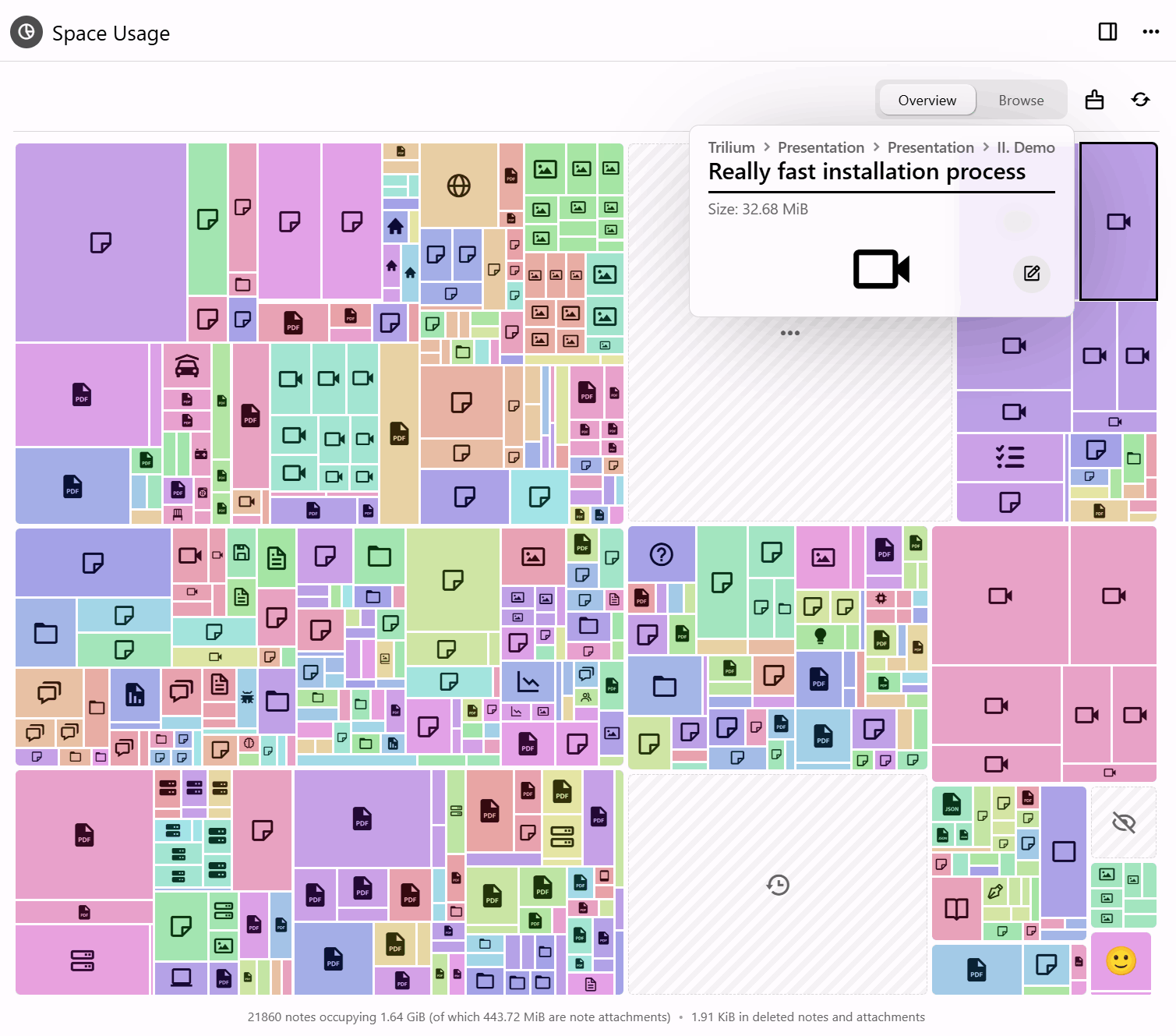
Two new tools answer the same question from opposite ends: what is actually taking up all that room?
- Space Usage draws it as a treemap — notes, revisions and attachments sized by how much space they take — so the thing quietly eating your disk is visible at a glance instead of guessed at. The cleanup tool then acts on what you find: erase deleted notes, trim old revisions, drop unused attachments and compact the database.
- Compress images goes after the usual culprit, resizing oversized pictures and re-saving them smaller — from a note, the tree, the attachments list, the image viewer or the cleanup run itself. It tells you what it found before it starts and what it saved when it finishes.
Automatic compression on upload, paste and import now keeps PNGs as PNGs, leaves already-compressed pictures alone, and runs off the thread serving the app, so a large import no longer freezes Trilium. (@adoriandoran)
Attributes finally have a home
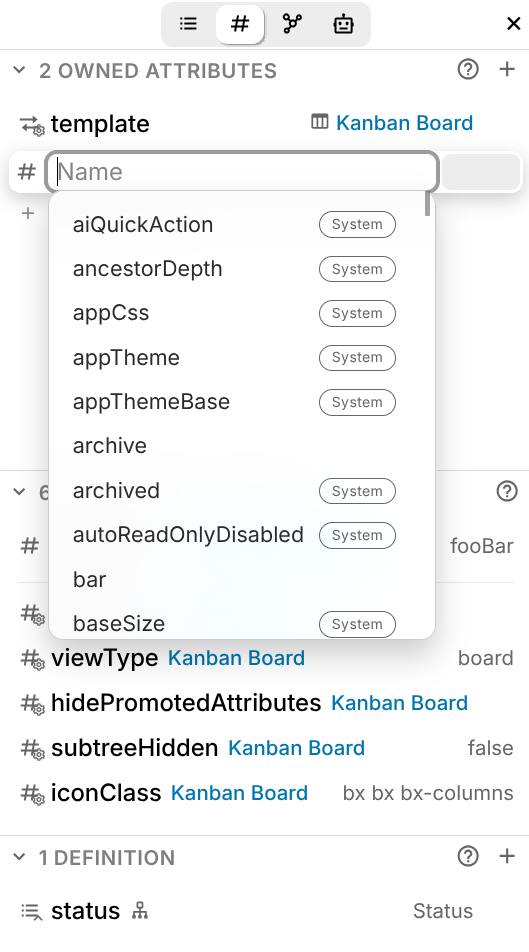
A dedicated Attributes sidebar tab shows owned, inherited and promoted attributes in one clear list, and lets you edit them in place. System attributes are marked with an icon in the sidebar and a badge in autocompletion, and every one of them now has a description. Their values are edited with the right control for the job — colour pickers, URL fields, date selectors.
Mobile gains an attribute editor with the same interface, and the classic attribute editor and its configuration modal received a round of fixes.
Backups you can lock, and actually restore
Backups can now be compressed and encrypted. Encryption uses AES-256-GCM with a password of your own, held in the operating system's keyring, so a backup written to a synced or shared folder cannot be read by whoever else can reach it — and later tampering or damage is detected. Both are off by default.
More to the point, Trilium can now restore one. Setting up an instance offers restoring from a backup as a fourth path, alongside a new knowledge base, syncing from a server and pairing with a desktop app; a running instance reaches the same screen from Options → Backup, and is offered a copy of what is already there first. The candidate is checked before anything is replaced, and a restore that fails rolls back — so an unusable backup leaves your notes exactly as they were. Backups measured in gigabytes are handled properly: a browser sends one in resumable pieces, and the desktop app reads it where it already sits. (@adoriandoran)
See everything your database is running
Databases collect scripts, themes and widgets over the years, and until now there was no single place to see them — or to tell which one was responsible for the odd behaviour you've been living with.
The content manager lists them all, grouped by category, and lets you switch any of them off without deleting it. Turn something off, see whether the problem goes away, turn it back on. (@adoriandoran)
Ask the editor to do the writing
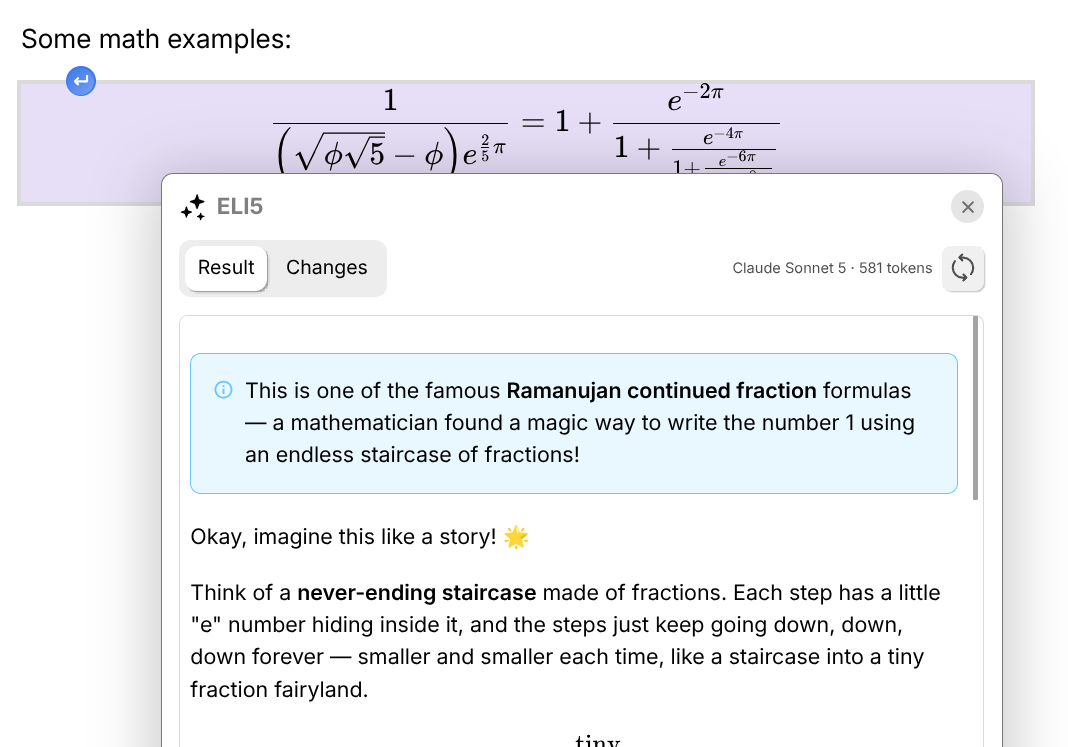
Trilium's LLM support has moved out of the chat panel and into the text editor. Select anything and hand it to a model — proof-read it, tighten it, summarise it — and take the result inline, without copying text into a chat window and back. Custom prompts let you keep the operations you run often. Requires an LLM provider to be configured; a GitHub Copilot subscription now works as one, alongside the existing providers.
Settings you can search, on a screen that fits
Every settings page has been rebuilt on a shared card component — a card per subject, one setting per row, its explanation under the name rather than beside it — and a search field now looks through all of them at once. It shows the settings themselves, live and operable where they stand, grouped under the page each one belongs to, and finds a page's own commands too: back up now, restore a backup, create an ETAPI token. (@adoriandoran)
🎁 Also new
- Geo Map on MapLibre — WebGL rendering, 3D terrain, marker clustering, full-screen mode and a floating info panel for each marker, with full GPX track support.
- Mind Map node panel — colours, fonts, icons, images and a rich-text memo, from a side panel.
- Calendar face lift — a new theme and layout, and a friendlier popup for creating and editing events.
- Connections sidebar tab — backlinks, note paths and the note map in one place.
- Office & EPUB previews —
.docx,.xlsx,.pptx, ODF, RTF and EPUB open in Trilium. - An important memory leak that accumulated components and event listeners has been fixed, and consistency checks no longer take minutes on databases with 20k+ notes.
📋 What else changed
Backups
- New: backups can be compressed, encrypted or both, written as a
.tnbackupcontainer. The password is kept in the OS keyring and is offered on the desktop application only, where there is somewhere safe to hold it. - Improved: the backup settings page opens by saying how many backups exist and how long ago the most recent one was written, with "Backup now" beside it.
- Improved: a backup can be given a name and a password of its own when taken by hand, rather than following the scheduled-backup settings.
- Fixed: a backup that fails part-way is deleted, so a half-written file is never listed or offered for download.
Database & maintenance
- New: Options → Database is where the knowledge base as a whole is now looked after. It opens with a summary — location, note and attachment counts, creation date, size, and how the backups stand — followed by everything that acts on the database: cleanup, space analysis, integrity check and repair, compaction, and anonymized copies.
- New: a cleanup tool that erases deleted notes, unused attachments and excess revision snapshots, honouring
#versioningLimit, and compacts the database. - New: a Keep named revisions option, so revisions you have named survive a cleanup.
- New: Start over returns an instance to the setup wizard without reinstalling. On a server it asks for your password, and your second factor where one is configured, so an instance reachable from outside stays closed while it waits.
- Improved: an anonymized database copy can be deleted once it has been handed over, and the folder holding them opens in the file manager.
Settings
- New: a search field over every settings page at once, showing the live controls grouped under the page each belongs to.
- Improved: all 18 settings pages rebuilt on a shared card component, several of them rearranged so that what a page is really about comes first.
- Improved: settings are usable on a phone — stacked controls, native tap-to-pick combo boxes, full-width descriptions and thumb-sized rows.
- Improved: the Media page folds image compression into the Images card, rather than keeping it as a subject apart.
- Fixed: the plain text entry in the code note MIME list read as unticked, though it is always applied.
- Database actions have moved to Options → Database. Cleanup, space analysis, integrity checks, compaction and anonymized copies are no longer under Options → Advanced, which now holds the experimental features and the two advanced sync actions alone.
Text notes & editor
Improved
- Migrated away from premium CKEditor features (commercial licence) to home-made implementations of slash commands, text snippets and copy formatting. Changing text snippets no longer requires an editor refresh, and note icons are integrated more natively.
- The automatic replacement of text (quotes, dashes) has been redesigned, with each option now configurable individually.
- The autocomplete mechanism for CKEditor (
@-references to links, emojis) was rewritten from scratch: it no longer gets stuck on a@character, and pressing Escape no longer leaves a marker in the text. The attribute editor no longer shows autocompletion when you click inside it. - Text snippets show a small content preview when no description is present.
- Markdown highlights (Obsidian-style
==) are supported by the import/export pipeline and the Markdown preview, and appear in the sidebar. - Inline Mermaid diagrams remember their display mode.
Fixed
- Multiple inline Mermaid diagrams don't render without making a change
- Resizing the Mermaid split view makes Gantt and bar charts vanish (@maphew)
- A failed image upload crashes the editor
- The collapsible block text editor crashes when deleting before it
- A single Backspace press deletes the entire content of a collapsible block; collapsible blocks also auto-expand when deleting the line break of the text after them
- Formatted text is pasted inside a collapsible block instead of into its title
- Checkbox task states affect sub-tasks in non-intuitive ways (@adoriandoran)
- Anchor reference-link insertion happens at the mention pick position (@maphew)
- CKEditor crashes when clicking near inline code with link text
- Formatting buttons overlap text in the popup editor
- Checkboxes are misaligned in RTL notes; read-only text notes were not properly aligned either
- Missing note reference links appeared invisible
"Continuous formatting" has been dropped from copy formatting as part of the move away from premium CKEditor features. → If you rely on it, please open a feature request.
Collections
Table
- Improved: Select columns support single and multiple values and expand outside the cell while selecting; colour columns gained a delete button and time columns a time selector; a "New row" button was added at the end of the table; columns with multiple values are no longer hidden and show each value as a chip inside a single cell.
- Fixed: date columns rendered in ISO format instead of the formatting locale; sorting by a relation-type column did not work; scroll position was lost when editing a cell or creating a row.
Board
- Fixed: adding a new column doesn't refresh the columns automatically; typing in a subnote slowed down when the board had many items.
Calendar
- Fixed: all-day recurrent events showed as midnight; events didn't react to inherited attribute changes; creating an event in the journal made the events flicker; aliases weren't taken into account by the calendar's displayed attributes; date selectors didn't follow the Chinese locale's date format.
Geo Map
- Improved: migrated from Leaflet to MapLibre GL — WebGL rendering, 3D terrain, marker clustering and a full-screen mode. Markers were overhauled with full-colour icons, automatic label collision, proper DPI scaling and performance that holds into the thousands. Adds custom tile sets, dark mode that respects custom themes, note tooltips on hover, zoom buttons, and a clear warning when WebGL is unavailable.
- Improved: clicking a marker opens a floating info panel — title, icon, colour, action buttons (open, move, quick edit, remove), promoted attributes with a coordinates copy button, and the note body as an inline rich-text editor. The same panel is shared with the Mind Map.
- Improved: full GPX track support, with distance, point and segment counts, waypoint listing and a highlightable path.
- Fixed: adding a marker now shows a ghost preview; several marker positioning bugs.
Geo Map, Mind Map & Relation Map
- Improved: relation maps, Mermaid diagrams, geo maps and mind maps now share the same zoom and add-note controls; the geo map lock button was removed in favour of the standard read-only mechanism used for notes.
Attributes
- New: promoted attribute types Phone, Email and Select — the latter shows a fixed list of items while still allowing new ones to be created easily. All are integrated with the Notion and AnyType importers and the table collection.
- Improved: promoted attributes with multiple values render as a single field with badges/chips instead of multiple fields.
- Fixed: the promoted attributes section showed an unnecessary scrollbar when at least one promoted attribute had a checkbox.
Attachments, files & PDF
Improved
- Syntax highlighting for source code in attachments.
- The attachments listing gained a grouping mechanism (yours vs. system), a grid layout and a general facelift.
- Link previews now use deduplicated attachments instead of inline images, with tweaks to favicon retrieval and better support for dark themes. The Notion importer downloads favicons automatically.
.icofiles are treated as images instead of file attachments.- PDF: highlights without selected text, and text annotations, are now shown in the sidebar.
Fixed
- Link previews are not visible in note revisions
- PDF attachments return 404 on Nginx Proxy Manager with "Block Common Exploits" enabled
- Entering PDF editing mode triggered a save even when there was nothing to save
- PDF sidebar information was wrong when two PDFs were open in a split
- PDF annotations were not displayed in the sidebar while editing
Images & clipboard
- Improved: you can now paste text with images from Trilium into other apps without the image disappearing; single images pasted from inaccessible sources (Google Chat, Slack) paste properly instead of appearing broken.
- Fixed: deleting a note right after uploading an image crashes the desktop app.
LLM & MCP
Improved
- A GitHub Copilot subscription can be used in the LLM chat.
- A new in-editor LLM for text notes handles operations such as proof-reading and summarisation, with support for custom prompts.
- Redesigned LLM chat bar with shortened model names and better-fitting message footers, improved error display, better icon search, and improved model listing for the Claude Code integration.
Fixed
Import & export
- OneNote import: improved error logging and throttling reports (including during long imports), a button to refresh OneNote sections, improved light/dark brush detection, and code block detection.
- The Notion and AnyType importers support the new promoted attribute types.
Markdown
- Single-tilde strikethrough is no longer supported, to avoid issues with
~used for number approximations. → Affects existing notes and import pipelines; use~~text~~. - Highlights (
==) are supported end-to-end in the import/export pipeline.
Desktop app
- New: back up to a folder of your choosing instead of the one inside the data directory. Options → Backup gains a "Backup location" card where you pick the folder, open it in your file manager, or reset it. If the chosen folder ever cannot be written to, the backup goes to the default location rather than being lost, and you are told. Servers are unaffected and keep using
TRILIUM_BACKUP_DIR. (@adoriandoran) - Improved: better error management — the app should no longer crash on an unhandled rejection; dragging a tab with splits into a new window preserves the split.
- Fixed: the app prints
undefinedwhen one is already running; "Switch to Mobile Version" not working on desktop builds accessed over the web; macOS dynamic traffic light offset based on zoom factor; file link handling broken for custom system explorers on Windows. - Changed: On Linux, the native title bar is now disabled by default, since rounded corners are supported for the custom frame, with native window buttons.
- New: the database file is revealed in the file manager from Options → Database, and a native folder picker backs the backup location (@adoriandoran)
Mobile
- New: an attribute editor with the same interface as the new sidebar editor.
- Fixed: the launch bar vanishes after a portrait → landscape orientation change; the tree sliding animation didn't respect the reduced animation setting.
- New: the whole of Settings reflows for a narrow screen, with a search field above the list of pages (@adoriandoran)
Interface & themes
Improved
- The sidebar is now split into tabs: Outline (ToC + highlights), the new Attributes pane, LLM chat and custom widgets.
- Most sidebar sections have a dedicated help button.
- Keyboard shortcuts for managing splits.
- Tree: copying references to notes with Ctrl+C now pastes as a reference link on the web version too, not just desktop.
Fixed
- Legacy themes: toasts not rendering, promoted attributes having a different layout, block drag icon overlapping text
- Toggle overlapping with window buttons in settings
- Icon tooltip stuck on screen (@maphew)
- Copying a bookmark in the browser crashes in an insecure context
- Deleting the active note showed a toast claiming the note was not found
- The update indicator was broken
- The note map sometimes did not render at all
Scripting
- More React components for scripts (@BeatLink)
- Some launcher scripts are now marked as dangerous, requiring safe import to be off.
- Fixed: render notes injected unscoped
<style>into the app DOM, and the leaked styles persisted after navigating away.
Server, sync & authentication
- Improved: OIDC gains configurable HTTP timeout, session lifetime and scopes (@perfectra1n).
- Fixed: OAuth fails with
OAUTH_JSON_ATTRIBUTE_COMPARISON_FAILEDon Authentik due to a missing leading slash; OIDC not working with some identity providers; occasional frontend errors caused by a partial sync; OCR does not work for protected notes.
Performance & stability
- Fixed an important memory leak that accumulated components and event listeners due to improper component cleanup.
- Consistency checks no longer take a long time to run on large databases (20k+ notes).
- Reduced the number of requests made when right-clicking the tree.
- CKEditor is preloaded for faster loading.
- Image compression now runs off the thread serving the app.
- Scissor "Cut & Paste Selection to Sub-note" now transfers image attachments and no longer fails intermittently.
Security
- SSRF protection in image auto-download and the LLM integration.
- MCP now requires authentication (see Before you upgrade).
- Web views now require an absolute URL in order to be displayed.
Internationalization
- Added Korean (@yoonnamhyuk)
- Added Turkish (@erkdgn)
- The text editor is now fully translatable, including Trilium-specific features.
Documentation
- Added
CONTRIBUTING.md(@maphew)