
Long-term Statistics
A new Statistics page keeps attack and decision history for much longer than the LAPI cache does. You can see trends, compare periods and act on what it finds, all from one place.
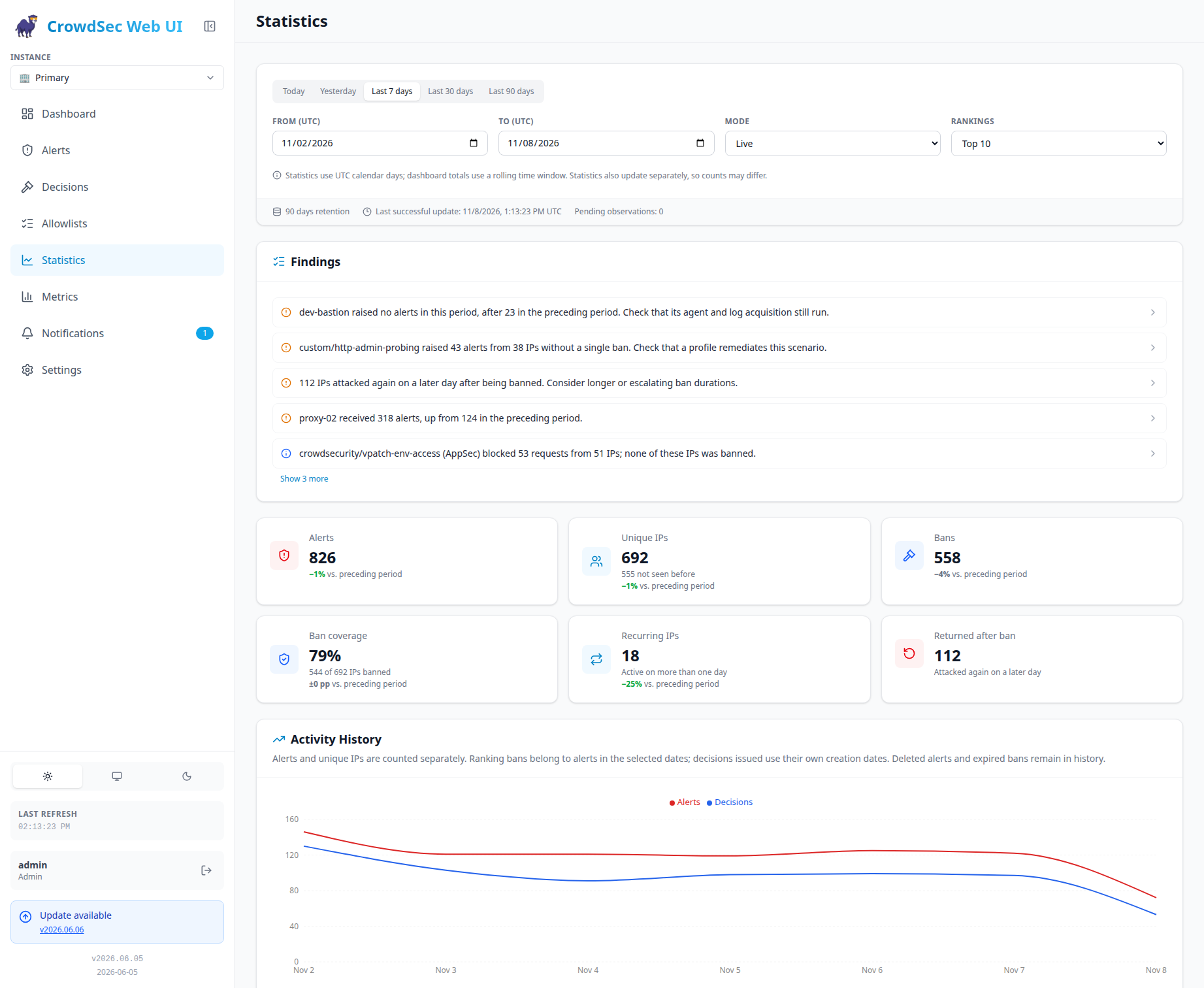
- Findings point out what needs attention: machines that went quiet, scenarios without bans, AppSec blocks, IPs that come back after a ban, traffic spikes per machine, new attack types, dominant networks, and IPs that target several machines. Warnings come first. Expand a finding to see the IPs or machine activity behind it.
- Act directly from a finding: ban one IP or block one range, or use Ban all / Block all for every listed value at once. Allowlisted values are skipped unless you choose to bypass the allowlist.
- Summary tiles show alerts, unique IPs (including how many are new), bans, ban coverage, recurring IPs and IPs that returned after a ban. Each one is compared with the previous period of the same length.
- Rankings list top IPs, machines, targets, scenarios, countries and AS, with labeled first and last seen dates. Select a scenario to filter the whole page by it.
- Activity chart shows activity by hour for today and yesterday, and by day for longer ranges. Coverage indicators mark incomplete periods instead of showing them as zero attacks.
- Jump to Alerts or Decisions: the current Statistics filters and period are applied there as quick filters.
- Filter by instance (or all instances combined), live or simulated, Top 10/20/50, and calendar presets or custom UTC dates.
- Data is stored in its own
statistics.db. It survives cache resets and is collected by a low-priority background worker, so normal page loads are not slowed down. Retention (1–3650 days, 90 by default), the collection interval and the time budget can be set in Settings → General → Statistics or in the config file. - New API endpoints:
GET /api/statistics,GET /api/statistics/details,POST /api/decisions/bulk-add,PUT /api/config/statisticsandPUT /api/config/statistics-sidebar.
Note: New installations collect statistics by default. Existing installations keep it off until you enable it in Settings or set
statistics.enabled: true. Back upstatistics.dbalong withstate.db, because finished statistics cannot be rebuilt once the LAPI history has expired.
Changes
- Add long-term statistics, including findings, rankings, period comparisons and bulk ban/block actions
- Apply Statistics filters as quick filters when opening Alerts and Decisions
- Fix machine heartbeats and usage metrics for all CrowdSec instances (#577)
- Fix mobile overflow on the Metrics page
- Refresh screenshots and documentation
Contributors
Docker
docker pull ghcr.io/TheDuffman85/crowdsec-web-ui:2026.11.6