
Peter Jackson's King Kong PC Port v1.9.5
What's new
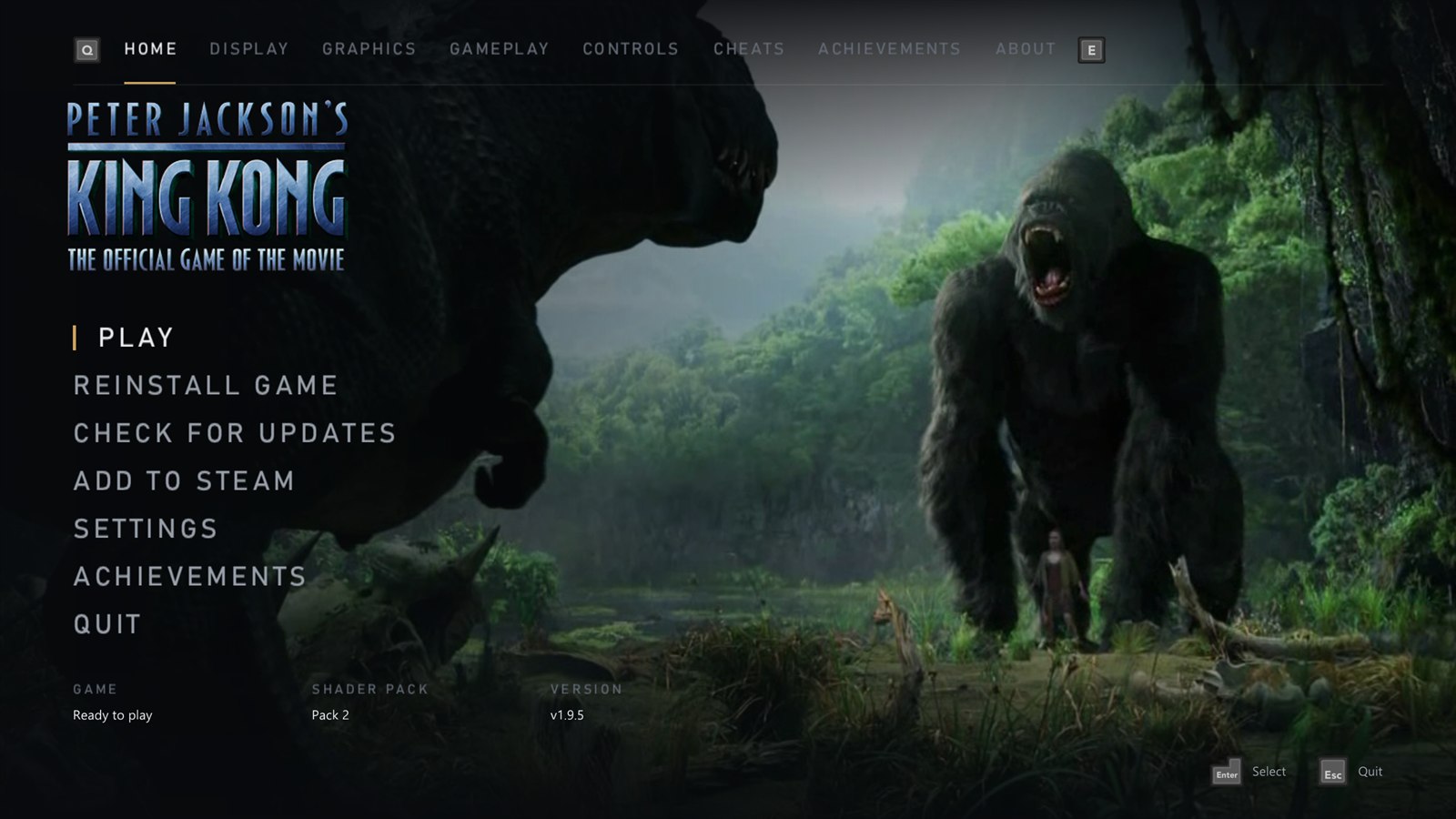
- A new launcher. Rebuilt from scratch with a cleaner look, and it now works fully with a controller: move with the stick or D-pad, change pages with the bumpers, and the button pictures follow your Button prompts setting (Xbox 360, Xbox Series, PlayStation 5, PlayStation 2 or keyboard). Keyboard and mouse work everywhere too, and the text is sharp at any Windows display scale.
- The game's own artwork. The launcher takes the King Kong logo and stills from the movie trailer from your copy of the game, and the Home screen shows them as a slow slideshow. Nothing from the game is in the download. On a new install the launcher starts on a setup screen: pick your disc image, it installs, prepares the artwork, then opens.
- The game's menu music and sounds. The main menu music plays in the launcher, and moving around makes the game's own menu sounds. Both come from your copy of the game, and each has a switch and a volume slider under About > Launcher.
- Add to Steam. A new Add to Steam entry on the Home screen adds the port to your Steam library as a non-Steam game, with artwork from SteamGridDB, so you can start it from Steam, Big Picture or a Steam Deck. Steam closes for a moment while it's added and opens again afterwards. Steam Input is switched off for the game, so your controller keeps working.
- Updates. Check for updates is on the Home screen, and an update now downloads on a screen of its own with a progress bar.
- The launcher in your language. It follows the game's Language setting (English, French, German, Spanish or Italian), and the setup screen lets you pick it before you install.
- New defaults. New installs start with AMD FSR 1 at Quality, and the Medium preset now uses it. If you're updating, your picture settings stay as they were. The startup logos are now skipped by default; turn them back on on the Gameplay page.
- Shader preparing is always Balanced. The setting is gone: Wait could pause the game for up to 2 seconds the first time an effect appeared, and Background could make objects vanish or flash.
Full changelog
- Launcher: rewritten (
launcher.cppand a small toolkit inlauncher_ui.cpp), with controllers read through SDL3 while it's open (let go before the game starts) and button pictures from theglyphsfolder, plus the Xbox 360 set cut from the game's own button sheet. - Sharp text:
rexruntime.dllis rebuilt withtools/rexglue-patches0010, which lets ImGui 1.92 bake its fonts at the size they're drawn. - Artwork:
launcher_art.cppreads the front end's texture pack inKKTextures.bf(LZO1X chunks; the logo is a tiled 8:8:8:8 texture, the button sheet DXT5) and takes keyframes fromVideo/Trailer.wmvwith Windows Media Foundation. It's kept inDocuments\king_kong\cache\art. - Music and sounds: from
Sound/Sound_Common.bfthroughSoundHeaders.db(Xbox ADPCM,game_sound.cpp). The menu music is key 0x060002C9; the move, select and back sounds are 0x87003BF2, 0x87003BF4 and 0x87003D8A, the ones the game's main menu plays. - Add to Steam:
steam_shortcut.cppadds the shortcut touserdata/<account>/config/shortcuts.vdf(binary VDF; every other entry is kept byte for byte) and setsUseSteamControllerConfigto 0 inlocalconfig.vdf, while Steam is closed, keeping a.kk-backupof each. The artwork is the top-scored grid, wide grid, hero, logo and icon of SteamGridDB game 5249080. - Settings:
kk_launcher_music,kk_launcher_music_volume,kk_launcher_sounds,kk_launcher_sounds_volume.kk_settings_version2 keeps the old upscaler defaults (present_effectbilinear,kk_render_qualitynative) for settings files from earlier versions.kk_skip_introsdefaults to on. Shader preparing is fixed at Balanced (async_shader_compilationon, the defaultasync_shader_wait_ms). - Translations: the launcher's 370 lines of text in German, Spanish, French and Italian.
How to update
If you have v1.4.0 or later, the launcher offers this update when it opens: click Update now. It restarts into the new launcher, which takes its artwork from your installed game the first time (a few seconds). Otherwise download KingKong-v1.9.5-windows-x64.zip below and copy everything in it over your KingKong folder. Your settings stay as they are.
New install
- Unzip KingKong-v1.9.5-windows-x64.zip anywhere and run king_kong.exe. The shader pack downloads by itself.
- Choose Select disc image and pick your own King Kong disc image (USA/Europe, title ID
555307D3, version0.0.0.1). - Press PLAY.
No game files are included. See the README for details.
Requires Windows 10 or 11 (64-bit) and a DirectX 12 graphics card. Linux version in development.
This port was made with AI (Claude Code). See the README for details.