
The DOS game, recompiled into a real Windows program. No DOSBox, no emulator, no setup: the
original 8086 code was translated to C and linked with a native runtime, so the game runs as a
normal 64-bit Windows application with modern video, sound and gamepad support.
You need your own copy of Prince of Persia 2. This download contains no game data, art or
music, only the port. Point the launcher at the folder that holds your PRINCE.EXE and the
.DAT files, and it sets everything up from there.
| 
|
| 
|
Installing
- Unzip
PoP2 Launcher.exeandpop2.exeinto the same folder. - Run the launcher and browse to your Prince of Persia 2 folder.
- Pick fullscreen or a window size, the filter and the view, then press PLAY.
Desktop shortcut puts an icon on your desktop.
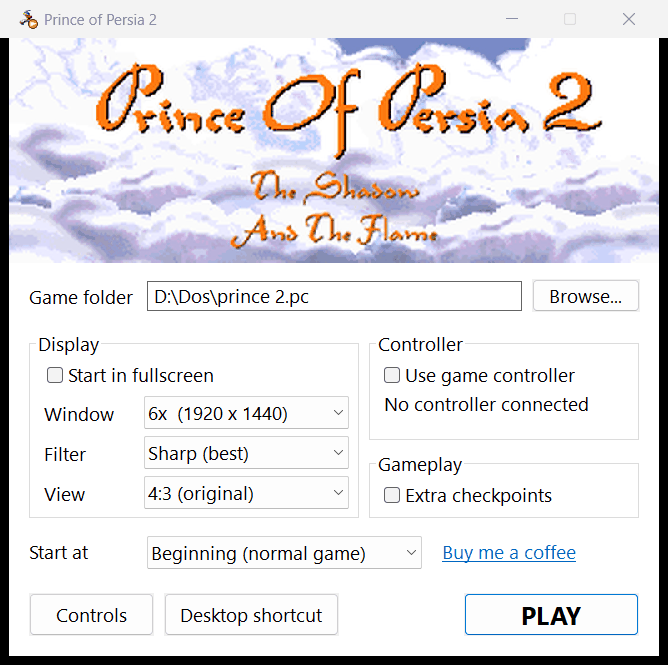
Windows 10 or 11, 64-bit. Nothing else to install - no runtime, no redistributable.
What it does
- Video: OpenGL, with a Sharp filter that keeps pixels crisp and evenly sized at any window
size, plus Pixel, Soft and Smooth HQ; views are 4:3, wide stretch, or a panorama that
keeps the centre at 4:3 and stretches toward the edges. Fullscreen with Alt+Enter or F11. - Sound: the game's own Sound Blaster Pro FM driver runs recompiled into an OPL2 synthesiser,
so the soundtrack is the real FM one, and it sounds the same no matter what the old DOS SETUP on
your copy was configured for. Effects play as digital samples. - Controllers: Xbox pads through XInput, PlayStation, Switch and generic USB pads through the
Windows joystick interface. - The game itself is untouched - all 14 levels, the intro, the endings, the saved games and
the 75 minute clock behave exactly as they do under DOS. The one addition is Extra
checkpoints, off by default.
Building it yourself
The recompiler and the runtime are in this repository; README.md has the three commands. The
generated sources are produced on your machine from your own copy of the game.
This port is free and stays that way. If it brought the game back for you, you can
buy me a coffee - there is a link in the launcher too.