
YACP 1.8.0 beta: long chapters, safer updates, and community fixes
YACP is built around a simple idea: the reader should spend its limited memory, storage activity, display work, and
network time on helping you read.
Version 1.8 extends that philosophy to books and situations that previously reached the device's limits. Unusually
long EPUB chapters can now fall back to bounded, on-demand pagination instead of becoming unreadable. Ordinary
chapters keep the existing full-layout path, with no new background task or additional SD-card work.
The same approach applies throughout this release. CJK font lookup uses less heap without removing glyph coverage.
Smart Sync is optional and resolves only unambiguous cases. Firmware updates are staged on the SD card, verified,
and installed without buffering the image in RAM. Network and display fixes improve reliability without adding idle
work.
Many of these changes come directly from reader reports. This beta is intended to validate them across more books,
fonts, networks, and X3/X4 hardware before YACP 1.8 becomes stable.
Reading difficult books without making normal reading heavier
- An ordinary chapter is still laid out completely in one pass. Its behavior, SD access pattern, and page-turn path
are unchanged. - If that path reaches YACP's heap safety guard, the reader keeps a resumable parser and serializes completed pages
in bounded batches. - More pages are prepared only when the reader approaches the current watermark. There is no continuous background
worker. - Chinese EPUB reports were an important motivation, but the fallback benefits any book with unusually long,
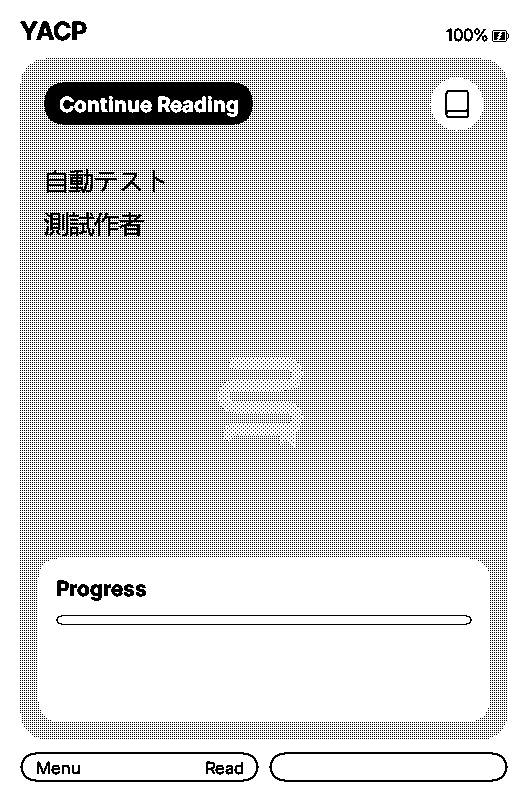
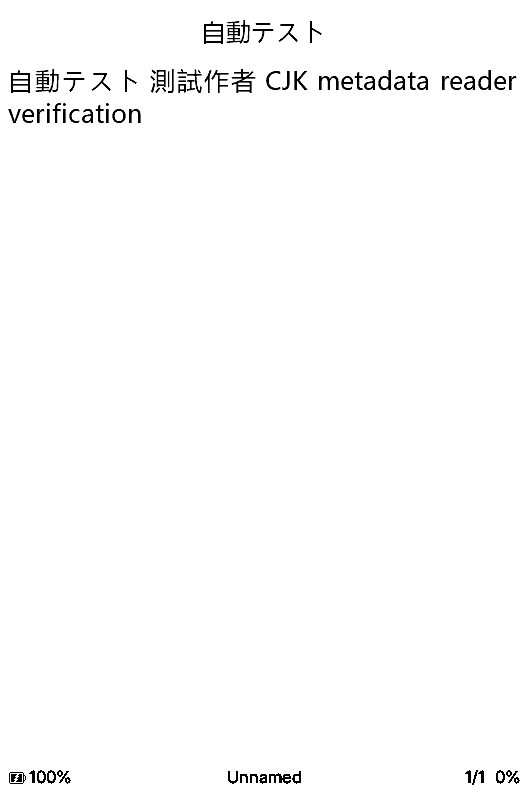
heavily styled, or SD-font-heavy chapters. - SD-card font lookup now uses compact 16-bit interval records for the Basic Multilingual Plane while preserving
full-width records for supplementary characters. The test CJK font metadata fell from 48,000 to 25,044 bytes,
saving 22,956 bytes of heap without changing glyph coverage.
| 
|
| CJK metadata on Home | CJK text in a synthetic EPUB |
These are English-UI simulator captures made with generated test data. No privately supplied EPUB is reproduced.
Optional KOReader Smart Sync
Smart Sync can keep the furthest valid reading position without asking which side should win every time. It uploads
when the device is ahead, applies the server position when the server is ahead, and uploads when no remote position
exists. Manual comparison remains the default and is also the safe fallback when positions are equal or cannot be
mapped reliably.
Safer firmware updates and networking
- Firmware is downloaded to the SD card first, checked against its size and SHA-256 when available, then validated as
an ESP image before installation. - The network connection and staged file reader are closed before flashing starts.
- Bounded wolfSSL streaming follows GitHub HTTPS redirects without buffering the firmware image in RAM.
- Outgoing TCP traffic requests non-fragmented IPv4 packets, and KOReader temporarily disables WiFi power saving
during transfers. This improves compatibility with IPv6-only and 464XLAT hotspots. - X3 display-controller detection now follows the stock three-byte version protocol and caches a versioned result,
distinguishing UC8279 from UC8253 without an unnecessary power-off cycle.
Other changes
- Full justification again distributes all remaining line width across word gaps. This removes the ragged right edge
caused by the previous spacing cap. - New and reset configurations show battery current by default in the reader status bar on supported hardware. It can
still be hidden.
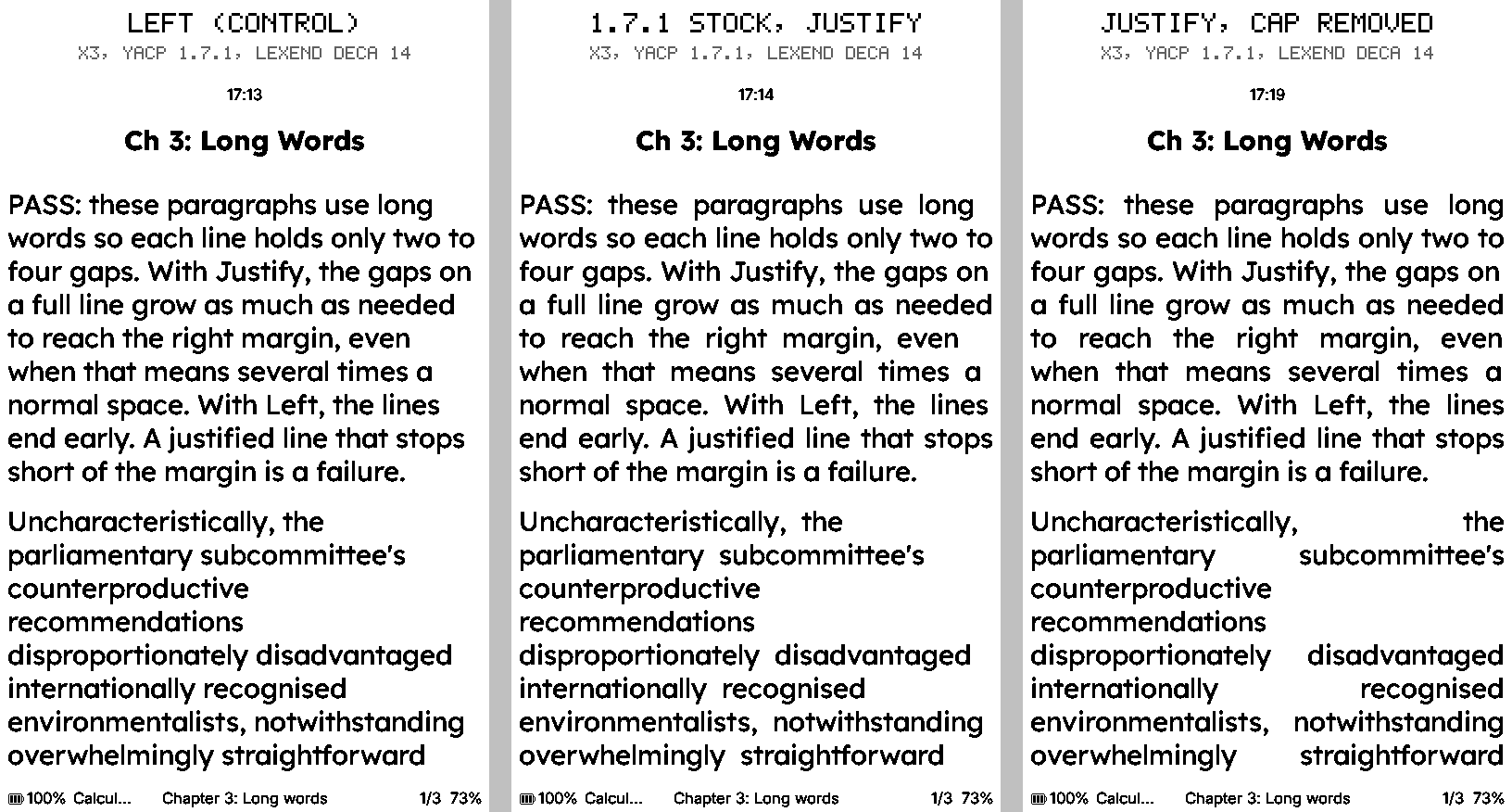
Justification comparison supplied by Doxxxxxx in
#8, reproduced with credit.
Community credits
This beta would not exist without the readers who reported reproducible problems, provided diagnostics, tested fixes, and shared comparisons.
- walloftexts: reported very long Chinese EPUB chapters that stopped after the title page and provided private diagnostics. This directly motivated the bounded pagination and CJK memory work. Private books and attachments are not included here.
- Doxxxxxx: reported and tested the justification issue (#8), IPv6-only and 464XLAT hotspot failures (#9), and the optional Smart Sync behavior (#10). Doxxxxxx also supplied the justification comparison and helped validate the network fixes.
- OzzyMcBean: reported the firmware updater failure (#7), which led to the staged and verified update path.
- Marek Vesely, alias notmarek: the CrossPoint quick-resume work in PR #2731 provided useful upstream inspiration for the display sleep and wake behavior.
- CrossInk and CrossPoint contributors: YACP builds on their open-source foundation, while adapting and integrating these ideas for its own battery, performance, and efficiency goals.
We also warmly thank an anonymous donor who will soon make an X4 Pro available for additional X4 and touchscreen work.
The issues remain open during the beta so the reporters and other readers can confirm the fixes on their own books,
networks, and devices.
Download and install
This is a prerelease. Install it manually and keep a copy of your current stable firmware if you may want to return
to it. Both variants support X3 and X4:
- Standard, recommended: built-in 10, 12, 14, and 16 pt fonts.
- XLarge: built-in 16, 18, and 20 pt fonts.
Download the matching .bin below and follow the
installation guide. The preview images
above are stored in the tagged source tree and are intentionally not release downloads.
Please report the device model, font variant, book characteristics, and the last visible screen or log message when
testing the changes.