
NeonPlan 4.0: your house in your pocket. A view made for the thumb, with a bar at the bottom, a list of what needs a look, and a card editor of its own for phones. Everything in this release is free.
New
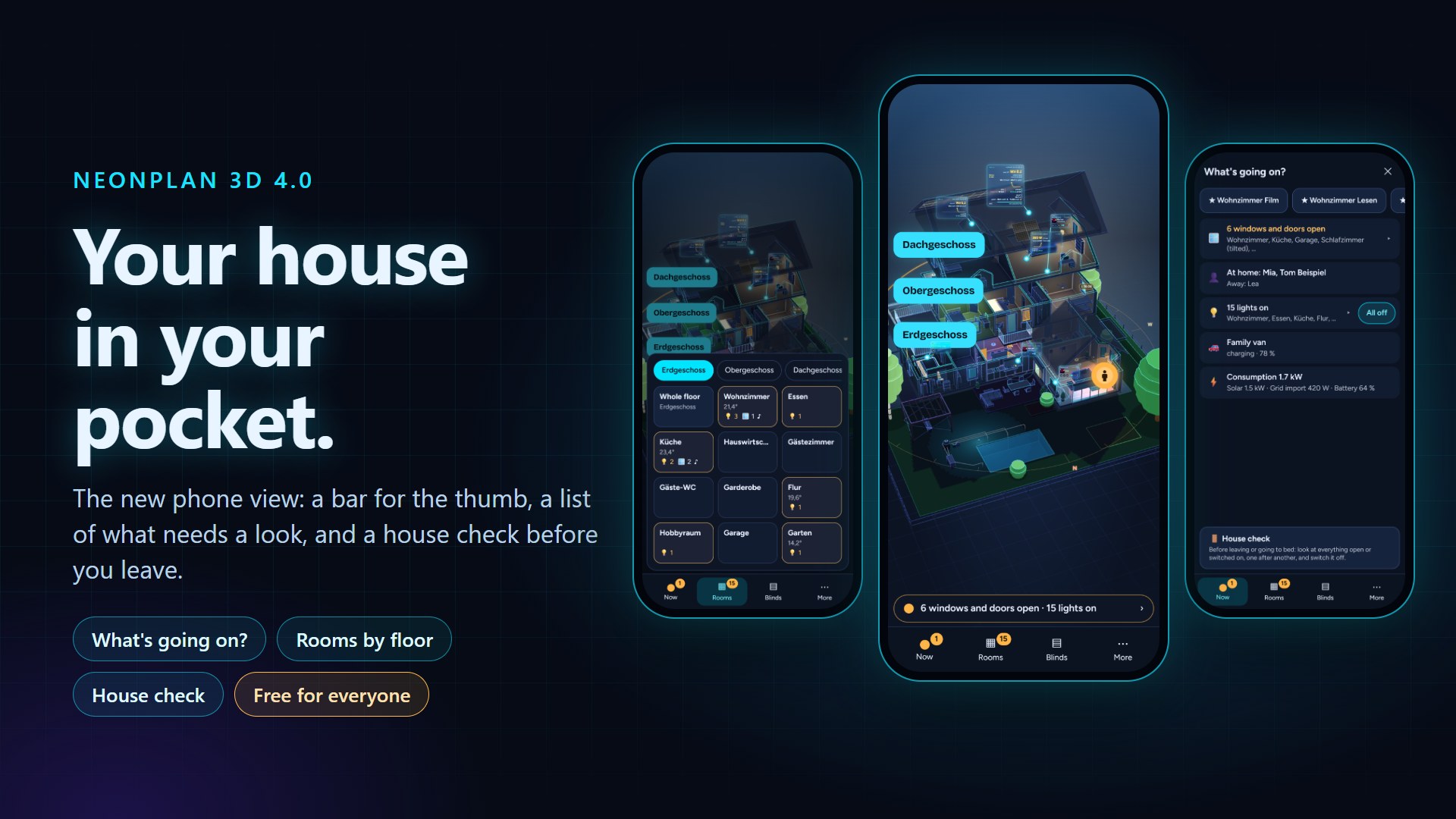
- Phone view: the house without header and loose buttons, and a bar at the bottom – Now (what needs a look, with a green, yellow or red dot), the rooms by floor as tiles with temperature, lights, open windows and music, the blinds of the house, and More (search, house check, whole house, room on its own). Your phone asks once whether you want to try it; tablets and PCs stay exactly as they are.
- "What is going on?": warnings, open windows and doors, unlocked doors, who is at home, the household, lights on, cars and energy – the urgent first, and "All is well" when nothing needs a look. A tap on a line shows the place in the house; "All off" and "Lock" stand right beside their lines.
- House check: before leaving or going to bed, NeonPlan steps through every open window, unlocked door and lit room and shows each one in the house.
- Phone view in the dashboard card:
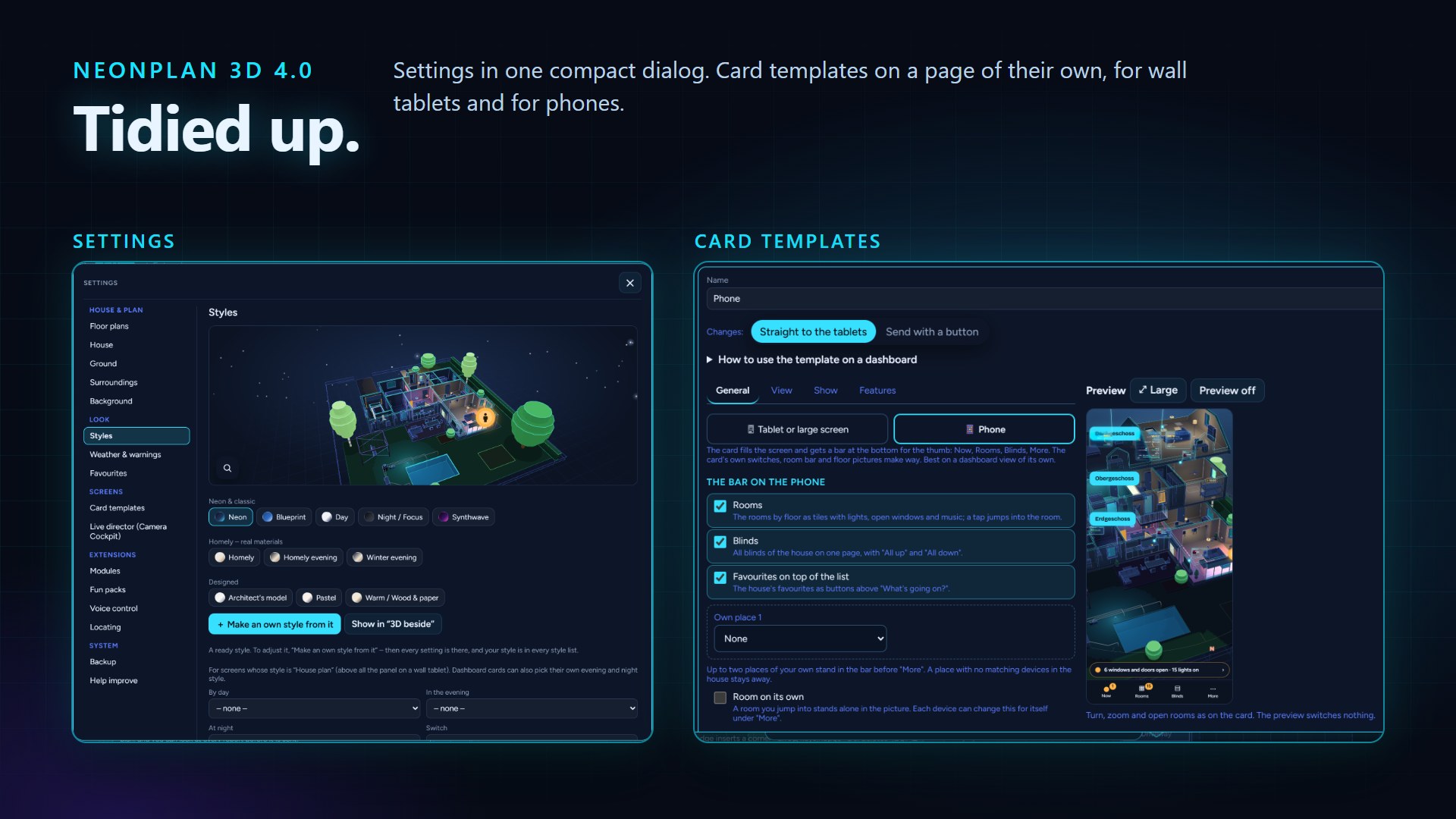
phone: true. The card form asks what the card is for – a tablet / large screen or a phone – and shows the options that fit. - Design the bar yourself: leave the rooms, the blinds or the favourites out, open with the list, and add up to two places of your own – all lamps or all thermostats by floor, a scene or script, or a page of a dashboard.
- From a notification straight to the place:
/neonplan3d?view=now,?room=…and?show=<entity>open NeonPlan at the list, a room or a device. The manual has an example for the Companion app. - Card option
surroundings: false: this card draws the house without the surroundings from the map. - Card templates as a management page: your templates on the left by screens and phones, the form in tabs, the preview on the right. The preview turns, zooms and opens rooms like the card and switches nothing.
- ⚙ Settings tidied up: one dialog instead of a list of sixteen entries – the topics in five groups on the left, the chosen topic on the right. Nothing was removed, every topic's content is unchanged.
Fixed
- Restoring a full backup with many packs failed with "not a plan". A large backup is now restored in pieces (#1213).
- Furniture and stairs from packs disappearing from the view when loading the packs had failed once (#1229).
- An LED strip without a height of its own hangs under its room's ceiling (#1226).
- "Rooms overlap" names the rooms and selects the first one (#1195).
- A tap on a blind on an Android phone could still move it instead of opening its menu (#1208).
- Surroundings from the map with a radius of 150 m or more could fail to save ("value must be at most 60"): a way mapped wider than 60 m is now kept at 60 m (#1234).
Thanks to RoyalPineapple, skywalker0403, ManuelHecht, KlausKanda, Atomiiik and TumblerP85D for the reports.
How to update: Settings → System → Updates (Home Assistant before 2026.11: HACS → NeonPlan 3D → ⋮ → Update information → Download), restart Home Assistant, then Ctrl+F5.
Runs on old wall tablets as always. Found a bug? Please open an issue on GitHub.
NeonPlan 4.0: dein Haus in der Hosentasche. Eine Ansicht für den Daumen, mit einer Leiste unten, einer Liste mit allem, was einen Blick braucht, und einem eigenen Karten-Editor fürs Handy. Alles in dieser Version ist kostenlos.
Neu
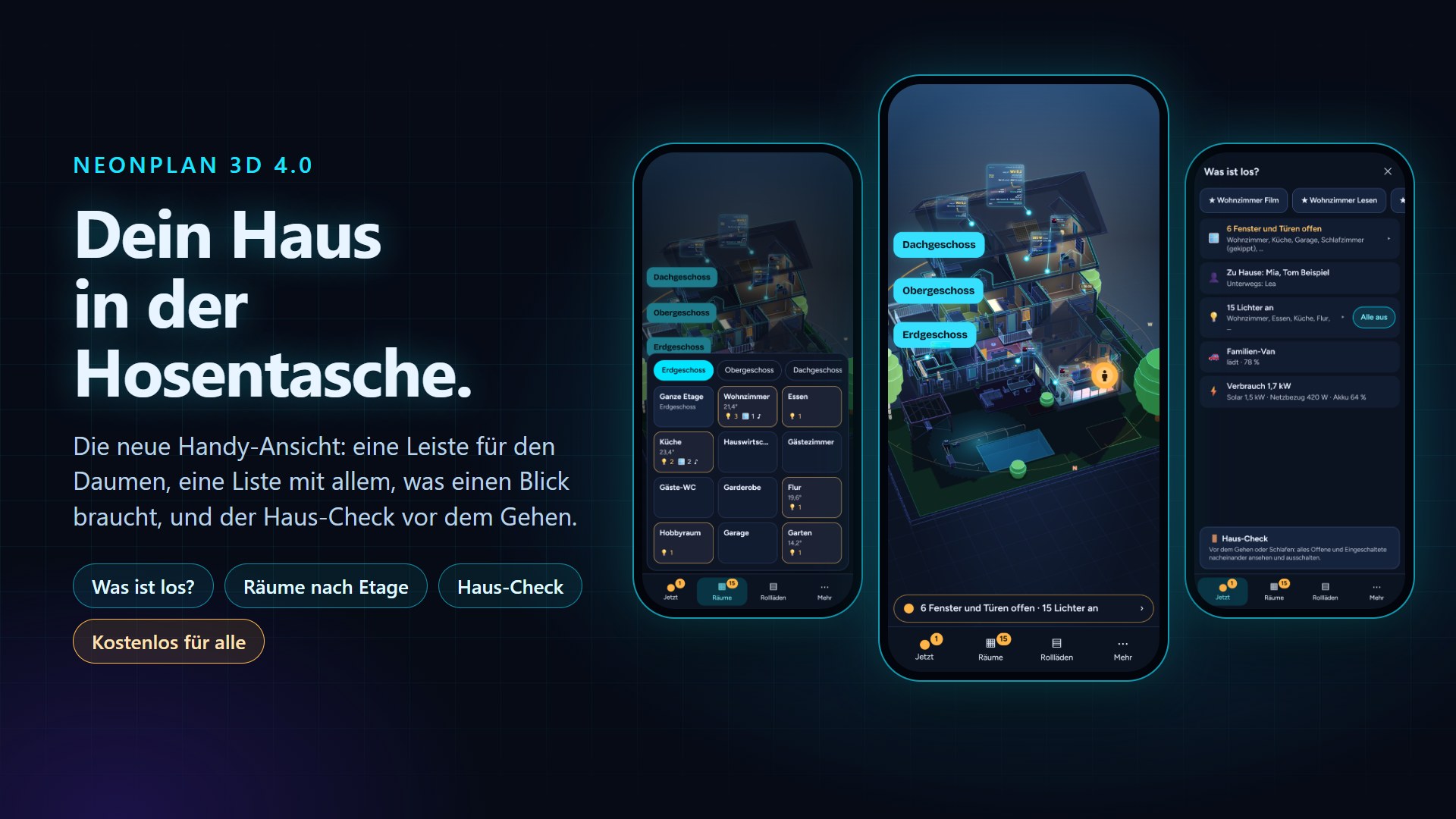
- Handy-Ansicht: das Haus ohne Kopfzeile und lose Knöpfe, unten eine Leiste – Jetzt (was einen Blick braucht, mit grünem, gelbem oder rotem Punkt), die Räume nach Etage als Kacheln mit Temperatur, Lichtern, offenen Fenstern und Musik, die Rollläden des Hauses und Mehr (Suchen, Haus-Check, Ganzes Haus, Raum einzeln). Dein Handy fragt einmal, ob du sie ausprobieren willst; Tablets und PCs bleiben genau, wie sie sind.
- „Was ist los?“: Warnungen, offene Fenster und Türen, nicht abgeschlossene Türen, wer zu Hause ist, der Haushalt, Lichter, Autos und Energie – das Dringende zuerst, und „Alles in Ordnung“, wenn nichts zu tun ist. Ein Tipp auf eine Zeile zeigt die Stelle im Haus; „Alle aus“ und „Abschließen“ stehen direkt daneben.
- Haus-Check: Vor dem Gehen oder Schlafen geht NeonPlan jedes offene Fenster, jede nicht abgeschlossene Tür und jeden Raum mit Licht durch und zeigt die Stelle im Haus.
- Handy-Ansicht in der Dashboard-Karte:
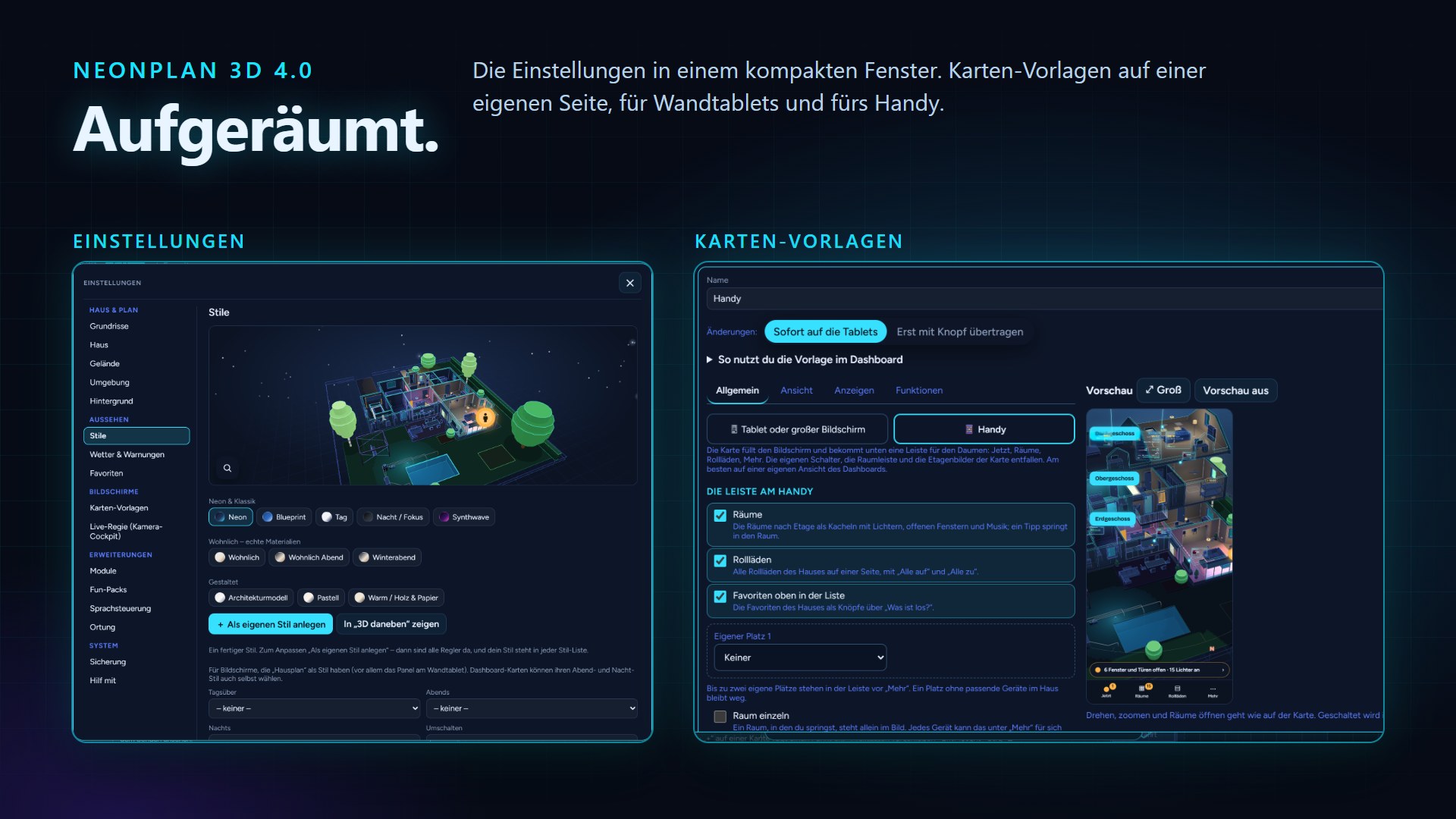
phone: true. Das Kartenformular fragt, wofür die Karte ist – Tablet / großer Bildschirm oder Handy – und zeigt die passenden Optionen. - Die Leiste selbst gestalten: Räume, Rollläden oder Favoriten weglassen, mit der Liste öffnen und bis zu zwei eigene Plätze – alle Lampen oder alle Thermostate nach Etage, eine Szene oder ein Skript, oder eine Seite eines Dashboards.
- Aus einer Benachrichtigung direkt an die Stelle:
/neonplan3d?view=now,?room=…und?show=<Entität>öffnen NeonPlan bei der Liste, in einem Raum oder an einem Gerät. In der Anleitung steht ein Beispiel für die Companion-App. - Karten-Option
surroundings: false: Diese Karte zeichnet das Haus ohne die Umgebung aus der Karte. - Karten-Vorlagen als Verwaltungsseite: links deine Vorlagen nach Bildschirmen und Handys, das Formular in Reitern, rechts die Vorschau. Die Vorschau lässt sich drehen und zoomen wie die Karte und schaltet nichts.
- ⚙ Einstellungen aufgeräumt: ein Fenster statt einer Liste mit sechzehn Einträgen – links die Themen in fünf Gruppen, rechts das gewählte Thema. Es fällt nichts weg, der Inhalt jedes Themas ist unverändert.
Behoben
- Ein Komplett-Backup mit vielen Packs ließ sich nicht wiederherstellen („kein Plan“). Ein großes Backup wird jetzt in Teilen eingespielt (#1213).
- Möbel und Treppen aus Packs verschwanden aus der Ansicht, wenn das Laden der Packs einmal fehlgeschlagen war (#1229).
- Ein LED-Streifen ohne eigene Höhe hängt unter der Decke seines Raums (#1226).
- „Räume überlappen sich“ nennt die Räume und wählt den ersten aus (#1195).
- Ein Tipp auf einen Rollladen am Android-Handy konnte ihn weiter fahren lassen, statt sein Menü zu öffnen (#1208).
- Umgebung aus der Karte mit 150 m Radius oder mehr ließ sich mitunter nicht speichern („value must be at most 60“): Ein Weg, der in der Karte breiter als 60 m eingetragen ist, wird jetzt auf 60 m begrenzt (#1234).
Danke an RoyalPineapple, skywalker0403, ManuelHecht, KlausKanda, Atomiiik und TumblerP85D für die Meldungen.
So bekommst du das Update: Einstellungen → System → Updates (Home Assistant vor 2026.11: HACS → NeonPlan 3D → ⋮ → Update-Informationen → Herunterladen), Home Assistant neu starten, dann Strg+F5.
Läuft wie immer auch auf alten Wandtablets. Fehler gefunden? Bitte ein Issue auf GitHub öffnen.