
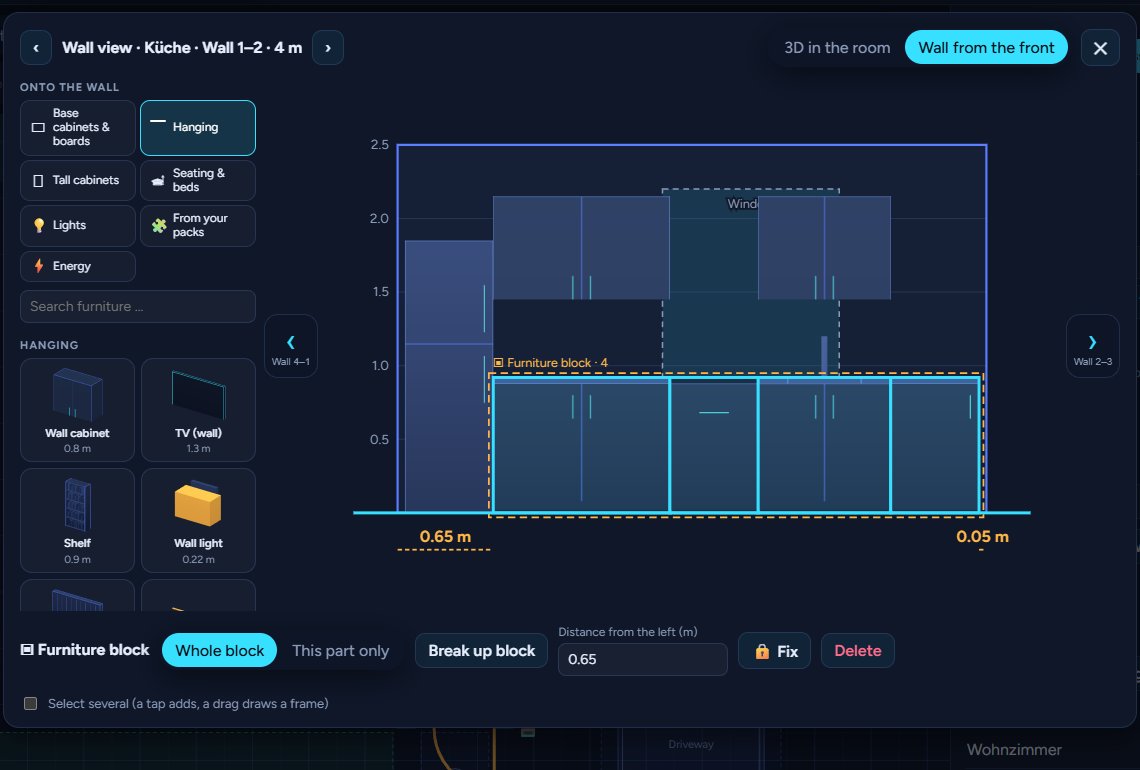
New: furniture blocks. Put your kitchen or wall unit together piece by piece – base cabinets, wall cabinets, the tall cabinet – then join it into a block and move it as one: in the plan, in the wall view and in 3D. The wall view gets a new side bar that offers only what fits into the gap you tap, and you can resize pieces right there. And time travel is now for everyone.
New
- Furniture blocks: Shift + click adds a piece to the selection, Shift + drag over an empty spot draws a frame (on a tablet: switch on Select several). Several pieces move, turn about their centre (R), copy (Ctrl+D), fix or delete together. Join into a block keeps them together: a click on any part selects the whole kitchen or wall unit, dragging moves it – in 3D beside the plan too. A double click edits one part on its own (a wall cabinet 2 cm higher), Break up block makes single pieces again.
- Wall view – blocks and resizing: blocks work in the wall view too, from the front and in 3D in the room: drag the whole block along the wall (it snaps with its outer sides), or switch to This part only to line up a single cabinet. Resize the chosen piece with the handles on its sides (width) and at the top and bottom (height) – the edges snap to the neighbours, the wall's ends, doors and windows, the size shows live; width and height can be typed in as well. Delete and the Del key remove pieces right there.
- Wall view – the side bar "Onto the wall": a few categories with pictures instead of a long list – base cabinets & boards, hanging, tall cabinets, seating & beds, lights, your packs (and Energie Pro devices) – plus a search and your recently used pieces. Tap a free spot on the wall: NeonPlan measures the gap and shows only what fits there, what fills it best first; cabinets built to measure take the gap's exact width.
- Time travel for everyone: after the supporter beta, the time travel Pro add-on is now in the shop for everyone (the Supporter Pass includes it). New: what a camera placed in the plan detects – motion, person, car – is an event day and night (thanks Alex for the beta feedback).
Fixed
- Lights: an effect name that is just a light's mode (white, colour, rgb, manual, default) no longer starts the colour effect in 3D – LocalTuya bulbs cycled through all colours (thanks Frank on Discord).
How to update
Settings → System → Updates. HACS only looks for new versions every few hours, so a fresh update may not show there yet. Then: HACS → NeonPlan 3D → ⋮ → Update information → Download. Restart Home Assistant and reload the page (Ctrl+F5).
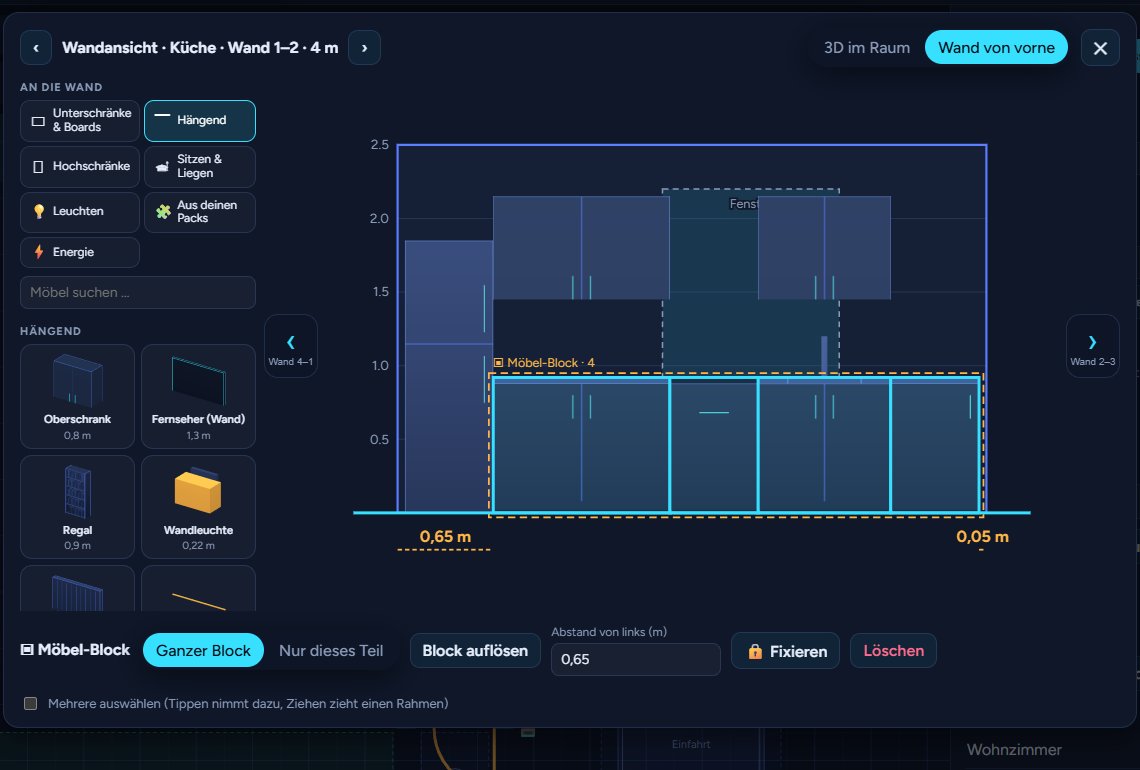
Neu: Möbel-Blöcke. Bau deine Küche oder Wohnwand Stück für Stück zusammen – Unterschränke, Hängeschränke, den Hochschrank –, fass sie zu einem Block zusammen und verschieb ihn am Stück: im Grundriss, in der Wandansicht und in 3D. Die Wandansicht bekommt eine neue Leiste, die nur anbietet, was in die angetippte Lücke passt, und du kannst Möbel direkt dort größer und kleiner ziehen. Und die Zeitreise gibt es jetzt für alle.
Neu
- Möbel-Blöcke: Umschalt + Klick nimmt ein Möbel zur Auswahl dazu, Umschalt + Ziehen über eine freie Stelle zieht einen Rahmen (am Tablet: Mehrere auswählen einschalten). Mehrere Möbel verschiebst, drehst (R, um ihre Mitte), kopierst (Strg+D), fixierst oder löschst du zusammen. Als Block zusammenfassen hält sie zusammen: Ein Klick auf ein Teil wählt die ganze Küche oder Wohnwand, Ziehen verschiebt sie – auch in 3D daneben. Ein Doppelklick bearbeitet ein einzelnes Teil (den Oberschrank 2 cm höher), Block auflösen macht wieder Einzelmöbel daraus.
- Wandansicht – Blöcke und Größe ändern: Blöcke gehen auch in der Wandansicht, von vorne und in 3D im Raum: den ganzen Block an der Wand entlangziehen (er rastet mit seinen Außenkanten ein) oder auf Nur dieses Teil umschalten und einen einzelnen Schrank ausrichten. Das gewählte Möbel ziehst du an den Anfassern an den Seiten (Breite) und oben und unten (Höhe) größer und kleiner – die Kanten rasten an Nachbarn, Wandenden, Türen und Fenstern ein, das Maß steht live dabei; Breite und Höhe lassen sich auch eintippen. Löschen und die Taste Entf entfernen Möbel direkt dort.
- Wandansicht – die Leiste „An die Wand“: wenige Kategorien mit Bildern statt einer langen Liste – Unterschränke & Boards, Hängend, Hochschränke, Sitzen & Liegen, Leuchten, deine Packs (und Energie-Pro-Geräte) –, dazu eine Suche und deine zuletzt benutzten Möbel. Tipp auf eine freie Stelle an der Wand: NeonPlan misst die Lücke und zeigt nur, was hineinpasst – zuerst, was sie am besten füllt; Schränke nach Maß bekommen genau die Breite der Lücke.
- Zeitreise für alle: Nach der Supporter-Beta gibt es die Pro-Erweiterung Zeitreise jetzt für alle im Shop (mit dem Supporter-Pass ist sie dabei). Neu: Was eine im Plan platzierte Kamera erkennt – Bewegung, Person, Auto – ist Tag und Nacht ein Ereignis (danke Alex für das Beta-Feedback).
Behoben
- Lichter: Ein Effektname, der nur der Modus der Lampe ist (Weiß, Farbe, RGB, manuell, Standard), startet in 3D keinen Farbeffekt mehr – LocalTuya-Lampen liefen durch alle Farben (danke Frank im Discord).
So bekommst du das Update
Einstellungen → System → Updates. HACS sucht nur alle paar Stunden nach neuen Versionen, deshalb fehlt ein frisches Update dort manchmal noch. Dann: HACS → NeonPlan 3D → ⋮ → Informationen aktualisieren → Herunterladen. Home Assistant neu starten und die Seite neu laden (Strg+F5).