
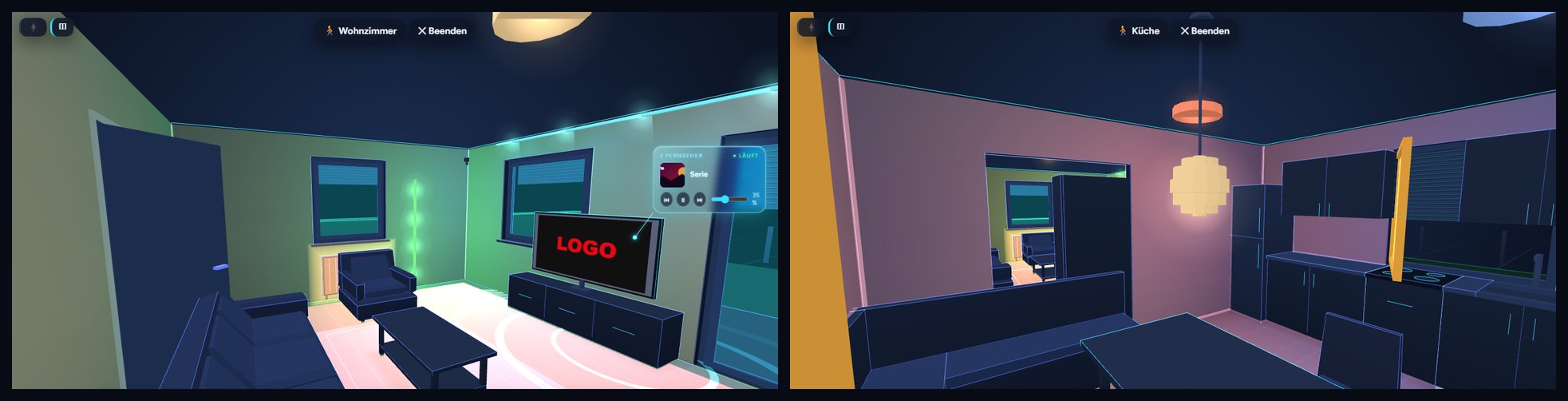
New: walk through your house. One tap on 🚶 Walk and you stand at eye height in your home – look around, tap the floor to walk there, through the doors into the next room. The lights, TVs, sunlight and glass cards live on around you. Plus a round of fixes from your reports.
New
-
Walk through the house: the 🚶 Walk button (top right) puts you at eye height into the chosen room (else the biggest of the floor shown). Drag to look around, tap the floor to walk there – through doors into other rooms too –, W A S D / arrow keys, or the stick on a tablet. Walls stop you, doors let you through; the room you are in shows at the top, ✕ End or Esc takes you back. Runs on old wall tablets too. In the card,
walk: falsehides the button. -
Thermostats count as room temperature: a room without its own temperature or humidity sensor now takes the
current_temperature/current_humidityof its thermostat (climate entity) – in the room cards, the heatmap and the room panel. A thermostat can also be chosen by hand as the room's sensor (#478 by gypais). -
Energie Pro – devices straight onto the wall: in the wall view, a side bar puts the meter, inverter, home battery and wallbox directly onto the wall you are looking at.
Fixed
- Dashboard card after a restart: a dashboard opened while Home Assistant was still starting could stay on "Configuration error" until it was reloaded – mostly on wall tablets. The card is now loaded by a small loader that Home Assistant serves from the start and that tries again while Home Assistant is still starting (#461 by Sanke1).
- Sonos group / stereo pair: several speakers linked to the same player all show that they play – rings at each, a line between them (#475 by hahne-t).
- Robot vacuum in its current room: cleaning states some integrations report (
room_cleaning,segment_cleaning, sweeping, mopping) count as cleaning, and when the room sensor names no room of the plan, the vacuum's own room attribute is tried (#470 by MKRAFT3D). - Echo on the glass card: ▶ and ⏸ now send
media_play/media_pause(some players ignore play/pause toggling), and the buttons act once on the lifted finger or the click, whichever arrives (#400 by domodial). - Light through doors: when the walls of several rooms lie on one straight line, a door was sometimes matched to the wrong one, and the light went into the wrong room (#444 by Thundras).
- Sun patches run on into rooms joined without a wall, like the lamps' light (#455 by Thundras).
- Camera wedge: a wall right next to the camera (a garden wall at the house corner) now stops its field of view on the floor (#438 by rolandarends).
- Drop-down lists keep the dark look when opened (no light text on a white list).
How to update
Settings → System → Updates. HACS only looks for new versions every few hours, so a fresh update may not show there yet. Then: HACS → NeonPlan 3D → ⋮ → Update information → Download. Restart Home Assistant and reload the page (Ctrl+F5).
Neu: der Rundgang durch dein Haus. Ein Tipp auf 🚶 Rundgang, und du stehst auf Augenhöhe in deinem Zuhause – umsehen, auf den Boden tippen und hinlaufen, durch die Türen in den nächsten Raum. Lichter, Fernseher, Sonnenlicht und Glaskarten leben um dich herum weiter. Dazu eine Runde Fehlerbehebungen aus euren Meldungen.
Neu
-
Rundgang durchs Haus: Der Knopf 🚶 Rundgang (oben rechts) stellt dich auf Augenhöhe in den gewählten Raum (sonst in den größten der gezeigten Etage). Ziehen schaut dich um, ein Tipp auf den Boden läuft dorthin – auch durch Türen in andere Räume –, W A S D / Pfeiltasten oder auf dem Tablet der Knüppel. Wände halten dich auf, Türen lassen dich durch; oben steht der Raum, in dem du bist, ✕ Beenden oder Esc führt zurück. Läuft auch auf alten Wandtablets. In der Karte blendet
walk: falseden Knopf aus. -
Thermostate zählen als Raumtemperatur: Ein Raum ohne eigenen Temperatur- oder Feuchtesensor nimmt jetzt
current_temperature/current_humidityseines Thermostats (Klima-Entität) – in den Raumkarten, der Heatmap und im Raumpanel. Ein Thermostat lässt sich auch von Hand als Sensor des Raums wählen (#478 von gypais). -
Energie Pro – Geräte direkt an die Wand: In der Wandansicht setzt eine Leiste Stromzähler, Wechselrichter, Stromspeicher und Wallbox direkt an die Wand, die du gerade ansiehst.
Behoben
- Dashboard-Karte nach einem Neustart: Ein Dashboard, das geöffnet wurde, während Home Assistant noch startete, konnte bis zum Neuladen bei „Konfigurationsfehler“ bleiben – vor allem auf Wandtablets. Die Karte lädt jetzt über einen kleinen Lader, den Home Assistant von Anfang an ausliefert und der es erneut versucht, solange Home Assistant noch startet (#461 von Sanke1).
- Sonos-Gruppe / Stereopaar: Mehrere Lautsprecher, die mit demselben Player verbunden sind, zeigen alle, dass sie spielen – Ringe an jedem, eine Linie dazwischen (#475 von hahne-t).
- Saugroboter im aktuellen Raum: Reinigungszustände, die manche Integrationen melden (
room_cleaning,segment_cleaning, Saugen, Wischen), zählen als Reinigen, und nennt der Raumsensor keinen Raum des Plans, wird das Raum-Attribut des Saugers versucht (#470 von MKRAFT3D). - Echo auf der Glaskarte: ▶ und ⏸ senden jetzt
media_play/media_pause(manche Player ignorieren das Umschalten), und die Knöpfe lösen einmal aus – beim Loslassen oder beim Klick, was zuerst kommt (#400 von domodial). - Licht durch Türen: Lagen die Wände mehrerer Räume auf einer geraden Linie, wurde eine Tür manchmal der falschen zugeordnet, und das Licht ging in den falschen Raum (#444 von Thundras).
- Sonnenflecken laufen in Räume weiter, die ohne Wand angebunden sind, wie das Licht der Lampen (#455 von Thundras).
- Kamerakegel: Eine Wand direkt neben der Kamera (eine Gartenmauer an der Hausecke) stoppt jetzt ihr Sichtfeld auf dem Boden (#438 von rolandarends).
- Auswahllisten bleiben beim Aufklappen dunkel (keine helle Schrift auf weißer Liste).
So bekommst du das Update
Einstellungen → System → Updates. HACS sucht nur alle paar Stunden nach neuen Versionen, deshalb fehlt ein frisches Update dort manchmal noch. Dann: HACS → NeonPlan 3D → ⋮ → Informationen aktualisieren → Herunterladen. Home Assistant neu starten und die Seite neu laden (Strg+F5).