Important
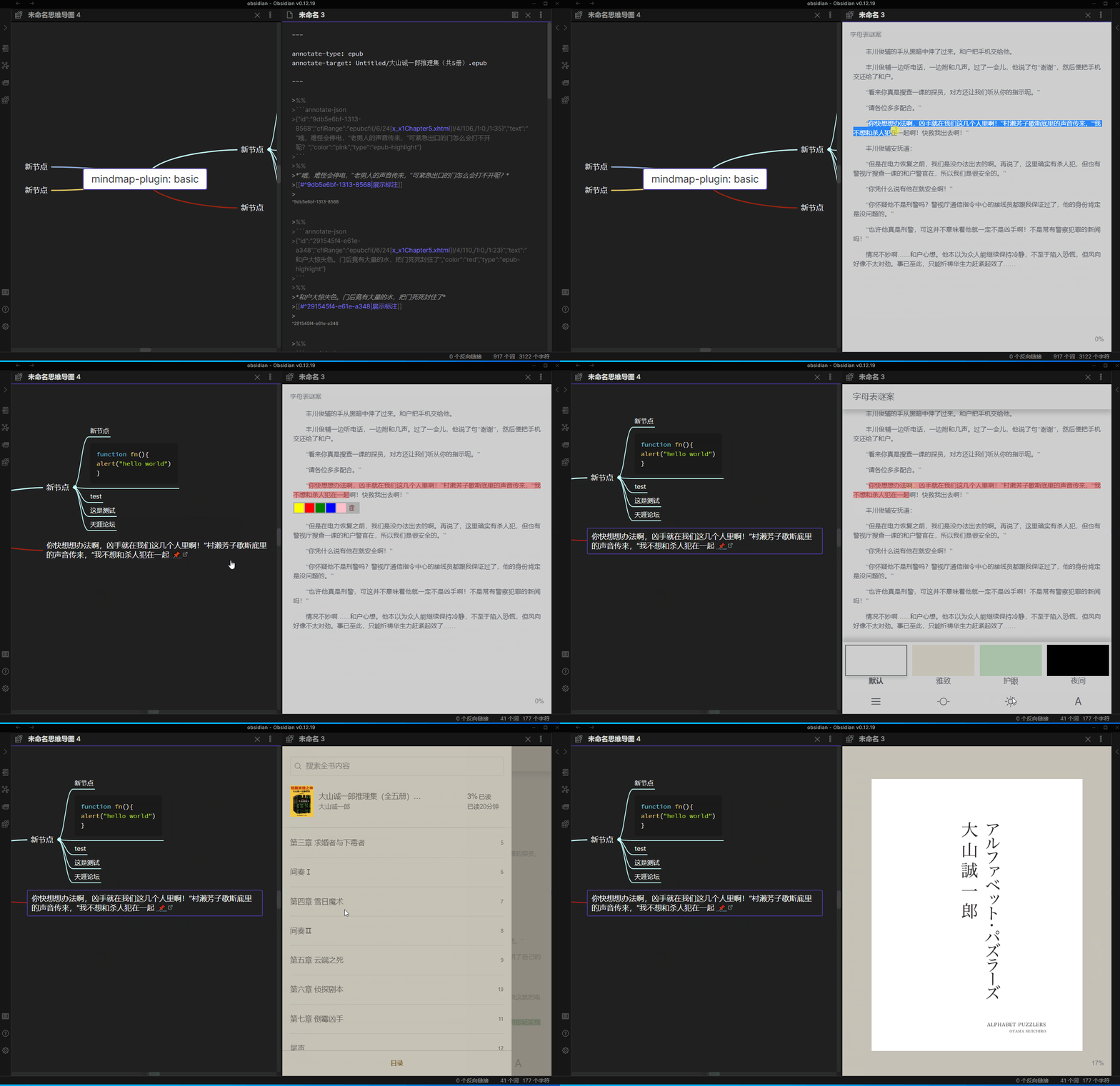
Please update pdfjs plugin , it's support epub file in pc version ,please set up your pdfjs plugin path again , (notice : mobile is not support epub temporarily)
PC pdfjs plugin
andrios pdfjs plugin
ios pdfjs plugin
- fix #87
- support read and annotate epub file,this is beta function
add yaml to md
---

annotate-target: test.epub
annotate-type: epub

---
then you can find annotate epub in more options
-
fix miss
$when save data bug -
simplify set up mobile pdfjs plugin path
- download lastest pdfjs plugin ,unzip it
- in andriod , create a
andriodfolder then putpdfjsfolder in it - in ios , create a
iosfolder then putpdfjsfolder in it - open a mind map
- call up command board , then you can find a
set up mobile pdfjs plugin pathcommand , click it
The pdf js path need set separately and if it is not work above in ios , you can try filza app , it can find obsidian path
重要提示
请更新pdfjs 插件,pc 端支持epub文件的阅读和批注,请重新设置您的移动端pdfjs 插件路径,epub功能处于测试中 ( 注意:暂时不支持移动端)
PC pdfjs plugin
andrios pdfjs plugin
ios pdfjs plugin
- 修复 #87
- 支持epub 文件阅读和批注,该功能处于测试中,可能有一些bug , 使用方法如下
添加yaml至md文件
---

annotate-target: test.epub
annotate-type: epub

---
-
修复保存数据时 丢失 公式 $ 的问题
-
简化 安卓和 IOS 系统设置 pdfjs 插件路径 , 使用方法如下,由于设置了默认路径,请重新设置您的移动端pdfjs插件路径
- 下载安卓 和 IOS pdf 插件
- 安卓系统默认放在库路径下的`andriod` 文件夹下的 `pdfjs` 文件夹,即在您的库中新建一个andriod文件夹,在andriod文件夹下放入解压后的pdfjs
- IOS 系统默认放在库文件夹下的 `ios` 文件夹下的`pdfjs`,即在您的库中新建一个ios文件夹,然后放入解压后的pdfjs文件夹
-  打开一个思维导图
- 调出命令面板,找到 `设置移动端 pdfjs 插件路径` 命令,点击即可
pdf js 插件路径在不同的平台上,需要单独设置 ,设置页面也会显示不同的路径
如果上面的步骤在ios 上不行的话,你可以尝试 filza 应用,可以找到 obsidian 路径
epub