
Bazarr+ v2.7.0 (Atlas)
Codename: Atlas (opening the v2.7 line).
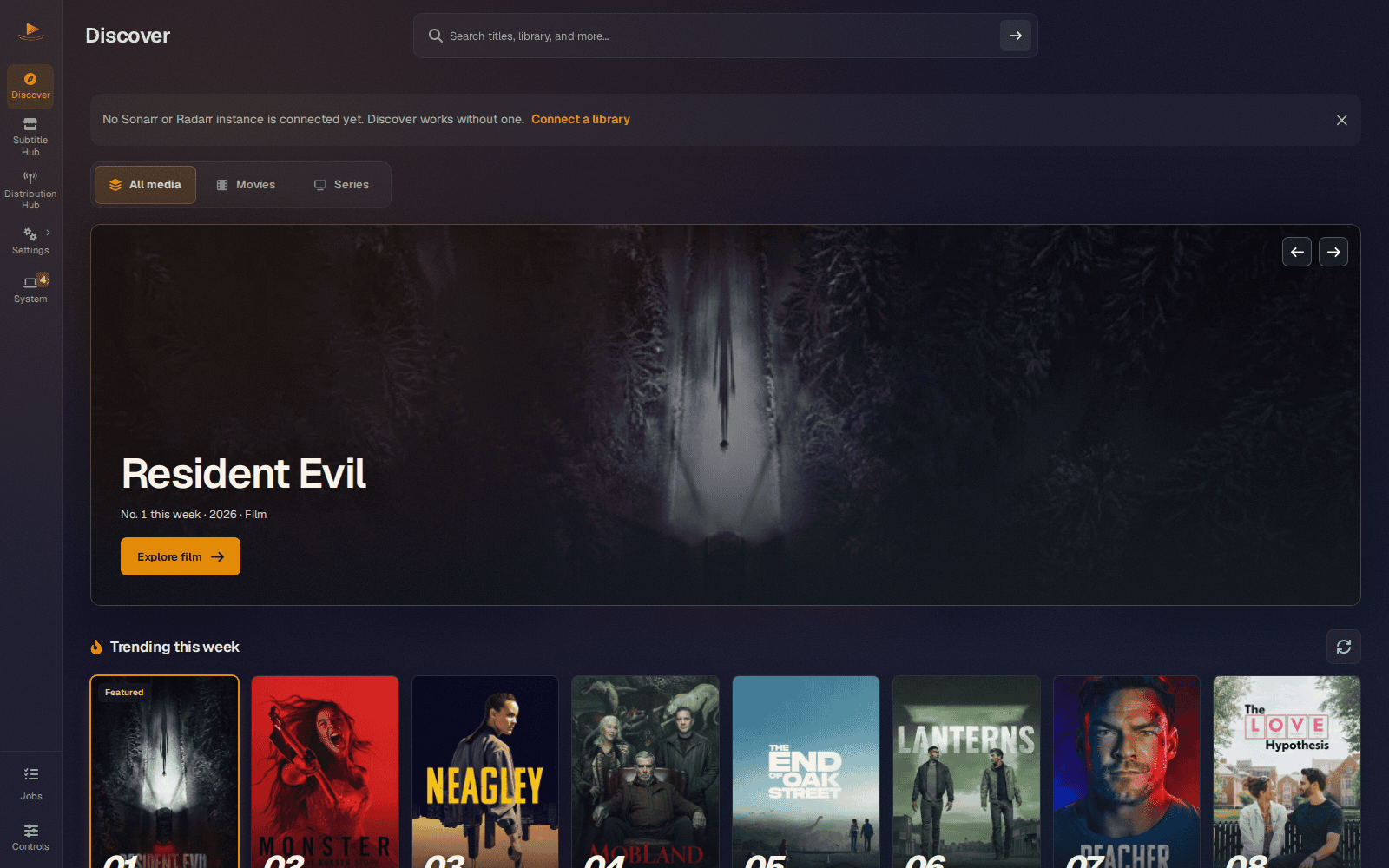
For most of its life Bazarr+ has been a tool that waits for Sonarr or Radarr to tell it what exists. Atlas turns that around. It opens on Discover, where you can type the name of any film or show, owned or not, and have your providers answer while you watch. There is no library required, no key to paste, and nothing contacts a subtitle provider until you ask it to.
And it no longer needs an *arr to be useful. With no Sonarr, Radarr or Sportarr at all, Discover is the whole app, and a library is something you can connect later if you ever want one. When you do run one, Sports is now a media type in its own right, with Sportarr as a third kind of library next to Sonarr and Radarr. Emby and Silo join Jellyfin and Plex, as many of each as you run, and each of them is asked to refresh when a new subtitle lands.
Around that, the setup wizard was rebuilt for people who arrive with nothing but a language, as well as for people who run four media servers. And every long action, from a download to a Provider Hub install, is now a job that finishes by telling you how it went and, when something failed, why.
In this release: Discover as the homepage · Sports with Sportarr · no *arr required · several Emby and Silo servers · a rebuilt setup wizard · Statistics under System · jobs that report their outcome · SubDL AI translations · session and container hardening · PostgreSQL backups that contain the database.
Headline: Discover, subtitles for anything you can name
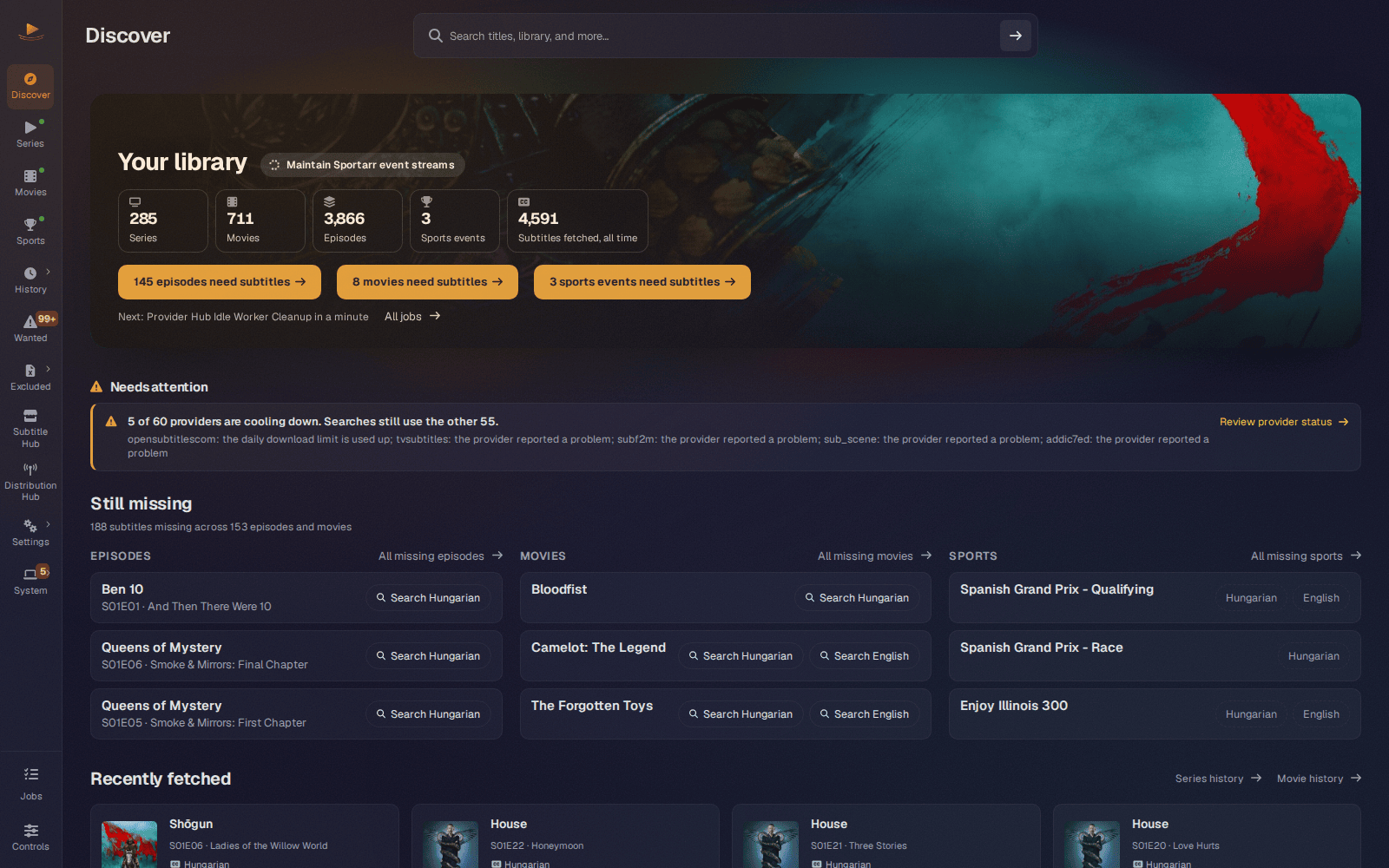
Discover is where Bazarr+ opens now (#435, #443, #450). The top half is your own library: what it holds, what it is working on, and what is still missing, grouped per library with a link into each queue. A Needs attention panel collects throttled providers, disconnected library sync and unreachable root folders, and stays quiet when there is nothing to say. Below your library sit trending titles, digital releases and recent episodes from TMDB.
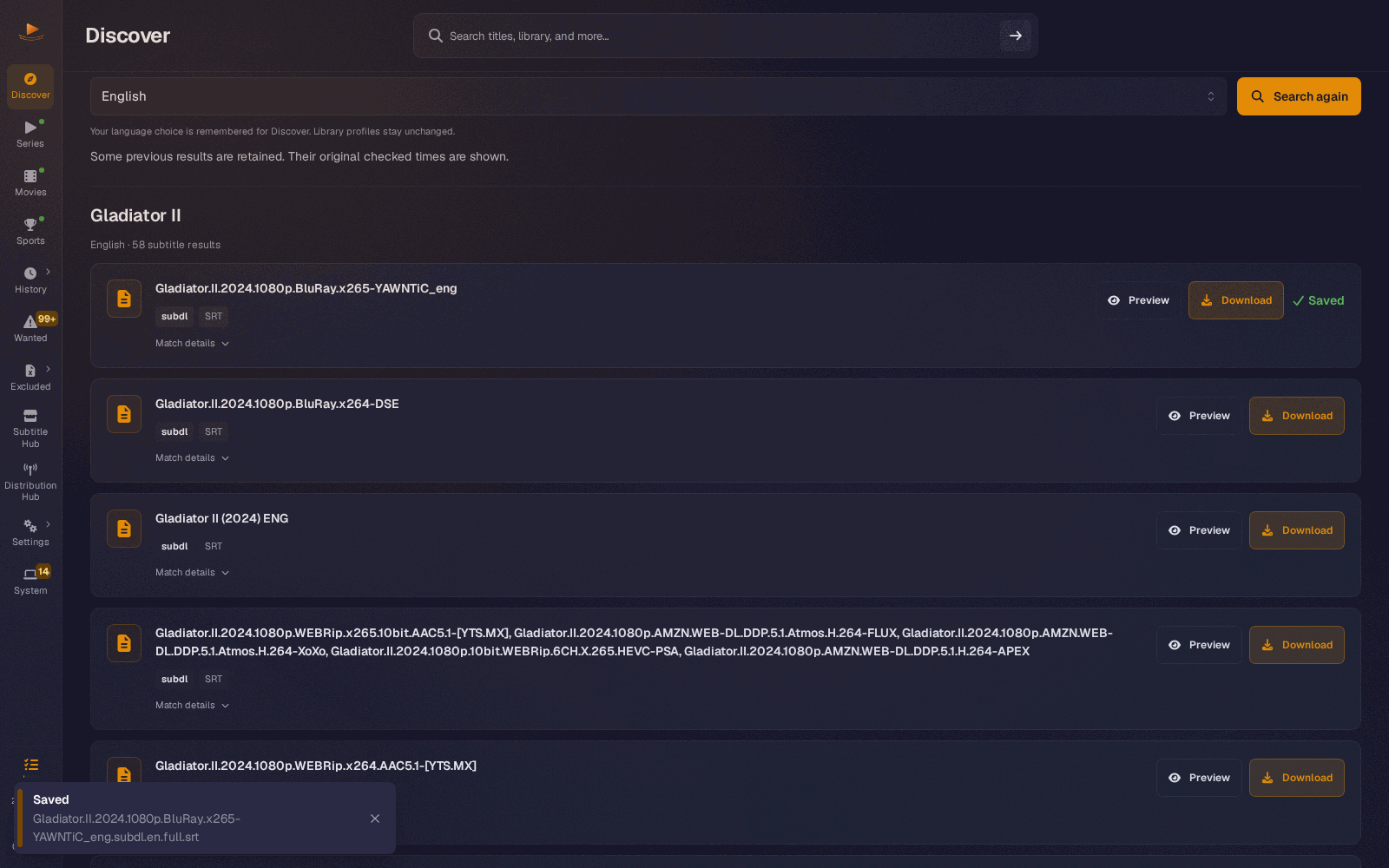
The part that changes how you use the app is the search box. Any film or show, by title or IMDb id, can be searched across your providers from its own title page, whether or not it is in your library, and whether or not you have a library at all.
Why you will like it
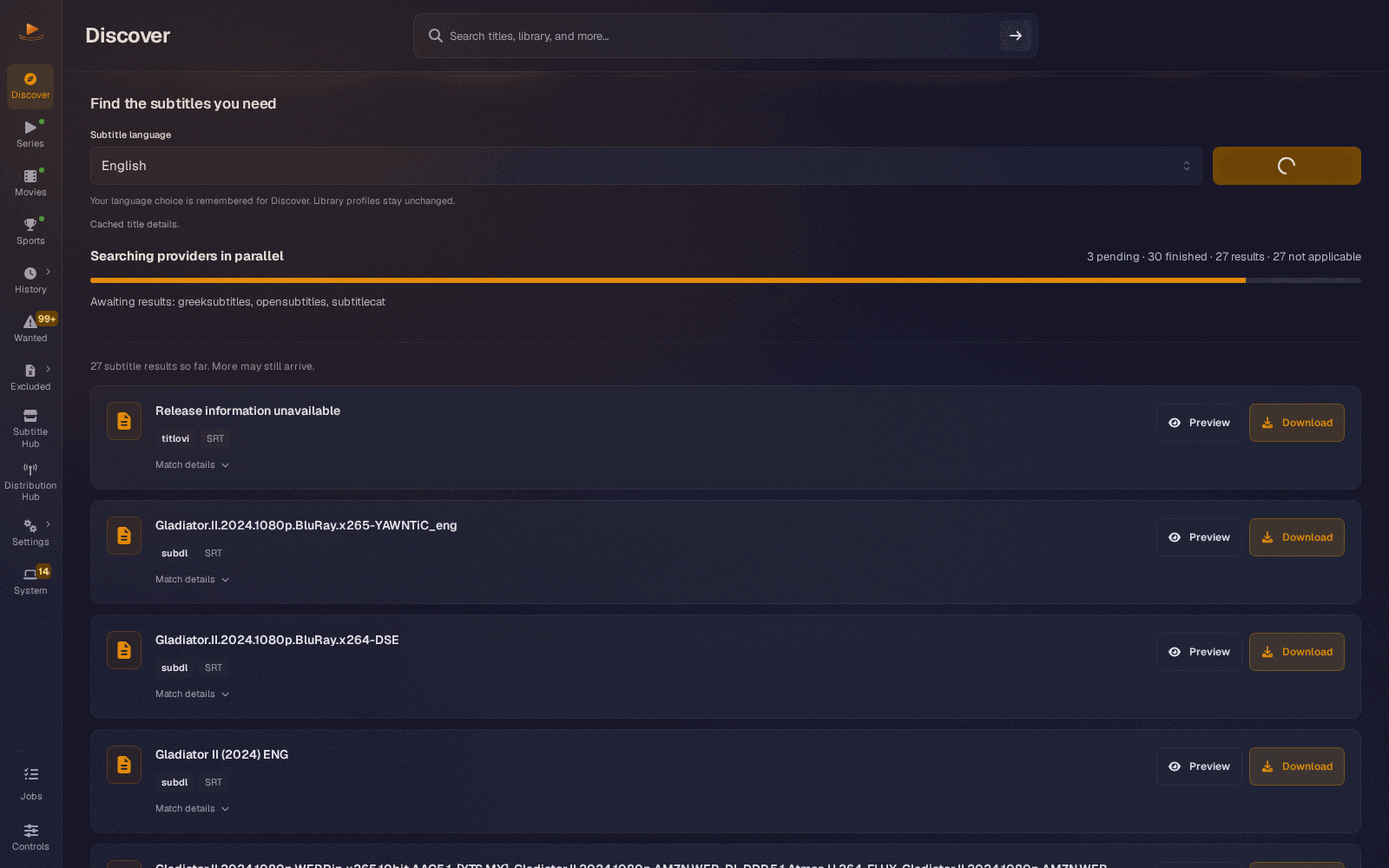
- It answers while it searches (#520). Rows appear as each provider finishes, in the order they arrive, and you can download one while the rest are still working. On a real 36-provider install the first rows landed at 6.3 seconds on a search that finished at 21.2, and a subtitle was downloaded with 8 providers still pending.
- It is honest about each provider (#443, #520). A provider that cannot serve this request is shown apart from one that is unavailable, and a provider that never got to run is no longer reported as a timeout. A failing site backs off the way it does for a library search instead of being hit again every minute.
- Slow providers get 40 seconds (#558, #561). A new install gives a search 40 seconds instead of 20, and rows still arrive as each provider answers, so the first results come no later; an existing install still on the old 20 second default moves to 40 once, and any other Global search timeout saved under Distribution Hub > Settings is kept. A provider left out of a search because it is cooling down now says so, with what happened last time and when it will be asked again, instead of repeating its last outcome.
- Preview before you commit (#445). A formatted preview opens right under the row you picked, with the original text one click away.
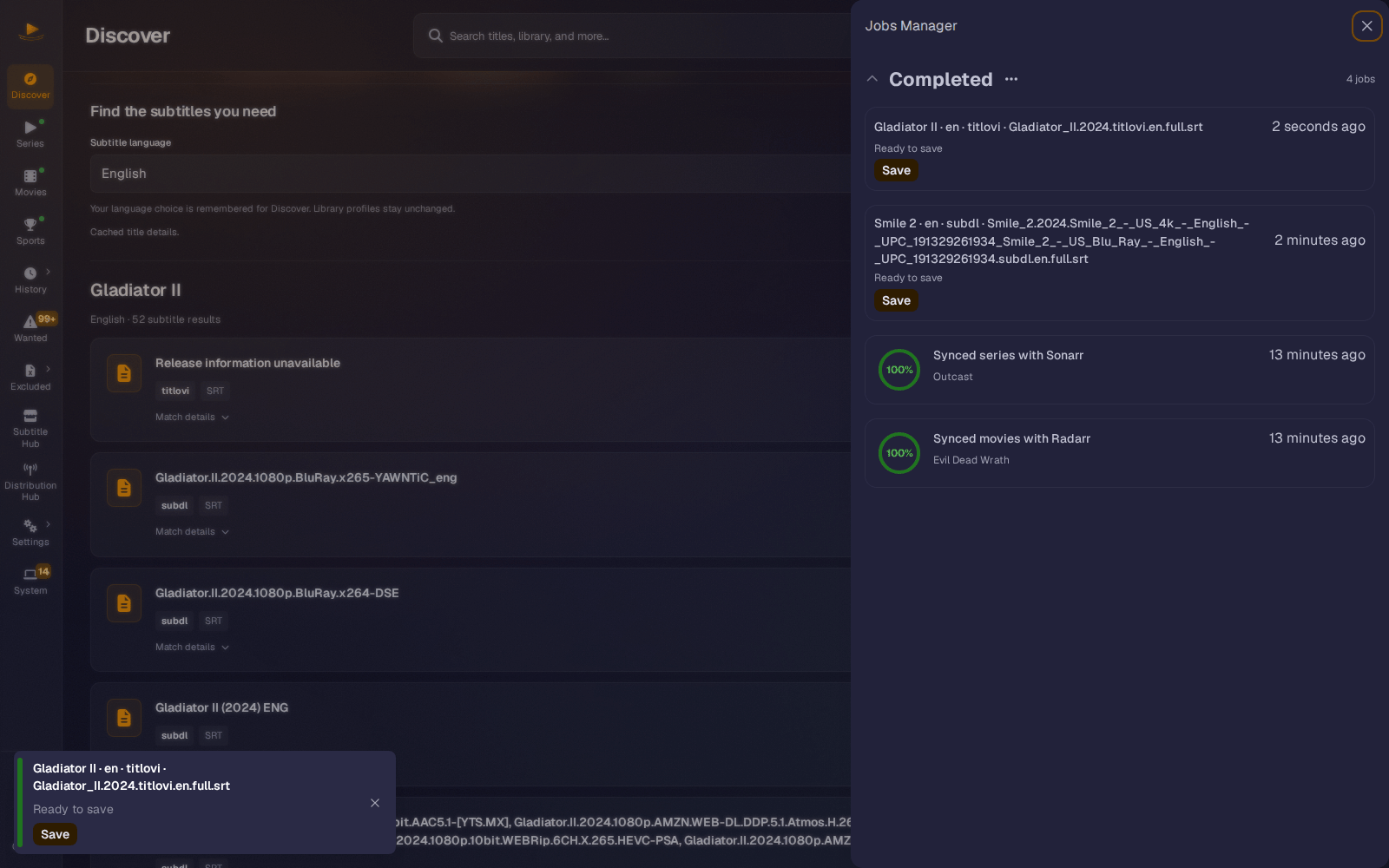
- Downloads are jobs (#526, #536). Download queues a job with a readable name, and when the file is ready it saves itself with no second click and the row shows Saved. You do not have to wait on the page for it: the file is kept for up to 30 minutes, and Save in the Jobs drawer gets it later. If it fails, the row says why in plain words and offers Retry where another attempt can help.
- Nothing costs a provider call you did not ask for. Browsing and refreshing Discover never contact a subtitle provider. Back and Forward restore a finished search without searching again, and a search you walked away from mid-flight is kept (#513). A search you do run counts against your provider accounts' quotas, the same as a library search.
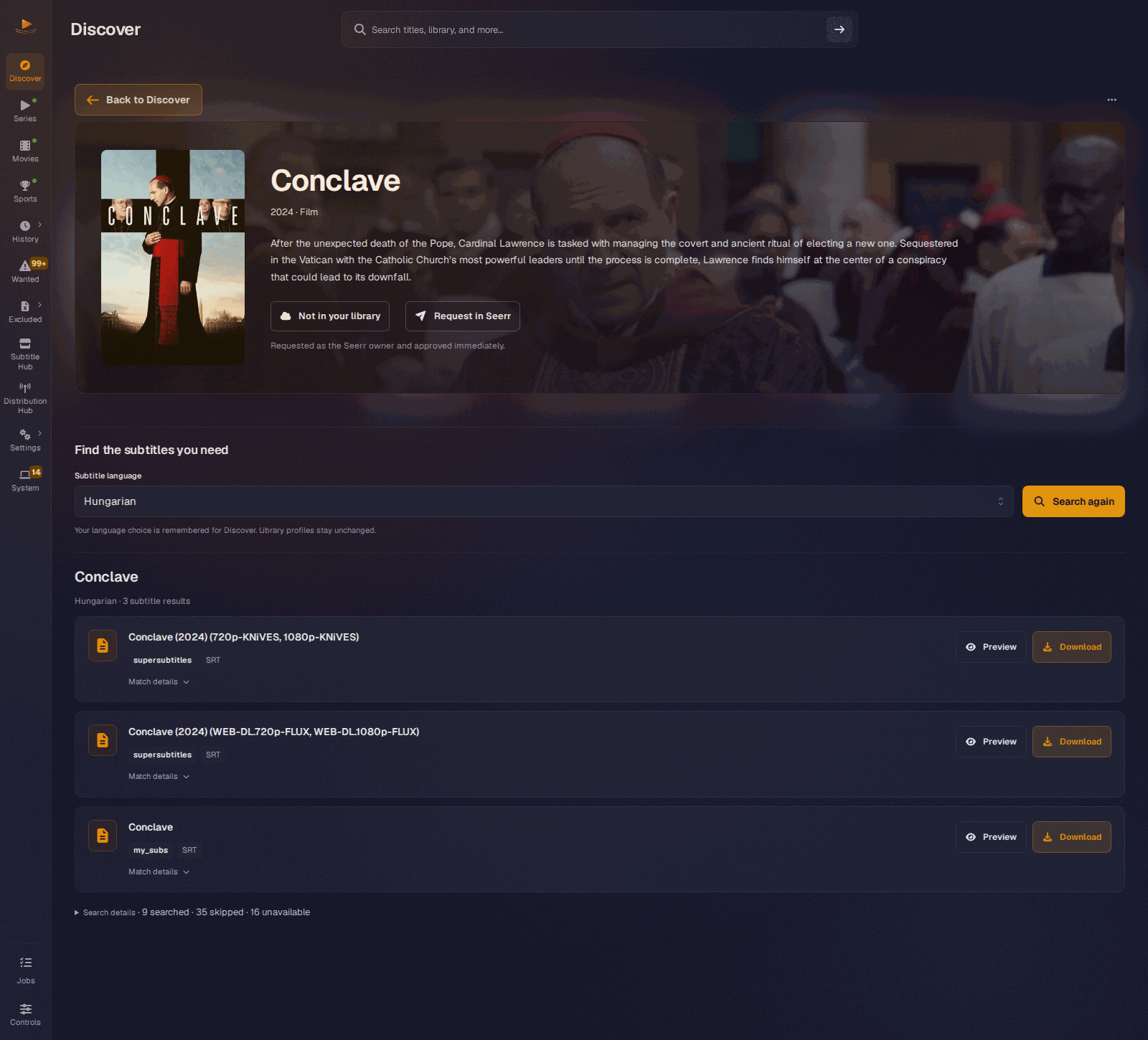
- Request it in Seerr (#453). If you run Seerr, Jellyseerr or Overseerr, a title page says what Seerr already knows and offers the matching action.
Try this
- Type a film you do not own into the search bar, open its title page, pick a language and press Find subtitles. Watch rows arrive, open Preview on one, then Download it. The file saves itself when the job finishes and the row shows Saved.
- Open Search details under the results after a search finishes. It tells you how many providers searched, how many skipped the request and how many were unavailable.
- If you run Seerr, add it under Settings > Connections > Seerr, then open a show you do not have. The season picker keeps what Seerr holds, what your library holds and what is left to request apart, so selecting everything cannot re-request what exists.
Under the hood
Title and exact-episode retrieval run behind identity guards, so a numbering disagreement or an unresolved external identity cannot silently turn into a looser search. When an episode and its show disagree, the page now refetches both sides and, when the show has an IMDb id, offers the manual path with the season and episode already filled in, instead of a warning with no way past it (#486). Result rows are built and given their download handle as each provider completes, and the final list reuses those same rows, so a handle offered mid-search stays valid. Provider outcomes are split into timeout (a deadline the provider owns), abandoned (still working when the shared wall fired) and not_started (never reached a worker), and not_started takes no cooldown and no health penalty, because nothing was asked. Discover now shares the global throttle table and provider health tracker with library searches, and a retry delay comes from the server's Retry-After first. Metadata comes from TMDB through the app's built-in key, which never appears in settings payloads, responses or logs; your own key remains an optional override. The TMDB feeds reuse one pooled connection per host, which took a cold warm-up of all three feeds from 48 connections and over 100 seconds to one connection and under two seconds (#454). Library covers now load through the image proxy of the instance that owns them, and every count names its unit, so "missing" episodes and missing languages no longer get mixed up (#450). The Seerr key is encrypted at rest and never logged, requests are made as the Seerr owner, which Seerr approves immediately, and the page says so beside the action.
Headline: Sports, with Sportarr
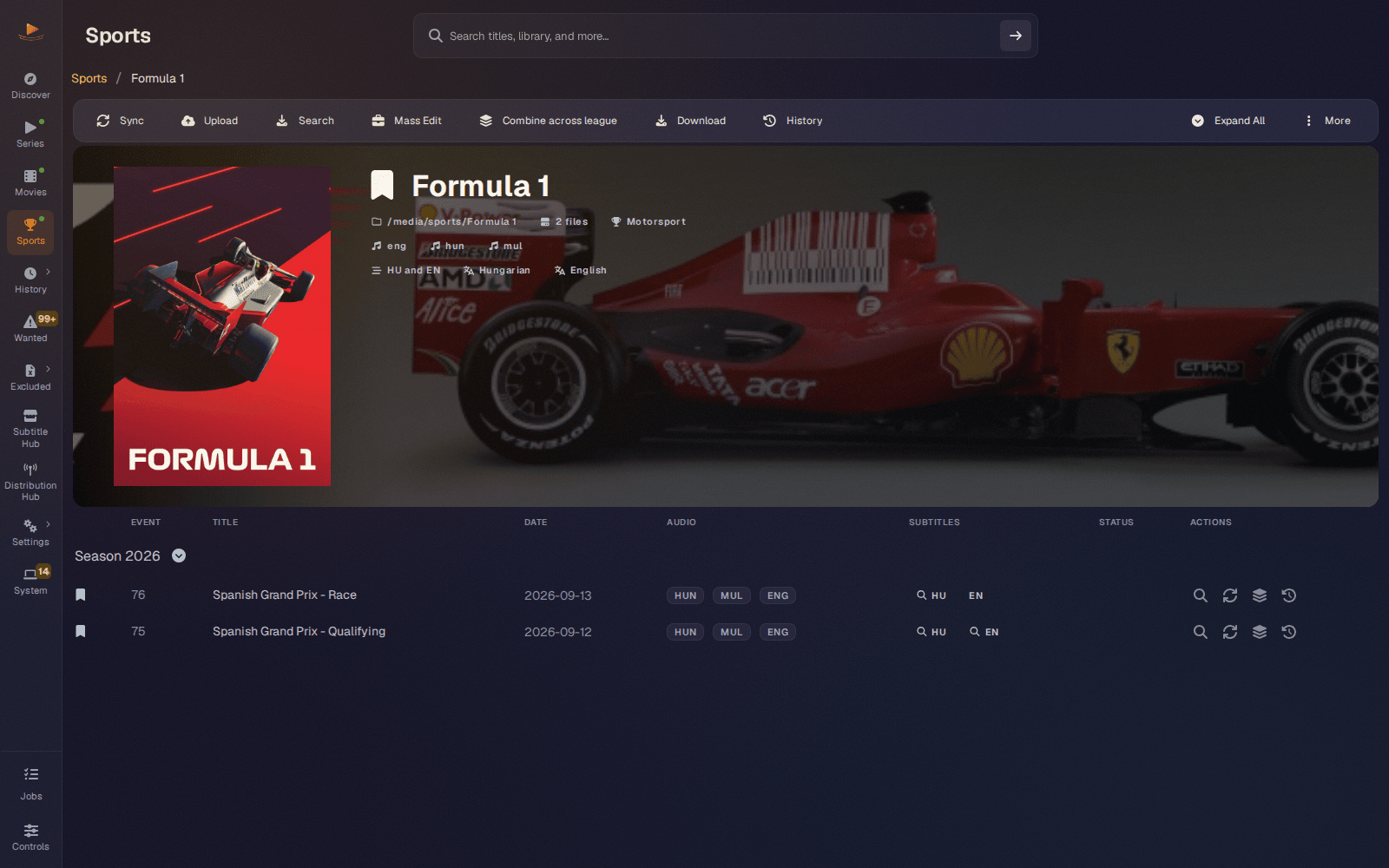
Sports used to live beside series and movies on a parallel path. In Atlas it is a first-class media type, and Sportarr is a library kind alongside Sonarr and Radarr, with as many instances as you run (#432).
Why you will like it
- Everything you already do for an episode works for a race. Manual search and download, uploads, the subtitle editor, sync, translation, combine, scheduled work, Wanted, History, Excluded, global search and library actions all cover sports recordings.
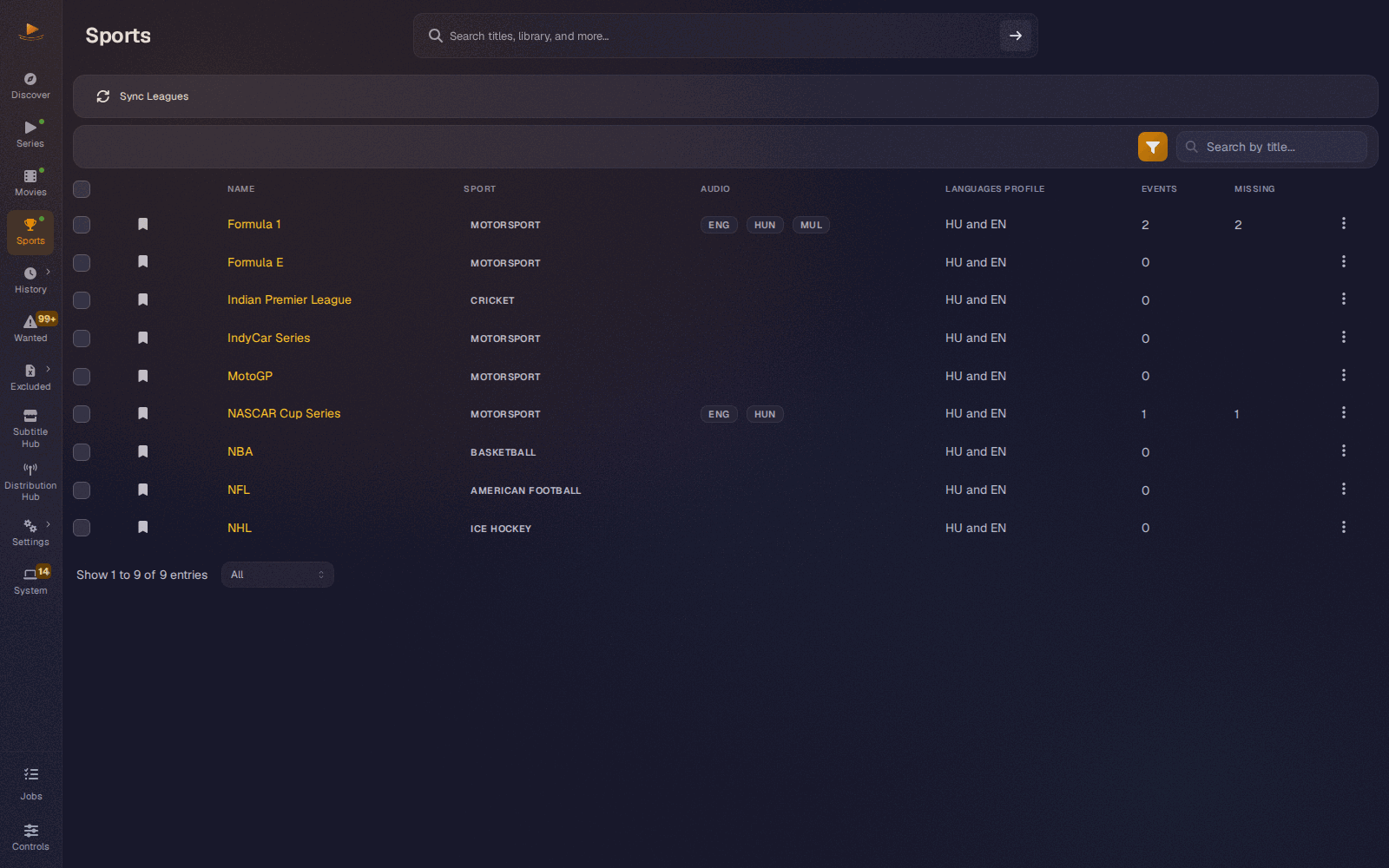
- Leagues and events, the way you think about them. The Sports page lists your leagues; a league page lists its events by season, with audio languages, subtitles and per-event actions on each row. Combine across league builds combined subtitles for a whole league in one job.
- Profiles per league. A league carries a language profile, set from Change Profile on the league or with Mass Edit across several, and that profile decides which languages its events look for.
- Settings that fit sports. Sportarr has its own minimum score for sports events, excluded tags, excluded sports, a monitored-only switch and search after sync, with global defaults and per-instance overrides.
- Your media servers hear about it. A new sports subtitle refreshes Plex and Jellyfin through their configured libraries, and Emby and Silo through their path mappings.
Try this
- Add Sportarr under Settings > Connections > Sportarr, test it and save. Give a league a language profile from its page.
- Open an event and run a manual search, or open Wanted and let the missing sports subtitles queue up with everything else.
- On a league page, try Combine across league and watch it run as one job with per-item progress.
Under the hood
The owning Sportarr instance travels with every piece of work: asynchronous jobs, file access, history and provider callbacks all check it, rather than trusting the entry point. A persistent recording index moves file hashing out of request handling, background scans run in bounded batches with retries, and an unknown recording keeps its request retryable until selection is safe. Wanted eligibility and paging run in SQL. When an event moves, its history and blacklist follow only after the upstream identity agrees, and a failed move rolls back completely. A minimum score of zero is kept rather than read as unset, and legacy translated history with no score stays eligible for upgrades.
Headline: No Sonarr, no Radarr, no problem
Bazarr+ no longer needs an *arr at all. With no Sonarr, Radarr or Sportarr connected, Discover is the whole app: search any film or show, let your providers answer, preview a result and save the subtitle to the device you are reading on. If you ever want automatic fetching for a library, connect one later and the library half of the app appears beside what you already use.
Why you will like it
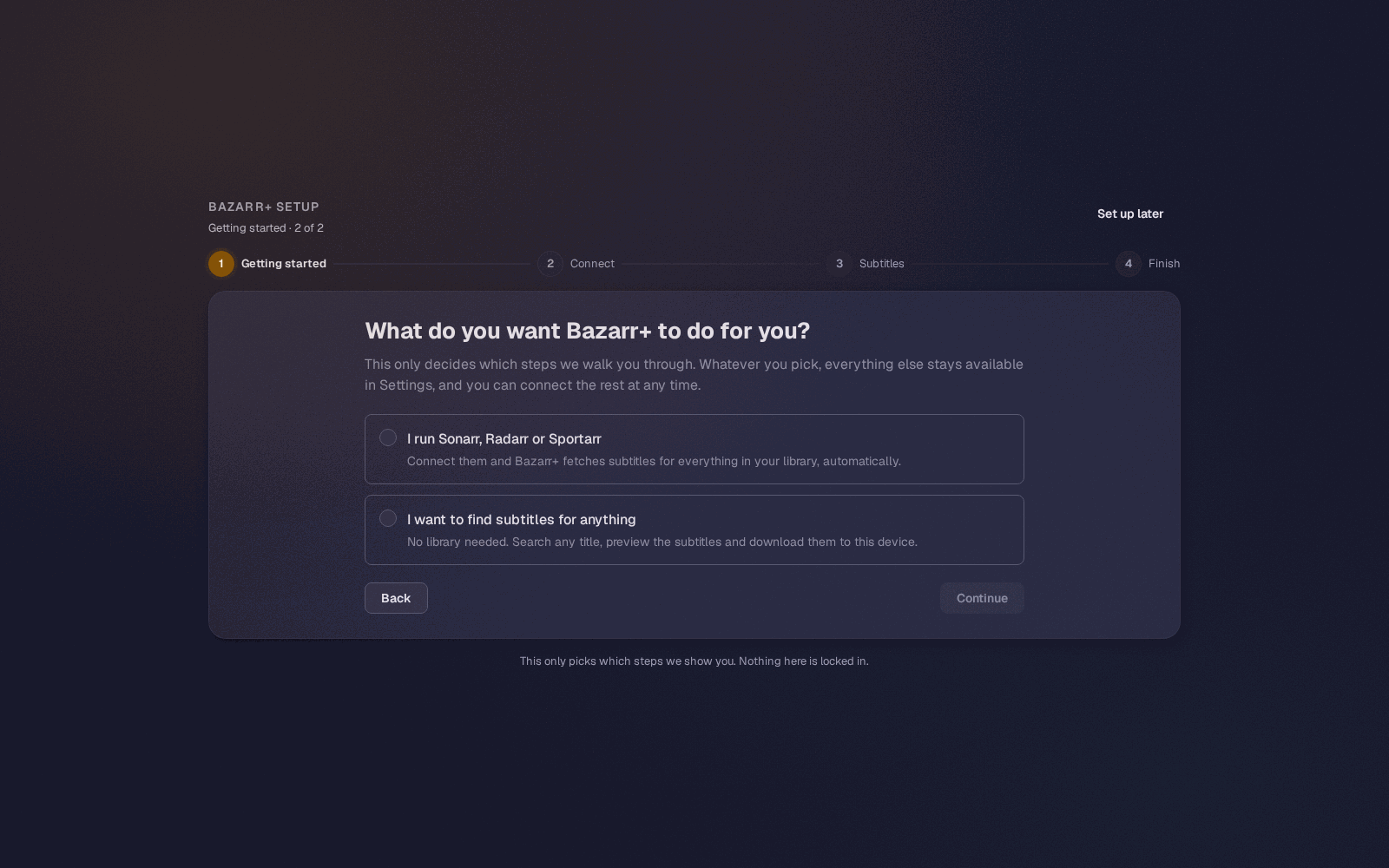
- The wizard asks who you are first (#462). Right after Welcome it offers two honest paths: have subtitles fetched automatically for a Sonarr, Radarr or Sportarr library, or find subtitles for anything with no library. The answer shapes the step list and nothing else, and either choice can be changed later in Settings.
- Sonarr is never required. Every library step is optional, and one you leave untouched writes nothing at all (#518).
- The app only shows what you have (#496). The sidebar lists Series, Movies and Sports per connected kind, so an install with no library has no dead-end pages, and an install running only Radarr gets Movies and not Series.
- No nagging (#496, #497, #498). One line on Discover offers to connect a library, and you can close it for good.
Try this
- Start a fresh container, choose subtitles for anything on the wizard's second screen, pick your language and install the recommended providers.
- Land on Discover, search for a title and download a subtitle; it saves itself when it is ready.
- Later, add Sonarr or Radarr under Settings > Connections and watch the library half and its sidebar pages appear.
Under the hood
A fresh install with no library used to show the crash screen on Discover (#468). The summary read now checks that the answer is really a summary, so a reverse proxy's sign-in page or the app's own index.html served in its place counts as a failed read rather than a crash, and the library half renders only where an instance is enabled. An enabled instance with nothing indexed yet keeps its half, because that is where the page says a scan is running. Nothing about the no-library path writes a backend setting; the wizard's answer is local to the wizard.
Headline: Emby and Silo, and every media server on one layer
Bazarr+ now talks to several Emby servers and several Silo servers, the way it already talked to several Sonarr and Radarr instances (#431). Both are new in this release. Jellyfin and Plex moved onto the same layer (#466), so all four media servers work the same way: named instances, each with its own settings, status and retry.
Why you will like it
- The subtitle shows up in your server. After a download or upload, Bazarr+ asks every enabled server that holds the file to refresh it natively: Emby and Silo through their path mappings, Jellyfin and Plex through the libraries you chose. A server that cannot reach the file is skipped quietly instead of reported as an error.
- One slow server does not hold up the rest. Each server refreshes on its own background worker, with pending targets and Retry pending when it was unreachable.
- Refresh on demand. Every server gets a Refresh libraries action that asks it to re-read itself, scoped the way that server scopes.
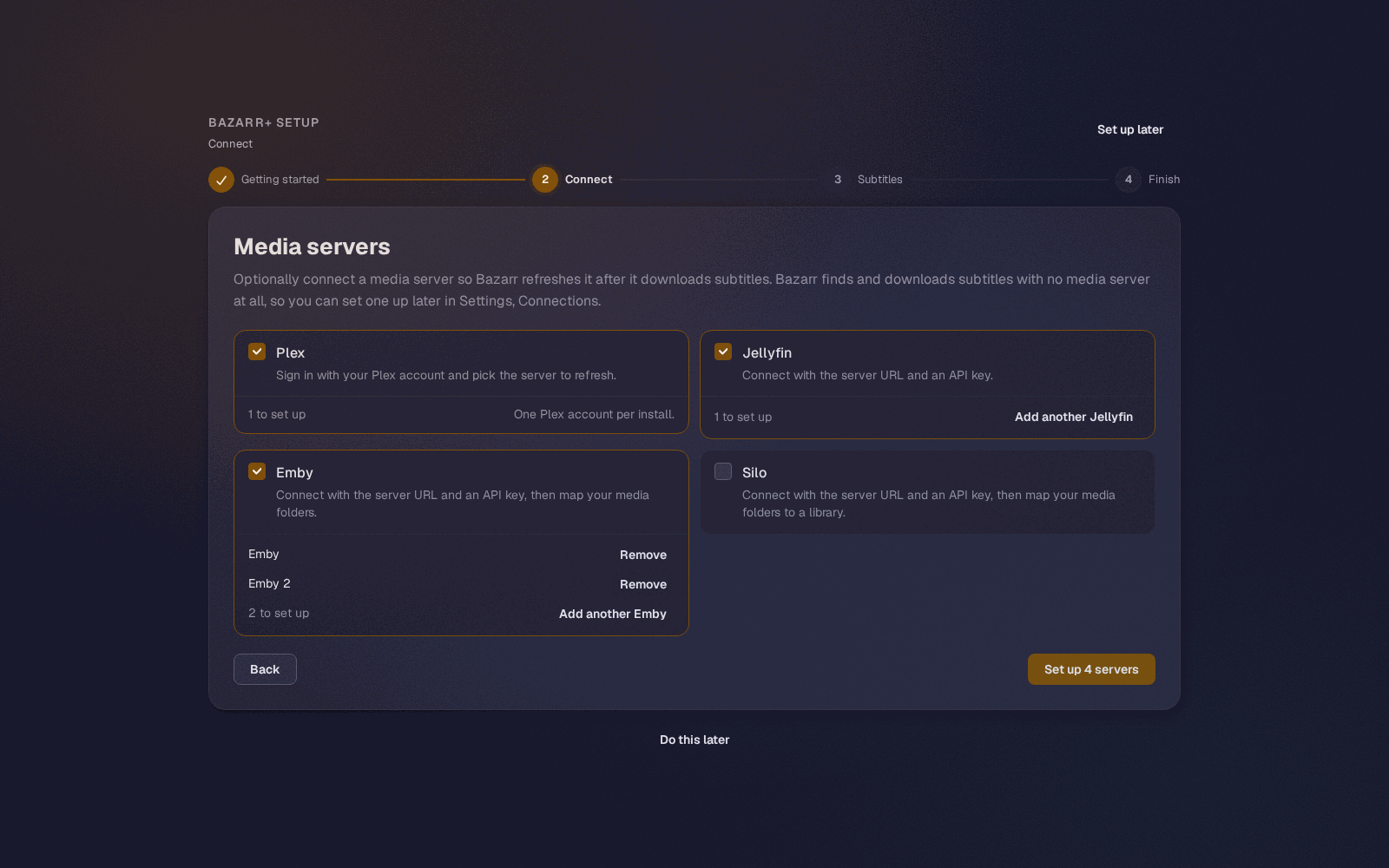
- Set them all up in the wizard (#502, #518). Tick every kind you run, add a second Emby with Add another, and configure each server on a screen of its own.
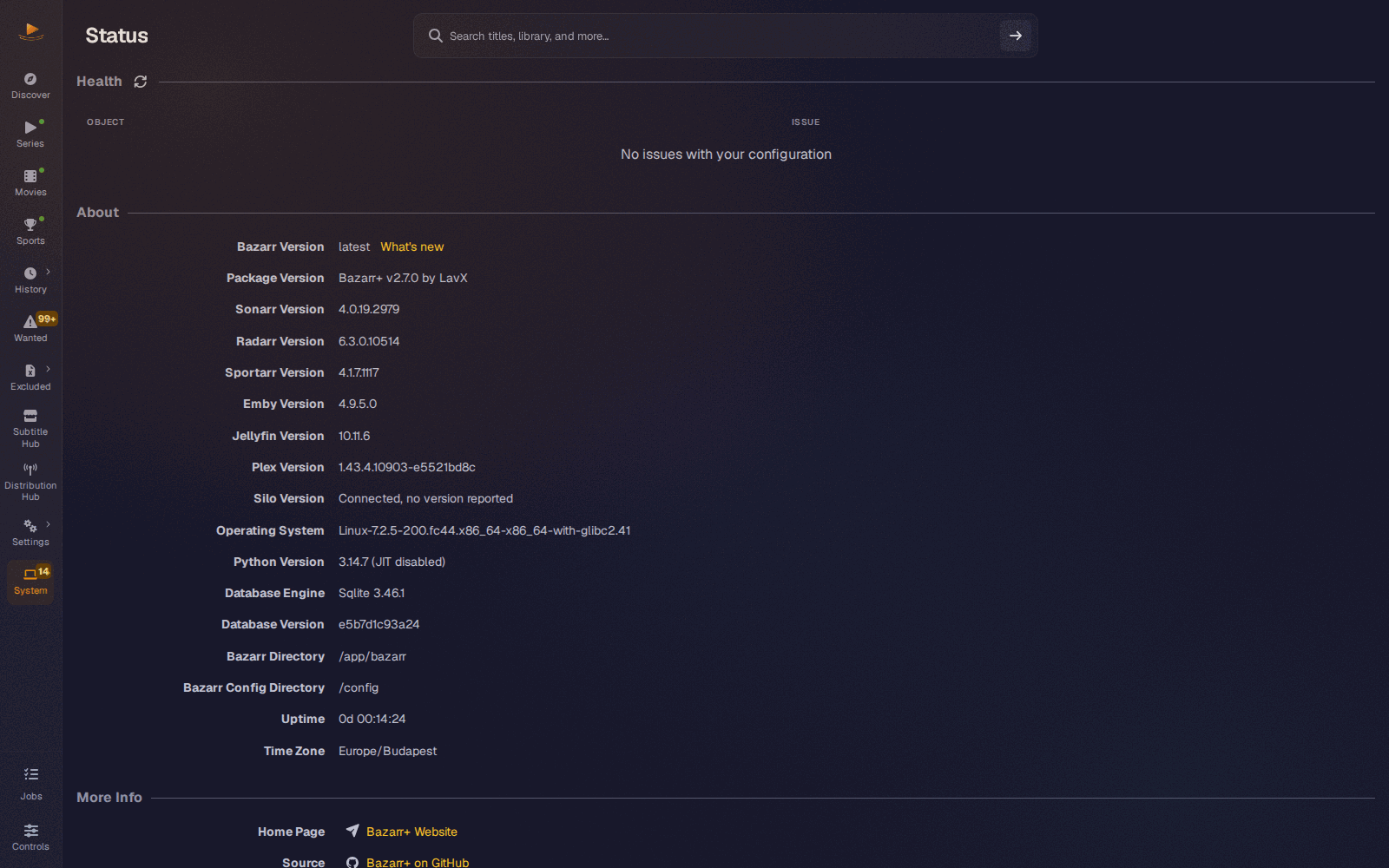
- See what is running (#521). System > Status lists every media server with the version it reports, says so when one is unreachable, and keeps checking until it answers.
- Two Jellyfins? Register both.
Try this
- Open Settings > Connections > Emby or Silo, add a server with its URL, API key and path mappings, and press Test.
- Download a subtitle for something that server holds, then look for it in the server without rescanning by hand.
- Open System > Status to see every server's version side by side.
Under the hood
A refresh target is resolved by walking a ladder and stopping at the first rung the server supports. Emby tries provider id, then exact path, then title and year, then a library refresh. Silo's Jellyfin-compatible API returns no provider ids at all, so Silo uses the exact path with a library scan as fallback, and Bazarr+ watches that scan to completion, so a Silo refresh is confirmed rather than merely requested. Jellyfin walks provider id, then title and year, then its configured libraries; Plex walks the IMDb guid, then a section update, which is all it ever did. Neither declares the exact-path rung, so neither needs path mappings, as before. Keys are encrypted at rest. Plex is converged for refreshes only: its account, OAuth, webhook and Autopulse features still read the existing Plex settings, except that their calls to your Plex server now take certificate checks from the account's own Plex instance (#580, #586), and opening the Plex tab no longer silently re-picks and saves a server connection (#472). The Status page never waits on a server: versions are probed in the background, cached for ten minutes on success and one minute on failure, and retired when you edit a server's URL.
Also new in Atlas
A setup wizard rebuilt from the first screen
Beyond asking who you are and taking every media server you run, the wizard grew up in the details (#462, #499, #501, #518, #523, #525, #541).
- One click installs every provider that needs no account, read from the catalog manifests so the set stays right as the catalog changes (#501). Everything else is still one tick away.
- Every step fits one screen at 1920 by 1080, including the provider steps with the full catalog loaded, with Back and Continue always in view (#518, #525).
- Set up later asks before it ends onboarding, and leaving then stays left instead of bouncing back into the wizard. Settings > General > Run first-time setup brings the wizard back at Welcome, even in a browser that remembered a later step (#523, #525, #541).
- The Providers step can be skipped, and it says what that means: nothing is searched until a provider is enabled, which you can do from the Subtitle Hub any time (#523).
- Each step has its own address under
/setup/<step>, so Back walks one step back and a reload stays put. The languages step starts from your browser's language, and what you typed survives Back, except API keys (#523). - Provider installs report each result as it settles, required credentials are checked before Continue, and a catalog that failed to load says so with a Retry instead of looking empty (#518, #525).
- Seerr and an OpenRouter key for the translator are optional steps of their own, and a fresh install reaches the wizard again on first load (#462, #499).
- A wizard in progress survives this upgrade, including behind a reverse proxy on a subpath (#518).
- The Finish screen, and each step you go Back to, say a Sonarr, Radarr, Sportarr, Emby, Jellyfin or Silo server is connected only when its Test passed during setup. One saved without a test, or after a failed one, is listed as saved with that said beside it. Saving never waits for a test (#576, #587).
- Running setup again finds a Sonarr, Radarr or Sportarr connection that was switched off since, or one whose Use Sonarr, Use Radarr or Use Sportarr is off, says so, and turns it back on at Continue (#592).
Statistics that answer something
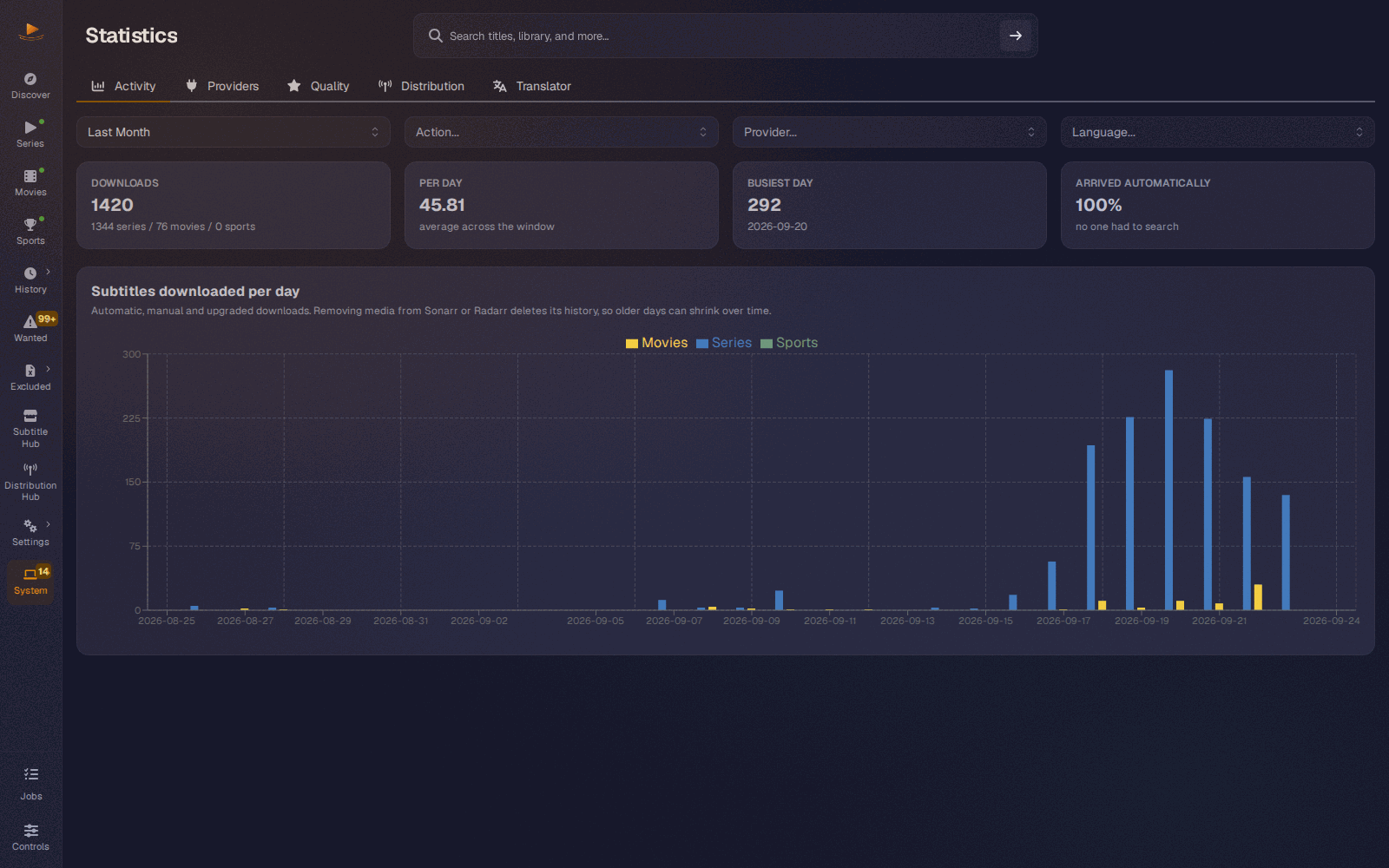
System > Statistics is a real page now (#448, #455). Activity plots downloads per day with the share that arrived without a manual search. Providers shows downloads, mean match quality and blacklist rate side by side, so the provider high on downloads and high on blacklist rate, the one to turn off, finally stands out. Quality shows the spread of match scores and which languages you actually end up with. One filter row drives every tab.
The numbers are careful: scores are normalised per media type before averaging, a real zero score is counted rather than dropped, uploads and translations are left out of quality by default, and the same library produces the same histogram on SQLite and PostgreSQL. Filtering by a language includes its hearing-impaired and forced subtitles, a download with no recorded score stays out of mean quality and the histogram, and the blacklist rate counts sports exclusions and follows the language filter; it is hidden while an action filter is set, because an exclusion does not record which kind of download it undid. A provider that only ever delivered sports can be picked in the filter, Activity keeps its sports bar after Sportarr is turned off, and Activity and the Translator tab say when their data failed to load instead of showing zeros. The 2.6 address, /history/stats, opens this page (#578).
Every long action is a job, and says how it went
The jobs queue could only ever say that a job had finished (#526, #527, #528, #529). Now a failed job says why in a single sentence, in its notification and in the Jobs drawer, with Retry when a second attempt can help. A finished job that has something for you, like a Discover download, offers it right there. Routine scheduled work stays quiet.
Downloads, uploads, syncs, subtitle tools and mods, scan disk, series and league combine, mass actions, Provider Hub installs and updates, editor translations and waveforms all run as jobs now. Saving a language profile returns at once while a Recalculating missing subtitles job does the library pass, so a slow library no longer makes a save look like it failed. A manual download that failed is listed as failed with its reason, where it used to be listed as completed, and tables refresh when the job finishes rather than when it is queued.
Stop reaches more of them. A Provider Hub install, update or catalog refresh stops at its next step, which the drawer names, and nothing is left half installed. A sports manual download stops before it publishes. Stopping an episode, movie or sports AI translation also cancels it in the AI Subtitle Translator, so it stops spending model tokens (#577, #582). After Bazarr+ restarts, a tab left open can no longer mark its next Provider Hub job done with the result of an older job that had the same id (#578). A Provider Hub install, update or catalog refresh that was stopped is no longer treated as a success, so the setup wizard no longer enables a provider whose install you stopped (#595).
SubDL AI translations, for Plus and Pro accounts
With a SubDL Plus or Pro account, Bazarr+ can use your SubDL translation quota to fill in languages nobody has uploaded (#571). It comes with the SubDL plugin 0.2.2 from the Provider Hub and stays off until you tick AI-translate missing languages in the plugin's settings. A free SubDL account includes no AI translation, and its regular searches work as before.
- Offered like any other result. When SubDL has a subtitle for the title but not in a language you want, the search offers a translation of it, named in manual search as a SubDL AI translation from its source language. Downloading one uses your quota and waits up to 240 seconds by default for SubDL to finish. SubDL publishes the result on subdl.com as a regular subtitle. Include AI-translated subtitles shows the translations SubDL already has, without requesting new ones.
- Marked in History. A subtitle SubDL translated carries an AI badge beside its provider in series, movie and sports History. Series and movie History show the provider now too.
- Ranked below human subtitles, if you like. AI-translated subtitle penalty (%) under Subtitle Hub > My Providers takes that many percentage points off an AI-translated subtitle's score, so a human subtitle of similar quality wins. It starts at 0, which changes nothing. With a penalty set, an AI translation stays open to upgrades, so a human subtitle found later can replace it. A large penalty can push AI translations under your minimum score, and then only a manual search downloads them.
- Quota on the card. After a search, the SubDL card in the Provider Hub shows what SubDL reported for the account, such as "AI translation: 37 of 50 left, resets 1 Oct", "AI translation quota used up" or "AI translation is not included in this account".
Other Improvements & Fixes
Discover
- On PostgreSQL, the library panel and Still missing show how many subtitles are outstanding. Every refresh used to fail to read them (#574).
- Provider downloads that never answer no longer leave every later preview and download failing until a restart. A stuck download gives up its slot once nobody is waiting on it (#581).
- The library panel stops counting what a switched-off integration or a disabled instance left behind: the hero, Still missing, the root-folder warnings and a title page's In your library. Sports downloads count in Subtitles fetched, all time and show in Recently fetched, and Still missing says when one of its lists could not be read (#581).
- Discover never asks you to connect TMDB. A saved key is used while TMDB accepts it, one TMDB rejects falls back to the built-in key, and only the TMDB API key field under Subtitle Hub > My Providers says so (#576, #584).
- A result kept on screen after a provider failed a refresh no longer expires while it is still offered (#595).
- A finished download stays saveable for its full 30 minutes, however many previews you open meanwhile (#595).
- Files of a switched-off integration or a disabled instance are no longer offered as library copies (#595).
Translation
- SmartFast and Custom OpenRouter provider routing in the AI translator settings. SmartFast needs AI Subtitle Translator 2.0.0, Custom needs 1.3.4, and existing installs keep their current routing (#434).
- Reasoning set to Disabled is really disabled now, and a cleared setting counts as disabled too, which stops translations timing out on reasoning tokens (#456, #457).
- Translation progress stays visible until the file is published, and two translations running at once each keep their own progress, on their own job (#458, #527).
- A failed OpenRouter translation names the translator service's own reason on the job, and a partial translation is named Partially translated (#527).
- Episode and movie translations from an embedded track return at once and extract inside the job, so a bitmap track fails with a sentence naming the likely codec (#529).
- Real costs are no longer rounded to
$0.00, and no duration is invented when the server reported none (#458). - A source subtitle with a score of 0 no longer passes Min Source Score for an automatic translation, for series, movies and sports (#594, #597).
Subtitles and search
- Manual and translated subtitle upgrades are separate switches, both off on a new install (#476).
- A translated subtitle is replaced by a real one once, instead of being re-downloaded every upgrade cycle (#507).
- An episode or movie upgrade accepts any subtitle that scores higher than the current one. It used to need two points more (#571).
- With an AI-translated subtitle penalty (%) set, the Series, Movies and Sports pages mark the AI-translated subtitles the upgrade job will replace, whatever their score (#594, #597).
- A failed search or download shows the actual reason, for episodes, movies and sports (#484, #487).
- A subtitle file with an empty cue is no longer rejected whole: the empty cue is dropped and the rest is kept (#526).
- Combined subtitles keep valid UTF-8 and BOM-marked Unicode, and a movie's translated badge follows the file on disk (#447).
- Editor keep-all sync previews work again, in a private workspace that is cleaned up afterwards (#463).
- Editor video playback works for media on an explicitly selected Sonarr or Radarr instance (#446).
- With a subtitle folder set, the subtitle editor opens and saves the subtitle Bazarr+ indexed, not a stale file of the same name beside the video (#594).
- The editor waveform is generated once per file and track, cached under 200 MB, and a replaced file gets a new one. Only one waveform starts ahead of the queue at a time, and a damaged audio track can no longer freeze it (#527, #577).
- The subtitle editor's video preview no longer leaves transcodes running after it closes. Switching the audio track replaces the running transcode instead of adding one, at most two run at once, and a closed preview's transcode stops within two minutes and the partial cache it wrote is deleted, as is anything a restart left behind (#602).
- Stop ends a waveform job even while ffmpeg is stuck on the file. A waveform job fails with ffmpeg's error when ffmpeg exits with one, and a file replaced while its waveform was read gets no cached waveform, so neither leaves a short or wrong waveform behind (#592, #593).
- Language profile lookups that crashed uploads and indexing are guarded (#433).
- A Sports publication that starts while another is installing the ownership triggers waits for that install, instead of failing with "Subtitle ownership protection is unavailable" (#562).
- Indexing a sports event's subtitles, or deleting one, says why it failed when the recording cannot be read, such as a missing file or an analysis that timed out, without naming the local path (#576).
- With Use Sportarr off, a Sports page left open can no longer start an event, league or Wanted search, a manual search, download or upload, an exclusion with a replacement, or a league sync. Turning it off also cancels queued and running sports manual downloads, and a sports search stopped after one language was saved reports that subtitle instead of nothing (#577, #586).
- With Use Sportarr off, Search Missing, Upgrade, Scan Disk and Combine on the Sports library page refuse with the same message as the other sports actions; mixed batches still run their series and movie items (#589).
- With Use Sportarr off, editing, creating, promoting, deleting, uploading, syncing, translating or applying mods to a sports subtitle is refused too (#594).
- On PostgreSQL, the Distribution Hub finds a Sportarr recording by its OpenSubtitles hash or file name when Serve subtitles already on disk is on. The lookup used to fail silently (#574).
- The Provider Hub catalog update that ships with Atlas adds eight new providers (Assrt, Pipocas.tv, CinemaZ, HDBits, AvistaZ, Karagarga, TsukiHime and AnimeTosho.xyz) and updates fifteen others, SubDL, Addic7ed, Subs4Series, Zimuku and OpenSubtitles.com among them. It arrives through the Provider Hub catalog.
Security
- One failed form login no longer produces a cookie that opens the log, the backup download and the cover proxies (#451).
- The legacy MD5 password upgrade no longer puts your plaintext password in the browser cookie (#451).
- CORS is off unless you turn it on; before, every route answered
Access-Control-Allow-Origin: *(#451). - The event socket refuses a connection that cannot prove who it is, by session cookie or API key (#451).
- Session cookies are
SameSite=LaxandHttpOnly, with aSecurepolicy, a configurable lifetime and a configurable trusted proxy (#451). - A Provider Hub plugin can no longer name itself after a Bazarr settings section to receive that section's secrets (#460).
- The SubDL plugin no longer keeps your SubDL API key inside stored download links or download error messages. SubDL can sign the links it returns with your key; the plugin now strips it and adds it back only when it sends the download request. Downloads only ever go over HTTPS to SubDL's own hosts, redirects included, and the API key is only ever sent to SubDL over HTTPS. This is a plugin change, and it reaches installs as SubDL 0.2.2 through the Provider Hub catalog (catalog pull requests 137 and 139).
- The connection tests only return a validated version string, instead of echoing whatever answered (#479).
- Calls to your Plex server follow Verify SSL certificate on the Plex instance your account owns: added-date writes after a download or upload, the account panel's server picker, connection test and library listing, and the Autopulse path lookup, as refreshes and the card's Test already did. The instance starts from the old
plex.verify_sslsetting, which is off unless you set it by hand, so an install that never set it is unchanged (#580, #586). - The container no longer hands the application tree to the runtime user, and the reference compose file runs read-only with all capabilities dropped but three (#464).
- The editor's
ffprobecall takes its media type from the validated constant instead of the request's string, which clears a CodeQL command-injection finding (#556). - vitest 5.0.1 and browserslist 4.29.0 close three Dependabot advisories in the frontend toolchain, a vitest path traversal among them (#556).
Backups
- PostgreSQL backups now contain the database, written with
pg_dump, and the image ships the client tools (#465). - A restore stages and checks the archive before the restart, and refuses one without the database for this instance or without its configuration (#465, #575).
- If
pg_restorefails partway, Bazarr+ stops instead of running on a half-restored database, and refuses to start whilerestore/bazarr_postgres.dump.failedis in the config folder; the log says how to retry or restore by hand. A restored database whose configuration cannot be written stops the start too, and the backup's copy is kept asconfig.yaml.restore(#575). - PostgreSQL backups and restores keep the options in
POSTGRES_URL, such assslmode,sslcertorservice, so client certificates andverify-fullwork there too. A restore that cannot reach the database changes nothing and stays staged for the next start, instead of being reported as a partial restore that stops Bazarr+ (#600). - Two backups running at once, such as a scheduled one and one you started, no longer share a temporary database file that one could overwrite or delete (#575).
- The restore log's warning about unknown server parameters names the PostgreSQL server's version instead of "unknown" (#586).
- A successful restore reports success instead of a 503 (#470).
- The migration guide stops Bazarr before it copies the config, and a rollback restores one exact backup folder, moving the current config aside instead of deleting it (#546).
- The one-line installer backs up the folder mounted at
/config,./configunless you setCONFIG_PATH, with the services stopped before an upgrade or reinstall, starts the old services again if a backup step fails, and never reports a database backup it did not take: a PostgreSQL database configured there that Bazarr+ reaches by its compose service name is dumped, and any other is named as not included (#546, #575). - The installer's upgrade and reinstall backups are private: the backup folder is created 0700 and the PostgreSQL dump 0600, where any local user could read the dump before (#549).
- The installer stops with a clear message, before changing anything, when
/configis a Docker named volume rather than a host folder, since it has nothing there to back up (#592).
Interface
- Settings changes survive a refresh that lands while you are editing (#461).
- A settings save that is refused, for example because
config.yamlcannot be written, no longer keeps its language, profile and notification changes or starts a Recalculating missing subtitles job. Enabling, disabling, installing or removing a Provider Hub plugin then fails with an error instead of looking done until the next restart (#575). - The Jobs icon stays visible while jobs run, with a thin progress stripe underneath (#452).
- The running version is in every page title (#449).
- Announcements are readable cards instead of a four column table (#505, #509).
- The header band keeps scrolled content from running under the page title (#485).
- An episode with dozens of subtitle tracks wraps and shows twelve with the rest behind a count (#495).
- Each subtitle badge on an episode row names its source on hover: the file name, embedded in the video file, or missing (#534).
- On a movie page, the subtitles table shows Score and Language in full instead of cutting them off, and Subtitle Path shows the file name, with the full path on hover. The path in the movie, series and league page header shows just the file or folder name, and its hover tooltip wraps into a readable box instead of one character per line (#601).
- The leave prompt's buttons share one row or stack cleanly on a phone (#500).
- Discover touch targets are at least 44px on a touch screen at 320px (#512), the manual identity row lines up (#488), the title action row and rail glyph are aligned (#467), the jobs pill elides and the toolbar band is thinner (#508, #515), the pill's last-fetched time moves to a second line on a phone instead of being cut off (#579), and the library hero stays readable in the light theme with no artwork (#474).
- Leaving a single-season series page for another title works (#519).
- The Series, Movies and Sports toolbars show the row count until you select rows, with active filters inside the toolbar instead of a second band. On a phone, selecting a row no longer pushes the table down, and the Wanted toolbar and the series, movie and league page toolbars wrap onto extra rows (#579, #587).
- The old progress toasts and the client-side task queue are gone; everything reports through jobs (#531).
- Opening the Plex tab no longer silently rewrites your stored Plex connection (#472).
- While you are signed in to Plex, the Plex instance your account created cannot be deleted, because the next restart would bring it back. Its card offers Disconnect instead, which asks first, signs you out of Plex and turns Plex off, including any Plex server you added by hand; the card then offers Delete (#582, #586, #587).
- The Plex panel's Disconnect from Plex now asks before signing out (#589).
- Catalog refresh tells a rate limit from access denial and keeps cached entries on failure (#445).
- A Provider Hub uninstall that fails no longer leaves the provider disabled (#596).
- Refresh libraries on a media server keeps going when the server refuses one of its rescans, and says how many failed. A server that cannot be reached still stops it at once, and so does editing, switching off or deleting the server mid-run. Emby libraries are no longer scanned twice, and a complete run clears the refresh queue overflow warning (#576, #582).
- A Plex refresh that fails because the server is down, times out, fails its certificate check or rejects the token is recorded as that failure, instead of falling back to a section scan and being reported as a missing item. A library update where one section fails is no longer reported as sent (#582).
- One Jellyfin library that refuses a refresh no longer stops the others chosen for the same media type, and the refresh is still reported as failed (#596).
- A Plex library lookup that fails because the server is down, times out or rejects the token records that cause instead of a missing library (#596).
- A failed library scan no longer lets the next queued refresh of the same library skip its own scan (#596).
- If the config cannot be saved while you sign in to Plex, the Plex destination it just created is removed again, instead of a second one appearing after the next restart (#596).
- While Sportarr is unreachable, System > Status probes it at most once a minute instead of waiting for it on every load (#577).
- Fixed on PostgreSQL: Sonarr and Radarr instances can be added, and the default instance is created at startup, instead of failing with a SAVEPOINT error. Editing an instance, switching one on or off, making one the default and deleting one failed the same way and work too (#598).
- A default Sonarr or Radarr instance with a timeout other than 60, 120, 180, 240, 300 or 600 seconds, such as 30, no longer makes every settings save fail, and a restart no longer brings the failure back (#600).
- Sonarr and Radarr live updates keep retrying when Sonarr or Radarr is down while Bazarr+ starts, instead of stopping until the next restart (#600).
Logging
- Per-logger levels are graded instead of flipped by one debug switch: a normal install gains the provider lines that explain an empty search, and debug mode loses the per-event socket and scheduler flood, from 957,284 rows to 4 on a replayed debug day (#506).
bazarr.logstarts a new file at midnight or when it reaches Maximum Log File Size (MB), default 32, whichever comes first, and keeps Log Files to Keep older files, default 7, so Bazarr's own log uses about 256 MB at most by default. Both are under Settings > General > Logging. Empty on System > Logs no longer stops the log rolling at midnight (#583).- System > Logs loads one page at a time instead of the whole log every minute, with a level picker and a text filter on the page, and says when a stored include or exclude regex is invalid and not applied (#585).
Docs and site
- The README, the site and the getting-started guide describe running with no library, and the site dropped a colour token that could not meet AA (#481, #482, #483, #503, #504, #511).
- A source install documents
postgres-requirements.txtfor PostgreSQL and takes its Node version fromfrontend/.nvmrc(#544). - The one-line installer writes its pre-seeded settings to
./config/config/config.yaml, where Bazarr+ reads them, so a fresh install keeps its Sonarr and Radarr answers; the migration guide gives the full host path (#549). - The getting-started guide points to Subtitle Hub > My Providers for your own TMDB key and for enabling and ordering providers, as does the wizard's "Installed, but not enabled" message, and it says that Set up later leaves the wizard and Settings > General > Run first-time setup brings it back (#576, #587).
- The API reference declares the job responses of scan-disk on series and movies (
202with the job id), the job list and retry, and the Sports download, Discover download and search, and editor waveform routes (#545).
CI / Docker
postgresql-clientis in the runtime image, so backups and restores findpg_dumpandpg_restore(#465).- The image asserts at build time that nothing under
/appis writable by the runtime user, and nested__pycache__no longer reaches the build context (#464). - A pre-release build no longer publishes as
lateston Docker Hub or ghcr (#480). - An on-demand end-to-end suite drives a real container with Playwright. It runs from a manual workflow and is not a required check (#535, #537, #538, #540, #542).
- New test suites are enumerated in
ci.yml, with a guard test that fails if one is left out. - A pull request gets one verdict,
ci-ok, in about ten minutes: the suites run as parallel jobs on the image's Python, the frontend tests run in three shards with the coverage floor checked on the merged result, and the full 3.12, 3.13 and 3.14 matrix runs after merge.scripts/ci/run-local.shruns the same checks on a workstation (#559). - The frontend shards and the coverage merge name the folder for their reports, since vitest 5 moved the default one, and the local mirror runs the same shards and merge (#563).
- The Plex setup step test no longer leaks an animation frame past teardown, which failed a frontend run with every test passing (#555).
- The Silo refresh tests hold the garbage collector off inside each test, so a full collection on a busy CI run can no longer expire an 80 ms refresh deadline and fail the job (#565).
- The local mirror splits its vitest worker budget across the three shards instead of rounding each shard up, so together they stay within
--vitest-workers(#572).
Dependency Updates
- Python: pysubs2 1.9.0 (#436), apprise 1.13.1 (#437), tomlkit >=0.15.1 (#438), cachetools >=7.1.8 (#439) and then >=7.2.0 (#560), ffsubsync 0.5.1 (#490), semver 3.1.0 (#491), msgpack 1.2.2 (#494), psycopg2-binary >=2.9.13 (#493), alembic 1.20.0, Flask-Compress 1.25, lxml >=6.1.3 and numpy >=2.5.3 with the 2.6.0 cap kept (#560), urllib3 2.8.0, SQLAlchemy 2.0.54 and knowit 0.7.0 (#570).
- Frontend and tooling: the react group, four updates (#440) and then React 19.3.0 with react-dom and both type packages (#570); the mantine group, six updates (#492) and then 9.6.2 (#560); ruff 0.16.7 (#441, #489); vitest 5.0.1 with @vitest/ui and @vitest/coverage-v8, and browserslist 4.29.0 (#556).
Upgrade / Migration Notes
Pull the new image and restart. Schema migrations run on boot, and existing settings, language profiles, providers and instances carry over. PostgreSQL remains fully supported and first-class, and every migration in this release is covered on both engines.
A few things need a closer look.
1. Jellyfin and Plex become instance rows on the first startup. A one-time backfill reads your existing Jellyfin and Plex settings and creates one instance row per configured kind, under a durable marker. Nothing to do, and unless you set plex.verify_ssl by hand, nothing changes about how your servers are refreshed.
- The Jellyfin settings form is gone. Jellyfin is edited as an instance under Settings > Connections, like the other three kinds, and its old settings section is import-only.
- The Jellyfin "refresh all libraries" maintenance button is removed. Use the per-instance Refresh libraries action on the instance card instead.
- Plex is converged for refreshes only. Its account panel, OAuth sign-in, server discovery, webhook helper, Autopulse generator and recently-added-date writes still read the scalar Plex settings for the account, server and libraries. Certificate checks are the exception: their calls to your Plex server now follow Verify SSL certificate on the account's own Plex instance (#580, #586). That instance is created from your old
plex.verify_ssl, which is off unless you set it by hand. If you did, refreshes and added-date writes now check your server's certificate, so it needs one this machine trusts. A Plex row is created only where Plex was genuinely configured, because itsip,portandverify_sslship with non-empty defaults. - Neither Jellyfin nor Plex needs path mappings, exactly as before. If you have two Jellyfin servers, you can now register both.
- Listing Plex servers no longer re-picks and saves the fastest connection, and a stored Sonarr or Radarr base path of
/is no longer rewritten to an empty string. - A Plex API key or sign-in token still stored in the old encrypted format is now converted on startup. The conversion failed on every start with an
ImportErrorin the log and left the old value in place (#533).
2. Everyone is signed out once. The session cookie changes, and a cookie from an older release cannot carry its stored password forward. Sign back in as usual.
Three settings behind this are read at startup, so changing them needs a restart: auth.session_lifetime_days (default 30 days, an idle window renewed on each request), auth.cookie_secure and general.trusted_proxy.
- Behind an HTTPS reverse proxy this instance cannot detect, set
auth.cookie_securetoalways. The default,auto, follows the scheme of each request. general.trusted_proxydefaults to127.0.0.1, the in-container supervisor hop. It is one address, not a list. If your reverse proxy runs in another container, set its address so forwarded headers are believed and per-visitor login rate limiting works. Clearing the field trusts nothing.- If CORS is disabled in your settings, you will stop receiving the
Access-Control-Allow-Originheader every route used to send. Turn CORS on deliberately if you need it. - The legacy password upgrade is now silent. Once an MD5 password is upgraded to PBKDF2, going back to upstream Bazarr means resetting the password in the config file.
3. If you run a custom compose file, compare it against the reference. The shipped compose, the README, the install guide and the one-liner installer now set read_only: true, tmpfs: /tmp capped at size=512m, cap_drop: [ALL], security_opt: [no-new-privileges:true], and add back exactly CHOWN, SETUID and SETGID. A bare cap_drop: [ALL] does not boot, because the entrypoint needs those three to hand /config to PUID:PGID and become that user. Adopting the hardened keys is optional, but the reference is what the project supports.
- The entrypoint now chowns
/configonly, not/app/bazarr, and drops to the numericPUID:PGID. - Managed binaries move to
/config/managed/bin. The old location is still read, so an upgrade keeps the binaries it already has. - The in-app updater is gated off in the image. Update by pulling a new image, as the Docker install always intended.
- If you mount a source tree over
/app/bazarrfor development, dropread_only.
4. PostgreSQL backups need pg_dump, and the version has to match. The image ships postgresql-client, so a normal install needs nothing. From source, install the PostgreSQL client tools, or POST /api/system/backups answers 500 naming the missing tool rather than writing a useless archive. The pg_dump client major version must be at least the server's: for a PostgreSQL 18 server, use an 18 or newer client.
Any backup you took on PostgreSQL before this release does not contain your database. Take a fresh one after upgrading. An archive without the database for this instance, or without its configuration, is refused before the restart. If pg_restore then fails partway, Bazarr+ will not start until you deal with restore/bazarr_postgres.dump.failed in the config folder, as the log explains; in the image, the backend keeps restarting and the page says it crashed until then (#575).
5. Existing installs keep their OpenRouter routing. SmartFast is the default only on a genuinely new install. A config that predates the routing setting keeps throughput, and one that already names a usable routing keeps it. To use SmartFast, pick it in the AI translator settings after updating the translator to 2.0.0; the Custom picker needs 1.3.4.
6. Translated subtitle upgrades are off after this upgrade. The combined upgrade toggle is split in two (#476). Your manual-upgrade setting is kept as stored, or on if it was missing, and Upgrade Translated Subtitles starts off. If you relied on translations being replaced by provider subtitles, turn it on in Settings > Subtitles.
7. The log file changes what it holds. A normal install gains the provider lifecycle lines, roughly two per provider and one per scored candidate per search (#506). Debug mode caps socketio.server, engineio.server and apscheduler at WARNING. To debug those on purpose, name them in the new log.verbose_loggers, empty by default.
bazarr.log also rolls when it reaches 32 MB (log.max_file_size_mb), and Log Files to Keep (log.backup_count, 7) now counts rolled files rather than days, so an install that logs more than 32 MB a day keeps less than a week. A second roll on the same day is named bazarr.log.YYYY-MM-DD.1, and existing rolled files are kept and count toward the limit (#583).
8. Long actions answer at once and finish as jobs (#526, #528, #529).
- A Discover Download queues a job instead of downloading while you wait. The file saves itself when the job finishes. If you left the page first, Save in the Jobs drawer gets it; the file is kept for up to 30 minutes.
- Saving language profiles, the embedded, audio and adaptive toggles, or a mass profile edit no longer waits for the missing-subtitle scan. The save returns immediately and a Recalculating missing subtitles job follows, so Wanted catches up a moment later.
- Provider Hub install, update, uninstall and catalog refresh, subtitle tools and mods, scan disk, series and league combine, and sports manual download answer with a job id. If you script against the API, those routes answer
202now and the outcome is on the job; a subtitle mod that fails fails its job instead of answering 409. - A manual download, upload or sync that fails is listed as failed with its reason, where it used to be listed as completed.
9. On a fresh install, Discover opens without a library, and the wizard asks which kind of install you are before building its steps. Sonarr is no longer required to finish it.
10. Discover's search deadline moves from 20 to 40 seconds once (#558, #561). An install that still had the old 20 second default for Global search timeout is moved to 40 on the first start; a value you chose yourself is kept, and if you set 20 again afterwards, it stays.
11. GET /api/system/logs returns one page, not the whole log (#585). If you script against it, it now answers the newest 500 entries by default, at most 5000, with total, offset, limit and filter_errors beside data. Page with limit and offset, and filter with level (a minimum severity) and contains (case-insensitive text). A script that read everything from data now gets only the newest 500 without any error: page through, or download /bazarr.log, which holds the current file only.
Database Migrations
Schema changes run on boot, in create-all-then-migrate order, on SQLite and PostgreSQL alike:
- Media server instance tables (
c2e7a4d9f810) for the shared media server layer, with per-instance URL, encrypted API key, TLS verification, path mappings, library selections, pending targets and status (#431). table_sports_file_index(a6d8f2b9c103), plus the two owned-event foreign keys in Sports history and blacklist gainingON UPDATE CASCADEbesideON DELETE CASCADE. Existing data is preserved and the index is filled after startup (#432).- Media server convergence (
e5b7d1c93a24, #466): the shared table gainsrefresh_movies,refresh_episodesand a JSONoptionscolumn, and both kind check constraints admitjellyfinandplex. The downgrade refuses while a Jellyfin or Plex row or import marker exists. - AI-translated history flag (
b2c9e741a605, #571): the series, movie and sports history tables gain a nullableai_translatedcolumn. Existing rows are left empty and read as not AI-translated.
Nothing else changes the schema. Seerr, Statistics, the session hardening, the backup work, the container hardening and the jobs work all run against the existing tables.
Docker
docker pull ghcr.io/lavx/bazarr:2.7.0
docker pull ghcr.io/lavx/bazarr:latest
After upgrade, confirm the UI loads and /api/system/status reports 2.7.0.
Included Pull Requests
- #431: Support multiple Emby and Silo servers for subtitle refresh.
- #432: Sports as a first-class media type, not a parallel implementation.
- #433: Guard the language profile lookups that crashed uploads and indexing.
- #434: Let Bazarr+ pick SmartFast or explicit OpenRouter providers.
- #435: Discover: standalone subtitle discovery.
- #436: Bump pysubs2 1.8.1 to 1.9.0.
- #437: Bump apprise 1.13.0 to 1.13.1.
- #438: Update tomlkit requirement to >=0.15.1.
- #439: Update cachetools requirement to >=7.1.8.
- #440: Bump the react group in frontend with 4 updates.
- #441: Bump ruff 0.16.4 to 0.16.6.
- #443: Dashboard and UX revamp.
- #445: Fix Discover preview formatting and dashboard follow-up issues.
- #446: Fix editor HLS playback for selected instances.
- #447: Fix combined subtitle encoding and stale translation status.
- #448: Add a Statistics page and retire History > Statistics.
- #449: Show the running version in the page title.
- #450: Open Discover with the reader's own library, and stop re-fetching what is already held.
- #451: Close the form-login session bypass, keep the password off the browser, and gate CORS and the event socket.
- #452: Keep the Jobs icon visible while jobs run.
- #453: Request a title in Seerr from the Discover page.
- #454: Stop the Discover feeds re-deriving themselves on every visit.
- #455: Make Statistics a real statistics page, under System.
- #456: Fix disabled reasoning in OpenRouter translations.
- #457: Treat a cleared reasoning setting as disabled.
- #458: Preserve translation progress and isolate job notifications.
- #459: Add the v2.7.0 What's New slides and the Seerr guide.
- #460: Stop a Provider Hub plugin id from claiming one of Bazarr's settings sections.
- #461: Keep staged settings when a refresh lands mid-edit.
- #462: Rebuild onboarding around what the user wants, not around Sonarr.
- #463: Give editor sync previews a destination they own.
- #464: Stop giving the container's runtime user the application tree.
- #465: Put the database in PostgreSQL backups and stop a failed restore halfway.
- #466: Fold Jellyfin and Plex onto the shared media server layer.
- #467: Align the Discover title action row and the rail's Discover glyph.
- #468: Let Discover open on an install that has no library.
- #469: Release notes draft: v2.7.0 Atlas.
- #470: Report a restore as the success it is, and restart after the response.
- #471: Remove the unused Discover system summary component.
- #472: Stop listing Plex servers from rewriting the stored connection.
- #473: The v2.7.0 hero artwork.
- #474: Keep the library hero readable when there is no artwork.
- #475: Atlas hero: the world turning under a fixed lamp.
- #476: Split manual and translated subtitle upgrades.
- #477: Release: Bazarr+ v2.7.0 (Atlas).
- #479: Clear the three high-severity CodeQL findings on the release cut.
- #480: Stop pre-release builds from publishing as latest.
- #481: Say what v2.7.0 Atlas ships, in the README.
- #482: Say what v2.7.0 Atlas ships, on the site.
- #483: Stop the getting-started guide requiring Sonarr.
- #484: Surface the reason a sports subtitle retrieval failed.
- #485: Give the header band one owner for its surface.
- #486: Make the Discover episode identity guard recoverable.
- #487: Show the reason a manual search or download failed.
- #488: Line up the Discover manual identity row.
- #489: Bump ruff 0.16.6 to 0.16.7.
- #490: Bump ffsubsync 0.5.0 to 0.5.1.
- #491: Bump semver 3.0.4 to 3.1.0.
- #492: Bump the mantine group in frontend with 6 updates.
- #493: Update psycopg2-binary requirement to >=2.9.13.
- #494: Bump msgpack 1.2.1 to 1.2.2.
- #495: Make an episode row with dozens of subtitle tracks readable.
- #496: An install with no library: the sidebar says so, and Discover stops nagging.
- #497: Centre the connect-a-library notice on one line.
- #498: Drop the catalog heading when there is no library to divide from.
- #499: Send a fresh install to the wizard again.
- #500: Give the leave prompt's buttons one row, or a real column.
- #501: Install the recommended providers in one action.
- #502: Ask which media server, then configure that one.
- #503: Drop the site's fourth ink level and the token that could not meet AA.
- #504: Three inherited Atlas debts in the README.
- #505: Give the announcements page the release notes' shape.
- #506: Grade per-logger levels instead of one debug switch.
- #507: Stop re-downloading the same subtitle for a translated language.
- #508: Elide the jobs pill, thin the toolbar band, drop dead CSS.
- #509: Close the four findings on the announcements redesign.
- #511: The Getting Started card no longer assumes a library.
- #512: Floor the 320px Discover controls at 44px on a coarse pointer.
- #513: Keep a Discover search the reader left running.
- #515: Elide the jobs pill and thin the toolbar band, for real this time.
- #518: Onboarding wizard: several media servers, and stop writing state nobody asked for.
- #519: Fix leaving a single-season series for another title.
- #520: Discover search: results as they arrive, and honest provider outcomes.
- #521: System Status: show the integrations that exist, including media servers.
- #522: Atlas notes: cover everything merged since the release-prep commit.
- #523: Onboarding wizard: a skip you can undo, and no step that traps you.
- #524: Atlas notes: the wizard exits.
- #525: Onboarding wizard: the provider steps fit the screen, and leaving really leaves.
- #526: Discover: a download is a job, and says why it failed.
- #527: Editor translation and waveform run as jobs.
- #528: Subtitle tools, missing-subtitle scans and Provider Hub actions run as jobs.
- #529: Subtitle jobs fail honestly, and batch work reports when it is done.
- #530: Atlas notes: jobs and notifications.
- #531: Remove the legacy progress channels and the client task queue.
- #532: Atlas release notes: features first, screenshots to follow.
- #533: Plex: stop the token migration failing on every start.
- #534: Say where each subtitle badge comes from on hover.
- #535: End-to-end tests: a Playwright harness against a real container, and the wizard.
- #536: Discover: a download saves itself when it is ready.
- #537: End-to-end tests: media servers.
- #538: End-to-end tests: System Status, jobs and What's New (landed through #541).
- #539: Atlas notes: the saved-download screenshot.
- #540: End-to-end tests: Discover.
- #541: Onboarding wizard: leaving really leaves, and running setup again starts at Welcome.
- #542: End-to-end tests: one viewport, a login for real installs, and Status rows that match the install.
- #543: Atlas notes: every merged pull request.
- #544: Docs: source installs, guides and the provider count match the code.
- #545: API reference: document the job responses.
- #546: Docs: backups and rollbacks that are safe to follow.
- #547: Atlas notes: the last documentation pull requests.
- #548: What's New: the Atlas tour keeps six highlights.
- #549: Installer: a private database dump, and a seed Bazarr actually reads.
- #555: Tests: stop the Plex step test leaking a Mantine frame past teardown.
- #556: Security: fix the three new alerts.
- #558: Discover: say cooling down when a provider was not asked, and give searches 40 seconds.
- #559: CI: one fast verdict per pull request, the full matrix after merge.
- #560: Dependencies: the open bumps in one pull request.
- #561: Discover: upgraded installs get the 40 second search deadline too.
- #562: Sports: stop refusing a publication that races the ownership trigger install.
- #563: CI: pin the vitest report folder so coverage merges again.
- #564: Atlas notes: the pull requests merged on release day.
- #565: Tests: keep full GC pauses out of the Silo refresh deadlines.
- #570: Dependencies: urllib3, SQLAlchemy, knowit and React bumps in one pull request.
- #571: Support AI-translated provider subtitles.
- #572: CI: keep the local vitest shards within their worker budget.
- #573: Atlas notes: SubDL AI translations.
- #574: Stop streaming reads on the AUTOCOMMIT PostgreSQL engine.
- #575: Stop the start after a partial restore, back up the mounted config, and persist settings honestly.
- #576: Fix the audit findings: an honest wizard Finish, sports file errors that say why, and stale TMDB key pointers.
- #577: Honour the Sportarr switch, stop sports jobs, and bound waveform jobs.
- #578: Close the metrics, Statistics and jobs cache review findings.
- #579: Keep the jobs pill's time readable and give the list toolbar something to hold.
- #580: Verify Plex TLS the way the account's Plex instance says to.
- #581: Close the Discover review findings on the release pull request.
- #582: Close the media server, Plex, translator Stop and Provider Hub Stop review findings.
- #583: Cap the log folder by file size as well as by day.
- #584: Discover: never ask to connect TMDB, fall back to the built-in key.
- #585: Page the system log and read it from the end.
- #586: The Sportarr switch on manual routes, Plex panel TLS, the account card Disconnect, and the PostgreSQL version.
- #587: Honest wizard Back labels, phone-width toolbars, a Plex Disconnect confirmation, and small leftovers.
- #588: Atlas notes: the rc.10 fixes, SubDL 0.2.2 and the Subtitle Hub paths.
- #589: Honour Use Sportarr in batch and combine, and confirm the Plex panel sign-out.
- #590: Atlas notes: the Sports batch switch and the Plex panel sign-out.
- #591: Tests: check end to end that Discover never asks to set up TMDB.
- #592: Installer named volumes, wizard switched-off arr rows, and stoppable waveform jobs.
- #593: Fail a waveform job when ffmpeg exits with an error.
- #594: Honour Use Sportarr in manual sports file work, keep the edited file, and hold a 0 source score to the threshold.
- #595: Discover handle, fetch, ticket and copy scope fixes, and report stopped jobs.
- #596: Jellyfin, Plex, refresh worker and Provider Hub review fixes.
- #597: Mark AI-translated series and movies like the upgrade job, and hold a 0 source score to the threshold.
- #598: Create Sonarr and Radarr instances on the AUTOCOMMIT PostgreSQL engine.
- #599: Atlas notes: the rc.11 fixes.
- #600: Accept any instance timeout in the scalar config, retry refused SignalR starts, and keep the POSTGRES_URL options in backups.
- #601: Keep subtitle table columns readable and fix path tooltips.
- #602: Stop editor preview transcodes when the preview closes or the audio track changes.
Fixes
Public reports closed by this release:
Contributors
Thanks to @wouterrutgers for fixing disabled reasoning in OpenRouter translations (#456), which was timing translations out on models that reason by default.
Thanks to @vladimir-aubrecht for making the movie subtitles table readable again, with Score and Language shown in full and path tooltips that wrap properly (#601).
Thanks to the reporters who made this release concrete:
- @franckflo for the Emby request (#296) and the SubDL AI translation request (#516)
- @illusive888 for the Silo request (#390)
- @HoudiMoudi for the persistent translated flag (#442)
- @sudonumen for the combine double-encoding report, with the subtitle pair that reproduced it (#444)
Thanks to @LavX for Discover and the Seerr integration, Sports as a first-class media type, the media server convergence, the setup wizard, the jobs work, the Statistics page, SubDL AI translations, the session and container hardening, the backup work, and the surrounding release work.
Thanks to everyone who reported, tested and argued with a release candidate in Discord. Bazarr+ is community-driven, and this release in particular was shaped by people telling us what a fresh install actually looks like.
Full Changelog: v2.6.2...v2.7.0