
TwinDesk 3.2.1: TwinDesk pop-ups, a richer Messages, and Photos albums
3.2.1 adds what's under New in 3.2.1 below; everything after it is what 3.2 brought.
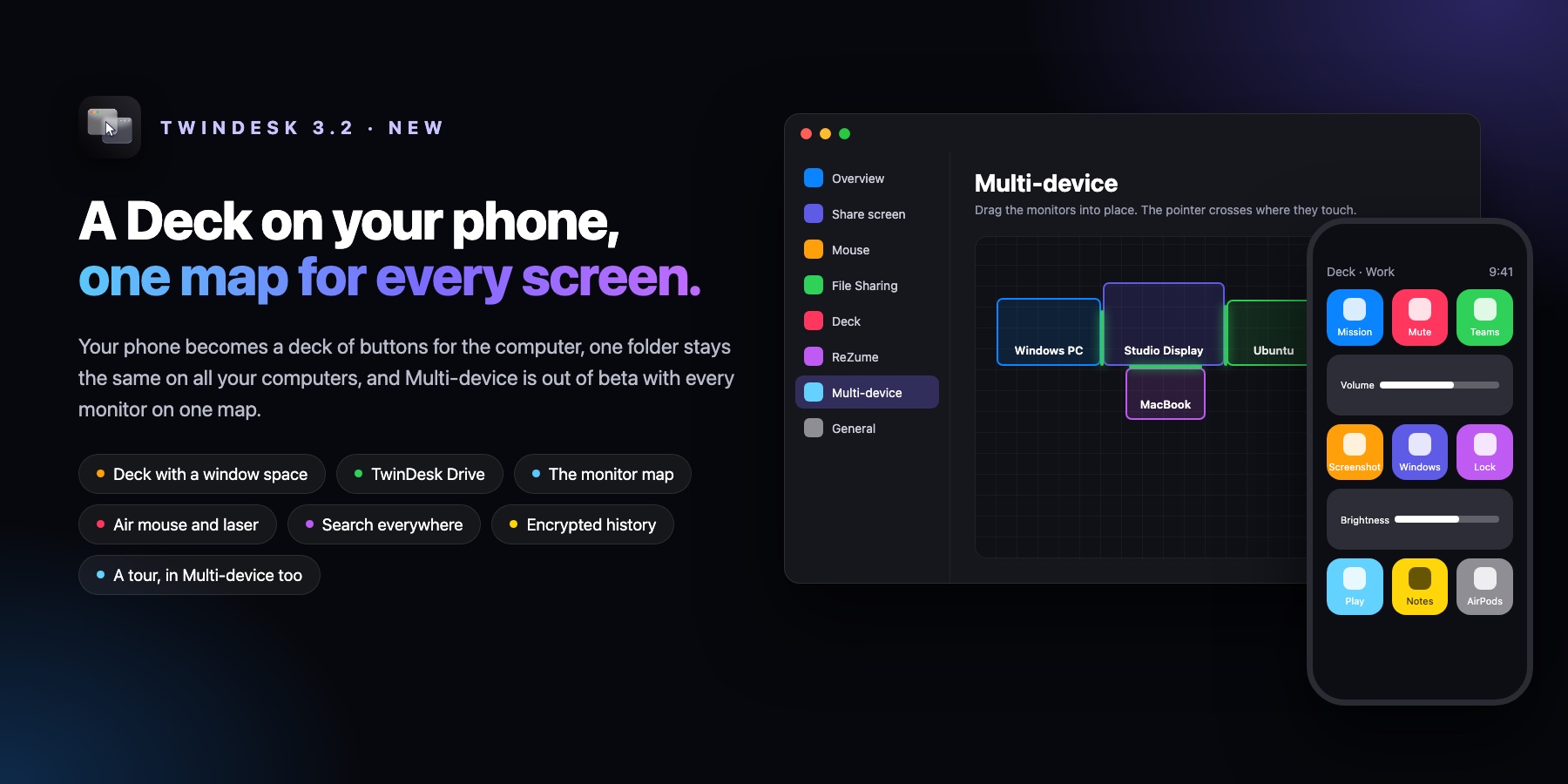
The first release since 3.0. Your phone becomes a Deck of buttons for the computer, with a window space that arranges your windows. TwinDesk Drive keeps one folder the same on all your computers, with no cloud. Multi-device is out of beta, with every device's monitors on one map. There's also search everywhere, an air mouse with a laser pointer, encrypted history, updates that install in place, and a tour for someone new, in Multi-device too.
⬇️ Download
| Device | File |
|---|---|
| Windows (Intel / AMD) | TwinDesk-Setup-3.2.1.exe
|
| Windows (ARM) | TwinDesk-Setup-3.2.1-arm64.exe
|
| Windows Portable (Intel / AMD, no install) | TwinDesk-Portable-3.2.1.exe
|
| Windows Portable (ARM, no install) | TwinDesk-Portable-3.2.1-arm64.exe
|
| Mac (Apple silicon, M1 and later) | TwinDesk-3.2.1-arm64.dmg
|
| Mac (Intel) | TwinDesk-3.2.1-x64_Intel.dmg
|
| Mac (Homebrew) | brew install --cask inukaasith/twindesk/twindesk
|
| Linux (any distro) | TwinDesk-3.2.1-x86_64.AppImage
|
| Linux (Debian / Ubuntu) | TwinDesk-3.2.1-amd64.deb, or our APT repository
|
| Linux (Arch) | twindesk-bin-3.2.1-1-x86_64.pkg.tar.zst
|
| Android | TwinDesk-3.2.1.apk
|
| Android (full: notification access, SMS, Accessibility) | TwinDesk-3.2.1-full.apk
|
| iPhone and iPad (sideload) | TwinDesk.ipa
|
| Any browser | Turn on TwinDesk Web on a computer, then type twindesk.local
|
Full KVM edition
The mouse and keyboard also reach UAC prompts, the lock screen, Ctrl+Alt+Del and, with System-wide, the login screen, through a system service. It installs over the normal TwinDesk (the same app with the service added), so a computer has one or the other.
| Device | File |
|---|---|
| Windows (Intel / AMD) | TwinDesk-FullKVM-Setup-3.2.1.exe
|
| Windows (ARM) | TwinDesk-FullKVM-Setup-3.2.1-arm64.exe
|
| Linux (any distro) | TwinDesk-FullKVM-3.2.1-x86_64.AppImage
|
| Linux (Debian / Ubuntu) | TwinDesk-FullKVM-3.2.1-amd64.deb
|
TwinDesk Portable runs without installing: run normally it does everything that needs no administrator, run as administrator it also does the firewall, folder sharing and Wake on LAN.
Already have TwinDesk? The in-app updater picks the right file for your computer, and from 3.2 on, Install now updates in place, and each edition updates to its own (Full KVM to Full KVM, Portable to Portable). Update every device you pair: 3.2 still talks to 3.0, but the new features switch on only when both sides have 3.2.
Windows: the installers aren't code-signed yet (signing is on its way). If SmartScreen stops it, choose More info › Run anyway.
iPhone and iPad: the IPA is unsigned. Install it with SideStore, AltStore or any signing tool, or let the computer sign it with your own Apple ID (General › TwinDesk iPhone, opt in).
🆕 New in 3.2.1
Ideas from @rahulpatel902's list of suggestions (#231), in TwinDesk's own look.
- TwinDesk pop-ups (Notifications › Showing here › Pop-ups): pick TwinDesk's own small window for your phone's notifications. Type a Reply right in it, use the app's own buttons (Mark as read, Mute…), see the notification's picture, Copy a one-time code, and watch a download or a timer fill its progress bar in place. The system's notifications stay the default, the lightest choice: with them the phone sends no pictures or progress.
- Buttons on Linux's own notifications: the phone app's buttons and a code's Copy, as on a Mac.
- Each app its own way: Show, No pop-ups (only in Recent) or Hide for each phone app.
- Pause pop-ups on a schedule, overnight too. Notifications still go in Recent and Messages.
- Copy codes by themselves: a one-time code goes on the clipboard when it arrives, never to your other devices or the clipboard history, and comes off it after 2 minutes.
- Messages: contact and chat pictures with the app's badge, a search box, Delete for a chat or a thread, and Apps… to choose which chat apps show. "Sending video…" and other progress notifications no longer turn into chats.
- Photos: your phone's albums in a sidebar, with covers and counts. Open, and on Windows Open with…, from the viewer.
- The media card stays compact: its chevron slides open back and forward 10 s, the phone's volume and where the sound plays, tinted by the artwork if you like (General).
- Calls pause the music (Calls › Sound): a call pauses what plays on the computer, and it plays again when the call ends.
- Camera: Mirror, quality from 720p to 4K, the light, zoom and a snapshot for the phone's camera.
- Keep on top: a pin in the toolbar of the phone's screen and a computer's shared screen keeps that window over the others.
- Skip adbd (Mirroring, off unless you switch it on): over Wi-Fi the phone's screen, sound and input go straight to the computer, encrypted, instead of through wireless debugging's adbd. Its biggest gain is while adb is busy: with a big file going to the phone, a tap showed up in about 90 ms instead of 210 ms. If the phone can't be reached directly, it goes through wireless debugging as before.
- Low latency (Mirroring, off): asks the phone's video encoder to send each frame as soon as it's ready. Some phones ignore it.
- Fixed: in Multi-device on a Mac, the Camera page's picture showed a broken image.
Android needs 3.2.1 too for pictures, progress bars, contact pictures and albums; with an older phone app the rest works as before.
🎛️ The Deck
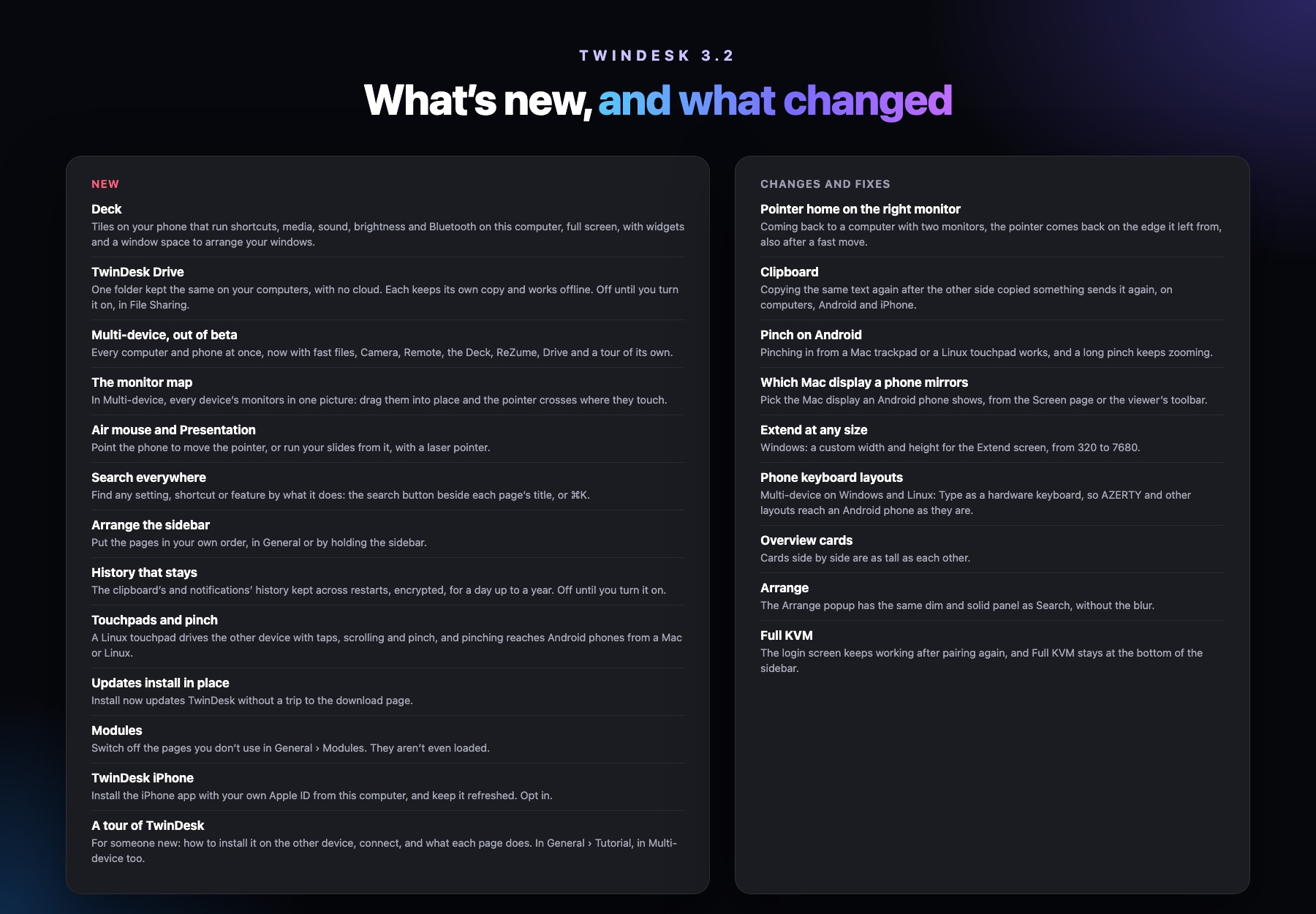
A Stream Deck style grid of buttons on the phone (Android, iPhone and Web) for the computer: spaces and pages, tiles of any size, live sliders for sound and brightness, Bluetooth devices, the sound output and microphone, and files and saved scripts opened like a double-click (never through a shell). Full screen, it shows widgets: a clock, the computer's media player, CPU, RAM and temperature.
- The window space: the computer's windows on the phone. Tap an app, pick a layout and they're arranged. Save a few apps as a set on the shelf and arrange them again with one tap. Snap, minimize, maximize and close from the phone.
🗂️ TwinDesk Drive
One folder kept the same on your computers, with no cloud. Each keeps its own copy and works offline, and they swap what changed when they connect. A file changed on two at once keeps both, and deleted files go to the Trash or Recycle Bin. Off until you turn it on in File Sharing. Mac, Windows and Linux, one-to-one and Multi-device.
🖥️ Multi-device, out of beta
- The monitor map (#225): every device's monitors in one picture, arranged by dragging. The pointer crosses only where monitors touch, keeps its place along the edge, and goes through an offline device to the next one.
- Everything one-to-one has: fast files (fx and fx2), Camera, Remote, Deck, ReZume with any one device, TwinDesk iPhone, Modules, every device's notifications with Reply and one-time codes, clipboard pictures, Now Playing both ways, and pairing a phone with a QR code.
- Mouse and keyboard over Bluetooth between Macs and Windows PCs.
- The tour and What's new now open in Multi-device too.
✨ Everywhere
- Air mouse and Presentation in Remote: point the phone to move the pointer, run your slides with a laser pointer. A three-finger tap is a middle click.
- Hold a key to cross (#230): pick a key on the Mouse page and the pointer leaves the computer at its edge only while you hold it. In Multi-device it's for that computer's own mouse or trackpad.
- Emergency return (#178): a shortcut (Control+Alt+Command+Esc, Win or Super on a PC, or your own) that brings the mouse and keyboard home and turns sharing off, whatever the other side is doing. One-to-one and Multi-device.
- Search everywhere (⌘K, Ctrl+K on Windows and Linux): settings, shortcuts and features found by what they do.
- Arrange the sidebar and the phone's bottom bar, and switch off pages you don't use in General › Modules (they aren't loaded).
- Clipboard and notification history kept across restarts, encrypted, for a day up to a year. Off until you turn it on.
- Updates install in place on Mac, Windows, Android, and iPhone (re-signed by the computer).
- TwinDesk iPhone (opt in): the computer signs TwinDesk for iPhone with your own free Apple ID and keeps it refreshed.
- A tour for someone new, and What's new after an update, now with the changes and fixes too. Both in General › Tutorial.
- Linux touchpad (#222): tap to click, two-finger scrolling and pinch on the other device, read from your desktop's own settings.
- Pick which Mac display an Android phone mirrors (#221), and a custom size for Extend on Windows (#226).
- Phone-to-phone sound between two Android phones (#205), and Photos has Copy and Share.
📦 Installing
- APT repository for Debian, Ubuntu, Mint and Pop!_OS, updated by
apt upgrade. - F-Droid build (the full app without Google's code scanner and without the updater).
🩹 Fixes
- Coming back to a PC with two monitors: the pointer comes back on the edge that touches the device it left, also after a fast move.
- Clipboard: copying the same text again after the other side copied something sends it again (#223, #227).
- Pinch on Android from a Mac trackpad or a Linux touchpad (#228).
- Phone keyboard layouts in Multi-device: Type as a hardware keyboard on Windows and Linux, so AZERTY and other layouts reach Android as they are (#188).
- Overview cards side by side end level (#224). Arrange has Search's dim and solid panel instead of a blur.
- Android reconnects after a long Wi-Fi interruption (#192, #217), and its settings refresh at once (#190, #191, #214).
- Mac: the screen capture names its display (#198, #199), General asks for a missing screen permission (#200, #201), the viewer fits the Android window (#215), and Universal Clipboard no longer delays pasting (#211).
- Windows: right Shift from some keyboards is no longer lost (#212), clicking TwinDesk's own window buttons from the other computer no longer freezes the session (#203, #208, #209), and Multi-device starts when Windows blocks the helper (#216).
- Multi-device: sound stays on its device when the selection moves (#194, #196), and per-pair switches stay in step (#193, #195).
- Linux: Open at login works under systemd's autostart generator (#189, #202). Nix starts with its window and tray again (#213).
🙏 Thanks
Suggestions from @rahulpatel902 (#231). Code from @alexfoxtm (#190, #199, #201, #214, #215, #217, #221, #227, #228), @youyouhdhd (#226), @pengusto (#178, #230), @hughesyadaddy (#195, #196), @ShivanshuKantPrasad (#205, #213), @Yashkush06 (#197) and @YashvanthSankar (#202). Reported by @ElMahaster (#188).
The full list is in the changelog.
Earlier release: 3.0.0 notes (iPhone and iPad app, TwinDesk Web, phone to phone).