
🩹 v2.5.1 hotpatch
A quick fix on top of 2.5.0. Everything in 2.5.0 below is in this release.
- Fixed: General was blank in Multi-device mode (#142). With Multi-device (the MESH beta) on, the General page drew its heading and nothing else, on Mac, Windows and Linux. It works again, and Appearance (theme and accent colour) now works in Multi-device mode too.
- Known: ReZume is one-to-one only for now. Multi-device mode doesn't have ReZume yet, and the phone says "ReZume isn't available on …" while the computer is in it. To use ReZume, go to Multi-device and choose Turn off: TwinDesk restarts in one-to-one mode, where the ReZume tab is.
Update every computer and phone you pair to 2.5.1. The in-app updater offers it.
TwinDesk 2.5: ReZume, an all-new look, and a new engine underneath
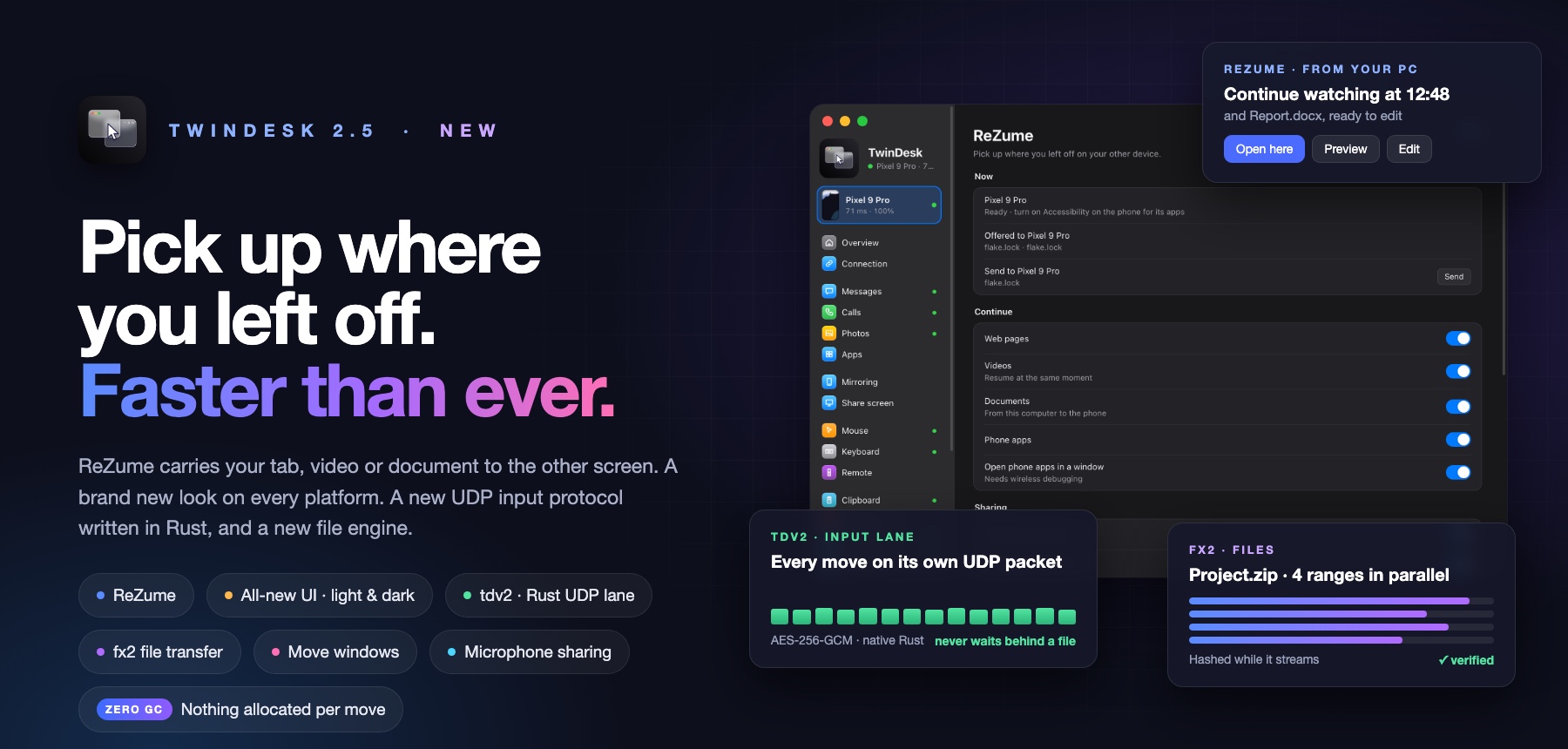
The biggest TwinDesk release so far. ReZume carries what you were doing to the other screen. Every app has a new look, in light and dark. Under it, the mouse and keyboard run on tdv2, a new UDP protocol written in Rust, and files move on fx2, a new transfer engine.
⬇️ Download
| Device | File |
|---|---|
| Windows (Intel / AMD) | TwinDesk-Setup-2.5.1.exe
|
| Windows (ARM) | TwinDesk-Setup-2.5.1-arm64.exe
|
| Mac (Apple silicon, M1 and later) | TwinDesk-2.5.1-arm64.dmg
|
| Mac (Intel) | TwinDesk-2.5.1-x64_Intel.dmg
|
| Mac (Homebrew) | brew install --cask inukaasith/twindesk/twindesk
|
| Linux (any distro) | TwinDesk-2.5.1-x86_64.AppImage
|
| Linux (Debian / Ubuntu) | TwinDesk-2.5.1-amd64.deb
|
| Linux (Arch) | twindesk-bin-2.5.1-1-x86_64.pkg.tar.zst
|
| Android | TwinDesk-2.5.1.apk
|
Already have TwinDesk? The in-app updater picks the right file for your computer. Update every device you pair: 2.5 still talks to older versions, but the new protocols only switch on when both sides have 2.5.
🔁 ReZume: pick up right where you left off
Walk from the PC to the Mac, or from your phone to the laptop, and carry on with what you were doing. ReZume sees what's in front on one device and offers it on the other: a button in the taskbar or Dock, the tray or menu bar, the ReZume tab, and the phone's notification.
- Web pages. The tab you were reading opens in the default browser on the other side. Read from the address bar itself (UI Automation on Windows, Apple Events on the Mac, AT-SPI on Linux, Accessibility on the phone), not from a stale history file.
- Videos, at the same second. YouTube, Vimeo, Twitch, Dailymotion or a video file opens where you stopped.
- Documents, three ways. A chooser in the middle of the screen offers:
- Preview: a copy, removed when TwinDesk quits.
- Edit: the original file, shared live for the session over encrypted WebDAV. Save on the Mac and the file on the PC is saved. Nothing else on the computer can be seen.
- Window: the app's own window, streamed across.
- App windows. For apps that show no page or document, the app's windows themselves come across, one by one (off until you turn it on).
- Phone apps. The app in front on the phone opens in a window on the computer, and Open on computer sits in the phone's share sheet.
- It finds the document even when the app doesn't say. Local files open in a browser, PDFs in Edge or Chrome, VLC, PotPlayer and other media players, and the Photos app.
- You decide which apps. Every app ReZume has seen is listed with a switch, how often it was sent and when. Choose where offers show: taskbar or Dock, tray or menu bar, notifications.
- Private by design. Off until you turn it on, one switch for the pair. A document's path never leaves the device, only http and https links are opened, and a file goes only to the side that asked for it.
✨ A brand-new look
Every app was redrawn: the desktop apps on Windows, macOS and Linux, and the Android app.
- Light, dark or system, with an accent color of your own (General › Appearance).
- Your devices in the sidebar. Every computer and phone you've paired, with its latency and battery, one click to connect or switch.
- A new Overview. The device you're connected to, with Ring, Lock, Sleep and Disconnect, and what's on at a glance. For a phone: Wi-Fi, mobile data, hotspot, torch, Do not disturb, auto-rotate, battery saver, its volume and ring mode, the clipboard, most-used apps and a drop zone for files.
- Settings in sections, and every two-way feature shown as one card per direction, named after your devices.
- Messages and Calls use the whole window, with tabs for Texts, WhatsApp, Instagram and Telegram.
- The Android app in Google's own Material style.
- The menu bar and tray do what the window does.
- The other side's version shows on Overview, so you know when a device needs updating.
⚡ tdv2: a new input protocol, in Rust, with zero garbage
Until now, every mouse move rode the same encrypted TCP stream as everything else. On Wi-Fi, one lost packet held back every message behind it, so the pointer stuttered whenever a file or a picture on the clipboard was on its way. tdv2 fixes that at the root.
- A UDP lane of its own. Mouse moves travel on their own UDP socket next to the session. A lost packet never holds back the next one, and nothing waits behind a file.
- Native, in Rust. The lane lives in a small Rust core (
tdfast) loaded straight into the native helper on every computer: Swift on the Mac, C on Linux, C# on Windows. A move goes from the input hook to the network and back into the other computer's input without passing through JavaScript. - Zero allocation per move. Nothing is allocated for a mouse move, in the helpers, in Node's fallback lane, in Multi-device and on Android, so no garbage collector ever pauses the pointer. The Windows helper also runs in low-latency GC mode.
- Exact, even when packets are lost. Each move carries the running total, so a lost packet costs nothing: the next one puts the pointer exactly where it should be. The last move is repeated a moment later, so the pointer always lands where you stopped.
- Clicks never overtake moves. Every click and key is numbered and fenced to the moves before it, and also sent on the reliable link, so it lands in the right place and is never lost.
- Encrypted and authenticated. AES-256-GCM with per-session keys from HKDF, and a replay window as in WireGuard. A packet that doesn't authenticate is dropped.
- Priority on the air. Packets are marked for voice-class priority (a qWAVE flow on Windows), and on Windows TwinDesk asks the Wi-Fi driver for its low-latency mode.
- Follows your network. The lane follows a switch between Wi-Fi and cable, and resumes when the session does.
- Always falls back. No UDP through a firewall, or an older TwinDesk on the other side? Input goes over the session as before, automatically. General › Advanced lets you choose UDP (tdv2), the default, or TCP (tdv1).
- Native from the first second. The first session after launch waits a fraction of a second for the lane to be ready, so it's native from the start.
📦 fx2: a new file transfer engine
- Its own process. Transfers run in a separate "TwinDesk Files" process with its own encrypted HTTPS server, so a big copy never slows the window, the clipboard or the mouse.
- Parallel ranges. A large file is split into ranges that stream side by side.
- Verified while it streams. Every range is hashed on the way, so a received file is checked without being read a second time.
- Many small files, fast. Up to 16 files in flight at once, and the Mac writes without blocking. In our test, 10,000 small files went from a PC to a Mac in under 48 seconds.
- Safer at the receiving end. A file stops at the size it was offered with, a full disk or missing folder fails cleanly instead of saving a short file, and a sender can no longer choose the name of a temporary file.
- Falls back by itself to the previous engine, then to pieces on the session, with an older TwinDesk, over Bluetooth or when something fails early.
🪟 Move windows
Hold Right Ctrl (Right Command on a Mac), grab a window and drag it past the edge of the screen: it moves to the other computer. Let go of it there and it comes back to where you grabbed it. Works with the key held on either keyboard.
🎙 Microphone sharing
Use one computer's microphone on the other, each way on its own switch (Audio › Microphone), or use your phone as a microphone for the computer.
🖥 Screen sharing
- H.265 as well as H.264 (Share screen › Picture › Codec), for a sharper picture at the same bitrate.
- Windows: a hardware encoder switch, with an automatic fallback when the encoder stalls.
- Mac: the screen's sound captured by macOS itself on 14.2 and later, in stereo and without echo.
- The share comes back after the sharing computer was locked.
🖱 Mouse and keyboard
- Media, volume and brightness keys work on the other computer.
- Caps Lock follows you to the computer you're typing on.
- Shake the mouse to bring the pointer back.
- Each computer's trackpad takes its pointer back, or turn on Sync touchpads to share one.
- The hotkey switch works even with cursor sharing off.
- A session survives 8 seconds of silence, not 4, so a busy Wi-Fi doesn't drop it.
📱 Phone
- Full (ADB) or Limited for the mouse and keyboard, the screen and the sound.
- Install apps on the phone from the computer: Phone › Apps › Install Apps takes .apk files.
- Notifications per app, on or off from the computer.
- Photos: remove one photo or several.
- Phone windows: an arrow-keys swipe button in the Windows title bar, the same controls on Linux.
- Gesture navigation no longer stays locked after the pointer visited the phone.
🌍 Languages
Русский, Türkçe and 简体中文 on Windows, macOS and Linux, picked from the system's language or chosen in General.
🐧 Linux
- Clipboard on Wayland through wl-clipboard.
- The Wayland screen picker no longer reopens when a capture never starts.
- Starts again through XWayland when the Wayland GPU process keeps crashing.
- The tray menu no longer flickers on GNOME.
- Extend keeps your main monitor as the primary one.
🔒 Security
- Pairing lockout: an address that keeps failing to pair is locked out, on every platform.
- Windows: the identity's passphrase is sealed with DPAPI on disk.
- Electron 44 everywhere (38 had CVE-2026-115570).
- Turning off Terminal removes the SSH key, and turning off sharing removes the share.
🔧 Fixes
- Windows: a port that's taken is tried again, and the app says who may hold it.
- Windows: a blocked helper no longer stops the whole app; the log rotates.
- Overview says Ethernet when the link runs over a cable.
- Multi-device: the keep-alive keeps the driving and driven link busy.
- Connect by address no longer leaves the window waiting.
- The cursor no longer jumps to the middle when it comes back to Windows.
- Two PCs no longer echo each other's audio settings.
🙏 Thanks
Testing partner @sitharapunchihewa.
Pull requests from @ari7hkm (#138, #139), @hughesyadaddy (#129), @Ahmedcodedk (#113, #120), @cashflowbeatz (#117), @Southertly (#106–#110), @GlazeCookie (#95), @iiiiiuri (#85), @atse25029-collab (#82), @VighneshKunjir (#78–#80), @AmriteshKhare (#76) and @jayden99236 (#71). Thank you.
Which Android APK?
TwinDesk-2.5.1.apk: install this one on your phone.TwinDesk-2.5.1-full.apk: the same app plus notification access, text messages and mouse and keyboard through Accessibility, which Play Protect blocks in downloaded apps. You don't need to install it yourself: your computer puts it on the phone over wireless debugging, and your settings and pairing stay.
First launch: the apps aren't code-signed. See First launch for macOS, Windows and Android.